fabric mirroring
2 TopicsAzure SQL DB Fabric Mirroring with Private Endpoint
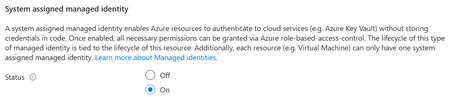
Introduction Overview steps for configuration of Mirroring between Azure SQL Database to Fabric Mirrored Database over Private Endpoint and Public Connectivity Disabled on source. Prerequisites #1 - The minimum requirement for the source Azure SQL Database tier is - it is Standard Tier with DTUs equal or greater than 100. Free, Basic Tier, or <100 DTUs are NOT supported. All vCore model tiers supported. #2 - System Assigned Managed Identity (SAMI) must be enabled on the Azure SQL logical server. #3 - Microsoft.PowerPlatform should be registered as a source provider at the subscription level. If this step is not completed, you'll face error in the next steps, while creating the 'Virtual Network Data Gateway', example below. #4 - The Virtual Network Subnet of the configured Private Endpoint should have the following selected. Select Microsoft.PowerPlatform/netaccesslinks for the Subnet Delegation tab. This is a required step, otherwise the subnet is grayed out to select while configuration of the Virtual Network Data Gateway at Fabric level. High Level Configuration Steps #1 - Go to Fabric Portal > Your Workspace Click on Settings button on top right > Click on Manage Connections and Gateways Go to 'Virtual Network Data Gateway' tab > Click New In the new page, Select your Capacity, Subscription, Resource Group, VNET and Subnet of the source Azure SQL DB and create it. #2 - Go back to your workspace, and click new item > Search 'Mirrored Azure SQL Database' #3 - Here, in Data Gateway section, chose your new created gateway which we created in previous step, and fill the required source Azure SQL Database details and click connect. #4 - Select the tables to be mirrored in the next steps and you will be able to successfully mirror from Azure SQL Database to Mirrored Azure SQL Database without Public Connectivity and using Private Endpoint.62Views0likes0Comments