export to pdf
2 Topics
Word Mail Merge->PDF->Auto Name
I am trying to think of a way to automate a process. Part of this is in word and part with Adobe. Basically, here is the scenario. Every year all the staff in the company (about 350-400 employees) get evaluated and then their compensation is recalculated and an employment contract sent to them for the next year. The contract is in PDF form which they digitally sign and return to the company. Right now the process is like this: A spreadsheet is created with all the employee specific information. The spreadsheet data is merged with the standard employment agreement based on their title. The merge creates a different document for each employee which must then be saved (named with the employee name), converted to a PDF, and then a digital signature is requested via Adobe. I would like to automate this whole procedure. I would like to mail merge, save each document as a Word Doc and then a PDF under the employee's name. Once I have all of that, I would like to get PDF to send out all the documents via email (which will be in the spreadsheet too). I am a programmer so code does not scare me in the least. I am just not sure of the approach to take. Any thoughts? Thanks in advance.4.8KViews0likes3Comments
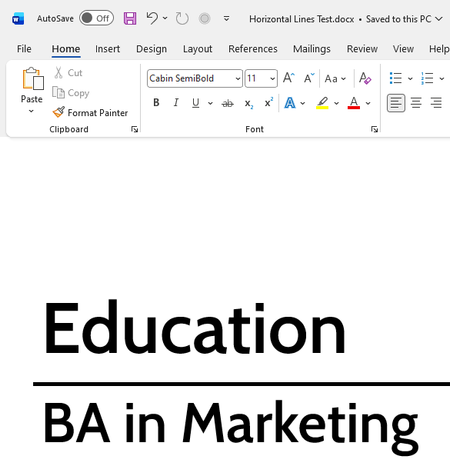
In Cabin font family, horizontal lines move downwards when exporting to PDF
I am trying to create my CV in Microsoft Word, but I'm running into an issue: the horizontal lines under my section headings (created by typing three hyphens and then hitting Enter) are being lowered too much when exporting to PDF. To see what I mean, see the below images. The first is an image of the section heading and the text below it as it appears in Word: There is a decent level of space between the heading, the line, and the text below. However, when I export the document to a PDF, the horizontal line moves downwards to the point where it is almost touching the text below: This seems to be a problem with the Cabin font family that I'm using; I tried the same with Calibri (a native Word font) and Source Serif 4 (from Google Fonts) and the horizontal line stayed where it should.142Views0likes2Comments