exchange
77 TopicsLimit public M365 groups to security group
Hi Experts, the following requirements are creating some headaches for us: We want to create several M365 groups which should be easy to discover for the majority of our users so they can join without any approvals. However, we still would like to shield them from certain user groups, which we can identify by a security group for instance. These users should not be able to discover the groups nor access their content. I was certain that we could achieve this using sensitivity labels of the group entity, but labels don't provide the functionality to hide the group or restrict the access. Is there another solution that we could apply while keeping the groups itself public? Or should we rather focus on going with private groups and try to automate the approval of any access request based on the security groups? I can't imagine that we are the only ones with that issue so any guidance would certainly help other as well. Thanks, Martin864Views0likes1CommentOffice 365 Groups (aka Microsoft 365 Groups) Recap from Microsoft Ignite 2019
As we come to the close of the month of May, which would have normally rounded out Microsoft Ignite the Tour, I just wanted to share the link to our Office 365 Groups (aka Microsoft 365 Groups) recap from Ignite 2019 in Orlando. This post has several useful links which cover the new innovations and feature improvements announced this year. https://techcommunity.microsoft.com/t5/office-365-blog/office-365-groups-ignite-recap/ba-p/1036796 Looking forward to another year of innovation with Microsoft 365 Groups! Mike McLean Principal Program Manager Microsoft 365 Groups711Views1like0CommentsProperties Mastered in Exchange Online Can Now Be Modified Without an Exchange Online License
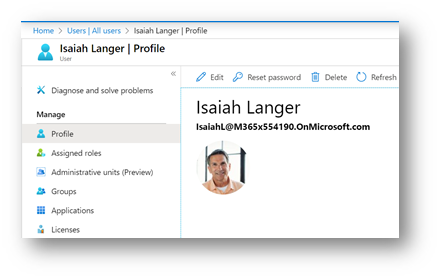
We’re excited to announce that group properties mastered in Exchange Online can now be modified without assigning an Exchange Online license. Many customers have reported a desire to allow administrators who manage Microsoft 365 Groups (previously Office 365 Groups) the ability to modify properties mastered in the Exchange Online service without being assigned an Exchange Online license. Previously, any attempt to modify a property mastered in Exchange Online would require an Exchange Online license be assigned to the user attempting to make the change. The product team has recently finished deploying a change which will allow administrators without an Exchange Online license the ability to update Exchange-mastered properties through the Microsoft 365 Admin Center as well as API calls using Microsoft Graph. The following screenshots illustrate how this scenario is supported. A full list of properties mastered in Exchange Online can be found at the bottom of this post. Let us start with a user in Azure Active Directory named Isaiah Langer: Isaiah is assigned the role of “Global administrator”: Isaiah does not have any licenses assigned: Navigating to the Microsoft 365 Admin Center, Isaiah finds the Marketing group: Isaiah is not an owner or a member of the Marketing group: Isaiah navigates to the “Settings” tab and discovers two properties which are both mastered in Exchange Online: Isaiah can enable “Allow external senders to email this group” and “Send copies of group conversations and events to group members”: After clicking “Save”, the properties are successfully updated: The full list of properties mastered in Exchange Online which can be modified without being assigned an Exchange Online license are the following: AcceptMessagesOnlyFrom AcceptMessagesOnlyFromDLMembers AcceptMessagesOnlyFromSendersOrMembers AllowExternalSenders AlwaysSubscribeMembersToCalendarEvents AutoSubscribeNewMembers CalendarMemberReadOnly ConnectorsEnabled DataEncryptionPolicy EmailAddresses EmailAddressPolicyEnabled GrantSendOnBehalfTo HiddenFromAddressListsEnabled HiddenFromExchangeClientsEnabled IsSubscribedByMail MailTip MailTipTranslations ModeratedBy PrimarySmtpAddress RejectMessagesFrom RejectMessagesFromDLMembers RejectMessagesFromSendersOrMembers ReportToManagerEnabled ReportToOriginatorEnabled RequireSenderAuthenticationEnabled SubscriptionEnabled UnifiedGroupWelcomeMessageEnabled UnseenCount Mike McLean Principal Program Manager Microsoft 365 Groups3.5KViews2likes0Comments
Delete, unshare, or hide an Office 365 Group's calendar
I see that when creating an Office 365 Group that a calendar is also automatically created for that group and that it appears in the list of calendars for all members of the Group regardless of their follow status of the group. My users would rather not have any calendars for Groups. How can I remove or hide them for the members of the Group?25KViews0likes6Comments
Office365 Grouo not email the users?
Hi We have a Office365 group which has a email address and we thought that if someone emailed this group the email could be distributed to all the members (ie it worked like the old distribution lists) However when we email the group it doesn't forward on to the members. It possible for a Office365 group to work like a DL or should we be using a DL? The group is currently used as in MS Teams Thanks2KViews0likes2Comments
Convert O356 Group to personal mailbox
Im trying to convert a O365 group to a personal mailbox. I'll do it manually, because I know that there is no way to do this in Exchange Center. My O365 group is client1@mydomain.com. I already created a personal mailbox named client1-mail@mydomain.com So this is my plan: Migrate all the mails from the group to the personal mailbox Change group mailbox alias to client1-old@mydomain.com Change personal mailbox alias to client1@mydomain.com Do you think this is possible? is the best approach? and finally, is there a way to send all the O365 old mails to the personal mailbox? Thank you in advance and sorry about my english.7.9KViews1like5Comments