exchange
100 Topics
Powershell Set-AuthenticationPolicy issues
Hello, I'm trying to selectively enable basic authentication on a service account for use with our backup system to back up Exchange public folders. I believe the syntax should be: Set-AuthenticationPolicy -Identity email address removed for privacy reasons -AllowBasicAuthAutodiscover But that returns an error: Write-ErrorMessage : Ex6F9304|Microsoft.Exchange.Configuration.Tasks.ManagementObjectNotFoundException|The operation couldn't be performed because object 'email address removed for privacy reasons' couldn't be found on 'MWHPR04A06DC004.NAMPR04A006.PROD.OUTLOOK.COM'. At C:\Users\User\AppData\Local\Temp\tmpEXO_uokxac5b.pq4\tmpEXO_uokxac5b.pq4.psm1:1098 char:13 + Write-ErrorMessage $ErrorObject + ~~~~~~~~~~~~~~~~~~~~~~~~~~~~~~~ + CategoryInfo : NotSpecified: (:) [Set-AuthenticationPolicy], ManagementObjectNotFoundException + FullyQualifiedErrorId : [Server=CH0PR16MB4330,RequestId=8ce97291-b766-650a-eb43-53b0f5af836c,TimeStamp=Wed, 11 J an 2023 20:41:47 GMT],Write-ErrorMessage I've verified that the identity is correct with "get-user -identity email address removed for privacy reasons" and it returns the correct information. Why would that identity not be found by Set-AuthenticationPolicy? I've tried with various identities (including my own), all live active accounts, and get the same result each time. Any help would be appreciated!Solved2.7KViews0likes3Comments
[Bug] ExchangeOnlineManagement uses incorrect TenantId in requests
An interaction between the ExchangeOnlineManagement powershell module and Microsoft.Identity.Client 4.83.0+ results in the REST API requests sent by the ExchangeOnlineManagement powershell module using realm.onmicrosoft.com in place of the expected Guid TenantId. This results in the dreaded Expired or Invalid pagination request after fetching one page. As discussed in https://github.com/AzureAD/microsoft-authentication-library-for-dotnet/issues/6093, Microsoft.Identity.Client.AuthenticationResult.TenantId can no longer be trusted to contain either null or the expected Guid TenantId, but instead will generally contain the realm.onmicrosoft.com realm name as of Microsoft.Identity.Client 4.83.0 As version 3.10.0 of the ExchangeOnlineManagement powershell module now depends on Microsoft.Identity.Client 4.83.1, this version of the powershell module can no longer retrieve groups with more than 1000 members or enumerate the groups, contacts, recipients, etc. in a domain that has more than 1000 of each without running into the dreaded Expired or Invalid pagination request. In theory the following Lib.Harmony patch encodes a potential fix for this issue (tested locally using ExchangeOnlineFetch 3.10.0 in a dotnet 10 program): using System.Reflection.Emit; using HarmonyLib; [HarmonyPatch("Microsoft.Exchange.Management.AdminApiProvider.Authentication.TokenProviderUtils", "GetTokenInformation")] static class Patch_TokenProviderUtils_GetTokenInformation { private static Harmony? _harmony = null; public static void PatchOnce() { var asms = AppDomain.CurrentDomain.GetAssemblies(); if (_harmony is null && asms.FirstOrDefault(e => e.GetName().Name == "Microsoft.Exchange.Management.AdminApiProvider") is { } asm && asm.GetType("Microsoft.Exchange.Management.AdminApiProvider.Authentication.TokenProviderUtils") is { } type && type.GetMethod("GetTokenInformation") is { } method) { var harmony = new Harmony("com.github.klightspeed.exchangeonlinemanagement.tenantidfix"); harmony.Patch( method, transpiler: new HarmonyMethod(typeof(Patch_TokenProviderUtils_GetTokenInformation), nameof(Transpiler)) ); _harmony = harmony; } } static IEnumerable<CodeInstruction> Transpiler(IEnumerable<CodeInstruction> instructions) { var matcher = new CodeMatcher(instructions); var get_TenantId = AccessTools.PropertyGetter("Microsoft.Identity.Client.AuthenticationResult:TenantId"); var get_Organization = AccessTools.PropertyGetter("Microsoft.Exchange.Management.AdminApiProvider.Authentication.TokenProviderContext:Organization"); // patch the following code snippet: // // if (IsCertificateBasedConnection(context)) // { // var upn = GetUPNForAppOnlyBasedConnection(context); // var tenantId = JwtSecurityTokenUtils.GetTenantId(tokenAcquisitionResult.AccessToken); // return TokenInformation.Create( // upn, // authorizationHeader, // tokenAcquisitionResult.TenantId ?? tenantId ?? context.Organization, // tokenAcquisitionResult.ExpiresOn // ); // } // // to // // if (IsCertificateBasedConnection(context)) // { // var upn = GetUPNForAppOnlyBasedConnection(context); // var tenantId = JwtSecurityTokenUtils.GetTenantId(tokenAcquisitionResult.AccessToken); // return TokenInformation.Create( // upn, // authorizationHeader, // PatchedTenantId(tokenAcquisitionResult.TenantId, context) ?? tenantId ?? context.Organization, // tokenAcquisitionResult.ExpiresOn // ); // } matcher.MatchStartForward( new CodeMatch(CodeInstruction.LoadArgument(0)), CodeMatch.Calls(get_TenantId), new CodeMatch(OpCodes.Dup), new CodeMatch(OpCodes.Brtrue_S), new CodeMatch(OpCodes.Pop) ); if (matcher.IsValid) { matcher.Advance(2); matcher.Insert( CodeInstruction.LoadArgument(1), new CodeInstruction(OpCodes.Call, get_Organization), CodeInstruction.Call(() => PatchedTenantId(default, default!)) ); } return matcher.InstructionEnumeration(); } static string? PatchedTenantId(string? tenantId, string? organization) => tenantId == organization ? null : tenantId; }511Views0likes3Comments
Running Un-attended Scripts via Task Scheduler
I am trying to get some of my PS Scripts that are required regularly to run un-attended on a server using Task Scheduler. I am aware that App Registrations seem to be the recommended way, but I am struggling to find the best way to plan and deploy a solution. For example, one of the jobs I want to automate is a search using Exchange get-messagetracev2, I have created a service account, given the account Delegate Full Access permissions to 31 shared mailboxes I need to report on. Basically, I need to know how many emails have been received during the previous week to each mailbox. Generate a csv, list the mailbox, start date - end date, number of emails received, then ideally either email 3 users the report, or send a Teams notification (using Workflow Bot) to send a notification that the report is ready and the file is attached. I must be using the least permissive method of doing this, looking for ways to achieve this with the lowest level of access and to understand the best config for the App Registration, can I use Delegate or must it be App permissions? Thanks in advance520Views0likes3Comments
Exchange Management Shell fails to load after Exchange SE update KB5071876
Hello, After installing Exchange Server Subscription Edition update KB5071876, Exchange Management Shell no longer loads correctly and generates PowerShell related errors. The server is currently in maintenance mode. I tested uninstalling and reinstalling the update, but the issue persists. I verified the applied Group Policies and did not find any GPO explicitly blocking PowerShell script execution. I have attached screenshots of the error messages, the applied GPO settings, and the PowerShell execution policy output. PowerShell execution policy result: MachinePolicy Undefined, UserPolicy Undefined, Process Undefined, CurrentUser Undefined, LocalMachine RemoteSigned. Despite this configuration, Exchange PowerShell scripts such as RemoteExchange.ps1, CommonConnectFunctions.ps1 and ps1xml files are still blocked and Exchange cmdlets are not available. Any guidance or similar experience after installing this update would be greatly appreciated. Thank you in advance.Solved821Views0likes4CommentsGet-MessageTraceV2 not recognized
I'm updating a script that automatically pulls message traces in Exchange Online. From my understanding, the Get-MessageTrace cmdlet will no longer work at the end of the month, and it needs to be upgraded to Get-MessageTraceV2. Below is the script. # Connect to Exchange Online Connect-ExchangeOnline -ShowBanner:$False # Define the start and end dates for the mail trace $startDate = (Get-Date).AddDays(-7).ToString("MM/dd/yyyy") $endDate = (Get-Date).ToString("MM/dd/yyyy") # Get the mail trace $params = @{ StartDate = $start DateEndDate = $endDate SenderAddress = "email address removed for privacy reasons" Status = "Failed" } Get-MessageTraceV2 @params Each time I run it, I get an error that the Get-MessageTracev2 is not recognized. I've confirmed I have ExchangeOnlineManagement module 3.8 installed (Microsoft documentation says the cmdlet was introduced in 3.7). When I run "Get-Command Get-MessageTraceV2" I get the same message saying the cmdlet is not recognized. When I try "Get-Command *V2" it lists several cmdlets from Microsoft.Graph but nothing from ExchangeOnlineManagement. I've tried the following all with the same results. Uninstalling and reinstalling the ExchangeOnlineManagement module. Installing with the -AllowClobber switch. Installed PowerShell 7 and installed the 3.9 prerelease. On a freshly reset computer, installed ExchangeOnlineManagement module. On the fresh computer, I uninstalled and then installed prerelease. I'm able to use other ExchangeOnlineManagement cmdlets like Get-Mailbox without issues. I am using a GCC tenant if that matters (I hope not). What am I missing (besides the cmdlet haha)?1.4KViews0likes2CommentsIntermittent issues with PowerShell Command Responses Since May 10, 2025
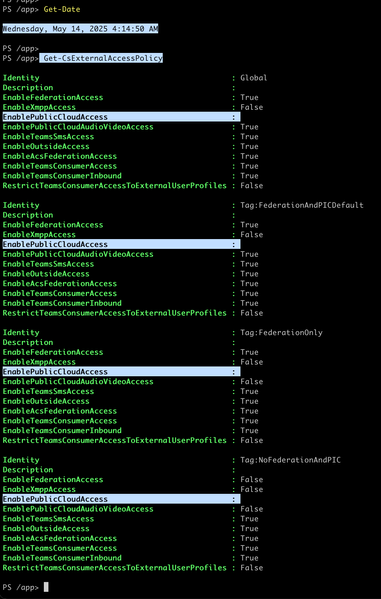
Since May 10, 2025, we have observed unexpected behavior intermittently in the responses of the following PowerShell commands. Could you please investigate the issues outlined below? Get-CsTenantFederationConfiguration: The AllowPublicUsers property appears in the command output, but when the response is passed to ConvertTo-Json, the AllowPublicUsers value is missing. Please refer to the attached screenshot for reference. Get-CsExternalAccessPolicy: The EnablePublicCloudAccess property, which is expected to return a boolean value, is now returning null. These issues are not isolated to a specific instance — we are intermittently observing the same behavior across multiple Office 365 tenants. Looking forward to your assistance.Solved284Views0likes1Comment
I need to remove an email from multiple exchange online mailboxes
PowerShell & Exchange Online. We had an online crime tips email sent to a distribution group in or organization. It has sensitive information related to an investigative case we're working on. We are a Law Enforcement Agency. I can connect to exchange with PowerShell but haven't been able to remove the message. Anyone have the proper syntax or guidance to share? Thank you!239Views0likes3CommentsGet DGs for a specific person from EXO
Having trouble with my script working right. Tried several scenarios. Looking for a GUI version. Attached are the two PS1's. I can connect to EXO but the GUI script won't produce anything ot just locks up Connect EXO: Connect-ExchangeOnLine This is straight forward and works but I cannot get it to work with the script below in an all in one script ------------------- <# Get-UserDGs-GUI.ps1 Author: You + ChatGPT Purpose: GUI to retrieve a user's Distribution Groups (member/owner) from Exchange Online. #> #region Preconditions if ($Host.Runspace.ApartmentState -ne 'STA') { Write-Warning "Re-running in STA mode..." Start-Process powershell.exe "-NoLogo -NoProfile -ExecutionPolicy Bypass -STA -File `"$PSCommandPath`"" -Verb RunAs exit } Add-Type -AssemblyName System.Windows.Forms Add-Type -AssemblyName System.Drawing [System.Windows.Forms.Application]::EnableVisualStyles() #endregion #region Helper Functions function Ensure-ExchangeModule { if (-not (Get-Module ExchangeOnlineManagement -ListAvailable)) { Write-Host "Installing ExchangeOnlineManagement..." Install-Module ExchangeOnlineManagement -Scope CurrentUser -Force -ErrorAction Stop } Import-Module ExchangeOnlineManagement -ErrorAction Stop } function Test-EXOConnection { try { # Fast no-op cmdlet to see if session works; adjust if needed Get-OrganizationConfig -ErrorAction Stop | Out-Null return $true } catch { return $false } } function Connect-EXO { param( [string]$AdminUpn ) if (Test-EXOConnection) { return $true } $connectParams = @{} if ($AdminUpn) { $connectParams.UserPrincipalName = $AdminUpn } try { Connect-ExchangeOnline @connectParams -ShowProgress $false -ErrorAction Stop | Out-Null return $true } catch { [System.Windows.Forms.MessageBox]::Show("Connection failed:`r`n$($_.Exception.Message)","Error", [System.Windows.Forms.MessageBoxButtons]::OK,[System.Windows.Forms.MessageBoxIcon]::Error) | Out-Null return $false } } function Disconnect-EXO-Safe { try { Disconnect-ExchangeOnline -Confirm:$false -ErrorAction SilentlyContinue | Out-Null } catch {} } function Get-UserDGData { param( [string]$TargetUpn, [bool]$IncludeOwner, [bool]$IncludeDynamic ) $resultTable = New-Object System.Data.DataTable "Groups" "DisplayName","PrimarySmtpAddress","ManagedBy","RecipientTypeDetails","MembershipType","IsDynamic" | ForEach-Object { [void]$resultTable.Columns.Add($_) } try { # DistinguishedName for membership filter $dn = (Get-User $TargetUpn -ErrorAction Stop).DistinguishedName # Member DGs $memberDgs = Get-DistributionGroup -ResultSize Unlimited -Filter "Members -eq '$dn'" -ErrorAction SilentlyContinue foreach ($dg in $memberDgs) { $managedBy = ($dg.ManagedBy | ForEach-Object { $_.Name }) -join '; ' $row = $resultTable.NewRow() $row.DisplayName = $dg.DisplayName $row.PrimarySmtpAddress = $dg.PrimarySmtpAddress $row.ManagedBy = $managedBy $row.RecipientTypeDetails = $dg.RecipientTypeDetails $row.MembershipType = "Member" $row.IsDynamic = if ($dg.RecipientTypeDetails -match 'Dynamic') {'Yes'} else {'No'} $resultTable.Rows.Add($row) } # Owner DGs if ($IncludeOwner) { $ownerDgs = Get-DistributionGroup -ResultSize Unlimited | Where-Object { ($_.ManagedBy -contains $dn) } foreach ($dg in $ownerDgs) { $managedBy = ($dg.ManagedBy | ForEach-Object { $_.Name }) -join '; ' $row = $resultTable.NewRow() $row.DisplayName = $dg.DisplayName $row.PrimarySmtpAddress = $dg.PrimarySmtpAddress $row.ManagedBy = $managedBy $row.RecipientTypeDetails = $dg.RecipientTypeDetails $row.MembershipType = "Owner" $row.IsDynamic = if ($dg.RecipientTypeDetails -match 'Dynamic') {'Yes'} else {'No'} $resultTable.Rows.Add($row) } } # Dynamic DG hit test (optional) if ($IncludeDynamic) { $dynamicHits = foreach ($ddg in Get-DynamicDistributionGroup -ResultSize Unlimited) { $filter = $ddg.RecipientFilter $ou = $ddg.RecipientContainer $match = Get-Recipient -ResultSize Unlimited -RecipientPreviewFilter $filter -OrganizationalUnit $ou | Where-Object { $_.PrimarySmtpAddress -ieq $TargetUpn } if ($match) { $ddg } } foreach ($dg in $dynamicHits) { # Avoid duplicates if already in table if (-not $resultTable.Select("PrimarySmtpAddress = '$($dg.PrimarySmtpAddress)' AND MembershipType='Member'").Count) { $row = $resultTable.NewRow() $row.DisplayName = $dg.DisplayName $row.PrimarySmtpAddress = $dg.PrimarySmtpAddress $row.ManagedBy = ($dg.ManagedBy | ForEach-Object { $_.Name }) -join '; ' $row.RecipientTypeDetails = $dg.RecipientTypeDetails $row.MembershipType = "Member (Dynamic Match)" $row.IsDynamic = "Yes" $resultTable.Rows.Add($row) } } } return $resultTable } catch { throw $_ } } #endregion #region GUI Build # Colors $colorBg = [System.Drawing.Color]::FromArgb(35,45,60) $colorPanel = [System.Drawing.Color]::FromArgb(50,60,80) $colorAccent = [System.Drawing.Color]::FromArgb(106,176,222) $colorText = [System.Drawing.Color]::White $fontMain = New-Object System.Drawing.Font("Segoe UI",10) $fontSmall = New-Object System.Drawing.Font("Segoe UI",7) $form = New-Object System.Windows.Forms.Form $form.Text = "Exchange Online - Distribution Groups Lookup" $form.StartPosition = "CenterScreen" $form.Size = New-Object System.Drawing.Size(1000,650) $form.BackColor = $colorBg $form.Font = $fontMain # Top panel $panelTop = New-Object System.Windows.Forms.Panel $panelTop.Dock = 'Top' $panelTop.Height = 120 $panelTop.BackColor = $colorPanel $form.Controls.Add($panelTop) # Labels / Inputs $lblAdminUpn = New-Object System.Windows.Forms.Label $lblAdminUpn.Text = "Admin UPN (for Connect):" $lblAdminUpn.ForeColor = $colorText $lblAdminUpn.Location = "20,15" $lblAdminUpn.AutoSize = $true $panelTop.Controls.Add($lblAdminUpn) $txtAdminUpn = New-Object System.Windows.Forms.TextBox $txtAdminUpn.Location = "220,12" $txtAdminUpn.Width = 250 $panelTop.Controls.Add($txtAdminUpn) $btnConnect = New-Object System.Windows.Forms.Button $btnConnect.Text = "Connect" $btnConnect.Location = "490,10" $btnConnect.Width = 100 $btnConnect.BackColor = $colorAccent $btnConnect.FlatStyle = 'Flat' $btnConnect.ForeColor = [System.Drawing.Color]::Black $panelTop.Controls.Add($btnConnect) $lblTargetUpn = New-Object System.Windows.Forms.Label $lblTargetUpn.Text = "Target User UPN:" $lblTargetUpn.ForeColor = $colorText $lblTargetUpn.Location = "20,50" $lblTargetUpn.AutoSize = $true $panelTop.Controls.Add($lblTargetUpn) $txtTargetUpn = New-Object System.Windows.Forms.TextBox $txtTargetUpn.Location = "220,47" $txtTargetUpn.Width = 250 $panelTop.Controls.Add($txtTargetUpn) $chkOwner = New-Object System.Windows.Forms.CheckBox $chkOwner.Text = "Include groups where user is OWNER" $chkOwner.ForeColor = $colorText $chkOwner.Location = "490,48" $chkOwner.Width = 260 $panelTop.Controls.Add($chkOwner) $chkDynamic = New-Object System.Windows.Forms.CheckBox $chkDynamic.Text = "Check Dynamic DG membership (slow)" $chkDynamic.ForeColor = $colorText $chkDynamic.Location = "490,70" $chkDynamic.Width = 260 $panelTop.Controls.Add($chkDynamic) $btnGet = New-Object System.Windows.Forms.Button $btnGet.Text = "Get Groups" $btnGet.Location = "770,44" $btnGet.Width = 160 $btnGet.Height = 40 $btnGet.BackColor = $colorAccent $btnGet.FlatStyle = 'Flat' $btnGet.ForeColor = [System.Drawing.Color]::Black $panelTop.Controls.Add($btnGet) # Grid $grid = New-Object System.Windows.Forms.DataGridView $grid.Dock = 'Fill' $grid.ReadOnly = $true $grid.AutoSizeColumnsMode = 'Fill' $grid.BackgroundColor = $colorBg $grid.ForeColor = [System.Drawing.Color]::Black $grid.EnableHeadersVisualStyles = $false $grid.ColumnHeadersDefaultCellStyle.BackColor = $colorAccent $grid.ColumnHeadersDefaultCellStyle.ForeColor = [System.Drawing.Color]::Black $grid.RowHeadersVisible = $false $form.Controls.Add($grid) # Bottom bar $panelBottom = New-Object System.Windows.Forms.Panel $panelBottom.Dock = 'Bottom' $panelBottom.Height = 70 $panelBottom.BackColor = $colorPanel $form.Controls.Add($panelBottom) $btnExport = New-Object System.Windows.Forms.Button $btnExport.Text = "Export CSV" $btnExport.Location = "20,15" $btnExport.Width = 110 $btnExport.BackColor = $colorAccent $btnExport.FlatStyle = 'Flat' $btnExport.ForeColor = [System.Drawing.Color]::Black $panelBottom.Controls.Add($btnExport) $btnCopy = New-Object System.Windows.Forms.Button $btnCopy.Text = "Copy to Clipboard" $btnCopy.Location = "140,15" $btnCopy.Width = 140 $btnCopy.BackColor = $colorAccent $btnCopy.FlatStyle = 'Flat' $btnCopy.ForeColor = [System.Drawing.Color]::Black $panelBottom.Controls.Add($btnCopy) $btnClear = New-Object System.Windows.Forms.Button $btnClear.Text = "Clear" $btnClear.Location = "290,15" $btnClear.Width = 90 $btnClear.BackColor = $colorAccent $btnClear.FlatStyle = 'Flat' $btnClear.ForeColor = [System.Drawing.Color]::Black $panelBottom.Controls.Add($btnClear) $btnDisconnect = New-Object System.Windows.Forms.Button $btnDisconnect.Text = "Disconnect" $btnDisconnect.Location = "390,15" $btnDisconnect.Width = 110 $btnDisconnect.BackColor = $colorAccent $btnDisconnect.FlatStyle = 'Flat' $btnDisconnect.ForeColor = [System.Drawing.Color]::Black $panelBottom.Controls.Add($btnDisconnect) $chkAutoDisc = New-Object System.Windows.Forms.CheckBox $chkAutoDisc.Text = "Auto-disconnect on close" $chkAutoDisc.ForeColor = $colorText $chkAutoDisc.Location = "520,20" $chkAutoDisc.Width = 180 $panelBottom.Controls.Add($chkAutoDisc) $statusLabel = New-Object System.Windows.Forms.Label $statusLabel.Text = "Ready." $statusLabel.ForeColor = $colorText $statusLabel.AutoSize = $true $statusLabel.Location = "720,22" $panelBottom.Controls.Add($statusLabel) # Footer $lblFooter = New-Object System.Windows.Forms.Label $lblFooter.Text = "Interactive Form Created By: Mark Snyder - All Rights Reserved!" $lblFooter.ForeColor = $colorText $lblFooter.Font = $fontSmall $lblFooter.AutoSize = $true $lblFooter.Location = New-Object System.Drawing.Point(20, $panelBottom.Top - 20) $form.Controls.Add($lblFooter) #endregion #region UI Logic $currentTable = $null function Set-Status { param([string]$msg) $statusLabel.Text = $msg [System.Windows.Forms.Application]::DoEvents() } $btnConnect.Add_Click({ Set-Status "Connecting..." Ensure-ExchangeModule if (Connect-EXO -AdminUpn $txtAdminUpn.Text) { Set-Status "Connected." } else { Set-Status "Not connected." } }) $btnGet.Add_Click({ if (-not $txtTargetUpn.Text.Trim()) { [System.Windows.Forms.MessageBox]::Show("Please enter the Target User UPN.","Missing Info", [System.Windows.Forms.MessageBoxButtons]::OK,[System.Windows.Forms.MessageBoxIcon]::Warning) | Out-Null return } Set-Status "Working..." $btnGet.Enabled = $false $btnGet.Text = "Working..." [System.Windows.Forms.Application]::DoEvents() Ensure-ExchangeModule if (-not (Test-EXOConnection)) { if (-not (Connect-EXO -AdminUpn $txtAdminUpn.Text)) { Set-Status "Connection failed." $btnGet.Enabled = $true $btnGet.Text = "Get Groups" return } } try { $table = Get-UserDGData -TargetUpn $txtTargetUpn.Text.Trim() -IncludeOwner $chkOwner.Checked -IncludeDynamic $chkDynamic.Checked $currentTable = $table $grid.DataSource = $currentTable Set-Status ("Retrieved {0} group(s)." -f $currentTable.Rows.Count) } catch { [System.Windows.Forms.MessageBox]::Show("Error retrieving data:`r`n$($_.Exception.Message)","Error", [System.Windows.Forms.MessageBoxButtons]::OK,[System.Windows.Forms.MessageBoxIcon]::Error) | Out-Null Set-Status "Error." } finally { $btnGet.Enabled = $true $btnGet.Text = "Get Groups" } }) $btnExport.Add_Click({ if (-not $currentTable -or $currentTable.Rows.Count -eq 0) { [System.Windows.Forms.MessageBox]::Show("Nothing to export.","Info",[System.Windows.Forms.MessageBoxButtons]::OK,[System.Windows.Forms.MessageBoxIcon]::Information) | Out-Null return } $sfd = New-Object System.Windows.Forms.SaveFileDialog $sfd.Filter = "CSV (*.csv)|*.csv" $sfd.FileName = "UserDGs.csv" if ($sfd.ShowDialog() -eq [System.Windows.Forms.DialogResult]::OK) { try { $currentTable | Export-Csv -NoTypeInformation -Path $sfd.FileName -Encoding UTF8 Set-Status "Saved to $($sfd.FileName)" } catch { [System.Windows.Forms.MessageBox]::Show("Export failed: $($_.Exception.Message)","Error", [System.Windows.Forms.MessageBoxButtons]::OK,[System.Windows.Forms.MessageBoxIcon]::Error) | Out-Null } } }) $btnCopy.Add_Click({ if (-not $currentTable -or $currentTable.Rows.Count -eq 0) { [System.Windows.Forms.MessageBox]::Show("Nothing to copy.","Info",[System.Windows.Forms.MessageBoxButtons]::OK,[System.Windows.Forms.MessageBoxIcon]::Information) | Out-Null return } $string = $currentTable | ConvertTo-Csv -NoTypeInformation | Out-String [System.Windows.Forms.Clipboard]::SetText($string) # Small toast-ish popup $popup = New-Object System.Windows.Forms.Form $popup.FormBorderStyle = 'None' $popup.StartPosition = 'Manual' $popup.BackColor = $colorAccent $popup.Size = New-Object System.Drawing.Size(200,60) $popup.TopMost = $true $popup.ShowInTaskbar = $false $popup.Location = New-Object System.Drawing.Point(($form.Location.X + $form.Width - 220), ($form.Location.Y + 40)) $lbl = New-Object System.Windows.Forms.Label $lbl.Text = "Copied to clipboard!" $lbl.AutoSize = $false $lbl.TextAlign = 'MiddleCenter' $lbl.Dock = 'Fill' $lbl.Font = New-Object System.Drawing.Font("Segoe UI",10,[System.Drawing.FontStyle]::Bold) $popup.Controls.Add($lbl) $popup.Show() $timer = New-Object System.Windows.Forms.Timer $timer.Interval = 1200 $timer.Add_Tick({ $timer.Stop(); $popup.Close(); $popup.Dispose() }) $timer.Start() }) $btnClear.Add_Click({ $grid.DataSource = $null $currentTable = $null Set-Status "Cleared." }) $btnDisconnect.Add_Click({ Disconnect-EXO-Safe Set-Status "Disconnected." }) $form.Add_FormClosing({ if ($chkAutoDisc.Checked) { Disconnect-EXO-Safe } else { $res = [System.Windows.Forms.MessageBox]::Show("Disconnect from Exchange Online now?","Disconnect?", [System.Windows.Forms.MessageBoxButtons]::YesNoCancel,[System.Windows.Forms.MessageBoxIcon]::Question) if ($res -eq [System.Windows.Forms.DialogResult]::Cancel) { $_.Cancel = $true } elseif ($res -eq [System.Windows.Forms.DialogResult]::Yes) { Disconnect-EXO-Safe } } }) #endregion [void]$form.ShowDialog()92Views0likes0CommentsConnecting to multiple Microsoft services with the same session
Hi guys. Working on a script that needs to connect to ExchangeOnlineManagement, TeamsOnlineManagement, SharePointOnlineManagement.... The script will be used across many different tenants, and I also plan to make it publicly available, so 1) I don't really want to pre-configure some complicated key setup and 2) I don't really want to have login pop-ups over and over again... For ExchangeOnline, I learned (accidentally), if I do this: $upn = Read-Host -Prompt "input yer wahawha" Connect-ExchangeOnline -userprimaryname $upn Connect-IPPSsession -userprimaryname $upn And login to MY tenant, I don't get prompted for login. I think likely because my device is Entra-joined, and it's using my Microsoft account. But even if I use a different account, it will only prompt me once - reusing it for the other. This is great, and exactly how I wanted things to flow - but now I'm trying to do Connect-SPOService (sharepoint) and Connect-MicrosoftTeams... and while both of these are part of the tenant, they don't take the -userprimaryname param - so I can specify to use the account I'm logged into my PC with.. The end-goal is to have this script run with minimal user input. I've SORT OF found a workaround for SharePoint, where I can get the SharePointSite from ExchangeOnline, then modify it a bit and use it as input for Connect-SPOService... but Teams, while it doesn't have the URL param requirement, DOES prompt me to login again. Is there a way to use the existing session for either of these, like I've done with ExchangeOnline / IPPSSession? We have MFA enabled, though not required from within our company network - but when I try to use Get-Credential, it errors me out because it wants MFA.728Views1like7Comments