excel desktop
338 Topics
I deleted merged cells - and all rows dissappeared - help!
I now only have row 2 and 3 (the headlines), and the area below is just grey (now row-numbering or anything, just grey void..) - how to get back the main part of my sheet? As far as I know, I havent hidden or deleted the rows, but they dissappeared when I tried to delete five columns with a shared merged cell on top of above them. Thankful for help!1.2KViews0likes0Comments
Is_Date Help!
I want an excel cell to properly detect there is a date in the cell. And then return the date to the cell. I cannot get this reliably working. Sometimes it works, but if I start with a text field in the cell, and then change it to a date, it returns the date as a 5 digit text field, that dateserial thing that Excel uses in to properly store a date, but I don't want the cell changed to that. This is the code: Function IS_DATE(rng As Range) As Boolean IS_DATE = IsDate(rng) End Function Then in a cell, I pass in: =IF(IS_DATE(C3),C3,TRIM(C3)) So if it's a date, I just want the date. If it's text, I want it to TRIM the text. So when stepping through the code, it ALWAYS properly detects if a date, but then upon return, the date might show properly as 04/04/1970, but it sometimes will show the 5 digit date number, such as 12345. Is there a simple way to do this, or am I looking at a fairly complex process here... Pass a cell into the vba code. Grab the formatting of the cell. If the value is a date, not only send the date back from the code, but send the formatting of the cell, and then set that formatting into the cell also? I will explain further if necessary, but I think somebody who has been down this path probably knows how subtle this is. Help!?!Solved1.4KViews0likes4Comments
Simple macro Excel 2010
Hello. I'm trying to execute a simple macro to print information on the footer of actice sheet using Excel 2010. When I record a macro personalizing the footer: Left footer -> Page: &[Page] of &[Pages] Right footer -> &[Date] - &[Hour] After 2nd running of macro the footer is not completed and the print out info is not complete, like: Left footer -> Page: & Right footer -> &[Date] - Is it related to specific setup? Thanks!855Views0likes1Comment
Rookie user; need help please
New user, apologies for asking for help for IF statement with several conditions. If cell value is<7, then return "purple fill" of the cell, and if cell value is 7-8:59, then return "green fill" of the cell, and if cell value is 9-12:59, then return "yellow fill" of the cell and if cell value is 13-15:59, then return "orange fill" of the cell and if cell value is >16, then return "red fill of the cell1.3KViews0likes2Comments
Return last occurrence(DateTime) of certain status filtered by UserName
hello community if anyone can help would be grateful. I want a solution for my sector. I need to follow up on sales. Know the store that made the sale based on the Mobility database, who made it and in which store it was at the time of sale. it's possible in power query. attached an idea I hadSolved1.8KViews0likes5CommentsMulti sheet spreadsheet with formulaes
Hi All - I have NO idea how to do what I want - but I shall try and explain and ask if anyone might be able to give me "an idiot guide" on how to do it ? I need to create a spreadsheet that allows me to record both sales and stock levels per day over a 13 day period? It runs over weekdays and weekends and they are different to each other - I have created templates for both weekdays and weekends as different sheets of the spreadsheet and have put in all the formulae I need on each template sheet - I need each sheet to represent a day in order - How do I easily "add another day template (with the formulae intact"" to my starting workbook ? And can I then perform calculations using data in cells from different sheets ? Any help would be MOST Welcome !!? Kind Regards DerekSolved1.7KViews0likes5CommentsNeed help for Conditional Formatting with formulas
I have created a formula to conditionally format a cell (E4) based on a value in another cell (S4). Now I want to copy that formatting to other rows. I've tried copying and pasting special as well as format painter but, for example, they copy to, say, E55 but instead of formatting that cell based on S55, it uses S4. Please help1.4KViews0likes3CommentsSaving Name Manager Forumlas
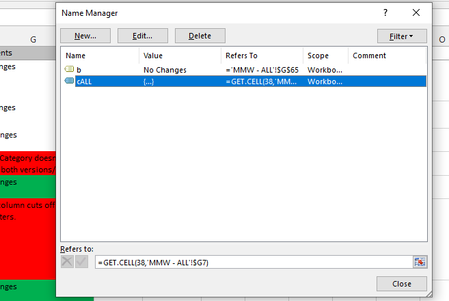
Hello, I am new to working in excel in a professional setting. I've been given a shared document and I've used the "Forumulas-->NameManger" functionality to create some handy forumlas to count color ids . However, when i go to save this, i get a warning about macros not being enabled and i need to change the file type. When I reopen this file, all my macros are gone. Since I have zero authority over this file, and cant very well demand everyone switch to a new one with a different file extension, I need some kind of work around, so I can reapply these macros to the shared document or have them persist through saves. I've done some googling, about macros under Developer-->Record Macro , but that seems to be something entirely different, and this naming convention is inhibiting my ability to troubleshoot my exact problem. Thanks for any advice you can provide. SteveSolved2.7KViews0likes4Commentssignificant shortcoming of Money in Excel
I noticed off to the side on the Excel community board an invitation to download a new master template called "Money in Excel" Downloaded it, got it running. Connected with one of my most active credit card accounts fine. The product looks impressive. Much much better than the typical templates that are offered for budget and personal tracking of expenses, income (not that that's saying much). But a couple of shortcomings, one of which is pretty major in my book. A minor oversight: among the standard fixed Expense categories, one that I would expect virtually every user to have, you will not find Taxes. I would also, were I designing my own (which I've done) have fewer major expense categories and allow for sub-categories. Just as a quick example, a major category for "Fixed/Basic" and another for "Discretionary" allows some useful analyses once you connect them to the sub-categories that correspond to each. "Groceries" goes to the former (Basic) while "Restaurant/Dining" clearly belongs in the latter. And "Shopping" is a category of its own?! Surely there could have been somebody on the design team with more experience actually, you know, shopping...someone who would know that shopping for clothes doesn't fit next to shopping for, oh, jewelry, or a new phone. But here's the more significant shortcoming, which for all practical purposes precludes my using it: my main account for virtually everything is a major financial institution--the institution itself is supported, and I was able to log in with user name and password, but, in 2020, this institution and its security-conscious users, among whom I count myself, believe in dual factor authentication. Not supported. So an appeal to Microsoft developers (or is it Plaid, the service through which you all make the connections to the financial institutions?): make Money in Excel useful by making it capable of handling dual factor authentication. I know it's possible (TurboTax manages)....Solved2.9KViews0likes6Comments