events
2 TopicsEffective, engaging events in communities and storylines
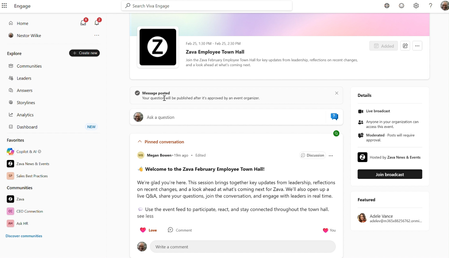
Whether you’re running a company-wide broadcast, a training session, a Reddit-style “ask me anything” (AMA) or an in-person gathering, Viva Engage and Microsoft Teams help you host and manage more effective and engaging events. Events have always been central to employee communications. Viva Engage and events play a critical role in building trust, encouraging authenticity, and listening at scale. From highly produced hybrid all-hands to asynchronous AMAs, the new Viva Engage features are helping our leaders connect with employees, address what matters most, and build trust—all in one platform. - John Cirone, Senior Director of Global Employee and Executive Communications We are upgrading existing community live events and storyline AMA features with a simple model: three event types—broadcast, meeting, async—from any community or storyline, super-powered with a long list of event features you have asked for. The result: improved experiences for organizers, presenters and attendees both before, during and after the event. This blog post will detail what this means for you! These new events features start rolling out April 27 th . And guess what? All of these new features will be available to all Microsoft 365 commercial customers with access to Engage and Teams—no “premium” license will be required for events up to 10,000 attendees. New features: the highlights The new capabilities of Engage events—particularly the moderated feed with support for anonymous questions and upvotes—has transformed the way we empower our leaders to listen and respond to questions from employees. - Alexander Bradley, Senior Director of Executive Communications With that in mind, let’s start by exploring the new features for every event in every community and storyline: Events listing: Each community and storyline has a calendar of upcoming and past events—a destination for people to register for future events and catch up with events they missed. Event page: The home for your event is a branded landing page with a custom cover photo (coming soon), the event details and description. This is the “micro site” for your event to which you drive attendees. They can learn about the event, engage with it, join the live session, and catch up with the event if they missed it. Event feed: A new event feed enables you to share updates, solicit questions, ideas and feedback, and support engagement between attendees and presenters. The new event feed introduces support for optional anonymous posting and moderation which allows organizers to approve posts before they are made visible to attendees. The feed allows you to tune the event experience for the engagement you want to encourage and support; you can enable or disable questions, comments, reactions, and upvoting; and you can change the settings at any time. The event feed is available before, during and after the event, showing up on the event landing page in Engage and in the “Q&A” panel of Teams. Event recording: After the event, the recording is available on the event page, so attendees can review both the recording and the feed. You can now update the recording link, allowing you to make edits to the video. Calendaring options: Events in Engage support two models to support your efforts to drive demand and attendance. First, you can invite attendees directly from Outlook, putting an invitation directly in their calendar. This model supports scenarios where their attendance is expected. Or, you can drive attendees to the event page where they can add to calendar, supporting an “opt-in” model that gives attendees control of what is on their calendar. Or you can mix and match, inviting those attendees who really need to have it on their calendar and letting others opt in. Event analytics: You’ll have access to analytics throughout the lifecycle of your event. You’ll be able to see how many people attended, how they engaged in the event feed, and how people consumed the recording after the event. For broadcasts, you can also access Teams insights. Mobile app choice: Attendees can join events from either the Teams or Engage mobile apps, across both iOS and Android. Integration with enterprise search and Copilot: Content from public events serves as grounding for Microsoft 365 Copilot and enterprise search, amplifying the reach and impact of the knowledge and information you share in your event. Event types Now, let’s explore the three event types and what is different. BROADCAST is best for company-wide or large-scale events, launches, keynotes and organizational “town hall” or “all hands” events. Key characteristics: Deliver a high‑quality live stream that scales to large audiences Organizers control what appears on screen Attendees watch the event and participate using Q&A and reactions This experience is an upgrade to the legacy “live event” broadcast, with an advanced feed and a rich suite of production features. MEETING is best for collaborative sessions, presentations, training workshops, expert panels, and all of the regular “rhythm of business” events your team or department conducts. Key characteristics: Share camera, microphone, and screen in real time Organizers can control who can present and share Up to 1,000 people can participate in the live event A collaborative event can feel exactly like a Teams meeting, where anyone can share. Or it can be like a presentation or webinar, where only presenters can share. Or anything in between. ASYNC is best for soliciting questions, collecting feedback, and crowdsourcing ideas from employees. Conduct an offline, asynchronous event with no live presentation or video stream Host an "ask-me-anything" (AMA) during which leaders or experts answer questions Enhance an in-person event by engaging your audience before and after This experience features an event page and event feed, but no real-time video experience powered by Teams. You can gather questions, ideas and feedback before an in-person event, or host a text-only (asynchronous) event like a Reddit-style AMA that can connect people with experts even over longer periods of time. Why host events in a community instead of creating them from your calendar? Until now, you’ve had one way to create events: From your Teams or Outlook calendar, you can create a Teams meeting, a Teams webinar, or a Teams Town Hall. Why would you want to change where you create and host events? An event isn’t just a calendar entry; its impact continues outside of the event confines. New event features help employees who missed the live event catch up quickly, help moderators engage attendees, and help leaders close the loop by responding to remaining questions. The result is a richer, more durable record of the event, so your organization benefits from the information and knowledge long after the event ends. Here’s the short list of what you can do better when you create your event from a community: Provide a calendar of upcoming and past events. Communicate effectively to drive awareness and attendance. Engage your audience before, during and after the event. Leverage event analytics to measure and improve effectiveness. Amplify information and knowledge shared at the event, after the event. Integration with community objectives and experiences. If you have experience with Microsoft 365 and events, think of it this way: By creating an event in a community, you’re taking a Teams event and wrapping it with the superpowers of Engage to reach and engage your audience at scale, before, during and after your event. And remember communities are not just for Engage anymore! Communities (powered by Engage) will be available in Teams Chat, alongside your chats, channels, and meetings; so, your events and their content will be seamlessly integrated into the flow of work in Teams. Preview customers have used these new event capabilities at scale, for company-wide “all hands” events, departmental rhythm-of-business meetings, and an extraordinary number of internal AI learning events. We look forward to celebrating your successful events as you apply these features to share news and information, train people, and engage employees. Resources Organize an Engage event - Microsoft Support Attend an Engage event - Microsoft Support Monday Masterclass Season 2 – Week 4 Designing Events Employees Remember | Microsoft Community Hub1KViews3likes0CommentsLearn from Microsoft: Best practices for engaging employees with AMAs and live events
At the beginning of each fiscal year, Rajesh Jha, EVP of Experiences + Devices at Microsoft, hosts a kick-off event for his organization of more than 40,000 employees. During the event he is eager to get his employees excited about what is to come, listen to, and engage with colleagues through their questions. This year was more engaging than ever as they adopted new technology to achieve their goals: Ask Me Anything (AMA) events and live events in Viva Engage. The event was so successful that the leader has committed to a bi-monthly cadence for future events.7.2KViews1like1Comment