entraid
23 Topics
How to Properly Configure IIS Reverse Proxy for ASP.NET Core Applications Secured with Entra ID
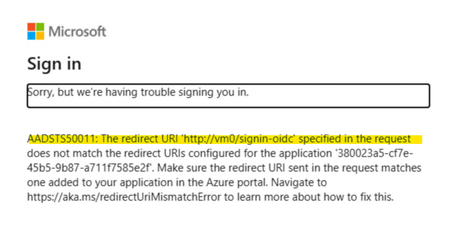
If you’ve ever worked on an ASP.NET Core application protected with Entra ID, you might have encountered an issue where the backend server URL appears as the redirect URI instead of the IIS Reverse Proxy URL. This is because ASP.NET Core applications use the backend server’s hostname to generate the redirect URI. While this behavior is the default, it can be problematic. While you can work around this by manually setting the redirect URI to the ARR/IIS Reverse Proxy endpoint in your code as follows: builder.Services.AddAuthentication(OpenIdConnectDefaults.AuthenticationScheme) .AddMicrosoftIdentityWebApp(builder.Configuration.GetSection("AzureAd")); builder.Services.Configure<OpenIdConnectOptions>(options => { options.Events.OnRedirectToIdentityProvider = context => { context.ProtocolMessage.RedirectUri = "https://arr.local.lab"; return Task.FromResult(0); }; }); It isn’t the most elegant solution, especially in environments where configuration changes might often be required. Instead, using Forwarded Headers offers a cleaner, more scalable approach. In this post, I’ll walk you through how to resolve this issue using Forwarded Headers. ASP.NET Core provides a ForwardedHeaders Middleware , which reads headers such as X-Forwarded-Host and X-Forwarded-Proto. These headers replace values in HttpContext such as HttpContext.Request.Host and HttpContext.Request.Scheme. By passing these headers appropriately from IIS Reverse Proxy, we can resolve the redirect URI issue. But IIS reverse proxy or server farms doesn't send X-Forwarded-Host & X-Forwarded-Proto headers by default. You’ll need to configure IIS to include these headers using the URL Rewrite feature. To do so, follow these steps: Set Server Variables Open the URL Rewrite module in the IIS Manager Console and Select View Server Variables. Add following Server Variables: HTTP_X_Forwarded_Host HTTP_X_Forwarded_Proto Edit Inbound Rules Once Server Variables are added, select the concerned reverse proxy inbound rule and select Edit under Inbound rules in Actions Pane. Add the Server Variables to the inbound rule: Map HTTP_X_Forwarded_Host to {HTTP_HOST} Map HTTP_X_Forwarded_Proto to https Once IIS is configured to pass forwarded headers, the application needs to process them. Add ForwardedHeaders Middleware in your ASP.NET Core application and configure ForwardedHeadersOptions as follows: using Microsoft.AspNetCore.HttpOverrides; var builder = WebApplication.CreateBuilder(args); // Add services to the container. builder.Services.AddAuthentication(OpenIdConnectDefaults.AuthenticationScheme) .AddMicrosoftIdentityWebApp(builder.Configuration.GetSection("AzureAd")); builder.Services.AddAuthorization(options => { // By default, all incoming requests will be authorized according to the default policy. options.FallbackPolicy = options.DefaultPolicy; }); builder.Services.AddRazorPages() .AddMicrosoftIdentityUI(); builder.Services.Configure<ForwardedHeadersOptions>(options => { options.KnownProxies.Add(IPAddress.Parse("10.160.7.4")); // Reverse Proxy IP address options.ForwardedHeaders = ForwardedHeaders.XForwardedProto | ForwardedHeaders.XForwardedHost; }); var app = builder. Build(); app.UseForwardedHeaders(); // ForwardedHeaders Middleware // Configure the HTTP request pipeline. if (!app.Environment.IsDevelopment()) { app.UseExceptionHandler("/Error"); app.UseHsts(); } app.UseHttpsRedirection(); app.UseRouting(); app.UseAuthentication(); app.UseAuthorization(); app.MapStaticAssets(); app.MapRazorPages() .WithStaticAssets(); app.MapControllers(); app.Run(); Note: Order of the Middleware is important. Ensure ForwardedHeaders Middleware is called before any other middleware in the pipeline. Make sure to add the IP address of your ARR/IIS Reverse Proxy to the KnownProxies list. Alternatively, you can use KnownNetwork to set IP range. With these configurations, X-Forwarded-Host and X-Forwarded-Proto headers sent from IIS Reverse Proxy will replace the Host and Scheme in HttpContext. This ensures that the redirect URI correctly points to the IIS Reverse Proxy endpoint, resolving the issue seamlessly. Further Reading: Refer to these resources for more information: Configure ASP.NET Core to work with proxy servers and load balancers | Microsoft Learn Setting HTTP request headers and IIS server variables | Microsoft Learn IIS Server Variables | Microsoft Learn Hope this guide helps!2.6KViews4likes0CommentsThe Future of Identity: Self-Service Account Recovery (Preview) in Microsoft Entra
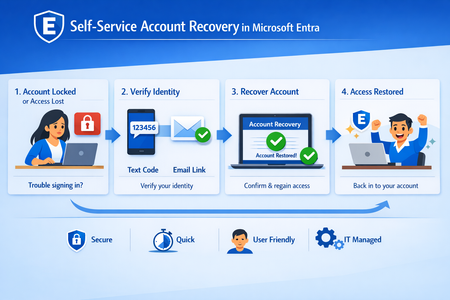
In the modern enterprise, the "Help Desk" is paradoxically both a vital resource and a massive security liability. As organizations move toward phishing-resistant, passwordless environments using passkeys and FIDO2 tokens, a critical question remains: What happens when a user loses their only authentication device? Historically, this required a phone call to a support agent. However, in an era of sophisticated social engineering and AI-generated deepfakes, a human agent is often the easiest point of entry for an attacker. Microsoft Entra’s new Self-Service Account Recovery solves this by replacing manual verification with high-assurance, automated identity proofing. The Fatal Flaw in Traditional Recovery Most organizations currently rely on one of two methods for recovery, both of which have significant drawbacks: Self-Service Password Reset (SSPR): Often relies on "weak" factors like SMS codes or security questions. These are easily intercepted or guessed and don't help a user who is trying to move away from passwords entirely. The Help Desk: Requires an agent to "vouch" for a user. Attackers can impersonate employees, use voice-cloning technology, or provide leaked personal information to trick an agent into issuing a Temporary Access Pass (TAP). The new Entra flow removes the human element from the validation process, ensuring that the person regaining access is exactly who they claim to be. How the New Recovery Flow Works: The recovery process is built on the concept of "identity proofing," utilizing government-issued documents and biometric liveness checks. Integration with Verification Partners Microsoft doesn’t store your passport or driver's license. Instead, Entra integrates with specialized Third-Party Identity Verification providers (such as True Credential, IDEMIA, AU10TIX). These services are experts in forensic document analysis. The Verification Process When a user begins a recovery, they are redirected to the partner service. The process typically involves: Document Capture: The user takes a photo of a government ID (Passport, Driver’s License, etc.). Forensic Analysis: The service checks for security features like holograms, fonts, and watermarks to ensure the ID is genuine. Liveness Check: The user takes a "selfie" or video. The system uses "Face Check" technology projecting specific light patterns or colors on the user’s face to ensure it is a live person and not a photo, video, or deepfake. Issuance of a Verified ID Once the third party confirms the user's identity, Microsoft Entra issues Verified ID. This is a decentralized, digital credential that sits in the user's Microsoft Authenticator app. It serves as digital proof of their identity that Entra can trust. The Final Handshake: Face Check To bridge the gap between the digital credential and the person at the keyboard, Entra performs a Face Check. It compares the live user's face against the photo contained within the Verified ID. If they match, Entra considers the identity "proven." Bootstrapping the New Device Once verified, Entra automatically issues a Temporary Access Pass (TAP). This allows the user to log in and immediately register their new device, passkey, or Authenticator app, effectively "bootstrapping" their new secure environment without ever speaking to a human. Strategic Advantages for IT Leaders Zero Trust Maturity: This process fulfills the Zero Trust requirement of "explicit verification" even during the recovery phase. Scalability: By automating the most time-consuming part of help desk tickets identity verification IT teams can focus on more complex tasks. Phishing Resistance: Because the recovery is tied to physical ID and biometrics, there is no "code" for an attacker to phish. Global Compliance: Leveraging government-issued IDs allows organizations to meet high-bar regulatory requirements for identity assurance (such as NIST IAL2). Deployment and Prerequisites To implement this, administrators need to ensure a few things are in place: Verified ID Setup: You must configure Microsoft Entra Verified ID within your tenant. Matching Logic: Entra uses attributes like First Name and Last Name to match the Verified ID to the user account. Ensuring your HR data is clean and synchronized is essential. License & Costs: While the recovery flow is a feature of Entra, the verification partners and the Face Check service (typically a per-check fee) must be provisioned through the Microsoft Security Store. Conclusion The transition to a passwordless world is incomplete if the "back door" (recovery) remains open and insecure. By integrating government-grade identity verification directly into the login flow, Microsoft Entra provides the final piece of the puzzle: a recovery method that is as secure as the primary login itself.
Moving from MDT/WDS to Autopilot – Real-World Lessons, Wins & Gotchas
Hi all, We’ve been moving away from an ageing WDS + MDT setup and over to Windows Autopilot, and I thought I’d share a few key lessons and experiences from the journey. In case anyone else is working through the same transition (...or about to). Why the change? MDT was becoming unreliable, drivers/apps would randomly fail to install, WDS is on the way out, and we needed a more remote-friendly approach. We also wanted to simplify things for our small IT team and shift from Hybrid Azure AD Join to Azure AD Join only. We’re doing this as a phased rollout. I harvested existing device hashes using a script from a central server, and manually added machines that weren’t online at the time (most of which were just unused spares, we haven't introduced new hardware yet). If you want a copy of this auto-harvest, please see my next post, this script is useful as it'll just go off and import the hardware hashes into Intune, and can run against multiple computers at a time. (I will add the link to the post once made). Some of the biggest hurdles: • 0x80070002 / 0x80070643 errors (typically due to incomplete registration or app deployment failures) • Enrollment Status Page (ESP) hangs due to app targeting issues (user vs device) and BitLocker config conflicts • Wi-Fi setup with RADIUS (NPS) was complex, Enterprise Certificates and we're still using internal AD for authentication, so user accounts exist there and sync over to Azure. • Legacy GPOs had to be rebuilt manually in Intune, lots of trial and error • Some software (like SolidWorks) wouldn’t install silently via Intune, so I used NinjaOne to handle these, along with remediation scripts in Intune where needed We also moved from WSUS to Windows Autopatch, which improved update reliability and even helped with driver delivery via Windows Update. What’s gone well: Device provisioning is more consistent, updates are more reliable, build time per machine has dropped, and remote users get systems faster. It’s also reduced our reliance on legacy infrastructure. What I’m still working on: Tightening up compliance and reporting, improving detection/remediation coverage, figuring out new errors that may occur, and automating as much manual processes as possible. Ask me anything or share your own experience! I’m happy to help anyone dealing with similar issues or just curious about the move. Feel free to reply here or message me. Always happy to trade lessons learned, especially if you’re in the middle of an Autopilot project yourself. Cheers, Timothy Jeens2.1KViews3likes5CommentsAugust 2025 Recap: Azure Database for PostgreSQL
Hello Azure Community, August was an exciting month for Azure Database for PostgreSQL! We have introduced updates that make your experience smarter and more secure. From simplified Entra ID group login to integrations with LangChain and LangGraph, these updates help with improving access control and seamless integration for your AI agents and applications. Stay tuned as we dive deeper into each of these feature updates. Feature Highlights Enhanced Performance recommendations for Azure Advisor - Generally Available Entra-ID group login using user credentials - Public Preview New Region Buildout: Austria East LangChain and LangGraph connector Active-Active Replication Guide Enhanced Performance recommendations for Azure Advisor - Generally Available Azure Advisor now offers enhanced recommendations to further optimize PostgreSQL server performance, security, and resource management. These key updates are as follows: Index Scan Insights: Detection and recommendations for disabled index and index-only scans to improve query efficiency. Audit Logging Review: Identification of excessive logging via the pgaudit.log parameter, with guidance to reduce overhead. Statistics Monitoring: Alerts on server statistics resets and suggestions to restore accurate performance tracking. Storage Optimization: Analysis of storage usage with recommendations to enable the Storage Autogrow feature for seamless scaling. Connection Management: Evaluation of workloads for short-lived connections and frequent connectivity errors, with recommendations to implement PgBouncer for efficient connection pooling. These enhancements aim to provide deeper operational insights and support proactive performance tuning for PostgreSQL workloads. For more details read the Performance recommendations documentation. Entra-ID group login using user credentials - Public Preview The public preview for Entra-ID group login using user credentials is now available. This feature simplifies user management and improves security within the Azure Database for PostgreSQL. This allows administrators and users to benefit from a more streamlined process like: Changes in Entra-ID group memberships are synchronized on a periodic 30min basis. This scheduled syncing ensures that access controls are kept up to date, simplifying user management and maintaining current permissions. Users can log in with their own credentials, streamlining authentication, and improving auditing and access management for PostgreSQL environments. As organizations continue to adopt cloud-native identity solutions, this update represents a major improvement in operational efficiency and security for PostgreSQL database environments. For more details read the documentation on Entra-ID group login. New Region Buildout: Austria East New region rollout! Azure Database for PostgreSQL flexible server is now available in Austria East, giving customers in and around the region lower latency and data residency options. This continues our mission to bring Azure PostgreSQL closer to where you build and run your apps. For the full list of regions visit: Azure Database for PostgreSQL Regions. LangChain and LangGraph connector We are excited to announce that native LangChain & LangGraph support is now available for Azure Database for PostgreSQL! This integration brings native support for Azure Database for PostgreSQL into LangChain or LangGraph workflows, enabling developers to use Azure PostgreSQL as a secure and high-performance vector store and memory store for their AI agents and applications. Specifically, this package adds support for: Microsoft Entra ID (formerly Azure AD) authentication when connecting to your Azure Database for PostgreSQL instances, and, DiskANN indexing algorithm when indexing your (semantic) vectors. This package makes it easy to connect LangChain to your Azure-hosted PostgreSQL instances whether you're building intelligent agents, semantic search, or retrieval-augmented generation (RAG) systems. Read more at https://aka.ms/azpg-agent-frameworks Active-Active Replication Guide We have published a new blog article that guides you through setting up active-active replication in Azure Database for PostgreSQL using the pglogical extension. This walkthrough covers the fundamentals of active-active replication, key prerequisites for enabling bi-directional replication, and step-by-step demo scripts for the setup. It also compares native and pglogical approaches helping you choose the right strategy for high availability, and multi-region resilience in production environments. Read more about the active-active replication guide on this blog. Azure Postgres Learning Bytes 🎓 Enabling Zone-Redundant High Availability for Azure Database for PostgreSQL Flexible Server Using APIs. High availability (HA) is essential for ensuring business continuity and minimizing downtime in production workloads. With Zone-Redundant HA, Azure Database for PostgreSQL Flexible Server automatically provisions a standby replica in a different availability zone, providing stronger fault tolerance against zone-level failures. This section will guide you on how to enable Zone-Redundant HA using REST APIs. Using REST APIs gives you clear visibility into the exact requests and responses, making it easier to debug issues and validate configurations as you go. You can use any REST API client tool of your choice to perform these operations including Postman, Thunder Client (VS Code extension), curl, etc. to send requests and inspect the results directly. Before enabling Zone-Redundant HA, make sure your server is on the General Purpose or Memory Optimized tier and deployed in a region that supports it. If your server is currently using Same-Zone HA, you must first disable it before switching to Zone-Redundant. Steps to Enable Zone-Redundant HA: Get an ARM Bearer token: Run this in a terminal where Azure CLI is signed in (or use Azure Cloud Shell) az account get-access-token --resource https://management.azure.com --query accessToken -o tsv Paste token in your API client tool Authorization: `Bearer <token>` </token> Inspect the server (GET) using the following URL: https://management.azure.com/subscriptions/{{subscriptionId}}/resourceGroups/{{resourceGroup}}/providers/Microsoft.DBforPostgreSQL/flexibleServers/{{serverName}}?api-version={{apiVersion}} In the JSON response, note: sku.tier → must be 'GeneralPurpose' or 'MemoryOptimized' properties.availabilityZone → '1' or '2' or '3' (depends which availability zone that was specified while creating the primary server, it will be selected by system if the availability zone is not specified) properties.highAvailability.mode → 'Disabled', 'SameZone', or 'ZoneRedundant' properties.highAvailability.state → e.g. 'NotEnabled','CreatingStandby', 'Healthy' If HA is currently SameZone, disable it first (PATCH) using API. Use the same URL in Step 3, in the Body header insert: { "properties": { "highAvailability": { "mode": "Disabled" } } } Enable Zone Redundant HA (PATCH) using API: Use the same URL in Step 3, in the Body header insert: { "properties": { "highAvailability": { "mode": "ZoneRedundant" } } } Monitor until HA is Healthy: Re-run the GET from Step 3 every 30-60 seconds until you see: "highAvailability": { "mode": "ZoneRedundant", "state": "Healthy" } Conclusion That’s all for our August 2025 feature updates! We’re committed to making Azure Database for PostgreSQL better with every release, and your feedback plays a key role in shaping what’s next. 💬 Have ideas, questions, or suggestions? Share them with us: https://aka.ms/pgfeedback 📢 Want to stay informed about the latest features and best practices? Follow us here for the latest announcements, feature releases, and best practices: Azure Database for PostgreSQL Blog More exciting improvements are on the way—stay tuned for what’s coming next!1.3KViews2likes0CommentsApril 2026 Recap: Azure Database for PostgreSQL
April brought several updates for Azure Database for PostgreSQL, focused on improving developer productivity, strengthening security and connectivity, and helping customers scale and optimize their PostgreSQL workloads. From new Entra ID token refresh libraries across .NET, JavaScript, and Python to simplify authentication, to guidance on migrating from VNet to Private Endpoint capable configurations, we continue to make it easier to build and manage secure applications. We also introduced enhancements to the PostgreSQL VS Code extension and published deep dives on query performance, data modeling, and real-world scaling patterns. We also published a blog on how PostgreSQL enters its AI era, which explores ways with which developers can adapt PostgreSQL to meet the needs of AI-driven and rapidly growing applications, with practical guidance on running and scaling PostgreSQL more effectively in these evolving workloads. POSETTE 2026 Before we dive deeper into the feature updates, POSETTE: An Event for Postgres 2026 is just around the corner, PostgreSQL’s free, virtual conference bringing together the global community. Taking place from June 16–18, the event will feature four livestream tracks with a strong lineup of content, including 44 sessions, 2 keynotes, and 50 speakers. It’s a great opportunity to hear from PostgreSQL experts, learn about the latest trends, and discover real-world best practices across a wide range of topics. Register today for updates and be part of three days of learning, insights, and community-driven discussions across a wide range of PostgreSQL topics. Features Entra-ID token refresh libraries for .NET, JavaScript, and Python: Preview Migrating from VNet to Private Endpoint: Preview New enhancements in the PostgreSQL VS Code Extension Improving Query Performance and Modeling in PostgreSQL Scaling PostgreSQL for Real-World Application Workloads Learning Bytes: Preventing accidental server deletion Entra-ID Token refresh libraries: .NET, JavaScript and Python We’ve introduced Entra ID token refresh libraries for .NET, JavaScript, and Python to simplify how applications authenticate with Azure Database for PostgreSQL using Entra ID. When using Entra ID–based authentication, access tokens are short-lived and need to be refreshed periodically. This often requires additional logic in the application to handle expiration, retries, and reconnection scenarios. These new libraries take care of that complexity by automatically refreshing tokens behind the scenes, so applications can maintain uninterrupted database connections without custom token management. With built-in support for token renewal, these libraries help: Reduce the need for manual token refresh logic in your application code Improve reliability for long-running or connection-pooled workloads Simplify adoption of Entra ID authentication across different language stacks Whether you're building new applications or migrating existing ones to use Entra ID, these libraries make it easier to integrate secure, passwordless authentication while keeping connection handling straightforward. Migrating from VNet to Private Endpoint Azure Database for PostgreSQL flexible server can now be migrated from a VNet‑integrated deployment to a network configuration that supports Private Endpoint connectivity. Servers originally deployed inside a VNet may require greater flexibility in networking management. Private Endpoints provide a simpler and more scalable model. Following migration, private access to the server continues over Azure’s backbone network, dependency on delegated subnets is reduced, and database networking can be better aligned with evolving architectural or organizational standards. The migration can be initiated through Azure CLI, API, or SDK and is designed to be straightforward. Although the operation involves a period of downtime, it enables adoption of Private Endpoint connectivity without recreating the server or manually moving data. After migration, Private Endpoints or firewall rules can be configured based on the desired access model, and infrastructure-as-code templates can be updated accordingly. Read more here: Migrate from VNet to a Private Endpoint Capable Network Configuration | Microsoft Learn New enhancements in the PostgreSQL VS Code Extension The latest release (v1.21) of the PostgreSQL VS Code extension delivers enhancements to query authoring and analysis workflows, improved cross-extension interoperability, reliability improvements across Object Explorer and connection management, and a set of targeted bug fixes. Schema-Aware Query Creation: You can now open a new query directly from a schema in Object Explorer, automatically setting the appropriate search_path so unqualified object names resolve correctly without additional setup. Query Plan Visualization Enhancements: The query plan visualizer now uses PostgreSQL-specific node icons across all views, making it easier to identify scan, join, and aggregate operations during performance analysis. Improved Multi-Extension Compatibility: The extension now coordinates editor ownership with the MSSQL extension when both are installed, reducing duplicate UI actions and avoiding conflicts in query execution workflows. Object Explorer Reliability Improvements: The Object Explorer has been refactored for more consistent refresh, expansion, and reconnection behavior, especially in long-running sessions and databases with many schemas. Enhanced IntelliSense Behavior: IntelliSense now respects the configured search_path, improving the relevance of suggestions and helping you work more efficiently across schemas. Bug Fixes: This release includes fixes across object scripting (including partitioned tables), connection profile handling, Docker container creation, and initial extension setup for improved reliability and stability. Improving Query Performance and Modeling in PostgreSQL This month, we also shared a set of technical blogs highlighting advanced PostgreSQL scenarios and practical guidance for real-world workloads: Guide on workload observability with Query store: This blog dives into how Query Store can be used to gain end-to-end visibility into query performance across both primary and replica nodes. It highlights the importance of understanding query behavior in distributed setups and how bottlenecks can surface differently across nodes. The post also shares practical guidance on using these insights to troubleshoot issues and optimize workload performance effectively. Guide on Common Table Expressions(CTEs) with Data Skew: This deep dive unpacks a complex query planning scenario in PostgreSQL v17, where data skew can lead to unexpected and suboptimal execution plans involving CTEs. It explains why the optimizer may choose inefficient plans and how this impacts real-world workloads. The blog also outlines strategies to diagnose and mitigate these issues, helping users better predict and tune query performance. Guide on PostgreSQL as a Graph Database: This blog explains how PostgreSQL can be leveraged to model and query graph-like relationships, making it highly relevant for AI-driven applications. It demonstrates how relational capabilities can be extended to support graph workloads without introducing additional systems. The post also highlights practical patterns and use cases that enable developers to build more connected, intelligent applications using PostgreSQL as a unified data platform. Scaling PostgreSQL for Real-World Application Workloads Alongside performance tuning and data modeling topics, we also explored how PostgreSQL behaves under real-world application patterns especially in scenarios involving high concurrency, background job processing, and connection-heavy workloads. These blogs focus on common architectural choices developers make and the trade-offs to consider when scaling reliably. Guide on using Postgres as a Job Queue: Thisblog takes a deeper look at the implications of using PostgreSQL as a job queue, a pattern commonly adopted for simplicity and tighter integration. It walks through how queue-like workloads can introduce contention due to frequent updates, row locking, and long-running transactions. The post highlights how these patterns can impact throughput, vacuum efficiency, and overall database health as scale increases. It also discusses when this approach is appropriate, and when teams should consider dedicated queuing systems to avoid performance bottlenecks. Guide on Connection Scaling with Elastic Clusters: This blog dives into the challenges of handling large volumes of concurrent connections, which is a common bottleneck for modern, microservices-based applications. It explains how Elastic Clusters help distribute connections and workload across multiple nodes, improving scalability and resilience under heavy load. The post also touches on connection management patterns, including pooling strategies, and how they work in conjunction with Elastic Clusters to prevent resource exhaustion and ensure consistent performance at scale. Azure Postgres Learning Bytes 🎓 Preventing accidental server deletion In production environments, accidental deletions can lead to significant downtime and data loss. To safeguard critical resources like Azure Database for PostgreSQL servers, Azure provides resource locks that add an extra layer of protection beyond standard role-based access control (RBAC). A commonly used option is the CanNotDelete (Delete Lock), which ensures that a resource cannot be deleted even by users with elevated permissions until the lock is explicitly removed. You can apply a delete lock easily using the Azure CLI by targeting the specific resource: az lock create --name PreventDelete --lock-type CanNotDelete --resource-group <rg-name> --resource-type Microsoft.DBforPostgreSQL/flexibleServers --resource-name <resource-name></resource-name></rg-name> Once applied, any delete operation on the resource will be blocked, helping prevent accidental or unintended deletions during maintenance, deployments, or testing. Locks can be applied at different levels subscription, resource group, or individual resources allowing flexibility based on your protection needs. For more details and step-by-step guidance, read our blog on Preventing accidental deletion of an Azure PostgreSQL Instance.455Views1like0CommentsStrengthening Identity Resilience: A Deep Dive into Microsoft Entra Backup and Recovery
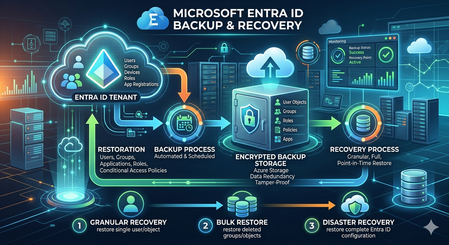
In the modern security landscape, we often say that "Identity is the new perimeter." We spend significant resources on Conditional Access, Phishing-Resistant MFA, and Identity Protection to keep the "bad guys" out. But what happens when the threat is already inside, or when a legitimate administrative action goes sideways? If our identity data the "brain" of our Microsoft 365 and Azure ecosystem is corrupted or maliciously altered, usr entire security posture collapses. Today, we’re exploring the new Microsoft Entra Backup and Recovery capability, a native safety net designed to ensure usr identity infrastructure remains resilient against both accidents and attacks. Why Native Backup Matters For years, Entra ID administrators relied on the Recycle Bin for deleted objects. However, a major gap existed: Attribute Corruption. If a script accidentally wipes the department and manager attributes for 10,000 users, or if a malicious actor modifies our most restrictive Conditional Access policies to create a backdoor, the Recycle Bin can't help us the objects aren't deleted; they are just wrong. Restoring these specific states previously required complex PowerShell scripting or expensive third-party tools. Entra Backup and Recovery closes this gap by providing a native, automated way to "roll back" the state of usr objects. Core Capabilities: How it Works The service is currently available in Public Preview for customers with Entra ID P1 or P2 licenses. It operates on a simple yet powerful "Snapshot" model: Automated Daily Snapshots The system automatically captures a point-in-time view of our tenant every day. Currently, the service maintains a 5-day retention window. This allows us to look back at the state of our environment from yesterday or earlier in the week to find a "known good" configuration. Visibility via Difference Reports One of the most powerful features is the Difference Report. Before committing to a restoration, we can compare a specific snapshot against the live state of our tenant. The report provides a granular view of: Object ID: Exactly which user, group, or policy is affected. Attribute Changes: A side-by-side comparison showing the "Old Value" (from the backup) versus the "Current Value" (live in the tenant). Metadata Loading: While the first report may take a moment to load metadata, subsequent reports are lightning-fast, allowing for quick triaging during an incident. Granular Restoration We aren't forced into an "all or nothing" recovery. We can choose to restore: An entire object class (e.g., all Conditional Access Policies). Specific object types (e.g., only Service Principals). Individual Object IDs for targeted fixes. The "Defense in Depth" Identity Strategy Entra Backup and Recovery is not a standalone silo; it is the third pillar of a complete identity resilience strategy. To truly harden our tenant, we must coordinate these three features: Pillar 1: Soft Delete (The Recycle Bin) Used for Deleted Objects. If a user or Microsoft 365 group is deleted, it sits in the Recycle Bin for 30 days. We can restore these easily via the portal or Graph API to maintain the original Object ID and SID. Pillar 2: Protected Actions (The Vault) To prevent an attacker from "hard deleting" our objects (purging them from the Recycle Bin so they can't be recovered), we must implement Protected Actions. How it works: we assign a "Conditional Access Authentication Context" to sensitive actions like Microsoft.Directory/deletedItems/delete. The Result: Even a Global Admin cannot permanently purge an object unless they meet strict requirements, such as using a Phishing-Resistant MFA key or working from a Secure Access Workstation (SAW). Pillar 3: Backup and Recovery (The Time Machine) Used for Corruption and Configuration Drift. When the object exists but its properties are compromised, this is our "Time Machine" to revert attributes and policy logic to a functional state. Real-World Scenario: Recovering from a Bulk Logic Error Imagine an admin runs a bulk update script intended to update the JobTitle for the Sales team. Due to a logic error in the CSV, the script instead clears the SecurityGroup memberships and ExtensionAttributes for the entire department. Detection: Users lose access to apps because their group memberships are gone. Analysis: The Admin generates a Difference Report between today and yesterday’s snapshot. Validation: The report confirms that 500 users now have "null" values for the affected attributes. Recovery: The Admin selects those 500 User IDs and hits Restore. Within minutes, the attributes are repopulated, and dynamic group memberships begin to recalculate automatically. Conclusion and Next Steps The preview of Microsoft Entra Backup and Recovery is a significant step forward in native tenant protection. By combining it with Protected Actions and the Recycle Bin, organizations can finally achieve a "circular" protection model for identity. Ready to try it? Navigate to the Microsoft Entra Admin Center, look for Backup and Recovery in the left-hand navigation, and explore usr first snapshot today.Conditional Access for Agent Identities in Microsoft Entra
AI agents are rapidly becoming part of everyday enterprise operations summarizing incidents, analyzing logs, orchestrating workflows, or even acting as digital colleagues. As organizations adopt these intelligent automations, securing them becomes just as important as securing human identities. Microsoft Entra introduces Agent Identities and extends Conditional Access to them but with very limited controls compared to traditional users and workload identities. This blog breaks down what Agent Identities are, how Conditional Access applies to them, and what are current limitations. What Exactly Are Agent Identities? Microsoft Entra now supports a new identity type designed specifically for AI systems: Agent Identity – like an app/service principal but specialized for AI Agent User – an identity that behaves more like a human user Agent Blueprint – a template used to create agent identities This model exists because AI systems behave differently than humans or applications: they can act autonomously, operate continuously, and make decisions without user input. AI-driven automation must be governed and that’s where Conditional Access comes in. Conditional Access for Agents, but with Important Limitations Today, Conditional Access for agent identities is purposely minimal. Microsoft clearly states: Conditional Access applies only when: An agent identity requests a token An agent user requests a token It does NOT apply when: A blueprint acquires a token to create identities An agent performs intermediate token exchange What Controls Are Actually Available Today? ✔ Supported Today Category Supported? Details Identity Targeting ✔ Yes You can include/exclude agent identities & agent users Block Access ✔ Yes This is the only Grant control currently available Agent Risk (Preview) ✔ Yes Early stage risk evaluation Sign-in evaluation ✔ Yes Token acquisition governed by CA ❌NOT Supported Today These CA controls do not apply to Agent Identities: MFA Authentication strength Device compliance Approved client apps App protection policies Session controls User sign-in frequency Terms of Use Location conditions (network/device-based) Client apps (legacy/modern access) Why? Because agents do not perform interactive authentication and do not use device signals or session context like humans. Their authentication is purely machine‑driven. How Conditional Access Works for Agents When an agent identity (or agent user) requests a token, Microsoft Entra: Identifies the requesting agent Checks CA policy assignments Evaluates any agent-risk conditions Allow/Blocks token issuance if conditions meet That’s it. No MFA prompt. No device check. No authentication strength evaluation. This makes CA for agents fundamentally different from CA for humans. Why Is Conditional Access So Limited for Agents? Two major reasons: Agents cannot satisfy user-based controls AI agents cannot: Perform MFA Use biometrics Run on compliant devices Follow session prompts These are human-driven processes. Agents authenticate via secure credential flows They use: Client credentials Federated identity credentials Token exchange flows So CA is limited to identity-level allow/block and risk-based token decisions. Practical Use Cases (Given Today’s Limitations) Even with limited controls, CA for agents is still important. Stop compromised agents from continuing to operate If Microsoft Entra detects high agent risk: CA can block token issuance This halts the agent’s ability to act immediately Enforce separation of duties for AI agents Even though you cannot apply MFA or auth strength, you can: Separate agents into “allowed” vs “blocked” groups Apply different CA rules per department or system Prevent AI sprawl Large enterprises may generate hundreds of AI agents. CA gives central admin control: Only approved, vetted agents can operate Others are blocked at token-request time Why Agent Blueprints Cannot Be Governed by CA Blueprints are templates, not active identities. Blueprint token flows are system-level operations, not access attempts. Therefore: ❌ No CA evaluation ❌ No controls applied ❌ Not counted as agent activity Only actual agent identities are governed by CA. What the Future Might Include Microsoft hints the capabilities will expand: Agent risk scoring Agent behaviour analytics More granularity in CA for agents Additional grant controls Policy scoping at task or capability level But as of today, CA for agents remains intentionally constrained to allow safe onboarding of the new identity type without accidental disruption. Final Summary Conditional Access for Agent Identities is currently a lightweight enforcement mechanism designed to block unauthorized or risky agents, not a full policy suite like we have for human users. ✔ What it does: Controls whether an agent identity can acquire a token Allows blocking specific agents Implements early agent‑risk logic Applies Zero Trust principles at the identity perimeter ❌ What it does not do: Enforce MFA Enforce authentication strength Enforce device or location conditions Apply session controls Govern blueprints As organizations adopt more autonomous agents, this foundational layer keeps AI identities visible and controllable and sets the stage for richer governance in the future.