entra id
3 TopicsUnlocking AI-Driven Data Access: Azure Database for MySQL Support via the Azure MCP Server
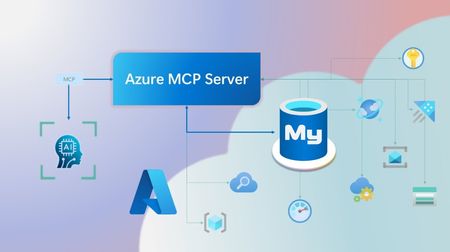
Step into a new era of data-driven intelligence with the fusion of Azure MCP Server and Azure Database for MySQL, where your MySQL data is no longer just stored, but instantly conversational, intelligent and action-ready. By harnessing the open-standard Model Context Protocol (MCP), your AI agents can now query, analyze and automate in natural language, accessing tables, surfacing insights and acting on your MySQL-driven business logic as easily as chatting with a colleague. It’s like giving your data a voice and your applications a brain, all within Azure’s trusted cloud platform. We are excited to announce that we have added support for Azure Database for MySQL in Azure MCP Server. The Azure MCP Server leverages the Model Context Protocol (MCP) to allow AI agents to seamlessly interact with various Azure services to perform context-aware operations such as querying databases and managing cloud resources. Building on this foundation, the Azure MCP Server now offers a set of tools that AI agents and apps can invoke to interact with Azure Database for MySQL - enabling them to list and query databases, retrieve schema details of tables, and access server configurations and parameters. These capabilities are delivered through the same standardized interface used for other Azure services, making it easier to the adopt the MCP standard for leveraging AI to work with your business data and operations across the Azure ecosystem. Before we delve into these new tools and explore how to get started with them, let’s take a moment to refresh our understanding of MCP and the Azure MCP Server - what they are, how they work, and why they matter. MCP architecture and key components The Model Context Protocol (MCP) is an emerging open protocol designed to integrate AI models with external data sources and services in a scalable, standardized, and secure manner. MCP dictates a client-server architecture with four key components: MCP Host, MCP Client, MCP Server and external data sources, services and APIs that provide the data context required to enhance AI models. To explain briefly, an MCP Host (AI apps and agents) includes an MCP client component that connects to one or more MCP Servers. These servers are lightweight programs that securely interface with external data sources, services and APIs and exposes them to MCP clients in the form of standardized capabilities called tools, resources and prompts. Learn more: MCP Documentation What is Azure MCP Server? Azure offers a multitude of cloud services that help developers build robust applications and AI solutions to address business needs. The Azure MCP Server aims to expose these powerful services for agentic usage, allowing AI systems to perform operations that are context-aware of your Azure resources and your business data within them, while ensuring adherence to the Model Context Protocol. It supports a wide range of Azure services and tools including Azure AI Search, Azure Cosmos DB, Azure Storage, Azure Monitor, Azure CLI and Developer CLI extensions. This means that you can empower AI agents, apps and tools to: Explore your Azure resources, such as listing and retrieving details on your Azure subscriptions, resource groups, services, databases, and tables. Search, query and analyze your data and logs. Execute CLI and Azure Developer CLI commands directly, and more! Learn more: Azure MCP Server GitHub Repository Introducing new Azure MCP Server tools to interact with Azure Database for MySQL The Azure MCP Server now includes the following tools that allow AI agents to interact with Azure Database for MySQL and your valuable business data residing in these servers, in accordance with the MCP standard: Tool Description Example Prompts azmcp_mysql_server_list List all MySQL servers in a subscription & resource group "List MySQL servers in resource group 'prod-rg'." "Show MySQL servers in region 'eastus'." azmcp_mysql_server_config_get Retrieve the configuration of a MySQL server "What is the backup retention period for server 'my-mysql-server'?" "Show storage allocation for server 'my-mysql-server'." azmcp_mysql_server_param_get Retrieve a specific parameter of a MySQL server "Is slow_query_log enabled on server my-mysql-server?" "Get innodb_buffer_pool_size for server my-mysql-server." azmcp_mysql_server_param_set Set a specific parameter of a MySQL server to a specific value "Set max_connections to 500 on server my-mysql-server." "Set wait_timeout to 300 on server my-mysql-server." azmcp_mysql_table_list List all tables in a MySQL database "List tables starting with 'tmp_' in database 'appdb'." "How many tables are in database 'analytics'?" azmcp_mysql_table_schema_get Get the schema of a specific table in a MySQL database "Show indexes for table 'transactions' in database 'billing'." "What is the primary key for table 'users' in database 'auth'?" azmcp_mysql_database_query Executes a SELECT query on a MySQL Database. The query must start with SELECT and cannot contain any destructive SQL operations for security reasons. “How many orders were placed in the last 30 days in the salesdb.orders table?” “Show the number of new users signed up in the last week in appdb.users grouped by day.” These interactions are secured using Microsoft Entra authentication, which enables seamless, identity-based access to Azure Database for MySQL - eliminating the need for password storage and enhancing overall security. How are these new tools in the Azure MCP Server different from the standalone MCP Server for Azure Database for MySQL? We have integrated the key capabilities of the Azure Database for MySQL MCP server into the Azure MCP Server, making it easier to connect your agentic apps not only to Azure Database for MySQL but also to other Azure services through one unified and secure interface! How to get started Installing and running the Azure MCP Server is quick and easy! Use GitHub Copilot in Visual Studio Code to gain meaningful insights from your business data in Azure Database for MySQL. Pre-requisites Install Visual Studio Code. Install GitHub Copilot and GitHub Copilot Chat extensions. An Azure Database for MySQL with Microsoft Entra authentication enabled. Ensure that the MCP Server is installed on a system with network connectivity and credentials to connect to Azure Database for MySQL. Installation and Testing Please use this guide for installation: Azure MCP Server Installation Guide Try the following prompts with your Azure Database for MySQL: Azure Database for MySQL tools for Azure MCP Server Try it out and share your feedback! Start using Azure MCP Server with the MySQL tools today and let our cloud services become your AI agent’s most powerful ally. We’re counting on your feedback - every comment, suggestion, or bug-report helps us build better tools together. Stay tuned: more features and capabilities are on the horizon! Feel free to comment below or write to us with your feedback and queries at AskAzureDBforMySQL@service.microsoft.com.346Views2likes0CommentsUpgrade performance, availability and security with new features in Azure Database for PostgreSQL
At Microsoft Build 2025 the Postgres on Azure team is announcing an exciting set of improvements and features for Azure Database for PostgreSQL. One area we are always focused on is the enterprise. This week we are delighted to announce improvements across the enterprise pillars of Performance, Availability and Security. In addition, we're improving Integration of Postgres workloads with services like ADF and Fabric. Here's a quick tour of the enterprise enhancements to Azure Database for PostgreSQL being announced this week. Performance and scale SSD v2 with HA support - Public Preview The public preview of zone-redundant high availability (HA) support for the Premium SSD v2 storage tier with Azure Database for PostgreSQL flexible server is now available. You can now enable High Availability with zone redundancy using Azure Premium SSD v2 when deploying flexible server, helping you achieve a Recovery Point Objective (RPO) of zero for mission-critical workloads. Premium SSD v2 offers sub-millisecond latency and outstanding performance at a low cost, making it ideal for IO-intensive, enterprise-grade workloads. With this update, you can significantly boost the price-performance of your PostgreSQL deployments on Azure and improve availability with reduced downtime during HA failover. The key benefits of SSD v2 include: Flexible disk sizing from 1 GiB to 64 TiB, with 1-GiB increment support Independent performance configuration: scale up to 80,000 IOPS and 1,200 MBps throughput without needing to provision larger disks To learn more about how to upgrade and best practices, visit: Premium SSDv2 PostgreSQL 17 Major Version Upgrade – Public Preview PostgreSQL version 17 brings a host of performance improvements, including a more efficient VACUUM process, faster sequential scans via streaming IO, and optimized query execution. Now, with the public preview of in-place major version upgrades to PostgreSQL 17 there is an easier path to v17 for your existing flexible server workloads. With this release, you can upgrade from earlier versions (14, 15, or 16) to PostgreSQL 17 without the need to migrate data or change server endpoints, simplifying the upgrade process and minimizing downtime. Azure’s in-place upgrade capability offers a native, low-disruption upgrade path directly from the Azure Portal or CLI. For upgrade steps and best practices, check out our detailed blog post. Availability Long-Term Backup (LTR) for Azure Database for PostgreSQL flexible server - Generally Available Long-term backups are essential for organizations with regulatory, compliance, and audit-driven requirements, especially in industries like finance and healthcare. Certifications such as HIPAA often mandate data retention periods up to 10 years, far exceeding the default 35-day retention limit provided by point-in-time restore (PITR) capabilities. Long-term backup for Azure Database for PostgreSQL flexible server, powered by Azure Backup is now generally available. With this release, you can now benefit from: Policy-driven, one-click enablement of long-term backups Resilient data retention across Azure Storage tiers Consumption-based pricing with no egress charges Support for restoring backups well beyond community-supported PostgreSQL versions This LTR capability uses a logical backup approach based on pg_dump and pg_restore, offering a flexible, open-source format that enhances portability and ensures your data can be restored across a variety of environments including Azure VMs, on-premises, or even other cloud providers. Learn more about long term retention: Backup and restore - Azure Database for PostgreSQL flexible server Azure Databases for PostgreSQL flexible server Resiliency Solution accelerator When it comes to ensuring business continuity, your database infrastructure is the most critical component. In addition to product documentation, it is important to have access to opinionated solution architecture, industry-proven recommended practices, and deployable infra-as-code that you can learn and customize to ensure an automated production-ready resilient infrastructure for your data. The Azure Database for PostgreSQL Resiliency Solution Accelerator is now available, providing a set of deployable architectures to ensure business continuity, minimize downtime, and protect data integrity during planned and unplanned events. In additional to architecture and recommended practices, a customizable Terraform deployment workflow is provided. Learn more: Azure Database for PostgreSQL Resiliency Solution Accelerator Security Automatic Customer Managed Key (CMK) version updates - Generally Available Azure Database for PostgreSQL flexible server data is fully encrypted, supporting both Service Managed and Customer Managed encryption keys (CMK). Automatic version updates for CMK (also known as “versionless keys”) is now generally available. This change simplifies the key lifecycle management by allowing PostgreSQL to automatically adopt new keys without needing manual updates. Combined with Azure Key Vault's auto-rotation feature this significantly reduces the management overhead of encryption key maintenance. Learn more about automatic CMK version updates. Azure confidential computing SKUs for flexible server - Public Preview Azure confidential computing enables secure sensitive and regulated data, preventing unwanted access of data in-use, by cloud providers, administrators, or external users. With the public preview of Azure confidential SKUs for Azure Database for PostgreSQL flexible server you can now select from a range of Confidential Computing VM sizes to run your PostgreSQL workloads in a hardware-based trusted execution environment (TEE). Azure confidential computing encrypts data in TEE, processing data in a verified environment, enabling you to securely process workloads while meeting compliance and regulatory demands. Learn more about confidential computing with the Azure Database for flexible server. Integration Entra Authentication for Azure Data Factory & Azure Synapse - Generally Available In an era of bring-your-own-device and cloud-enabled apps it is increasingly important for enterprises to maintain central control an identity-based security perimeter. With integrated Entra ID support, Azure Database for PostgreSQL flexible server allows you to bring your database workloads within this perimeter. But how do you securely connect to other services? Entra ID authentication is now supported in the Azure Data Factory and Azure Synapse connectors for Azure Database for PostgreSQL. This feature enables seamless, secure connectivity using Service Principal (key or certificate) and both User-Assigned and System-Assigned Managed Identities, streamlining access to your data pipelines and analytics workloads. Learn more about How to Connect from Azure Data Factory and Synapse Analytics to Azure Database for PostgreSQL. Fabric Data Factory – Upsert Method & Script Activity - Generally Available The Microsoft Fabric has become to go-to data analytics platform with services and tools for every data lifecycle state. To improve customization and fine-grained control over processing of PostgreSQL data, the Upsert Method and custom Script Activity are now generally available in Fabric Data Factory when using Azure Database for PostgreSQL as a source or sink. Upsert Method enables intelligent insert-or-update logic for PostgreSQL, making it easier to handle incremental data loads and change data capture (CDC) scenarios without complex workarounds. Script Activity allows you to embed and execute your own SQL scripts directly within pipelines—ideal for advanced transformations, procedural logic, and fine-grained control over data operations. These capabilities offer enhanced flexibility for building robust, enterprise-grade data workflows, simplifying your ETL processes. Connect to VS Code from the Azure Portal - Public Preview With the exciting announcement of a revamped VS Code PostgreSQL extension preview this week, we're adding a new connection option to the Azure Portal to connect to your flexible server with VS Code, creating a more unified and efficient developer experience. Here's why it matters: One Click Connectivity: No manual connection strings or configuration needed. Faster Onboarding: Go from provisioning a database in Azure to exploring and managing it in VS Code within seconds. Integrated Workflow: Manage infrastructure and development from a single, cohesive environment. Productivity: Connect directly from the Portal to leverage VS Code extension features like query editing, result views, and schema browsing. Where to learn more The Build 2025 announcements this week are just the latest in a compelling set of features delivered by the Azure Database for PostgreSQL team and build on our latest set of monthly feature updates (see: April 2025 Recap: Azure Database for PostgreSQL Flexible Server). Follow the Azure Database for PostgreSQL Blog where you'll see many of the latest updates from Build, including What's New with PostgreSQL @Build, and New Generative AI Features in Azure Database for PostgreSQL.639Views4likes0Comments