enterprise security
54 Topics
Building Secure, Enterprise Ready AI Agents with Purview SDK and Agent Framework
At Microsoft Ignite, we announced the public preview of Purview integration with the Agent Framework SDK—making it easier to build AI agents that are secure, compliant, and enterprise‑ready from day one. AI agents are quickly moving from demos to production. They reason over enterprise data, collaborate with other agents, and take real actions. As that happens, one thing becomes non‑negotiable: Governance has to be built in. That’s where Purview SDK comes in. Agentic AI Changes the Security Model Traditional apps expose risks at the UI or API layer. AI agents are different. Agents can: Process sensitive enterprise data in prompts and responses Collaborate with other agents across workflows Act autonomously on behalf of users Without built‑in controls, even a well‑designed agent can create compliance gaps. Purview SDK brings Microsoft’s enterprise data security and compliance directly into the agent runtime, so governance travels with the agent—not after it. What You Get with Purview SDK + Agent Framework This integration delivers a few key things developers and enterprises care about most: Inline Data Protection Evaluate prompts and responses against Data Loss Prevention (DLP) policies in real time. Content can be allowed or blocked automatically. Built‑In Governance Send AI interactions to Purview for audit, eDiscovery, communication compliance, and lifecycle management—without custom plumbing. Enterprise‑Ready by Design Ship agents that meet enterprise security expectations from the start, not as a follow‑up project. All of this is done natively through Agent Framework middleware, so governance feels like part of the platform—not an add‑on. How Enforcement Works (Quickly) When an agent runs: Prompts and responses flow through the Agent Framework pipeline Purview SDK evaluates content against configured policies A decision is returned: allow, redact, or block Governance signals are logged for audit and compliance This same model works for: User‑to‑agent interactions Agent‑to‑agent communication Multi‑agent workflows Try It: Add Purview SDK in Minutes Here’s a minimal Python example using Agent Framework: That’s it! From that point on: Prompts and responses are evaluated against Purview policies setup within the enterprise tenant Sensitive data can be automatically blocked Interactions are logged for governance and audit Designed for Real Agent Systems Most production AI apps aren’t single‑agent systems. Purview SDK supports: Agent‑level enforcement for fine‑grained control Workflow‑level enforcement across orchestration steps Agent‑to‑agent governance to protect data as agents collaborate This makes it a natural fit for enterprise‑scale, multi‑agent architectures. Get Started Today You can start experimenting right away: Try the Purview SDK with Agent Framework Follow the Microsoft Learn docs to configure Purview SDK with Agent Framework. Explore the GitHub samples See examples of policy‑enforced agents in Python and .NET. Secure AI, Without Slowing It Down AI agents are quickly becoming production systems—not experiments. By integrating Purview SDK directly into the Agent Framework, Microsoft is making governance a default capability, not a deployment blocker. Build intelligent agents. Protect sensitive data. Scale with confidence.Understanding and mitigating security risks in MCP implementations
Introducing any new technology can introduce new security challenges or exacerbate existing security risks. In this blog post, we’re going to look at some of the security risks that could be introduced to your environment when using Model Context Protocol (MCP), and what controls you can put in place to mitigate them. MCP is a framework that enables seamless integration between LLM applications and various tools and data sources. MCP defines: A standardized way for AI models to request external actions through a consistent API Structured formats for how data should be passed to and from AI systems Protocols for how AI requests are processed, executed, and returned MCP allows different AI systems to use a common set of tools and patterns, ensuring consistent behavior when AI models interact with external systems. MCP architecture MCP follows a client-server architecture that allows AI models to interact with external tools efficiently. Here’s how it works: MCP Host – The AI model (e.g., Azure OpenAI GPT) requesting data or actions. MCP Client – An intermediary service that forwards the AI model's requests to MCP servers. MCP Server – Lightweight applications that expose specific capabilities (APIs, databases, files, etc.). Data Sources – Various backend systems, including local storage, cloud databases, and external APIs. MCP security controls Any system which has access to important resources has implied security challenges. Security challenges can generally be addressed through correct application of fundamental security controls and concepts. As MCP is only newly defined, the specification is changing very rapidly and as the protocol evolves. Eventually the security controls within it will mature, enabling a better integration with enterprise and established security architectures and best practices. Research published in the Microsoft Digital Defense Report states that 98% of reported breaches would be prevented by robust security hygiene and the best protection against any kind of breach is to get your baseline security hygiene, secure coding best practices and supply chain security right – those tried and tested practices that we already know about still make the most impact in reducing security risk. Let's look at some of the ways that you can start to address security risks when adopting MCP. MCP server authentication (if your MCP implementation was before 26th April 2025) Problem statement: The original MCP specification assumed that developers would write their own authentication server. This requires knowledge of OAuth and related security constraints. MCP servers acted as OAuth 2.0 Authorization Servers, managing the required user authentication directly rather than delegating it to an external service such as Microsoft Entra ID. As of 26 April 2025, an update to the MCP specification allows for MCP servers to delegate user authentication to an external service. Risks: Misconfigured authorization logic in the MCP server can lead to sensitive data exposure and incorrectly applied access controls. OAuth token theft on the local MCP server. If stolen, the token can then be used to impersonate the MCP server and access resources and data from the service that the OAuth token is for. Mitigating controls: Thoroughly review your MCP server authorization logic, here some posts discussing this in more detail - Azure API Management Your Auth Gateway For MCP Servers | Microsoft Community Hub and Using Microsoft Entra ID To Authenticate With MCP Servers Via Sessions · Den Delimarsky Implement best practices for token validation and lifetime Use secure token storage and encrypt tokens Excessive permissions for MCP servers Problem statement: MCP servers may have been granted excessive permissions to the service/resource they are accessing. For example, an MCP server that is part of an AI sales application connecting to an enterprise data store should have access scoped to the sales data and not allowed to access all the files in the store. Referencing back to the principle of least privilege (one of the oldest security principles), no resource should have permissions in excess of what is required for it to execute the tasks it was intended for. AI presents an increased challenge in this space because to enable it to be flexible, it can be challenging to define the exact permissions required. Risks: Granting excessive permissions can allow for exfiltration or amending data that the MCP server was not intended to be able to access. This could also be a privacy issue if the data is personally identifiable information (PII). Mitigating controls: Clearly define the permissions that the MCP server has to access the resource/service it connects to. These permissions should be the minimum required for the MCP server to access the tool or data it is connecting to. Indirect prompt injection attacks Problem statement: Researchers have shown that the Model Context Protocol (MCP) is vulnerable to a subset of Indirect Prompt Injection attacks known as Tool Poisoning Attacks. Tool poisoning is a scenario where an attacker embeds malicious instructions within the descriptions of MCP tools. These instructions are invisible to users but can be interpreted by the AI model and its underlying systems, leading to unintended actions that could ultimately lead to harmful outcomes. Risks: Unintended AI actions present a variety of security risks that include data exfiltration and privacy breaches. Mitigating controls: Implement AI prompt shields: in Azure AI Foundry, you can follow these steps to implement AI prompt shields. Implement robust supply chain security: you can read more about how Microsoft implements supply chain security internally here. Established security best practices that will uplift your MCP implementation’s security posture Any MCP implementation inherits the existing security posture of your organization's environment that it is built upon, so when considering the security of MCP as a component of your overall AI systems it is recommended that you look at uplifting your overall existing security posture. The following established security controls are especially pertinent: Secure coding best practices in your AI application - protect against the OWASP Top 10, the OWASP Top 10 for LLMs, use of secure vaults for secrets and tokens, implementing end-to-end secure communications between all application components, etc. Server hardening – use MFA where possible, keep patching up to date, integrate the server with a third party identity provider for access, etc. Keep devices, infrastructure and applications up to date with patches Security monitoring – implementing logging and monitoring of an AI application (including the MCP client/servers) and sending those logs to a central SIEM for detection of anomalous activities Zero trust architecture – isolating components via network and identity controls in a logical manner to minimize lateral movement if an AI application were compromised. Conclusion MCP is a promising development in the AI space that enables rich data and context access. As developers embrace this new approach to integrating their organization's APIs and connectors into LLMs, they need to be aware of security risks and how to implement controls to reduce those risks. There are mitigating security controls that can be put in place to reduce the risks inherent in the current specification, but as the protocol develops expect that some of the risks will reduce or disappear entirely. We encourage you to contribute to and suggest security related MCP RFCs to make this protocol even better! With thanks to OrinThomas, dasithwijes, dendeli and Peter Marcu for their inputs and collaboration on this post.Strengthening Semiconductor Supply Chain Trust with Microsoft’s Artifact Signing and Transparency
As enterprises expand their use of Confidential Computing in the cloud and in AI infrastructure, the security of the underlying hardware is more critical than ever. Organizations and their customers need confidence not only in the software they deploy, but also in the silicon and firmware executing their most sensitive workloads. AMD and Microsoft are collaborating to demonstrate how signing and transparency can strengthen trust in the semiconductor supply chain. By combining AMD Device Provenance with Microsoft’s Artifact Signing and Signing Transparency, we are exploring how device provenance, signing, and transparency could work together to support independently verifiable hardware evidence. Why Hardware Provenance Needs Transparency Provenance evidence is most useful when it can be independently verified and evaluated alongside related supply chain evidence. Semiconductor manufacturers generate evidence across selected manufacturing and lifecycle stages, which may describe relevant device attributes, manufacturing events, and validation activities. A digitally signed record establishes who issued information and its integrity. Individual signatures alone do not provide a durable and independently verifiable record of the order in which they were issued, whether they were recorded consistently, or whether unexpected activity occurred in the interval. Transparency addresses this gap. Microsoft's Signing Transparency leverages confidential computing to create a verified, tamper-evident record of signing events, allowing customers and auditors to confirm that evidence was recorded and has not been silently changed or been removed. It applies the Zero Trust principle of “trust but Verify” by giving relying parties cryptographic proof they can evaluate directly. Extending Transparency from Software to Silicon Microsoft's Signing Transparency was designed to address software supply chain threats that traditional code signing alone cannot fully prevent. The same principles can be applied to firmware, hardware provenance, and other evidence generated across the physical supply chain. AMD Device Provenance is designed to provide visibility into the manufacturing and lifecycle of data center components. Through our collaboration, AMD and Microsoft are demonstrating how this evidence can be signed, made transparent, and independently validated. This approach provides several important benefits: Transparent provenance: Changes to signed hardware evidence can be detected rather than silently accepted. Independent validation: Customers can independently validate the integrity, signing history, and transparency records associated with provenance evidence while still applying their own trust requirements to the evidence issuer. Stronger accountability: Transparency creates a durable record of signing events, providing evidence that can help identify unexpected patterns or unauthorized signatures. Audit and compliance evidence: Verifiable records may help inform supplier assessments, regulatory inquiries, and internal due diligence. Standards-based portability: Evidence can be validated across organizational boundaries using interoperable IETF specifications, including RFC 9943, An Architecture for Trustworthy and Transparent Digital Supply Chains, RFC 9942, CBOR Object Signing and Encryption Receipts, and RFC 9995, CBOR Object Signing and Encryption Hash Envelope, rather than proprietary trust mechanisms. Together, these capabilities allow relying parties to verify the origin, integrity, registration, and device binding of manufacturer-issued provenance evidence. Learn More at OCP Global Summit At OCP Global Summit 2026, AMD and Microsoft will present a proof-of-concept demonstration that prototypes how these components could operate together. Visit the AMD (#C61) booth to see the demonstration and learn how AMD and Microsoft are advancing semiconductor supply chain security. To dive deeper into the demo details read AMD’s blog Advancing Semiconductor Supply Chain Assurance. Organizations interested in applying Artifact Signing and Signing Transparency to software, firmware, or hardware can also join the Artifact Signing with Signing Transparency preview community to learn more and help shape the future of the service.Step by Step: 2-Tier PKI Lab
Purpose of this blog Public Key Infrastructure (PKI) is the backbone of secure digital identity management, enabling encryption, digital signatures, and certificate-based authentication. However, neither setting up a PKI nor management of certificates is something most IT pros do on a regular basis and given the complexity and vastness of the subject it only makes sense to revisit the topic from time to time. What I have found works best for me is to just set up a lab and get my hands dirty with the topic that I want to revisit. One such topic that I keep coming back to is PKI - be it for creating certificate templates, enrolling clients, or flat out creating a new PKI itself. But every time I start deploying a lab or start planning a PKI setup, I end up spending too much time sifting through the documentations and trying to figure out why my issuing certificate authority won't come online! To make my life easier I decided to create a cheatsheet to deploy a simple but secure 2-tier PKI lab based on industry best practices that I thought would be beneficial for others like me, so I decided to polish it and make it into a blog. This blog walks through deploying a two-tier PKI hierarchy using Active Directory Certificate Services (AD CS) on Windows Server: an offline Root Certification Authority (Root CA) and an online Issuing Certification Authority (Issuing CA). We’ll cover step-by-step deployment and best practices for securing the root CA, conducting key ceremonies, and maintaining Certificate Revocation Lists (CRLs). Overview: Two-Tier PKI Architecture and Components In a two-tier PKI, the Root CA sits at the top of the trust hierarchy and issues a certificate only to the subordinate Issuing CA. The Root CA is kept offline (disconnected from networks) to protect its private key and is typically a standalone CA (not domain-joined). The Issuing CA (sometimes called a subordinate or intermediate CA) is kept online to issue certificates to end-entities (users, computers, services) and is usually an enterprise CA integrated with Active Directory for automation and certificate template support. Key components: Offline Root CA: A standalone CA, often on a workgroup server, powered on only when necessary (initial setup, subordinate CA certificate signing, or periodic CRL publishing). By staying offline, it is insulated from network threats. Its self-signed certificate serves as the trust anchor for the entire PKI. The Root CA’s private key must be rigorously protected (ideally by a Hardware Security Module) because if the root is compromised, all certificates in the hierarchy are compromised. Online Issuing CA: An enterprise subordinate CA (domain-joined) that handles day-to-day certificate issuance for the organization. It trusts the Root CA (via the root’s certificate) and is the one actually responding to certificate requests. Being online, it must also be secured, but its key is kept online for operations. Typically, the Issuing CA publishes certificates and CRLs to Active Directory and/or HTTP locations for clients to download. The following diagram shows the simplified view of this implementations: The table below summarizes the roles and differences: Aspect Offline Root CA Online Issuing CA Role Standalone Root CA (workgroup) Enterprise Subordinate CA (domain member) Network Connectivity Kept offline (powered off or disconnected when not issuing) Online (running continuously to serve requests) Usage Signs only one certificate (the subordinate CA’s cert) and CRLs Issues end-entity certificates (users, computers, services) Active Directory Not a member of AD domain; doesn’t use templates or auto-enrollment Integrated with AD DS; uses certificate templates for streamlined issuance Security Extremely high: physically secured, limited access, often protected by HSM Very High: server hardened, but accessible on network; HSM recommended for private key CRL Publication Manual. Admin must periodically connect, generate, and distribute CRL. Delta CRLs usually disabled. Automatic. Publishes CRLs to configured CDP locations (AD DS, HTTP) at scheduled intervals. Validity Period Longer (e.g. 5-10+ years for the CA certificate) to reduce frequency of renewal. Shorter (e.g. 2 years) to align with organizational policy; renewed under the root when needed. In this lab setup, we will create a Contoso Root CA (offline) and a Contoso Issuing CA (online) as an example. This mirrors real-world best practices which is to "deploy a standalone offline root CA and an online enterprise subordinate CA”. Deploying the Offline Root CA Setting up the offline Root CA involves preparing a dedicated server, installing AD CS, configuring it as a root CA, and then securing it. We’ll also configure certificate CDP/AIA (CRL Distribution Point and Authority Information Access) locations so that issued certificates will point clients to the correct locations to fetch the CA’s certificate and revocation list. Step 1: Prepare the Root CA Server (Offline) Provision an isolated server: Install a Windows Server OS (e.g., Windows Server 2022) on the machine designated to be the Root CA. Preferably on a portable enterprise grade physical server that can be stored in a safe. Do not join this server to any domain – it should function in a Workgroup to remain independent of your AD forest. System configuration: Give the server a descriptive name (e.g., ROOTCA) and assign a static IP (even though it will be offline, a static IP helps when connecting it temporarily for management). Install the latest updates and security patches while it’s still able to go online. Lock down network access: Once setup is complete, disable or unplug network connections. If the server must remain powered on for any reason, ensure all unnecessary services/ports are disabled to minimize exposure. In practice, you will keep this server shut down or physically disconnected except when performing CA maintenance. Step 2: Install the AD CS Role on the Root CA Add the Certification Authority role: On the Root CA server, open Server Manager and add the Active Directory Certificate Services role. During the wizard, select the Certification Authority role service (no need for web enrollment or others on the root). Proceed through the wizard and complete the installation. You can also install the CA role and management tools via PowerShell: Install-WindowsFeature AD-Certificate -IncludeManagementToolsThis Role Services: Choose Certification Authority. Setup Type: Select Standalone CA (since this root CA is not domain-joined). CA Type: Select Root CA. Private Key: Choose “Create a new private key.” Cryptography: If using an HSM, select the HSM’s Cryptographic Service Provider (CSP) here; otherwise use default. Choose a strong key length (e.g., 2048 or 4096 bits) and a secure hash algorithm (SHA-256 or higher). CA Name: Provide a common name for the CA (e.g., “Contoso Root CA”). This name will appear in issued certificates as the Issuer. Avoid using a machine DNS name here for security – pick a name without revealing the server’s actual hostname. Validity Period: Set a long validity (e.g., 10 years) for the root CA’s self-signed certificate. A decade is common for enterprise roots, reducing how often you must touch the offline CA for renewal. Database: Specify locations for the CA database and logs (the defaults are fine for a lab). Review settings and complete the configuration. This process will generate the root CA’s key pair and self-signed certificate, establishing the Root CA.Post-install configuration: After the binary installation, click Configure Active Directory Certificate Services (a notification in Server Manager). In the configuration wizard: You can also perform this configuration via PowerShell in one line: Install-AdcsCertificationAuthority ` -CAType StandaloneRootCA ` -CryptoProviderName "YourHSMProvider" ` -HashAlgorithmName SHA256 -KeyLength 2048 ` -CACommonName "Contoso Root CA" ` -ValidityPeriod Years -ValidityPeriodUnits 10 This would set up a standalone Root CA named "Contoso Root CA" with a 2048-bit key on an HSM provider, valid for 10 years. Step 3: Integrate an HSM (Optional but Recommended) If your lab has a Hardware Security Module, use it to secure the Root CA’s keys. Using an HSM provides a dedicated, tamper-resistant storage for CA private keys and can further protect against key compromise. To integrate: Install the HSM vendor’s software and drivers on the Root CA server. Initialize the HSM and create a security world or partition as per the vendor instructions. Before or during the CA configuration (Step 2 above), ensure the HSM is ready to generate/store the key. When running the AD CS configuration, select the HSM’s CSP/KSP for the cryptographic provider so that the CA’s private key is generated on the HSM. Secure any HSM admin tokens or smartcards. For a root CA, you might employ M of N key splits – requiring multiple key custodians to collaborate to activate the HSM or key – as part of the key ceremony (discussed later). (If an HSM is not available, the root key will be stored on the server’s disk. At minimum, protect it with a strong admin passphrase when prompted, and consider enabling the option to require administrator interaction (e.g., a password) whenever the key is accessed.) Step 4: Configure CA Extensions (CDP/AIA) It’s critical to configure how the Root CA publishes its certificate and revocation list, since the root is offline and cannot use Active Directory auto-publishing. Open the Certification Authority management console (certsrv.msc), right-click the CA name > Properties, and go to the Extensions tab. We will set the CRL Distribution Points (CDP) and Authority Information Access (AIA) URLs: CRL Distribution Point (CDP): This is where certificates will tell clients to fetch the CRL for the Root CA. By default, a standalone CA might have a file:// path or no HTTP URL. Click Add and specify an HTTP URL that will be accessible to all network clients, such as: http://<IssuingCA_Server>/CertEnroll/<CaName><CRLNameSuffix><DeltaCRLAllowed>.crl For example, if your issuing CA’s server name is ISSUINGCA.contoso.local, the URL might be http://issuingca.contoso.local/CertEnroll/Contoso%20Root%20CA.crl This assumes the Issuing CA (or another web server) will host the Root CA’s CRL in the CertEnroll directory. Check the boxes for “Include in the CDP extension of issued certificates” and “Include in all CRLs. Clients use this to find Delta CRLs” (you can uncheck the delta CRL publication on the root, as we won’t use delta CRLs on an offline root). Since the root CA won’t often revoke its single issued cert (the subordinate CA), delta CRLs aren’t necessary. Note: If your Active Directory is in use and you want to publish the Root CA’s CRL to AD, you can also add an ldap:///CN=... path and check “Publish in Active Directory”. However, publishing to AD from an offline CA must be done manually using the following command when the root is temporarily connected. certutil -dspublish Many setups skip LDAP for offline roots and rely on HTTP distribution. Authority Information Access (AIA): This is where the Root CA’s certificate will be published for clients to download (to build certificate chains). Add an HTTP URL similarly, for example: http://<IssuingCA_Server>/CertEnroll/<ServerDNSName>_<CaName><CertificateName>.crt This would point to a copy of the Root CA’s certificate that will be hosted on the issuing CA web server. Check “Include in the AIA extension of issued certificates”. This way, any certificate signed by the Root CA (like your subordinate CA’s cert) contains a URL where clients can fetch the Root CA’s cert if they don’t already have it. After adding these, remove any default entries that are not applicable (e.g., LDAP if the root isn’t going to publish to AD, or file paths that won’t be used by clients). These settings ensure that certificates issued by the Root CA (in practice, just the subordinate CA’s certificate) will carry the correct URLs for chain building and revocation checking. Step 5: Back Up the Root CA and Issue the Subordinate Certificate With the Root CA configured, we need to issue a certificate for the Issuing CA (subordinate). We’ll perform that in the next section from the Issuing CA’s side via a request file. Before taking the root offline, ensure you: Back up the CA’s private key and certificate: In the Certification Authority console, or via the CA Backup wizard, export the Root CA’s key pair and CA certificate. Protect this backup (store it offline in a secure location, e.g., on encrypted removable media in a safe). This backup is crucial for disaster recovery or if the Root CA needs to be migrated or restored. Save the Root CA Certificate: You will need the Root CA’s public certificate (*.crt) to distribute to other systems. Have it exported (Base-64 or DER format) for use on the Issuing CA and for clients. Initial CRL publication: Manually publish the first CRL so that it can be distributed. Open an elevated Command Prompt on the Root CA and run: certutil -crl This generates a new CRL file (in the CA’s configured CRL folder, typically %windir%\system32\CertSrv\CertEnroll). Take that CRL file and copy it to the designated distribution point (for example, to the CertEnroll directory on the Issuing CA’s web server, as per the HTTP URL configured). If using Active Directory for CRL distribution, you would also publish it to AD now (e.g., certutil -dspublish -f RootCA.crl on a domain-connected machine). In most lab setups, copying to an HTTP share is sufficient. With these tasks done, the Root CA is ready. At this point, disconnect or power off the Root CA and store it securely – it should remain offline except when it’s absolutely needed (like publishing a new CRL or renewing the subordinate CA’s certificate in the far future). Keeping the root CA offline maximizes its security by minimizing exposure to compromise. Best Practices for Securing the Root CA: The Root CA is the trust anchor, so apply stringent security practices: Physical security: Store the Root CA machine in a locked, secure location. If it’s a virtual machine, consider storing it on a disconnected hypervisor or a USB drive locked in a safe. Only authorized PKI team members should have access. An offline CA should be treated like crown jewels – offline CAs should be stored in secure locations. Minimal exposure: Keep the Root CA powered off and disconnected when not in use. It should not be left running or connected to any network. Routine operations (like issuing end-entity certs) should never involve the root. Admin access control: Limit administrative access on the Root CA server. Use dedicated accounts for PKI administration. Enable auditing on the CA for any changes or issuance events. No additional roles or software: Do not use the Root CA server for any other function (no web browsing, no email, etc.). Fewer installed components means fewer potential vulnerabilities. Protect the private key: Use an HSM if possible; if not, ensure the key is at least protected by a strong password and consider splitting knowledge of that password among multiple people (so no single person can activate the CA). Many organizations opt for an offline root key ceremony (see below) to generate and handle the root key with multiple witnesses and strict procedures. Keep system time and settings consistent: If the Root CA is powered off for long periods, ensure its clock is accurate whenever it is started (to avoid issuing a CRL or certificate with a wrong date). Don’t change the server name or CA name after installation (doing so invalidates issued certs). Periodic health checks: Even though offline, plan to turn on the Root CA at a secure interval (e.g., semi-annually or annually) to perform tasks like CRL publishing and system updates. Make sure to apply OS security updates during these maintenance windows, as offline does not mean immune to vulnerabilities (especially if it ever connects to a network for CRL publication or uses removable media). Deploying the Online Issuing CA Next, set up the Issuing CA server which will actually issue certificates to end entities in the lab. This server will be domain-joined (if using AD integration) and will obtain its CA certificate from the Root CA we just configured. Step 1: Prepare the Issuing CA Server Provision the server: Install Windows Server on a new machine (or VM) that will be the Issuing CA. Join this server to the Active Directory domain (e.g., Contoso.local). Being an enterprise CA, it needs domain membership to publish templates and integrate with AD security groups. Rename the server to something descriptive like ISSUINGCA for clarity. Assign a static IP and ensure it can communicate on the network. IIS for web enrollment (optional): If you plan to use the Web Enrollment or Certificate Enrollment Web Services, ensure IIS is installed. (The AD CS installation wizard can add it if you include those role services.) For this guide, we will include the Web Enrollment role so that the CertEnroll directory is set up for hosting certificate and CRL files. Step 2: Install AD CS Role on Issuing CA On the Issuing CA server, add the Active Directory Certificate Services role via Server Manager or PowerShell. This time, select both Certification Authority and Certification Authority Web Enrollment role services (Web Enrollment will set up the HTTP endpoints for certificate requests if needed). For example, using PowerShell: Install-WindowsFeature AD-Certificate, ADCS-Web-Enrollment -IncludeManagementTools After installation, launch the AD CS configuration wizard: Role Services: Choose Certification Authority (and Web Enrollment if prompted). Setup Type: Select Enterprise CA (since this CA will integrate with AD DS). CA Type: Select Subordinate CA (this indicates it will get its cert from an existing root CA). Private Key: Choose “Create a new private key” (we’ll generate a new key pair for this CA). Cryptography: If using an HSM here as well, select the HSM’s CSP/KSP for the issuing CA’s key. Otherwise, choose a strong key length (2048+ bits, SHA256 or better for hash). CA Name: Provide a name (e.g., “Contoso Issuing CA”). This name will appear as the Issuer on certificates it issues. Certificate Request: The wizard will ask how you want to get the subordinate CA’s certificate. Choose “Save a certificate request to file”. Specify a path, e.g., C:\CertRequest\issuingCA.req. The wizard will generate a request file that we need to take to the Root CA for signing. (Since our Root CA is offline, this file transfer might be via secure USB or a network share when the root is temporarily online.) CA Database: Choose locations or accept defaults for the certificate DB and logs. Finish the configuration wizard, which will complete pending because the CA doesn’t have a certificate yet. The AD CS service on this server won’t start until we import the issued cert from the root. Step 3: Integrate HSM on Issuing CA (Optional) If available, repeat the HSM setup on the Issuing CA: install HSM drivers, initialize it, and generate/secure the key for the subordinate CA on the HSM. Ensure you chose the HSM provider during the above configuration so that the issuing CA’s private key is stored in the HSM. Even though this CA is online, an HSM still greatly enhances security by protecting the private key from extraction. The issuing CA’s HSM may not require multiple custodians to activate (as it needs to run continuously), but should still be physically secured. Step 4: Obtain the Issuing CA’s Certificate from the Root CA Now we have a pending request (issuingCA.req) for the subordinate CA. To get its certificate: Transport the request to the Root CA: Copy the request file to the offline Root CA (via secure means – e.g., formatted new USB stick). Start up the Root CA (in a secure, offline setting) and open the Certification Authority console. Submit the request on Root CA: Right-click the Root CA in the CA console -> All Tasks -> Submit new request, and select the .req file. The request will appear in the Pending Requests on the root. Issue the subordinate CA certificate: Find the pending request (it will list the Issuing CA’s name). Right-click and choose All Tasks > Issue. The subordinate CA’s certificate is now issued by the Root CA. Export the issued certificate: Still on the Root CA, go to Issued Certificates, find the newly issued subordinate CA cert (you can identify it by the Request ID or by the name). Right-click it and choose Open or All Tasks > Export to get the certificate in a file form. If using the console’s built-in “Export” it might only allow binary; alternatively use the certutil command: certutil -dup <RequestID> .\ContosoIssuingCA.cer or simply open and copy to file. Save the certificate as issuingCA.cer. Also make sure you have a copy of the Root CA’s certificate (if not already done). Publish Root CA cert and CRL as needed: Before leaving the Root CA, you may also want to ensure the Root’s own certificate and latest CRL are available to the issuing CA and clients. If not already done in Step 5 of root deployment, export the Root CA cert (DER format) and copy the CRL file. You might use certutil -crl again if some time has passed since initial CRL. Now take the issuingCA.cer file (and root cert/CRL files) and move them back to the Issuing CA server. Step 5: Install the Issuing CA’s Certificate and Complete Configuration On the Issuing CA server (which is still waiting for its CA cert): Install the subordinate CA certificate: In Server Manager or the Certification Authority console on the Issuing CA, there should be an option to “Install CA Certificate” (if the AD CS configuration wizard is still open, it will prompt for the file; or otherwise, in the CA console right-click the CA name > All Tasks > Install CA Certificate). Provide the issuingCA.cer file obtained from the root. This will install the CA’s own certificate and start the CA service. The Issuing CA is now operational as a subordinate CA. Alternatively, use PowerShell: certutil -installcert C:\CertRequest\issuingCA.cer This installs the cert and associates it with the pending key. Trust the Root CA certificate: Because the Issuing CA is domain-joined, when you install the subordinate cert, it might automatically place the Root CA’s certificate in the Trusted Root Certification Authorities store on that server (and possibly publish it to AD). If not, you should manually install the Root CA’s certificate into the Trusted Root CA store on the Issuing CA machine (using the Certificates MMC or certutil -addstore -f Root rootCA.cer). This step prevents any “chain not trusted” warnings on the Issuing CA and ensures it trusts its parent. In an enterprise environment, you would also distribute the root certificate to all client machines (e.g., via Group Policy) so that they trust the whole chain. Import Root CRL: Copy the Root CA’s CRL (*.crl file) to the Issuing CA’s CRL distribution point location (e.g., C:\Windows\System32\CertSrv\CertEnroll\ if that’s the directory served by the web server). This matches the HTTP URL we configured on the root. Place the CRL file there and ensure it is accessible (the Issuing CA’s IIS might need to serve static .crl files; often, if Web Enrollment is installed, the CertEnroll folder is under C:\Inetpub\wwwroot\CertEnroll). At this point, the subordinate CA and any client hitting the HTTP URL can retrieve the root’s CRL. The subordinate CA is now fully established. It holds a certificate issued by the Root CA (forming a complete chain of trust), and it’s ready to issue end-entity certificates. Step 6: Configure Issuing CA Settings and Start Services Start the Certificate Services: If the CA service (CertSvc) isn’t started automatically, start or restart it. On PowerShell: Restart-Service certsvc The CA should show as running in the CA console with the name “Contoso Issuing CA” (or your chosen name). Configure Certificate Templates: Because this is an Enterprise CA, it can utilize certificate templates stored in Active Directory to simplify issuing common cert types (user auth, computer auth, web server SSL, etc.). By default, some templates (e.g., User, Computer) are available but not issued. In the Certification Authority console under Certificate Templates, you can choose which templates to issue (e.g., right-click > New > Certificate Template to Issue, then select templates like “User” or “Computer”). This lab guide doesn’t require specific templates but know that only Enterprise CAs can use templates. Templates define the policies and settings (cryptography, enrollment permissions, etc.) for issued certificates. Ensure you enable only the templates needed and configure their permissions appropriately (e.g., allow the appropriate groups to enroll). Set CRL publishing schedule: The Issuing CA will automatically publish its own CRL (for certificates it issues) at intervals. You can adjust the CRL and Delta CRL publication interval in the CA’s Properties > CRL Period. A common practice is a small base CRL period (e.g., 1 week or 2 weeks) for issuing CAs, because they may revoke user certs more frequently; and enable Delta CRLs (published daily) for timely revocation information. Make sure the CDP/AIA for the Issuing CA itself are properly configured too (the wizard usually sets LDAP and HTTP locations, but verify in the Extensions tab). In a lab, the default settings are fine. Web Enrollment (if installed): You can verify the web enrollment by browsing to http://<IssuingCA>/certsrv. This web UI allows browser-based certificate requests. It’s a legacy interface mostly, but for testing it can be used if your clients aren’t domain-joined or if you want a manual request method. In modern use, the Certificate Enrollment Web Service/Policy roles or auto-enrollment via Group Policy are preferred for remote and automated enrollment. At this stage, your PKI is operational: the Issuing CA trusts the offline Root CA and can issue certificates. The Root CA can be kept offline with confidence that the subordinate will handle all regular work. Validation and Testing of the PKI It’s important to verify that the PKI is configured correctly: Check CA status: On the Issuing CA, open the Certification Authority console and ensure no errors. Verify that the Issuing CA’s certificate shows OK (no red X). On the Root CA (offline most of the time), you can use the Pkiview.msc snap-in (Microsoft PKI Health Tool) on a domain-connected machine to check the health of the PKI. This tool will show if the CDPs/AIA are reachable and if certificates are properly published. Trust chain on clients: On a domain-joined client PC, the Root CA certificate should be present in the Trusted Root Certification Authorities store (if the Issuing CA was installed as Enterprise CA, it likely published the root cert to AD automatically; you can also distribute it via Group Policy or manually). The Issuing CA’s certificate should appear in the Intermediate Certification Authorities store. This establishes the chain of trust. If not, import the root cert into the domain’s Group Policy for Trusted Roots. A quick test: on a client, run certutil -config "ISSUINGCA\\Contoso Issuing CA" -ping to see if it can contact the CA (or use the Certification Authority MMC targeting the issuing CA). Enroll a test certificate: Try to enroll for a certificate from the Issuing CA. For instance, from a domain-joined client, use the Certificates MMC (in Current User or Computer context) and initiate a certificate request for a User or Computer certificate (depending on templates issued). If auto-enrollment is configured via Group Policy for a template, you can simply log on a client and see if it automatically receives a certificate. Alternatively, use the web enrollment page or certreq command to submit a request. The request should be approved and a certificate issued by "Contoso Issuing CA". After enrollment, inspect the issued certificate: it should chain up to "Contoso Root CA" without errors. Ensure that the certificate’s CDP points to the URL we set (and try to browse that URL to see the CRL file), and that the AIA points to the root cert location. Revocation test (optional): To test CRL behavior, you could revoke a test certificate on the Issuing CA (using the CA console) and publish a new CRL. On the client, after updating the CRL, the revoked certificate should show as revoked. For the Root CA, since it shouldn’t issue end-entity certs, you wouldn’t normally revoke anything except potentially the subordinate CA’s certificate (which would be a drastic action in case of compromise). By issuing a test certificate and validating the chain and revocation, you confirm that your two-tier PKI lab is functioning correctly. Maintaining the PKI: CRLs, Key Ceremonies, and Security Procedures Deploying the PKI is only the beginning. Proper maintenance and operational procedures are crucial to ensure the PKI remains secure and reliable over time. Periodic CRL Updates for the Offline Root: The Root CA’s CRL has a defined validity period (set during configuration, often 6 or 12 months for offline roots). Before the CRL expires, the Root CA must be brought online (in a secure environment) to issue a new CRL. It’s recommended to schedule CRL updates periodically (e.g., semi-annually) to prevent the CRL from expiring. An expired CRL can cause certificate chain validation to fail, potentially disrupting services. Typically, organizations set the offline root CRL validity so that publishing 1-2 times a year is sufficient. When the time comes: Start the Root CA (ensuring the system clock is correct). Run certutil -crl to issue a fresh CRL. Distribute the new CRL: copy it to the HTTP CDP location (overwrite the old file) and, if applicable, use certutil -dspublish -f RootCA.crl to update it in Active Directory. Verify that the new CRL’s next update date is extended appropriately (e.g., another 6 months out). Clients and the Issuing CA will automatically pick up the new CRL when checking for revocation. (The Issuing CA, if configured, might cache the root CRL and need a restart or certutil -setreg ca\CRLFlags +CRLF_REVCHECK_IGNORE_OFFLINE tweak if the root CRL expires unexpectedly. Keeping the schedule prevents such issues.) Issuing CA CRL and OCSP: The Issuing CA’s CRLs are published automatically as it is online. Ensure the IIS or file share hosting the CRL is accessible. Optionally, consider setting up an Online Responder (OCSP) for real-time status checking, especially if CRLs are large or you need faster revocation information. OCSP is another AD CS role service that can be configured on the issuing CA or another server to answer certificate status queries. This might be beyond a simple lab, but it’s worth mentioning for completeness. Key Ceremonies and Documentation: For production environments (and good practice even in labs), formalize the process of handling CA keys in a Key Ceremony. A key ceremony is a carefully controlled process for activities like generating the Root CA’s key pair, installing the CA, and signing subordinate certificates. It often involves multiple people to ensure no single person has unilateral control (principle of dual control) and to witness the process. Best practices for a Root CA key ceremony include: Advance Planning: Create a step-by-step script of the ceremony tasks. Include who will do what, what materials are needed (HSMs, installation media, backup devices, etc.), and the order of operations. Multiple trusted individuals present: Roles might include a Ceremony Administrator (leads the process), a Security Officer (responsible for HSM or key material handling), an Auditor (to observe and record), etc. This prevents any one person from manipulating the process and increases trust. Secure environment: Conduct the ceremony in a secure location (e.g., a locked room) free of recording devices or unauthorized personnel. Ensure the Root CA machine is isolated (no network), and ideally that BIOS/USB access controls are in place to prevent any malware. Generate keys with proper controls: If using an HSM, initialize and generate the key with the required number of key custodians each providing part of the activation material (e.g., smartcards or passphrases). Immediately back up the HSM partition or key to secure media (requiring the same custodians to restore). Sign subordinate CA certificate: As part of the ceremony, once the root key is ready, sign the subordinate’s request. This might also be a witnessed step. Document every action: Write down each command run, each key generated, serial numbers of devices used, and have all participants sign an acknowledgment of the outcomes. Also record the fingerprints of the generated Root CA certificate and any subordinate certificate to ensure they are exactly as expected. Secure storage: After the ceremony, store the Root CA machine (if it’s a laptop or VM) and HSM tokens in a tamper-evident bag or safe. The idea is to make it evident if someone tries to access the root outside of an authorized ceremony. While a full key ceremony might be overkill for a small lab, understanding these practices is important. Even in a lab, you can simulate some aspects (for learning), like documenting the procedure of taking the root online to sign the request and then locking it away. These practices greatly increase the trust in a production PKI by ensuring transparency and accountability for critical operations. Backup and Recovery Plans: Both CAs’ data should be regularly backed up: For the Root CA: since it’s rarely online, backup after any change. Typically, you’d back up the CA’s private key and certificate once (right after setup or any renewal). Store this securely offline (separate from the server itself). Also back up the CA database if it ever issues more than one cert (for root it might not issue many). For the Issuing CA: schedule automated backups of the CA database and private key. You can use the built-in certutil -backup or Windows Server Backup (which is aware of the AD CS database). Keep backups secure and test restoration procedures. Having a documented recovery procedure for the CA is crucial for continuity. Also consider backup of templates and any scripts. Maintain spare hardware or VMs in case you need to restore the CA on new hardware (especially for the root, having a procedure to restore on a new machine if the original is destroyed). Security maintenance: Apply OS updates to the CAs carefully. For the offline root, patch it offline if possible (offline servicing or connecting it briefly to a management network). For the issuing CA, treat it as a critical infrastructure server: limit its exposure (firewall it so only required services are reachable), monitor its event logs (enable auditing for Certificate Services events, which can log each issuance and revocation), and employ anti-malware tools with caution (whitelisting the CA processes to avoid interference). Also, periodically review the CA’s configuration and certificate templates to ensure they meet current security standards (for example, deprecate any weak cryptography or adjust validity periods if needed). By following these maintenance steps and best practices, your two-tier PKI will remain secure and trustworthy over time. Remember that PKI is not “set and forget” – it requires operational diligence, but the payoff is a robust trust infrastructure for your organization’s security. Additional AD CS Features and References Active Directory Certificate Services provides more capabilities than covered in this basic lab. Depending on your needs, you might explore: Certificate Templates: We touched on templates; they are a powerful feature on Enterprise CAs to enforce standardized certificate settings. Administrators can create custom templates for various use cases (SSL, S/MIME email, code signing) and control enrollment permissions. Understanding template versions and permissions is key for enterprise deployments. (Refer to Microsoft’s documentation on Certificate template concepts in Windows Server for details on how templates work and can be customized.) Web Services for Enrollment: In scenarios with remote or non-domain clients, AD CS offers the Certificate Enrollment Web Service (CES) and Certificate Enrollment Policy Web Service (CEP) role services. These allow clients to fetch enrollment policy information and request certificates over HTTP or HTTPS, even when not connected directly to the domain. They work with the certificate templates to enable similar auto-enrollment experiences over the web. See Microsoft’s guides on the Certificate Enrollment Web Service overview and Certificate Enrollment Policy Web Service overview for when to use these. Network Device Enrollment Service (NDES): This AD CS role service implements the Simple Certificate Enrollment Protocol (SCEP) to allow devices like routers, switches, and mobile devices to obtain certificates from the CA without domain credentials. NDES acts as a proxy (Registration Authority) between devices and the CA, using one-time passwords for authentication. If you need to issue certificates to network equipment or MDM-managed mobile devices, NDES is the solution. Microsoft Docs provide a Network Device Enrollment Service(NDES) overview and even details on using a policy module with NDES for advanced scenarios (like customizing how requests are processed or integrating with custom policies). Online Responders (OCSP): As mentioned, an Online Responder can be configured to answer revocation status queries more efficiently than CRLs, especially useful if your CRLs grow large or you have high-volume certificate validation (VPNs, etc.). AD CS’s Online Responder role service can be installed on a member server and configured with the OCSP Response Signing certificate from your Issuing CA. Monitoring and Auditing: Windows Servers have options to audit CA events. Enabling auditing can log events such as certificate issuance, revocation, or changes to the CA configuration. These logs are important in enterprise PKI to track who did what (for compliance and security forensics). Also, tools like the PKI Health Tool (pkiview.msc) and PowerShell cmdlets (like Get-CertificationAuthority, Get-CertificationAuthorityCertificate) can help monitor the health and configuration of your CAs. Conclusion By following this guide, you have set up a secure two-tier PKI environment consisting of an offline Root CA and an online Issuing CA. This design, which uses an offline root, is considered a security best practice for enterprise PKI deployments because it reduces the risk of your root key being compromised. With the offline Root CA acting as a hardened trust anchor and the enterprise Issuing CA handling day-to-day certificate issuance, your lab PKI can issue certificates for various purposes (HTTPS, code signing, user authentication, etc.) in a way that models real-world deployments. As you expand this lab or move to production, always remember that PKI security is as much about process as technology. Applying strict controls to protect CA keys, keeping software up to date, and monitoring your PKI’s health are all part of the journey. For further reading and official guidance, refer to these Microsoft documentation resources: 📖 AD CS PKI Design Considerations: PKI design considerations using Active Directory Certificate Services in Windows Server helps in planning a PKI deployment (number of CAs, hierarchy depth, naming, key lengths, validity periods, etc.). This is useful to read when adapting this lab design to a production environment. It also covers configuring CDP/AIA and why offline roots usually don’t need delta CRLs. 📖 AD CS Step-by-Step Guides: Microsoft’s Test Lab Guide Test Lab Guide: Deploying an AD CS Two-Tier PKI Hierarchy walk through a similar scenario.Graph RAG for Security: Insights from a Microsoft Intern
As a software engineering intern at Microsoft Security, I had the exciting opportunity to explore how Graph Retrieval-Augmented Generation (Graph RAG) can enhance data security investigations. This blog post shares my learning journey and insights from working with this evolving technology.Microsoft Security Community Spotlight: Marcel Graewer
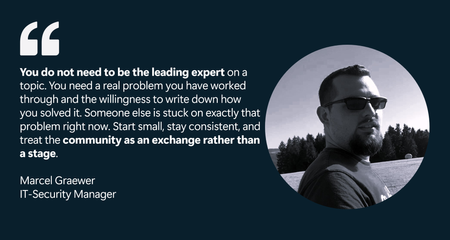
Globally, Marcel shares practical detection engineering insights on Microsoft Sentinel and Microsoft Defender XDR through forums and blog posts. Locally, he represents his employer in the IT-Security group of the Microsoft Business User Forum, where German companies using Microsoft technologies exchange real-world experience and expertise. The work Marcel values most is helping people enter the IT field. In Germany, "Fachinformatiker" is a recognized IT profession learned through a multi-year apprenticeship, and he is proud to have trained apprentices. He also serves as an examiner for the IHK (the German Chamber of Industry and Commerce), evaluating the final exams of these IT apprentices. This commitment also led him to support younger learners by teaching school cybersecurity classes and participating in Girls’ Day, where he introduced female students to the field. “I do this because most people don’t get an honest view of security work until much later in their education—if they see it at all. Showing someone early that this field is creative, varied, and genuinely interesting can change their path. Being part of that, even for a few people, means more to me than anything that fits neatly on a CV.” Let’s hear more from Marcel about his Microsoft Security Community and product paths. All responses to questions are direct quotes from Marcel. What do you find most rewarding about being a member of the Microsoft Security Community? The most rewarding part for me is how practical the exchange is. Microsoft security tooling moves fast - Microsoft Sentinel, Microsoft Defender XDR and Microsoft Security Copilot all change month to month- and no single person keeps up with all of it alone. The community is where that gap gets closed. When I read how someone else tuned a detection in their environment, or when someone responds to something I posted with a problem I hadn't considered, my own work gets better. It's a feedback loop you don't get from documentation. The other part I value is that it works in both directions: I started as a reader, learning from people more experienced than me, and now I'm at a point where I can give some of that back. Watching that shift happen has been genuinely motivating. How long have you been working with Microsoft Security Products? Over ten years! My way into Microsoft security ran through infrastructure rather than security itself. I started out administering Active Directory and VMware environments, the on-premises world, and that is where I first understood identity, endpoints and the quiet attack surface they create. At the time, security was something layered on top of infrastructure. What changed everything was the shift to the cloud. As the environments I worked in moved into Microsoft Azure and Microsoft 365, the old separation between "running things" and "securing things" stopped making sense. In a cloud-first world, the identity is the perimeter, the sign-in log is the crime scene, and the telemetry that used to be scattered across servers suddenly lives in one place you could actually query. That was the moment Microsoft's security stack became less of a product set and more of a working environment for me. As I moved from running infrastructure into roles centered on defending it, first leading IT infrastructure and security as a team lead, then as an IT Security Expert, and now as IT Security Manager focused on architecture and incident response in an Azure and M365 environment, Sentinel and Defender XDR went from tools I knew of to tools I work in every day. The infrastructure background turned out to be an advantage rather than a detour. Detection engineering makes far more sense once you have run the Active Directory and the endpoints that generate the very signals you are now writing detections against, and cloud security makes far more sense once you have felt the limits of the on-premises model it replaced. The part that keeps me engaged is that none of this stands still. The cloud security landscape changes constantly, the work is never quite finished, and that is exactly what I like about it. What Microsoft Security features or products have provided the most impact? The single biggest impact for me comes from Microsoft Sentinel as a cloud-native SIEM and SOAR platform. The move away from a self-hosted SIEM matters more than it first appears. A traditional SIEM is itself a piece of infrastructure that has to be sized, hosted, patched, and scaled, and that effort constantly competes with the actual security work. Microsoft Sentinel removes that layer. There is no platform estate to keep alive and no capacity planning for the SIEM itself, which frees attention for what actually matters: getting the right telemetry in and getting detection and response right. What I value most is how naturally Sentinel fits into modern, cloud-first environments. When the landscape you are protecting already lives in Azure and Microsoft 365, a security platform that lives in the same place removes an entire class of integration friction. The other strength is the breadth of data onboarding. With a traditional SIEM, connecting a new log source was often a small project of its own, with connectors to build and parsers to maintain. With Sentinel, that friction is largely gone. Whether a source sits on-premises, in another cloud or in a third-party product, getting it in is straightforward, and the platform still provides the integration depth that genuinely matters rather than a shallow connection. Microsoft Sentinel handles almost anything you point it at. Equally important is that SIEM and SOAR are not two separate platforms here. The orchestration and automation layer is built into the same solution, so response playbooks run on the same data that the detections are built on. For architecture, that is a real advantage: detection and response are designed as one system rather than stitched together afterwards. The central telemetry layer is one of the few decisions that is genuinely hard to reverse later, and Sentinel makes that an easy one to defend. What advice do you have for others who would like to get involved in the Microsoft Community? My advice is to start before you feel ready. I read Microsoft Tech Community (forums) for years before I posted anything myself, always with the feeling that I needed more experience first, that I would just be adding noise. That was the wrong instinct. The moment I actually started contributing, the feedback I got back made my own work better, and I realised the bar for being useful is far lower than it looks from the outside. You do not need to be the leading expert on a topic. You need a real problem you have worked through and the willingness to write down how you solved it. Someone else is stuck on exactly that problem right now. Start small, stay consistent, and treat the community as an exchange rather than a stage. Consistency matters more than any single brilliant post. Alles rund um sein Buch (All About His Book) Last year, I published "Die neue Realität der Cybersecurity" (2025). It tackles a question every security team is dealing with right now: “Where does AI genuinely strengthen security architecture and incident response, and where is it just noise?” Rather than staying abstract, the book takes the practitioner's side of that question, looking at how AI actually changes the work of designing defensible systems and responding to incidents, and where the limits and risks really are. It is written for the people doing the work, security architects, IR practitioners and the leaders who have to make decisions about AI without the marketing gloss. If that question is on your desk too, it is worth a look. Connect with Marcel Microsoft Tech Community: @marcel_graewer Linkedin: https://www.linkedin.com/in/mgraewer/ Github: https://github.com/bifrost0x Blogs: graewer.com and magra-sec.de Book: Die neue Realität der Cybersecurity (ISBN: 9783695708833) Marcel Graewer is currently an IT-Security Manager at Festool Group and holds the CISSP certification. Outside of work, he is happiest when experimenting with technology on his own terms. He runs a Proxmox-based homelab with a range of self-hosted services and Docker containers, using it as both a playground and a testing ground. It gives him space to break things, learn, and explore without the constraints of formal change processes. He also spends time on Hack The Box and TryHackMe, believing that staying sharp on the offensive side makes him a stronger defender. Away from the keyboard, his life is refreshingly analog. He and his family, including two children, live in an old house that always seems to have one more project waiting. Between the homelab and the house, there is never a shortage of things to fix, and that suits him just fine. Learn and Engage with the Microsoft Security Community Log in and follow this Microsoft Security Community Blog. Follow = Click the heart in the upper right when you're logged in 🤍. Join the Microsoft Security Community and be notified of upcoming events, product feedback surveys, and more. Get early access to Microsoft Security products and provide feedback to engineers by joining the Microsoft Security Advisors. Join the Microsoft Security Community LinkedIn Group and follow the Microsoft Entra Community on LinkedInAzure Integrated HSM: New Chapter&Shift from Centralized Clusters to Embedded Silicon-to-Cloud Trust
Azure Integrated HSM marks a major shift in how cryptographic keys are handled—moving from centralized clusters… to local, tamper‑resistant modules embedded directly in virtual machines. This new model brings cryptographic assurance closer to the workload, reducing latency, increasing throughput, and redefining what’s possible for secure applications in the cloud. Before diving into this innovation, let’s take a step back. Microsoft’s journey with HSMs in Azure spans nearly a decade, evolving through multiple architectures, vendors, and compliance models. From shared services to dedicated clusters, from appliance‑like deployments to embedded chips, each milestone reflects a distinct response to enterprise needs and regulatory expectations. Let’s walk through that progression — not as a single path, but as a layered portfolio that continues to expand. Azure Key Vault Premium, with nCipher nShield Around 2015, Microsoft made Azure Key Vault generally available, and soon after introduced the Premium tier, which integrated nCipher nShield HSMs (previously part of Thales, later acquired by Entrust). This was the first time customers could anchor their most sensitive cryptographic material in FIPS 140‑2 Level 2 validated hardware within Azure. Azure Key Vault Premium is delivered as a fully managed PaaS service, with HSMs deployed and operated by Microsoft in the backend. The service is redundant and highly available, with cryptographic operations exposed through Azure APIs while the underlying HSM infrastructure remains abstracted and secure. This enabled two principal cornerstone scenarios. Based on the Customer Encryption Key (CEK) model, customers could generate and manage encryption keys directly in Azure, always protected by HSMs in the backend. Going further with the Bring Your Own Key (BYOK) model, organizations could generate keys in their own on‑premises HSMs and then securely import and manage them into Azure Key Vault–backed HSMs. These capabilities were rapidly adopted across Microsoft’s second-party services. For example, they underpin the master key management for Azure RMS, later rebranded as Azure Information Protection, and now part of Microsoft Purview Information Protection. These HSM-backed keys can protect the most sensitive data if customers choose to implement the BYOK model through Sensitivity Labels, applying encryption and strict usage controls to protect highly confidential information. Other services like Service Encryption with Customer Key allow customers to encrypt all their data at rest in Microsoft 365 using their own keys, via Data Encryption Policies. This applies to data stored in Exchange, SharePoint, OneDrive, Teams, Copilot, and Purview. This approach also applies to Power Platform, where customer-managed keys can encrypt data stored in Microsoft Dataverse, which underpins services like Power Apps and Power Automate. Beyond productivity services, Key Vault Premium became a building block in hybrid customer architectures: protecting SQL Server Transparent Data Encryption (TDE) keys, storing keys for Azure Storage encryption or Azure Disk Encryption (SSE, ADE, DES), securing SAP workloads running on Azure, or managing TLS certificates for large‑scale web applications. It also supports custom application development and integrations, where cryptographic operations must be anchored in certified hardware — whether for signing, encryption, decryption, or secure key lifecycle management. Around 2020, Azure Key Vault Premium benefit from a shift away from the legacy nCipher‑specific BYOK process. Initially, BYOK in Azure was tightly coupled to nCipher tooling, which limited customers to a single vendor. As the HSM market evolved and customers demanded more flexibility, Microsoft introduced a multi‑vendor BYOK model. This allowed organizations to import keys from a broader set of providers, including Entrust, Thales, and Utimaco, while still ensuring that the keys never left the protection of FIPS‑validated HSMs. This change was significant: it gave customers freedom of choice, reduced dependency on a single vendor, and aligned Azure with the diverse HSM estates that enterprises already operated on‑premises. Azure Key Vault Premium remains a cornerstone of Azure’s data protection offerings. It’s widely used for managing keys, secrets (passwords, connection strings), and certificates. Around February 2024 then with a latest firmware update in April 2025, Microsoft and Marvel has announced the modernization of the Key Vault HSM backend to meet newer standards: Azure’s HSM pool has been updated with Marvell LiquidSecurity adapters that achieved FIPS 140-3 Level 3 certification. This means Key Vault’s underpinnings are being refreshed to the latest security level, though the service interface for customers remains the same. [A tip for Tech guys: you can check the HSM backend provider by looking at the FIPS level in the "hsmPlatform" key attribute]. Key Vault Premium continues to be the go-to solution for many scenarios where a fully managed, cloud-integrated key manager with a shared HSM protection is sufficient. Azure Dedicated HSM, with SafeNet Luna In 2018, Microsoft introduced Azure Dedicated HSM, built on SafeNet Luna hardware (originally Gemalto, later part of Thales). These devices were validated to FIPS 140‑2 Level 3, offering stronger tamper resistance and compliance guarantees. This service provided physically isolated HSM appliances, deployed as single-tenant instances within a customer’s virtual network. By default, these HSMs were non-redundant, unless customers explicitly provisioned multiple units across regions. Each HSM was connected to a private subnet, and the customer retained full administrative control over provisioning, partitioning, and policy enforcement. Unlike Key Vault, using a Dedicated HSM meant the customer had to manage a lot more: HSM user management, key backup (if needed), high availability setup, and any client access configuration. Dedicated HSM was particularly attractive to regulated industries such as finance, healthcare, and government, where compliance frameworks demanded not only FIPS‑validated hardware but also the ability to define their own cryptographic domains and audit processes. Over time, however, Microsoft evolved its HSM portfolio toward more cloud‑native and scalable services. Azure Dedicated HSM is now being retired: Microsoft announced that no new customer onboardings are accepted as of August 2025, and that full support for existing customers will continue until July 31, 2028. Customers are encouraged to plan their transition, as Azure Cloud HSM will succeed Dedicated HSM. Azure Key Vault Managed HSM, with Marvell LiquidSecurity By 2020, it was evident that Azure Key Vault (with shared HSMs) and Dedicated HSM (with single-tenant appliances) represented two ends of a spectrum, and customers wanted something in between: the isolation of a dedicated HSM and the ease-of-use of a managed cloud service. In 2021, Microsoft launched Azure Key Vault Managed HSM, a fully managed, highly available service built on Marvell LiquidSecurity adapters, validated to FIPS 140‑3 Level 3. The key difference with Azure Key Vault Premium lies in the architecture and assurance model. While AKV Premium uses a shared pool of HSMs per Azure geography, organized into region-specific cryptographic domains based on nShield technology — which enforces key isolation through its Security World architecture — Managed HSM provides dedicated HSM instances per customer, ensuring stronger isolation. Also delivered as a PaaS service, it is redundant by design, with built‑in clustering and high availability across availability zones; and fully managed in terms of provisioning, configuration, patching, and maintenance. Managed HSM consists of a cluster of multiple HSM partitions, each based on a separate customer-specific security domain that cryptographically isolates every tenant. Managed HSM supports the same use cases as AKV Premium — CEK, BYOK for Azure RMS or SEwCK, database encryption keys, or any custom integrations — but with higher assurance, stronger isolation, and FIPS 140‑3 Level 3 compliance. Azure Payment HSM, with Thales payShield 10K Introduced in 2022, Azure Payment HSM is a bare-metal, single-tenant service designed specifically for regulated payment workloads. Built on Thales payShield 10K hardware, it meets stringent compliance standards including FIPS 140-2 Level 3 and PCI HSM v3. Whereas Azure Dedicated HSM was built for general-purpose cryptographic workloads (PKI, TLS, custom apps), Payment HSM is purpose-built for financial institutions and payment processors, supporting specialized operations like PIN block encryption, EMV credentialing, and 3D Secure authentication. The service offers low-latency, high-throughput cryptographic operations in a PCI-compliant cloud environment. Customers retain full administrative control and can scale performance from 60 to 2500 CPS, deploying HSMs in high-availability pairs across supported Azure regions. Azure Cloud HSM, with Marvell LiquidSecurity In 2025, Microsoft introduced Azure Cloud HSM, also based on Marvell LiquidSecurity, as a single‑tenant, cloud‑based HSM cluster. These clusters offer a private connectivity and are validated to FIPS 140‑3 Level 3, ensuring the highest level of assurance for cloud‑based HSM services. Azure Cloud HSM is now the recommended successor to Azure Dedicated HSM and gives customers direct administrative authority over their HSMs, while Microsoft handles availability, patching, and maintenance. It is particularly relevant for certificate authorities, payment processors, and organizations that need to operate their own cryptographic infrastructure in the cloud but do not want the burden of managing physical hardware. It combines sovereignty and isolation with the elasticity of cloud operations, making it easier for customers to migrate sensitive workloads without sacrificing control. A single Marvell LiquidSecurity2 adapter can manage up to 100,000 key pairs and perform over one million cryptographic operations per second, making it ideal for high-throughput workloads such as document signing, TLS offloading, and PKI operations. In contrast to Azure Dedicated HSM, Azure Cloud HSM simplifies deployment and management by offering fast provisioning, built-in redundancy, and centralized operations handled by Microsoft. Customers retain full control over their keys while benefiting from secure connectivity via private links and automatic high availability across zones — without the need to manually configure clustering or failover. Azure Integrated HSM, with Microsoft Custom Chips In 2025, Microsoft finally unveiled Azure Integrated HSM, a new paradigm, shifting from a shared cryptographic infrastructure to dedicated, hardware-backed modules integrated at the VM level: custom Microsoft‑designed HSM chips are embedded directly into the host servers of AMD v7 virtual machines. These chips are validated to FIPS 140‑3 Level 3, ensuring that even this distributed model maintains the highest compliance standards. This innovation allows cryptographic operations to be performed locally, within the VM boundary. Keys are cached securely, hardware acceleration is provided for encryption, decryption, signing, and verification, and access is controlled through an oracle‑style model that ensures keys never leave the secure boundary. The result is a dramatic reduction in latency and a significant increase in throughput, while still maintaining compliance. This model is particularly well suited for TLS termination at scale, high‑frequency trading platforms, blockchain validation nodes, and large‑scale digital signing services, where both performance and assurance are critical. Entered public preview in September 2025, Trusted Launch must be enabled to use the feature, and Linux support is expected soon. Microsoft confirmed that Integrated HSM will be deployed across all new Azure servers, making it a foundational component of future infrastructure. Azure Integrated HSM also complements Azure Confidential Computing, allowing workloads to benefit from both in-use data protection through hardware-based enclaves and key protection via local HSM modules. This combination ensures that neither sensitive data nor cryptographic keys ever leave a secure hardware boundary — ideal for high-assurance applications. A Dynamic Vendor Landscape The vendor story behind these services is almost as interesting as the technology itself. Thales acquired nCipher in 2008, only to divest it in 2019 during its acquisition of Gemalto, under pressure from competition authorities. The buyer was Entrust, which suddenly found itself owning one of the most established HSM product lines. Meanwhile, Gemalto’s SafeNet Luna became part of Thales — which would also launch the Thales payShield 10K in 2019, leading PCI-certified payment HSM — and Marvell emerged as a new force with its LiquidSecurity line, optimized for cloud-scale deployments. Microsoft has navigated these shifts pragmatically, adapting its services and partnerships to ensure continuity for customers while embracing the best available hardware. Looking back, it is almost amusing to see how vendor mergers, acquisitions, and divestitures reshaped the HSM market, while Microsoft’s offerings evolved in lockstep to give customers a consistent path forward. Comparative Perspective Looking back at the evolution of Microsoft’s HSM integrations and services, a clear trajectory emerges: from the early days of Azure Key Vault Premium backed by certified HSMs (still active), completed by Azure Key Vault Managed HSM with higher compliance levels, through the Azure Dedicated HSM offering, replaced by the more cloud‑native Azure Cloud HSM, and finally to the innovative Azure Integrated HSM embedded directly in virtual machines. Each step reflects a balance between control, management, compliance, and performance, while also adapting to the vendor landscape and regulatory expectations. Service Hardware Introduced FIPS Level Model / Isolation Current Status / Notes Azure Key Vault Premium nCipher nShield (Thales → Entrust) Then Marvell LiquidSecurity 2015 FIPS 140‑2 Level 2 > Level 3 Shared per region, PaaS, HSM-backed Active; standard service; supports CEK and BYOK; multi-vendor BYOK since ~2020 Azure Dedicated HSM SafeNet Luna (Gemalto → Thales) 2018 FIPS 140‑2 Level 3 Dedicated appliance, single-tenant, VNet Retiring; no new onboardings; support until July 31, 2028; succeeded by Azure Cloud HSM Azure Key Vault Managed HSM Marvell LiquidSecurity 2021 FIPS 140‑3 Level 3 Dedicated cluster per customer, PaaS Active; redundant, isolated, fully managed; stronger compliance than Premium Azure Payment HSM Thales payShield 10K 2022 FIPS 140-2 Level 3 Bare-metal, single-tenant, full customer control, PCI-compliant Active. Purpose-built for payment workloads. Azure Cloud HSM Marvell LiquidSecurity 2025 FIPS 140‑3 Level 3 Single-tenant cluster, customer-administered Active; successor to Dedicated HSM; fast provisioning, built-in HA, private connectivity Azure Integrated HSM Microsoft custom chips 2025 FIPS 140‑3 Level 3 Embedded in VM host, local operations Active (preview/rollout); ultra-low latency, ideal for high-performance workloads Microsoft’s strategy shows an understanding that different customers have different requirements on the spectrum of control vs convenience. So Azure didn’t take a one-size-fits-all approach; it built a portfolio: - Use Azure Key Vault Premium if you want simplicity and can tolerate multi-tenancy. - Use Azure Key Vault Managed HSM if you need sole ownership of keys but want a turnkey service. - Use Azure Payment HSM if you operate regulated payment workloads and require PCI-certified hardware. - Use Azure Cloud HSM if you need sole ownership and direct access for legacy apps. - Use Azure Integrated HSM if you need ultra-low latency and per-VM key isolation, for the highest assurance in real-time. Beyond the HSM: A Silicon-to-Cloud Security Architecture by Design Microsoft’s HSM evolution is part of a broader strategy to embed security at every layer of the cloud infrastructure — from silicon to services. This vision, often referred to as “Silicon-to-Cloud”, includes innovations like Azure Boost, Caliptra, Confidential Computing, and now Azure Integrated HSM. Azure Confidential Computing plays a critical role in this architecture. As mentioned, by combining Trusted Execution Environments (TEEs) with Integrated HSM, Azure enables workloads to be protected at every stage — at rest, in transit, and in use — with cryptographic keys and sensitive data confined to verified hardware enclaves. This layered approach reinforces zero-trust principles and supports compliance in regulated industries. With Azure Integrated HSM installed directly on every new server, Microsoft is redefining how cryptographic assurance is delivered — not as a remote service, but as a native hardware capability embedded in the compute fabric itself. This marks a shift from centralized HSM clusters to distributed, silicon-level security, enabling ultra-low latency, high throughput, and strong isolation for modern cloud workloads. Resources To go a bit further, I invite you to check out the following articles and take a look at the related documentation. Protecting Azure Infrastructure from silicon to systems | Microsoft Azure Blog by Mark Russinovich, Chief Technology Officer, Deputy Chief Information Security Officer, and Technical Fellow, Microsoft Azure, Omar Khan, Vice President, Azure Infrastructure Marketing, and Bryan Kelly, Hardware Security Architect, Microsoft Azure Microsoft Azure Introduces Azure Integrated HSM: A Key Cache for Virtual Machines | Microsoft Community Hub by Simran Parkhe Securing Azure infrastructure with silicon innovation | Microsoft Community Hub by Mark Russinovich, Chief Technology Officer, Deputy Chief Information Security Officer, and Technical Fellow, Microsoft Azure About the Author I'm Samuel Gaston-Raoul, Partner Solution Architect at Microsoft, working across the EMEA region with the diverse ecosystem of Microsoft partners—including System Integrators (SIs) and strategic advisory firms, Independent Software Vendors (ISVs) / Software Development Companies (SDCs), and Startups. I engage with our partners to build, scale, and innovate securely on Microsoft Cloud and Microsoft Security platforms. With a strong focus on cloud and cybersecurity, I help shape strategic offerings and guide the development of security practices—ensuring alignment with market needs, emerging challenges, and Microsoft’s product roadmap. I also engage closely with our product and engineering teams to foster early technical dialogue and drive innovation through collaborative design. Whether through architecture workshops, technical enablement, or public speaking engagements, I aim to evangelize Microsoft’s security vision while co-creating solutions that meet the evolving demands of the AI and cybersecurity era.Secure Model Context Protocol (MCP) Implementation with Azure and Local Servers
Introduction The Model Context Protocol (MCP) enables AI systems to interact with external data sources and tools through a standardized interface. While powerful, MCP can introduce security risks in enterprise environments. This tutorial shows you how to implement MCP securely using local servers, Azure OpenAI with APIM, and proper authentication. Understanding MCP's Security Risks There are a couple of key security concerns to consider before implementing MCP: Data Exfiltration: External MCP servers could expose sensitive data. Unauthorized Access: Third-party services become potential security risks. Loss of Control: Unknown how external services handle your data. Compliance Issues: Difficulty meeting regulatory requirements with external dependencies. The solution? Keep everything local and controlled. Secure Architecture Before we dive into implementation, let's take a look at the overall architecture of our secure MCP solution: This architecture consists of three key components working together: Local MCP Server - Your custom tools run entirely within your local environment, reducing external exposure risks. Azure OpenAI + APIM Gateway - All AI requests are routed through Azure API Management with Microsoft Entra ID authentication, providing enterprise-grade security controls and compliance. Authenticated Proxy - A lightweight proxy service handles token management and request forwarding, ensuring seamless integration. One of the key benefits of this architecture is that no API key is required. Traditional implementations often require storing OpenAI API keys in configuration files, environment variables, or secrets management systems, creating potential security vulnerabilities. This approach uses Azure Managed Identity for backend authentication and Azure CLI credentials for client authentication, meaning no sensitive API keys are ever stored, logged, or exposed in your codebase. For more security, APIM and Azure OpenAI resources can be configured with IP restrictions or network rules to only accept traffic from certain sources. These configurations are available for most Azure resources and provide an additional layer of network-level security. This security-forward approach gives you the full power of MCP's tool integration capabilities while keeping your implementation completely under your control. How to Implement MCP Securely 1. Local MCP Server Implementation Building the MCP Server Let's start by creating a simple MCP server in .NET Core. 1. Create a web application dotnet new web -n McpServer 2.Add MCP packages dotnet add package ModelContextProtocol --prerelease dotnet add package ModelContextProtocol.AspNetCore --prerelease 3. Configure Program.cs var builder = WebApplication.CreateBuilder(args); builder.Services.AddMcpServer() .WithHttpTransport() .WithToolsFromAssembly(); var app = builder.Build(); app.MapMcp(); app.Run(); WithToolsFromAssembly() automatically discovers and registers tools from the current assembly. Look into the C# SDK for other ways to register tools for your use case. 4. Define Tools Now, we can define some tools that our MCP server can expose. here is a simple example for tools that echo input back to the client: using ModelContextProtocol.Server; using System.ComponentModel; namespace Tools; [McpServerToolType] public static class EchoTool { [McpServerTool] [Description("Echoes the input text back to the client in all capital letters.")] public static string EchoCaps(string input) { return new string(input.ToUpperInvariant()); } [McpServerTool] [Description("Echoes the input text back to the client in reverse.")] public static string ReverseEcho(string input) { return new string(input.Reverse().ToArray()); } } Key components of MCP tools are the McpServerToolType class decorator indicating that this class contains MCP tools, and the McpServerTool method decorator with a description that explains what the tool does. Alternative: STDIO Transport If you want to use STDIO transport instead of SSE (implemented here), check out this guide: Build a Model Context Protocol (MCP) Server in C# 2. Create a MCP Client with Cline Now that we have our MCP server set up with tools, we need a client that can discover and invoke these tools. For this implementation, we'll use Cline as our MCP client, configured to work through our secure Azure infrastructure. 1. Install Cline VS Code Extension Install the Cline extension in VS Code. 2. Deploy secure Azure OpenAI Endpoint with APIM Instead of connecting Cline directly to external AI services (which could expose the secure implementation to external bad actors), we will route through Azure API Management (APIM) for enterprise security. With this implementation, all requests go through Microsoft Entra ID and we use managed identity for all authentications. Quick Setup: Deploy the Azure OpenAI with APIM solution. Ensure your Azure OpenAI resources are configured to allow your APIM's managed identity to make calls. The APIM policy below uses managed identity authentication to connect to Azure OpenAI backends. Refer to the Azure OpenAI documentation on managed identity authentication for detailed setup instructions. 3. Configure APIM Policy After deploying APIM, configure the following policy to enable Azure AD token validation, managed identity authentication, and load balancing across multiple OpenAI backends: <!-- Azure API Management Policy for OpenAI Endpoint --> <!-- Implements Azure AD Token validation, managed identity authentication --> <!-- Supports round-robin load balancing across multiple OpenAI backends --> <!-- Requests with 'gpt-5' in the URL are routed to a single backend --> <!-- The client application ID '04b07795-8ddb-461a-bbee-02f9e1bf7b46' is the official Azure CLI app registration --> <!-- This policy allows requests authenticated by Azure CLI (az login) when the required claims are present --> <policies> <inbound> <!-- IP Allow List Fragment (external fragment for client IP restrictions) --> <include-fragment fragment-id="YourCompany-IPAllowList" /> <!-- Azure AD Token Validation for Azure CLI app ID --> <validate-azure-ad-token tenant-id="YOUR-TENANT-ID-HERE" header-name="Authorization" failed-validation-httpcode="401" failed-validation-error-message="Unauthorized. Access token is missing or invalid."> <client-application-ids> <application-id>04b07795-8ddb-461a-bbee-02f9e1bf7b46</application-id> </client-application-ids> <audiences> <audience>api://YOUR-API-AUDIENCE-ID-HERE</audience> </audiences> <required-claims> <claim name="roles" match="any"> <value>YourApp.User</value> </claim> </required-claims> </validate-azure-ad-token> <!-- Acquire Managed Identity access token for backend authentication --> <authentication-managed-identity resource="https://cognitiveservices.azure.com" output-token-variable-name="managed-id-access-token" ignore-error="false" /> <!-- Set Authorization header for backend using the managed identity token --> <set-header name="Authorization" exists-action="override"> <value>@("Bearer " + (string)context.Variables["managed-id-access-token"])</value> </set-header> <!-- Check if URL contains 'gpt-5' and set backend accordingly --> <choose> <when condition="@(context.Request.Url.Path.ToLower().Contains("gpt-5"))"> <set-variable name="selected-backend-url" value="https://your-region1-oai.openai.azure.com/openai" /> </when> <otherwise> <cache-lookup-value key="backend-counter" variable-name="backend-counter" /> <choose> <when condition="@(context.Variables.ContainsKey("backend-counter") == false)"> <set-variable name="backend-counter" value="@(0)" /> </when> </choose> <set-variable name="current-backend-index" value="@((int)context.Variables["backend-counter"] % 7)" /> <choose> <when condition="@((int)context.Variables["current-backend-index"] == 0)"> <set-variable name="selected-backend-url" value="https://your-region1-oai.openai.azure.com/openai" /> </when> <when condition="@((int)context.Variables["current-backend-index"] == 1)"> <set-variable name="selected-backend-url" value="https://your-region2-oai.openai.azure.com/openai" /> </when> <when condition="@((int)context.Variables["current-backend-index"] == 2)"> <set-variable name="selected-backend-url" value="https://your-region3-oai.openai.azure.com/openai" /> </when> <when condition="@((int)context.Variables["current-backend-index"] == 3)"> <set-variable name="selected-backend-url" value="https://your-region4-oai.openai.azure.com/openai" /> </when> <when condition="@((int)context.Variables["current-backend-index"] == 4)"> <set-variable name="selected-backend-url" value="https://your-region5-oai.openai.azure.com/openai" /> </when> <when condition="@((int)context.Variables["current-backend-index"] == 5)"> <set-variable name="selected-backend-url" value="https://your-region6-oai.openai.azure.com/openai" /> </when> <when condition="@((int)context.Variables["current-backend-index"] == 6)"> <set-variable name="selected-backend-url" value="https://your-region7-oai.openai.azure.com/openai" /> </when> </choose> <set-variable name="next-counter" value="@(((int)context.Variables["backend-counter"] + 1) % 1000)" /> <cache-store-value key="backend-counter" value="@((int)context.Variables["next-counter"])" duration="300" /> </otherwise> </choose> <!-- Always set backend service using selected-backend-url variable --> <set-backend-service base-url="@((string)context.Variables["selected-backend-url"])" /> <!-- Inherit any base policies defined outside this section --> <base /> </inbound> <backend> <base /> </backend> <outbound> <base /> </outbound> <on-error> <base /> </on-error> </policies> This policy creates a secure gateway that validates Azure AD tokens from your local Azure CLI session, then uses APIM's managed identity to authenticate with Azure OpenAI backends, eliminating the need for API keys. It automatically load-balances requests across multiple Azure OpenAI regions using round-robin distribution for optimal performance. 4. Create Azure APIM proxy for Cline This FastAPI-based proxy forwards OpenAI-compatible API requests from Cline through APIM using Azure AD authentication via Azure CLI credentials, eliminating the need to store or manage OpenAI API keys. Prerequisites: Python 3.8 or higher Azure CLI (ensure az login has been run at least once) Ensure the user running the proxy script has appropriate Azure AD roles and permissions. This script uses Azure CLI credentials to obtain bearer tokens. Your user account must have the correct roles assigned and access to the target API audience configured in the APIM policy above. Quick setup for the proxy: Create this requirements.txt: fastapi uvicorn requests azure-identity Create this Python script for the proxy source code azure_proxy.py: import os import requests from fastapi import FastAPI, Request from fastapi.responses import StreamingResponse import uvicorn from azure.identity import AzureCliCredential # CONFIGURATION APIM_BASE_URL = <APIM BASE URL HERE> AZURE_SCOPE = <AZURE SCOPE HERE> PORT = int(os.environ.get("PORT", 8080)) app = FastAPI() credential = AzureCliCredential() # Use a single requests.Session for connection pooling from requests.adapters import HTTPAdapter session = requests.Session() session.mount("https://", HTTPAdapter(pool_connections=100, pool_maxsize=100)) import time _cached_token = None _cached_expiry = 0 def get_bearer_token(scope: str) -> str: """Get an access token using AzureCliCredential, caching until expiry is within 30 seconds.""" global _cached_token, _cached_expiry now = int(time.time()) if _cached_token and (_cached_expiry - now > 30): return _cached_token try: token_obj = credential.get_token(scope) _cached_token = token_obj.token _cached_expiry = token_obj.expires_on return _cached_token except Exception as e: raise RuntimeError(f"Could not get Azure access token: {e}") @app.api_route("/{path:path}", methods=["GET", "POST", "PUT", "PATCH", "DELETE", "OPTIONS"]) async def proxy(request: Request, path: str): # Assemble the destination URL (preserve trailing slash logic) dest_url = f"{APIM_BASE_URL.rstrip('/')}/{path}".rstrip("/") if request.url.query: dest_url += "?" + request.url.query # Get the Bearer token bearer_token = get_bearer_token(AZURE_SCOPE) # Prepare headers (copy all, overwrite Authorization) headers = dict(request.headers) headers["Authorization"] = f"Bearer {bearer_token}" headers.pop("host", None) # Read body body = await request.body() # Send the request to APIM using the pooled session resp = session.request( method=request.method, url=dest_url, headers=headers, data=body if body else None, stream=True, ) # Stream the response back to the client return StreamingResponse( resp.raw, status_code=resp.status_code, headers={k: v for k, v in resp.headers.items() if k.lower() != "transfer-encoding"}, ) if __name__ == "__main__": # Bind the app to 127.0.0.1 to avoid any Firewall updates uvicorn.run(app, host="127.0.0.1", port=PORT) Run the setup: pip install -r requirements.txt az login # Authenticate with Azure python azure_proxy.py Configure Cline to use the proxy: Using the OpenAI Compatible API Provider: Base URL: http://localhost:8080 API Key: <any random string> Model ID: <your Azure OpenAI deployment name> API Version: <your Azure OpenAI deployment version> The API key field is required by Cline but unused in our implementation - any random string works since authentication happens via Azure AD. 5. Configure Cline to listen to your MCP Server Now that we have both our MCP server running and Cline configured with secure OpenAI access, the final step is connecting them together. To enable Cline to discover and use your custom tools, navigate to your installed MCP servers on Cline, select Configure MCP Servers, and add in the configuration for your server: { "mcpServers": { "mcp-tools": { "autoApprove": [ "EchoCaps", "ReverseEcho", ], "disabled": false, "timeout": 60, "type": "sse", "url": "http://<your localhost url>/sse" } } } Now, you can use Cline's chat interface to interact with your secure MCP tools. Try asking Cline to use your custom tools - for example, "Can you echo 'Hello World' in capital letters?" and watch as it calls your local MCP server through the infrastructure you've built. Conclusion There you have it: A secure implementation of MCP that can be tailored to your specific use case. This approach gives you the power of MCP while maintaining enterprise security. You get: AI capabilities through secure Azure infrastructure. Custom tools that never leave your environment. Standard MCP interface for easy integration. Complete control over your data and tools. The key is keeping MCP servers local while routing AI requests through your secure Azure infrastructure. This way, you gain MCP's benefits without compromising security. Disclaimer While this tutorial provides a secure foundation for MCP implementation, organizations are responsible for configuring their Azure resources according to their specific security requirements and compliance standards. Ensure proper review of network rules, access policies, and authentication configurations before deploying to production environments. Resources MCP SDKs and Tools: MCP C# SDK MCP Python SDK Cline SDK Cline User Guide Azure OpenAI with APIM Azure API Management Network Security: Azure API Management - restrict caller IPs Azure API Management with an Azure virtual network Set up inbound private endpoint for Azure API Management Azure OpenAI and AI Services Network Security: Configure Virtual Networks for Azure AI services Securing Azure OpenAI inside a virtual network with private endpoints Add an Azure OpenAI network security perimeter az cognitiveservices account network-rule3.9KViews4likes2Comments