endpoint security
28 Topics
Deploying and Onboarding 2008 R2
Hi all, We purchased Defender for Business Servers, and i need to install it on some 2008 R2 servers. There is no Defender for Endpoint software, so following the guides, i only have to install the MMA, but then how i know my server is protected? i need to enroll it at azure? Our servers are on-premise, and i don't know if i need to use Azure Arc (i need to pay?), anyone is using Defender for Windows Servers (On-Premise) with 2008 R2 version? Thanks in advanceSolved49KViews0likes7Comments
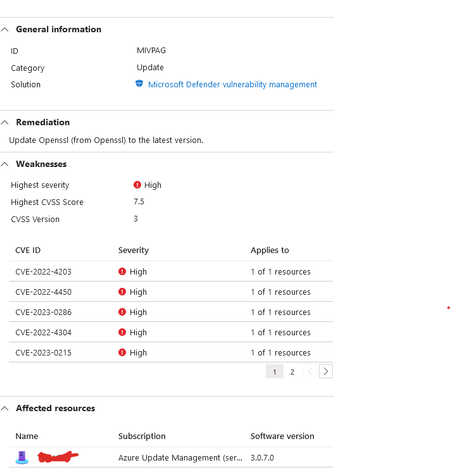
Update OpenSSL : Machines should have vulnerability findings resolved
Hi, I am new to this Defender Cloud. We are getting this message about out of date OpenSSL version: I have updated the .NetCore to the latest version : However it still doesnt seems to have resolved the error from Defender Cloud. I dont have any OpenSSL client installed on this machine from .net core. when I searched I only found these files : any assistance will be greatly appreciated on how do I resolve this issue? as far as I can see everything is up to date.3.1KViews0likes1Comment
Security alerts in Microsoft defender for Cloud
Hello All, we have received below security alert in Microsoft defender for cloud for our App service. 1) NMap scanning detected (for this we got the carrier and organization as Microsoft) 2) Vulnerability scanner detected 3) Suspicious User Agent detected Our website is Internet facing (Public facing). so, we cannot put much restriction on our app service (ex IP restriction, SSL certificate). We are unable to investigate the below alerts. we checked the log analytics workspace logs but and extracted the logs from the caller IP. but could not find much information form it we also checked there was no impact found on our webapp. 1) NMap scanning detected (for this we got the carrier and organization as Microsoft) 2) Vulnerability scanner detected 3) Suspicious User Agent detected Is there any way by which we can investigate why these alerts got generated. and what next action can be taken on this ?2.9KViews0likes1CommentDefender for Server deployed, integration for DfE checked, but M365 Defender showing "Can be onboard
I'm sure I'm missing something in the slightly complicated way of enabling servers for DfE via Defender for Cloud Server. The licensing is in-place the checkboxes to share data are ticked. The servers are showing as onboarded in Defender for Cloud however, the one portal to rule them all - Microsoft Defender 365 - is still showing the servers as "Can be onboarded" and missing the data of a properly onboarded DfE client. Where should I start my troubleshooting to determine what I've missed or what is going wrong? Paul2.6KViews1like5Comments
Qualys scanner vs Microsoft Defender Vulnerability Management
Hi, Does anyone knows what the benefit is to move from Qualys scanner to Microsoft Defender Vulnerability Management? Or pros and cons about them? And does Microsoft Defender Vulnerability Management can: Generate reports? Can it tell if the vulnerability is exploitable? Can it tell me the publish date of the vulnerability? Can it tell me the release date of the patch? Can I use filters or querys to find which vulnerabilities are greater than 90 days? Can patching be from third parties and from Windows? Does it give you the risk of the vulnerbaility and/or type of severity? I only find this: https://learn.microsoft.com/en-us/azure/defender-for-cloud/deploy-vulnerability-assessment-vm?source=recommendations https://learn.microsoft.com/en-us/azure/defender-for-cloud/deploy-vulnerability-assessment-defender-vulnerability-management?source=recommendations Thank you!2.5KViews1like0CommentsQuestion regarding manual (or delayed automatic) onboarding of VMs to Microsoft Defender for Cloud
Hello, I have a use case scenario where my infrastructure consisting of both Linux and Windows Virtual Machines is deployed via Azure DevOps Pipeline to an Azure Subscription, which has Microsoft Defender for Cloud enabled with advanced security features. I'd like for my Infrastructure Build Pipeline tasks to finish before letting Microsoft Defender for Cloud do it's magic with enabling Microsoft Defender for Endpoint features (mainly enabling EDR solution on Endpoints) in order to prevent any possible conflicts between these two actions. So here's my question - is it possible to manually onboard Virtual Machines or delay the automatic onboarding to Microsoft Defender for Cloud?New Blog| Defender for APIs Better Together w/ Azure Web Application Firewall + Azure API Management
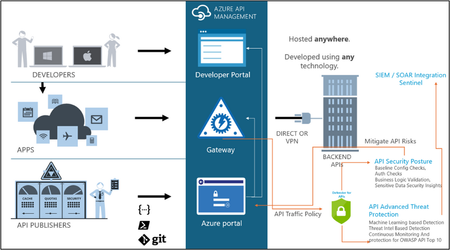
Under the Microsoft Defender for Cloud umbrella, Microsoft Defender for APIs, offers protection for APIs at every stage of their lifecycle. This service enhances the protections from Web Application Firewalls and API Gateways, resulting in a comprehensive security framework for API endpoints. This article dives deeper into how Defender for APIs augments the security offered by Azure Web Application Firewall (Azure WAF) and Azure API Management (APIM). Read the full blog here: Defender for APIs Better Together with WAF and APIM (microsoft.com)1.2KViews1like1Comment
New Blog Post | How to configure Security Events collection with Azure Monitor Agent
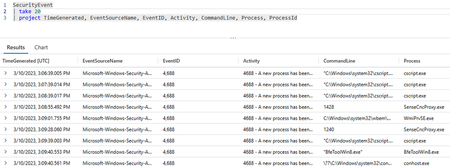
How to configure Security Events collection with Azure Monitor Agent - Microsoft Community Hub Although Microsoft Defender for Servers (part of the Microsoft Defender for Cloud suite) does not rely on security events collection to provide its protection capabilities, customers may want to collect this valuable data to bring additional context to their server security investigations or alerts. For this reason, Defender for Servers Plan 2 users benefit from a 500-MB free data ingestion allowance (per day, per server) into Log Analytics, as long as the Defender for Servers Plan 2 is also enabled at the Log Analytics Workspace level. Security events collection (for Windows systems only) is done with the help of a guest agent. This has been possible so far with the legacy Log Analytics agent and the Defender for Servers auto-provisioning experience, and is also possible for Microsoft Sentinel users, via the Log Analytics and Azure Monitor Agent (AMA) data connectors. However, if you are not a Sentinel user yet and you are using Defender for Servers with the new AMA experience, it is still possible to collect security events, as you will learn next.1KViews0likes0CommentsNew Blog Post | Microsoft Defender for Endpoint for Linux and Microsoft Defender for Servers
Full blog post: Microsoft Defender for Endpoint for Linux and Microsoft Defender for Servers - Microsoft Community Hub When it comes to protecting servers in hybrid and multicloud environments, Microsoft Defender for Servers as part of Microsoft Defender for Cloud is the solution you might be looking for. However, with all the features, dependencies, and complexity, it might become challenging to always make the right decision when planning, integrating, and deploying Defender for Servers across your environment. With this blog, we are focusing on deployment and integration of Microsoft Defender for Endpoint with Microsoft Defender for Servers on Linux machines. Microsoft Defender for Servers is available in two different plans, both of which include integration and automated deployment of Microsoft Defender for Endpoint for both, Windows and Linux machines. Original Post: New Blog Post | Microsoft Defender for Endpoint for Linux and Microsoft Defender for Servers - Microsoft Community Hub986Views0likes0Comments