endpoint dlp
15 Topics
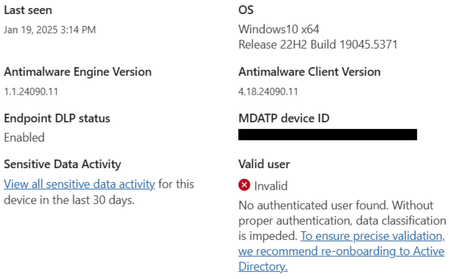
Onboarding Devices: "No authenticated user found"
Hi, I am looking to onboard a device in Purview for the purpose of testing some Endpoint DLP policies. I have ran the onboarding script locally and the device successfully appears on the 'Devices' screen. 'Real time protection/RTP' and 'Behavior monitoring/BM' both show as 'enabled' with a green tick, however under 'Valid User' it has a red cross and states: "Invalid: No authenticated user found. Without proper authentication, data classification is impeded. To ensure precise validation, we recommend re-onboarding to Active Directory". The device is in active directory. I have signed into the device with an account that is also in Active Directory. Is there anything additional that I need to do? Any help would be really appreciated - thank you!!!Solved2.1KViews2likes4Comments
[HELP] "Action required for browser protections" alert
Hello! I have an Endpoint DLP policy with Device location. After several scoping changes (device groups, inclusions/exclusions) to narrow it to a specific target group, the orange alert appeared: Action required for browser protections. One or more policies were not applied in Edge for Business. This could be due to a policy sync issue, lack of required permissions, or an issue with the server. Either resync these policies or contact an admin with the required permissions to resync. After resyncing, you might still see this message for up to 1 day while the system completes the sync and activates protections. The policies were working before. Clicked Resync multiple times, only for the error to return. Please help!445Views1like4Comments
DLP for SaaS Apps - Endpoint DLP/MDE + Purview Browser Extension
I need help verifying my understanding of how Purview tools control file upload/download and clipboard copy/paste actions. Here's the situation: Goal: Block file upload/download, copy/paste of sensitive data to/from SaaS apps. Deployment: Rolling out MDE (in Passive mode) or Endpoint DLP (Onboarding device to Purview) and the Purview browser extension for Chrome/Firefox. My Understanding: Copy Control: Handled by Endpoint DLP/MDE on the endpoint. Upload/Download/Paste Control: Requires the Purview browser extension (or native browser support Edge/Safari). Specific Question: The browser extension isn't available for macOS. I've read that MDE on macOS can handle everything (file upload/download and clipboard control). Could someone confirm if the table I've created correctly reflects this? Summary of Clipboard (Copy/Paste) Enforcement Operation Windows (Onboarded) macOS (Onboarded) Note Copy to Clipboard Endpoint Endpoint DLP Sensor Endpoint DLP Sensor Prevents data from reaching the clipboard Paste into SaaS Apps (Chrome/Firefox) Browser Extension Endpoint DLP Sensor Blocks paste into SaaS apps. Paste into SaaS Apps (MS Edge/Safari) Native on Edge Native on Edge/Safari Built-in integration; no extension needed.716Views1like2Comments