end of support
4 TopicsSQL Server 2016 Reaches End of Support: A Customer Engineer's Perspective on What's Next
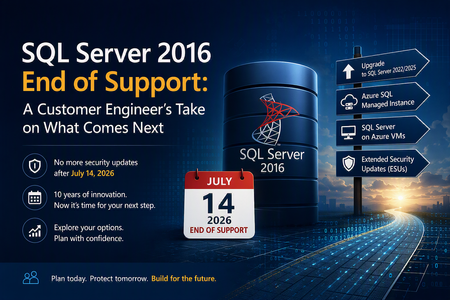
Why This Day Matters July 14, 2026 marks the end of Extended Support for SQL Server 2016. After today, organizations running SQL Server 2016 will no longer receive security updates, non-security hotfixes, or product support unless they have a specific support strategy in place. As a Customer Engineer, I've spent years helping customers navigate technology lifecycle events. This one feels particularly significant because SQL Server 2016 remains heavily deployed across enterprise environments. For official lifecycle dates and milestones, see the Microsoft Lifecycle Policy for SQL Server 2016: Reference: https://learn.microsoft.com/lifecycle/products/sql-server-2016 Why SQL Server 2016 Feels Different SQL Server 2016 introduced capabilities that many organizations still rely on today, including: Query Store Always Encrypted Native JSON Support Stretch Database Enhanced security and performance capabilities For many businesses, SQL Server 2016 became the standard data platform supporting ERP systems, billing applications, healthcare workloads, manufacturing systems, and custom line-of-business applications. Ten years is a long time in IT. During that period, databases often evolve from "just another server" into business-critical infrastructure. Learn more about SQL Server 2016 features: Reference: https://learn.microsoft.com/sql/sql-server/what-s-new-in-sql-server-2016 What "End of Support" Really Means One of the most common misconceptions I hear is: "Will my SQL Server stop working tomorrow?" No. The server will continue running. Applications will continue connecting. What changes is your risk profile. Organizations will no longer receive: Security updates Product fixes Technical support Regulatory assurance associated with supported software Microsoft's official guidance on end-of-support considerations can be found here: Reference: https://learn.microsoft.com/sql/sql-server/end-of-support/sql-server-end-of-support-overview Option 1: Upgrade to a Supported SQL Server Version For many organizations, the most straightforward path is upgrading to SQL Server 2022 or SQL Server 2025. Benefits include: Continued support Latest security protections Performance improvements New AI and data platform capabilities Before upgrading, review compatibility considerations and perform application testing. Reference: https://learn.microsoft.com/sql/database-engine/install-windows/upgrade-sql-server Reference: https://learn.microsoft.com/sql/sql-server/sql-server-release-notes Option 2: Move to Azure SQL Managed Instance Azure SQL Managed Instance is often my recommendation when customers want to reduce operational overhead while maintaining high SQL Server compatibility. Advantages include: Automated patching Built-in high availability Automated backups Near full SQL Server compatibility Reduced infrastructure management Learn more: Reference: https://learn.microsoft.com/azure/azure-sql/managed-instance/sql-managed-instance-paas-overview Option 3: Lift and Shift to SQL Server on Azure Virtual Machines For organizations seeking minimal application changes, SQL Server on Azure Virtual Machines can provide a familiar environment while eliminating hardware refresh requirements. This option also enables customers to take advantage of Extended Security Updates through Azure while planning broader modernization initiatives. Reference: https://learn.microsoft.com/azure/azure-sql/virtual-machines/windows/sql-server-on-azure-vm-iaas-what-is-overview Option 4: Purchase Extended Security Updates (ESUs) If immediate migration is not possible, Extended Security Updates provide up to three additional years of Critical security updates. ESUs can be valuable when: Vendor certification delays upgrades Hardware refresh projects are underway Business priorities prevent immediate migration However, ESUs should be viewed as a temporary bridge rather than a long-term strategy. Reference: https://learn.microsoft.com/sql/sql-server/end-of-support/sql-server-extended-security-updates Don't Skip the Assessment Phase The most successful migration projects begin with discovery and assessment. Common issues identified include: Deprecated features Compatibility concerns Linked Server dependencies SQL Agent jobs CLR integrations Legacy SSIS and SSRS workloads Resources that can help: https://learn.microsoft.com/azure/migrate/migrate-services-overview https://learn.microsoft.com/sql/sql-server/azure-arc/overview https://learn.microsoft.com/sql/dma/dma-overview Migration Tools Worth Evaluating Different migration scenarios require different tools. Microsoft provides several options: Data Migration Assistant (DMA) SQLPackage Azure Database Migration Service Managed Instance Link Distributed Availability Groups Comprehensive migration guidance: https://techcommunity.microsoft.com/blog/microsoftdatamigration/microsoft-options-to-migrate-sql-server-databases/4407666 https://learn.microsoft.com/azure/dms/dms-overview https://learn.microsoft.com/sql/tools/sqlpackage/sqlpackage Lessons Learned from Customer Engagements After supporting numerous SQL Server modernization projects, several themes consistently emerge: The database is rarely the hardest part. Applications and dependencies drive complexity. Downtime requirements significantly influence migration strategy. Organizations that start 6–9 months early typically experience smoother transitions. ESUs buy time, but they do not replace a modernization plan. For migration planning best practices: https://learn.microsoft.com/azure/cloud-adoption-framework/migrate/ Final Thoughts If you're reading this on or shortly after July 14, 2026, and SQL Server 2016 is still running in your environment, you're not alone. Whether your path forward is: SQL Server 2025 Azure SQL Managed Instance SQL Server on Azure Virtual Machines Extended Security Updates the most important step is to begin with an assessment and establish a modernization plan. SQL Server 2016 served organizations exceptionally well for nearly a decade. The conversation now is not about the end of SQL Server 2016. It's about preparing your data platform for the next decade.771Views3likes1CommentEnd of support for Access 2016 and Access 2019 nears
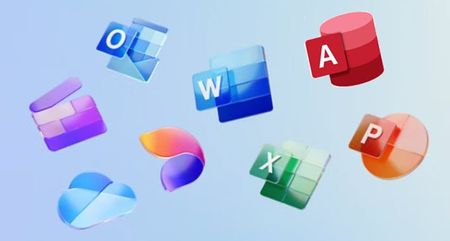
Your product will still work, but when Microsoft says a product has reached "end of support", it means the product will no longer receive: Security updates Non-security updates Bug fixes New features Assisted support (free or paid) What this means for Access users: No more updates: Customers will not receive any new builds, patches, or improvements—even if vulnerabilities are discovered. No support: Microsoft will no longer provide technical support or troubleshooting assistance. Increased risk: Continued use of unsupported software can expose systems to security threats and compliance issues. Migration encouraged: Customers are advised to upgrade to a supported version or product to maintain security and functionality. We strongly encourage all Access users with perpetual licenses to upgrade to a Microsoft 365 Apps subscription. Subscription users get more out of the same Office desktop apps with artificial intelligence (AI) backed design ideas and analytic insights, rich contents and templates, cloud powered connected experiences and more. They also enjoy additional benefits beyond capabilities in Office apps, such as 1TB storage, Office on multiple devices and mobile, Microsoft Family Safey app, etc. I've noticed many perpetual users are "subscription adverse." I hear "I've used the desktop version forever and prefer not to switch to the cloud." Migrating to subscription does not mean that you'll get a different version of Access. You'll still get the desktop version you know and love, plus all the premium Office features a subscription provides. My favorites are Editor in Word, Money in Excel, and all the extra OneDrive storage. Check with Microsoft Sales Support to see if you're eligible for upgrade incentives depending on your region or organization type. (Yes, we know the Access icon does not appear with the other Office apps. You'll find it directly below the icons in the alphabetized apps list.) Sources: End of support for Office 2016 and 2019 Overview - Product End of Support and Retirements - Microsoft Lifecycle Access 2016 - Microsoft Lifecycle Access 2019 - Microsoft Lifecycle1.9KViews1like1CommentEnd of servicing: Windows 10, version 2004 and Windows Server, version 2004
On December 14, 2021, all editions of Windows 10, version 2004 and Windows Server, version 2004 will reach end of servicing. After that date, devices running these editions will no longer receive monthly security and quality updates containing protections from the latest security threats. We recommend that you update your devices to the latest version of Windows 10, or upgrade eligible devices to Windows 11. For information about servicing timelines and lifecycle, see Windows 10 release information, Windows 11 release information, and the Windows lifecycle FAQ.1.5KViews1like1CommentWindows 10 version 1903 is no longer supported after today
Just a notice for all Windows 10 users, Windows 10, version 1903 will reach the end of service on December 8, 2020, which is Today. This applies to the following editions of Windows 10 released in May of 2019: Windows 10 Home, version 1903 Windows 10 Pro, version 1903 Windows 10 Pro Education, version 1903 Windows 10 Pro for Workstations, version 1903 Windows 10 Enterprise, version 1903 Windows 10 Education, version 1903 Windows 10 IoT Enterprise, version 1903 These editions will no longer receive security updates after December 8, 2020. Customers who contact Microsoft Support after this date will be directed to update their device to the latest version of Windows 10 to remain supported. https://docs.microsoft.com/en-us/lifecycle/announcements/windows-10-1903-end-of-servicing you can check your Windows 10 version by going to Windows settings => System => About you can check and download newer version of Windows 10 OS either from Windows update or from this website: https://www.microsoft.com/en-us/software-download/windows1018KViews0likes0Comments