education
952 TopicsAccelerating the Flow of Learning
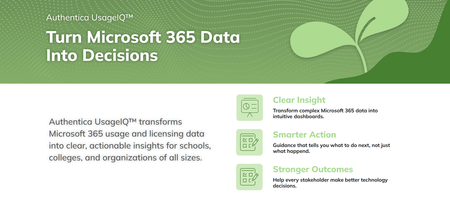
By Vince Frankson, Authentica Solutions | Guest Post via the Microsoft Education Blog Education technology leaders are not short on vision; they are short on time. They know exactly what their Microsoft 365 environment is capable of. What they deserve are better tools, smarter automation, and a partner that shows up ready to serve. At Authentica Solutions, we pride ourselves on our culture of servant leadership, not just as a slogan, but as our guiding principle. Our mission is to support and serve district technology teams, ensuring that technology enhances their valuable work rather than making it more complex. Everything we build is organized around one purpose: accelerating the flow of learning. Not technology for its own sake... tools and services focused at getting teachers back to teaching, students back to learning, and district leaders back to the decisions that matter most. With the school year winding down and Back to School planning already on the horizon, there is no better moment to look at where your Microsoft 365 environment stands, and how the right tools and the right team can compress your timeline, free your people, and make this the smoothest Back to School launch yet. District Technology Teams Deserve Better Tools K-12 technology leaders oversee complex systems, sometimes across multiple campuses, and support a wide range of users. While Microsoft 365 offers advanced features, many remain underused due to the time and expertise required for full implementation. Microsoft’s School Data Sync (SDS) is a great example. It is a genuinely powerful free service that automates the flow of student roster and identity data from your Student Information System (SIS) into Microsoft Entra ID, provisioning Teams classrooms, Intune device groups, SharePoint sites, and OneNote Class Notebooks automatically, at scale. The platform is exceptional. Fully configuring it, keeping it healthy across an academic year, and extending its value into the rest of the data ecosystem is specialized work that deserves specialized support. Authentica addresses this gap by providing support so school IT teams can focus on high-impact tasks, helping educators and students achieve more. Authentica seed™: Built to Accelerate the Flow of Learning Authentica seed™ is Authentica’s Education Intelligence Cloud Service, designed to streamline learning by enabling clean, automated, bidirectional data pipelines. This allows teachers to access rosters quickly, students to begin learning immediately, and administrators to monitor instruction in real time, accelerating progress for everyone. Getting Your Data into Microsoft 365 seed™ sits between your SIS and SDS, handling data preparation, mapping, and delivery so your team can focus on higher-value work. Districts that previously invested significant time in validation cycles and configuration troubleshooting are reaching full value in a fraction of the time. Automated SIS-to-SDS delivery with built-in validation, so errors are caught before they ever reach your tenant. Support for OneRoster API and CSV formats across all major SIS platforms, meeting your district where it already is. Automatic provisioning of users, classes, and groups across Microsoft Entra ID, Teams, SharePoint, Exchange, and Intune for Education. Manage Student Age Groups to limit or support access to Microsoft Copilot for students 13+. Every hour returned from focusing on the data pipeline is an hour returned to learning. That is Cloud with Purpose. Getting Your Data Back Where It Belongs Learning does not stop at the edge of Microsoft 365, and neither should your data. seed™ closes the loop by moving grade data, assessment data, and engagement signals back to the platforms that need them, automatically. Back to your SIS: Keeping your system of record current and authoritative without double grade entry. To your Analytics platform: Giving administrators and instructional coaches visibility into what is working, event making Microsoft 365 activity visible, without waiting for manual exports. Building your dream data estate: What if you could combine your academic and instructional data, your operations and staff data, and your financial data into a single place? What if you could have it prepped and ready so you can ask questions with Copilot and / or AI Agents. Which schools have the most students off track right now? Top 5, and why. Where are we spending the most with the weakest results? Top 3. One connected data ecosystem. Compounding the return on every platform investment your district has made and accelerating the flow of learning throughout. UsageIQ™ Microsoft 365 Edition: Giving Leaders the Visibility They Deserve District technology leaders make consequential decisions about licensing, training, and support every year. They deserve data that makes those decisions clear. Authentica UsageIQ™ Microsoft 365 Edition was built to provide exactly that: a straightforward, actionable picture of how your Microsoft 365 environment is being used across the organization. Not a consultant engagement. Not a manual pull from the admin portal. A purpose-built, single view of your tenant that tells you what you need to know, when you need to know it. App-by-app usage across your tenant: Teams, SharePoint, OneDrive, Exchange, OneNote, and more, in one place. School-by-school and role-based breakdowns: See where adoption is strong and where targeted support would unlock real value. License utilization insights: Ensure every seat is earning its value and renewal conversations are grounded in actual usage data. Back to School readiness views: Identify accounts and configurations that need attention before day one, not after. When technology leaders can see clearly, they lead confidently. That visibility is not a luxury. It is what great tools are supposed to deliver. Managed Services for Microsoft 365: A Team That Has Been Here Before At Authentica, we deliver Managed Services with a servant leadership mindset. We're not just a helpdesk, our team has years of experience at Microsoft, having built education solutions like SDS, Teams for Education, and Graph APIs. We support your district as an expert extension to handle critical Microsoft 365 tasks efficiently, allowing your technology staff to focus on their key responsibilities. What Managed Services for Microsoft 365 Covers End-of-Year close support for SDS expiration management, tenant cleanup, graduating account archiving, and identity hygiene, handled on time and on spec so your team can close the year cleanly. Back to School launch for new year SDS configuration, classroom provisioning, device group refresh, and Conditional Access review, so teachers walk into a working environment on day one. Ongoing SDS health monitoring and proactive troubleshooting, so issues are resolved before they become incidents Microsoft Entra ID and identity management support across the full user lifecycle. Teams for Education configuration, governance, and adoption enablement. Intune for Education device policy and deployment support. Copilot readiness assessment and enablement, so your district is positioned for AI-powered learning when you are ready to move. This is what it looks like when your Microsoft 365 environment has a team behind it that is fully committed to your success, not just at launch, but every day. End of School Checklist: Five Things Worth Doing Before Summer Break These are the actions that make Back to School smoother, faster, and less reactive. Your team knows this; this is a reminder of what is worth prioritizing before the calendar turns. Audit Microsoft Entra ID for inactive and graduating accounts. Clean identities now mean a cleaner, more secure tenant heading into the new year, and fewer licensing surprises at renewal. Review your SDS sync health. Check error and warning logs now. Small data issues that are easy to address in the spring become August emergencies. Get ahead of them while there is room to breathe. Check your Microsoft 365 license utilization. If you are on A3 or A5, are those features actively working for your district? UsageIQ™ Microsoft 365 Edition can show you the full picture and give you a clear story heading into renewal season. Archive Teams classes from the current year. Establish your retention and archival approach before the new year roster drop. A clean tenant makes everyone faster, IT, teachers, and students. Plan your Back-to-School timeline now. Microsoft School Data Sync (SDS) provisioning for a large district takes time. Build in buffer, engage your support resources before August, and set your team up to launch the year confidently instead of reactively. We Are Here to Serve Authentica Solutions is offering a complimentary Microsoft 365 Readiness Assessment for districts that want a clear picture of where they stand before the new year begins. This is a straightforward conversation with our team, people who have been inside these systems for years, helping you identify what is working, what is ready to unlock, and where the right tools can return the most value. No pressure. Just expertise, in service of your district and the learning that happens inside it. Let’s talk to schedule your complimentary Microsoft 365 Readiness Assessment. About Authentica Solutions Authentica Solutions is an EdTech company grounded in servant leadership and built around one purpose: accelerating the flow of learning. Our team, including former Microsoft engineers who built core Microsoft 365 education products, serves K-12 districts through seed™, UsageIQ™, reachAI™, and Managed Services for Microsoft 365. Cloud with Purpose. Visit www.authenticasolutions.com159Views1like0CommentsHands-on Session: From idea to interactive lesson with Microsoft Learning Zone
Join us on Tuesday, May 12th at 8:00 AM Pacific for a hands-on professional development session introducing Learning Zone - a new app that helps you create interactive, classroom-ready lessons in minutes. In this 45-minute webinar, the Product Management team will guide you through core capabilities and the latest updates. You can follow along using your own Microsoft 365 Education account. Also, you will be able to get Professional Development credit with this session and we will offer a Credly badge at the end. What we will cover: ✅ Getting started with Learning Zone: Access Learning Zone and get set up ✅ Experience as a student: Join a session and see how it works from the student perspective ✅ Building your first interactive lesson: Create your first interactive lesson (in minutes!) ✅ Assigning to your class: Send lessons via link, short code, Teams Assignments, or your LMS ✅ Exploring the ready-to-learn library: Bring immediate value to your students through a variety of lessons by trusted of partners. Important note: Lesson generation is currently available only on Copilot+ PCs with any Microsoft 365 Education license (supported in English and Spanish). No Copilot+ PC? No problem. You’ll still get to try out the student experience, learn how to use the lesson library, assign interactive lessons, review insights, and integrate Learning Zone into your existing workflows. 📅 Date: Tuesday, May 12th ⏰ Time: 8:00 AM Pacific Register: https://aka.ms/LZwebinarMay26 We look forward to having you attend the event!90Views0likes0Comments
Looking for official role-based AI learning paths and Microsoft AI ecosystem diagram
Hello everyone, I am responsible for AI up-skilling at my company, and we are currently building role-based learning paths for roles such as AI Engineer, Data Analyst, Data Engineer, and Data Scientist. I would really appreciate any advice or pointers to official Microsoft resources on the following topics. Q1. Role-based learning paths I am aware of the Microsoft Learn career paths: However, I am looking for the most up-to-date official learning paths or curated guidance that also cover newer services such as: Copilot GitHub Copilot Microsoft Fabric Azure AI Foundry Are there any Microsoft resources that organize recommended learning content by role for these newer areas? Q2. Official Microsoft AI ecosystem diagram I am also looking for an official Microsoft diagram, map, or architecture overview that shows the overall AI ecosystem, including services such as Copilot, GitHub Copilot, Microsoft Fabric, and Azure AI Foundry. As a reference, I am aware of unofficial resource, although it appears to be somewhat outdated: If anyone knows of an official and more recent resource, I would be very grateful. (If direct links are not allowed in replies, page titles or document names would also be very helpful.) Thank you.88Views0likes1CommentMinecraft Education Lesson Plans in Teach: AI-powered lesson planning meets the world of Minecraft
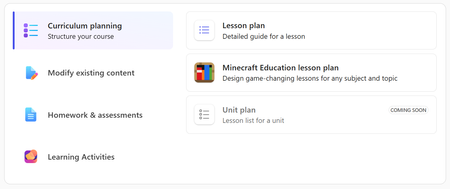
As educators, you've told us that some of your most time-consuming work is adapting lessons for engagement, aligning them to standards, and finding ways to bring immersive experiences into your curriculum. At the same time, Minecraft Education is already one of the most effective learning tools for engaging learners in classrooms around the world, with students lighting up the moment they hear the word "Minecraft." Today, we're bringing those two things together. Minecraft Education lesson plans are now generally available in Teach. Describe your topic, pick a grade level and subject, and Teach generates a complete, standards-aligned lesson plan built around Minecraft Education activities, including the specific blocks, materials, and preparation steps you need to run it confidently, even if you've never opened Minecraft Education before. (Minecraft Education is included in most Microsoft 365 software subscriptions for schools, so you also likely have full access.) What you get Every generated Minecraft Education lesson plan includes: Standards-aligned Minecraft Education activities - Build activities and challenges that reflect your selected standards across subjects like ELA, math, science, social studies, computer science, and more Minecraft-specific materials guidance - Recommendations for the exact blocks, items, and in-game tools your students will need, so you don't have to figure it out yourself Preparation instructions - Step-by-step setup guidance for educators new to Minecraft Education, so you can walk into the classroom ready to go Differentiation and collaboration - Tiered challenge options, collaborative build tasks, and formative checks embedded within gameplay A student link - A shareable link to send directly to students so they can join the activity See it in action Once your lesson is generated, you can edit any section directly or use Enhance with AI to refine it further: add collaborative build tasks, adjust the length and tone, include accessibility supports, or regenerate with new instructions. When it's ready, save to OneDrive and open it in Word to share with colleagues, or launch the Minecraft Education app directly to set up the lesson experience. For a full walkthrough of every step, see the support article. Why this matters We know many of you already love using Minecraft Education in your classrooms, while others are curious how Minecraft can enhance your teaching to deepen student learning and engagement. Minecraft Education lesson plans in Teach make it easier to create experiences by generating a complete, customized lesson from your topic and standards, with the Minecraft-specific materials, activities, and preparation guidance built in. Whether you're looking for a fresh lesson idea in a subject you haven't tried with Minecraft Education before, or you want to quickly adapt a concept for a different grade level, this tool gives you a starting point you can make your own. You bring the teaching expertise and your knowledge of your students. Get started Try it now: Minecraft Education lesson plan Available to Faculty/Staff with a Microsoft 365 for Education license and Copilot Chat enabled Does not require a paid Microsoft 365 Copilot license Minecraft Education may already be included with your Microsoft 365 license or can be purchased separately. Check your licensing options. Helpful Links Teach module training on Microsoft Learn, now including training on Minecraft Education lesson generation Training courses for Minecraft educators Have questions or ideas? Drop them in the comments below - We'd love to hear how you plan to use Minecraft Education lesson plans in your classroom! Share your feedback with us by joining our EDU Insider Program (aka.ms/joinEIP). Until next time, Max Fritz · Microsoft Education651Views1like1CommentMore standards are coming to the Teach Module and Teams for Education!
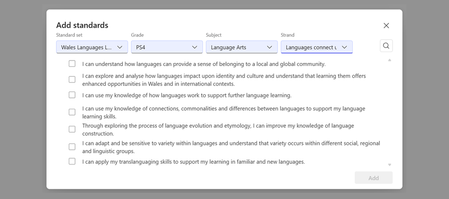
Hi everyone! As educators, you have told us that aligning lessons, assessments, and classroom materials to the standards you actually use is one of the most important parts of making AI-powered teaching tools useful in practice. When standards are available and easy to apply, it becomes much faster to create materials that fit your local curriculum and instructional goals. That is why we are continuing to expand the standards experience across Microsoft Education. We are excited to share a new wave of international standards coming to the standards experience in Teach and in Teams for Education. These standards will support experiences in the Teach module across Lesson Plans, Quizzes, and Rubrics, and they are also coming to Assignments in Teams for Education. If you don't see your country listed, you can request more standards at this link. In this post, we will share what is coming this week, what is planned over the next two months, what we are targeting for summer, and how we plan to keep you updated going forward. Why this matters Standards alignment helps you spend less time translating curriculum requirements into classroom materials and more time supporting student learning. Whether you are building a lesson plan, generating a quiz, creating a rubric, or preparing future assignments workflows in Teams for Education, access to the right standards makes those experiences more relevant and easier to use. Our goal is to keep expanding coverage so more educators can work with the standards they already know and trust, in more countries, subjects, and grade bands. New standards added in 2025 In 2025, we expanded standards coverage with a new set of international additions, including: Austria Canada - Ontario Early Language Learners Health & PE Technology Education Art Canada - Quebec Francophone Canada - Ontario World Languages French as a Second Language Native Languages American Sign Language as a Second Language Classical Studies and International Languages Egypt England Arts Education Health & PE World Languages Technology Education Career Technical Education Finland Kuwait UK GCE AS and A Level Qualifications across a broad range of subject areas These additions helped expand standards coverage beyond core national frameworks and into more subject-specific and qualification-based experiences. Recently added We have already started rolling out new international standards this spring. Recent additions include: Czech Republic UK additions, including recent support for Scotland, Wales, and UK GCE AS and A Level qualifications New Brunswick - Technology Standards Kuwait - Language Arts, Math, Social Studies Estonia - Language Arts, Math, Science Estonia - Social Studies Latvia New Brunswick - Language Arts, Math, Science, Social Studies These recent additions laid the groundwork for the next wave of standards now arriving across Teach and Teams for Education. Coming this week This week, we are adding the following standards to the standards experience in Teach and Teams for Education: Finland Lithuania Norway Romania These additions continue our recent rollout of international standards and expand access for educators who want to align AI-assisted lesson creation and assessment workflows to local curriculum expectations. Coming in the next two months Over the next two months, we expect to continue expanding standards coverage with the following additions: Slovakia Sweden Egypt Canada - Quebec Francophone Standards India NCERT - Hindi Language Arts India NCERT - Sanskrit Language Arts Bahrain Lebanon Oman Qatar Greece We also have additional standards in progress that are on the roadmap, with timing still being finalized: Austria Kuwait - Science India NCERT - Urdu Language Arts Australia ACARA National Technology Education Health & PE Art Languages Canada - New Brunswick additional subject expansion Health & PE Art Languages Norway vocational standards As these become available, they will light up the same standards-backed experiences across Teach and Teams for Education. Planned for summer Looking ahead, we are planning an even broader set of standards expansions over the summer. This work is designed to add more international coverage across core subjects and additional curriculum frameworks. The following are planned for summer: Belgium - Flemish Catholic Network Standards (VVKSO) Language Arts, Math, Science, Social Studies Canada, British Columbia ADST (Entrepreneurship & Marketing) Career Education (Career-Life Education, Career-Life Connections) Core Competencies Canada: Ontario Business Studies Canadian & World Studies Co-op Ed Guidance & Career Ed Ontario Catholic expectations (ICE) CEFR (Common European Framework of Reference for Languages) Language Arts Portugal Language Arts, Math, Science, Social Studies Germany: NRW State Kernlehrplan Language Arts, Math, Science, Social Studies Hong Kong Language Arts, Math, Science, Social Studies Turkey Language Arts, Math, Science, Social Studies Vietnam Language Arts, Math, Science, Social Studies Costa Rica Language Arts, Math, Science, Social Studies Peru Language Arts, Math, Science, Social Studies Guatemala Language Arts, Math, Science, Social Studies Morocco Language Arts, Math, Science, Social Studies Croatia Language Arts, Math, Science, Social Studies Kenya Language Arts, Math, Science, Social Studies Bolivia Language Arts, Math, Science, Social Studies Chile Language Arts, Math, Science, Social Studies Pakistan Language Arts, Math, Science, Social Studies Panama Language Arts, Math, Science, Social Studies This planned summer wave reflects our continued focus on expanding standards coverage in ways that are useful for real classroom workflows across regions. Where you will see these standards As standards coverage expands, educators will see the impact across several experiences: Teach module - Lesson Plans Teach module - Quizzes Teach module and Teams for Education – Rubrics Teams for Education – Assignments Instructions (Coming soon) This means more opportunities to use standards as part of lesson creation, assessment design, and classroom workflows without having to start from scratch. What this means for educators As more standards become available, you will be able to: Align lesson materials to more local and regional curriculum requirements Build quizzes and rubrics that better reflect what students are expected to know and do Use standards-backed workflows in Teach across more countries and subject areas Prepare for future standards-aligned experiences in Assignments in Teams for Education For educators working across multiple countries, languages, or curriculum systems, this expanded coverage can help reduce manual work and make AI-generated outputs more relevant to your teaching context. We plan to keep sharing updates We also plan to share regular blog updates roughly every quarter so you can see what standards are newly available, what is rolling out next, and where we are continuing to expand coverage. Our goal is to make these updates easier to track so educators, school leaders, and partners can stay current on what is available in the standards experience across Microsoft Education. Helpful links Getting started with Teach Modify content - Align to Standards Microsoft Teams for Education International standards currently available through EdGate Request additional standards Share feedback with us by joining our EDU Insider Program Have questions or want to let us know which standards you would like to see next? Drop a comment below or submit a request through our Standards Feedback form. We would love to hear what curriculum frameworks matter most in your classrooms. Until next time, Samantha Fisher · Microsoft Education1.2KViews2likes4CommentsClassic LTI App Retirements, Preview of OneDrive LTI Migration Tool for Canvas
Classic Microsoft LTI® Apps Retiring in 2026: What You Need to Know and How to Prepare Microsoft is continuing its investment in a unified, modern Microsoft 365 LTI experience. As part of this evolution, several classic Microsoft LTI apps will be retired in September 2026. This post outlines: Which classic LTI apps are retiring and when What happens to existing course links and content created in classic LTIs retiring What actions you should take now to prepare, and start transitioning to Microsoft 365 LTI New migration tooling available to support transition Classic Microsoft LTI® Apps Retiring September 17, 2026 As we shared last September in our Microsoft 365 LTI GA release Blog, the following classic Microsoft LTI apps will be retired on September 17, 2026: Microsoft OneDrive LTI (1.3) OneNote Class Notebook LTI (1.1) Microsoft Reflect LTI (1.3) Microsoft Teams Assignments LTI (1.3) After September 17, 2026, any links or placements of these classic apps in courses will stop working. However, the files, notebooks, assignments, and check-ins created by these classic apps will continue to be available to copy and reuse. Replacements for these classic experiences are now available through the unified Microsoft 365 LTI built on the LTI® 1.3 Advantage standard. This delivers modern security, simplified identity mapping with Microsoft Entra, LMS enrollment and grade syncing, and a single deployment model for LMS administrators. We’ll continue to update our migration guides as additional tools and guidance become available. NEW: Preview the OneDrive LTI Migration Tool for Canvas Canvas LMS Customers: We are excited to announce that the Microsoft OneDrive LTI Migration Tool for Canvas is now available in Preview! This tool helps institutions using Canvas LMS migrate OneDrive content links from the classic Microsoft OneDrive LTI app to the new Microsoft 365 LTI app — preserving existing file links in courses so educators and students experience a seamless transition. For new preview deployments: detailed deployment instructions are available in the Canvas migration guide, which has been updated with configuration steps and guidance for using the migration tool. If you participated in the private preview: If you have already deployed the OneDrive LTI Migration Tool in Canvas during the private preview, no action is required. Your existing deployment will continue to work as part of the Public Preview, and in GA. If you deployed the private preview in a testing environment, we suggest that you follow the new Canvas migration guide in your production environment. Below is guidance to assist with transition from the other classic LTI apps and on additional LMS platforms. We will continue to communicate updates to this guidance as it evolves. If you use the classic Microsoft OneDrive LTI 1.3 with an LMS other than Canvas Deploy Microsoft 365 LTI with the OneDrive app enabled and guide educators to use the new Microsoft 365 LTI (Microsoft Education menus) to create file links or embeds in course content. Disable/hide/remove placements of the classic Microsoft OneDrive LTI app in your LMS but do not uninstall or disable the app. Files linked or embedded with the classic Microsoft OneDrive LTI will stop working when the app is retired, so those links and embeds must be replaced using the new Microsoft 365 LTI (Microsoft Education) app ahead of the retirement date. OneNote Class Notebook LTI 1.1 (All LMS platforms) The new OneNote Class Notebook LTI 1.3 integration is now available in the Microsoft 365 LTI app, with automatic roster sync and streamlined setup. Deploy Microsoft 365 LTI with the OneNote Class Notebook app enabled, and guide educators to use the new app. Disable/hide/remove placements of the classic OneNote integration, but do not uninstall the app to avoid migration issues during transition. While there is no direct migration path from OneNote Class Notebook LTI 1.1 notebooks to Microsoft 365 LTI Class Notebooks, educators can copy sections/pages from one notebook to another using the right-click menu on Sections and Pages (and selecting “Move/Copy”) in OneNote on Windows, OneNote Web, and OneNote for Mac. Instructions are also available for content transfer using OneNote on Mac, iOS, or Android. Microsoft Teams Assignments LTI 1.3 (All LMS platforms) Deploy Microsoft 365 LTI with the Assignments app enabled, and guide educators to create assignments using the new app. Disable/hide/remove placements of the legacy Teams Assignments LTI app as soon as you install the new Microsoft 365 LTI and enable the Assignments app, and guide you users to copy their existing assignments using the new app. Teams Assignments created by the classic LTI 1.3 app can be reused as in the new Microsoft 365 LTI Assignments experience (which does not require a Team) Assignments created in the LMS or via the Assignments app in Microsoft Teams can be copied and reused using the Create from Existing functionality in the Microsoft 365 LTI (Microsoft Education) Assignment instructor flow. Microsoft Reflect LTI 1.3 (All LMS platforms) Deploy Microsoft 365 LTI with the Reflect app enabled, and guide educators to create new Reflects in the new Microsoft 365 LTI experience. There is no migration path for reflects created in the classic Reflect LTI 1.3 app to the Reflect experience in the new Microsoft 365 LTI Reflect app. We recommend transitioning to the new Reflect experience in Microsoft 365 LTI as soon as possible, and remove the classic app ahead of the September 17, 2026 retirement. Stay Connected We love hearing from you! There are a few ways to stay engaged with Microsoft and your peers on the LMS integrations. Follow this blog! Click Register at the top right to create an account and profile for the Microsoft Tech Community and Follow the Education Blog so you don’t miss any of our updates. Join the free Education Insiders Program to preview updates, get support from other community members, meet the team, and influence the roadmap. Join us for Microsoft 365 LTI office hours to connect with your peers and share feedback directly with Microsoft experts. When: 1st and 3rd Thursday of each month @ 11AM EST Where: https://aka.ms/LTIOfficeHours Getting help and giving feedback LMS and Microsoft 365 admins can contact Microsoft Education Support to help resolve configuration and deployment issues, for themselves or on behalf of users. Educators and Learners can contact support or give feedback directly from the app through the help and feedback menu. TJ Vering Principal Product Manager Microsoft Education https://linkedin.com/in/tvering Learning Tools Interoperability® (LTI®) is a trademark of the 1EdTech Consortium, Inc. (https://1edtech.org/)660Views0likes0CommentsNew information literacy features in Search Progress now generally available
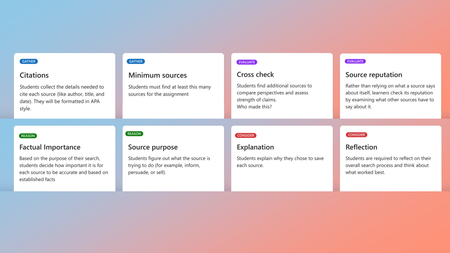
Hello all! Last September, we shared a preview of new information literacy features coming to Search Progress — designed to help students pause, think critically, and show their reasoning as they research online. Today, we’re excited to share that these features are generally available for all educators using Search Progress through Assignments in Teams for Education and the Microsoft 365 LTI®. A special thank you to the educators who participated in the preview and shared feedback along the way; your insights helped shape these features into what they are today. See it in action Want a walkthrough before reading the details? Watch our Elevate Signature Series session, “Show Me Your Thinking,” where Dr. Geri Gillespy and I discuss future ready skills along with Search Progress setup, the full educator-to-student workflow, and how these skills connect to global assessment frameworks like PISA 2029. Why process matters more than ever Information literacy skills like verifying sources, understanding context, and thinking critically are foundational for responsible and effective navigation of online information. These skills become even more critical as AI becomes an integral part of learning and daily life, where students don’t just need access to information, they need to know how to evaluate it. To ensure these features were developed in alignment with the latest in online reasoning research, we consulted with experts from the Digital Inquiry Group — a team with decades of experience as curriculum designers, classroom educators, researchers, and teacher educators — recognized with awards from UNESCO, the American Educational Research Association, and the School Library Association, to name a few. What’s now available The enhanced Search Progress features introduce structured activities and checkpoints — cognitive forcing functions that encourage students to pause, consider, and articulate their reasoning as they navigate the complex world of online information. Here’s what you can now enable for your assignments: Evaluating source reputability: Instead of relying solely on what a source says about itself, students investigate the individuals or organizations behind the information by looking into what other sources say about them, like how employers use references in a job interview. Cross-checking and lateral reading: “Using the internet to check the internet”, students compare information and perspectives across multiple sources to reveal patterns, differences, and possible inaccuracies. Impact awareness: Students consider what could be at risk if the information is inaccurate or fabricated with the new "factual importance" checkpoint. For instance, health advice carries different consequences than an AI-generated image of a cat dancing at the disco. Identifying source purpose: Information is created for a reason. Students consider who created a source, and whether it’s trying to inform, persuade, sell, or entertain. Metacognitive reflection: Students reflect on the research process itself including why certain sources stood out, which strategies worked best, and how to apply those learnings in the future. Not just for research projects These features aren’t only for formal research assignments. They’re designed for class activities that involve online research, whether students are exploring a new topic, gathering sources for a presentation, or verifying information for a discussion. The goal is to build habits that transfer throughout the digital information ecosystem, from navigating social media to evaluating AI-generated content. For example: A science educator assigns a pre-lab research task on chemical reactions. By enabling Source Reputation and Factual Importance, students learn to prioritize safety data sheets and academic sources over unverified blogs and to think about why accuracy matters when the stakes are high. A social studies educator uses Cross-check for an assignment focusing on current events. Students discover that a viral statistic has been reported differently across sources, and they practice tracing claims back to their origin — building lateral reading habits they’ll carry into their media consumption outside of school. What educators are saying Teacher librarians, in particular, have told us that the “process over product” approach gives them something they’ve been missing — visibility into the process of student inquiry, not just what they turn in. These features give them a window into the journey, not just the destination. With new scaffolds that support cross-checking and the investigation of source reputation, Search Progress now covers more of the skills they’ve been trying to teach. We’ve heard from educators that the explanation prompts reveal a side of student thinking that traditional assignments don't often capture. During an early pilot, students pushed back on a text field that didn’t scroll to expand, not because they wanted less writing, but because they had more to say about why they chose their sources and wanted more space to explain their thinking. Students who described themselves as not being strong essay writers found a different way to show their thinking, and when they knew that their reasoning mattered as much as the final product, it changed how they engaged with the assignment. Preparing students with future-ready skills for the age of AI As educators worldwide work to build students’ information literacy skills, global frameworks are evolving to match. The OECD recently published a first draft of the PISA 2029 Media and Artificial Intelligence Literacy (MAIL) assessment framework — a new assessment that will measure 15-year-olds’ ability to critically evaluate digital and AI-generated content across all participating countries. We were interested to see how closely the skills that Search Progress helps build align with the competences this framework describes. The MAIL assessment places significant emphasis on evaluating source credibility, assessing purpose and bias, and cross-checking information across multiple sources — all skills that Search Progress is designed to support through structured activities and checkpoints in the flow of research. Educators have also shared that these features help address a tension many are navigating right now: how to maintain academic integrity when AI-generated work is increasingly difficult to distinguish from student work. Rather than relying on detection tools at the end of the pipeline, Search Progress makes the research process itself the artifact, which gives educators evidence of student thinking throughout. Of course, information literacy is broader than any single tool. The MAIL framework also includes competences around content creation and collaborative digital participation that go beyond what Search Progress currently addresses. But for the core skill of analysing and evaluating online information — which the framework highlights as one of its most heavily weighted competences — Search Progress can help you give your students meaningful practice right now. By integrating these research habits into everyday assignments, you’re helping students build skills that will serve them well beyond any single assessment — from navigating social media to evaluating AI-generated content in their daily lives. Getting started Open Assignments in Teams for Education (or your LMS via the Microsoft 365 LTI). Create a new assignment and select Search Progress as a Learning Accelerator. Choose which information literacy features to enable for this assignment; you can mix and match based on the lesson. Customize the checkpoint card prompts to fit your subject area and grade level. Assign it to your class and watch the research process unfold. Requirements Available to all Microsoft 365 Education customers Classes set up in Teams for Education or the Microsoft 365 LTI Helpful links 📘 Take the MS Learn course — Intro course for educators 📘 Microsoft 365 LTI app overview — Bring Search Progress into your LMS 💬 Join the Education Insiders Program — Share feedback directly with our product team We’re committed to helping you foster information and AI literacy, and your feedback continues to shape how these tools evolve. Join the Search Progress channel in the Education Insiders Program to connect with other educators, attend community calls, and share your experience directly with the product team. If you’re not yet an EIP member, sign up here: aka.ms/JoinEIP. Have questions or ideas? Drop them in the comments below. I’d love to hear how you’re using these features in your classroom! Until next time, Emma Gray Product Manager II Microsoft Education Learning Tools Interoperability® (LTI®) is a trademark of the 1EdTech Consortium, Inc. (1edtech.org)338Views1like0Comments
Allow form respondents to save and continue to fill the form later
My comment refers to this voting: https://microsoftforms.uservoice.com/forums/386451-welcome-to-microsoft-forms-suggestion-box/suggestions/18447406-allow-form-respondents-to-save-and-continue-to-fil In our company we use sharepoint and MS 365 Business every day. MS Forms is very intuitive and esasy to handle, thats great! I made a long survey on sustainability topics to our members. Then I got feedback that in many cases more than one person in the adressed member companies have to work together according to their expertise... so they need the option to save the survey, send it to another colleague who can conitnue answering the question... Right now I have to look to alternative tools to fullfill this very important option. But I would prefer to continue my survey (where I already put more than one week of effort) in MS Forms. Is there already any timeline, when Mircrosoft will implement this function? Best regards from Germany Matthias105KViews18likes56Comments