edge
5 Topics
SmartScreen false positives
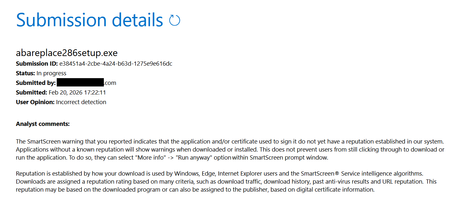
Hello, I'm a developer of https://www.abareplace.com/ Unfortunately, Microsoft SmartScreen blocks https://www.abareplace.com/download/ of my application and multiple attempts to contact Microsoft about this case were in vain. The app is clean on VirusTоtаl, has a valid digital signature, and is published to MS Store. However, users see the SmartScreen warning when trying to run the installer downloaded from my website: Windows protected your PC Windows Defender SmartScreen prevented an unrecognized app from starting. Running this app might put your PC at risk. Other developers report exactly the same problem and it https://www.reddit.com/r/Windows11/comments/1pz8qww/windows_code_signing_is_broken_for_indie/ It has no sense from the security point of view to block something that is already published on Microsoft Store. I submitted a ticket to https://www.microsoft.com/en-us/wdsi/filesubmission?persona=SoftwareDeveloper one month ago. The ticket was "In progress" for many weeks, then was silently closed. I opened a new ticket one week ago and it's still "in progress". I also submitted the file via Report this file as safe > I am the owner or representative of this website and I want to report an incorrect warning about it button in Microsoft Edge several times, but received no confirmation email that you should receive after submitting the form. I know that the times when Steve Ballmer shouted: "Developers! Developers! Developers!" are long gone, but can Microsoft make live at least a bit easier to independent software vendors? Thank you.1.1KViews1like4Comments
Application Guard Closing Browser
Hi All, I am implementing WDAG in my organization. I am testing with the MS Edge browser. After configuring the "Network Isolation" settings, every time I browse to an "untrusted" website, my current/non-WDAG browser closes and the WDAG browser instance opens. Is there a setting that keeps the current/non-WDAG browser open when the WDAG browser instance opens? Thanks!586Views0likes0Comments🔒How to deal with multiple passwords cross-device [Password Manager]
NEW VIDEO N. 209 In this video tutorial, I’ll show how to deal with multiple passwords on the web cross-device. Today Microsoft Edge has the same functionality as Google Chrome, plus it offers the ability to manage passwords, combining Edge with the smartphone app Microsoft Authenticator you are able to sync all passwords through devices. The Microsoft Authenticator app helps you sign in to your accounts when you're using two-factor verification. Two-factor verification helps you to use your accounts more securely because passwords can be forgotten, stolen, or compromised. Two-factor verification uses a second factor like your phone to make it harder for other people to break in to your account. Moreover the Microsoft Authenticator app store and encrypt all passwords.2.1KViews0likes0Comments
Windows 10 WIP rules and Chromium Edge cannot access Sharepoint Online ERR_BLOCKED_BY_ADMINISTRATOR
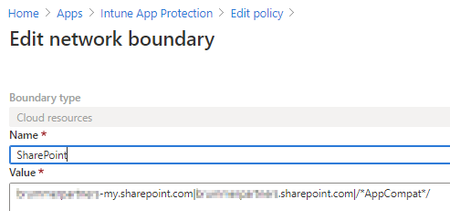
Hi all, A few weeks ago Sharepoint Online access via Edge (Chromium) browser stopped working from our AAD joined + Intune Windows 10 (2004) computers. Error from Edge: You don’t have access to this content Try accessing the site again using a profile connected to your work or school account. Learn more. If the problem continues, contact your administrator. ERR_BLOCKED_BY_ADMINISTRATOR I suspect the issue has something to do with Windows Information Protection (WIP) policy because of the error message and since IE still works. There is no briefcase in Edge address bar. Intune App Protection have and Windows Information Protection (WIP) policy. The policy have both WIPMode Allow and Exempt policy XML files added. It have worked for a few months up to a couple weeks ago. We have not touched any policy. MsEdge - WIPMode-Allow - Enterprise AppLocker Policy File.xml MsEdge - WIPMode-Exempt - Enterprise AppLocker Policy File.xml Also, the WIP policy do have a Network Boundary for Sharepoint Any suggestions? Thanks!Solved10KViews0likes8Comments
Maximum Anti-Exploit hardening for new Edge
I would like to hear your Anti-Exploit settings for new Chromium-Edge. From MalwareTips.com forum i got the following: (* will break Chrome or extensions) ACG (off)* BLII (on) BRI (on) BUF (on) CIG (on) - also allow loading of images signed by Microsoft Store CFG (on) - Strict (Off)* DEP (on) - ATL (on) Dep (on) Win32k (off)* Child Process (off) EAF (off)* Mandatory ASLR (on) - Stripped (on) IAF (off)* BottomUp ASLR (on) SimExec (off)* CallerCheck (off)* SEHOP (on) VHU (on) VHI (on) VIDI (on) StackPivot (off) Edit: Also someone say the settings are needed for "MicrosoftEdgeCP.exe" too.2.5KViews0likes4Comments