edge extensions
10 Topics
Known Issue – Adblock causing errors on YouTube
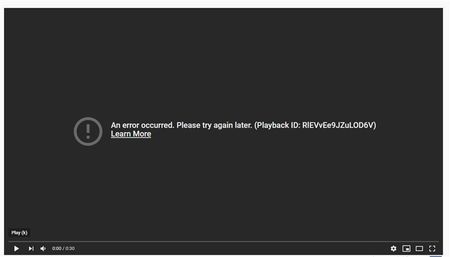
Hello Insiders, Our Media team has received a number of reports regarding a potential bug, so we wanted to loop you in on our findings. We’ve heard that a number of users who have the AdBlock (Plus) or Adblock for Youtube extensions installed are running into errors on YouTube videos. If you’re experiencing this bug, you will likely encounter a black screen on the video player when attempting to load a video on YouTube. (See the screenshot below.) We’ve found that this behavior is happening on all operating systems and all Microsoft Edge channels. Here’s a screenshot of the error: Image description: a black video player screen that says, “An error occurred. Please try again later.” Thankfully, the team has also identified an easy workaround while they investigate this further. If you’re experiencing issues with YouTube and have either Adblock extension enabled, they recommend disabling the it then reloading the web page. Give it a try and let us know if it works in the comments below! We’d love to know if you’re seeing this error message but not using an Adblock extension, or if the above workaround doesn’t resolve the error. If so, please submit feedback through Microsoft Edge by holding down Shift+Alt+I within the browser, or navigating to the “…” menu, selecting “Help and feedback,” then choosing “Send feedback.” Please include a detailed description of what you’re encountering, and select the checkbox to include diagnostic data. Thanks for all of the feedback and we’ll let you know when this is resolved. - The Microsoft Edge Team61KViews13likes23CommentsExtensions Badging on the Edge Add-Ons Store
Extensions have been contributing to making browsing on edge a delightful experience for users. The Edge addons store catalogue has grown to close to 11,000 add-ons and as we continue to grow, we want to evolve and be ready for scale. This means there is more hustle and competition for extensions discoverability in the marketplace. Thus, making sure we provide the best experience to both our users and developers becomes critical for us. Towards that end, we intend to ensure users can trust the extensions they are downloading on edge and we as a marketplace, surface high quality extensions to help them achieve this. We are planning to introduce extensions badging on EAS which will encourage developers to build extensions, keeping our best practices in mind. Leading to edge extension users getting the ease to differentiate and discover these quality extensions on EAS. The Edge Addons Store is starting its experiment with extensions badges soon. And we want to iteratively build this alongside our dev community. Edge is starting with a small-scale experiment and will begin to engage with the developer community to talk through the criterion and help them get acquainted with the badging process on EAS. Please look out for more details on the extensions badging experiment from Edge! What are our principles? User Centric Objective evaluation criterion Watch out this space for more information on Badging extensions on EAS. You may also refer to our documentation for further details. PS – Badging in this case refers to visual labels, which will be shown on the extensions’ product description pages and other pages on the EAS, once they are granted to a particular extension.4KViews3likes0Comments
Some extensions don't work on Android Edge Canary when returning to the app
I am using Edge Canary and have installed several extensions through the developer options, but some of the extensions are not working when I resume from the background. The extensions that don't work seem to be automatically disabled internally, so I can disable them from the extension options and then re-enable them to use them again. (However, in the latest Canary build, if this problem occurs, the app crashes when I try to open the extension options.) This issue occurs with uBlock Origin, Stylus, etc., and probably occurs with the Manifest V2 extension. This issue occurs on multiple devices and occurs even after reinstalling, so it is not device-dependent.1.8KViews2likes3CommentsPartner center will stop accepting new MV2 extensions from 11th July
Hello, Edge Add-ons developers! In May 2022, Microsoft announced the timelines for embracing Manifest Version 3 (MV3) for Microsoft Edge extensions and phasing out support for Manifest Version 2 (MV2). As we move forward in this direction, the following change will come into effect starting 11 th July 2022 – All new extensions must use MV3 to be published to the Microsoft Edge Add-ons store. You can continue updating your existing MV2 extensions that are already published on the Microsoft Edge Add-ons website. This timeline is subject to change; for the latest updates, visit: Overview and timelines for migrating to MV3 Microsoft Edge Add-ons roadmap If you have any technical questions on your MV3 migration or the Microsoft Edge Add-ons ecosystem in general, you can reach out to us via our discussion forum on GitHub. If you are facing any issues on Partner Center, or the Microsoft Edge Add-ons site; or you have any suggestions for us to improve the Microsoft Edge Add-ons ecosystem; you can submit those via our GitHub developer community.9.8KViews2likes7CommentsMicrosoft Edge Add-ons | NEW Feature to manage user reviews on your extension
Microsoft Partner Center now includes a Reviews dashboard. This feature brings a crucial change to help manage your Microsoft Edge extension product page. This update enables you to view and engage with the user reviews. You can thank your extension’s users for positive feedback or respond appropriately to any comments. Your response to a review appears under the respective review on the product detail page of your Microsoft Edge add-on. Go to Partner Center to try out the Reviews feature! Share your feedback and questions about this new feature with the Microsoft Edge Add-ons Team in the comments below or on the GitHub community's Discussion topic.7.5KViews2likes2Comments