edge browser
15 TopicsBug fixes in Microsoft Access - Current Channel Version 2605 (Build 16.0.20026.20118)
Bug Name Issue Fixed Edge Browser Control didn't render PDFs on some machines When the Edge Browser Control was used to display a PDF, on some machines the PDF would not render at all if the registry value "HKEY_CLASSES_ROOT\.pdf\Content Type" was missing. Access now provides the missing content type, so the Edge Browser Control can render the PDF. Export to SharePoint failed for tables with both lookup fields and attachment columns When exporting an Access table to a SharePoint list, if the table contained both a lookup field and an attachment column, the export could fail with an error. The export now handles this combination correctly, so the export completes successfully. Conditional Formatting color picker showed a reduced palette in Version 2604 A regression introduced in Version 2604 caused the Conditional Formatting color picker to display a smaller set of color choices than previous versions. The full legacy color palette has been restored. Some Unicode characters displayed incorrectly in objects exported to Excel When exporting an Access object whose name contained certain extended Unicode characters, the resulting file's sheet name displayed the characters incorrectly. These characters are now preserved correctly during export. Power BI Gateway couldn't refresh semantic models from .accdb files Refreshing a Power BI semantic model that connected to a .accdb file via the on-premises gateway could fail with "Unspecified error". Connection setup has been adjusted so the gateway can successfully refresh the model. Monaco SQL view: Ctrl+Z didn't undo Ctrl+Shift+K line deletion In the new Monaco-based SQL editor, pressing Ctrl+Shift+K to delete the current line removed the line, but a subsequent Ctrl+Z would not restore it. Undo now works correctly for this and similar editing operations. Document tab text didn't scale with Windows text-size setting When the Windows display setting for text size was increased, document tab labels and the record navigation bar continued to render at the standard size, while other Access UI scaled correctly. The document tabs and record navigation bar now honor the system text-size setting. Error when editing a Long Text field after a write conflict When a write conflict occurred on a record containing a Long Text field, subsequent attempts to edit the field could fail with an error. The data path now refreshes the cached field values correctly after a conflict so that further edits succeed. Access terminated unexpectedly when reading Edge Browser Control properties in form design view In form design view, retrieving the ReadyState or LocationUrl property on an Edge Browser Control could cause Access to terminate unexpectedly. Both properties now return safely in design view. "Copy" prefix was prepended instead of appended to copied object names When duplicating a database object, Access named the copy "Copy of Form1" instead of "Form1 - Copy". This made copies of related objects sort apart from their originals in the Navigation Pane. Copy-of names now append the suffix, so related objects stay together when sorted alphabetically.917Views3likes8Comments
Add Secure DNS (DNS-over-HTTPS) Support to Edge Mobile
Hello Edge Team, I’ve noticed that while Edge desktop already supports Secure DNS (DNS-over-HTTPS), the mobile version currently lacks this option. Competing browsers like Chrome and Brave allow users to configure Secure DNS directly on mobile, which provides: Improved privacy by preventing ISP-level DNS snooping Consistency across platforms so Edge users enjoy the same protections on desktop and mobile User choice to select trusted DNS providers (Cloudflare, Google, Quad9, etc) Adding Secure DNS support in Edge mobile would strengthen Edge’s privacy posture and align it with modern browser standards. Could the team consider prioritizing this feature in upcoming Insider builds? I believe many users would welcome the option to configure Secure DNS directly within Edge mobile settings. Thank you for your continued work on making Edge a competitive and privacy‑friendly browser.123Views1like0Comments
How to disable confirmation pop-up in Edge Browser when opening many tabs
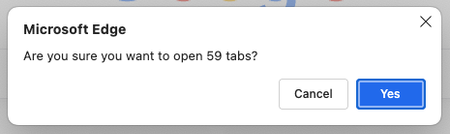
I have bookmarks arranged in multiple folders, varying from 10 to 500 or more links per folder. Whenever I try to click on the bookmark folder to open all of them at once, I always get this Pop-up, which is very annoying to me (I was ignoring that pop-up for more than a year). Is there any built-in setting to disable or increase the limit? P.S: FYI, I am on a very high-end laptop(M4 pro with increased RAM & SSD) and due to my use case, I have to regularly, almost every day open many links89Views0likes0CommentsAccess Releases 7 Issue Fixes in Version 2311 (Released November 25th, 2023)
Our newest round of Access bug fixes was released on November 25th, 2023. In this blog post, we highlight some of the fixed issues that our Access engineers released in the current monthly channel.9.9KViews3likes29CommentsAnyone down for Edge logo options?
So is it me or the new Microsoft Edge log not as fun? You know what would be fun? Options. I would love to see a buried settings options for the type of logo we can have. Hell, I think if they give us the option to swap between the Spartan Logo, Edge logo, and New Edge logo that will be fun. I love options and Windows has always been the better bet for it. Let us have fun with one of the most important apps we use on our computers.2.2KViews1like8Comments
(MAJOR BUG) Bookmarks dont shift by drag and drop when selected (even multiple selecting is broken).
(MAJOR BUG) Bookmarks dont shift by drag and drop when selected (even multiple selecting is broken). See invalid button when dragging multple bookmarks. I dont face same issues in any browser including chrome and firefox and opera and brave and vivaldi whatsoever. Only edge browser has these unique bugs. And this bug is common in all edge browsers and on all platforms. Checked before posting this.418Views0likes0Comments(MAJOR BUGS) "Found81results" is together, no space, and wrong when selected results are 137?
(MAJOR BUGS) "Found81results" is together, no space, and wrong when selected results are 137? Edges of the browser. This is edge browser, which wants us to ditch Google Chrome. Never faced such childish bugs in chrome in 20 years of usage. Common in all edge browsers on all devices. Checked personally every one of them and can confirm.701Views0likes0CommentsIe and edge SharePoint site access issue in windows server 2019
None of the sharepoint sites are working in ie and edge browser. We have sharepoint 2016 on windows server 2019. The site is accessible from chrome,but doesn't work in IE and edge. I have tried all basic things like security settings, trusted sited, TLS 1.2, nothing is working. Anyone is aware of this issue?1.3KViews0likes1Comment