edgarus71
6 TopicsMicrosoft Security Copilot: AI-Driven Security Operations at Greater Scale
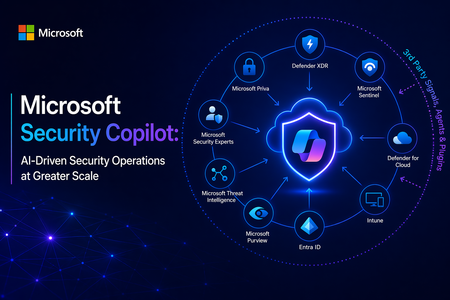
At its core, Security Copilot is built to enhance every facet of security operations at machine speed. It translates a vast array of inputs (Microsoft’s cloud-scale telemetry, threat intelligence feeds, security best practices, and enterprise-specific data) into tailored recommendations and summaries, helping security teams “catch what others miss,” respond faster, and strengthen their expertise. In the sections below, I explore the key security benefits of Security Copilot, its extensibility via third-party plugins and skills, and the value of its deep integration with Microsoft’s security ecosystem. Key Benefits for Security Operations Security Copilot meaningfully improves threat detection, investigation, response, correlation of signals, and analyst productivity. The table below summarizes these core security benefits and capabilities: Security Operations Aspect Benefit with Security Copilot Threat Detection Augmented detection of elusive threats: Security Copilot leverages broad threat intelligence and comprehensive signals to identify subtle threats, anomalies, and attack patterns that might be missed through manual analysis. By reasoning over Microsoft’s vast security graph and global threat telemetry, it helps analysts “catch what others miss,” ensuring unique or stealthy threats are surfaced. Incident Investigation Faster, context-rich investigations: Security Copilot can swiftly summarize and analyze incident data from multiple sources, enhancing incident details with additional context from logs, alerts, and threat intel. It correlates related events and highlights root causes, giving analysts a consolidated understanding of complex incidents in minutes. This enables quicker triage and deeper insights, so investigators know what happened and where to focus next. Response & Remediation Guided response and remediation: Security Copilot not only identifies issues but also provides prescriptive guidance on how to respond. It can suggest remediation steps and mitigation strategies in plain language, helping analysts act decisively. For example, it may outline containment steps or orchestrate automated actions through integrated tools, significantly reducing response time to incidents. Signal Correlation Holistic cross-domain correlation: Because it taps into signals across identities, endpoints, email, cloud workloads, and more, Security Copilot automatically connects the dots among disparate alerts and data streams. It presents unified incident narratives by linking related indicators (e.g., matching an endpoint malware alert with identity login anomalies and cloud logs), eliminating manual cross-tool correlation and uncovering hidden attack paths. Analysts get a single cohesive view of an incident across the kill chain. Analyst Productivity Boosted efficiency & skill elevation: By automating repetitive tasks (like scanning logs, writing KQL queries, or summarizing reports) and supporting natural language interaction, Security Copilot reduces manual workload and accelerates everyday tasks. This lets analysts focus on higher-value activities. In practice, teams using Security Copilot have seen significant productivity gains – a recent study found 23–47% improvement in SecOps task efficiency after adoption. Junior analysts ramp up faster (learning from Copilot’s guidance), while senior analysts can handle more incidents with less fatigue. These improvements translate into measurable security outcomes. Incident response becomes faster and more consistent, with mean time to resolution reduced by 30% on average within a few months of use according to early research. Security Copilot’s ability to accelerate investigations and streamline tasks drives down risk exposure and helps organizations make the most of their security investments. Ultimately, it strengthens an organization’s security posture by augmenting human analysts with AI-driven speed, scale, and intelligence. Seamless Integration with the Microsoft Security Ecosystem Another key strength of Security Copilot is its deep native integration with Microsoft’s security portfolio. From day one, Security Copilot was “designed with integration in mind.” It plugs directly into a broad range of Microsoft security products — including Microsoft 365 Defender (XDR), Microsoft Sentinel (SIEM), Microsoft Entra (ID and access management), Microsoft Intune (endpoint management), Microsoft Purview (compliance), and more. In practice, Security Copilot is available as both a standalone portal and as an embedded side-by-side experience within these Microsoft security tools. This means a security analyst working in Microsoft Sentinel or Defender can access Copilot’s capabilities without switching context: Copilot is right there in the workflow, ready to answer questions or assist with tasks in real time. Because of this close integration, Security Copilot can access data and signals from across all Microsoft security solutions that an organization uses. It operates over a unified security data estate encompassing endpoints, identities, emails, applications, cloud workloads, data repositories, and beyond. The result is truly end-to-end visibility and protection: Copilot can reason across diverse telemetry (e.g., correlating a device malware alert from Defender with cloud logs from Azure, or identity risk signals from Entra) to provide comprehensive insight. This unified approach eliminates silos and tool fragmentation — analysts spend less time pivoting between separate consoles or manually stitching together information because Copilot synthesizes it automatically. Moreover, leveraging the Microsoft ecosystem means Security Copilot can immediately add value without requiring a rip-and-replace of existing tools. It acts as a “force multiplier” across the installed Microsoft Security stack, maximizing the return on those investments by making them more effective and easier to use. For example, Copilot can turn a collection of raw alerts from different Microsoft products into a single, coherent incident storyline with actionable next steps. This synergy leads to significant operational efficiency gains and a more streamlined SOC workflow, as analysts have a central AI assistant coordinating across all defenses on their behalf. By providing unified insights, reducing tool sprawl, and bringing together Microsoft’s best-in-class security technologies, Security Copilot emerges as a valuable asset for modern security teams. It empowers organizations to practice “AI-first” security operations – enabling defenders to work faster and smarter, while fully utilizing an integrated security ecosystem to protect the enterprise from evolving threats. In summary, Microsoft Security Copilot offers a compelling combination of advanced AI capabilities, extensibility, and seamless integration that helps security teams achieve unprecedented speed, breadth, and efficiency in defending their organizations. It enhances human expertise with machine-scale intelligence, improving threat detection and response outcomes and transforming the way security operations centers operate for the better. Open Extensibility with Third-Party Plugins and Skills A standout capability of Security Copilot is its extensible plugin architecture, which allows it to incorporate external data sources and integrate with third-party security tools. Plugins in Security Copilot are modular connectors that bring in specific data or perform defined actions (each plugin encapsulates certain “skills,” such as running a KQL query, calling an API, or searching threat intel). Microsoft provides numerous pre-installed plugins out-of-the-box for common Microsoft security services and workflows, and administrators can easily add or develop custom plugins to connect 3rd-party systems or bespoke data sources. This design ensures that Security Copilot’s capabilities can expand and adapt to different environments. Through both Microsoft-built and third-party plugins, Security Copilot can tap into a wide variety of security data beyond the Microsoft stack. For example, supported third-party plugins let Copilot pull context from external solutions such as IT service management tools (e.g., ServiceNow), vulnerability management platforms, identity providers, network security appliances, and others. Plugins feed additional logs, alerts, and intelligence into Copilot’s analysis, thereby enriching its understanding of incidents with non-Microsoft data and events. This means a SOC can leverage existing investments in third-party security products by having Security Copilot analyze and correlate those systems’ outputs alongside Microsoft’s telemetry. Microsoft and its partners have already created an ecosystem of Security Copilot plugins. For instance, Microsoft announced 15+ new third-party plugins at Ignite 2024, spanning categories like threat intelligence (e.g., integrating feeds from providers like CrowdSec, Cybersixgill, GreyNoise) and device/network/identity management tools (e.g., Red Canary, Netskope, Tanium, CyberArk, etc.). These plugins bring rich external data on threat actors, indicators of compromise, vulnerabilities, device health, user activity, and more, allowing Copilot to provide even more comprehensive analyses and recommendations. Crucially, customers can build their own plugins and skills if needed, using Security Copilot’s developer tools and APIs. This means an enterprise could integrate a proprietary threat feed, custom data store, or even trigger custom response workflows via Copilot, tailoring the AI assistant to their unique security environment. Thanks to secure design and admin controls, organizations maintain full governance over which plugins are enabled and how they consume resources. In summary, Security Copilot’s open, plugin-based extensibility ensures that it can grow with an organization’s needs, incorporating any relevant third-party data or workflow to further enhance threat analysis and incident response. Technical Resources: Security Copilot Main documentation site Security Copilot agents Security Copilot plugins What’s new for Security Copilot Responsible AI in Security Copilot Official Security Copilot GitHub How to operationalize Security Copilot and increase SOC productivityUnified AI Defense: Security Copilot, Project Perception, and MDASH
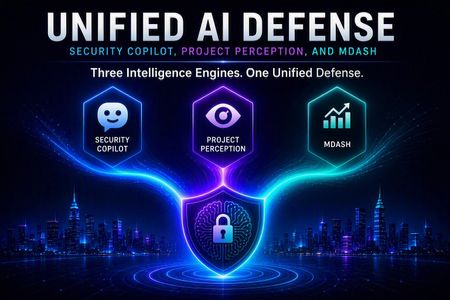
Executive Summary This triumvirate of tools present a cohesive and unified platform that tells a compelling story: Microsoft Security Copilot as the assistive AI experience and extensible agent platform for security and IT work; Project Perception as the coordinated multi-agent defense system that executes Red, Blue, and Green workflows. MDASH as the specialized multi-model agentic code-scanning harness for discovering, validating, proving, and helping remediate exploitable source-code vulnerabilities. Security Copilot helps analysts and teams ask, summarize, investigate, report, and extend workflows. Project Perception coordinates agents that reason and act across the defense lifecycle. MDASH feeds high-confidence vulnerability findings into broader security workflows, including Project Perception. Simple distinction Security Copilot assists the human. Project Perception coordinates the defense workflow. MDASH finds and validates software vulnerabilities. Platform Description Security Copilot AI that assists security and IT teams through natural-language investigation, summarization, promptbooks, plugins, embedded experiences, and extensible agents across Microsoft Security products. Project Perception AI that acts through coordinated multi-agent defense, using Red, Blue, and Green agents to expose gaps, investigate threats, remediate, and harden with humans in control of critical decisions. MDASH AI that finds and proves code vulnerabilities through a multi-model agentic scanning harness focused on source-code vulnerability discovery, validation, deduplication, proof, prioritization, and fix guidance. Relationship Model Security Copilot, Project Perception, and MDASH should not be positioned as interchangeable AI security tools. They sit at different layers of the security operating model: Security Copilot is the broad assistance and agent platform across Microsoft Security experiences; Project Perception is the coordinated multi-agent defense system for continuous defense; MDASH is the specialized code-security harness whose findings can feed Project Perception workflows. Layer Role How it connects Security Copilot Assistive AI and extensible agent platform Provides the user-facing experience, promptbooks, plugins, reporting, investigation help, and custom/Microsoft-built agents. Project Perception Coordinated multi-agent defense system Coordinates Red, Blue, and Green agents across exposure discovery, investigation, prioritization, remediation, and hardening. MDASH Specialized source-code vulnerability scanner Produces validated vulnerability findings and fix guidance that can inform broader Project Perception workflows. Detailed Comparison Matrix Category Security Copilot Project Perception MDASH Primary purpose Improve defender efficiency through generative AI assistance, embedded experiences, plugins, promptbooks, and agents. Coordinate specialized Red, Blue, and Green agents across the security lifecycle. Discover, validate, prove, prioritize, and help remediate exploitable source-code vulnerabilities. Core operating model Natural-language assistant and extensible agent platform. Coordinated agent playbooks and workflows with shared security context. Multi-model, multi-agent code-scanning pipeline. Primary users SOC analysts, threat hunters, IT admins, data security admins, identity teams, and teams building custom agents. Security operations, exposure management, posture, and incident response teams. AppSec, DevSecOps, product security, engineering, and authorized security teams. Inputs Prompts, incidents, alerts, logs, threat intelligence, plugins, policies, and product context. Security signals, threat intelligence, organizational context, sensors, models, agents, and approved actions. Source repositories or code folders, scan configuration, model outputs, code context, and vulnerability signals. Outputs Summaries, reports, investigations, KQL/query help, recommendations, and agent-generated results. Exposure findings, investigations, triage, detections, remediation/hardening recommendations, and approved actions. HTML/SARIF outputs, severity/confidence details, affected paths, proof details, and remediation suggestions. Strength Breadth and usability across Microsoft Security workflows. End-to-end coordinated defense across agent roles. Depth in software vulnerability discovery and exploitability validation. Best fit Productivity, explanation, reporting, analyst assistance, and workflow extension. Machine-speed coordinated defense for mature security operations. Deep application security and secure engineering workflows. Overlap Analysis Shared AI security reasoning All three use AI for security reasoning, but at different levels. Security Copilot grounds analyst-facing assistance through prompts, plugins, connectors, and organization context. Project Perception coordinates agents across security workflows. MDASH uses a specialized multi-model harness for code vulnerability analysis and proof-oriented validation. Investigation and analyst assistance Security Copilot and Project Perception overlap most clearly around investigations. The difference is the operating model: Security Copilot is optimized for human-assisted investigation; Project Perception is optimized for coordinated multi-agent workflows. Vulnerability discovery and remediation MDASH and Project Perception overlap around vulnerability discovery, exploitability validation, prioritization, and remediation. MDASH focuses on code vulnerabilities, while Project Perception can use MDASH findings with threat intelligence and broader security context to prioritize and drive remediation actions. Agent orchestration Security Copilot agents automate specific security and IT tasks. Project Perception coordinates Red, Blue, and Green defense agents across end-to-end workflows. MDASH orchestrates specialized scanning agents inside the code vulnerability pipeline. Scenario-Based Guidance Scenario Lead with Reason Faster SOC investigation, summarization, reporting, KQL help, and embedded assistance Security Copilot Best when the goal is analyst productivity and guided work inside existing Microsoft Security experiences. Deep source-code vulnerability discovery and exploitability validation MDASH Best when the organization has large code estates and needs richer AppSec analysis than traditional scanners alone. Coordinated Red/Blue/Green defense workflow across security domains Project Perception Best when the organization is ready for agentic defense workflows that identify, investigate, prioritize, and reduce risk. Organization asks whether Project Perception is just Security Copilot Clarify distinction Security Copilot assists; Project Perception coordinates agentic defense workflows. Organization asks whether MDASH is the same as Project Perception Clarify layered relationship MDASH produces code vulnerability findings; Project Perception operationalizes findings in broader defense workflows. Organization wants a complete agentic security story Combination Use Security Copilot for interaction and extensibility, Project Perception for coordinated defense, and MDASH for code vulnerability signals. How to position these AI offerings Lead with Security Copilot for analyst productivity, MDASH for source-code vulnerability discovery, and Project Perception for coordinated agentic defense. Project Perception is not a Security Copilot rebrand. Position the product as a distinct multi-agent defense system that complements Security Copilot. Each of these products complement each other rather than replace any of them. MDASH is not a general SOC platform. In essence, it is a specialized code vulnerability discovery and validation capability. Organization maturity Primary message Recommended offering Early AI/security productivity Use AI to help analysts and IT teams work faster inside the tools they already use. Security Copilot Mature SOC / Defender-centric operations Move from task assistance to coordinated defense workflows with agents that expose, investigate, and harden. Project Perception Strong engineering/AppSec focus Use AI to find, validate, prove, prioritize, and help remediate vulnerabilities in code repositories. MDASH Strategic AI-era security transformation Combine assistive AI, agentic defense, and deep code security. Combination Summary Security Copilot is a great entry point for organizations starting their Frontier journey and how AI can empower their security analysts, investigations and autonomous agent deployments. Project Perception is a coordinated agentic defense system. MDASH is a specialized code-security analysis engine. A simple, concise explanation would be: Copilot assists humans analyzing vast amount of security sources, MDASH discovers software vulnerabilities at machine speed level, and Project Perception coordinates security agents to determine what’s exploitable before an attacker does. Additional insights The newly updated documentation adds a clearer operating model for Project Perception: a continuous cycle to perceive risk, reason across security context, and act with human oversight. It also describes the underlying cyber stack and the role of the purpose-built MAI-Cyber-1-Flash model. Perceive, reason, and act Perceive: Continuously identify emerging risk across endpoints, identities, clouds, applications, and broader security signals. Reason: Apply threat intelligence, organizational context, and security signals to determine which risks are meaningful. Act: Help defenders move from findings to protective action faster, while retaining human judgment and approval for high-impact decisions. The new cyber stack Layer Role in Project Perception Field positioning cue Signals and sensors Provide visibility across endpoints, identities, clouds, applications, data, and AI. Start with the breadth of the digital estate. Security context Connect signals, threat intelligence, and organizational knowledge so agents can reason with operational context. Context turns raw signals into relevant understanding. Models Use a multi-model approach, including specialized cybersecurity reasoning. Select the right model for the task rather than relying on one model. Harness Orchestrate models and agents with the tools and controls required for reliable operation. The harness coordinates workflow, evaluation, and control. Agents Apply Red, Blue, and Green roles across discovery, investigation, response, remediation, and hardening. Agents are specialized roles working as one defense team. Actuators Translate decisions into real-world protective effects, not only recommendations. Actions remain governed and subject to the appropriate oversight. MAI-Cyber-1-Flash and the MDASH relationship MAI-Cyber-1-Flash is a Microsoft purpose-built cybersecurity model optimized for software vulnerability analysis. It operates as one model within the multi-model MDASH system, supporting selected stages of vulnerability discovery and analysis. MAI-Cyber-1-Flash provides specialized reasoning, while MDASH coordinates multiple models and scanning agents, and Project Perception connects those findings to broader defense workflows. Governance and human control Human oversight remains part of the operating model, especially for critical or high-impact actions. Agent activity should be positioned as governed, logged, auditable, and aligned to least-privilege access. Project Perception is designed to inherit enterprise security, governance, privacy, and compliance foundations rather than operate outside them. Appendix A: Project Perception Agent Roles and Relationship to Security Copilot and MDASH Understanding the Red, Blue, and Green Agents Project Perception is built around a coordinated virtual team of specialized AI agents. Just as human security organizations employ Red Teams, Blue Teams, and Security Engineering functions, Project Perception introduces AI agents that perform analogous activities at machine speed while maintaining human oversight for critical decisions. Red Agents Red Agents are responsible for identifying weaknesses before attackers can exploit them. Typical activities: Discover attack paths Identify exposed assets Detect privilege escalation opportunities Analyze risky configurations Correlate exposures across systems Surface previously unknown attack opportunities Business value: Red Agents help organizations move from reactive security to proactive exposure management by continuously searching for conditions that could enable compromise. Blue Agents Blue Agents investigate and validate risk. Once a potential exposure or threat is identified, Blue Agents determine whether it represents a meaningful security concern. Typical activities: Analyze alerts and incidents Correlate telemetry Validate exploitability Assess likelihood of attack Prioritize findings Evaluate business impact Generate investigative conclusions Business value: Blue Agents reduce alert fatigue and help security teams focus on the threats and vulnerabilities that present the highest operational risk. Green Agents Green Agents focus on remediation and hardening. After a risk has been identified and validated, Green Agents help eliminate or reduce that risk. Typical activities: Recommend fixes Validate remediation strategies Propose configuration changes Reduce attack surface Improve security posture Coordinate hardening activities Track remediation progress Business value: Green Agents help close the gap between identifying a problem and fixing it, accelerating risk reduction across the environment. Overlap with Security Copilot Security Copilot and Project Perception share some capabilities but are optimized for different operating models. Security Copilot is fundamentally an analyst-facing experience whose primary objective is to make humans more effective. Incident investigation Threat hunting Alert analysis Report generation Threat intelligence research Security summarization Security operations assistance Workflow automation through Security Copilot agents Positioning statement Security Copilot helps security professionals perform their jobs faster and more effectively. Area Security Copilot Project Perception agents Positioning Red overlap Assists analysts in understanding exposure data. Red Agents proactively discover exposures and attack opportunities. Security Copilot explains the exposure; Red Agents discover the exposure. Blue overlap Helps analysts investigate incidents and alerts. Blue Agents investigate as part of coordinated defense workflows. Security Copilot helps analysts investigate; Blue Agents investigate as part of the defense system. Green overlap Recommends remediation actions and implementation guidance. Green Agents coordinate remediation and hardening activities. Security Copilot recommends fixes; Green Agents drive remediation activities. Overlap with MDASH MDASH differs significantly from Security Copilot because it is focused specifically on software and source-code security. Its mission is vulnerability discovery, exploitability validation, and remediation guidance rather than general security operations. Area MDASH Project Perception agents Positioning Red overlap Identifies software weaknesses in source code. Red Agents evaluate broader attack surface across identity, endpoint, cloud, network, applications, and configuration weaknesses. MDASH identifies software weaknesses; Red Agents identify security weaknesses across the environment. Blue overlap Validates vulnerabilities and exploitability from a software perspective. Blue Agents validate operational risk using endpoint telemetry, identity exposure, threat intelligence, business impact, and attack paths. MDASH validates vulnerabilities; Blue Agents validate operational risk. Green overlap Provides code-level remediation guidance. Green Agents focus on broader environmental remediation and hardening. MDASH fixes code; Green Agents reduce organizational risk. Capability Comparison Matrix Capability Security Copilot Red Agents Blue Agents Green Agents MDASH Natural language interaction Primary No No No Limited Analyst assistance Primary No Limited Limited No Exposure discovery Limited Primary Limited No Code-focused Attack path analysis Limited Primary Yes No Limited Vulnerability discovery Limited Limited Limited No Primary Incident investigation Yes Limited Primary No Limited Alert triage Yes No Primary No No Risk prioritization Yes Limited Primary Limited Yes Exploitability validation Limited Limited Yes Limited Primary Remediation guidance Yes No Limited Primary Yes Code fix recommendations Limited No No Limited Primary Security hardening Limited No Limited Primary Limited Multi-agent orchestration Limited Yes Yes Yes Internal scanning agents End-to-end security lifecycle coverage Partial Partial Partial Partial No Final Takeaway Simple explanation In simple terms: Security Copilot assists humans. MDASH discovers software vulnerabilities. Project Perception coordinates security agent's activities and actions. Within Project Perception, Red Agents identify weaknesses, Blue Agents determine what matters, and Green Agents reduce risk. Technical Resources Getting started with Project Perception Project Perception FAQ Codename MDASH Overview Introducing MAI-Cyber-1-Flash inside MDASH Getting started with Security Copilot Security Copilot is now included for Microsoft 365 E5 and E7 organizations The AI Strategy Roadmap: Five drivers of successful AI transformation The AI Strategy Roadmap: How organizations are achieving Frontier Transformation (pdf)