ebpf
14 Topics
Metrics Filtering and Log Aggregation Now GA for Advanced Container Networking Services
We are thrilled to announce that Advanced Container Networking Services (ACNS) for Azure Kubernetes Service (AKS) now delivers two powerful observability features in General Availability: container network metrics filtering and container network log filtering and aggregation. Together, these capabilities set a new standard for Kubernetes network observability, giving you high-fidelity visibility at dramatically lower cost and noise. These capabilities fundamentally redefine how network observability works at scale while delivering up to 97% cost reduction. Why this is a Milestone? Most Kubernetes observability solutions face a fundamental tension: collect everything and drown in noise and cost, or sample and miss the signals that matter, with new features of Advanced Container Networking Services that tradeoff has been eliminated. With this release, Azure becomes the first cloud provider to deliver on-node metrics filtering and flow log aggregation for Kubernetes networking, capabilities now also contributed to the upstream Hubble project, making them available to the broader open-source community. For AKS customers running Cilium-based clusters, this means: Every flow you care about is captured. Everything else is dropped at the source. Log volume is compressed by up to 45% through aggregation, without losing security verdicts or error context. Costs scale with what you monitor, not with cluster size. What’s been improved in observability? This release introduces two capabilities that work together: container network metrics filtering and container network log filtering and aggregation. Both are available on AKS clusters with the Cilium data plane and give you precise controls to keep observability costs predictable while maintaining the visibility you need. Container Network Metrics Filtering Container network metrics are generated for all pods by default whenever Advanced Container Networking Services is enabled. With metrics filtering, you now control what gets collected at the point of ingestion, on the node, before anything is scraped or transmitted. A single ContainerNetworkMetric CRD per cluster defines which metric types (dns, flow, tcp, drop), namespaces, pod labels, and protocols to ingest. It supports both include and exclude filters, so you can maintain broad collection while carving out specific workloads or namespaces. Anything that doesn't match is dropped on the node. Changes reconcile in a few seconds, with no Cilium agent or Prometheus restarts required. Container Network Log Filtering and Aggregation Unlike metrics, container network logs are not generated automatically. You start capturing network flows only after applying a ContainerNetworkLog CRD that defines exactly which traffic to capture-by namespace, pod, service, protocol, or verdict. Only matching flows are logged, giving you a precise, targeted view rather than a fire hose. This is where Azure's first-to-market innovation comes in. Flow log aggregation, now built into Advanced Container Networking Services and contributed upstream to Hubble for the open-source community, groups similar flows into summarized records every 30 seconds. The result is dramatically reduced data volume while preserving security verdicts, service identity, and error context. What previously required custom post-processing pipelines is now built directly into the platform before storage costs are incurred. Every matched flow log captures: source and destination pods, namespaces, ports, protocols, traffic direction, and policy verdicts. Logs are stored in a Log Analytics workspace (ContainerNetworkLogs table) with a choice of using the Analytics or Basic tier. Built-in Azure portal dashboards are available for both tiers. Logs can also be exported to external log collectors such as Splunk or Datadog. First to Market: Azure and the upstream Hubble Contribution Advanced Container Networking Services built-in filtering and aggregation capabilities were engineered from the ground up to solve real production observability challenges at scale. Rather than keeping this innovation proprietary, Azure contributed the log aggregation and filtering capabilities to the upstream Hubble project, the observability layer of the Cilium ecosystem. This means: AKS customers get a fully managed, Azure-native experience with portal dashboards, Log Analytics integration, and Grafana visualization, out of the box. The broader open-source community gains access to the same filtering and aggregation primitives through upstream Hubble. Azure is the first to ship this capability in a managed Kubernetes service, and the first to give it back to the community. Key Benefits 💰 Lower observability cost. Metrics filtering drops unwanted data on the node before Prometheus ever scrapes it. Flow log aggregation compresses log data by up to 97% in lab testing. Your cost scales with what you choose to monitor, not with cluster size. 📉 Less noise, more signal. Metrics filtering carves out the namespaces and workloads that matter, so dashboards show only relevant signals. Log filters scope collection to specific pods and verdicts. Engineers start every investigation with data that's already relevant. ⚡ Faster root-cause isolation. Every metric carries source and destination pod context. Targeted flow logs add the forensic detail, which policy, destination, or port is involved. Together, they cut mean time to resolution from hours of guesswork to minutes of structured investigation. 🔒 Full signal, zero gaps. Within the scope you define, every flow is captured and every pattern is preserved. Aggregation compresses volume without losing security verdicts or error context. Who Benefits Platform engineers managing multi-tenant clusters can scope data collection per namespace, so each team gets visibility into their own traffic without contributing to a shared cost pool. SREs can isolate packet drops, TCP resets, or DNS failures to a specific workload in minutes, starting with data that's already scoped to what matters. Decision-makers evaluating observability spend get predictable, controllable ingestion costs that scale with intent, not infrastructure size. How to optimize metrics and logs with filtering? Enable Advanced Container Networking Services ( ACNS) on your AKS cluster with the Cilium data plane: az aks create --enable-acns Or on an existing cluster: az aks update --resource-group $RESOURCE_GROUP --name $CLUSTER --enable-acns Apply a ContainerNetworkMetric CRD to filter which metrics are collected on each node. Start by excluding noisy system namespaces, then scope to business-critical workloads. Apply a ContainerNetworkLog CRD to define which flows to capture. Enable Azure Monitor integration with --enable-container-network-logs to send logs to a Log Analytics workspace, or export logs from the node to an external logging system such as Splunk or Datadog. Check your dashboards. Open your cluster in the Azure portal and go to Monitor > Insights > Networking for bytes, drops, DNS errors, and flows. For flow logs, use the built-in Azure portal dashboards available for both Basic and Analytics tiers. Conclusion Kubernetes network observability has long meant choosing between visibility and cost. With container network metrics filtering and log filtering and aggregation now GA in Advanced Container Networking Services (ACNS) and contributed to upstream Hubble for the open-source community, that tradeoff is gone. Azure is first to market with this capability. AKS customers get it fully managed, out of the box, with built-in dashboards with Log Analytics integration. And the broader Cilium ecosystem gets it through upstream Hubble. High-fidelity visibility. Lower cost. No compromise. Learn more: Container network metrics overview: Container network metrics overview - Azure Kubernetes Service | Microsoft Learn Container network logs overview: Container Network Logs Overview - Azure Kubernetes Service | Microsoft Learn Configure container network metrics filtering: Configure Container network metrics filtering for Azure Kubernetes Service (AKS) - Azure Kubernetes Service | Microsoft Learn Set up container network logs: Set up container network logs - Azure Kubernetes Service | Microsoft Learn 582Views0likes0Comments
Announcing public preview: Cilium mTLS encryption for Azure Kubernetes Service
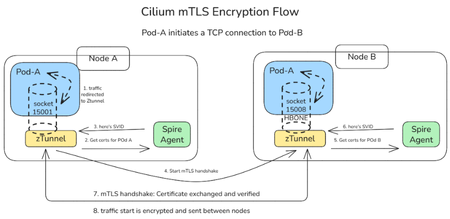
We are thrilled to announce the public preview of Cilium mTLS encryption in Azure Kubernetes Service (AKS), delivered as part of Advanced Container Networking Services and powered by the Azure CNI dataplane built on Cilium. This capability is the result of a close engineering collaboration between Microsoft and Isovalent (now part of Cisco). It brings transparent, workload‑level mutual TLS (mTLS) to AKS without sidecars, without application changes, and without introducing a separate service mesh stack. This public preview represents a major step forward in delivering secure, high‑performance, and operationally simple networking for AKS customers. In this post, we’ll walk through how Cilium mTLS works, when to use it, and how to get started. Why Cilium mTLS encryption matters Traditionally, teams looking to in-transit traffic encryption in Kubernetes have had two primary options: Node-level encryption (for example, WireGuard or virtual network encryption), which secures traffic in transit but lacks workload identity and authentication. Service meshes, which provide strong identity and mTLS guarantees but introduce operational complexity. This trade‑off has become increasingly problematic, as many teams want workload‑level encryption and authentication, but without the cost, overhead, and architectural impact of deploying and operating a full-service mesh. Cilium mTLS closes this gap directly in the dataplane. It delivers transparent, inline mTLS encryption and authentication for pod‑to‑pod TCP traffic, enforced below the application layer. And implemented natively in the Azure CNI dataplane built on Cilium, so customers gain workload‑level security without introducing a separate service mesh, resulting in a simpler architecture with lower operational overhead. To see how this works under the hood, the next section breaks down the Cilium mTLS architecture and follows a pod‑to‑pod TCP flow from interception to authentication and encryption. Architecture and design: How Cilium mTLS works Cilium mTLS achieves workload‑level authentication and encryption by combining three key components, each responsible for a specific part of the authentication and encryption lifecycle. Cilium agent: Transparent traffic interception and wiring Cilium agent which already exists on any cluster running with Azure CNI powered by cilium, is responsible for making mTLS invisible to applications. When a namespace is labelled with “io.cilium/mtls-enabled=true”, The Cilium agent enrolls all pods in that namespace. It enters each pod's network namespace and installs iptables rules that redirect outbound traffic to ztunnel on port 15001. It is also responsible for passing workload metadata (such as pod IP and namespace context) to ztunnel. Ztunnel: Node‑level mTLS enforcement Ztunnel is an open source, lightweight, node‑level Layer 4 proxy that was originally created by Istio. Ztunnel runs as a DaemonSet, on the source node it looks up the destination workload via XDS (streamed from the Cilium agent) and establishes mutually authenticated TLS 1.3 sessions between source and destination nodes. Connections are held inline until authentication is complete, ensuring that traffic is never sent in plaintext. The destination ztunnel decrypts the traffic and delivers it into the target pod, bypassing the interception rules via an in-pod mark. The application sees a normal plaintext connection — it is completely unaware encryption happened. SPIRE: Workload identity and trust SPIRE (SPIFFE Runtime Environment) provides the identity foundation for Cilium mTLS. SPIRE acts as the cluster Certificate Authority, issuing short‑lived X.509 certificates (SVIDs) that are automatically rotated and validated. This is a key design principle of Cilium mTLS - trust is based on workload identity, not network topology. Each workload receives a cryptographic identity derived from: Kubernetes namespace Kubernetes ServiceAccount These identities are issued and rotated automatically by SPIRE and validated on both sides of every connection. As a result: Identity remains stable across pod restarts and rescheduling Authentication is decoupled from IP addresses Trust decisions align naturally with Kubernetes RBAC and namespace boundaries This enables a zero‑trust networking model that fits cleanly into existing AKS security practices. End‑to‑End workflow example To see how these components work together, consider a simple pod‑to‑pod connection: A pod initiates a TCP connection to another pod. Traffic intercepted inside the pod network namespace and redirected to the local ztunnel instance. ztunnel retrieves the workload identity using certificates issued by SPIRE. ztunnel establishes a mutually authenticated TLS session with the destination node’s ztunnel. Traffic is encrypted and sent between pods. The destination ztunnel decrypts the traffic and delivers it to the target pod. Every packet from an enrolled pod is encrypted. There is no plaintext window, and no dropped first packets. The connection is held inline by ztunnel until the mTLS tunnel is established, then traffic flows bidirectionally through an HBONE (HTTP/2 CONNECT) tunnel. Workload enrolment and scope Cilium mTLS in AKS is opt‑in and scoped at the namespace level. Platform teams enable mTLS by applying a single label to a namespace. From that point on: All pods in that namespace participate in mTLS Authentication and encryption are mandatory between enrolled workloads Non-enrolled namespaces continue to operate unchanged Encryption is applied only when both pods are enrolled. Traffic between enrolled and non‑enrolled workloads continues in plaintext without causing connectivity issues or hard failures. This model enables gradual rollout, staged migrations, and low-risk adoption across environments. Getting started in AKS Cilium mTLS encryption is available in public preview for AKS clusters that use: Azure CNI powered by Cilium Advanced Container Networking Services You can enable mTLS: When creating a new cluster, or On an existing cluster by updating the Advanced Container Networking Services configuration Once enabled, enrolling workloads is as simple as labelling a namespace. 👉 Learn more Concepts: How Cilium mTLS works, architecture, and trust boundaries How-to guide: Step-by-step instructions to enable and verify mTLS in AKS Looking ahead This public preview represents an important step forward in simplifying network security for AKS and reflects a deep collaboration between Microsoft and Isovalent to bring open, standards‑based innovation into production‑ready cloud platforms. We’re continuing to work closely with the community to improve the feature and move it toward general availability. If you’re looking for workload‑level encryption without the overhead of a traditional service mesh, we invite you to try Cilium mTLS in AKS and share your experience.1.8KViews3likes0Comments
Introducing eBPF Host Routing: High performance AI networking with Azure CNI powered by Cilium
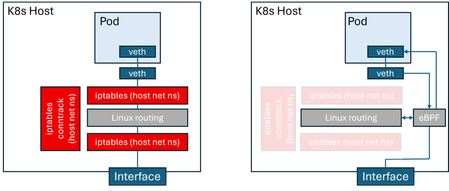
AI-driven applications demand low-latency workloads for optimal user experience. To meet this need, services are moving to containerized environments, with Kubernetes as the standard. Kubernetes networking relies on the Container Network Interface (CNI) for pod connectivity and routing. Traditional CNI implementations use iptables for packet processing, adding latency and reducing throughput. Azure CNI powered by Cilium natively integrates Azure Kubernetes service (AKS) data plane with Azure CNI networking modes for superior performance, hardware offload support, and enterprise-grade reliability. Azure CNI powered by Cilium delivers up to 30% higher throughput in both benchmark and real-world customer tests compared to a bring-your-own Cilium setup on AKS. The next leap forward: Now, AKS data plane performance can be optimized even further with eBPF host routing, which is an open-source Cilium CNI capability that accelerates packet forwarding by executing routing logic directly in eBPF. As shown in the figure, this architecture eliminates reliance on iptables and connection tracking (conntrack) within the host network namespace. As a result, significantly improving packet processing efficiency, reducing CPU overhead and optimized performance for modern workloads. Comparison of host routing using the Linux kernel stack vs eBPF Azure CNI powered by Cilium is battle-tested for mission-critical workloads, backed by Microsoft support, and enriched with Advanced Container Networking Services features for security, observability, and accelerated performance. eBPF host routing is now included as part of Advanced Container Networking Services suite, delivering network performance acceleration. In this blog, we highlight the performance benefits of eBPF host routing, explain how to enable it in an AKS cluster, and provide a deep dive into its implementation on Azure. We start by examining AKS cluster performance before and after enabling eBPF host routing. Performance comparison Our comparative benchmarks measure the difference in Azure CNI Powered by Cilium, by enabling eBPF host routing. To perform these measurements, we use AKS clusters on K8s version 1.33, with host nodes of 16 cores, running Ubuntu 24.04. We are interested in throughput and latency numbers for pod-to-pod traffic in these clusters. For throughput measurements, we deploy netperf client and server pods, and measure TCP_STREAM throughput at varying message sizes in tests running 20 seconds each. The wide range of message sizes are meant to capture the variety of workloads running on AKS clusters, ranging from AI training and inference to messaging systems and media streaming. For latency, we run TCP_RR tests, measuring latency at various percentiles, as well as transaction rates. The following figure compares pods on the same node; eBPF-based routing results in a dramatic improvement in throughput (~30%). This is because, on the same node, the throughput is not constrained by factors such as the VM NIC limits and is almost entirely determined by host routing performance. For pod-to-pod throughput across different nodes in the cluster. eBPF host routing results in better pod-to-pod throughput across nodes, and the difference is more pronounced with smaller message sizes (3x more). This is because, with smaller messages, the per-message overhead incurred in the host network stack has a bigger impact on performance. Next, we compare latency for pod-to-pod traffic. We limit this benchmark to intra-node traffic, because cross-node traffic latency is determined by factors other than the routing latency incurred in the hosts. eBPF host routing results in reduced latency compared to the non-accelerated configuration at all measured percentiles. We have also measured the transaction rate between client and server pods, with and without eBPF host routing. This benchmark is an alternative measurement of latency because a transaction is essentially a small TCP request/response pair. We observe that eBPF host routing improves transactions per second by around 27% as compared to legacy host routing. Transactions/second (same node) Azure CNI configuration Transactions/second eBPF host routing 20396.9 Traditional host routing 16003.7 Enabling eBPF routing through Advanced Container Networking Services eBPF host routing is disabled by default in Advanced Container Networking Services because bypassing iptables in the host network namespace can ignore custom user rules and host-level security policies. This may lead to visible failures such as dropped traffic or broken network policies, as well as silent issues like unintended access or missed audit logs. To mitigate these risks, eBPF host routing is offered as an opt-in feature, enabled through Advanced Container Networking Services on Azure CNI powered by Cilium. The Advanced Container Networking Services advantage: Built-in safeguards: Enabling eBPF Host Routing in ACNS enhances the open-source offering with strong built-in safeguards. Before activation, ACNS validates existing iptables rules in the host network namespace and blocks enablement if user-defined rules are detected. Once enabled, kernel-level protections prevent new iptables rules and generate Kubernetes events for visibility. These measures allow customers to benefit from eBPF’s performance gains while maintaining security and reliability. Thanks to the additional safeguards, eBPF host routing in Advanced Container Networking Services is a safer and more robust option for customers who wish to obtain the best possible networking performance on their Kubernetes infrastructure. How to enable eBPF Host Routing with ACNS Visit the documentation on how to enable eBPF Host Routing for new and existing Azure CNI Powered by Cilium clusters. Verify the network profile with the new performance `accelerationMode`field set to `BpfVeth`. "networkProfile": { "advancedNetworking": { "enabled": true, "performance": { "accelerationMode": "BpfVeth" }, … For more information on Advanced Container Networking Services and ACNS Performance, please visit https://aka.ms/acnsperformance. Resources For more info about Advanced Container Networking Services please visit (Container Network Security with Advanced Container Networking Services (ACNS) - Azure Kubernetes Service | Microsoft Learn). For more info about Azure CNI Powered by Cilium please visit (Configure Azure CNI Powered by Cilium in Azure Kubernetes Service (AKS) - Azure Kubernetes Service | Microsoft Learn).1.8KViews1like2Comments
Simplify container network metrics filtering in Azure Container Networking Services for AKS
We’re excited to introduce container network metrics filtering in Azure Container Networking Services for Azure Kubernetes Service (AKS) is now in public preview! This capability transforms how you manage network observability in Kubernetes clusters by giving you control over what metrics matter most. Why excessive metrics are a problem (and how we’re fixing it) In today’s large-scale, microservices-driven environments, teams often face metrics bloat, collecting far more data than they need. The result? High storage & ingestion costs: Paying for data you’ll never use. Cluttered dashboards: Hunting for critical latency spikes in a sea of irrelevant pod restarts. Operational overhead: Slower queries, higher maintenance, and fatigue. Our new filtering capability solves this by letting you define precise filters at the pod level using standard Kubernetes custom resources. You collect only what matters, before it ever reaches your monitoring stack. Key Benefits: Signal Over Noise Benefit Your Gain Fine-grained control Filter by namespace or pod label. Target critical services and ignore noise. Cost optimization Reduce ingestion costs for Prometheus, Grafana, and other tools. Improved observability Cleaner dashboards and faster troubleshooting with relevant metrics only. Dynamic & zero-downtime Apply or update filters without restarting Cilium agents or Prometheus. How it works: Filtering at the source Unlike traditional sampling or post-processing, filtering happens at the Cilium agent level—inside the kernel’s data plane. You define filters using the ContainerNetworkMetric custom resource to include or exclude metrics such as: DNS lookups TCP connection metrics Flow metrics Drop (error) metrics This reduces data volume before metrics leave the host, ensuring your observability tools receive only curated, high-value data. Example: Filtering flow metrics to reduce noise Here’s a sample ContainerNetworkMetric CRD that filters only dropped flows from the traffic/http namespace and excludes flows from traffic/fortio pods: apiVersion: acn.azure.com/v1alpha1 kind: ContainerNetworkMetric metadata: name: container-network-metric spec: filters: - metric: flow includeFilters: # Include only DROPPED flows from traffic namespace verdict: - "dropped" from: namespacedPod: - "traffic/http" excludeFilters: # Exclude traffic/fortio flows to reduce noise from: namespacedPod: - "traffic/fortio" Before filtering: After applying filters: Getting started today Ready to simplify your network observability? Enable Advanced Container Networking Services: Make sure Advanced Container Networking Services is enabled on your AKS cluster. Define Your Filter: Apply the ContainerNetworkMetric CRD with your include/exclude rules. Validate: Check your settings via ConfigMap and Cilium agent logs. See the Impact: Watch ingestion costs drop and dashboards become clearer! 👉 Learn more in the Metrics Filtering Guide. Try the public preview today and take control of your container network metrics.574Views0likes0CommentsLayer 7 Network Policies for AKS: Now Generally Available for Production Security and Observability!
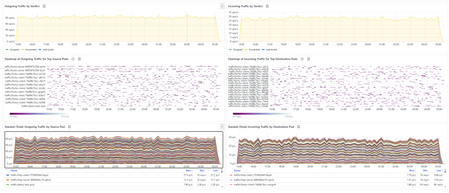
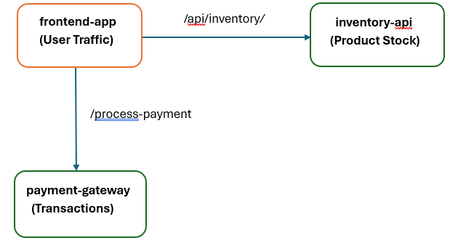
We are thrilled to announce that Layer 7 (L7) Network Policies for Azure Kubernetes Service (AKS), powered by Cilium and Advanced Container Networking Services (ACNS), has reached General Availability (GA)! The journey from public preview to GA signifies a critical step: L7 Network Policies are now fully supported, highly optimized, and ready for your most demanding, mission-critical production workloads. A Practical Example: Securing a Multi-Tier Retail Application Let's walk through a common production scenario. Imagine a standard retail application running on AKS with three core microservices: frontend-app: Handles user traffic and displays product information. inventory-api: A backend service that provides product stock levels. It should be read-only for the frontend. payment-gateway: A highly sensitive service that processes transactions. It should only accept POST requests from the frontend to a specific endpoint. The Security Challenge: A traditional L4 policy would allow the frontend-app to talk to the inventory-api on its port, but it couldn't prevent a compromised frontend pod from trying to exploit a potential vulnerability by sending a DELETE or POST request to modify inventory data. The L7 Policy Solution: With GA L7 policies, you can enforce the Principle of Least Privilege at the application layer. Here's how you would protect the inventory-api: apiVersion: cilium.io/v2 kind: CiliumNetworkPolicy metadata: name: protect-inventory-api spec: endpointSelector: matchLabels: app: inventory-api ingress: - fromEndpoints: - matchLabels: app: frontend-app toPorts: - ports: - port: "8080" # The application port protocol: TCP rules: http: - method: "GET" # ONLY allow the GET method path: "/api/inventory/.*" # For paths under /api/inventory/ The Outcome: Allowed: A legitimate request from the frontend-app (GET /api/inventory/item123) is seamlessly forwarded. Blocked: Assuming frontend-app is compromised, any malicious request (like DELETE /api/inventory/item123) originating from it is blocked at the network layer. This Zero Trust approach protects the inventory-api service from the threat, regardless of the security state of the source service. This same principle can be applied to protect the payment-gateway, ensuring it only accepts POST requests to the /process-payment endpoint, and nothing else. Beyond L7: Supporting Zero Trust with Enhanced Security In addition, toL7 application-level policies to ensure Zero Trust, we support Layer 3/4 network security and advanced egress controls like Fully Qualified Domain Name (FQDN) filtering. This comprehensive approach allows administrators to: Restrict Outbound Connections (L3/L4 & FQDN): Implement strict egress control by ensuring that workloads can only communicate with approved external services. FQDN filtering is crucial here, allowing pods to connect exclusively to trusted external domains (e.g., www.trusted-partner.com), significantly reducing the risk of data exfiltration and maintaining compliance. To learn more, visit the FQDN Filtering Overview. Enforce Uniform Policy Across the Cluster (CCNP): Extend protections beyond individual namespaces. By defining security measures as a Cilium Clusterwide Network Policy (CCNP), thanks to its General Availability (GA), administrators can ensure uniform policy enforcement across multiple namespaces or the entire Kubernetes cluster, simplifying management and strengthening the overall security posture of all workloads. To learn CCNP Example: L4 Egress Policy with FQDN Filtering This policy ensures that all pods across the cluster (CiliumClusterwideNetworkPolicy) are only allowed to establish outbound connections to the domain *.example.com on the standard web ports (80 and 443). apiVersion: cilium.io/v2 kind: CiliumClusterwideNetworkPolicy metadata: name: allow-egress-to-example-com spec: endpointSelector: {} # Applies to all pods in the cluster egress: - toFQDNs: - matchPattern: "*.example.com" # Allows access to any subdomain of example.com toPorts: - ports: - port: "443" protocol: TCP - port: "80" protocol: TCP Operational Excellence: Observability You Can Trust A secure system must be observable. With GA, the integrated visibility of your L7 traffic is production ready. In our example above, the blocked DELETE request isn't silent. It is immediately visible in your Azure Managed Grafana dashboards as a "Dropped" flow, attributed directly to the protect-inventory-api policy. This makes security incidents auditable and easy to diagnose, enabling operations teams to detect misconfigurations or threats in real time. Below is a sample dashboard layout screenshot. Next Steps: Upgrade and Secure Your Production! We encourage you to enable L7 Network Policies on your AKS clusters and level up your network security controls for containerized workloads. We value your feedback as we continue to develop and improve this feature. Please refer to the Layer 7 Policy Overview for more information and visit How to Apply L7 Policy for an example scenario.905Views1like0CommentsIntroducing Container Network Logs with Advanced Container Networking Services for AKS
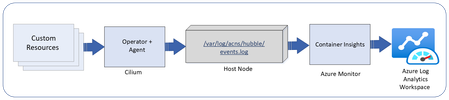
Overview of container network logs Container network logs offer a comprehensive way to monitor network traffic in AKS clusters. Two modes of support, stored-logs and on-demand logs, provides debugging flexibility with cost optimization. The on-demand mode provides a snapshot of logs with queries and visualization with Hubble CLI UI for specific scenarios and does not use log storage to persist the logs. The stored-logs mode when enabled continuously collects and persists logs based on user-defined filters. Logs can be stored either in Azure Log Analytics (managed) or locally (unmanaged). Managed storage: Logs are forwarded to Azure Log Analytics for secure, scalable, and compliant storage. This enables advanced analytics, anomaly detection, and historical trend analysis. Both basic and analytics table plans are supported for storage. Unmanaged storage: Logs are stored locally on the host nodes under /var/log/acns/hubble. These logs are rotated automatically at 50 MB to manage storage efficiently. These logs can be exported to external logging systems or collectors for further analysis. Use cases Connectivity monitoring: Identify and visualize how Kubernetes workloads communicate within the cluster and with external endpoints, helping to resolve application connectivity issues efficiently. Troubleshooting network errors: Gain deep granular visibility into dropped packets, misconfigurations, or errors with details on where and why errors are occurring (TCP/UDP, DNS, HTTP) for faster root cause analysis. Security policy enforcement: Detect and analyze suspicious traffic patterns to strengthen cluster security and ensure regulatory compliance. How it works Container network logs use eBPF technology with Cilium to capture network flows from AKS nodes. Log collection is disabled by default. Users can enable log collection by defining custom resources (CRs) to specify the types of traffic to monitor, such as namespaces, pods, services, or protocols. The Cilium agent collects and processes this traffic, storing logs in JSON format. These logs can either be retained locally or integrated with Azure Monitoring for long-term storage and advanced analytics and visualization with Azure managed Grafana. Fig1: Container network logs overview If using managed storage, users will enable Azure monitor log collection using Azure CLI or ARM templates. Here’s a quick example of enabling container network logs on Azure monitor using the CLI: az aks enable-addons -a monitoring --enable-high-log-scale-mode -g $RESOURCE_GROUP -n $CLUSTER_NAME az aks update --enable-acns \ --enable-retina-flow-logs \ -g $RESOURCE_GROUP \ -n $CLUSTER_NAME Key benefits Faster issue resolution: Detailed logs enable quick identification of connectivity and performance issues. Operational efficiency: Advanced filtering reduces data management overhead. Enhanced application reliability: Proactive monitoring ensures smoother operations. Cost optimization: Customized logging scopes minimize storage and data ingestion costs. Streamlined compliance: Comprehensive logs support audits and security requirements. Observing logs in Azure managed Grafana dashboards Users can visualize container network logs in Azure managed Grafana dashboards, which simplify monitoring and analysis: Flow logs dashboard: View internal communication between Kubernetes workloads. This dashboard highlights metrics such as total requests, dropped packets, and error rates. Error logs dashboard: Easily zoom in only on the logs which show errors for faster log parsing. Service dependency graph: Visualize relationships between services, detect bottlenecks, and optimize network flows. These dashboards provide filtering options to isolate specific logs, such as DNS errors or traffic patterns, enabling efficient root cause analysis. Summary statistics and top-level metrics further enhance understanding of cluster health and activity. Fig 2: Azure managed Grafana dashboard for container network logs Conclusion Container network logs for AKS offer a powerful and cost optimized way to monitor and analyze network activity, enhance troubleshooting, security, and ensure compliance. To get started, enable Advanced Container Networking Services in your AKS cluster and configure custom resources for logging. Visualize your logs in Grafana dashboards and Azure Log Analytics to unlock actionable insights. Learn more here.1.6KViews3likes0CommentsAzure CNI now supports Node Subnet IPAM mode with Cilium Dataplane
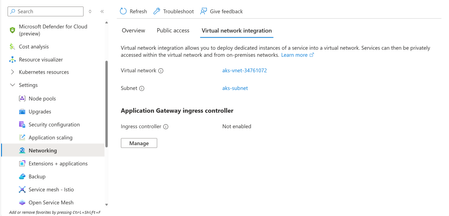
Azure CNI Powered by Cilium is a high-performance data plane leveraging extended Berkeley Packet Filter (eBPF) technologies to enable features such as network policy enforcement, deep observability, and improved service routing. Legacy CNI supports Node Subnet where every pod gets an IP address from a given subnet. AKS clusters that require VNet IP addressing mode (non-overlay scenarios) are typically advised to use Pod Subnet mode. However, AKS clusters that do not face the risk of IP exhaustion can continue to use node subnet mode for legacy reasons and switch the CNI dataplane to utilize Cilium's features. With this feature launch, we are providing that migration path! Users often leverage node subnet mode in Azure Kubernetes Service (AKS) clusters for ease of use. This mode provides an optionality where users do not want to worry about managing multiple subnets, especially when using smaller clusters. Besides, let’s highlight some additional benefits unlocked by this feature. Improved Network Debugging Capabilities through Advanced Container Networking Services By upgrading to Azure CNI Powered by Cilium with Node Subnet, Advanced Container Networking Services opens the possibility of using eBPF tools to gather request metrics at the node and pod level. Advanced Observability tools provide a managed Grafana dashboard to inspect these metrics for a streamlined incident response experience. Advanced Network Policies Network policies for Legacy CNI present a challenge because policies on IP-based filtering require constant updating in a Kubernetes cluster where pod IP addresses frequently change. Enabling the Cilium data plane offers an efficient and scalable approach to managing network policies. Create an Azure CNI Powered by Cilium cluster with node subnet as the IP Address Management (IPAM) networking model. This is the default option when done with a `--network-plugin azure` flag. az aks create --name <clusterName> --resource-group <resourceGroupName> --location <location> --network-plugin azure --network-dataplane cilium --generate-ssh-keys A flat network can lead to less efficient use of IP addresses. Careful planning through the List Usage command of a given VNet helps to see current usage of the subnet space. AKS creates a VNet and subnet automatically from cluster creation. Note the resource group for this VNet is generated based on the resource group for the cluster, the cluster name, and location. From the Portal under Settings > Networking for the AKS cluster, we can see the names of the resources created automatically. az rest --method get \ --url https://management.azure.com/subscriptions/{subscription-id} /resourceGroups/MC_acn-pm_node-subnet-test_westus2/providers/Microsoft.Network/virtualNetworks/aks-vnet-34761072/usages?api-version=2024-05-01 { "value": [ { "currentValue": 87, "id": "/subscriptions/9b8218f9-902a-4d20-a65c-e98acec5362f/resourceGroups/MC_acn-pm_node-subnet-test_westus2/providers/Microsoft.Network/virtualNetworks/aks-vnet-34761072/subnets/aks-subnet", "isAdjustable": false, "limit": 65531, "name": { "localizedValue": "Subnet size and usage", "value": "SubnetSpace" }, "unit": "Count" } ] } To better understand this utilization, click the link of the Virtual network then access the list of Connected Devices. The view also shows which IPs are utilized on a given node. There are a total of 87 devices consistent with the previous command line output of subnet usage. Since the default creates three nodes with a max pod count of 30 per node (configurable up to 250), IP exhaustion is not a concern although careful planning is required for larger clusters. Next, we will enable Advanced Container Networking Services (ACNS) on this cluster. az aks update --resource-group <resourceGroupName> --name <clusterName> --enable-acns Create a default deny Cilium Network policy. The namespace is `default`, and we will use `app: server` as the label in this example. kubectl apply -f - <<EOF apiVersion: cilium.io/v2 kind: CiliumNetworkPolicy metadata: name: default-deny namespace: default spec: endpointSelector: matchLabels: app: server ingress: - {} egress: - {} EOF The empty brackets under ingress and egress represent all traffic. Next, we will use `agnhost`, a network connectivity utility used in Kubernetes upstream testing that can help set up a client/server scenario. kubectl run server --image=k8s.gcr.io/e2e-test-images/agnhost:2.41 --labels="app=server" --port=80 --command -- /agnhost serve-hostname --tcp --http=false --port "80" Get the server address IP: kubectl get pod server -o wide NAME READY STATUS RESTARTS AGE IP NODE NOMINATED NODE READINESS GATES server 1/1 Running 0 9m 10.224.0.57 aks-nodepool1-20832547-vmss000002 <none> <none> Create a client that will use the agnhost utility to test the network policy. Open a new terminal window as this will also open a new shell. kubectl run -it client --image=k8s.gcr.io/e2e-test-images/agnhost:2.41 --command -- bash Test connectivity to the server from client. Timeout is expected since the network policy is default deny for all traffic in the default namespace. Your pod IP may be different from the example. bash-5.0# ./agnhost connect 10.224.0.57:80 --timeout=3s --protocol=tcp –verbose TIMEOUT Remove the network policy. In practice, additional policies would be added to retain the default deny policy while allowing applications that satisfy the conditions to allow connectivity. kubectl delete cnp default-deny From a shell with the client pod, verify the connection is now allowed. If successful, there is simply no output. kubectl attach client -c client -i -t bash-5.0# ./agnhost connect 10.224.0.57:80 --timeout=3s --protocol=tcp Connectivity between server and client is restored. Additional tools such as Hubble UI for debugging can be found in Container Network Observability - Advanced Container Networking Services (ACNS) for Azure Kubernetes Service (AKS) - Azure Kubernetes Service | Microsoft Learn. Conclusion Building a seamless migration path is critical to continued growth and adoption of ACPC. The goal is to provide a best-in-class experience by providing an upgrade path to enable the Cilium data plane to enable high-performance networking across various IP addressing modes. This allows for flexibility to fit your IP address plans to build varied workload types using AKS networking. Keep an eye out on the AKS public roadmap for more developments in the near future. Resources Learn more about Azure CNI Powered by Cilium. Learn more about IP address planning. Visit Azure CNI Powered by Cilium benchmarking to see performance benchmarks using an eBPF dataplane. Visit to learn more about Advanced Container Networking Services.771Views1like2CommentsWhat's New in the World of eBPF from Azure Container Networking!
Azure Container Networking Interface (CNI) continues to evolve, now bolstered by the innovative capabilities of Cilium. Azure CNI Powered by Cilium (ACPC) leverages Cilium’s extended Berkeley Packet Filter (eBPF) technologies to enable features such as network policy enforcement, deep observability, and improved service routing. Here’s a deeper look into the latest features that make management of Azure Kubernetes Service (AKS) clusters more efficient, scalable, and secure. Improved Performance: Cilium Endpoint Slices One of the standout features in the recent updates is the introduction of CiliumEndpointSlice. This feature significantly enhances the performance and scalability of the Cilium dataplane in AKS clusters. Previously, Cilium used Custom Resource Definitions (CRDs) called CiliumEndpoints to manage pods. Each pod had a CiliumEndpoint associated with it, which contained information about the pod’s status and properties. However, this approach placed significant stress on the control plane, especially in larger clusters. To alleviate this load, CiliumEndpointSlice batches CiliumEndpoints and their updates, reducing the number of updates propagated to the control plane. Our performance testing has shown remarkable improvements: Average API Server Responsiveness: Upto 50% decrease in latency, meaning faster processing of queries. Pod Startup Latencies: Upto 60% reduction, allowing for faster deployment and scaling. In-Cluster Network Latency: Upto 80% decrease, translating to better application performance. Note that this feature is Generally Available in AKS clusters, by default, using Cilium 1.17 release and above and does not require additional configuration changes! Learn more about improvements unlocked by CiliumEndpointSlices with Azure CNI by Cilium - High-Scale Kubernetes Networking with Azure CNI Powered by Cilium | Microsoft Community Hub. Deployment Flexibility: Dual Stack for Cilium Network Policies Kubernetes clusters operating on an IPv4/IPv6 dual-stack network enable workloads to natively access both IPv4 and IPv6 endpoints without incurring additional complexities or performance drawbacks. Previously, we had enabled the use of dual stack networking on AKS clusters (starting with AKS 1.29) running Azure CNI powered by Cilium in preview mode. Now, we are happy to announce that the feature is Generally Available! By enabling both IPv4 and IPv6 addressing, you can manage your production AKS clusters in mixed environments, accommodating various network configurations seamlessly. More importantly, dual-stack support in Azure CNI’s Cilium network policies extend security benefits for AKS clusters in those complex environments. For instance, you can enable dual stack AKS clusters using eBPF dataplane as follows: az aks create \ --location <region> \ --resource-group <resourceGroupName> \ --name <clusterName> \ --network-plugin azure \ --network-plugin-mode overlay \ --network-dataplane cilium \ --ip-families ipv4,ipv6 \ --generate-ssh-keys Learn more about Azure CNI’s Network Policies - Configure Azure CNI Powered by Cilium in Azure Kubernetes Service (AKS) - Azure Kubernetes Service | Microsoft Learn Ease of Use: Node Subnet Mode with Cilium Azure CNI now supports Node Subnet IPAM mode with Cilium Dataplane. In Node Subnet mode IP addresses to pods are assigned from the same subnet as the node itself, simplifying routing and policy management. This mode is particularly beneficial for smaller clusters where managing multiple subnets is cumbersome. AKS clusters using this mode also gain the benefits of improved network observability, Cilium Network Policies and FQDN filtering and more capabilities unlocked by Advanced Container Networking Services (ACNS). More notable, with this feature we now support all IPAM configuration options with eBPF dataplane on AKS clusters. You can create an AKS cluster with node subnet IPAM mode and eBPF dataplane as follows: az aks create \ --name <clusterName> \ --resource-group <resourceGroupName> \ --location <location> \ --network-plugin azure \ --network-dataplane cilium \ --generate-ssh-keys Learn more about Node Subnet - Configure Azure CNI Powered by Cilium in Azure Kubernetes Service (AKS) - Azure Kubernetes Service | Microsoft Learn. Defense-in-depth: Cilium Layer 7 Policies Azure CNI by Cilium extends its comprehensive Layer4 network policy capabilities to Layer7, offering granular control over application traffic. This feature enables users to define security policies based on application-level protocols and metadata, adding a powerful layer of security and compliance management. Layer7 policies are implemented using Envoy, an open-source service proxy, which is part of ACNS Security Agent operating in conjunction with the Cilium agent. Envoy handles traffic between services and provides necessary visibility and control at the application layer. Policies can be enforced based on HTTP and gRPC methods, paths, headers, and other application-specific attributes. Additionally, Cilium Network Policies support Kafka-based workflows, enhancing security and traffic management. This feature is currently in public preview mode and you can learn more about the getting started experience here - Introducing Layer 7 Network Policies with Advanced Container Networking Services for AKS Clusters! | Microsoft Community Hub. Coming Soon: Transparent Encryption with Wireguard By leveraging Cilium’s Wireguard, customers can achieve regulatory compliance by ensuring that all network traffic, whether HTTP-based or non-HTTP, is encrypted. Users can enable inter-node transparent encryption in their Kubernetes environments using Cilium’s open-source based solution. When Wireguard is enabled, the cilium agent on each cluster node will establish a secure Wireguard tunnel with all other known nodes in the cluster to encrypt traffic between cilium endpoints. This feature will soon be in public preview and will be enabled as part of ACNS. Stay tuned for more details on this. Conclusion These new features in Azure CNI Powered by Cilium underscore our commitment to enhancing default network performance and security in your AKS environments, all while collaborating with the open-source community. From the impressive performance boost with CiliumEndpointSlice to the adaptability of dual-stack support and the advanced security of Layer7 policies and Wireguard based encryption, these innovations ensure your AKS clusters are not just ready for today but are primed for the future. Also, don’t forget to dive into the fascinating world of eBPF-based observability in multi-cloud environments! Check out our latest post - Retina: Bridging Kubernetes Observability and eBPF Across the Clouds. Why wait, try these out now! Stay tuned to the AKS public roadmap for more exciting developments! For additional information, visit the following resources: For more info about Azure CNI Powered by Cilium visit - Configure Azure CNI Powered by Cilium in AKS. For more info about ACNS visit Advanced Container Networking Services (ACNS) for AKS | Microsoft Learn.1.1KViews0likes0CommentsIntroducing Layer 7 Network Policies with Advanced Container Networking Services for AKS Clusters!
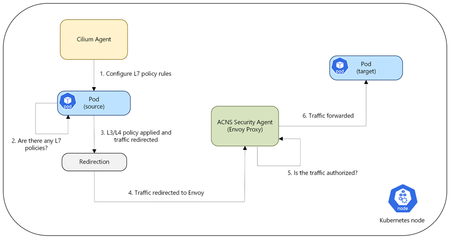
We have been on an exciting journey to enhance the network observability and security capabilities of Azure Kubernetes Service (AKS) clusters through our Azure Container Networking Services offering. Our initial step, the launch of Fully Qualified Domain Name (FQDN) filtering, marked a foundational step in enabling policy-driven egress control. By allowing traffic management at the domain level, we set the stage for more advanced and fine-grained security capabilities that align with modern, distributed workloads. This was just the beginning, a glimpse into our commitment to enabling AKS users with robust and granular security controls. Today, we are thrilled to announce the public preview of Layer 7 (L7) Network Policies for AKS and Azure CNI powered by Cilium users with Advanced Container Networking Services enabled. This update brings a whole new dimension of security to your containerized environments, offering much more granular control over your application layer traffic. Overview of L7 Policy Unlike traditional Layer 3 and Layer 4 policies that operate at the network and transport layers, L7 policies operate at the application layer. This enables more precise and effective traffic management based on application-specific attributes. L7 policies enable you to define security rules based on application-layer protocols such as HTTP(S), gRPC, and Kafka. For example, you can create policies that allow traffic based on HTTP(S) methods (GET, POST, etc.), headers, paths, and other protocol-specific attributes. This level of control helps in implementing fine-grained access control, restricting traffic based on the actual content of the communication, and gaining deeper insights into your network traffic at the application layer. Use cases of L7 policy API Security: For applications exposing APIs, L7 policies provide fine-grained control over API access. You can define policies that only allow specific HTTP(S) methods (e.g., GET for read-only operations, POST for creating resources) on particular API paths. This helps in enforcing API security best practices and prevent unnecessary access. Zero-Trust Implementation: L7 policies are a key component in implementing a Zero-Trust security model within your AKS environment. By default-denying all traffic and then explicitly allowing only necessary communication based on application-layer context, you can significantly reduce the attack surface and improve overall security posture. Microservice Segmentation and Isolation: In microservice architecture, it's essential to isolate services to limit the blast radius of potential security breaches. L7 policies allow you to define precise rules for inter-service communication. For example, you can ensure that a billing service can only be accessed by an order processing service via specific API endpoints and HTTP(S) methods, preventing unauthorized access from other services. How Does It Work? When a pod sends out network traffic, it is first checked against your defined rules using a small, efficient program called an extended Berkley Packet Filter (eBPF) probe. This probe marks the traffic if L7 policies are enabled for that pod, it is then redirected to a local Envoy Proxy. The Envoy proxy here is part of the ACNS Security Agent, separate from the Cilium agent. The Envoy Proxy, part of the ACNS Security Agent, then acts as a gatekeeper, deciding whether the traffic is allowed to proceed based on your policy criteria. If the traffic is permitted, it flows to its destination. If not, the application receives an error message saying access denied. Example: Restricting HTTP POST Requests Let's say you have a web application running on your AKS cluster, and you want to ensure that a specific backend service (backend-app) only accepts GET requests on the /data path from your frontend application (frontend-app). With L7 Network Policies, you can define a policy like this: apiVersion: cilium.io/v2 kind: CiliumNetworkPolicy metadata: name: allow-get-products spec: endpointSelector: matchLabels: app: backend-app # Replace with your backend app name ingress: - fromEndpoints: - matchLabels: app: frontend-app # Replace with your frontend app name toPorts: - ports: - port: "80” protocol: TCP rules: http: - method: "GET" path: "/data" How Can You Observe L7 Traffic? Advanced Container Networking Services with L7 policies also provides observability into L7 traffic, including HTTP(S), gRPC, and Kafka, through Hubble. Hubble is enabled by default with Advanced Container Networking Services. To facilitate easy analysis, Advanced Container Networking Services with L7 policy offers pre-configured Azure Managed Grafana dashboards, located in the Dashboards > Azure Managed Prometheus folder. These dashboards, such as "Kubernetes/Networking/L7 (Namespace)" and "Kubernetes/Networking/L7 (Workload)", provide granular visibility into L7 flow data at the cluster, namespace, and workload levels. The screenshot below shows a Grafana dashboard visualizing incoming HTTP traffic for the http-server-866b29bc75 workload in AKS over the last 5 minutes. It displays request rates, policy verdicts (forwarded/dropped), method/status breakdown, and dropped flow rates for real-time monitoring and troubleshooting. This is just an example; similar detailed metrics and visualizations, including heatmaps, are also available for gRPC and Kafka traffic on our pre-created dashboards. For real-time log analysis, you can also leverage the Hubble CLI and UI options offered as part of the Advanced Container Networking Services observability solution, allowing you to inspect individual L7 flows and troubleshoot any policy enforcement. Call to Action We encourage you to try out the public preview of L7 Network Policies on your AKS clusters and level up your network security controls for containerized workloads. We value your feedback as we continue to develop and improve this feature. Please refer to the Layer 7 Policy Overview for more information and visit How to Apply L7 Policy for an example scenario.1.4KViews2likes0Comments
High-Scale Kubernetes Networking with Azure CNI Powered by Cilium
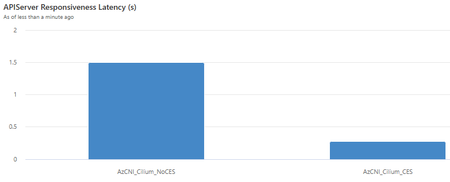
Kubernetes users have diverse cluster networking needs, but paramount to them all are efficient pod networking and robust security features. Azure CNI (Container Networking Interface) powered by Cilium is a solution that addresses these needs by blending the capabilities of the Azure CNI’s control plane and Cilium’s eBPF dataplane. Cilium enables performant networking and security by leveraging the power of eBPF (extended Berkeley Packet Filter), a revolutionary Linux kernel technology. eBPF enables the execution of custom code within the Linux kernel, providing both flexibility and efficiency. This translates to: High-performance networking: eBPF enables efficient packet processing, reduced latencies and improved throughput Enhanced security: Azure CNI (AzCNI) powered by Cilium enables network security policies based on DNS to easily manage and secure network traffic through Advanced Network Security features. Better observability: Our eBPF-based Advanced Network Observability suite provides detailed monitoring, tracing and diagnostics tools for cluster users. Introducing CiliumEndpointSlice A performant CNI dataplane is crucial for low-latency, high-throughput pod communication, enhancing distributed application efficiency and user experience. While Cilium’s eBPF-powered dataplane provides high-performance networking today, we sought to further enhance its scalability and performance. To do this, we looked at enabling a new feature in the dataplane’s configuration, CiliumEndpointSlice, thereby achieving: Lower traffic load on the Kubernetes control plane, leading to reduced control plane memory consumption and improved performance Faster pod start-up latencies Faster in-cluster network latencies for better application performance In particular, this feature improves upon how Azure CNI powered by Cilium manages pods. Previously, Cilium managed pods using Custom Resource Definitions (CRDs) called CiliumEndpoints. Each pod has a CiliumEndpoint associated with it. The CRD contains information about a pod’s status and properties. The Cilium Agent, a core component of the dataplane, runs on every node and watches each of these CiliumEndpoints for information about updates to pods. We have observed that this behavior can place significant stress and load on the control plane, leading to performance bottlenecks, especially for larger clusters. To alleviate load on the control plane, we are bringing in CiliumEndpointSlice, a feature which batches CiliumEndpoints and their associated updates. This reduces the number of updates propagated to the control plane. Consequently, we greatly reduce the risk of overloading the control plane at scale, ensuring smoother operation of the cluster. Performance Testing We have conducted performance testing of Azure CNI powered by Cilium with and without CiliumEndpointSlice enabled. The testing was done on a cluster with the following dimensions: 1000 nodes (Standard_D4_v3) 20,000 pods (i.e. 20 pods per node) 1 service with 4000 backends 800 services with 20 backends each The test involved repeating the following actions 10 times: creating deployments and services, restarting deployments, and deleting deployments and services. We detail the various performance metrics measured below. Average APIServer Responsiveness This metric measures the average latency of responses to LIST requests (one of the most expensive types of requests to the control plane) by the kube-apiserver. With CiliumEndpointSlice enabled, we observed a remarkable 50% decrease in latency, dropping from an average of ~1.5 seconds to ~0.25 seconds! For cluster users, this means much faster processing of queries sent to the kube-apiserver, leading to improved performance. Pod Startup Latencies This metric measures the time taken for a pod to be reported as running. Here, an over 60% decrease in pod startup latency was observed with CiliumEndpointSlice enabled, allowing for faster deployment and scaling of applications. In-Cluster Network Latency This is a critical metric, measuring the latency of pings from a prober pod to a server. An over 80% decrease in latency was observed. This reduction in latency translates to better application performance. Azure CNI powered by Cilium offers a powerful eBPF-based solution for Kubernetes networking and security. With the enablement of CiliumEndpointSlice from Kubernetes version 1.32 on AzCNI Powered by Cilium clusters, we see further improvements in application and control plane performance. For more information, visit https://learn.microsoft.com/en-us/azure/aks/azure-cni-powered-by-cilium.1.4KViews1like0Comments