ebpf
27 TopicseBPF-Powered Observability Beyond Azure: A Multi-Cloud Perspective with Retina
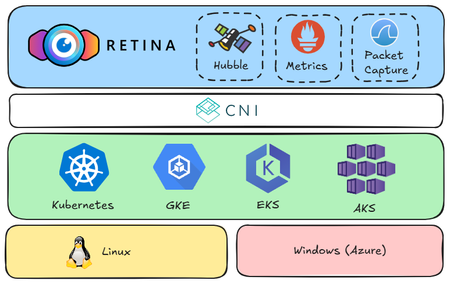
Kubernetes simplifies container orchestration but introduces observability challenges due to dynamic pod lifecycles and complex inter-service communication. eBPF technology addresses these issues by providing deep system insights and efficient monitoring. The open-source Retina project leverages eBPF for comprehensive, cloud-agnostic network observability across AKS, GKE, and EKS, enhancing troubleshooting and optimization through real-world demo scenarios.2.1KViews10likes0CommentsUse cases of Advanced Network Observability for your Azure Kubernetes Service clusters
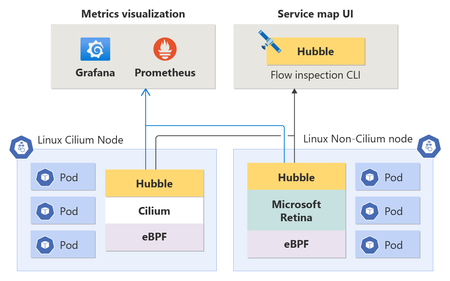
The blog explores the use cases of Advanced Network Observability for Azure Kubernetes Service (AKS) clusters. It introduces the Advanced Network Observability feature, which brings Hubble's control plane to both Cilium and Non-Cilium Linux data planes. This feature provides deep insights into containerized workloads, enabling precise detection and root-cause analysis of network-related issues in Kubernetes clusters. The document also includes customer scenarios that demonstrate the benefits of Advanced Network Observability, such as DNS metrics, network policy drops at the pod level, and traffic imbalance for pods within a workload4.3KViews4likes2Comments
Announcing public preview: Cilium mTLS encryption for Azure Kubernetes Service
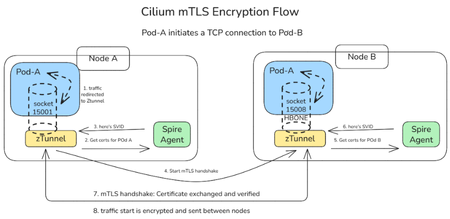
We are thrilled to announce the public preview of Cilium mTLS encryption in Azure Kubernetes Service (AKS), delivered as part of Advanced Container Networking Services and powered by the Azure CNI dataplane built on Cilium. This capability is the result of a close engineering collaboration between Microsoft and Isovalent (now part of Cisco). It brings transparent, workload‑level mutual TLS (mTLS) to AKS without sidecars, without application changes, and without introducing a separate service mesh stack. This public preview represents a major step forward in delivering secure, high‑performance, and operationally simple networking for AKS customers. In this post, we’ll walk through how Cilium mTLS works, when to use it, and how to get started. Why Cilium mTLS encryption matters Traditionally, teams looking to in-transit traffic encryption in Kubernetes have had two primary options: Node-level encryption (for example, WireGuard or virtual network encryption), which secures traffic in transit but lacks workload identity and authentication. Service meshes, which provide strong identity and mTLS guarantees but introduce operational complexity. This trade‑off has become increasingly problematic, as many teams want workload‑level encryption and authentication, but without the cost, overhead, and architectural impact of deploying and operating a full-service mesh. Cilium mTLS closes this gap directly in the dataplane. It delivers transparent, inline mTLS encryption and authentication for pod‑to‑pod TCP traffic, enforced below the application layer. And implemented natively in the Azure CNI dataplane built on Cilium, so customers gain workload‑level security without introducing a separate service mesh, resulting in a simpler architecture with lower operational overhead. To see how this works under the hood, the next section breaks down the Cilium mTLS architecture and follows a pod‑to‑pod TCP flow from interception to authentication and encryption. Architecture and design: How Cilium mTLS works Cilium mTLS achieves workload‑level authentication and encryption by combining three key components, each responsible for a specific part of the authentication and encryption lifecycle. Cilium agent: Transparent traffic interception and wiring Cilium agent which already exists on any cluster running with Azure CNI powered by cilium, is responsible for making mTLS invisible to applications. When a namespace is labelled with “io.cilium/mtls-enabled=true”, The Cilium agent enrolls all pods in that namespace. It enters each pod's network namespace and installs iptables rules that redirect outbound traffic to ztunnel on port 15001. It is also responsible for passing workload metadata (such as pod IP and namespace context) to ztunnel. Ztunnel: Node‑level mTLS enforcement Ztunnel is an open source, lightweight, node‑level Layer 4 proxy that was originally created by Istio. Ztunnel runs as a DaemonSet, on the source node it looks up the destination workload via XDS (streamed from the Cilium agent) and establishes mutually authenticated TLS 1.3 sessions between source and destination nodes. Connections are held inline until authentication is complete, ensuring that traffic is never sent in plaintext. The destination ztunnel decrypts the traffic and delivers it into the target pod, bypassing the interception rules via an in-pod mark. The application sees a normal plaintext connection — it is completely unaware encryption happened. SPIRE: Workload identity and trust SPIRE (SPIFFE Runtime Environment) provides the identity foundation for Cilium mTLS. SPIRE acts as the cluster Certificate Authority, issuing short‑lived X.509 certificates (SVIDs) that are automatically rotated and validated. This is a key design principle of Cilium mTLS - trust is based on workload identity, not network topology. Each workload receives a cryptographic identity derived from: Kubernetes namespace Kubernetes ServiceAccount These identities are issued and rotated automatically by SPIRE and validated on both sides of every connection. As a result: Identity remains stable across pod restarts and rescheduling Authentication is decoupled from IP addresses Trust decisions align naturally with Kubernetes RBAC and namespace boundaries This enables a zero‑trust networking model that fits cleanly into existing AKS security practices. End‑to‑End workflow example To see how these components work together, consider a simple pod‑to‑pod connection: A pod initiates a TCP connection to another pod. Traffic intercepted inside the pod network namespace and redirected to the local ztunnel instance. ztunnel retrieves the workload identity using certificates issued by SPIRE. ztunnel establishes a mutually authenticated TLS session with the destination node’s ztunnel. Traffic is encrypted and sent between pods. The destination ztunnel decrypts the traffic and delivers it to the target pod. Every packet from an enrolled pod is encrypted. There is no plaintext window, and no dropped first packets. The connection is held inline by ztunnel until the mTLS tunnel is established, then traffic flows bidirectionally through an HBONE (HTTP/2 CONNECT) tunnel. Workload enrolment and scope Cilium mTLS in AKS is opt‑in and scoped at the namespace level. Platform teams enable mTLS by applying a single label to a namespace. From that point on: All pods in that namespace participate in mTLS Authentication and encryption are mandatory between enrolled workloads Non-enrolled namespaces continue to operate unchanged Encryption is applied only when both pods are enrolled. Traffic between enrolled and non‑enrolled workloads continues in plaintext without causing connectivity issues or hard failures. This model enables gradual rollout, staged migrations, and low-risk adoption across environments. Getting started in AKS Cilium mTLS encryption is available in public preview for AKS clusters that use: Azure CNI powered by Cilium Advanced Container Networking Services You can enable mTLS: When creating a new cluster, or On an existing cluster by updating the Advanced Container Networking Services configuration Once enabled, enrolling workloads is as simple as labelling a namespace. 👉 Learn more Concepts: How Cilium mTLS works, architecture, and trust boundaries How-to guide: Step-by-step instructions to enable and verify mTLS in AKS Looking ahead This public preview represents an important step forward in simplifying network security for AKS and reflects a deep collaboration between Microsoft and Isovalent to bring open, standards‑based innovation into production‑ready cloud platforms. We’re continuing to work closely with the community to improve the feature and move it toward general availability. If you’re looking for workload‑level encryption without the overhead of a traditional service mesh, we invite you to try Cilium mTLS in AKS and share your experience.1.8KViews3likes0CommentsScaling DNS on AKS with Cilium: NodeLocal DNSCache, LRP, and FQDN Policies
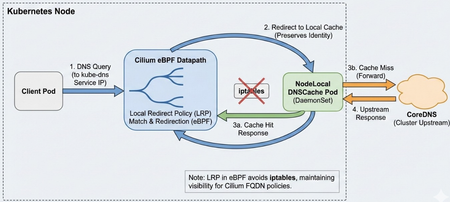
Why Adopt NodeLocal DNSCache? The primary drivers for adoption are usually: Eliminating Conntrack Pressure: In high-QPS UDP DNS scenarios, conntrack contention and UDP tracking can cause intermittent DNS response loss and retries; depending on resolver retry/timeouts, this can appear as multi-second lookup delays and sometimes much longer tails. Reducing Latency: By placing a cache on every node, you remove the network hop to the CoreDNS service. Responses are practically instantaneous for cached records. Offloading CoreDNS: A DaemonSet architecture effectively shards the DNS query load across the entire cluster, preventing the central CoreDNS deployment from becoming a single point of congestion during bursty scaling events. Who needs this? You should prioritize this architecture if you run: Large-scale clusters large clusters (hundreds of nodes or thousands of pods), where CoreDNS scaling becomes difficult to manage. High-churn endpoints, such as spot instances or frequent auto-scaling jobs that trigger massive waves of DNS queries. Real-time applications where multi-second (and occasionally longer) DNS lookup delays are unacceptable. The Challenge with Cilium Deploying NodeLocal DNSCache on a cluster managed by Cilium (CNI) requires a specific approach. Standard NodeLocal DNSCache relies on node-level interface/iptables setup. In Cilium environments, you can instead implement the interception via Cilium Local Redirect Policy (LRP), which redirects traffic destined to the kube-dns ClusterIP service to a node-local backend pod. This post details a production-ready deployment strategy aligned with Cilium’s Local Redirect Policy model. It covers necessary configuration tweaks to avoid conflicts and explains how to maintain security filtering. Architecture Overview In a standard Kubernetes deployment, NodeLocal DNSCache creates a dummy network interface and uses extensive iptables rules to hijack traffic destined for the Cluster DNS IP. When using Cilium, we can achieve this more elegantly and efficiently using Local Redirect Policies. DaemonSet: Runs node-local-dns on every node. Configuration: Configured to skip interface creation and iptables manipulation. Redirection: Cilium LRP intercepts traffic to the kube-dns Service IP and redirects it to the local pod on the same node. 1. The NodeLocal DNSCache DaemonSet The critical difference in this manifest is the arguments passed to the node-local-dns binary. We must explicitly disable its networking setup functions to let Cilium handle the traffic. The NodeLocal DNSCache deployment also requires the node-local-dns ConfigMap and the kube-dns-upstream Service (plus RBAC/ServiceAccount). For brevity, the snippet below shows only the DaemonSet arguments that differ in the Cilium/LRP approach. The node-cache reads the template Corefile (/etc/coredns/Corefile.base) and generates the active Corefile (/etc/Corefile). The -conf flag points CoreDNS at the active Corefile it should load. The node-cache binary accepts -localip as an IP list; 0.0.0.0 is a valid value and makes it listen on all interfaces, appropriate for the LRP-based redirection model. apiVersion: apps/v1 kind: DaemonSet metadata: name: node-local-dns namespace: kube-system labels: k8s-app: node-local-dns spec: selector: matchLabels: k8s-app: node-local-dns template: metadata: labels: k8s-app: node-local-dns annotations: # Optional: policy.cilium.io/no-track-port can be used to bypass conntrack for DNS. # Validate the impact on your Cilium version and your observability/troubleshooting needs. policy.cilium.io/no-track-port: "53" spec: # IMPORTANT for the "LRP + listen broadly" approach: # keep hostNetwork off so you don't hijack node-wide :53 hostNetwork: false # Don't use cluster DNS dnsPolicy: Default containers: - name: node-cache image: registry.k8s.io/dns/k8s-dns-node-cache:1.15.16 args: - "-localip" # Use a bind-all approach. Ensure server blocks bind broadly in your Corefile. - "0.0.0.0" - "-conf" - "/etc/Corefile" - "-upstreamsvc" - "kube-dns-upstream" # CRITICAL: Disable internal setup - "-skipteardown=true" - "-setupinterface=false" - "-setupiptables=false" ports: - containerPort: 53 name: dns protocol: UDP - containerPort: 53 name: dns-tcp protocol: TCP # Ensure your Corefile includes health :8080 so the liveness probe works livenessProbe: httpGet: path: /health port: 8080 initialDelaySeconds: 60 timeoutSeconds: 5 volumeMounts: - name: config-volume mountPath: /etc/coredns - name: kube-dns-config mountPath: /etc/kube-dns volumes: - name: kube-dns-config configMap: name: kube-dns optional: true - name: config-volume configMap: name: node-local-dns items: - key: Corefile path: Corefile.base 2. The Cilium Local Redirect Policy (LRP) Instead of iptables, we define a CRD that tells Cilium: "When you see traffic for `kube-dns`, send it to the `node-local-dns` pod on this same node." apiVersion: "cilium.io/v2" kind: CiliumLocalRedirectPolicy metadata: name: "nodelocaldns" namespace: kube-system spec: redirectFrontend: # ServiceMatcher mode is for ClusterIP services serviceMatcher: serviceName: kube-dns namespace: kube-system redirectBackend: # The backend pods selected by localEndpointSelector must be in the same namespace as the LRP localEndpointSelector: matchLabels: k8s-app: node-local-dns toPorts: - port: "53" name: dns protocol: UDP - port: "53" name: dns-tcp protocol: TCP This is an LRP-based NodeLocal DNSCache deployment: we disable node-cache’s iptables/interface setup and let Cilium LRP handle local redirection. This differs from the upstream NodeLocal DNSCache manifest, which uses hostNetwork + dummy interface + iptables. LRP must be enabled in Cilium (e.g., localRedirectPolicies.enabled=true) before applying the CRD. Official Cilium LRP doc DNS-Based FQDN Policy Enforcement Flow The diagram below illustrates how Cilium enforces FQDN-based egress policies using DNS observation and datapath programming. During the DNS resolution phase, queries are redirected to NodeLocal DNS (or CoreDNS), where responses are observed and used to populate Cilium’s FQDN-to-IP cache. Cilium then programs these mappings into eBPF maps in the datapath. In the connection phase, when the client initiates an HTTPS connection to the resolved IP, the datapath checks the IP against the learned FQDN map and applies the policy decision before allowing or denying the connection. The Network Policy "Gotcha" If you use CiliumNetworkPolicy to restrict egress traffic, specifically for FQDN filtering, you typically allow access to CoreDNS like this: - toEndpoints: - matchLabels: k8s:io.kubernetes.pod.namespace: kube-system k8s:k8s-app: kube-dns toPorts: - ports: - port: "53" protocol: ANY This will break with local redirection. Why? Because LRP redirects the DNS request to the node-local-dns backend endpoint; strict egress policies must therefore allow both kube-dns (upstream) and node-local-dns (the redirected destination). The Repro Setup To demonstrate this failure, the cluster is configured with: NodeLocal DNSCache: Deployed as a DaemonSet (node-local-dns) to cache DNS requests locally on every node. Local Redirect Policy (LRP): An active LRP intercepts traffic destined for the kube-dns Service IP and redirects it to the local node-local-dns pod. Incomplete Network Policy: A strict CiliumNetworkPolicy (CNP) is enforced on the client pod. While it explicitly allows egress to kube-dns, it misses the corresponding rule for node-local-dns. Reveal the issue using Hubble: In this scenario, the client pod dns-client is attempting to resolve the external domain github.com. When inspecting the traffic flows, you will see EGRESS DENIED verdicts. Crucially, notice the destination pod in the logs below: kube-system/node-local-dns, not kube-dns. Although the application originally sent the packet to the Cluster IP of CoreDNS, Cilium's Local Redirect Policy modified the destination to the local node cache. Since strictly defined Network Policies assume traffic is going to the kube-dns identity, this redirected traffic falls outside the allowed rules and is dropped by the default deny stance. The Fix: You must allow egress to both labels. - toEndpoints: - matchLabels: k8s:io.kubernetes.pod.namespace: kube-system k8s:k8s-app: kube-dns # Add this selector for the local cache - matchLabels: k8s:io.kubernetes.pod.namespace: kube-system k8s:k8s-app: node-local-dns toPorts: - ports: - port: "53" protocol: ANY Without this addition, pods protected by strict egress policies will timeout resolving DNS, even though the cache is running. Use Hubble to observe the network flows: After adding matchLabels: k8s:k8s-app: node-local-dns, the traffic is now allowed. Hubble confirms a policy verdict of EGRESS ALLOWED for UDP traffic on port 53. Because DNS resolution now succeeds, the response populates the Cilium FQDN cache, subsequently allowing the TCP traffic to github.com on port 443 as intended. Real-World Example: Restricting Egress with FQDN Policies Here is a complete CiliumNetworkPolicy that locks down a workload to only access api.example.com. Note how the DNS rule explicitly allows traffic to both kube-dns (for upstream) and node-local-dns (for the local cache). apiVersion: "cilium.io/v2" kind: CiliumNetworkPolicy metadata: name: secure-workload-policy spec: endpointSelector: matchLabels: app: critical-workload egress: # 1. Allow DNS Resolution (REQUIRED for FQDN policies) - toEndpoints: - matchLabels: k8s:io.kubernetes.pod.namespace: kube-system k8s:k8s-app: kube-dns # Allow traffic to the local cache redirection target - matchLabels: k8s:io.kubernetes.pod.namespace: kube-system k8s:k8s-app: node-local-dns toPorts: - ports: - port: "53" protocol: ANY rules: dns: - matchPattern: "*" # 2. Allow specific FQDN traffic (populated via DNS lookups) - toFQDNs: - matchName: "api.example.com" toPorts: - ports: - port: "443" protocol: TCP Configuration & Upstream Loops When configuring the ConfigMap for node-local-dns, use the standard placeholders provided by the image. The binary replaces them at runtime: __PILLAR__CLUSTER__DNS__: The Upstream Service IP (kube-dns-upstream). __PILLAR__UPSTREAM__SERVERS__: The system resolvers (usually /etc/resolv.conf). Ensure kube-dns-upstream exists as a Service selecting the CoreDNS pods so cache misses are forwarded to the actual CoreDNS backends. Alternative: AKS LocalDNS LocalDNS is an Azure Kubernetes Services (AKS)-managed node-local DNS proxy/cache. Pros: Managed lifecycle at the node pool level. Support for custom configuration via localdnsconfig.json (e.g., custom server blocks, cache tuning). No manual DaemonSet management required. Cons & Limitations: Incompatibility with FQDN Policies: As noted in the official documentation, LocalDNS isn’t compatible with applied FQDN filter policies in ACNS/Cilium; if you rely on FQDN enforcement, prefer a DNS path that preserves FQDN learning/enforcement. Updating configuration requires reimaging the node pool. For environments heavily relying on strict Cilium Network Policies and FQDN filtering, the manual deployment method described above (using LRP) can be more reliable and transparent. AKS recommends not enabling both upstream NodeLocal DNSCache and LocalDNS in the same node pool, as DNS traffic is routed through LocalDNS and results may be unexpected. References Kubernetes Documentation: NodeLocal DNSCache Cilium Documentation: Local Redirect Policy AKS Documentation: Configure LocalDNS1.3KViews3likes2Comments
Introducing Container Network Logs with Advanced Container Networking Services for AKS
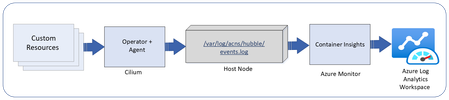
Overview of container network logs Container network logs offer a comprehensive way to monitor network traffic in AKS clusters. Two modes of support, stored-logs and on-demand logs, provides debugging flexibility with cost optimization. The on-demand mode provides a snapshot of logs with queries and visualization with Hubble CLI UI for specific scenarios and does not use log storage to persist the logs. The stored-logs mode when enabled continuously collects and persists logs based on user-defined filters. Logs can be stored either in Azure Log Analytics (managed) or locally (unmanaged). Managed storage: Logs are forwarded to Azure Log Analytics for secure, scalable, and compliant storage. This enables advanced analytics, anomaly detection, and historical trend analysis. Both basic and analytics table plans are supported for storage. Unmanaged storage: Logs are stored locally on the host nodes under /var/log/acns/hubble. These logs are rotated automatically at 50 MB to manage storage efficiently. These logs can be exported to external logging systems or collectors for further analysis. Use cases Connectivity monitoring: Identify and visualize how Kubernetes workloads communicate within the cluster and with external endpoints, helping to resolve application connectivity issues efficiently. Troubleshooting network errors: Gain deep granular visibility into dropped packets, misconfigurations, or errors with details on where and why errors are occurring (TCP/UDP, DNS, HTTP) for faster root cause analysis. Security policy enforcement: Detect and analyze suspicious traffic patterns to strengthen cluster security and ensure regulatory compliance. How it works Container network logs use eBPF technology with Cilium to capture network flows from AKS nodes. Log collection is disabled by default. Users can enable log collection by defining custom resources (CRs) to specify the types of traffic to monitor, such as namespaces, pods, services, or protocols. The Cilium agent collects and processes this traffic, storing logs in JSON format. These logs can either be retained locally or integrated with Azure Monitoring for long-term storage and advanced analytics and visualization with Azure managed Grafana. Fig1: Container network logs overview If using managed storage, users will enable Azure monitor log collection using Azure CLI or ARM templates. Here’s a quick example of enabling container network logs on Azure monitor using the CLI: az aks enable-addons -a monitoring --enable-high-log-scale-mode -g $RESOURCE_GROUP -n $CLUSTER_NAME az aks update --enable-acns \ --enable-retina-flow-logs \ -g $RESOURCE_GROUP \ -n $CLUSTER_NAME Key benefits Faster issue resolution: Detailed logs enable quick identification of connectivity and performance issues. Operational efficiency: Advanced filtering reduces data management overhead. Enhanced application reliability: Proactive monitoring ensures smoother operations. Cost optimization: Customized logging scopes minimize storage and data ingestion costs. Streamlined compliance: Comprehensive logs support audits and security requirements. Observing logs in Azure managed Grafana dashboards Users can visualize container network logs in Azure managed Grafana dashboards, which simplify monitoring and analysis: Flow logs dashboard: View internal communication between Kubernetes workloads. This dashboard highlights metrics such as total requests, dropped packets, and error rates. Error logs dashboard: Easily zoom in only on the logs which show errors for faster log parsing. Service dependency graph: Visualize relationships between services, detect bottlenecks, and optimize network flows. These dashboards provide filtering options to isolate specific logs, such as DNS errors or traffic patterns, enabling efficient root cause analysis. Summary statistics and top-level metrics further enhance understanding of cluster health and activity. Fig 2: Azure managed Grafana dashboard for container network logs Conclusion Container network logs for AKS offer a powerful and cost optimized way to monitor and analyze network activity, enhance troubleshooting, security, and ensure compliance. To get started, enable Advanced Container Networking Services in your AKS cluster and configure custom resources for logging. Visualize your logs in Grafana dashboards and Azure Log Analytics to unlock actionable insights. Learn more here.1.6KViews3likes0CommentsSecuring Microservices with Cilium and Istio
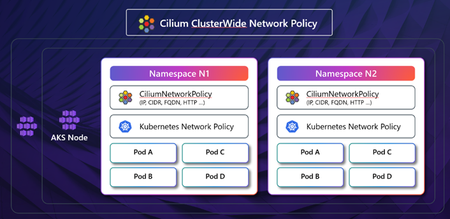
The adoption of Kubernetes and containerized applications is booming, leading to new challenges in visibility and security. As the landscape of cloud-native applications is rapidly evolving so are the number of sophisticated attacks targeting containerized workloads. Traditional tools often fall short in tracking the usage and traffic flows within these applications. The immutable nature of container images and the short lifespan of containers further necessitate addressing vulnerabilities early in the delivery pipeline. Comprehensive Security Controls in Kubernetes Microsoft Azure offers a range of security controls to ensure comprehensive protection across various layers of the Kubernetes environment. These controls include but are not limited to: Cluster Security: Features such as private clusters, managed cluster identity, and API server authorized ranges enhance security at the cluster level. Node and Pod Security: Hardened bootstrapping, confidential nodes, and pod sandboxing are implemented to secure the nodes and pods within a cluster. Network Security: Advanced Container Networking Services and Cilium Network policies offer granular control over network traffic. Authentication and Authorization: Azure Policy in-cluster enforcement, Entra authentication, and Istio mTLS and authorization policies provide robust identity and access management. Image Scanning: Microsoft Defender for Cloud provides both image and runtime scanning to identify vulnerabilities and threats. Let’s highlight how you can secure micro services while scaling your applications running on Azure Kubernetes Service (AKS) using service mesh for robust traffic management, and network policies for security. Micro segmentation with Network Policies Micro segmentation is crucial for enhancing security within Kubernetes clusters, allowing for the isolation of workloads and controlled traffic between microservices. Azure CNI by Cilium leverages eBPF to provide high-performance networking, security, and observability features. It dynamically inserts eBPF bytecode into the Linux kernel, offering efficient and flexible control over network traffic. Cilium Network Policies enable network isolation within and across Kubernetes clusters. Cilium also provides an identity-based security model, offering Layer 7 (L7) traffic control, and integrates deep observability for L4 to L7 metrics in Kubernetes clusters. A significant advantage of using Azure CNI based on Cilium is its seamless integration with existing AKS environments, requiring minimal modifications to your infrastructure. Note that Cilium Clusterwide Network Policy (CCNP) is not supported at the time of writing this blog post. FQDN Filtering with Advanced Container Networking Services (ACNS) Traditional IP-based policies can be cumbersome to maintain. ACNS allows for DNS-based policies, providing a more granular and user-friendly approach to managing network traffic. This is supported only with Azure CNI powered by Cilium and includes a security agent DNS proxy for FQDN resolution even during upgrades. It’s worth noting that with Cilium’s L7 enforcement, you can control traffic based on HTTP methods, paths, and headers, making it ideal for APIs, microservices, and services that use protocols like HTTP, gRPC, or Kafka. At the time of writing this blog, this capability is not supported via ACNS. More on this in a future blog! AKS Istio Add-On: Mutual TLS (mTLS) and Authorization Policy Istio enhances the security of microservices through its built-in features, including mutual TLS (mTLS) and authorization policies. The Istiod control plane, acting as a certificate authority, issues X.509 certificates to the Envoy sidecar proxies via the Secret Discovery Service (SDS). Integration with Azure Key Vault allows for secure management of root and intermediate certificates. The PeerAuthentication Custom Resource in Istio controls the traffic accepted by workloads. By default, it is set to PERMISSIVE to facilitate migration but can be set to STRICT to enforce mTLS across the mesh. Istio also supports granular authorization policies, allowing for control over IP blocks, namespaces, service accounts, request paths, methods, and headers. The Istio add-on also supports integration with Azure Key Vault (AKV) and the AKV Secrets Store CSI Driver Add-On for plug-in CA certificates, where the root CA lives on a secure machine offline, and the intermediate certs for the Istiod control plane are synced to the cluster by the CSI Driver Add-On. Additionally, certificates for the Istio ingress gateway for TLS termination or SNI passthrough can also be stored in AKV. Defense-In-Depth with Cilium, ACNS and Istio Combining the capabilities of Cilium's eBPF technologies through ACNS and AKS managed Istio addon, AKS provides a defense-in-depth strategy for securing Kubernetes clusters. Azure CNI's Cilium Network Policies and ACNS FQDN filtering enforce Pod-to-Pod and Pod-to-egress policies at Layer 3 and 4, while Istio enforces STRICT mTLS and Layer 7 authorization policies. This multi-layered approach ensures comprehensive security coverage across all layers of the stack. Now, let’s highlight the key steps in achieving this: Step 1: Create an AKS Cluster with Azure CNI (by Cilium), ACNS and Istio Addon enabled. az aks create \ --resource-group $RESOURCE_GROUP \ --name $CLUSTER_NAME \ --location $LOCATION \ --kubernetes-version 1.30.0 \ --node-count 3 \ --node-vm-size standard_d16_v3 \ --enable-managed-identity \ --network-plugin azure \ --network-dataplane cilium \ --network-plugin-mode overlay \ --pod-cidr 192.168.0.0/16 \ --enable-asm \ --enable-acns \ --generate-ssh-keys Step 2: Create Cilium FQDN policy that allows egress traffic to google.com while blocking traffic to httpbin.org. Sample Policy (fqdn-filtering-policy.yaml): apiVersion: cilium.io/v2 kind: CiliumNetworkPolicy metadata: name: sleep-network-policy namespace: foo spec: endpointSelector: matchLabels: app: sleep egress: - toFQDNs: - matchPattern: "*.google.com" - toEndpoints: - matchLabels: "k8s:io.kubernetes.pod.namespace": foo "k8s:app": helloworld - toEndpoints: - matchLabels: "k8s:io.kubernetes.pod.namespace": kube-system "k8s:k8s-app": kube-dns toPorts: - ports: - port: "53" protocol: ANY Apply policy: kubectl apply -f fqdn-filtering-policy.yaml Step 3: Create an Istio deny-by-default AuthorizationPolicy. This denies all requests across the mesh unless specifically authorized with an “ALLOW” policy. Sample Policy (istio-deny-all-authz.yaml): apiVersion: security.istio.io/v1 kind: AuthorizationPolicy metadata: name: allow-nothing namespace: aks-istio-system spec: {} Apply policy: kubectl apply -f istio-deny-all-authz.yaml Step 4: Deploy an Istio L7 AuthorizationPolicy to explicitly allow traffic to the “sample” pod in namespace foo for http “GET” requests. Sample Policy (istio-L7-allow-policy.yaml): apiVersion: security.istio.io/v1 kind: AuthorizationPolicy metadata: name: allow-get-requests namespace: foo spec: selector: matchLabels: app: sample action: ALLOW rules: - to: - operation: methods: [“GET”] Apply policy: kubectl apply -f istio-L7-allow-policy.yaml Step 5: Deploy an Istio strict mTLS PeerAuthentication Resource to enforce that all workloads in the mesh only accept Istio mTLS traffic. Sample PeerAuthentication (istio-peerauth.yaml): apiVersion: security.istio.io/v1 kind: PeerAuthentication metadata: name: strict-mtls namespace: aks-istio-system spec: mtls: mode: STRICT Apply policy: kubectl apply -f istio-peerauth.yaml These examples demonstrate how you can manage traffic to specific FQDNs and enforce L7 authorization rules in your AKS cluster. Conclusion Traditional IP and perimeter security models are insufficient for the dynamic nature of cloud-native environments. More sophisticated security mechanisms, such as identity-based policies and DNS names, are required. Azure CNI, powered by Cilium and ACNS, provides robust FQDN filtering and Layer 3/4 Network Policy enforcement. The Istio add-on offers mTLS for identity-based encryption and Layer7 authorization policies. A defense-in-depth model, incorporating both Azure CNI and service mesh mechanisms, is recommended for maximizing security posture. So, give these a try and let us know (Azure Kubernetes Service Roadmap (Public)) how we can evolve our roadmap to help you build the best with Azure. Credit(s): Niranjan Shankar, Sr. Software Engineer, Microsoft2.6KViews3likes0Comments
Azure CNI Powered by Cilium for Azure Kubernetes Service (AKS)
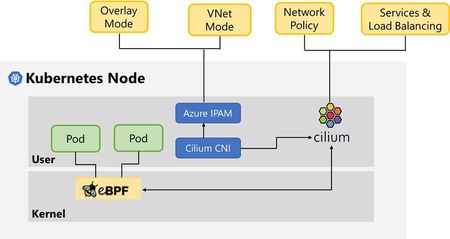
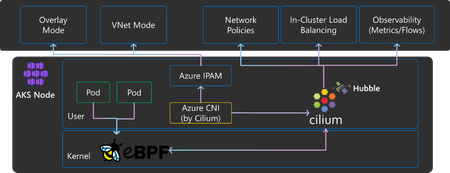
Azure CNI powered by Cilium integrates the scalable and flexible Azure IPAM control plane with the robust dataplane offered by Cilium OSS to create a modern container networking stack that meets the demands of cloud native workloads.17KViews3likes1Comment
Introducing Layer 7 Network Policies with Advanced Container Networking Services for AKS Clusters!
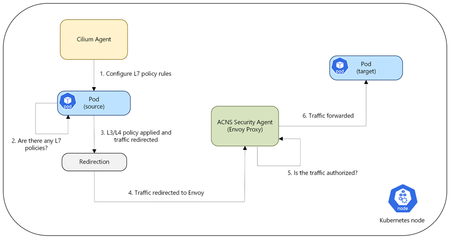
We have been on an exciting journey to enhance the network observability and security capabilities of Azure Kubernetes Service (AKS) clusters through our Azure Container Networking Services offering. Our initial step, the launch of Fully Qualified Domain Name (FQDN) filtering, marked a foundational step in enabling policy-driven egress control. By allowing traffic management at the domain level, we set the stage for more advanced and fine-grained security capabilities that align with modern, distributed workloads. This was just the beginning, a glimpse into our commitment to enabling AKS users with robust and granular security controls. Today, we are thrilled to announce the public preview of Layer 7 (L7) Network Policies for AKS and Azure CNI powered by Cilium users with Advanced Container Networking Services enabled. This update brings a whole new dimension of security to your containerized environments, offering much more granular control over your application layer traffic. Overview of L7 Policy Unlike traditional Layer 3 and Layer 4 policies that operate at the network and transport layers, L7 policies operate at the application layer. This enables more precise and effective traffic management based on application-specific attributes. L7 policies enable you to define security rules based on application-layer protocols such as HTTP(S), gRPC, and Kafka. For example, you can create policies that allow traffic based on HTTP(S) methods (GET, POST, etc.), headers, paths, and other protocol-specific attributes. This level of control helps in implementing fine-grained access control, restricting traffic based on the actual content of the communication, and gaining deeper insights into your network traffic at the application layer. Use cases of L7 policy API Security: For applications exposing APIs, L7 policies provide fine-grained control over API access. You can define policies that only allow specific HTTP(S) methods (e.g., GET for read-only operations, POST for creating resources) on particular API paths. This helps in enforcing API security best practices and prevent unnecessary access. Zero-Trust Implementation: L7 policies are a key component in implementing a Zero-Trust security model within your AKS environment. By default-denying all traffic and then explicitly allowing only necessary communication based on application-layer context, you can significantly reduce the attack surface and improve overall security posture. Microservice Segmentation and Isolation: In microservice architecture, it's essential to isolate services to limit the blast radius of potential security breaches. L7 policies allow you to define precise rules for inter-service communication. For example, you can ensure that a billing service can only be accessed by an order processing service via specific API endpoints and HTTP(S) methods, preventing unauthorized access from other services. How Does It Work? When a pod sends out network traffic, it is first checked against your defined rules using a small, efficient program called an extended Berkley Packet Filter (eBPF) probe. This probe marks the traffic if L7 policies are enabled for that pod, it is then redirected to a local Envoy Proxy. The Envoy proxy here is part of the ACNS Security Agent, separate from the Cilium agent. The Envoy Proxy, part of the ACNS Security Agent, then acts as a gatekeeper, deciding whether the traffic is allowed to proceed based on your policy criteria. If the traffic is permitted, it flows to its destination. If not, the application receives an error message saying access denied. Example: Restricting HTTP POST Requests Let's say you have a web application running on your AKS cluster, and you want to ensure that a specific backend service (backend-app) only accepts GET requests on the /data path from your frontend application (frontend-app). With L7 Network Policies, you can define a policy like this: apiVersion: cilium.io/v2 kind: CiliumNetworkPolicy metadata: name: allow-get-products spec: endpointSelector: matchLabels: app: backend-app # Replace with your backend app name ingress: - fromEndpoints: - matchLabels: app: frontend-app # Replace with your frontend app name toPorts: - ports: - port: "80” protocol: TCP rules: http: - method: "GET" path: "/data" How Can You Observe L7 Traffic? Advanced Container Networking Services with L7 policies also provides observability into L7 traffic, including HTTP(S), gRPC, and Kafka, through Hubble. Hubble is enabled by default with Advanced Container Networking Services. To facilitate easy analysis, Advanced Container Networking Services with L7 policy offers pre-configured Azure Managed Grafana dashboards, located in the Dashboards > Azure Managed Prometheus folder. These dashboards, such as "Kubernetes/Networking/L7 (Namespace)" and "Kubernetes/Networking/L7 (Workload)", provide granular visibility into L7 flow data at the cluster, namespace, and workload levels. The screenshot below shows a Grafana dashboard visualizing incoming HTTP traffic for the http-server-866b29bc75 workload in AKS over the last 5 minutes. It displays request rates, policy verdicts (forwarded/dropped), method/status breakdown, and dropped flow rates for real-time monitoring and troubleshooting. This is just an example; similar detailed metrics and visualizations, including heatmaps, are also available for gRPC and Kafka traffic on our pre-created dashboards. For real-time log analysis, you can also leverage the Hubble CLI and UI options offered as part of the Advanced Container Networking Services observability solution, allowing you to inspect individual L7 flows and troubleshoot any policy enforcement. Call to Action We encourage you to try out the public preview of L7 Network Policies on your AKS clusters and level up your network security controls for containerized workloads. We value your feedback as we continue to develop and improve this feature. Please refer to the Layer 7 Policy Overview for more information and visit How to Apply L7 Policy for an example scenario.1.4KViews2likes0CommentsSecure, High-Performance Networking for Data-Intensive Kubernetes Workloads
In today’s data-driven world, AI and high-performance computing (HPC) workloads demand a robust, scalable, and secure networking infrastructure. As organizations rely on Kubernetes to manage these complex workloads, the need for advanced network performance becomes paramount. In this blog series, we explore how Azure CNI powered by Cilium, built on eBPF technology, is transforming Kubernetes networking. From high throughput and low latency to enhanced security and real-time observability, discover how these cutting-edge advancements are paving the way for secure, high-performance AI workloads. Ready to optimize your Kubernetes clusters?1.9KViews2likes0Comments