dragoncopilot
8 Topics
A Deeper Look at Microsoft Dragon Copilot: Transforming Clinical Workflow with AI
This week, we unveiled Microsoft Dragon Copilot, the first AI assistant for clinical workflow that brings together voice dictation, ambient AI, and new natural language capabilities into a single unified experience for clinicians. Microsoft Dragon Copilot combines the trusted natural language voice dictation capabilities of Dragon Medical One, which is trusted by over 600K clinicians around the world to document billions of patient records, and DAX Copilot ambient listening capabilities, which have assisted more than 3 million ambient patient encounters in the last month alone, into a new unified solution. For years, DAX Copilot and Dragon Medical One have delivered proven outcomes at scale across various care settings, enhancing patient experience and clinician well-being, while also improving operational efficiency and financial impact. We are especially proud that, in some cases, these improvements have inspired clinicians to continue practicing medicine and remain with their current healthcare organization. Transform the way clinicians work Dragon Copilot enables clinicians to streamline documentation with new levels of customization, surface information without leaving their workflow, and automate other workflow tasks with a single click: Streamline documentation and workflow with multiple modalities Dragon Copilot provides unparalleled flexibility in how work gets done with multiple modalities that allow clinicians to choose the best approach for their needs. This flexibility helps reduce the administrative burden across the care continuum, enabling clinicians to select the most efficient method based on their specific tasks and circumstances. The power of ambient: Clinicians can securely capture multiparty, multilingual patient-clinician conversations and convert them into comprehensive, specialty-specific notes. This allows clinicians to focus on patient care rather than screens, fostering a more personal and attentive connection. The power of natural language: Clinicians can interact with their documentation naturally – editing, querying, and even creating new content in natural language. This modality transforms the review process, enabling multiple updates at once to deliver further time savings. The power of voice dictation: Clinicians are often highly proficient using voice dictation for tasks such as documenting outside the patient visit and reviewing and navigating clinical content. Dragon's features and capabilities, such as voice commands, edit controls, and shortcuts like Step-by-step commands and AutoTexts, refined over two decades, enhance these processes, ensuring a truly personalized documentation workflow. Step-by-step commands allow clinicians to automate navigation and highly repeatable tasks performed within the EHR workflow by issuing a single command. AutoTexts enable clinicians to automate and integrate commonly used templates into their documentation. These customizations and voice commands are widely used by more than 600K Dragon Medical users today, with 140 million AutoTexts and 300 million voice skills and commands used annually. They will continue to be available in Dragon Copilot. New levels of customization Dragon Copilot allows clinicians to further customize their documentation, such as configuring the writing style and formatting of notes. Clinicians can define custom templates for capturing highly repeatable clinical information and even have those templates be updated automatically based on pertinent findings detected in the ambient conversation. Surface information without leaving your workflow Dragon Copilot provides access to relevant information when needed, from querying notes and getting medical information from certified content sources to receiving encounter recording suggestions. This ensures that clinicians can easily get the information they need without leaving their workflow. Automate tasks with a single click Dragon Copilot helps automate clinical and non-clinical tasks, such as summarizing notes and evidence, prepping orders, and drafting pre-defined referral letters and after-visit summaries. This saves time and increases clinician productivity and efficiency. Repeatable tasks Dragon Copilot enables clinicians to easily manage their own library of highly repeatable, custom tasks and trigger them when desired. Do more with Dragon Seamless modality selection Organizations often use a hybrid solution that combines ambient and speech recognition capabilities from separate products leading to an inconsistent user experience. With Dragon Copilot, clinicians can easily transition between voice dictation, ambient, and natural language across care settings and the clinical documentation workflow. Natural language prompt interface Dragon Copilot allows clinicians to speak naturally to edit, query, and create clinical documentation. This new and innovative prompt interface will allow us to rapidly bring new innovations to Dragon Copilot, such as enabling seamless access to clinical intelligence without disrupting workflow. Here are a few examples of how clinicians might use the prompt interface: Edit and append summaries: “Update the fever reading to 102” Generating: Success! Query encounter transcripts for information: “Was the patient experiencing ear pain?” Create new outputs: “Summarize the ear issues briefly for a referral to an otolaryngologist.” Meeting clinicians where they are Dragon Copilot is available across mobile, web, and desktop. It is fully integrated inside Epic and is compatible with all major EHRs. Manage prompts Dragon Copilot enables clinicians to easily create and reuse their favorite prompts for frequent tasks. Whether simple or complex, prompts help clinicians get the most out of our AI. The copilot for clinicians Our vision for Microsoft Dragon Copilot is to serve as the copilot for clinicians, with functional expansion to include new priority personas (e.g., nurses) and future extensibility for third-party capabilities. Microsoft’s extensive healthcare partner ecosystem is core to this vision, ushering in a new layer of proactive intelligence driven by conversational context to deliver meaningful outcomes. Built on trust The gains we are making in helping to improve patient and clinician experiences—by transforming clinical workflows with AI—will only be durable if we foster an environment of high public trust in these technologies. We are committed to helping customers use and build AI that is trustworthy, secure, safe, and private. By leveraging the Microsoft Secure Future Initiative, we support the highest standards of security, privacy, and compliance. Our AI aligns with Microsoft's Responsible AI practices and incorporates healthcare-specific clinical, chat, and compliance safeguards to provide accurate and safe outputs. Additionally, our data is grounded in privacy principles, backed by transparent policies, and protected by rigorous safeguards. Working together We are excited for you to see—and help shape—what comes next. Together, we can enhance the patient experience and rekindle the joy of practicing medicine for clinicians. We look forward to sharing updates with this community and to hearing your feedback and questions. Learn more at aka.ms/DragonCopilot.Seamlessly manage Dragon Copilot with the new Microsoft Dragon admin center
Today, we are thrilled to announce the Microsoft Dragon admin center – a new way to manage your Microsoft Cloud for Healthcare clinical applications including Microsoft Dragon Copilot. This user-friendly platform, built upon Microsoft 365 and Microsoft’s e-commerce framework, enables healthcare administrators to control and manage their licensing, billing and organizational lifecycle with ease and efficiency. The Microsoft Dragon admin center streamlines the implementation and management of clinical applications in the health provider ecosystem, reducing time from weeks or months to days. Microsoft Dragon Copilot can be purchased and provisioned quickly with a few clicks. We are excited to have Microsoft partners and customers try it out! Benefits The Microsoft Dragon admin center provides numerous benefits to healthcare organizations and partners: Efficiency: Streamlines administration of clinical applications through a centralized and unified interface that provides consistency across all administrative functions. Partner Integration: Offers flexibility to embed Dragon Copilot in the Electronic Health Record (EHR) system of choice or resell the application out of the box. Customization: Enables high degrees of customization for administrators managing wide ranges of users. Scalability: Allows healthcare providers to scale clinical applications within a few hours. Compliance: Adheres to Microsoft standards of privacy, compliance, and security. Key Features The Microsoft Dragon admin center offers several key features that make it an indispensable tool for healthcare administrators: Simplified license management, user role assignment, and billing allows customers to easily purchase more or upgrade licenses depending on business needs. Seamless and automated provisioning of the Dragon Copilot application limits deployment delays. Customizable organization hierarchy empowers healthcare administrators to manage their organization in a few clicks. One stop shop for managing Electronic Health Record (EHR) partners and users operating in the embedded Dragon Copilot application reduces the complexity and time required to manage multiple systems and partners separately. Extensive configuration of settings and library objects of Dragon Copilot increases time-to-value. How to Get Started Getting started with the Microsoft Dragon admin center is straightforward: Purchase licenses: Identify the type of billing account you have in M365 and contact your Microsoft representative to purchase licenses. If you are a Microsoft Partner you can purchase through Partner Center. Assign licenses and conduct user role management: Assign licenses and provide different individuals the right roles to administer the Dragon admin center. Once the license and user role management is complete, navigate to the Microsoft Dragon admin center where you will be able to: Provision your Dragon Copilot application. Set up your organization hierarchy and healthcare groups, and manage your Electronic Health Record partners (EHRs). Manage and configure your Dragon Copilot application settings, features, and library objects in the context of your organization hierarchy. For a detailed step by step set-up guide for Microsoft Dragon admin center, please visit: End-to-end workflow overview | Microsoft Learn Conclusion The Microsoft Dragon admin center is a valuable tool that empowers healthcare administrators and streamlines clinical application management. By leveraging its advanced functionalities and user-friendly interface, healthcare organizations can enhance efficiency, accuracy, and customization in their workflows. Learn more about the Microsoft Dragon admin center here: Dragon admin center documentation | Microsoft Learn
A specialty-specific approach with Microsoft Dragon Copilot
Clinicians are at the heart of patient care, and the documentation they create shapes how that care is delivered, interpreted, and continued. Nearly 70% of the global medical workforce—around 9 million practitioners, according to recent World Health Organization data—are specialists whose work spans a wide range of disciplines and care settings. As these specialties evolve, so do their documentation needs to ensure the highest quality and accurate care. Each specialty brings its own documentation requirements. Orthopedics relies heavily on imaging reports, physical exam findings, and procedural notes. Preventive Medicine, on the other hand, focuses on understanding the breadth of the patient’s conditions and proactive measures to promote health. Across care settings—from outpatient clinics to emergency departments to inpatient units—documentation also varies in its requirements. Accurate, specialty-specific documentation supports not only improved patient outcomes but also the broader healthcare ecosystem—from ensuring appropriate reimbursement to enabling clinical research and the development of more targeted treatments. When designed to meet the needs of specialists, documentation becomes more than a requirement—it becomes a tool for delivering better care. Purpose-built with clinicians Microsoft Dragon Copilot enhances the clinician experience by streamlining the creation of medical notes tailored to each specialty’s unique requirements. Powered by advanced natural language processing, Dragon Copilot recognizes and adapts to the specific needs of disparate medical fields. This enables clinicians to focus more on patient care and less on administrative work, enhancing both efficiency and satisfaction. Built for continuous learning and adaptation, Dragon Copilot helps specialists keep pace with the evolving clinical guidelines, medical standards, and billing requirements with Microsoft’s dedicated team of medical professionals including MD’s (Doctor of Medicine), RN’s (Registered Nurse), and APP’s (Advanced Practice Provider). In a field shaped by constant change, this agility helps to ensure documentation stays accurate and relevant. At the core of this innovation is Microsoft’s deep, daily engagement with clinicians using Dragon Copilot. Through a diverse network—physicians, advanced care practitioners, coders, and other healthcare professionals—Microsoft works directly with those on the front line of care. This network, and other early access participants, work alongside Microsoft’s in-house clinical experts and researchers to co-design, test, and refine Dragon Copilot. This close partnership brings real-world insight into the development process, helping us ensure Dragon Copilot aligns with the practical, specialty-specific needs of medical professionals. By embedding clinical knowledge and clinician feedback into each iteration, we deliver a solution that is not only clinically accurate but also intuitive and trusted. This is about more than building a better product experience—it is about fostering trust and ownership among clinicians with technology that fits naturally into their everyday practice, supports their expertise, and helps them deliver the highest quality care. The power of a specialty-optimized approach Dragon Copilot is built on a trusted core medical model, fine-tuned on millions of real-world patient encounters. From this core medical foundation, the model is then adapted and optimized for each specialty—integrating clinical experts’ knowledge and research, national association recommendations, and feedback from clinicians. This layered approach supports outputs that are not only medically accurate but also aligned with the documentation standards and workflows clinicians depend on in their daily practice. The system evolves with changes in clinical guidelines and inputs from practicing specialists. This iterative process keeps Dragon Copilot current, relevant, and reflective of both specialty-specific requirements and real-world practice. By aligning note content with specialty-specific standards, Dragon Copilot helps reduce cognitive load, minimize documentation errors, and shorten the time needed to complete and sign notes. The result is a more efficient workflow that enhances both the quality of care and patient data processing. “By teaming up with specialty providers, Microsoft has elevated the quality and accuracy of notes—making my documentation clearer, more robust yet concise, and significantly improving readability for both patients and fellow providers. Additionally, this update also greatly improved the capture of physical exam findings.” Eric Alford, M.D. Baylor Scott & White Health Consider ophthalmology: clinical guidelines in this specialty require documentation of complex decision-making—such as discussing lens implant options in a way that balances clinical appropriateness with individual patient preferences. Dragon Copilot helps to capture both, generating documentation that is structured and personalized to each unique patient encounter. Or take psychiatry: the mental status exam is a crucial component of the evaluation for informed decisions about the patient's treatment. Dragon Copilot supports by capturing this comprehensive assessment essential for tracking the patient's progress over time. Customization that reflects the art of medicine Specialty-specific notes are only part of the solution—clinician satisfaction and adoption rely on meaningful customization. Documentation is personal, and no two clinicians document the same way. Microsoft Dragon Copilot is designed with that in mind, offering customizable templates and flexible styles that align with individual preferences and workflows. “I think the potential of Dragon Copilot is going to be even greater as we start to bring in local vernacular, and the ability to help each doctor tune their note to their appropriate desires because one person's note that is too brief is another one that's too long for someone else”- R. Hal Baker, MD, SVP and CIO, Wellspan Health This level of personalization preserves each clinician’s unique voice while enhancing the accuracy, completeness, and efficiency of documentation. By bridging standardized requirements with specialty-specific content and individual style, Dragon Copilot supports a more seamless and effective documentation experience. Tailoring technology to meet the diverse needs of clinicians not only enhances satisfaction and adoption but contributes to better care delivery across the healthcare system. Trustworthy AI by design Microsoft Dragon Copilot is built on a secure data estate and incorporates healthcare-adapted clinical, chat and compliance safeguards for accurate and safe AI outputs. Dragon Copilot also aligns to Microsoft’s responsible AI principles to help guide AI development and use — transparency, reliability and safety, fairness, inclusiveness, accountability, privacy, and security. We invest in technical performance through regular assessments, building trust with medical professionals. This process looks for potential biases and errors, enabling timely corrections and continuous improvements across specialties. With a strong focus on inclusiveness, Dragon Copilot supports a wide range of medical practices and specialties, reflecting the diverse needs of clinicians and patients. By upholding these principles, Microsoft drives innovation while helping to safeguard the interests of both patients and healthcare providers. These commitments set a high standard for trustworthy AI in healthcare. Looking ahead Clinical documentation should tell the complete story of a patient’s care—clearly and comprehensively—for the stakeholders involved. We are excited to keep innovating around specialty-specific clinical documentation and beyond—and we want you to be part of it. Your feedback fuels our progress. Together, we can improve clinician well-being and keep the focus where it belongs: on patient care. Learn more Watch an on-demand demo Take a deeper look at Dragon Copilot Explore the latest with our new health AI models and integrationsMeet Dragon Copilot: Your new AI assistant for clinical workflow in the UK
Streamline documentation, surface information, automate tasks Microsoft Dragon Copilot streamlines documentation, surfaces information, and automates tasks across care settings. It’s an extensible workspace that brings together natural language and ambient speech capabilities with advanced generative AI. Dragon Copilot offers a unified experience, integrates with EHRs, and supports clinicians across all stages of their workflow, allowing them to create, summarise, search, automate, and analyse data like never before. Part of Microsoft for Healthcare, it’s built on secure modern architecture and can take clinical productivity to new heights while helping boost clinician well-being and the patient experience, increasing efficiency, and quality of care and documentation. More than AI notes Dragon Copilot is a clinical AI assistant. Ambient note capture with fully customisable clinical documentation is just one of the many powerful capabilities of Dragon Copilot. Go beyond AI notes for even more control with natural language dictation and advanced generative AI. In and out of the EHR, Dragon Copilot supports clinicians across all stages of their workflow. Benefits of Dragon Copilot: Promotes clinician wellbeing with reduced burnout, cognitive load and a better work-life balance. Increases operational efficiency with advanced AI that improves throughput and delivers more than just notes from patient conversations, all without extra work. Enhances clinician focus on patients by efficiently and consistently capturing the full patient story ambiently at the point of care. A solution for UK regulations and NHS guidelines; aligned with Microsoft’s commitment to safety, security, privacy and trustworthy AI Dragon Copilot uses Microsoft Azure, the world's largest multi-terabit global network, offering high availability and guaranteed uptime by operating through a network of secure locations. Microsoft employs specific features and processes for Dragon Copilot components to help protect customer data, including end-to-end data encryption, authentication, as well as regular auditing, vulnerability-testing and firewalls. Microsoft maintains the highest commitment to privacy and helps ensure customer data is protected and compliant through our long-standing robust privacy principles. Dragon Copilot is UK GDPR compliant and hosted on a Microsoft Azure data centre in the United Kingdom. Dragon Copilot has been assessed by a UK-based appointed Clinical Safety Officer, completing DCB0129 per NHS expectations. Dragon Copilot is a Class I Medical Device in Great Britain and is intended to assist healthcare professionals by providing documentation automation, and workflow optimisation. The system leverages artificial intelligence (AI) to streamline the capture of patient information for review by qualified healthcare professionals. Responsible AI is grounded in our AI principles of fairness, reliability and safety, privacy and security, inclusiveness, transparency, and accountability. The Responsible AI Standard helps ensure that Microsoft’s AI systems achieve a set of goals that map to our core principles. Dragon Copilot is not intended to make decisions or recommendations for diagnosis, prognosis, monitoring or treatment of individual patients, and is not to be used as a substitute for professional medical advice. Streamline management of Dragon Copilot Microsoft Dragon admin centre is a powerful new platform designed to simplify and streamline the management of Microsoft Healthcare products such as Microsoft Dragon Copilot. Built on the trusted Microsoft 365, the Dragon admin centre offers administrators a user-friendly interface to efficiently manage licensing, billing, and the organisational hierarchy. With centralised controls and intuitive workflows, administrators can easily configure Dragon Copilot to align with their organisation’s structure and business needs. Dragon admin centre only supports Dragon Copilot so before you can start using Dragon admin centre to provision and manage the Dragon Copilot app, you need to purchase licenses for Dragon Copilot. You can purchase licenses through your Microsoft representatives or a certified Microsoft partner. For more information on Dragon Copilot licenses, see: Licensing Critical workflows of Dragon admin centre Environment setup Create a new environment, which acts as a container for managing Dragon Copilot and provision a single instance of Dragon Copilot per environment, aligned with your organisational structure. Provisioning the healthcare product Leverage Dragon admin centre to rapidly provision Dragon Copilot with minimal effort. Reduce set-up time from weeks to days, enabling scalable rollout across your organisation. Organisation hierarchy & healthcare groups Build your organisation’s hierarchy to reflect real-world organisational structures. Optionally, create healthcare groups to provide users with shared configurations and streamline administration. EHR & User EHR ID configuration When you're working with the Dragon Copilot app embedded in an electronic health record (EHR) system, Dragon admin centre allows you to seamlessly add, configure, and manage your EHR instance. This setup establishes the connection between your EHR system and the embedded Dragon Copilot app. Settings & library management Tailor Dragon Copilot settings per organisational unit to optimise user experience. Use the library feature to manage texts, keywords, and AI action prompts that enhance clinical documentation and saves time. Learn more about Dragon Copilot: What is Microsoft Dragon Copilot? | Microsoft Learn Dragon Copilot whitepapers | Microsoft Learn Frequently asked questions about Dragon Copilot | Microsoft Learn Learn more about Dragon admin centre: For a detailed step-by-step setup guide, visit: End-to-end workflow overview | Microsoft Learn1.6KViews2likes0CommentsUshering in the Next Era of Cloud-Native AI Capabilities for Radiology
Introducing Dragon Copilot, your AI companion for PowerScribe One For radiologists, the reporting workflow of the future is here. At RSNA 2025, in Chicago, we’re showcasing Dragon Copilot, a cloud-native companion for PowerScribe One. Currently in preview, Dragon Copilot builds on the trusted capabilities of PowerScribe One to accelerate innovation and modernize reporting workflows while unlocking extensibility for radiology teams and partners. Why we built it: Technical drivers for a new era With growing demand for imaging services coupled with a workforce shortage, healthcare professionals face increased workloads and burnout while patients experience greater wait times. With our breadth of healthcare industry experience combined with our AI expertise and development at Microsoft, we immediately understood how we could help address these challenges. For radiologists, we sought to plugin into existing reporting workflows with rapid innovation, scalable AI, and open extensibility. How we built it: Modern architecture and extensibility By delivering Dragon Copilot as cloud-native solution built on Azure, we can enable new services globally. We apply the full capabilities of Azure for compute, storage, and security for high availability and compliance. Our modular architecture enables fast delivery of new features with APIs at the core to allow seamless integration, extensibility, and partner innovation. To imbue the workflow with AI through our platform, we harness the latest generative, multimodal, and agentic AI (both internal and through our partners) to support clinical reporting, workflow automation, and decision support. Key architectural highlights: AI services: Integrated large language models (LLMs) and vision-language models (VLMs) for multimodal data processing. API-first design: RESTful APIs expose core functions (draft report content generation, prior summarization, quality checks and chat) enabling partners and developers to build extensions and custom workflows. Extensibility framework: Open platform for 1st- and 3rd-party extensions, supporting everything from custom AI models to workflow agents. Inside the innovation Dragon Copilot alongside PowerScribe provides a unified AI experience. Radiologists can take advantage of the latest AI advancements without disruption to their workflows. They do not need another widget taking up room on their desktop. Instead, they need AI that fits seamlessly into existing workflows connecting their data to the cloud. Our cloud-first approach brings increased reliability, stability, and performance to a radiologists’ workflow. I’m thrilled to highlight the key capabilities of this dynamic duo: PowerScribe One with Dragon Copilot. Prior report summary: Automatically summarizes relevant prior reports, surfacing key findings, and context for the current study. AI-generated draft reports and quality checks: The most transformative aspect of Dragon Copilot is its open, extensible architecture for AI integration. We don’t limit radiology teams to a single set of AI tools. We enable seamless plug-ins for AI apps & agents from both Microsoft and our growing ecosystem of 3rd-parties. We provide a single surface for all your AI needs. This approach will enable radiology departments to discover, acquire, & deploy new AI-powered extensions. We’re enthusiastic about embarking on this journey with partners. We're also excited about collaborations with developers and academic innovators to bring their own AI models and services directly into the Dragon Copilot experience. Integrated chat experience with credible knowledge sources and medical safeguards: This chat interface connects radiologists to credible, clinically validated sources from Radiopedia and Radiology Assistant. It enables agentic orchestration and safeguards provided by Azure's Healthcare Agent Services for PHI and clinical accuracy. In the future, we expect to have a variety of other sources for radiology customers to choose from as well as the ability for organizations to add their own approved policies and protocols. This chat is designed to route questions to the right agent, provide evidence for claims, and filter responses for clinical validity. Over time, it will include extensions with custom agents powered by Copilot Studio. Help us shape what’s next As we continue to evolve Dragon Copilot alongside PowerScribe One, we invite innovators, developer partners, and academics to join us in shaping the future of radiology workflow. Dragon Copilot is more than a product; it’s a solution for rapid, responsible innovation in radiology. By combining cloud-native architecture, advanced AI capabilities, and open extensibility, we’re enabling radiology teams to work smarter, faster, and with greater confidence. Ready to see it in action? Visit us at RSNA 2025 (November 30–December 4), booth #1311 South Hall. Or contact our team to join the journey.Modernizing radiology reporting—without disrupting care: A practical path to PowerScribe One
With growing imaging volumes, increasing complexity, and the rapid emergence of AI, healthcare organizations are reevaluating how their reporting environments support clinicians and strengthen operational performance. They are faced with how to modernize without interrupting the work that matters most. We developed our PowerScribe One solution and implementation approach with that reality in mind. In active production across a wide range of healthcare environments (including large integrated delivery networks, academic medical centers, independent radiology practices, and community hospitals), PowerScribe One reflects a solution that is both proven in practice and designed for what comes next. Over 250 organizations and 10,000+ radiologists use PowerScribe One to generate millions of reports each month. This scale is significant; it’s validation of what we bring through our solution and support. It reflects a system and team tested across diverse environments, integration landscapes, and operational models, performing reliably in real-world conditions. Combining the strength of our solutions with an experienced Microsoft team, we deliver a seamless implementation that minimizes disruption. Redefining the migration experience As I’ve worked with customers modernizing their reporting environments, I’ve noticed a consistent pattern of concern: how to modernize without disrupting the workflows teams rely on or the care they deliver. In my experience, even when a solution offers meaningful capabilities, customers still worry about the potential downsides of a prolonged migration. I understand that perspective. Many have worked with vendors who promise a “lift-and-shift” implementation but fall short of that expectation. Migrations can introduce real challenges, including downtime, retraining, and workflow disruption. Over time, we’ve seen that successful transformation is driven not only by the strength of the technology, but also by how effectively the transition is managed. With years of experience supporting PowerScribe environments, we’ve taken those insights and applied them to our approach. We defined what a successful PowerScribe One implementation looks like and developed a migration model designed to reduce risk while supporting adoption. Rather than viewing migration as a single milestone, PowerScribe One transitions are designed as a structured journey with clearly defined phases and timing: Discovery: Align on goals, workflows, and integration requirements Build: Preparing the technical and operational foundation Testing: Validating workflows end to end and addressing issues proactively Production: Supporting go-live with a focus on stability and adoption Each phase includes checkpoints and shared accountability to increase transparency and reduce uncertainty. Our Microsoft team works closely with our customers to build a project timeline that fits their needs while existing PowerScribe 360 workflows and content are leveraged, eliminating the need to rebuild from scratch. I’d also like to highlight at the center of this migration model is a parallel transition strategy. We enable PowerScribe 360 and PowerScribe One to operate side-by-side during our customer’s migration period. This approach provides organizations with the flexibility to: Introduce PowerScribe One to early adopters Validate workflows and integrations in a live environment Phase adoption across teams Maintain continuity throughout the transition In this measured approach, our customers can move forward with confidence, ensuring that systems, workflows, and teams are ready for successful adoption. The result is a model that is both repeatable and adaptable, capable of supporting organizations with varying levels of complexity. Our efforts to center our implementation process on the customer experience shows how migration work is not simply a technical capability proposition. This focus reflects our broader philosophy: transformation should be deliberate, not disruptive. From implementation to enablement Minimizing disruption doesn’t end with implementation. It extends into how teams are supported, trained, and enabled in their day-to-day workflows. Our focus on enablement is especially important in radiology, where even small workflow disruptions can have outsized impacts on productivity and the radiologist experience. With PowerScribe One, organizations not only gain access to a modern reporting solution but also support from teams with deep experience in radiology workflows, integrations, and large-scale deployments. With that in mind, I’ve seen firsthand how the healthcare landscape has radically changed over the last six years. Our customers tell us how workforce shifts in radiology means they are adapting their staffing models and workflows to include telework. With these changes in the workforce, organizations benefit from training and support models that are flexible, digital, and accessible remotely. We made live expert access (known to our customers as “drop-in help”) easily accessible through a simple QR code. It can be an ad hoc or scheduled engagement which ensures the offering aligns with a radiologist’s schedule. The feedback on this level of access we’ve received has been extremely positive and is resonating strongly with customers. I know that for any healthcare solution deployment to be successful, it requires a learning and support model that aligns with clinical schedules and operational realities. Modernizing radiology reporting is both a technical and operational effort with its success depending on advancing capability without disrupting clinical continuity. The transition to PowerScribe One shows this balance is achievable through phased adoption, low-disruption deployment, and strong user readiness. Organizations can modernize without affecting day-to-day care delivery with our structured approach, proven expertise and a focus on provider experience and patient outcomes. If you want to learn more about our approach or PowerScribe One, I’ll be at SIIM26, June 10-12, please stop by the Microsoft booth at 630-632. You can also discover how we partner with our customers why they decided to move to PowerScribe One by reading our Industry Blog.Notes and documents – the way clinicians want them
The moment after the visit There is a moment in every patient encounter when the clinical story needs to become something more than a note. It may become a referral letter, a set of patient instructions, a school or work note, or a summary that helps a patient remember what was discussed. These documents matter as much as the note itself. A patient needs clear instructions they can understand and follow. A referring physician needs concise context and clinical reasoning. A specialist needs relevant background. Each audience is different; each document has a different purpose. For clinicians, these documents are not administrative leftovers. They are part of care itself. They carry the reasoning, reassurance, precision, and next steps that help patients and care teams move forward with confidence. And yet, creating them often happens under pressure and requires clinicians to rely on memory, whether they are documenting in between patients or after clinic hours. Introducing custom document templates in Dragon Copilot Dragon Copilot's custom document templates are designed to solve this problem by allowing the clinician to create these documents directly in the workflow. A custom document template is a reusable, AI-generated structure that turns a clinical encounter into the right finished document — a referral letter, after-visit summary, work note, pre-operative instructions — in the format the clinician defines. How it works A clinician describes what they need in plain language: "Create a patient-friendly follow-up letter after a cardiology visit." Dragon Copilot generates a draft template from that description. The clinician can then refine it — by speaking naturally— to adjust the tone, the structure, or the level of clinical detail until it reflects how they communicate. The finished template is saved and reusable, and ready to populate from the next encounter's notes. Templates can be built from scratch with a prompt, from a pasted sample, or from an uploaded file, with a preview before the template is used with real patient data. Built around how each clinician works Imagine a clinician finishing a consultation. The conversation was nuanced. The patient asked thoughtful questions. The next step requires a referral letter that reflects not only the diagnosis, but also the clinical reasoning behind it. Traditionally, that letter may be written later, when the clinician is already thinking about the next patient, the next inbox message, or the next task. With custom documents, the clinician can define the structure they need, save it, and generate the right type of output directly in the workflow. Referral letters are just one example. Clinicians create a wide range of documents every day, each designed for a different audience and purpose. A pediatrician needs parent-friendly discharge instructions — plain language, no jargon, clear next steps. A surgeon needs structured pre-operative guidance that follows a consistent format every time. A general practitioner needs a concise work note that takes seconds, not minutes. A specialist needs a referral response that reflects both the diagnosis and the clinical reasoning behind it. Each of these is a different template, built once, refined in conversation, and reused whenever it is needed. The AI adapts to the clinician's specialty, communication style, and intended audience — not the other way around. Clinical impact in real-world workflows Custom documents can create value where clinicians feel pressure most: in the moments after the encounter, when the clinical conversation needs to become clear, actionable communication. In practice, this means less time spent on repetitive drafting, manual rework, switching between documentation tasks, reconstructing details after the visit, creating routine letters, instructions, or summaries from scratch. Custom documents help make documentation more flexible, reusable, and aligned with how care is delivered. A step toward a more human future Less time spent drafting, reworking, and reconstructing details after the visit. More consistency across documents. And clinical communication that reflects how care was delivered — not a generic approximation of it. Custom documents help turn the conversation in the exam room into the right document for the right moment, with less friction and more consistency The goal is a future where clinicians do not have to choose between being present in the room and being precise in the record. Custom document templates in Dragon Copilot are a step toward that future. ------------- Click here to learn more about Dragon Copilot.299Views2likes0CommentsClinical precision starts with more complete documentation
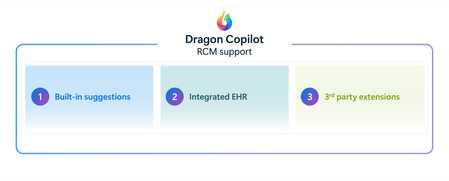
This blog is authored by Josh Waldo, Product Manager Every patient has a story, and that story deserves to be accurately reflected in the clinical documentation. Clinicians work hard to assess, diagnose, and care for patients, often while balancing complex cases, competing priorities, and limited time. While the diagnosis itself may be clear, the documentation does not always capture every detail that helps tell the full patient story. Important clinical information about severity, complexity, acuity, or related conditions may be discussed during the encounter but not fully reflected in the medical record. These details matter. Clinical documentation serves as the foundation for communication across care teams, supports quality reporting and care coordination, and provides an accurate record of the care delivered. Dragon Copilot helps clinicians create more complete documentation by identifying potential opportunities where additional specificity may be appropriate based on information already present within the encounter. This capability helps ensure that the documentation more fully reflects the clinician's assessment and the patient's clinical story. Rather than asking clinicians to remember every documentation requirement or revisit records after the encounter, Dragon Copilot can surface contextual suggestions that highlight where additional detail may strengthen the completeness of the note. For example, when documenting certain conditions, clinicians may receive suggestions that help capture additional clinically relevant details that were discussed during the visit and support a more complete description of the patient's condition. Importantly, these suggestions do not change a diagnosis, influence clinical decision-making, or replace clinician judgment. The clinician remains responsible for every diagnosis and every documentation decision. Dragon Copilot simply helps ensure that the documentation accurately reflects what the clinician already knows and has determined. Supporting better documentation without disrupting workflow Documentation quality should not require additional chart reviews, extensive research, or time-consuming follow-up work. Dragon Copilot is designed to fit naturally into existing clinical workflows, providing documentation support within the course of the encounter. By surfacing opportunities for greater specificity at the point of documentation, clinicians can address potential gaps in the moment rather than correcting them later. This may help reduce the need for downstream clarification requests from CDI and coding teams, saving time while improving the completeness of the medical record. Most importantly, clinicians remain in control. Suggestions are simply that suggestions. The clinician decides what is relevant, appropriate, and ultimately included in the note. Why more complete documentation matters Clinical documentation is used by many people beyond the author of the note. Physicians, nurses, specialists, care coordinators, coding professionals, quality teams, and healthcare organizations all rely on documentation to understand a patient's condition and the care that was provided. When documentation more fully reflects the clinician's assessment, it can support clearer communication across teams and a more consistent understanding of the patient's clinical status throughout the care journey. More complete documentation can also help organizations better reflect patient complexity, support quality initiatives, and reduce the administrative effort associated with documentation clarification and follow-up. For clinicians, that means less time spent revisiting notes and more confidence that the patient's story has been accurately captured in the record. AI that supports clinical expertise Dragon Copilot is built on a simple principle: AI should support clinical expertise, not replace it. Diagnosis specificity suggestions is built on a foundation of proven clinical AI innovation, informed by more than a decade of real-world healthcare experience. Drawing on years of clinician interactions and documentation insights, the feature is designed to surface meaningful opportunities for greater diagnostic specificity while fitting naturally into existing workflows. The technology does not diagnose patients, recommend treatments, or override clinical judgment. Instead, it acts as an intelligent assistant that helps clinicians identify opportunities to enhance documentation based on information already available during the encounter. By reducing some of the cognitive burden associated with documentation, Dragon Copilot allows clinicians to focus their attention where it matters most: caring for patients. Helping the right patient story reach the medical record Healthcare organizations continue to look for ways to improve documentation quality while reducing administrative burden. Achieving both goals requires technology that works alongside clinicians, helping them document care more efficiently without creating additional work. By helping clinicians capture greater detail within their existing workflows, Dragon Copilot supports more complete records, more accurate documentation, and a smoother documentation experience. Because better documentation is not about changing the diagnosis. It is about helping ensure that the right patient story is reflected in the medical record with greater clarity, completeness, and confidence. Learn more about Dragon Copilot.