download
28 Topics
Edge stable channel not providing option to Keep download on HTTP link over HTTPS site (*.crdownload
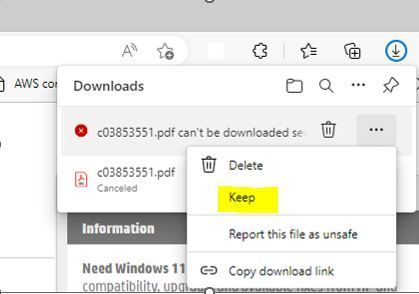
Edge stable Version 110.0.1587.63 is no longer displaying option to Keep a downloaded file for HTTP links hosted on an HTTPS site and the file is stuck as a *.crdownload file in the Explorer Downloads folder. this does work in Canary, Dev and Beta. when will Edge stable channel be updated next? working on Beta channel screenshot Non-working Edge stable channel859Views0likes0Comments
Edge on iOS, does not download files
Hi Microsoft team, I am using an API request to download a pdf (or a .doc) file from our servers. Most browsers support createObjectURL(blob), however for IE and EDGE , We have been using msSaveOrOpenBlob to save the blob data. iOS Edge browser, however, neither does not support msSaveOrOpenBlob nor does respond to createObjectURL. So what should I do to download a file in iOS edge? Thank you, Koushik Kuppanna1.3KViews0likes0Comments
File is not Downloading IOS 15.1
Hi Everyone, I am facing issue in Microsoft Edge browser as default browser in my iPhone, I am facing issue while Downloading the file, whenever I click on download link I can see some progress on the browser process but after waiting for a while nothing happens, while expected scenario is on click of a Download link File should be download and it will open a popup with the respective File Name. I tried the same in multiple browsers and result is same except the Safari Browser, it is working normal in Safari Browser. I am searching for some of the settings but not able to find such. Below is the Specification: iPhone : iPhone 13 IOS : 15.1 Browser : Microsoft Edge, Mozilla Firefox.1KViews0likes0CommentsNew feature | Edge PWAs are getting Hubs
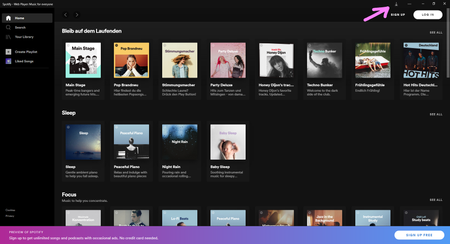
This an example of Spotify web player and YouTube installed as a PWA in Edge Version 91.0.862.0 (Official build) canary (64-bit) in this version, which is the first time this is appearing in a installed PWA, only the downloads button/hub appears there. I hope in the future the Global Media Controls button also become available there, that will make the most sense. we'll have to wait and see whether favorites, history or collections icons will be there too or not.918Views1like0CommentsNew Edge Canary Mobile version - Available Now - Updated Chromium version
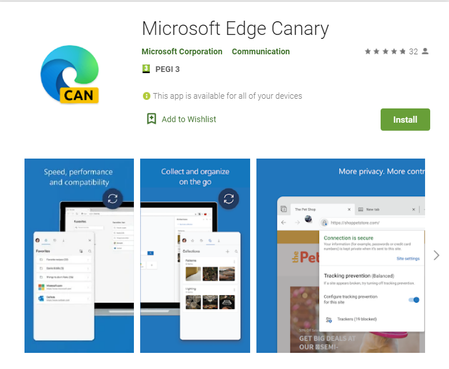
Microsoft Edge Canary is the newest Edge app on mobile. here is the app on Google play: https://play.google.com/store/apps/details?id=com.microsoft.emmx.canary The Chromium version is up to date, latest version, same as on Edge desktop. the UI has some different design elements. settings page is also different. sync is fully enabled and working. Flags are all available and working. you can set it as default browser on your phone. this has been promised a while ago, but now it's here. so go on and download it, comment down below what you think about it. https://www.youtube.com/watch?v=p2Ya2cfGDVI8.6KViews5likes15Comments
"Save as" in embedded PDF downloads a 0 KB file
I've got an embedded PDF Window, where I see the PDF correctly. But when I use "save as..", it downloads a 0 KB PDF file. This happens only in Edge. I tried it with Firefox and Chrome, and there it downloads the PDF without problem. The funny thing is that this website gives me the option to download the PDF directly without showing it embedded in the Window. And that download works perfect. Only the download of the embedded view doesn't work. Any ideas?Solved15KViews0likes6CommentsDownload speed on Edge is too slow - Parallel downloading is broken
I've been testing and using this feature for as long as the new Edge has been around, without parallel downloading flag (edge://flags/#enable-parallel-downloading), the download speed is unbelievably slow, with the flag enabled, it's only slightly better. I don't know how many concurrent connections Edge makes to the download server with this flag on, but it's very broken. for example, download speed of a file in Edge is only 500 KB/s with parallel downloading on, with a download manager like Free Download Manager, the speed is 10x faster. I'm aware that this is depended on the network conditions of each user and my experience can't be universal and experienced by everyone, but the simply fact that a download manager with 6 to 8 concurrent (parallel) connections can fully utilize my Internet bandwidth, and Edge can't do this, is a problem. this is not something to be fixed with a simple browser reinstall or even related to OS. throughout the past 2 years I've done these countless times, literally. I'm sending feedback about it using the feedback button on Edge, if you're reading this and want download speed to be improved in Edge, please do the same and in the feedback URL add the link to this post for full description, thank you27KViews7likes10CommentsEdge should have the ability to Resume Downloads after restarting the Edge browser or device
when I was using chrome few years ago, it also had this annoying limitation, now Edge (using latest available Edge canary) still has this problem. when you are downloading and pause your downloads, you can't restart the browser or device without losing your download progress, it will reset. this is really a fundamental problem, I've done my part which was sending feedback through Edge, if you are reading this and want the same thing, please send feedback from your browser and request this to be fixed. thank you5.5KViews7likes1Comment
Edge on iOS does not allow download
Hi Microsoft team, I am using an xhr request to download a pdf (or a zip) file from our servers. Most browsers support createObjectURL(blob), however for IE/edge, I have been using msSaveOrOpenBlob to save the blob data. iOS Edge however, neither does not support msSaveOrOpenBlob, not does respond to createObjectURL. So what should I do to download a file in iOS edge? Other considerations A simple GET request to the url is not an option as the files are behind a session. Even if I set a cookie to set the session (which I prefer to not) and perform a GET request, iOS edge allows you to successfully preview the pdf. However upon tapping 'open with' performs another GET request and seems to ignore the cookie entirely resulting in failure to download. Thanks,2.8KViews0likes2CommentsSS46: Hey Edge - voice control
Suggestion (SS): 46 Classification: VOICE CONTROL PRIORITY IN MY OPINION: 2-3 on a scale from 1 (low) to 10 (high) Bing already has some integration of voice control, Firefox too. Now i think it's time for Hey Edge function. Examples of tasks Hey Edge should be able to do: -Hey Edge, move tabs to the right to another window, hide it in macos, save PDF and add all links to bookmark folder IMPORT for all tabs in this new window; once done close the window. - Hey Edge, reload all techcommunity.microsoft - Hey Edge, change to Bing as default - Hey Edge, mute all - Hey Edge, volume 50% - Hey Edge, go to minute 3.45 - Hey Edge, loop mode - Hey Edge, loop from x to y - Hey Edge, set download path to configuration 1 - Hey Edge, search this with %s1 %s2 ... at the same time - Hey Edge, open %s settings - Hey Edge, add this search to %s and use abbreviation <ed - Hey Edge, duplicate 5 tabs from this - Hey Edge, change my profile image now - Hey Edge, launch xxx (an extension) - Hey Edge, quit Edge in 10 minutes - Hey Edge, open random website from folder XXX - Hey Edge, disable all extensions for 5 seconds. - Hey Edge, random open my most visited youtube links - Hey Edge, write new instagram post (by opening a 3. app for posting) - Hey Edge, activate all disabled extensions. - Hey Edge, reopen last closed session - Hey Edge, reopen last 7 tabs - Hey Edge, move tab to first - Hey Edge, color tab to red - Hey Edge, go back to the source (example when you open webpage a then b ... to z, go back to a) - Hey Edge, pipmode - Hey Edge, go to next video - Hey Edge, save to collections (last used) - Hey Edge, close tabs to left - Hey Edge, merge windows - Hey Edge, quit - Hey Edge, open flags - Hey Edge, activate flag xx - Hey Edge, restart - Hey Edge, share this page to xxx - Hey Edge, new mail to xxx - Hey Edge, install xxx - Hey Edge, create new profile for account mailto:a@a.com - Hey Edge, delete this profile - Hey Edge, activate vpn now (once integrated) - Hey Edge, change background new tab pictures from onedrive folder AA to BB - Hey Edge, open all links inside folder XXX - Hey Edge, download all images that i click in the future, stop it once i say stop - Hey Edge, launch beta profile xxx - Hey Edge, show me when i visited this page in the past - Hey Edge, add this page to bookmarks (using recent folder) as shortcut <emis - Hey Edge open 6x incognito pages with url http://www.... - Hey Edge, ban all selected email from outlook - Hey Edge, start new chat support session - Hey Edge, new feedback - Hey Edge, share this file (in onedrive = this mean you copy directly the url) - Hey Edge, save all picture to onedrive - Hey Edge, open word - Hey Edge, find similar websites - Hey Edge, show me my IP - Hey Edge, export this image as png - Hey Edge, save this files to xxx and rename it as yyy - Hey Edge, open Missy Edge profile - Hey Edge, run workspace 4 now - Hey Edge, run highlight mode now (once integrated) - Hey Edge, save next selected texts to collections - Hey Edge, search hello in youtube as playlist - Hey Edge, disable notifications from all future visited pages - Hey Edge, activate flash always - Hey Edge, open all selected urls in edge dev profile 3 (if we use canary for example) - Hey Edge, copy all urls from tabs - Hey Edge, add selected tabs to my vertical favorite tabs (once integrated) - Hey Edge, open with profile 2 .... (once container is integrated) - Hey Edge, download all images from tabs - Hey Edge, create merge all tab groups and move to new window by hiding it in macos - Hey Edge, download all files in this website with torrent (once integrated) - Hey Edge, open in tabs selected links - Hey Edge, export bookmarks every 5 minutes to my mac - Hey Edge, reverse search this image - Hey Edge, show me social accounts of this person (from a video/photo) - Hey Edge, create new outlook alias mailto:b@.... - Hey Edge, change outlook recovery email to .... - Hey Edge, ban all social accounts for 4 hours - Hey Edge, add label xxx to this page (for history panel, once integrated) - Hey Edge export last 7 days of history to my desktop folder xxx - Hey Edge, activate kids mode - Hey Edge, create new rule for this email and use setting 1 (example forward to 3 emails ...) - etc. If we can run such multiple rules without Hey Edge would be cool too, so something in keyboard maestro style. Obviously first we need to support a better way to run such actions and similar actions without Hey Edge, but once this is done, different action can be implemented in Hey Edge too. Then it depends, sometimes is much faster to do manually instead of saying Hey Edge... (and maybe Hey Edge doesn't understand what we say too...., like Bing does) To be more faster instead of saying "Hey Edge, save pdf for all tabs to the right" or similar, we just say "Hey Edge, pdf right". The same for all other examples You can even integrate a smart Hey Edge, where i can combine my manual and Hey Edge actions. Example: i'm reading a pdf. at the same time i say "Hey Edge, pdf right once i say NOW". then i read pdf on tab 2, 3, 4, 5. Once done i say "NOW" and you export all pdf to the right (based on the tabs where i requested this rule). This means in the same time i can close and open new tabs, you do the action only once i say "NOW". Such "NOW" actions can be implemented in so many workflows and would be a great productivity boost.3.3KViews0likes4Comments