dms
33 TopicsAn end-to-end process for lifting and shifting your applications to Azure
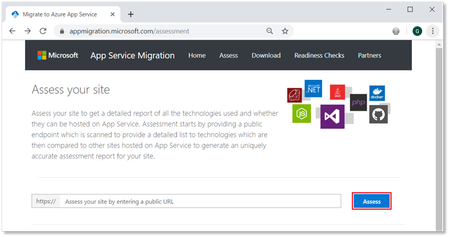
This blog describes how to streamline the migration journey for Microsoft Azure web workloads across your application and relevant databases. By taking advantage of Azure Migrate, the Azure App Service Migration Assistant, the Data Migration Assistant, and Azure Database Migration Service, we simplify the migration of your web apps and databases to Azure with minimal or no code changes.
GitHub Copilot and SSMA: Strap a GenAI conversion booster to your Oracle to SQL Migrations
In this blog, we’ll explore how GitHub Copilot and SQL Server Migration Assistant (SSMA) for Oracle can supercharge your code conversion journey from PL/SQL to T-SQL. Learn how both these tools bring comprehensive conversion rule set and Generative AI capabilities together to simplify and expedite your migration journey from Oracle to Azure SQL.5KViews6likes0CommentsAzure DMS - MySQL Consistent Backup now in Preview
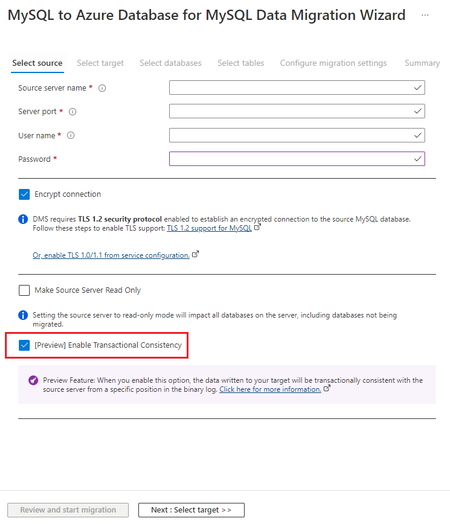
We are pleased to announce preview of MySQL Data Migration - Consistent Backup feature, which allows users to take a Consistent Backup of a MySQL server without losing data integrity at source because of ongoing CRUD (Create, Read, Update, and Delete) operations.7.2KViews4likes0Comments
General Availability - DMS's PowerShell, Azure CLI, and Python SDK
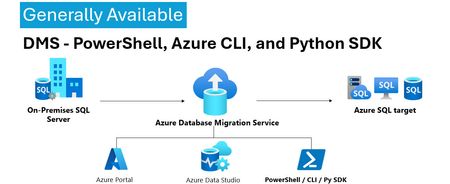
We’re excited to announce the General Availability (GA) of DMS client tools - PowerShell, Azure CLI, Python SDK and more. This milestone unlocks efficient, stable, and scalable automation options for database migration workflows—making it easier than ever to integrate DMS into your DevOps pipelines and enterprise migration strategies. 💡Introduction: With the general availability of DMS client tools - PowerShell, Azure CLI, Python SDK, users can now use stable release of: PowerShell module 1.0.0 (https://www.powershellgallery.com/packages/Az.DataMigration/1.0.0) Azure CLI extension 1.0.0 (https://learn.microsoft.com/en-us/cli/azure/datamigration?view=azure-cli-latest) DMS V2 APIs (version 2025-06-30) SDKs for multiple languages (listed below) SDKs Releases: Language GA Package / Link .Net https://www.nuget.org/packages/Azure.ResourceManager.DataMigration/1.0.0 Java https://central.sonatype.com/artifact/com.azure.resourcemanager/azure-resourcemanager-datamigration/1.1.0 Go https://pkg.go.dev/github.com/Azure/azure-sdk-for-go/sdk/resourcemanager/datamigration/armdatamigration/v2 Python azure-mgmt-datamigration · PyPI JavaScript https://www.npmjs.com/package/@azure/arm-datamigration/v/3.0.0 🔧 What’s New? Three new commands have been introduced in the latest releases of the SDK, PowerShell module, and CLI extension, as outlined below: New CLI Commands: az datamigration sql-db retry - Retry the failed SQL DB migrations. az datamigration sql-managed-instance delete - Delete Azure SQL MI’s Database Migration resource. az datamigration sql-vm delete - Delete Azure SQL VM’s Database Migration resource. New PowerShell Commands: Invoke-AzDataMigrationRetryToSqlDb - Retry the failed SQL DB migrations. Remove-AzDataMigrationToSqlManagedInstance - Delete Azure SQL MI’s Database Migration resource. Remove-AzDataMigrationToSqlVM - Delete Azure SQL VM’s Database Migration resource. 🚀Conclusion: With this GA / stable release, users can now: Use them to configure and execute migrations with full control. Automate migrations: DevOps teams can embed migration steps into CI/CD pipelines. Integrate into custom applications and orchestration tools. These support all the DMS migration scenarios—from simple lift-and-shift operations to complex logical migrations—while ensuring stability, and repeatability. For more details, refer: Documentation: Migrate databases at scale using Azure PowerShell / CLI PowerShell: Az.DataMigration Module Azure CLI: az datamigration Python SDK: azure-mgmt-datamigration · PyPI417Views2likes0CommentsLeveraging GitHub Copilot for T-SQL Code Conversion: A Deep Dive into Code Explainability
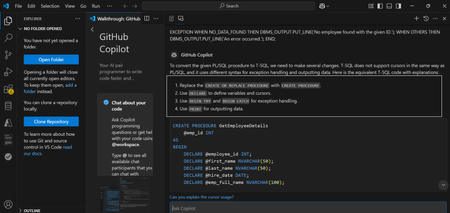
Converting database code between different relational database management systems (RDBMS) is an essential part of database migration , especially when moving from Oracle’s PL/SQL to SQL Server’s T-SQL. Both Oracle and SQL Server have unique syntax, functions, and programming conventions that require significant adjustments when converting complex SQL queries, stored procedures, or functions. While manual conversion can be a painstaking process, GitHub Copilot, an AI-powered code assistant, can ease this burden by offering real-time suggestions and automating many aspects of the conversion. In the first part of this two-part blog, we explore how GitHub Copilot can be a powerful tool for code conversion, helping developers quickly adapt code from one language or framework to another. By providing context-aware suggestions and completions, Copilot simplifies the process of rewriting and refactoring code. In the second part, we dive deeper into Copilot’s explainability feature, showcasing how it enhances the code conversion process from Oracle to Azure SQL. Code explainability in GitHub Copilot refers to the tool’s ability to offer suggestions and comments that help developers understand what a given piece of code is doing. When dealing with database migrations, such as converting Oracle SQL code to Azure SQL (SQL Server), GitHub Copilot’s ability to explain, suggest, and refactor code can ease the transition. It can assist in making the conversion process smoother, more efficient, and less error-prone by explaining the logic behind Oracle-specific queries and suggesting corresponding changes in Azure SQL’s syntax We'll go through multiple examples, analyze the differences between the two languages, and show how GitHub Copilot handles these challenges. Understanding the Key Differences: PL/SQL vs T-SQL Before jumping into examples, it's important to understand few of the fundamental differences between PL/SQL (Oracle) and T-SQL (SQL Server): Syntax: While both are procedural SQL dialects, there are key differences in the way they handle variables, control structures, and flow control. Functions: Each platform has its own set of built-in functions (e.g., string manipulation, date handling, etc.), and these need to be mapped correctly during conversion. Error Handling: Error handling and exception management differ between the two, with PL/SQL using EXCEPTION blocks and T-SQL using TRY...CATCH. Cursor Handling: While both support cursors for iterating through results, their syntax differs. Leveraging GitHub Copilot for Oracle PL/SQL to SQL Server T-SQL Code Conversion: A Deep Dive into Complex Examples with Explainability Converting database code between different relational database management systems (RDBMS) is an essential part of database migration , especially when moving from Oracle’s PL/SQL to SQL Server’s T-SQL. Both Oracle and SQL Server have unique syntax, functions, and programming conventions that require significant adjustments when converting complex SQL queries, stored procedures, or functions. While manual conversion can be a painstaking process, GitHub Copilot, an AI-powered code assistant, can ease this burden by offering real-time suggestions and automating many aspects of the conversion. In the first part of this two-part blog, we explore how GitHub Copilot can be a powerful tool for code conversion, helping developers quickly adapt code from one language or framework to another. By providing context-aware suggestions and completions, Copilot simplifies the process of rewriting and refactoring code. In the second part, we dive deeper into Copilot’s explainability feature, showcasing how it enhances the code conversion process from Oracle to Azure SQL. Code explainability in GitHub Copilot refers to the tool’s ability to offer suggestions and comments that help developers understand what a given piece of code is doing. When dealing with database migrations, such as converting Oracle SQL code to Azure SQL (SQL Server), GitHub Copilot’s ability to explain, suggest, and refactor code can ease the transition. It can assist in making the conversion process smoother, more efficient, and less error-prone by explaining the logic behind Oracle-specific queries and suggesting corresponding changes in Azure SQL’s syntax We'll go through multiple examples, analyse the differences between the two languages, and show how GitHub Copilot handles these challenges. Understanding the Key Differences: PL/SQL vs T-SQL Before jumping into examples, it's important to understand few of the fundamental differences between PL/SQL (Oracle) and T-SQL (SQL Server): Syntax: While both are procedural SQL dialects, there are key differences in the way they handle variables, control structures, and flow control. Functions: Each platform has its own set of built-in functions (e.g., string manipulation, date handling, etc.), and these need to be mapped correctly during conversion. Error Handling: Error handling and exception management differ between the two, with PL/SQL using EXCEPTION blocks and T-SQL using TRY...CATCH. Cursor Handling: While both support cursors for iterating through results, their syntax differs. Example 1: Complex Stored Procedure Conversion Let’s start with a complex example that involves handling parameters, cursors, and error handling. We'll look at a PL/SQL stored procedure in Oracle that processes employee records and outputs their details. CREATE OR REPLACE PROCEDURE GetEmployeeDetails (emp_id IN NUMBER) IS CURSOR emp_cursor IS SELECT employee_id, first_name, last_name, hire_date FROM employees WHERE employee_id = emp_id; emp_record emp_cursor%ROWTYPE; emp_full_name VARCHAR2(100); BEGIN OPEN emp_cursor; LOOP FETCH emp_cursor INTO emp_record; EXIT WHEN emp_cursor%NOTFOUND; -- Concatenate first and last name emp_full_name := emp_record.first_name || ' ' || emp_record.last_name; -- Output employee details DBMS_OUTPUT.PUT_LINE('Employee ID: ' || emp_record.employee_id); DBMS_OUTPUT.PUT_LINE('Full Name: ' || emp_full_name); DBMS_OUTPUT.PUT_LINE('Hire Date: ' || TO_CHAR(emp_record.hire_date, 'YYYY-MM-DD')); END LOOP; CLOSE emp_cursor; EXCEPTION WHEN NO_DATA_FOUND THEN DBMS_OUTPUT.PUT_LINE('No employee found with the given ID.'); WHEN OTHERS THEN DBMS_OUTPUT.PUT_LINE('An error occurred.'); END; Oracle PL/SQL Example In Oracle, we might have a procedure that uses a cursor to fetch employee records and print them. The procedure also includes error handling for potential issues during execution. Key Points in Oracle PL/SQL: Cursor: PL/SQL uses CURSOR for iterating through rows. Concatenation: Oracle uses || for string concatenation. Error Handling: PL/SQL uses EXCEPTION blocks for handling errors such as NO_DATA_FOUND. Converting to SQL Server T-SQL with GitHub Copilot When you type the PL/SQL code into an IDE with GitHub Copilot enabled (e.g., Visual Studio Code), Copilot will start suggesting the equivalent SQL Server T-SQL code. Here’s how Copilot converts the procedure. Copilot’s Suggested SQL Server T-SQL Code CREATE PROCEDURE GetEmployeeDetails (@emp_id INT) AS BEGIN DECLARE @emp_id INT, @first_name NVARCHAR(50), @last_name NVARCHAR(50); DECLARE @emp_full_name NVARCHAR(100); DECLARE emp_cursor CURSOR FOR SELECT employee_id, first_name, last_name, hire_date FROM employees WHERE employee_id = @emp_id; OPEN emp_cursor; FETCH NEXT FROM emp_cursor INTO @emp_id, @first_name, @last_name, @hire_date; WHILE @@FETCH_STATUS = 0 BEGIN -- Concatenate first and last name SET @emp_full_name = @first_name + ' ' + @last_name; -- Output employee details PRINT 'Employee ID: ' + CAST(@emp_id AS NVARCHAR); PRINT 'Full Name: ' + @emp_full_name; PRINT 'Hire Date: ' + CONVERT(NVARCHAR, @hire_date, 23); FETCH NEXT FROM emp_cursor INTO @emp_id, @first_name, @last_name, @hire_date; END CLOSE emp_cursor; DEALLOCATE emp_cursor; BEGIN TRY -- Error handling code (example) END TRY BEGIN CATCH PRINT 'An error occurred.'; END CATCH END; Key Points in T-SQL: Cursor: SQL Server uses DECLARE CURSOR to declare a cursor, similar to PL/SQL but with different syntax for opening and fetching. Concatenation: SQL Server uses + for string concatenation. Error Handling: SQL Server uses TRY...CATCH for error handling, unlike PL/SQL’s EXCEPTION block. GitHub Copilot provides a T-SQL equivalent for an Oracle PL/SQL stored procedure. Explanation of the Conversion Process Cursor Declaration and Fetching: PL/SQL uses CURSOR with OPEN, FETCH, and CLOSE to process rows. T-SQL uses DECLARE CURSOR to define the cursor and fetches rows with FETCH NEXT. Both approaches are similar, but T-SQL requires explicit DEALLOCATE to release the cursor. Error Handling: PL/SQL uses EXCEPTION blocks to handle errors like NO_DATA_FOUND. T-SQL uses TRY...CATCH blocks to capture and handle errors, a major difference in error handling between the two systems. String Concatenation: PL/SQL uses || for concatenating strings, while T-SQL uses +. This is a simple yet crucial change when converting between the two dialects. Example 2: Complex Query with Date Handling Let’s now look at a query that involves date handling and conditional logic. These are often tricky when converting between PL/SQL and T-SQL due to differences in how each platform handles dates. Oracle PL/SQL Query Example SELECT employee_id, first_name, hire_date, CASE WHEN hire_date < TO_DATE('2000-01-01', 'YYYY-MM-DD') THEN 'Veteran' ELSE 'New Hire' END AS employee_status FROM employees WHERE hire_date BETWEEN TO_DATE('1990-01-01', 'YYYY-MM-DD') AND SYSDATE; Key Points in PL/SQL: TO_DATE: Used to convert strings into dates. SYSDATE: Returns the current system date. CASE: Used for conditional logic to categorize employees as either "Veteran" or "New Hire". Copilot’s Suggested SQL Server T-SQL Code SELECT employee_id, first_name, hire_date, CASE WHEN hire_date < CONVERT(DATE, '2000-01-01', 23) THEN 'Veteran' ELSE 'New Hire' END AS employee_status FROM employees WHERE hire_date BETWEEN CONVERT(DATE, '1990-01-01', 23) AND GETDATE(); Key Points in T-SQL: CONVERT: SQL Server uses CONVERT for date formatting, similar to Oracle’s TO_DATE, but with different syntax and style codes. GETDATE(): Equivalent to Oracle’s TO_DATE In conclusion, GitHub Copilot streamlines code conversion by offering both quick suggestions and detailed explanations. The first part highlighted its ability to assist with code transitions, while the second part focused on how its explainability feature enhances the Oracle to Azure SQL migration, providing guided, efficient, and error-free conversion. This combination accelerates development and reduces potential issues during migration.2.1KViews2likes0CommentsGeneral Availability: Online migration for Azure Database for MySQL using Azure DMS
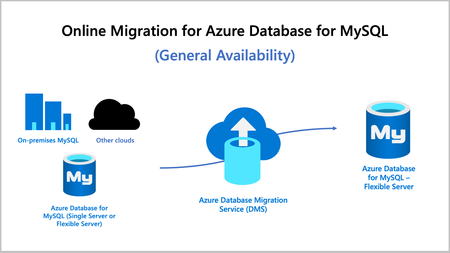
We're pleased to announce general availability of online migration for Azure Database for MySQL using Azure Database Migration Service (DMS). With an online migration, businesses can now migrate an instance of Azure Database for MySQL - Single Server or their on-premises MySQL instance to Azure Database for MySQL - Flexible Server with minimal downtime for critical applications, limiting the impact to service level availability.7.8KViews2likes0CommentsAlternatives After the Deprecation of the Azure SQL Migration Extension in Azure Data Studio
The Azure SQL Migration extension for Azure Data Studio is being deprecated and will be retired by February 28, 2026. As part of our unified and streamlined migration strategy for Azure SQL, we are consolidating all migration experiences into a consistent, scalable platform. If you are currently using the Azure SQL Migration extension, this blog will guide you through recommended replacement options for every phase of migration, whether you are moving to Azure SQL Managed Instance, SQL Server on Azure Virtual Machines, or Azure SQL Database. What is happening to the Azure SQL Migration extension in ADS? As you already know, Azure data studio will officially retire on February 28, 2026. The Azure SQL Migration extension in Azure Data Studio will also retire along with Azure Data Studio on February 28, 2026. The Azure SQL Migration extension will no longer be available in the marketplace of Azure Data Studio. What should you use instead? Below is the updated guidance for the migration tool categorized by migration phase and target. 1) Pre‑Migration: Discovery & Assessments Prior to migration, it is advisable to evaluate the SQL Server environment for readiness and to determine the right-sized Azure SQL SKU. Below are the recommended options: A) SQL Server enabled by Azure Arc Use the SQL Server migration experience in the Azure Arc portal for: Instance discovery at scale Migration assessments at scale, including: Readiness assessment for all Azure SQL targets. Performance-based, right-sized target recommendations. Projected Azure costs with the recommended target configuration. Reference: Steps to get started with the Azure Arc assessments- Deploy Azure Arc on your servers. SQL Server instances on Arc-enabled servers are automatically connected to Azure Arc. See options to optimize this. B) Automated assessments at scale using Azure DMS PowerShell and Azure CLI The Azure DataMigration modules in Azure PowerShell and Azure CLI can be used to automate assessments at scale. Learn more about how to do this. Here are the sample templates to automate the assessment workflow: Azure PowerShell DataMigration cmdlets DMS Azure CLI commands C) Azure Migrate For scenarios where assessments are required at data center level including different types of workloads like Applications, VM Servers and databases, use Azure Migrate to perform discovery and assessments at scale. Learn more about Azure Migrate. References: Review inventory Create SQL Assessment Review SQL Assessment 2) Migrations Based on the migration targets, here are the recommended tools you can use to carry out the migration: A. To Azure SQL Managed Instance The following options are available for migrating data to Azure SQL Managed Instance: 1. SQL Migration experience in Azure Arc For migrations to Azure SQL MI, leverage the streamlined SQL Migration experience in Azure Arc which lets you complete the end-to-end migration journey in a single experience. This experience provides: Evergreen assessments and right-fit Azure SQL target recommendation. Inline Azure SQL Target creation. Free Azure SQL MI Next generation General Purpose service that lets you experience the power of Azure SQL MI for free for 12 months. Near zero downtime migration using Managed Instance link powered by Distributed Availability Group technology. Secure connectivity. Reference blog: SQL Server migration in Azure Arc 2. Automated migration at scale using Azure DMS PowerShell and Azure CLI To Orchestrate migrations to Azure SQL MI at scale programmatically, use: DMS PowerShell cmdlets DMS Azure CLI commands Learn more about how to do this. B. To SQL Server on Azure Virtual Machines To migrate to SQL Server on Azure Virtual Machines, use: 1. Azure Database Migration Service (DMS) DMS supports migrating to SQL Server on Azure Virtual Machines using both online and offline methods. Your SQL Server backups can be in Azure Blob Storage or on a network SMB file share. For details on each option, see: Backups stored in Azure Blob Storage Backups maintained on network SMB file shares Note: The migration experience from SQL Server on-premises to SQL Server on Azure VM will soon be available in SQL Server enabled by Azure Arc. 2. Automated migration at scale using Azure DMS PowerShell and Azure CLI For programmatic migrations to Azure SQL Virtual Machines: DMS PowerShell cmdlets DMS Azure CLI commands Learn more about how to do this. 3. SSMS option: SQL Server Management Studio (SSMS) migration component If you can connect to both SQL Server on-premises and SQL Server running on Azure VM using SQL Server Management Studio, the migration component in SSMS can help you to migrate to SQL Server on Azure VM. For details, see SSMS Migration component. C. To Azure SQL Database Migrating a SQL Server database to Azure SQL Database typically involves migrating schema and data separately. Here are the options to perform offline and online migration to Azure SQL Database: 1. Offline migration to Azure SQL Database a. Azure Database Migration Service (DMS) portal experience Use Azure DMS portal to migrate both schema and data. Azure DMS uses Azure Data Factory and leverages the Self-hosted Integration Runtime (SHIR). Installation steps are here. b. Automated migration at scale using Azure DMS PowerShell and Azure CLI Use Azure DMS PowerShell and Azure CLI command line to orchestrate the schema and data migration to Azure SQL Database at scale: DMS PowerShell cmdlets DMS Azure CLI commands Learn more about how to do this. 2. Online migration to Azure SQL Database Using Striim To enable online migration of your mission critical databases to Azure SQL Database leverage Striim. Microsoft and Striim have entered a strategic partnership to enable continuous data replication from off-Azure SQL Servers to Azure SQL Database with near-zero downtime. For more details, refer to: Zero downtime migration from SQL Server to Azure SQL Database | Microsoft Community Hub Removing barriers to migrating databases to Azure with Striim’s Unlimited Database Migration program... To leverage the Striim program for migrations, please reach out to your Microsoft contact or submit the below feedback to get started. Summary The table below provides a summary of the available alternatives for each migration scenario. Migration Scenario Guided experience Automation experience Pre-Migration (Discovery + Assessment) SQL Migration experience in Azure Arc / Azure Migrate DMS PowerShell / Azure CLI To Azure SQL Managed Instance SQL Migration experience in Azure Arc DMS PowerShell / Azure CLI To SQL Server on Azure Virtual Machine DMS Azure Portal / SSMS migration component DMS PowerShell / Azure CLI To Azure SQL Database DMS Azure portal (offline & schema migration) / Striim (online migration) DMS PowerShell / Azure CLI (offline & schema migration) Final Thoughts Simplify your SQL migration journey and improve migration velocity to all Azure SQL targets, leverage the connected migration experiences in SQL Server enabled by Azure Arc, DMS, and SSMS. For SSMS, as a first step we brought the capabilities to perform assessment and migration to higher versions of SQL Server including to SQL Server on Azure Virtual Machines. As a next step, we are bringing cloud migration capabilities as well into SSMS. Feedback We love hearing from our customers. If you have feedback or suggestions for the product group, please use the following form: Feedback form As you begin your migration to Azure, we welcome your feedback. If you do not see suitable alternatives for any migration phases, use the feedback form to let us know so we can update the options accordingly.2.5KViews1like0CommentsEnhanced SQL Migration Tracking & Bringing SQL Server Arc Assessments to Azure Data Studio
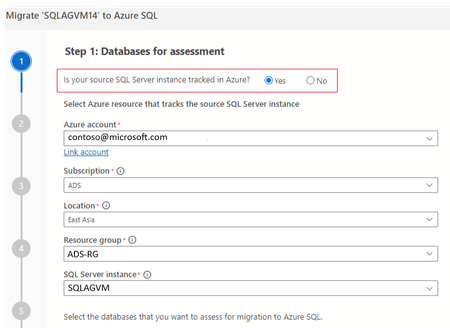
In the ever-evolving landscape of data management, ensuring seamless and efficient migrations is crucial for businesses. Migration is a multi-step process and typically requires multiple tools to complete the migration. To enhance the migration experience, we are bringing a new feature that enhances the migration tracking experience across tools. In this blog post we delve into the benefits this feature offers to streamline the migration tracking process. This feature is available for Azure Data studio users via the latest Azure SQL Migration extension v1.5.8 The Azure SQL migration extension now offers 2 new features in ADS to help users in their migration journey. Ability to view Arc assessments, SKU recommendation in Azure Data Studio Ability to track the migration via SQL Server instance (At no additional cost!) Viewing Arc assessments in Azure Data Studio for SQL Server enabled by Azure Arc If you are planning to migrate SQL Server instances that are Arc-enabled, The Azure Data studio now helps you jump start the migration by providing the ability to view the pre-computed Arc assessments. ADS now provides a link to the pre-computed assessments in the Arc experience Azure portal, which provides migration readiness assessment, SKU recommendation and pricing information (coming soon). Users can continue with rest of their migration journey in the Arc experience. To view the pre-computed assessments computed by Arc, users have to select Yes to the ‘Is your SQL Server instance tracked in Azure? ‘and fill in the Azure resource details of the SQL Server Instance enabled by Azure Arc. The pre-computed assessments and SKU recommendations will be generated as a navigation link to users like below: Ability to streamline the migration tracking process For SQL Server instances which are not Arc-enabled, this feature provides an ability to track the migration by creating an Azure resource with no additional cost associated. Once this resource has been created, users can select this migration resource which is created for their successive migrations that take place for the same source & avail the assessment and readiness benefits. This migration tracking ability is available for both Azure Data Studio and Database migration service portal. Below images show the experience for this ability in Azure DMS portal:Release Announcement of SQL Server Migration Assistant (SSMA) v 10.1
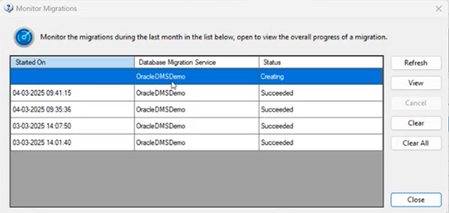
Overview SQL Server Migration Assistant (SSMA) Access, DB2, MySQL, Oracle, and SAP ASE (formerly SAP Sybase ASE) allow users to convert a database schema to a Microsoft SQL Server schema, deploy the schema, and then migrate data to the target SQL Server (see below for supported versions). What’s new? Enhanced monitoring experience for migrations using DMS [ SSMA-Oracle] Migrating Oracle workloads using Azure Database Migration service is in preview, please refer for more details. For Oracle workloads migrating using DMS in SSMA, we are bringing an enhanced monitoring experience through tabular user interface where the users can now view live list of migrations that are in progress or completed phase. Each entry represents a migration activity along with the start time of migration, DMS used for migration and status. Users can view quick brief migration information of individual tables to know more information like Table name, Schema name, copy duration, No. of Rows copied & status real-time. For the sake of users requiring more granular monitoring information about their migration activity, SSMA provides a link to the Azure Database Migration service portal webpage (View Comprehensive Report) where they can view details like Data read, writes, Rows copies, Throughput along with copy duration, etc. Code Conversion Improvements [DB2, Oracle] Conversion enhancements for identity column from Db2 z/OS to SQL Server 2019 Improve conversion of Db2 stored procedure WITH RETURN clause to Azure SQL Database Improve database objects load for Db2 Appropriate error handling for conversion of identifier REPLACE(STRING, CHAR,CHAR) in Db2 Detection of CHAR length in Oracle VARCHAR2 datatype Downloads SSMA for Access SSMA for DB2 SSMA for MySQL SSMA for Oracle SSMA for SAP ASE Supported sources and target versions Source: For the list of supported sources, please review the information on the Download Center for each of the above SQL Server Migration Assistant downloads. Target: SQL Server 2016, SQL Server 2017, SQL Server 2019, Azure SQL Database, an Azure SQL Database managed instance Resources SQL Server Migration Assistant documentation618Views1like0Comments