discover and respond
70 TopicsThe Advantages of Premium Cases in Purview eDiscovery
Capacity & Scale Feature Description Advantage over E3 Enhanced Limits Supports significantly higher limits, including eDiscovery case count and export volume. For example, up to 50,000 cases and 5 TB per search in E5 (versus 10,000 cases and 2 TB in E3). Handles large investigations without splitting into multiple cases or searches. E3’s lower limits would force breaking up big jobs, adding overhead and risk of errors. E5’s higher capacity means fewer workarounds and seamless handling of large-scale litigation. Tenant-Wide eDiscovery Process and Holds Reports (Preview) Provides a central dashboard of all eDiscovery activities and eDiscovery holds across the tenant. Compliance and IT teams get at-a-glance status of ongoing jobs and active holds. Improves oversight and management efficiency for eDiscovery. E3 lacks centralized reporting, making it harder to track many cases. E5’s reporting gives better visibility into operations, which is crucial for heavy workloads and tight deadlines. Expanded Hold Capacity Each legal hold in E5 can encompass up to 2,000 mailboxes and 2,000 sites in one policy. E3 holds are limited to 1,000 mailboxes or 100 sites per policy. Enables placing very large custodian sets on hold with a single action. In E3, exceeding hold limits means juggling multiple policies for one case, increasing complexity. E5 simplifies hold management by consolidating more custodians per hold, reducing admin burden. Search & Collection Feature Description Advantage over E3 Advanced Search Filters Offers richer search criteria beyond keywords. You can filter by sensitive info types (credit cards, SSNs), specific message IDs, or sensitivity labels on documents. This helps pinpoint relevant sensitive content directly. Enables more precise and speedy discovery of critical data. In E3, finding the same info might require complex keyword strings or separate tools (with a higher chance of missing items). E5’s advanced filters mean faster, targeted searches for things like confidential data or GDPR content. Data Source Sync Allows you to refresh custodians’ data sources in a search or hold to catch updates to locations. For example, if a custodian adds a new OneDrive, E5 will detect and prompt you to include it. Ensures no content location is overlooked as the case evolves. E3 has no easy way to know if data moved or new sites were created, potentially leaving gaps. E5’s sync provides complete and defensible collection by keeping holds/searches up-to-date. Cloud Attachment Collection (Hyper-linked Documents) Automatically collects the content of files shared via cloud links (OneDrive/SharePoint) in emails or chats. E5 can retrieve the actual document (and its versions) that was linked, even pulling the specific version that was shared at the time if the version shared feature is enabled. Preserves evidence that E3 would miss. E3 eDiscovery does not fetch linked file content. It would only show a hyperlink, making it difficult to return the associated file. E5 ensures linked documents (with version history) are collected, so the full context of communications is retained. Conversation Threading (Chats & Email) Reconstructs conversations in a threaded view for Microsoft Teams chats and email chains. Reviewers can see messages in context (like a chat transcript or email thread) rather than as isolated items. Greatly improves contextual understanding. E3 exports chats as separate messages with no threading, making it hard to follow the story. E5’s threaded view lets reviewers grasp the full conversation at a glance, reducing confusion and ensuring nothing is interpreted out of context. Custodian & Hold Management Feature Description Advantage over E3 Case-Level Custodian Management Provides a dedicated tab to manage custodians (people) within each case. You add custodians once and can easily apply holds or searches to all their data without re-entering their information each time. Streamlines hold setup and ensures clarity on who is in the case. E3 has no concept of custodians. You must manually input email or site addresses for each search/hold. E5’s approach saves time, reduces errors, and gives a clear view of all people involved in the matter. Bulk Custodian Import Supports importing up to 1,000 custodians at once from a list into a case. Useful for large investigations (e.g., adding an entire department as custodians in one go). Dramatically faster setup for big cases. In E3, adding hundreds of people means typing or pasting each individually, which is time-consuming and error prone. E5’s bulk import means quick, one-time setup for large custodian lists, ensuring no one is missed. “Explore & Add” Custodian Sources Provides an intelligent way to discover related data sources for a given custodian. For example, it can list Teams, SharePoint sites, or groups the person is part of, and let you add those to the case. Helps capture all relevant locations for each person. In E3, you might overlook a Teams channel or group mailbox a custodian was involved in. E5’s explore feature surfaces those connections, improving completeness of your holds and searches by including collaboration spaces that might otherwise be missed. In-Place Review & Analytics Feature Description Advantage over E3 Advanced Indexing and OCR Automatically re-indexes content that was partially indexed or had errors and performs OCR (Optical Character Recognition) on images to extract text. This means files with images or previously unsearchable formats become searchable in E5. Ensures “no stone is left unturned.” E3 would flag such content as “unindexed” (meaning you know a file exists but not what’s inside it). With E5, far more data is searchable, even text inside images or scanned PDFs, reducing the amount of partially indexed content and the chance of missing critical evidence due to format issues. In-Place Review Sets Lets you create a review set of collected data in the cloud. Review sets offer contextual review of conversations, powerful query and filtering capabilities, and query reports for additional insights. Pre-review culling is possible in E5. E3 has no in-product review capability. You must export everything to an outside tool for examination. E5’s review sets allow the team to filter out irrelevant data and focus on what matters before exporting. This reduces the volume (and cost) of data sent for attorney review and keeps data in a secure, auditable environment during analysis. Tagging and Metadata Filters Enables applying tags (labels like “Responsive,” “Privileged,” “Personal Data”) to documents and emails in a review set, and filtering by these tags or other metadata fields. Improves organization and review workflow. E3 cannot tag items in-place, so keeping track of important documents is harder. In E5, tagging allows systematic categorization for quick retrieval (e.g., find all items tagged Highly Relevant instantly). These tags also carry over on export, so any work done during review isn’t lost when handing off to external counsel. Email Threading and Analytics Automatically identifies and stitches together email threads, showing only the last inclusive email that contains the entire conversation. Earlier duplicate emails in the chain are noted and can be skipped. Cuts down review volume and improves context. E3 reviewers would see every single email (even if content repeats across replies). This saves review time and ensures attorneys see the full discussion in one place rather than piecemeal. Conversation View Displays collected Teams (and other chat) messages in a conversation format in a review set, similar to how one would view a chat in the app, instead of individual out-of-context messages. Makes reviewing chat evidence much easier. In E3, chat messages are isolated, forcing reviewers to manually piece together who said what when. E5’s conversational view provides full context at a glance, so nothing is misunderstood or missed in chat-based communications. Near-Duplicate Detection Finds and groups nearly identical documents (e.g. multiple versions of a file or emails with only slight differences). Reviewers are informed which items are alike. Saves time and ensures consistency. E3 requires manually spotting similar files. E5 can let a reviewer examine one version and then quickly tag all its close duplicates the same way. This speeds up review and ensures similar content is handled uniformly (no conflicting judgments on essentially the same document). Themes (Topic Analytics) Uses analytics to cluster documents by themes/topics. For example, it might reveal a group of emails all discussing “Project X” or detect an unusual theme (like frequent mentions of “resignation”). Uncovers hidden patterns that simple keyword searches in E3 might miss. This insight helps investigators spot important threads of discussion or issues they weren’t explicitly searching for, leading to a more thorough understanding of the data set. It adds a layer of proactive insight absent in E3. Global Deduplication Automatically de-duplicates exact copies of emails or files across all custodians using review sets. Each unique item is retained once for review, with duplicates noted. Prevents redundant review work. In E3, the same email stored in five mailboxes would appear five times and could be reviewed and tagged inconsistently by different people. E5’s deduplication means reviewers spend time only on unique content improving efficiency and ensuring consistency in treatment of identical items. Export & Integration Feature Description Advantage over E3 Guest Reviewer Access Allows secure, read-only external access to a review set for outside experts (like outside counsel). Guest reviewers can be invited to review and tag documents in your E5 case via secure Azure AD access (with MFA), without data leaving the tenant. Enables collaboration with outside counsel without exporting data. E3 cannot extend access to external users. You’d have to export files and send them out, which is slower and riskier. E5 keeps the data in-place and governed, letting external reviewers work more efficiently while your organization retains control and visibility. Import External Data Supports ingestion of data from outside M365 into eDiscovery. You can load files like PST emails, PDFs, or documents from file shares into an E5 review set, maintaining custodians’ identity and metadata. Brings all relevant data under one roof. E3 cannot handle content beyond Exchange/SharePoint/Teams, so any non-M365 data would be reviewed separately. E5’s ingestion means even file server or third-party data can be included in the case, making your eDiscovery truly comprehensive and eliminating blind spots between different systems. Rich Export with Metadata Exports include a detailed load file with extensive metadata from the review (custodian info, email thread indices, attachment names, message IDs, tags applied, etc.). This is in addition to the actual content files. Simplifies downstream processing and preserves review decisions. E3’s export is basic (limited metadata), often requiring additional data processing in third-party tools. E5’s comprehensive load file means that all important context (including tags like “Privileged” that your team applied) travels with the exported data, so external reviewers immediately see those cues. This saves time and prevents rework. MIP Search and Decryption Integration Can automatically decrypt protected content (encrypted by Microsoft Information Protection, e.g. with sensitivity labels/Azure RMS) during eDiscovery. Encrypted emails and documents are made readable and searchable when added to a review set. Ensures encrypted files aren’t “invisible” in your investigation. E3 often cannot search or preview MIP-protected emails/docs until they’re manually decrypted after export (if at all). E5 seamlessly includes these encrypted items in search results and review, so you don’t miss evidence that was simply locked behind encryption. Insider Risk Management Escalation Integrates with Microsoft Insider Risk Management (IRM) alerts. With E5, if an insider risk policy flags a user (e.g., for a potential data theft), you can one-click escalate to create an eDiscovery case that automatically targets that user’s content around the incident. Enables a fast, seamless response to insider threats. E3 has no IRM at all, so there’s no such trigger. In E5, the moment a high-risk activity is detected, the legal team can immediately jump into collecting and reviewing the related data. This tight integration means quicker investigations and potentially mitigating issues before they escalate. Communication Compliance Escalation Ties into Communication Compliance (E5’s internal communications monitoring for policy violations). If a serious policy violation is found (e.g., harassment in Teams chats or inappropriate sharing of sensitive info), it can be escalated directly into an eDiscovery case for further investigation. Offers proactive discovery of misconduct. E3 lacks built-in communication monitoring, so issues may go unnoticed until too late. With E5, compliance officers can swiftly pivot from detecting a problem to launching a full eDiscovery inquiry, ensuring faster and more thorough handling of incidents like HR violations or data leaks. Graph API & Automation Fully supports the Microsoft Graph API for eDiscovery. This means eDiscovery tasks (case creation, adding custodians, running searches, exporting data) can be automated or integrated into other applications via scripting/programming without additional cost. While API support is supported for E3, the E3 export API is a metered solution. E5 allows organizations to streamline eDiscovery workflows – for example, auto-create a case and hold when HR flags an employee exit, or integrate with third-party legal management tools without additional cost. Teams and Copilot Interactions Purge Provides an incident response capability to search and purge Teams chats or Microsoft 365 Copilot interactions if sensitive information was shared. Authorized investigators can directly delete up to 100 Teams chat messages (across participant mailboxes) in one go via the eDiscovery interface (leveraging Graph API) when necessary to contain a data leak. Allows quick containment of spills that E3 cannot do. E3’s content search can purge emails but cannot delete Teams messages or Copilot content. With E5, if confidential data pops up in a Teams chat, compliance can not only find it but also bulk-delete those messages from user mailboxes to mitigate further exposure. This capability is crucial for responding to internal data mishandling in real time.Collecting Microsoft 365 Copilot Data with Microsoft Purview eDiscovery
Copilot Data Collection Reference Table Data Type Storage Location Item Class Collection Strategy Copilot Prompts (user questions sent to M365 Copilot) Exchange Online: Hidden folder in the user's mailbox. Compliance copies stored similar to Teams chats, but with unique item classes. IPM.SkypeTeams.Message.Copilot.<AppName> (e.g., .Word, .Excel, .Outlook, .BizChat). Additional AI-related classes may also apply: IPM.SkypeTeams.Message.ConnectedAIApp*, IPM.SkypeTeams.Message.CloudAIApp*, IPM.SkypeTeams.Message.TeamCopilot*, IPM.SkypeTeams.TeamCopilot* 1. Add the user's Exchange mailbox as a data source to the search. 2. In the condition builder you can optionally filter the search to only return Copilot prompts by adding a condition of "Item class contains any of Copilot activity". This automatically applies all relevant M365 Copilot item classes as a condition of the search. 3. Add any further additional conditions such as date range or keywords to narrow results as required. You can also use the Item Class condition to exclude M365 Copilot interactions from your collections when targeting a user’s mailbox. Notes: · Additional item classes may be added. The item class condition will be updated accordingly. Copilot Responses (AI-generated answers) Exchange Online: The same hidden folder in the user's mailbox as prompts. The same IPM.SkypeTeams.Message.Copilot.<AppName> pattern as prompts The same collection strategy used for prompts. Copilot Memories (personalized saved information Copilot "remembers") Exchange Online: Hidden CopilotMemory subfolder within the user's mailbox contacts. Stored as contact entries separate from prompts and responses. IPM.Contact Each memory item appears as a contact card within Exchange, which is distinct from the message-based item classes used for prompts/responses. 1. Add the user's Exchange mailbox as a data source to the search. 2. In the condition builder you can optionally filter the search to only return Contacts by adding a condition of "Item class contains any of Contacts". Notes: · Copilot memories will not be preserved under a legal hold or retention policy. · This will return both Copilot memories stored in contacts as well as traditional contacts from the user’s Exchange mailbox. Copilot Pages (AI-generated, user-editable documents) SharePoint Online: Stored in a user-owned SharePoint embedded container (shared with Loop workspace content and Copilot Notebooks). File format is .page. Not stored in the user's mailbox. N/A These are SharePoint files (not Exchange items), so no item class applies. Identify them in search results by the .page file extension. 1. Add the custodian’s SharePoint embedded site URL as a data source to the search. Alternatively, tenant-wide searches of all SPO sites will include all SharePoint Embedded containers 2. Optionally use the condition builder with conditions such as date range, keywords or file type to further filter results returned Facilitator agent interactions in a Team meeting chat Exchange Online: Hidden folder in all meeting attendees’ mailboxes. Compliance copies stored as Teams chats IPM.SkypeTeams.Message 1. Add the user's Exchange mailbox as a data source to the search. 2. In the condition builder you can optionally filter the search to only return Copilot prompts by adding a condition of "Item class contains any of Instant messages". 3. Add any further additional conditions such as date range or keywords to narrow results as required. Facilitator agent meeting notes (loop) SharePoint Online: Facilitator meeting notes are stored as a .loop file in a OneDrive folder titled Meetings of the user who initiated Facilitator in Teams N/A These are SharePoint files (not Exchange items), so no item class applies. Identify them in search results by the .loop file extension. 1. Add the user's OneDrive URL as a data source to the search. 2. In the condition builder you can optionally filter the search to only return loop files by adding a condition of "File type equals any of loop". 3. Add any further additional conditions such as date range or keywords to narrow results as required. Notes: · With eDiscovery premium enabled cases you can follow the standard workflow for collecting Team meeting messages and select to include cloud attachments in your collection. This will automatically pull into the export or review set any Facilitator agent meeting notes. Facilitator created word/loop documents SharePoint Online: When the facilitator agent is asked to create a word or loop document during a meeting they are stored in the requesters OneDrive in a folder called N/A These are SharePoint files (not Exchange items), so no item class applies. Identify them in search results by the .loop file extension. 1. Add the user's OneDrive URL as a data source to the search. 2. In the condition builder you can optionally filter the search to only return loop and doc files by adding a condition of "File type equals any of loop, docx". 3. Add any further additional conditions such as date range or keywords to narrow results as required. Notes: · With eDiscovery premium enabled cases you can follow the standard workflow for collecting Team meeting messages and select to include cloud attachments in your collection. This will automatically pull into the export or review set any Facilitator generated loop or word documents. Facilitator generated and assigned tasks Exchange Online: When the facilitator agent creates and assigns a task to an individual, it is created as a to-do item in the assigned individual's Exchange Mailbox IPM.Task 1. Add the user's Exchange mailbox as a data source to the search. 2. In the condition builder you can optionally filter the search to only return Tasks by adding a condition of "Item class contains any of Tasks". 3. Add any further additional conditions such as date range or keywords to narrow results as required. Application-Specific Item Classes for Prompts & Responses For more granular filtering by Copilot application, the following item class values can be used in KQL queries: Application Context Item Class Value Microsoft Copilot Chat (BizChat / Teams) IPM.SkypeTeams.Message.Copilot.BizChat Copilot in Excel IPM.SkypeTeams.Message.Copilot.Excel Copilot in Loop IPM.SkypeTeams.Message.Copilot.Loop Copilot in Outlook IPM.SkypeTeams.Message.Copilot.Outlook Copilot in PowerPoint IPM.SkypeTeams.Message.Copilot.PowerPoint Copilot in Teams IPM.SkypeTeams.Message.Copilot.Teams Copilot in Whiteboard IPM.SkypeTeams.Message.Copilot.Whiteboard Copilot in Word IPM.SkypeTeams.Message.Copilot.Word To target all Copilot applications at once, use the wildcard query ItemClass:IPM.SkypeTeams.Message.Copilot.*. For a wider list of AI data sources, see the following link: https://learn.microsoft.com/en-us/purview/edisc-search-copilot-data#data-sources-for-ai-data Important Notes for eDiscovery Practitioners Excluding Copilot Data from Broader Searches Because Copilot prompts and responses reside in the same Exchange mailbox as emails and Teams chats, they will appear in broad mailbox searches unless explicitly filtered out. To exclude Copilot items, use the condition "Item Class Contains none of Copilot activity" in the condition builder, or add (-ItemClass:IPM.SkypeTeams.Message.Copilot.*) in KQL. Some eDiscovery managers run separate searches, one for Copilot data and one for other communications, to keep collections distinct. Copilot Memories: Retention & Hold Limitations Purview retention policies and eDiscovery holds do not currently apply to Copilot memory items. Memory items remain until a user deletes them or an admin explicitly removes them via eDiscovery or Graph API. Additionally, deleting a Copilot prompt and response does not delete any memory derived from that conversation. Memories must be removed separately if required. Copilot Pages: Do Not Treat Like Prompts/Responses Copilot Pages are not stored in Exchange mailboxes. Searching only a custodian’s mailbox will not return Copilot Pages. Treat Copilot Pages the same way as you do for SharePoint content in your existing eDiscovery workflow. For collections, keyword searches will generate hits on text content within the .page file if either the SharePoint Embedded URL is included in the search or the search is a tenant-wide search of all SharePoint sites Be aware that full-text search within .page files in Purview eDiscovery review sets is not currently available. Instead you can use filters such as Subject/Title or Native File Type to locate Copilot Pages in your review set and review the content. When an eDiscovery hold is placed on a custodian’s mailbox, it does not automatically extend to the SharePoint Embedded site where the Copilot Pages are stored. Instead, ensure the hold policy includes the URL for the user-owned SharePoint Embedded site that contains the Copilot Page(s) that must be preserved. Audit Logs vs. eDiscovery for Copilot Content Audit logs record that a Copilot interaction occurred (time, user, workload context) but do not include the actual prompt or response text. To retrieve the substance of Copilot interactions, use Purview eDiscovery searches against the mailbox. Copilot Prompts and Responses: HTML Transcription Copilot prompts and responses are stored as individual messages within the user’s mailbox. When collecting Copilot interactions, enabling the “Organize conversations into HTML transcripts” premium option will convert these individual messages into HTML transcripts making for easier review and linkage between the user’s original prompt and the Copilot responses. Copilot Prompts and Responses: Contextual prompts and responses When using the Keywords condition as part of your collection in eDiscovery, it will only return items that match the keywords included in the query. This means that you may only return a part of the Copilot interaction. If using keywords in your collection query you can enable the “Include full conversation for Copilot, Teams and Viva Engage messages” premium option. This will include in the export or review set any prompts or responses from the Copilot interaction within a 12-hour window before and after each responsive item. This means that you are able to see the full context of the prompt or response that was responsive to search. Collecting Referenced Documents (Cloud Attachments) Copilot responses may reference or summarize SharePoint/OneDrive files. When collecting Copilot interactions, enabling the "Access links (cloud attachments) in messages" premium option will additionally collect the files referenced in the prompt or response and include them in the export package. This provides full evidentiary context but can significantly increase export size and processing time so consider if collecting these artifacts are relevant to the investigation. If so, look to use additional conditions such as date to effectively manage volumes or reduce the number of custodians in the collection. Facilitator agent in Microsoft Teams Meetings The Facilitator agent in Microsoft Teams is an AI-powered assistant (included with Microsoft 365 Copilot) that enhances meeting productivity by generating real-time notes, summarizing key decisions, and managing action items. It acts as an active participant, allowing for collaborative editing of notes and answering chat questions during calls. As the Facilitator works within the context of Microsoft Teams meetings (scheduled private meetings only) your existing workflows for collecting Microsoft Teams meetings chat should be used. In addition, enabling the "Access links (cloud attachments) in messages" premium setting will automatically collect any meeting note (loop) or loop or word documents created by the Facilitator agent. Copilot Retention Reference Table Data Type Microsoft Purview Retention Policy Location/Scope Copilot prompts and responses Microsoft Copilot experiences Copilot Memories (personalized saved information Copilot "remembers") Not supported Copilot Pages (AI-generated, user-editable documents) SharePoint classic and communications sites (Static Scopes only) Facilitator interactions in a Team meeting Teams chats Facilitator meeting notes (loop) OneDrive Accounts Facilitator created word/loop documents OneDrive Accounts Facilitator generated and assigned tasks Exchange mailboxes (Tasks with end dates only)Why UK Enterprise Cybersecurity Is Failing in 2026 (And What Leaders Must Change)
Enterprise cybersecurity in large organisations has always been an asymmetric game. But with the rise of AI‑enabled cyber attacks, that imbalance has widened dramatically - particularly for UK and EMEA enterprises operating complex cloud, SaaS, and identity‑driven environments. Microsoft Threat Intelligence and Microsoft Defender Security Research have publicly reported a clear shift in how attackers operate: AI is now embedded across the entire attack lifecycle. Threat actors use AI to accelerate reconnaissance, generate highly targeted phishing at scale, automate infrastructure, and adapt tactics in real time - dramatically reducing the time required to move from initial access to business impact. In recent months, Microsoft has documented AI‑enabled phishing campaigns abusing legitimate authentication mechanisms, including OAuth and device‑code flows, to compromise enterprise accounts at scale. These attacks rely on automation, dynamic code generation, and highly personalised lures - not on exploiting traditional vulnerabilities or stealing passwords. The Reality Gap: Adaptive Attackers vs. Static Enterprise Defences Meanwhile, many UK enterprises still rely on legacy cybersecurity controls designed for a very different threat model - one rooted in a far more predictable world. This creates a dangerous "Resilience Gap." Here is why your current stack is failing- and the C-Suite strategy required to fix it. 1. The Failure of Traditional Antivirus in the AI Era Traditional antivirus (AV) relies on static signatures and hashes. It assumes malicious code remains identical across different targets. AI has rendered this assumption obsolete. Modern malware now uses automated mutation to generate unique code variants at execution time, and adapts behaviour based on its environment. Microsoft Threat Intelligence has observed threat actors using AI‑assisted tooling to rapidly rewrite payload components, ensuring that every deployment looks subtly different. In this model, there is no reliable signature to detect. By the time a pattern exists, the attacker has already moved on. Signature‑based detection is not just slow - it is structurally misaligned with AI‑driven attacks. The Risk: If your security relies on "recognising" a threat, you are already breached. By the time a signature exists, the attacker has evolved. The C-Suite Pivot: Shift investment from artifact detection to EDR/XDR (Extended Detection and Response). We must prioritise behavioural analytics and machine learning models that identify intent rather than file names. 2. Why Perimeter Firewalls Fail in a Cloud-First World Many UK enterprise still rely on firewalls enforcing static allow/deny rules based on IP addresses and ports. This model worked when applications were predictable and networks clearly segmented. Today, enterprise traffic is encrypted, cloud‑hosted, API‑driven, and deeply integrated with SaaS and identity services. AI‑assisted phishing campaigns abusing OAuth and device‑code flows demonstrate this clearly. From a network perspective, everything looks legitimate: HTTPS traffic to trusted identity providers. No suspicious port. No malicious domain. Yet the attacker successfully compromises identity. The Risk: Traditional firewalls are "blind" to identity-based breaches in cloud environments. The C-Suite Pivot: Move to Identity-First Security. Treat Identity as the new Control Plane, integrating signals like user risk, device health, and geolocation into every access decision. 3. The Critical Weakness of Single-Factor Authentication Despite clear NCSC guidance, single-factor passwords remain a common vulnerability in legacy applications and VPNs. AI-driven credential abuse has changed the economics of these attacks. Threat actors now deploy adaptive phishing campaigns that evolve in real-time. Microsoft has observed attackers using AI to hyper-target high-value UK identities- specifically CEOs, Finance Directors, and Procurement leads. The Risk: Static passwords are now the primary weak link in UK supply chain security. The C-Suite Pivot: Mandate Phishing‑resistant MFA (Passkeys or hardware security keys). Implement Conditional Access policies that evaluate risk dynamically at the moment of access, not just at login. Legacy Security vs. AI‑Era Reality 4. The Inherent Risk of VPN-Centric Security VPNs were built on a flawed assumption: that anyone "inside" the network is trustworthy. In 2026, this logic is a liability. AI-assisted attackers now use automation to map internal networks and identify escalation paths the moment they gain VPN access. Furthermore, Microsoft has tracked nation-state actors using AI to create synthetic employee identities- complete with fake resumes and deepfake communication. In these scenarios, VPN access isn't "hacked"; it is legally granted to a fraudster. The Risk: A compromised VPN gives an attacker the "keys to the kingdom." The C-Suite Pivot: Transition to Zero Trust Architecture (ZTA). Access must be explicit, scoped to the specific application, and continuously re‑evaluated using behavioural signals. 5. Data: The High-Velocity Target Sensitive data sitting unencrypted in legacy databases or backups is a ticking time bomb. In the AI era, data discovery is no longer a slow, manual process for a hacker. Attackers now use AI to instantly analyse your directory structures, classify your files, and prioritise high-value data for theft. Unencrypted data significantly increases your "blast radius," turning a containable incident into a catastrophic board-level crisis. The Risk: Beyond the technical breach, unencrypted data leads to massive UK GDPR fines and irreparable brand damage. The C-Suite Pivot: Adopt Data-Centric Security. Implement encryption by default, classify data while adding sensitivity labels and start board-level discussions regarding post‑quantum cryptography (PQC) to future-proof your most sensitive assets. 6. The Failure of Static IDS Traditional Intrusion Detection Systems (IDS) rely on known indicators of compromise - assuming attackers reuse the same tools and techniques. AI‑driven attacks deliberately avoid that assumption. Threat actors are now using Large Language Models (LLMs) to weaponize newly disclosed vulnerabilities within hours. While your team waits for a "known pattern" to be updated in your system, the attacker is already using a custom, AI-generated exploit. The Risk: Your team is defending against yesterday's news while the attacker is moving at machine speed. The C-Suite Pivot: Invest in Adaptive Threat Detection. Move toward Graph‑based XDR platforms that correlate signals across email, endpoint, and cloud to automate investigation and response before the damage spreads. From Static Security to Continuous Security Closing Thought: Security Is a Journey, Not a Destination For UK enterprises, the shift toward adaptive cybersecurity is no longer optional - it is increasingly driven by regulatory expectation, board oversight, and accountability for operational resilience. Recent UK cyber resilience reforms and evolving regulatory frameworks signal a clear direction of travel: cybersecurity is now a board‑level responsibility, not a back‑office technical concern. Directors and executive leaders are expected to demonstrate effective governance, risk ownership, and preparedness for cyber disruption - particularly as AI reshapes the threat landscape. AI is not a future cybersecurity problem. It is a current force multiplier for attackers, exposing the limits of legacy enterprise security architectures faster than many organisations are willing to admit. The uncomfortable truth for boards in 2026 is that no enterprise is 100% secure. Intrusions are inevitable. Credentials will be compromised. Controls will be tested. The difference between a resilient enterprise and a vulnerable one is not the absence of incidents, but how risk is managed when they occur. In mature organisations, this means assuming breach and designing for containment: Access controls that limit blast radius Least privilege and conditional access restricting attackers to the smallest possible scope if an identity is compromised Data‑centric security using automated classification and encryption, ensuring that even when access is misused, sensitive data cannot be freely exfiltrated As a Senior Enterprise Cybersecurity Architect, I see this moment as a unique opportunity. AI adoption does not have to repeat the mistakes of earlier technology waves, where innovation moved fast and security followed years later. We now have a rare chance to embed security from day one - designing identity controls, data boundaries, automated monitoring, and governance before AI systems become business‑critical. When security is built in upfront, enterprises don’t just reduce risk - they gain the confidence to move faster and unlock AI’s value safely. Security is no longer a “department”. In the age of AI, it is a continuous business function - essential to preserving trust and maintaining operational continuity as attackers move at machine speed. References: Inside an AI‑enabled device code phishing campaign | Microsoft Security Blog AI as tradecraft: How threat actors operationalize AI | Microsoft Security Blog Detecting and analyzing prompt abuse in AI tools | Microsoft Security Blog Post-Quantum Cryptography | CSRC Microsoft Digital Defense Report 2025 | Microsoft https://www.ncsc.gov.uk/news/government-adopt-passkey-technology-digital-services
Credential Exposure Risk & Response Workbook
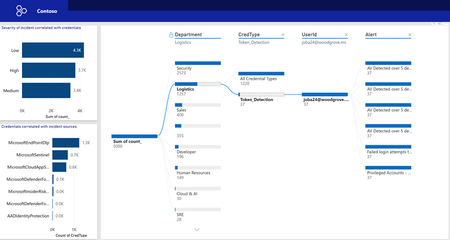
How to set up the Workbook Use the steps outlined in the Identify and Remediate Credentials article to get the right rules in place to start capturing credential data. You may choose to use custom regex patterns or more specific SITs that align with your scenario. This workbook will help you once that is done. This workbook transforms credential leakage detection into a measurable, executive-ready capability. End‑to‑end situational awareness: Correlates alerts across workloads, departments, credential types, and users to surface material exposure quickly. Actionable triage & forensics: Drill from trends to the artifact (message/file/URL), accelerating containment and root‑cause analysis. Risk‑aligned decisions: Quantifies exposure and response performance (creation vs. resolution trends) to guide investment and policy changes. Audit‑ready governance: Captures decisions, timelines, and outcomes for PCI/PII controls, identity hygiene, and secrets management. Prerequisites License requirements for Microsoft Purview Information Protection depend on the scenarios and features you use. To understand your licensing requirements and options for Microsoft Purview Information Protection, see the Information Protection sections from Microsoft 365 guidance for security & compliance and the related PDF download for feature-level licensing requirements. Before you start, all endpoint interaction with Sensitive content is already being included in the audit logging with Endpoint DLP enabled (Endpoint DLP must be enabled). For Microsoft 365 SharePoint, OneDrive Exchange, and Teams you can enable policies that generate events but not incidents for important sensitive information types. Install Power BI Desktop to make use of the templates Downloads - Microsoft Power BI Step-by-step guided walkthrough In this guide, we will provide high-level steps to get started using the new tooling. Get the latest version of the report that you are interested in. In this case, we will show the Board report. Open the report. If Power BI Desktop is installed, it should look like this: 3. You must authenticate with the https://api.security.microsoft.com, select Organizational account, and sign in. Then click Connect. 4. You will also have to authenticate with httpps://api.security.microsoft.com/api/advancedhunting, select Organizational account, and sign in. Then click Connect. What the Workbook Delivers The workbook moves programs to something that is measurable. Combined with customers' outcome‑based metrics (operational risk, control risk, end‑user impact), it enables an executive‑level, data‑driven narrative for investment and policy decisions. End‑to‑end situational awareness: Correlates alerts across workloads, departments, credential types, and users to surface material exposure quickly. Actionable triage & forensics: Drill from trends to the artifact (message/file/URL), accelerating containment and root‑cause analysis. Risk‑aligned decisions: Quantifies exposure and response performance (creation vs. resolution trends) to guide investment and policy changes. Audit‑ready governance: Captures decisions, timelines, and outcomes for PCI/PII controls, identity hygiene, and secrets management. Troubleshooting tips: If you are receiving a (400): Bad request error, it is likely that you do not have the necessary tables from the endpoint in Advanced Hunting. Those errors may also show if there are empty values passed from the left-hand side of the KQL queries. Detection trend Apply filtering to this view based on the DLP policies that monitor credentials. Trend Analysis Over Time Displays daily detection counts, helping identify spikes in credential leakage activity and enabling proactive investigation. Workload and Credential Type Breakdown Shows which workloads (e.g., Endpoint, Exchange, OneDrive) and credential types are most affected, guiding targeted security measures. Detection Source Visibility Highlight which security tools (Sentinel, Cloud App Security, Defender) are catching leaks, ensuring monitoring coverage, and identifying gaps. Detailed Credential Exposure Lists exposed credentials for quick validation and remediation, reducing the risk of misuse or compromise. (This part is dependent on the AI component) Supports Incident Response Enables rapid triage by correlating detection trends with specific credentials and sources, improving response times. Compliance and Audit Readiness Provides clear evidence of credential monitoring and leakage detection for regulatory and governance reporting. Credential incident trends Lifecycle Tracking of Credential Alerts Visualizes creation and resolution trends over time, helping teams measure response efficiency and identify periods of heightened risk. Workload and Credential Type Breakdown Shows which workloads (Endpoint, Exchange, OneDrive) and credential types are most impacted, enabling targeted mitigation strategies. Incident Type Analysis Highlights the distribution of alerts by category (e.g., CredRisk, Agent), supporting prioritization of critical incidents. Detailed Alert Context Provides message IDs and associated credentials for precise investigation and remediation, reducing time to contain threats. Performance and SLA Monitoring Tracks resolution timelines to ensure compliance with internal security SLAs and regulatory requirements. Audit and Governance Support Offers clear evidence of alert handling and closure, strengthening accountability and reporting. Content view Workload-Level Risk Visibility Highlights which workloads (e.g., SharePoint, Endpoint) have the highest credential exposure, enabling targeted security hardening. Departmental Risk Breakdown Shows which departments (Security, Logistics, Sales) are most impacted, helping prioritise remediation for critical business areas. Credential Type Analysis Identifies exposed credential types such as API keys, shared access keys, and tokens, guiding policy enforcement and rotation strategies. User and Document Correlation Links exposed credentials to specific users and documents, supporting rapid investigation and containment of leaks. Comprehensive Drill-Down Enables navigation from department → credential type → user → document for precise root cause analysis. Governance and Compliance Support Provides auditable evidence of credential exposure across workloads and departments, strengthening regulatory reporting. For endpoint, this view is an excellent way to catch applications that are not treating secrets in a safe way and expose them in temporary files. Force-directed graph Visual Alert Correlation Displays a force-directed graph linking users to alert categories, making it easy to identify patterns and clusters of credential-related risks. High-Risk User Identification Highlights users with multiple or severe alerts, enabling prioritisation for investigation and remediation. Credential Type and Department Context Shows which credential types and departments are most associated with alerts, supporting targeted security measures. Alert Severity and Details Provides a detailed table of alerts with severity and category, helping analysts quickly assess impact and urgency. Improved Threat Hunting Enables analysts to trace relationships between users, alert types, and credential exposure for deeper root cause analysis. Compliance and Reporting Offers clear evidence of monitoring and categorisation of credential-related alerts for governance and audit purposes. Security incidents correlated to credential leakage Focused on Credential Leakage Provides a dedicated view of alerts related to exposed credentials, enabling quick detection and response. Role-Based Risk Analysis Breaks down incidents by department and role, helping prioritise remediation for high-risk groups such as developers and security teams. User-Level Investigation Allows drill-down to individual users involved in credential-related alerts for rapid containment and corrective action. Credential Type Insights Highlight which types of credentials (e.g., API keys, passwords) are most vulnerable, guiding policy improvements and rotation strategies. Alert Source Correlation Displays which security tools (Sentinel, MCAS, Defender) are detecting leaks, ensuring coverage and identifying monitoring gaps. Compliance and Governance Support Offers auditable evidence of credential monitoring, supporting regulatory and internal security requirements. App and Network correlated to credential leakage For network detection, adjust the query in production to remove standard applications if they are too noisy. We have seen cases where Word and other commonly used applications make calls using FTP services as an example. While other applications may add too much noise. Token Detection Event Traceability Shows detected Token credentials events linked directly to individual User IDs and Device IDs for investigation. Application Usage Context Identifies that the detected activity is associated with the application ms‑teams.exe as an example. External URL Association Displays the Remote URL connected to the token detection event. Remote IP Visibility Lists the Remote IP addresses associated with the activity. Entity-Level Correlation Links UserId, DeviceId, Application, Remote URL, and Remote IP within a single event flow. You can select port used or how Apps are linked as well. Detection Count Aggregation Summarises the number of credential events tied to each correlated entity path. Turn detection into decisions. Deploy the workbook today to get measurable insights, accelerate triage, and deliver audit-ready governance. Start driving risk-aligned investment and policy changes with confidence. The PBI report is located here. Based on what you identify, you may be using tools such as Data Security Investigations to go deeper. We are also working on surfacing the AI triaging in a context that will enrich the DLP analyst experience.
Building Secure, Enterprise Ready AI Agents with Purview SDK and Agent Framework
At Microsoft Ignite, we announced the public preview of Purview integration with the Agent Framework SDK—making it easier to build AI agents that are secure, compliant, and enterprise‑ready from day one. AI agents are quickly moving from demos to production. They reason over enterprise data, collaborate with other agents, and take real actions. As that happens, one thing becomes non‑negotiable: Governance has to be built in. That’s where Purview SDK comes in. Agentic AI Changes the Security Model Traditional apps expose risks at the UI or API layer. AI agents are different. Agents can: Process sensitive enterprise data in prompts and responses Collaborate with other agents across workflows Act autonomously on behalf of users Without built‑in controls, even a well‑designed agent can create compliance gaps. Purview SDK brings Microsoft’s enterprise data security and compliance directly into the agent runtime, so governance travels with the agent—not after it. What You Get with Purview SDK + Agent Framework This integration delivers a few key things developers and enterprises care about most: Inline Data Protection Evaluate prompts and responses against Data Loss Prevention (DLP) policies in real time. Content can be allowed or blocked automatically. Built‑In Governance Send AI interactions to Purview for audit, eDiscovery, communication compliance, and lifecycle management—without custom plumbing. Enterprise‑Ready by Design Ship agents that meet enterprise security expectations from the start, not as a follow‑up project. All of this is done natively through Agent Framework middleware, so governance feels like part of the platform—not an add‑on. How Enforcement Works (Quickly) When an agent runs: Prompts and responses flow through the Agent Framework pipeline Purview SDK evaluates content against configured policies A decision is returned: allow, redact, or block Governance signals are logged for audit and compliance This same model works for: User‑to‑agent interactions Agent‑to‑agent communication Multi‑agent workflows Try It: Add Purview SDK in Minutes Here’s a minimal Python example using Agent Framework: That’s it! From that point on: Prompts and responses are evaluated against Purview policies setup within the enterprise tenant Sensitive data can be automatically blocked Interactions are logged for governance and audit Designed for Real Agent Systems Most production AI apps aren’t single‑agent systems. Purview SDK supports: Agent‑level enforcement for fine‑grained control Workflow‑level enforcement across orchestration steps Agent‑to‑agent governance to protect data as agents collaborate This makes it a natural fit for enterprise‑scale, multi‑agent architectures. Get Started Today You can start experimenting right away: Try the Purview SDK with Agent Framework Follow the Microsoft Learn docs to configure Purview SDK with Agent Framework. Explore the GitHub samples See examples of policy‑enforced agents in Python and .NET. Secure AI, Without Slowing It Down AI agents are quickly becoming production systems—not experiments. By integrating Purview SDK directly into the Agent Framework, Microsoft is making governance a default capability, not a deployment blocker. Build intelligent agents. Protect sensitive data. Scale with confidence.Microsoft Purview Data Governance - Authoring Custom Data Quality rules using expression languages
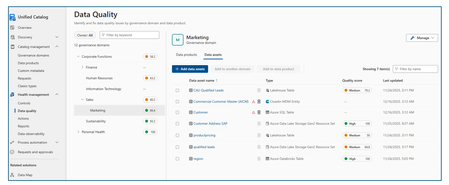
The cost of poor-quality data runs into millions of dollars in direct losses. When indirect costs—such as missed opportunities—are included, the total impact is many times higher. Poor data quality also creates significant societal costs. It can lead customers to pay higher prices for goods and services and force citizens to bear higher taxes due to inefficiencies and errors. In critical domains, the consequences can be severe. Defective or inaccurate data can result in injury or loss of life, for example due to medication errors or incorrect medical procedures, especially as healthcare increasingly relies on data- and AI-driven decision-making. Students may be unfairly denied admission to universities because of errors in entrance exam scoring. Consumers may purchase unsafe or harmful food products if nutritional labels are inaccurate or misleading. Research and industry measurements show that 20–35 percent of an organization’s operating revenue is often wasted on recovering from process failures, data defects, information scrap, and rework caused by poor data quality (Larry P. English, Information Quality Applied). Data Quality Rules To maintain high-quality data, organizations must continuously measure and monitor data quality and understand the negative impact of poor-quality data on their specific use cases. Data quality rules play a critical role in objectively measuring, enforcing, and quantifying data quality, enabling organizations to improve trust, reduce risk, and maximize the value of their data assets. Data Quality (DQ) rules define how data should be structured, related, constrained, and validated so it can be trusted for operational, analytical, and AI use cases. Data quality rules are essential guidelines that organizations establish to ensure the accuracy, consistency, and completeness of their data. These rules fall into four major categories: Business Entity rules, Business Attribute rules, Data Dependency rules, and Data Validity rules (Ref: Informit.com/articles). Business Entity Rules These rules ensure that core business objects (such as Customer, Order, Account, or Product) are well-defined and correctly related. Business entity rules prevent duplicate records, broken relationships, and incomplete business processes. Business Entity Rules Definition Example Uniqueness Every entity instance must be uniquely identifiable. Each customer must have a unique Customer ID that is never NULL. Duplicate customer records indicate poor data quality. Cardinality Defines how many instances of one entity can relate to another. One customer can place many orders (one-to-many), but an order belongs to exactly one customer. Optionality Defines whether a relationship is mandatory or optional. An order must be linked to a customer (mandatory), but a customer may exist without having placed any orders (optional). Business Attribute Rules These rules focus on individual data elements (columns/fields) within business entities. Attribute rules ensure consistency, interpretability, and prevent invalid or meaningless values. Business Attribute Rules Definition Example Data Inheritance Attributes defined in a supertype must be consistent across subtypes. An Account Number remains the same whether the account is Checking or Savings. Data Domains Attribute values must conform to allowed formats or ranges. · State Code must be one of the 50 U.S. state abbreviations · Age must be between 0 and 120 · Date must follow CCYY/MM/DD format Data Dependency Rules These rules define logical and conditional relationships between entities and attributes. Data dependency rules enforce business logic and prevent contradictory or illogical data states. Data Dependency Rules Definition Example Entity Relationship Dependency The existence of one relationship depends on another condition. Orders cannot be placed for customers with a “Delinquent” status. Attribute Dependency The value of one attribute depends on others. · If Loan Status = “Funded,” then Loan Amount > 0 and Funding Date is required · Pay Amount = Hours Worked × Hourly Rate · If Monthly Salary > 0, then Commission Rate must be NULL Data Validity Rules These rules ensure that actual data values are complete, correct, accurate, precise, unique, and consistent. Validity rules ensure data is trustworthy for reporting, regulatory compliance, and AI/ML models. Data Validity Rules Definition Example Completeness Required records, relationships, attributes, and values must exist. No NULLs in mandatory fields like Customer ID or Order Date. Correctness & Accuracy Values must reflect real-world truth and business rules. A customer’s credit limit must align with approved financial records. Precision Data must be stored with the required level of detail. Interest rates stored to four decimal places if required for calculations. Uniqueness No duplicate records, keys, definitions, or overloaded columns. A “Customer Type Code” column should not mix customer types and shipping methods. Consistency Duplicate or redundant data must match everywhere it appears. Customer address stored in multiple systems must be identical. Compliance PII and sensitive data Check and validate personal information like credit card, passport number, national id, bank account, etc. System Rules Microsoft Purview Data Quality provides both system (out-of-the-box) rules and custom rules, along with an AI-enabled data quality rule recommendation feature. Together, these capabilities help organizations effectively measure, monitor, and improve data quality by applying the right set of data quality rules. System (out-of-the-box) rules cover the majority of business attribute and data validity scenarios. List of the system rules are illustrated below (see the screenshot below). Custom Rules Custom rules allow you to define validations that evaluate one or more values within a row, enabling complex, context-aware data quality checks tailored to specific business requirements. Custom rules support all four major categories of data quality rules: Business Entity rules, Business Attribute rules, Data Dependency rules, and Data Validity rules. You can use regular expression language, Azure Data Factory expression, and SQL expression language to create custom rules. Purview Data Quality custom rule has three parts: Row expression: This Boolean expression applies to each row that the filter expression approves. If this expression returns true, the row passes. If it returns false, the row fails. Filter expression: This optional condition narrows down the dataset on which the row condition is evaluated. You activate it by selecting the Use filter expression checkbox. This expression returns a Boolean value. The filter expression applies to a row and if it returns true, then that row is considered for the rule. If the filter expression returns false for that row, then it means that row is ignored for the purposes of this rule. The default behavior of the filter expression is to pass all rows, so if you don't specify a filter expression, all rows are considered. Null expression: Checks how NULL values should be handled. This expression returns to a Boolean that handles cases where data is missing. If the expression returns true, the row expression isn't applied. Each part of the rule works similarly to existing Microsoft Purview Data Quality conditions. A rule only passes if the row expression evaluates to TRUE for the dataset that matches the filter expression and handles missing values as specified in the null expression. Examples: Ensure that the location of the salesperson is correct. Azure data factory expression language is used to author this rule. 2. Ensure "fare Amount" is positive and "trip Distance" is valid. SQL expression language is used to author this rule. 3. For each trip, check if the fare is above the average for its payment type. SQL expression language is used to author this rule. Together, above listed four categories of data quality rules: Prevent errors at the source Enforce business logic Improve trust in analytics and AI Reduce remediation costs downstream In short, high-quality data is not accidental—it is enforced through well-defined data quality rules across entities, attributes, relationships, and values. References Create Data Quality Rules in Unified Catalog | Microsoft Learn Expression builder in mapping data flows - Azure Data Factory & Azure Synapse | Microsoft Learn Expression Functions in the Mapping Data Flow - Azure Data Factory & Azure Synapse | Microsoft Learn http://www.informit.com/articles/article.aspx?p=399325&seqNum=3 Information Quality Applied, Larry P. EnglishMicrosoft Ignite 2025: Top Security Innovations You Need to Know
🤖 Security & AI -The Big Story This Year 2025 marks a turning point for cybersecurity. Rapid adoption of AI across enterprises has unlocked innovation but introduced new risks. AI agents are now part of everyday workflows-automating tasks and interacting with sensitive data—creating new attack surfaces that traditional security models cannot fully address. Threat actors are leveraging AI to accelerate attacks, making speed and automation critical for defense. Organizations need solutions that deliver visibility, governance, and proactive risk management for both human and machine identities. Microsoft Ignite 2025 reflects this shift with announcements focused on securing AI at scale, extending Zero Trust principles to AI agents, and embedding intelligent automation into security operations. As a Senior Cybersecurity Solution Architect, I’ve curated the top security announcements from Microsoft Ignite 2025 to help you stay ahead of evolving threats and understand the latest innovations in enterprise security. Agent 365: Control Plane for AI Agents Agent 365 is a centralized platform that gives organizations full visibility, governance, and risk management over AI agents across Microsoft and third-party ecosystems. Why it matters: Unmanaged AI agents can introduce compliance gaps and security risks. Agent 365 ensures full lifecycle control. Key Features: Complete agent registry and discovery Access control and conditional policies Visualization of agent interactions and risk posture Built-in integration with Defender, Entra, and Purview Available via the Frontier Program Microsoft Agent 365: The control plane for AI agents Deep dive blog on Agent 365 Entra Agent ID: Zero Trust for AI Identities Microsoft Entra is the identity and access management suite (covering Azure AD, permissions, and secure access). Entra Agent ID extends Zero Trust identity principles to AI agents, ensuring they are governed like human identities. Why it matters: Unmanaged or over-privileged AI agents can create major security gaps. Agent ID enforces identity governance on AI agents and reduces automation risks. Key Features: Provides unique identities for AI agents Lifecycle governance and sponsorship for agents Conditional access policies applied to agent activity Integrated with open SDKs/APIs for third‑party platforms Microsoft Entra Agent ID Overview Entra Ignite 2025 announcements Public Preview details Security Copilot Expansion Security Copilot is Microsoft’s AI assistant for security teams, now expanded to automate threat hunting, phishing triage, identity risk remediation, and compliance tasks. Why it matters: Security teams face alert fatigue and resource constraints. Copilot accelerates response and reduces manual effort. Key Features: 12 new Microsoft-built agents across Defender, Entra, Intune, and Purview. 30+ partner-built agents available in the Microsoft Security Store. Automates threat hunting, phishing triage, identity risk remediation, and compliance tasks. Included for Microsoft 365 E5 customers at no extra cost. Security Copilot inclusion in Microsoft 365 E5 Security Copilot Ignite blog Security Dashboard for AI A unified dashboard for CISOs and risk leaders to monitor AI risks, aggregate signals from Microsoft security services, and assign tasks via Security Copilot - included at no extra cost. Why it matters: Provides a single pane of glass for AI risk management, improving visibility and decision-making. Key Features: Aggregates signals from Entra, Defender, and Purview Supports natural language queries for risk insights Enables task assignment via Security Copilot Ignite Session: Securing AI at Scale Microsoft Security Blog Microsoft Defender Innovations Microsoft Defender serves as Microsoft’s CNAPP solution, offering comprehensive, AI-driven threat protection that spans endpoints, email, cloud workloads, and SIEM/SOAR integrations. Why It Matters Modern attacks target multi-cloud environments and software supply chains. These innovations provide proactive defense, reduce breach risks before exploitation, and extend protection beyond Microsoft ecosystems-helping organizations secure endpoints, identities, and workloads at scale. Key Features: Predictive Shielding: Proactively hardens attack paths before adversaries pivot. Automatic Attack Disruption: Extended to AWS, Okta, and Proofpoint via Sentinel. Supply Chain Security: Defender for Cloud now integrates with GitHub Advanced Security. What’s new in Microsoft Defender at Ignite Defender for Cloud innovations Global Secure Access & AI Gateway Part of Microsoft Entra’s secure access portfolio, providing secure connectivity and inspection for web and AI traffic. Why it matters: Protects against lateral movement and AI-specific threats while maintaining secure connectivity. Key Features: TLS inspection, URL/file filtering AI Prompt Injection protection Private access for domain controllers to prevent lateral movement attacks. Learn about Secure Web and AI Gateway for agents Microsoft Entra: What’s new in secure access on the AI frontier Purview Enhancements Microsoft Purview is the data governance and compliance platform, ensuring sensitive data is classified, protected, and monitored. Why it matters: Ensures sensitive data remains protected and compliant in AI-driven environments. Key Features: AI Observability: Monitor agent activities and prevent sensitive data leakage. Compliance Guardrails: Communication compliance for AI interactions. Expanded DSPM: Data Security Posture Management for AI workloads. Announcing new Microsoft Purview capabilities to protect GenAI agents Intune Updates Microsoft Intune is a cloud-based endpoint device management solution that secures apps, devices, and data across platforms. It simplifies endpoint security management and accelerates response to device risks using AI. Why it matters: Endpoint security is critical as organizations manage diverse devices in hybrid environments. These updates reduce complexity, speed up remediation, and leverage AI-driven automation-helping security teams stay ahead of evolving threats. Key Features: Security Copilot agents automate policy reviews, device offboarding, and risk-based remediation. Enhanced remote management for Windows Recovery Environment (WinRE). Policy Configuration Agent in Intune lets IT admins create and validate policies with natural language What’s new in Microsoft Intune at Ignite Your guide to Intune at Ignite Closing Thoughts Microsoft Ignite 2025 signals the start of an AI-driven security era. From visibility and governance for AI agents to Zero Trust for machine identities, automation in security operations, and stronger compliance for AI workloads-these innovations empower organizations to anticipate threats, simplify governance, and accelerate secure AI adoption without compromising compliance or control. 📘 Full Coverage: Microsoft Ignite 2025 Book of News3.2KViews2likes0CommentsMicrosoft Security Store: Now Generally Available
When we launched the Microsoft Security Store in public preview on September 30, our goal was simple: make it easier for organizations to discover, purchase, and deploy trusted security solutions and AI agents that integrate seamlessly with Microsoft Security products. Today, Microsoft Security Store is generally available—with three major enhancements: Embedded where you work: Security Store is now built into Microsoft Defender, featuring SOC-focused agents, and into Microsoft Entra for Verified ID and External ID scenarios like fraud protection. By bringing these capabilities into familiar workflows, organizations can combine Microsoft and partner innovation to strengthen security operations and outcomes. Expanded catalog: Security Store now offers more than 100 third-party solutions, including advanced fraud prevention, forensic analysis, and threat intelligence agents. Security services available: Partners can now list and sell services such as managed detection and response and threat hunting directly through Security Store. Real-World Impact: What We Learned in Public Preview Thousands of customers explored Microsoft Security Store and tried a growing catalog of agents and SaaS solutions. While we are at the beginning of our journey, customer feedback shows these solutions are helping teams apply AI to improve security operations and reduce manual effort. Spairliners, a cloud-first aviation services joint venture between Air France and Lufthansa, strengthened identity and access controls by deploying Glueckkanja’s Privileged Admin Watchdog to enforce just-in-time access. “Using the Security Store felt easy, like adding an app in Entra. For a small team, being able to find and deploy security innovations in minutes is huge.” – Jonathan Mayer, Head of Innovation, Data and Quality GTD, a Chilean technology and telecommunications company, is testing a variety of agents from the Security Store: “As any security team, we’re always looking for ways to automate and simplify our operations. We are exploring and applying the world of agents more and more each day so having the Security Store is convenient—it’s easy to find and deploy agents. We’re excited about the possibilities for further automation and integrations into our workflows, like event-triggered agents, deeper Outlook integration, and more." – Jonathan Lopez Saez, Cybersecurity Architect Partners echoed the momentum they are seeing with the Security Store: “We’re excited by the early momentum with Security Store. We’ve already received multiple new leads since going live, including one in a new market for us, and we have multiple large deals we’re looking to drive through Security Store this quarter.” - Kim Brault, Head of Alliances, Delinea “Partnering with Microsoft through the Security Store has unlocked new ways to reach enterprise customers at scale. The store is pivotal as the industry shifts toward AI, enabling us to monetize agents without building our own billing infrastructure. With the new embedded experience, our solutions appear at the exact moment customers are looking to solve real problems. And by working with Microsoft’s vetting process, we help provide customers confidence to adopt AI agents” – Milan Patel, Co-founder and CEO, BlueVoyant “Agents and the Microsoft Security Store represent a major step forward in bringing AI into security operations. We’ve turned years of service experience into agentic automations, and it’s resonating with customers—we’ve been positively surprised by how quickly they’re adopting these solutions and embedding our automated agentic expertise into their workflows.” – Christian Kanja, Founder and CEO of glueckkanja New at GA: Embedded in Defender, Entra—Security Solutions right where you work Microsoft Security Store is now embedded in the Defender and Entra portals with partner solutions that extend your Microsoft Security products. By placing Security Store in front of security practitioners, it’s now easier than ever to use the best of partner and Microsoft capabilities in combination to drive stronger security outcomes. As Dorothy Li, Corporate Vice President of Security Copilot and Ecosystem put it, “Embedding the Security Store in our core security products is about giving customers access to innovative solutions that tap into the expertise of our partners. These solutions integrate with Microsoft Security products to complete end-to-end workflows, helping customers improve their security” Within the Microsoft Defender portal, SOC teams can now discover Copilot agents from both Microsoft and partners in the embedded Security Store, and run them all from a single, familiar interface. Let’s look at an example of how these agents might help in the day of the life of a SOC analyst. The day starts with Watchtower (BlueVoyant) confirming Sentinel connectors and Defender sensors are healthy, so investigations begin with full visibility. As alerts arrive, the Microsoft Defender Copilot Alert Triage Agent groups related signals, extracts key evidence, and proposes next steps; identity related cases are then validated with Login Investigator (adaQuest), which baselines recent sign-in behavior and device posture to cut false positives. To stay ahead of emerging campaigns, the analyst checks the Microsoft Threat Intelligence Briefing Agent for concise threat rundowns tied to relevant indicators, informing hunts and temporary hardening. When HR flags an offboarding, GuardianIQ (People Tech Group) correlates activity across Entra ID, email, and files to surface possible data exfiltration with evidence and risk scores. After containment, Automated Closing Comment Generator (Ascent Global Inc.) produces clear, consistent closure notes from Defender incident details, keeping documentation tight without hours of writing. Together, these Microsoft and partner agents maintain platform health, accelerate triage, sharpen identity decisions, add timely threat context, reduce insider risk blind spots, and standardize reporting—all inside the Defender portal. You can read more about the new agents available in the Defender portal in this blog. In addition, Security Store is now integrated into Microsoft Entra, focused on identity-centric solutions. Identity admins can discover and activate partner offerings for DDoS protection, intelligent bot defense, and government ID–based verification for account recovery —all within the Entra portal. With these capabilities, Microsoft Entra delivers a seamless, multi-layered defense that combines built-in identity protection with best-in-class partner technologies, making it easier than ever for enterprises to strengthen resilience against modern identity threats. Learn more here. Levent Besik, VP of Microsoft Entra, shared that “This sets a new benchmark for identity security and partner innovation at Microsoft. Attacks on digital identities can come from anywhere. True security comes from defense in depth, layering protection across the entire user journey so every interaction, from the first request to identity recovery, stays secure. This launch marks only the beginning; we will continue to introduce additional layers of protection to safeguard every aspect of the identity journey” New at GA: Services Added to a Growing Catalog of Agents and SaaS For the first time, partners can offer their security services directly through the Security Store. Customers can now find, buy, and activate managed detection and response, threat hunting, and other expert services—making it easier to augment internal teams and scale security operations. Every listing has a MXDR Verification that certifies they are providing next generation advanced threat detection and response services. You can browse all the services available at launch here, and read about some of our exciting partners below: Avanade is proud to be a launch partner for professional services in the Microsoft Security Store. As a leading global Microsoft Security Services provider, we’re excited to make our offerings easier to find and help clients strengthen cyber defenses faster through this streamlined platform - Jason Revill, Avanade Global Security Technology Lead ProServeIT partnering with Microsoft to have our offers in the Microsoft Security Store helps ProServeIT protect our joint customers and allows us to sell better with Microsoft sellers. It shows customers how our technology and services support each other to create a safe and secure platform - Eric Sugar, President Having Reply’s security services showcased in the Microsoft Security Store is a significant milestone for us. It amplifies our ability to reach customers at the exact point where they evaluate and activate Microsoft security solutions, ensuring our offerings are visible alongside Microsoft’s trusted technologies. Notable New Selections Since public preview, the Security Store catalog has grown significantly. Customers can now choose from over 100 third-party solutions, including 60+ SaaS offerings and 50+ Security Copilot agents, with new additions every week. Recent highlights include Cisco Duo and Rubrik: Cisco Duo IAM delivers comprehensive, AI-driven identity protection combining MFA, SSO, passwordless and unified directory management. Duo IAM seamlessly integrates across the Microsoft Security suite—enhancing Entra ID with risk-based authentication and unified access policy management across cloud and on-premises applications seamlessly in just a few clicks. Intune for device compliance and access enforcement. Sentinel for centralized security monitoring and threat detection through critical log ingestion about authentication events, administrator actions, and risk-based alerts, providing real-time visibility across the identity stack. Rubrik's data security platform delivers complete cyber resilience across enterprise, cloud, and SaaS alongside Microsoft. Through the Microsoft Sentinel integration, Rubrik’s data management capabilities are combined with Sentinel’s security analytics to accelerate issue resolution, enabling unified visibility and streamlined responses. Furthermore, Rubrik empowers organizations to reduce identity risk and ensure operational continuity with real-time protection, unified visibility and rapid recovery across Microsoft Active Directory and Entra ID infrastructure. The Road Ahead This is just the beginning. Microsoft Security Store will continue to make it even easier for customers to improve their security outcomes by tapping into the innovation and expertise of our growing partner ecosystem. The momentum we’re seeing is clear—customers are already gaining real efficiencies and stronger outcomes by adopting AI-powered agents. As we work together with partners, we’ll unlock even more automation, deeper integrations, and new capabilities that help security teams move faster and respond smarter. Explore the Security Store today to see what’s possible. For a more detailed walk-through of the capabilities, read our previous public preview Tech Community post If you’re a partner, now is the time to list your solutions and join us in shaping the future of security.1.3KViews3likes0CommentsSecurity as the core primitive - Securing AI agents and apps
This week at Microsoft Ignite, we shared our vision for Microsoft security -- In the agentic era, security must be ambient and autonomous, like the AI it protects. It must be woven into and around everything we build—from silicon to OS, to agents, apps, data, platforms, and clouds—and throughout everything we do. In this blog, we are going to dive deeper into many of the new innovations we are introducing this week to secure AI agents and apps. As I spend time with our customers and partners, there are four consistent themes that have emerged as core security challenges to secure AI workloads. These are: preventing agent sprawl and access to resources, protecting against data oversharing and data leaks, defending against new AI threats and vulnerabilities, and adhering to evolving regulations. Addressing these challenges holistically requires a coordinated effort across IT, developers, and security leaders, not just within security teams and to enable this, we are introducing several new innovations: Microsoft Agent 365 for IT, Foundry Control Plane in Microsoft Foundry for developers, and the Security Dashboard for AI for security leaders. In addition, we are releasing several new purpose-built capabilities to protect and govern AI apps and agents across Microsoft Defender, Microsoft Entra, and Microsoft Purview. Observability at every layer of the stack To facilitate the organization-wide effort that it takes to secure and govern AI agents and apps – IT, developers, and security leaders need observability (security, management, and monitoring) at every level. IT teams need to enable the development and deployment of any agent in their environment. To ensure the responsible and secure deployment of agents into an organization, IT needs a unified agent registry, the ability to assign an identity to every agent, manage the agent’s access to data and resources, and manage the agent’s entire lifecycle. In addition, IT needs to be able to assign access to common productivity and collaboration tools, such as email and file storage, and be able to observe their entire agent estate for risks such as over-permissioned agents. Development teams need to build and test agents, apply security and compliance controls by default, and ensure AI models are evaluated for safety guardrails and security vulnerabilities. Post deployment, development teams must observe agents to ensure they are staying on task, accessing applications and data sources appropriately, and operating within their cost and performance expectations. Security & compliance teams must ensure overall security of their AI estate, including their AI infrastructure, platforms, data, apps, and agents. They need comprehensive visibility into all their security risks- including agent sprawl and resource access, data oversharing and leaks, AI threats and vulnerabilities, and complying with global regulations. They want to address these risks by extending their existing security investments that they are already invested in and familiar with, rather than using siloed or bolt-on tools. These teams can be most effective in delivering trustworthy AI to their organizations if security is natively integrated into the tools and platforms that they use every day, and if those tools and platforms share consistent security primitives such as agent identities from Entra; data security and compliance controls from Purview; and security posture, detections, and protections from Defender. With the new capabilities being released today, we are delivering observability at every layer of the AI stack, meeting IT, developers, and security teams where they are in the tools they already use to innovate with confidence. For IT Teams - Introducing Microsoft Agent 365, the control plane for agents, now in preview The best infrastructure for managing your agents is the one you already use to manage your users. With Agent 365, organizations can extend familiar tools and policies to confidently deploy and secure agents, without reinventing the wheel. By using the same trusted Microsoft 365 infrastructure, productivity apps, and protections, organizations can now apply consistent and familiar governance and security controls that are purpose-built to protect against agent-specific threats and risks. gement and governance of agents across organizations Microsoft Agent 365 delivers a unified agent Registry, Access Control, Visualization, Interoperability, and Security capabilities for your organization. These capabilities work together to help organizations manage agents and drive business value. The Registry powered by the Entra provides a complete and unified inventory of all the agents deployed and used in your organization including both Microsoft and third-party agents. Access Control allows you to limit the access privileges of your agents to only the resources that they need and protect their access to resources in real time. Visualization gives organizations the ability to see what matters most and gain insights through a unified dashboard, advanced analytics, and role-based reporting. Interop allows agents to access organizational data through Work IQ for added context, and to integrate with Microsoft 365 apps such as Outlook, Word, and Excel so they can create and collaborate alongside users. Security enables the proactive detection of vulnerabilities and misconfigurations, protects against common attacks such as prompt injections, prevents agents from processing or leaking sensitive data, and gives organizations the ability to audit agent interactions, assess compliance readiness and policy violations, and recommend controls for evolving regulatory requirements. Microsoft Agent 365 also includes the Agent 365 SDK, part of Microsoft Agent Framework, which empowers developers and ISVs to build agents on their own AI stack. The SDK enables agents to automatically inherit Microsoft's security and governance protections, such as identity controls, data security policies, and compliance capabilities, without the need for custom integration. For more details on Agent 365, read the blog here. For Developers - Introducing Microsoft Foundry Control Plane to observe, secure and manage agents, now in preview Developers are moving fast to bring agents into production, but operating them at scale introduces new challenges and responsibilities. Agents can access tools, take actions, and make decisions in real time, which means development teams must ensure that every agent behaves safely, securely, and consistently. Today, developers need to work across multiple disparate tools to get a holistic picture of the cybersecurity and safety risks that their agents may have. Once they understand the risk, they then need a unified and simplified way to monitor and manage their entire agent fleet and apply controls and guardrails as needed. Microsoft Foundry provides a unified platform for developers to build, evaluate and deploy AI apps and agents in a responsible way. Today we are excited to announce that Foundry Control Plane is available in preview. This enables developers to observe, secure, and manage their agent fleets with built-in security, and centralized governance controls. With this unified approach, developers can now identify risks and correlate disparate signals across their models, agents, and tools; enforce consistent policies and quality gates; and continuously monitor task adherence and runtime risks. Foundry Control Plane is deeply integrated with Microsoft’s security portfolio to provide a ‘secure by design’ foundation for developers. With Microsoft Entra, developers can ensure an agent identity (Agent ID) and access controls are built into every agent, mitigating the risk of unmanaged agents and over permissioned resources. With Microsoft Defender built in, developers gain contextualized alerts and posture recommendations for agents directly within the Foundry Control Plane. This integration proactively prevents configuration and access risks, while also defending agents from runtime threats in real time. Microsoft Purview’s native integration into Foundry Control Plane makes it easy to enable data security and compliance for every Foundry-built application or agent. This allows Purview to discover data security and compliance risks and apply policies to prevent user prompts and AI responses from safety and policy violations. In addition, agent interactions can be logged and searched for compliance and legal audits. This integration of the shared security capabilities, including identity and access, data security and compliance, and threat protection and posture ensures that security is not an afterthought; it’s embedded at every stage of the agent lifecycle, enabling you to start secure and stay secure. For more details, read the blog. For Security Teams - Introducing Security Dashboard for AI - unified risk visibility for CISOs and AI risk leaders, coming soon AI proliferation in the enterprise, combined with the emergence of AI governance committees and evolving AI regulations, leaves CISOs and AI risk leaders needing a clear view of their AI risks, such as data leaks, model vulnerabilities, misconfigurations, and unethical agent actions across their entire AI estate, spanning AI platforms, apps, and agents. 90% of security professionals, including CISOs, report that their responsibilities have expanded to include data governance and AI oversight within the past year. 1 At the same time, 86% of risk managers say disconnected data and systems lead to duplicated efforts and gaps in risk coverage. 2 To address these needs, we are excited to introduce the Security Dashboard for AI. This serves as a unified dashboard that aggregates posture and real-time risk signals from Microsoft Defender, Microsoft Entra, and Microsoft Purview. This unified dashboard allows CISOs and AI risk leaders to discover agents and AI apps, track AI posture and drift, and correlate risk signals to investigate and act across their entire AI ecosystem. For example, you can see your full AI inventory and get visibility into a quarantined agent, flagged for high data risk due to oversharing sensitive information in Purview. The dashboard then correlates that signal with identity insights from Entra and threat protection alerts from Defender to provide a complete picture of exposure. From there, you can delegate tasks to the appropriate teams to enforce policies and remediate issues quickly. With the Security Dashboard for AI, CISOs and risk leaders gain a clear, consolidated view of AI risks across agents, apps, and platforms—eliminating fragmented visibility, disconnected posture insights, and governance gaps as AI adoption scales. Best of all, there’s nothing new to buy. If you’re already using Microsoft security products to secure AI, you’re already a Security Dashboard for AI customer. Figure 5: Security Dashboard for AI provides CISOs and AI risk leaders with a unified view of their AI risk by bringing together their AI inventory, AI risk, and security recommendations to strengthen overall posture Together, these innovations deliver observability and security across IT, development, and security teams, powered by Microsoft’s shared security capabilities. With Microsoft Agent 365, IT teams can manage and secure agents alongside users. Foundry Control Plane gives developers unified governance and lifecycle controls for agent fleets. Security Dashboard for AI provides CISOs and AI risk leaders with a consolidated view of AI risks across platforms, apps, and agents. Added innovation to secure and govern your AI workloads In addition to the IT, developer, and security leader-focused innovations outlined above, we continue to accelerate our pace of innovation in Microsoft Entra, Microsoft Purview, and Microsoft Defender to address the most pressing needs for securing and governing your AI workloads. These needs are: Manage agent sprawl and resource access e.g. managing agent identity, access to resources, and permissions lifecycle at scale Prevent data oversharing and leaks e.g. protecting sensitive information shared in prompts, responses, and agent interactions Defend against shadow AI, new threats, and vulnerabilities e.g. managing unsanctioned applications, preventing prompt injection attacks, and detecting AI supply chain vulnerabilities Enable AI governance for regulatory compliance e.g. ensuring AI development, operations, and usage comply with evolving global regulations and frameworks Manage agent sprawl and resource access 76% of business leaders expect employees to manage agents within the next 2–3 years. 3 Widespread adoption of agents is driving the need for visibility and control, which includes the need for a unified registry, agent identities, lifecycle governance, and secure access to resources. Today, Microsoft Entra provides robust identity protection and secure access for applications and users. However, organizations lack a unified way to manage, govern, and protect agents in the same way they manage their users. Organizations need a purpose-built identity and access framework for agents. Introducing Microsoft Entra Agent ID, now in preview Microsoft Entra Agent ID offers enterprise-grade capabilities that enable organizations to prevent agent sprawl and protect agent identities and their access to resources. These new purpose-built capabilities enable organizations to: Register and manage agents: Get a complete inventory of the agent fleet and ensure all new agents are created with an identity built-in and are automatically protected by organization policies to accelerate adoption. Govern agent identities and lifecycle: Keep the agent fleet under control with lifecycle management and IT-defined guardrails for both agents and people who create and manage them. Protect agent access to resources: Reduce risk of breaches, block risky agents, and prevent agent access to malicious resources with conditional access and traffic inspection. Agents built in Microsoft Copilot Studio, Microsoft Foundry, and Security Copilot get an Entra Agent ID built-in at creation. Developers can also adopt Entra Agent ID for agents they build through Microsoft Agent Framework, Microsoft Agent 365 SDK, or Microsoft Entra Agent ID SDK. Read the Microsoft Entra blog to learn more. Prevent data oversharing and leaks Data security is more complex than ever. Information Security Media Group (ISMG) reports that 80% of leaders cite leakage of sensitive data as their top concern. 4 In addition to data security and compliance risks of generative AI (GenAI) apps, agents introduces new data risks such as unsupervised data access, highlighting the need to protect all types of corporate data, whether it is accessed by employees or agents. To mitigate these risks, we are introducing new Microsoft Purview data security and compliance capabilities for Microsoft 365 Copilot and for agents and AI apps built with Copilot Studio and Microsoft Foundry, providing unified protection, visibility, and control for users, AI Apps, and Agents. New Microsoft Purview controls safeguard Microsoft 365 Copilot with real-time protection and bulk remediation of oversharing risks Microsoft Purview and Microsoft 365 Copilot deliver a fully integrated solution for protecting sensitive data in AI workflows. Based on ongoing customer feedback, we’re introducing new capabilities to deliver real-time protection for sensitive data in M365 Copilot and accelerated remediation of oversharing risks: Data risk assessments: Previously, admins could monitor oversharing risks such as SharePoint sites with unprotected sensitive data. Now, they can perform item-level investigations and bulk remediation for overshared files in SharePoint and OneDrive to quickly reduce oversharing exposure. Data Loss Prevention (DLP) for M365 Copilot: DLP previously excluded files with sensitivity labels from Copilot processing. Now in preview, DLP also prevents prompts that include sensitive data from being processed in M365 Copilot, Copilot Chat, and Copilot agents, and prevents Copilot from using sensitive data in prompts for web grounding. Priority cleanup for M365 Copilot assets: Many organizations have org-wide policies to retain or delete data. Priority cleanup, now generally available, lets admins delete assets that are frequently processed by Copilot, such as meeting transcripts and recordings, on an independent schedule from the org-wide policies while maintaining regulatory compliance. On-demand classification for meeting transcripts: Purview can now detect sensitive information in meeting transcripts on-demand. This enables data security admins to apply DLP policies and enforce Priority cleanup based on the sensitive information detected. & bulk remediation Read the full Data Security blog to learn more. Introducing new Microsoft Purview data security capabilities for agents and apps built with Copilot Studio and Microsoft Foundry, now in preview Microsoft Purview now extends the same data security and compliance for users and Copilots to agents and apps. These new capabilities are: Enhanced Data Security Posture Management: A centralized DSPM dashboard that provides observability, risk assessment, and guided remediation across users, AI apps, and agents. Insider Risk Management (IRM) for Agents: Uniquely designed for agents, using dedicated behavioral analytics, Purview dynamically assigns risk levels to agents based on their risky handing of sensitive data and enables admins to apply conditional policies based on that risk level. Sensitive data protection with Azure AI Search: Azure AI Search enables fast, AI-driven retrieval across large document collections, essential for building AI Apps. When apps or agents use Azure AI Search to index or retrieve data, Purview sensitivity labels are preserved in the search index, ensuring that any sensitive information remains protected under the organization’s data security & compliance policies. For more information on preventing data oversharing and data leaks - Learn how Purview protects and governs agents in the Data Security and Compliance for Agents blog. Defend against shadow AI, new threats, and vulnerabilities AI workloads are subject to new AI-specific threats like prompt injections attacks, model poisoning, and data exfiltration of AI generated content. Although security admins and SOC analysts have similar tasks when securing agents, the attack methods and surfaces differ significantly. To help customers defend against these novel attacks, we are introducing new capabilities in Microsoft Defender that deliver end-to-end protection, from security posture management to runtime defense. Introducing Security Posture Management for agents, now in preview As organizations adopt AI agents to automate critical workflows, they become high-value targets and potential points of compromise, creating a critical need to ensure agents are hardened, compliant, and resilient by preventing misconfigurations and safeguarding against adversarial manipulation. Security Posture Management for agents in Microsoft Defender now provides an agent inventory for security teams across Microsoft Foundry and Copilot Studio agents. Here, analysts can assess the overall security posture of an agent, easily implement security recommendations, and identify vulnerabilities such as misconfigurations and excessive permissions, all aligned to the MITRE ATT&CK framework. Additionally, the new agent attack path analysis visualizes how an agent’s weak security posture can create broader organizational risk, so you can quickly limit exposure and prevent lateral movement. Introducing Threat Protection for agents, now in preview Attack techniques and attack surfaces for agents are fundamentally different from other assets in your environment. That’s why Defender is delivering purpose-built protections and detections to help defend against them. Defender is introducing runtime protection for Copilot Studio agents that automatically block prompt injection attacks in real time. In addition, we are announcing agent-specific threat detections for Copilot Studio and Microsoft Foundry agents coming soon. Defender automatically correlates these alerts with Microsoft’s industry-leading threat intelligence and cross-domain security signals to deliver richer, contextualized alerts and security incident views for the SOC analyst. Defender’s risk and threat signals are natively integrated into the new Microsoft Foundry Control Plane, giving development teams full observability and the ability to act directly from within their familiar environment. Finally, security analysts will be able to hunt across all agent telemetry in the Advanced Hunting experience in Defender, and the new Agent 365 SDK extends Defender’s visibility and hunting capabilities to third-party agents, starting with Genspark and Kasisto, giving security teams even more coverage across their AI landscape. To learn more about how you can harden the security posture of your agents and defend against threats, read the Microsoft Defender blog. Enable AI governance for regulatory compliance Global AI regulations like the EU AI Act and NIST AI RMF are evolving rapidly; yet, according to ISMG, 55% of leaders report lacking clarity on current and future AI regulatory requirements. 5 As enterprises adopt AI, they must ensure that their AI innovation aligns with global regulations and standards to avoid costly compliance gaps. Introducing new Microsoft Purview Compliance Manager capabilities to stay ahead of evolving AI regulations, now in preview Today, Purview Compliance Manager provides over 300 pre-built assessments for common industry, regional, and global standards and regulations. However, the pace of change for new AI regulations requires controls to be continuously re-evaluated and updated so that organizations can adapt to ongoing changes in regulations and stay compliant. To address this need, Compliance Manager now includes AI-powered regulatory templates. AI-powered regulatory templates enable real-time ingestion and analysis of global regulatory documents, allowing compliance teams to quickly adapt to changes as they happen. As regulations evolve, the updated regulatory documents can be uploaded to Compliance Manager, and the new requirements are automatically mapped to applicable recommended actions to implement controls across Microsoft Defender, Microsoft Entra, Microsoft Purview, Microsoft 365, and Microsoft Foundry. Automated actions by Compliance Manager further streamline governance, reduce manual workload, and strengthen regulatory accountability. Introducing expanded Microsoft Purview compliance capabilities for agents and AI apps now in preview Microsoft Purview now extends its compliance capabilities across agent-generated interactions, ensuring responsible use and regulatory alignment as AI becomes deeply embedded across business processes. New capabilities include expanded coverage for: Audit: Surface agent interactions, lifecycle events, and data usage with Purview Audit. Unified audit logs across user and agent activities, paired with traceability for every agent using an Entra Agent ID, support investigation, anomaly detection, and regulatory reporting. Communication Compliance: Detect prompts sent to agents and agent-generated responses containing inappropriate, unethical, or risky language, including attempts to manipulate agents into bypassing policies, generating risky content, or producing noncompliant outputs. When issues arise, data security admins get full context, including the prompt, the agent’s output, and relevant metadata, so they can investigate and take corrective action Data Lifecycle Management: Apply retention and deletion policies to agent-generated content and communication flows to automate lifecycle controls and reduce regulatory risk. Read about Microsoft Purview data security for agents to learn more. Finally, we are extending our data security, threat protection, and identity access capabilities to third-party apps and agents via the network. Advancing Microsoft Entra Internet Access Secure Web + AI Gateway - extend runtime protections to the network, now in preview Microsoft Entra Internet Access, part of the Microsoft Entra Suite, has new capabilities to secure access to and usage of GenAI at the network level, marking a transition from Secure Web Gateway to Secure Web and AI Gateway. Enterprises can accelerate GenAI adoption while maintaining compliance and reducing risk, empowering employees to experiment with new AI tools safely. The new capabilities include: Prompt injection protection which blocks malicious prompts in real time by extending Azure AI Prompt Shields to the network layer. Network file filtering which extends Microsoft Purview to inspect files in transit and prevents regulated or confidential data from being uploaded to unsanctioned AI services. Shadow AI Detection that provides visibility into unsanctioned AI applications through Cloud Application Analytics and Defender for Cloud Apps risk scoring, empowering security teams to monitor usage trends, apply Conditional Access, or block high-risk apps instantly. Unsanctioned MCP server blocking prevents access to MCP servers from unauthorized agents. With these controls, you can accelerate GenAI adoption while maintaining compliance and reducing risk, so employees can experiment with new AI tools safely. Read the Microsoft Entra blog to learn more. As AI transforms the enterprise, security must evolve to meet new challenges—spanning agent sprawl, data protection, emerging threats, and regulatory compliance. Our approach is to empower IT, developers, and security leaders with purpose-built innovations like Agent 365, Foundry Control Plane, and the Security Dashboard for AI. These solutions bring observability, governance, and protection to every layer of the AI stack, leveraging familiar tools and integrated controls across Microsoft Defender, Microsoft Entra, and Microsoft Purview. The future of security is ambient, autonomous, and deeply woven into the fabric of how we build, deploy, and govern AI systems. Explore additional resources Learn more about Security for AI solutions on our webpage Learn more about Microsoft Agent 365 Learn more about Microsoft Entra Agent ID Get started with Microsoft 365 Copilot Get started with Microsoft Copilot Studio Get started with Microsoft Foundry Get started with Microsoft Defender for Cloud Get started with Microsoft Entra Get started with Microsoft Purview Get started with Microsoft Purview Compliance Manager Sign up for a free Microsoft 365 E5 Security Trial and Microsoft Purview Trial 1 Bedrock Security, 2025 Data Security Confidence Index, published Mar 17, 2025. 2 AuditBoard & Ascend2, Connected Risk Report 2024; as cited by MIT Sloan Management Review, Spring 2025. 3 KPMG AI Quarterly Pulse Survey | Q3 2025. September 2025. n= 130 U.S.-based C-suite and business leaders representing organizations with annual revenue of $1 billion or more 4 First Annual Generative AI study: Business Rewards vs. Security Risks, , Q3 2023, ISMG, N=400 5 First Annual Generative AI study: Business Rewards vs. Security Risks, Q3 2023, ISMG, N=400Teams Private Channels: Group-Based Compliance Model & Purview eDiscovery Considerations
Microsoft Teams Private Channels are undergoing an architectural change that will affect how your organisations uses Microsoft Purview eDiscovery to hold and discovery these messages going forward. In essence, copies of private channel messages will now be stored in the M365 Group mailbox, aligning their storage with how standard and shared channels work today. This shift, due to roll out from early October 2025 to December 2025, brings new benefits (like greatly expanded channel limits and meeting support) and has the potential to impact your Purview eDiscovery searches and legal holds workflows. In this blog post, we’ll break down what’s changing, what remains the same, and provide you with the information you need to review your own eDiscovery processes when working with private channel messages. What’s Changing? Private channel conversation history is moving to a group-based model. Historically, when users posted in a private channel, copies of those messages were stored in each member of the private channel’s Exchange Online mailbox (in a hidden folder). This meant that Microsoft Purview eDiscovery search and hold actions for private channel content had to be scoped to the member’s mailbox, which added complexity. Under the new model rolling out in late 2025, each private channel will get its own dedicated channel mailbox linked to the parent Teams’ M365 group mailbox. In other words, private channel messages will be stored similarly to shared channel messages; where the parent Teams’ M365 group mailbox is targeted in eDiscovery searches and holds, instead of targeting the mailboxes of all members of the private channel. Targeting the parent Teams’ M365 Group mailbox in a search or a hold will extend to all dedicated channel mailboxes for shared and private channels within the team as well as including any standard channels. After the transition, any new messages in a private channel will see the message copy being stored in the channel’s group mailbox, not in users’ mailboxes. Why the change? This aligns the retention and collection of private channel messages to standard and shared channel messages. Instead of having to include separate data sources depending on the type of Teams channel, eDiscovery practitioners can simply target the Team’s M365 Group mailbox and cover all its channel, no matter it’s type. This update will introduce major improvements to private channels themselves. This includes raising the limits on private channels and members, and enabling features that were previously missing: Maximum private channels per team: increasing from 30 to 1000. Maximum members in a private channel: increasing from 250 to 5000. Meeting scheduling in private channels: previously not supported, now allowed under the new model. The table below summarizes the old vs new model for Teams private channel messages: Aspect Before (User Mailbox Model) After (Group Mailbox Model) Message Storage Messages copied into each private channel member’s Exchange Online mailbox. Messages are stored in a channel mailbox associated with the parent Teams’ M365 group mailbox. eDiscovery Search Had to search private channel member’s mailboxes to find channel messages. Search the parent M365 group mailbox for new private channel messages and user mailboxes for any messages that were not migrated to the group mailbox. Legal Hold Placement Apply hold on private channel member’s mailbox to preserve messages. Apply hold on the parent M365 group mailbox. Existing holds may need to include both the M365 group mailbox and members mailboxes to cover new messages and messages that were not migrated to the group mailbox. Things to know about the changes During the migration of Teams private channel messages to the new group-based model, the process will transfer the latest version of each message from the private channel member’s mailbox to the private channel’s dedicated channel mailbox. However, it’s important to note that this process does not include the migration of held message versions; specifically, any messages that were edited or deleted prior to the migration. These held messages, due to a legal hold or retention policy, will remain in the individual user mailboxes where they were originally stored. As such, eDiscovery practitioners should consider, based on their need, including the user mailboxes in their search and hold scopes. Legal Holds for Private Channel Content Before the migration, if you needed to preserve a private channel’s messages, you placed a hold on the mailboxes of each member of the private channel. This ensured each user’s copy of the channel messages was held by the hold. Often, eDiscovery practitioners would also place a hold on the M365 group mailbox to also hold the messages from standard and shared channels After the migration, this workflow changes: you will instead place a hold on the parent Team’s M365 group mailbox that corresponds to the private channel. Before migration: It is recommended to update any existing hold that are intended to preserve private channel messages so that it includes the parent Team’s M365 group mailbox in addition to the private channel members’ mailboxes. This ensures continuity as any new messages (once the channel migrates) will be stored in the group mailbox. After migration: For any new eDiscovery hold involving a private channel, simply add the parent Teams’ M365 group mailbox to the hold. As previously discussed eDiscovery practitioners should consider, based on need, if the hold also needs to include the private channel members mailboxes due to non-migrated content. Any private channel messages currently held in the user mailbox will continue to be preserved by the existing hold, but to hold any future messages sent post migration will require a hold placed on the group mailbox. eDiscovery Search and Collection Performing searches related to private channel messages will change after the migration: Before Migration: To collect private channel messages, you targeted the private channel member’s mailbox as a data source in the search. After migration: The private channel messages will be stored in a channel mailbox associated with the parent Team’s M365 group mailbox. That means you include the Team’s M365 group mailbox as a data source in your search. As previously discussed eDiscovery practitioners should consider, based on need, if the search also needs to include the private channel members mailboxes due to non-migrated content. What Isn’t Changing? It’s important to emphasize that only Teams private channel messages are changing in this rollout. Other content locations in Teams remain as they were, so your existing eDiscovery processes remain unchanged: Standard channel messages: These are been stored in the Teams M365 group mailbox. You will continue to place holds on the Team’s M365 group mailbox for standard channel content and target it in searches to do collections. Shared channel messages: Shared channels messages are stored in a channel mailbox linked to the M365 group mailbox for the Team. You continue to place holds and undertake searches by targeting the M365 group mailbox for the Team that contains the shared channel. Teams chats (1:1 or group chats): Teams chats are stored in each user’s Exchange Online mailbox. For eDiscovery, you will continue to search individual user mailboxes for chats and place holds on user mailboxes to preserve chat content. Files and SharePoint data: Any file shared in teams message or uploaded to a SharePoint site associated with a channel remains as it is today. In conclusion For more information regarding timelines, refer to the to the Microsoft Teams blog post “New enhancements in Private Channels in Microsoft Teams unlock their full potential” as well as checking for updates via the Message Center Post MC1134737.