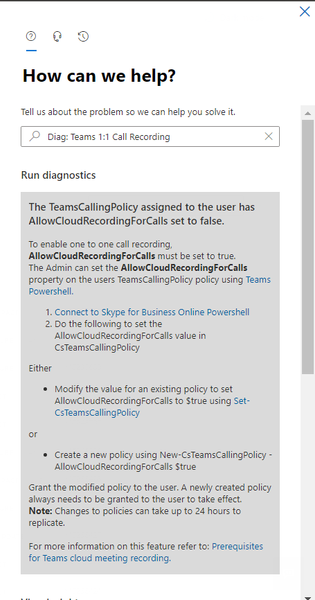
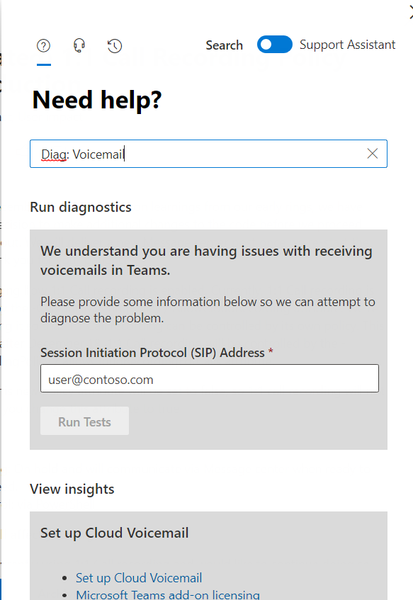
diagnostics
23 TopicsModernizing radiology reporting—without disrupting care: A practical path to PowerScribe One
With growing imaging volumes, increasing complexity, and the rapid emergence of AI, healthcare organizations are reevaluating how their reporting environments support clinicians and strengthen operational performance. They are faced with how to modernize without interrupting the work that matters most. We developed our PowerScribe One solution and implementation approach with that reality in mind. In active production across a wide range of healthcare environments (including large integrated delivery networks, academic medical centers, independent radiology practices, and community hospitals), PowerScribe One reflects a solution that is both proven in practice and designed for what comes next. Over 250 organizations and 10,000+ radiologists use PowerScribe One to generate millions of reports each month. This scale is significant; it’s validation of what we bring through our solution and support. It reflects a system and team tested across diverse environments, integration landscapes, and operational models, performing reliably in real-world conditions. Combining the strength of our solutions with an experienced Microsoft team, we deliver a seamless implementation that minimizes disruption. Redefining the migration experience As I’ve worked with customers modernizing their reporting environments, I’ve noticed a consistent pattern of concern: how to modernize without disrupting the workflows teams rely on or the care they deliver. In my experience, even when a solution offers meaningful capabilities, customers still worry about the potential downsides of a prolonged migration. I understand that perspective. Many have worked with vendors who promise a “lift-and-shift” implementation but fall short of that expectation. Migrations can introduce real challenges, including downtime, retraining, and workflow disruption. Over time, we’ve seen that successful transformation is driven not only by the strength of the technology, but also by how effectively the transition is managed. With years of experience supporting PowerScribe environments, we’ve taken those insights and applied them to our approach. We defined what a successful PowerScribe One implementation looks like and developed a migration model designed to reduce risk while supporting adoption. Rather than viewing migration as a single milestone, PowerScribe One transitions are designed as a structured journey with clearly defined phases and timing: Discovery: Align on goals, workflows, and integration requirements Build: Preparing the technical and operational foundation Testing: Validating workflows end to end and addressing issues proactively Production: Supporting go-live with a focus on stability and adoption Each phase includes checkpoints and shared accountability to increase transparency and reduce uncertainty. Our Microsoft team works closely with our customers to build a project timeline that fits their needs while existing PowerScribe 360 workflows and content are leveraged, eliminating the need to rebuild from scratch. I’d also like to highlight at the center of this migration model is a parallel transition strategy. We enable PowerScribe 360 and PowerScribe One to operate side-by-side during our customer’s migration period. This approach provides organizations with the flexibility to: Introduce PowerScribe One to early adopters Validate workflows and integrations in a live environment Phase adoption across teams Maintain continuity throughout the transition In this measured approach, our customers can move forward with confidence, ensuring that systems, workflows, and teams are ready for successful adoption. The result is a model that is both repeatable and adaptable, capable of supporting organizations with varying levels of complexity. Our efforts to center our implementation process on the customer experience shows how migration work is not simply a technical capability proposition. This focus reflects our broader philosophy: transformation should be deliberate, not disruptive. From implementation to enablement Minimizing disruption doesn’t end with implementation. It extends into how teams are supported, trained, and enabled in their day-to-day workflows. Our focus on enablement is especially important in radiology, where even small workflow disruptions can have outsized impacts on productivity and the radiologist experience. With PowerScribe One, organizations not only gain access to a modern reporting solution but also support from teams with deep experience in radiology workflows, integrations, and large-scale deployments. With that in mind, I’ve seen firsthand how the healthcare landscape has radically changed over the last six years. Our customers tell us how workforce shifts in radiology means they are adapting their staffing models and workflows to include telework. With these changes in the workforce, organizations benefit from training and support models that are flexible, digital, and accessible remotely. We made live expert access (known to our customers as “drop-in help”) easily accessible through a simple QR code. It can be an ad hoc or scheduled engagement which ensures the offering aligns with a radiologist’s schedule. The feedback on this level of access we’ve received has been extremely positive and is resonating strongly with customers. I know that for any healthcare solution deployment to be successful, it requires a learning and support model that aligns with clinical schedules and operational realities. Modernizing radiology reporting is both a technical and operational effort with its success depending on advancing capability without disrupting clinical continuity. The transition to PowerScribe One shows this balance is achievable through phased adoption, low-disruption deployment, and strong user readiness. Organizations can modernize without affecting day-to-day care delivery with our structured approach, proven expertise and a focus on provider experience and patient outcomes. If you want to learn more about our approach or PowerScribe One, I’ll be at SIIM26, June 10-12, please stop by the Microsoft booth at 630-632. You can also discover how we partner with our customers why they decided to move to PowerScribe One by reading our Industry Blog.improve telemetry feature in windows 10 to be able to detect problems better
Currently the Telemetry, Error reporting and diagnostics services inside Windows 10 (Insider or not) are not good enough to catch the problems and bugs. specially those bugs that don't cause system crashes or bugs that cause some thing in Windows not to work. for these type of bugs and problems, Microsoft relies on people to report them but most of the time either people don't report them or they fail to specify how to produce that problem/bug. Windows 10 needs such a robust Telemetry and diagnostics services that would do its job regardless of people reporting a problem or not. this Telemetry and diagnostics services must be even more thorough in Insider builds, they'd have to be so deep into Insider builds so that they produce very clear and thorough reports for Microsoft to identify the problems and things that don't work. Upvote this Feedback: https://aka.ms/AA65fmf9.4KViews1like4CommentsLessons Learned #555: The First 60 Seconds of a Production Incident: Stop, Scope, Correlate
When a critical production incident starts, the first message we often receive is something like: “The database is down.” At that moment, everything suddenly becomes urgent. Engineers open monitoring dashboards. Someone starts checking logs. Another person reviews CPU and memory. Someone else asks whether there was a deployment. Connections are tested. Metrics are queried. Teams are contacted. All of these actions may eventually be necessary. But there is a more important question to answer first: What exactly does “down” mean? After working on many production incidents, one lesson becomes increasingly clear: The first 60 seconds are not about solving the incident. They are about defining the incident. A vague problem description can send troubleshooting in many different directions. A precise problem statement dramatically reduces the investigation space. This article describes a simple approach that can be applied during the first moments of an incident: Stop. Scope. Correlate. 1. Stop: Define What “Down” Actually Means The first mistake during many incidents is assuming that everyone understands the problem in the same way. Consider the statement: “The database is unavailable.” That statement could mean many different things: Applications cannot establish new connections. Existing connections are still working, but new connections fail. Queries are timing out. A specific login cannot authenticate. One database is inaccessible. One application is failing while other applications work correctly. Performance degradation makes the service appear unavailable. The application returns HTTP 500 errors, but the database itself is healthy. Connections fail intermittently. A failover is occurring. DNS or networking issues prevent the application from reaching the database. These scenarios require completely different investigation paths. Before opening ten different tools, try to transform the original statement into something more specific. For example: Instead of: “The database is down.” Try to reach something like: “Since approximately 14:32 UTC, new application connections to Database A have intermittently failed with login errors, while existing sessions remain active.” Now we have something we can investigate. The problem statement contains: a timestamp, a specific database, a specific symptom, affected connection behavior, and an indication that the issue may be intermittent. That is already much more valuable than the original alert. 2. Scope: Determine the Blast Radius Once we understand the symptom, the next question is: Who or what is affected? This is sometimes called determining the blast radius. The scope can immediately eliminate entire categories of possible causes. Ask questions such as: Is one user affected or every user? Is one application affected or several applications? Is one database affected or all databases? Are all connection types affected? Are existing connections healthy while new connections fail? Are only specific clients or drivers affected? Imagine the following situation. Application A reports database connectivity failures. However: Application B connects successfully. SSMS connects successfully. Azure metrics show the database is available. Existing sessions continue executing queries. This changes the investigation dramatically. The problem may not be: “Azure SQL is unavailable.” It may instead be: “Application A cannot establish new connections.” That distinction is extremely important. A large percentage of troubleshooting time can be saved simply by identifying the correct scope early. 3. Build the Timeline The next critical dimension is time. During an incident, timestamps are evidence. Ask: When did the issue start? Is there an exact timestamp? How long did it last? Is the issue continuous or intermittent? Did the problem recover automatically? Did the issue occur once or multiple times? Was there another event immediately before the problem? A good incident timeline may look like this: 14:31:52 UTC – Application operating normally 14:32:08 UTC – First connection error reported 14:32:10 UTC – Database failover detected 14:32:14 UTC – Additional login failures 14:32:18 UTC – New connections begin succeeding 14:32:20 UTC – Application fully recovere Now the investigation is no longer based on assumptions. We have a five-to-ten-second window that can be correlated with platform telemetry, database events, application logs, networking information, and deployment history. Without the timeline, engineers may analyze hours of logs. With the timeline, the investigation becomes focused. 4. Correlate Before Changing Anything The next step is correlation. Once we understand the symptom, scope, and timeline, we can ask: What changed at the same time? Useful correlation sources may include: application deployments, infrastructure changes, configuration changes, database failovers, scaling operations, maintenance events, firewall changes, authentication changes, networking events, DNS changes, resource utilization, query regressions, blocking, deadlocks, connection pool behavior, driver updates, platform events. etc The key word here is correlation. It is tempting during an incident to immediately change something. For example: restart the application, restart a service, scale the database, clear the connection pool, change configuration, rebuild an index, modify a query, fail over manually. Sometimes these actions are necessary. But every change also modifies the evidence. A restart may restore the service while simultaneously removing valuable diagnostic information. Whenever possible: Collect evidence before changing the environment. 5. Use Multiple Sources of Evidence Production incidents rarely provide the complete answer in one telemetry source. A better approach is to correlate multiple sources. For a database-related incident, we may investigate: Application telemetry Application logs may reveal: connection failures, authentication errors, request latency, retry attempts, timeout exceptions, HTTP errors, dependency failures. Platform metrics Cloud metrics may help determine: service availability, CPU utilization, storage pressure, connection count, throttling, resource saturation. Database telemetry Database-level information may include: active sessions, waits, blocking, query performance, login failures, failover events, resource statistics. Query Store For performance incidents, Query Store can be extremely valuable. It may help identify: query regressions, plan changes, increased execution duration, abnormal CPU consumption, changes in execution frequency. Deployment history Always ask: What changed recently? Many incidents have a strong temporal relationship with: application deployments, schema changes, configuration modifications, infrastructure updates, new releases, security changes. The goal is not to assume that the most recent change caused the incident. The goal is to determine whether the events correlate. 6. Avoid Starting With a Tool One common troubleshooting pattern is: “Open the monitoring portal.” or: “Run this query.” or: “Check this log.” Tools are essential, but tools should follow the investigation strategy. The investigation should determine which tool we need. Not the other way around. If the problem is authentication, the investigation path may focus on: login errors, authentication configuration, identity providers, user mappings, connection strings. If the problem is performance, the investigation may focus on: Query Store, waits, blocking, execution plans, resource utilization. If the problem is connectivity, we may investigate: DNS, network paths, firewalls, drivers, retries, connection pools. A clear problem definition tells us where to look. 7. Ask the Same Questions Every Time One of the most effective improvements teams can make is standardizing the first questions asked during incidents. A simple initial checklist could be: Symptom: What exactly is failing? Scope: Who or what is affected? Timeline: When did it start? Error: What exact error message or error code is being returned? Frequency: Is the issue continuous, intermittent, or already recovered? Changes: What changed immediately before the incident? Evidence : Which telemetry sources can confirm the behavior? These questions are intentionally simple. During a high-severity incident, simplicity is valuable. 8. The First 60 Seconds Framework We can summarize the approach in four steps. 1. Define: What does the reported symptom actually mean? 2. Scope: Determine the blast radius. 3. Timeline: Identify exactly when the problem occurred. 4. Correlate Connect the symptom with telemetry, events, and recent changes. Only after these steps should we decide the deeper troubleshooting path. 9. Speed Is Important, but Direction Is More Important During critical incidents, teams naturally want to move quickly. That is the correct instinct. But speed without direction can create noise. Ten engineers investigating ten different theories at the same time may generate enormous activity without producing clarity. A well-defined incident allows teams to divide the investigation intelligently. For example: One engineer investigates application telemetry. Another checks database telemetry. Another reviews platform events. Another investigates recent deployments. Another builds the incident timeline. All of them are now investigating the same defined problem. That is very different from everyone independently trying to determine what the problem might be.
PerfView: ASP.NET Core Stats View
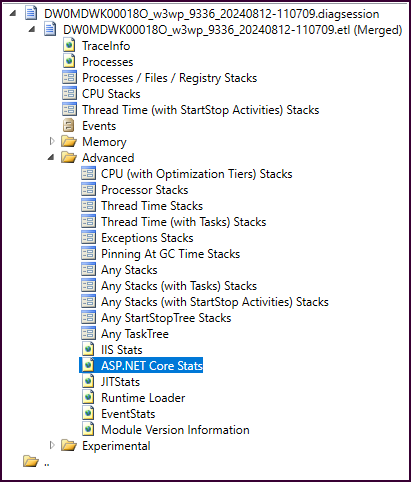
In PerfView v3.1.10, released 02-May-2024, if a trace containing the needed events is opened, there is a new ASP.NET Core Stats view available that shows individual request information along with overall statistics. The events needed to construct this view are available in the .NET Profiler traces that are captured in AppServices (both Windows and Linux) and can be captured manually with other tools like PerfView and dotnet-trace. The view was modeled after the IIS Stats view. It also features clickable ActivityIds for requests so if there's a specific one you want to dig further into, you can click the ActivityId and it will open the Events window and show all events in the trace with that ID within the timeframe of the request.2.3KViews1like0Comments