devsecops
18 Topics
Building Secure, Enterprise Ready AI Agents with Purview SDK and Agent Framework
At Microsoft Ignite, we announced the public preview of Purview integration with the Agent Framework SDK—making it easier to build AI agents that are secure, compliant, and enterprise‑ready from day one. AI agents are quickly moving from demos to production. They reason over enterprise data, collaborate with other agents, and take real actions. As that happens, one thing becomes non‑negotiable: Governance has to be built in. That’s where Purview SDK comes in. Agentic AI Changes the Security Model Traditional apps expose risks at the UI or API layer. AI agents are different. Agents can: Process sensitive enterprise data in prompts and responses Collaborate with other agents across workflows Act autonomously on behalf of users Without built‑in controls, even a well‑designed agent can create compliance gaps. Purview SDK brings Microsoft’s enterprise data security and compliance directly into the agent runtime, so governance travels with the agent—not after it. What You Get with Purview SDK + Agent Framework This integration delivers a few key things developers and enterprises care about most: Inline Data Protection Evaluate prompts and responses against Data Loss Prevention (DLP) policies in real time. Content can be allowed or blocked automatically. Built‑In Governance Send AI interactions to Purview for audit, eDiscovery, communication compliance, and lifecycle management—without custom plumbing. Enterprise‑Ready by Design Ship agents that meet enterprise security expectations from the start, not as a follow‑up project. All of this is done natively through Agent Framework middleware, so governance feels like part of the platform—not an add‑on. How Enforcement Works (Quickly) When an agent runs: Prompts and responses flow through the Agent Framework pipeline Purview SDK evaluates content against configured policies A decision is returned: allow, redact, or block Governance signals are logged for audit and compliance This same model works for: User‑to‑agent interactions Agent‑to‑agent communication Multi‑agent workflows Try It: Add Purview SDK in Minutes Here’s a minimal Python example using Agent Framework: That’s it! From that point on: Prompts and responses are evaluated against Purview policies setup within the enterprise tenant Sensitive data can be automatically blocked Interactions are logged for governance and audit Designed for Real Agent Systems Most production AI apps aren’t single‑agent systems. Purview SDK supports: Agent‑level enforcement for fine‑grained control Workflow‑level enforcement across orchestration steps Agent‑to‑agent governance to protect data as agents collaborate This makes it a natural fit for enterprise‑scale, multi‑agent architectures. Get Started Today You can start experimenting right away: Try the Purview SDK with Agent Framework Follow the Microsoft Learn docs to configure Purview SDK with Agent Framework. Explore the GitHub samples See examples of policy‑enforced agents in Python and .NET. Secure AI, Without Slowing It Down AI agents are quickly becoming production systems—not experiments. By integrating Purview SDK directly into the Agent Framework, Microsoft is making governance a default capability, not a deployment blocker. Build intelligent agents. Protect sensitive data. Scale with confidence.
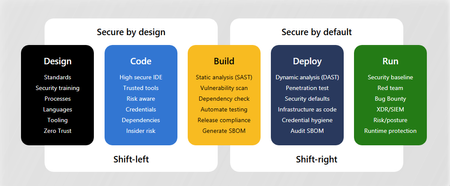
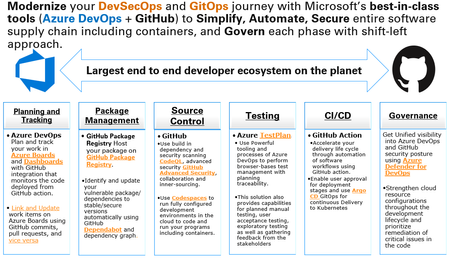
Modernize DevSecOps and GitOps journey with Microsoft’s Unified solution (Azure DevOps + GitHub)
Modernize your DevSecOps and GitOps journey with Microsoft’s Unified solution and best-in-class tools (Azure DevOps + GitHub) to Simplify, Automate, Secure entire software supply chain including containers, and Govern each phase with shift-left approach.Hacking Made Easy, Patching Made Optional: A Modern Cyber Tragedy
In today’s cyber threat landscape, the tools and techniques required to compromise enterprise environments are no longer confined to highly skilled adversaries or state-sponsored actors. While artificial intelligence is increasingly being used to enhance the sophistication of attacks, the majority of breaches still rely on simple, publicly accessible tools and well-established social engineering tactics. Another major issue is the persistent failure of enterprises to patch common vulnerabilities in a timely manner—despite the availability of fixes and public warnings. This negligence continues to be a key enabler of large-scale breaches, as demonstrated in several recent incidents. The Rise of AI-Enhanced Attacks Attackers are now leveraging AI to increase the credibility and effectiveness of their campaigns. One notable example is the use of deepfake technology—synthetic media generated using AI—to impersonate individuals in video or voice calls. North Korean threat actors, for instance, have been observed using deepfake videos and AI-generated personas to conduct fraudulent job interviews with HR departments at Western technology companies. These scams are designed to gain insider access to corporate systems or to exfiltrate sensitive intellectual property under the guise of legitimate employment. Social Engineering: Still the Most Effective Entry Point And yet, many recent breaches have begun with classic social engineering techniques. In the cases of Coinbase and Marks & Spencer, attackers impersonated employees through phishing or fraudulent communications. Once they had gathered sufficient personal information, they contacted support desks or mobile carriers, convincingly posing as the victims to request password resets or SIM swaps. This impersonation enabled attackers to bypass authentication controls and gain initial access to sensitive systems, which they then leveraged to escalate privileges and move laterally within the network. Threat groups such as Scattered Spider have demonstrated mastery of these techniques, often combining phishing with SIM swap attacks and MFA bypass to infiltrate telecom and cloud infrastructure. Similarly, Solt Thypoon (formerly DEV-0343), linked to North Korean operations, has used AI-generated personas and deepfake content to conduct fraudulent job interviews—gaining insider access under the guise of legitimate employment. These examples underscore the evolving sophistication of social engineering and the need for robust identity verification protocols. Built for Defense, Used for Breach Despite the emergence of AI-driven threats, many of the most successful attacks continue to rely on simple, freely available tools that require minimal technical expertise. These tools are widely used by security professionals for legitimate purposes such as penetration testing, red teaming, and vulnerability assessments. However, they are also routinely abused by attackers to compromise systems Case studies for tools like Nmap, Metasploit, Mimikatz, BloodHound, Cobalt Strike, etc. The dual-use nature of these tools underscores the importance of not only detecting their presence but also understanding the context in which they are being used. From CVE to Compromise While social engineering remains a common entry point, many breaches are ultimately enabled by known vulnerabilities that remain unpatched for extended periods. For example, the MOVEit Transfer vulnerability (CVE-2023-34362) was exploited by the Cl0p ransomware group to compromise hundreds of organizations, despite a patch being available. Similarly, the OpenMetadata vulnerability (CVE-2024-28255, CVE-2024-28847) allowed attackers to gain access to Kubernetes workloads and leverage them for cryptomining activity days after a fix had been issued. Advanced persistent threat groups such as APT29 (also known as Cozy Bear) have historically exploited unpatched systems to maintain long-term access and conduct stealthy operations. Their use of credential harvesting tools like Mimikatz and lateral movement frameworks such as Cobalt Strike highlights the critical importance of timely patch management—not just for ransomware defense, but also for countering nation-state actors. Recommendations To reduce the risk of enterprise breaches stemming from tool misuse, social engineering, and unpatched vulnerabilities, organizations should adopt the following practices: 1. Patch Promptly and Systematically Ensure that software updates and security patches are applied in a timely and consistent manner. This involves automating patch management processes to reduce human error and delay, while prioritizing vulnerabilities based on their exploitability and exposure. Microsoft Intune can be used to enforce update policies across devices, while Windows Autopatch simplifies the deployment of updates for Windows and Microsoft 365 applications. To identify and rank vulnerabilities, Microsoft Defender Vulnerability Management offers risk-based insights that help focus remediation efforts where they matter most. 2. Implement Multi-Factor Authentication (MFA) To mitigate credential-based attacks, MFA should be enforced across all user accounts. Conditional access policies should be configured to adapt authentication requirements based on contextual risk factors such as user behavior, device health, and location. Microsoft Entra Conditional Access allows for dynamic policy enforcement, while Microsoft Entra ID Protection identifies and responds to risky sign-ins. Organizations should also adopt phishing-resistant MFA methods, including FIDO2 security keys and certificate-based authentication, to further reduce exposure. 3. Identity Protection Access Reviews and Least Privilege Enforcement Conducting regular access reviews ensures that users retain only the permissions necessary for their roles. Applying least privilege principles and adopting Microsoft Zero Trust Architecture limits the potential for lateral movement in the event of a compromise. Microsoft Entra Access Reviews automates these processes, while Privileged Identity Management (PIM) provides just-in-time access and approval workflows for elevated roles. Just-in-Time Access and Risk-Based Controls Standing privileges should be minimized to reduce the attack surface. Risk-based conditional access policies can block high-risk sign-ins and enforce additional verification steps. Microsoft Entra ID Protection identifies risky behaviors and applies automated controls, while Conditional Access ensures access decisions are based on real-time risk assessments to block or challenge high-risk authentication attempts. Password Hygiene and Secure Authentication Promoting strong password practices and transitioning to passwordless authentication enhances security and user experience. Microsoft Authenticator supports multi-factor and passwordless sign-ins, while Windows Hello for Business enables biometric authentication using secure hardware-backed credentials. 4. Deploy SIEM and XDR for Detection and Response A robust detection and response capability is vital for identifying and mitigating threats across endpoints, identities, and cloud environments. Microsoft Sentinel serves as a cloud-native SIEM that aggregates and analyses security data, while Microsoft Defender XDR integrates signals from multiple sources to provide a unified view of threats and automate response actions. 5. Map and Harden Attack Paths Organizations should regularly assess their environments for attack paths such as privilege escalation and lateral movement. Tools like Microsoft Defender for Identity help uncover Lateral Movement Paths, while Microsoft Identity Threat Detection and Response (ITDR) integrates identity signals with threat intelligence to automate response. These capabilities are accessible via the Microsoft Defender portal, which includes an attack path analysis feature for prioritizing multicloud risks. 6. Stay Current with Threat Actor TTPs Monitor the evolving tactics, techniques, and procedures (TTPs) employed by sophisticated threat actors. Understanding these behaviours enables organizations to anticipate attacks and strengthen defenses proactively. Microsoft Defender Threat Intelligence provides detailed profiles of threat actors and maps their activities to the MITRE ATT&CK framework. Complementing this, Microsoft Sentinel allows security teams to hunt for these TTPs across enterprise telemetry and correlate signals to detect emerging threats. 7. Build Organizational Awareness Organizations should train staff to identify phishing, impersonation, and deepfake threats. Simulated attacks help improve response readiness and reduce human error. Use Attack Simulation Training, in Microsoft Defender for Office 365 to run realistic phishing scenarios and assess user vulnerability. Additionally, educate users about consent phishing, where attackers trick individuals into granting access to malicious apps. Conclusion The democratization of offensive security tooling, combined with the persistent failure to patch known vulnerabilities, has significantly lowered the barrier to entry for cyber attackers. Organizations must recognize that the tools used against them are often the same ones available to their own security teams. The key to resilience lies not in avoiding these tools, but in mastering them—using them to simulate attacks, identify weaknesses, and build a proactive defense. Cybersecurity is no longer a matter of if, but when. The question is: will you detect the attacker before they achieve their objective? Will you be able to stop them before reaching your most sensitive data? Additional read: Gartner Predicts 30% of Enterprises Will Consider Identity Verification and Authentication Solutions Unreliable in Isolation Due to AI-Generated Deepfakes by 2026 Cyber security breaches survey 2025 - GOV.UK Jasper Sleet: North Korean remote IT workers’ evolving tactics to infiltrate organizations | Microsoft Security Blog MOVEit Transfer vulnerability Solt Thypoon Scattered Spider SIM swaps Attackers exploiting new critical OpenMetadata vulnerabilities on Kubernetes clusters | Microsoft Security Blog Microsoft Defender Vulnerability Management - Microsoft Defender Vulnerability Management | Microsoft Learn Zero Trust Architecture | NIST tactics, techniques, and procedures (TTP) - Glossary | CSRC https://learn.microsoft.com/en-us/security/zero-trust/deploy/overviewMCP safety & evaluation with the Agent 365 CLI & Agent Governance Toolkit
Co Author: JiteshThakur AI agents are useful because they can act. They call tools, query databases, send messages, and hand work to other agents. That same freedom creates a problem: access control can tell you which service an agent may reach, but it does not always tell you whether a particular action is sensible, safe, or permitted. MCP is how most agents now act. Two Control Points: This post examines two control points that address different parts of the MCP lifecycle. Agent 365 CLI evaluates the MCP server before an agent uses it. Agent Governance Toolkit (AGT) governs sensitive tool calls while the agent runs. One improves what the agent sees. The other governs what the agent does. The Agent 365 CLI is a cross-platform command-line tool for Agent 365 applications on Azure. Its evaluation command examines MCP tool definitions and scores their quality. AGT evaluates actions against policy and records each decision. Together, these tools support a practical model: evaluate the server first, then provide proper scaffolding for the developer to test this in a dry run. Agent 365 CLI: Score an MCP server from the command line: The Agent 365 CLI can evaluate an MCP server against research-based practices for production readiness. The result is more useful than a simple pass or fail. The evaluation gives you: A score for each tool name, description, and parameter schema; A prioritized list of improvements; An overall maturity score for the server; and Local output that you can use early in development. This report turns a vague question, "Is this MCP server ready?", into a concrete list of work. The evaluate command a365 develop-mcp evaluate --server-url <server-url> [--auth-token <auth-token>] [options] The command reads the tool schemas from the server. It then produces guidance for names, descriptions, parameters, and schema structure. A local coding-agent CLI scores the semantic checks. You can use GitHub Copilot CLI or Claude Code under your account and AI subscription. The command does not send tool-schema data to Microsoft. Prerequisites: Install the following software: Agent 365 CLI; Node.js 18 or later for GitHub Copilot CLI; and A supported coding-agent CLI for semantic scoring. For example, install GitHub Copilot CLI with this command: powershell npm install -g @github/copilot This bring-your-own-LLM model keeps the scoring step in your local development environment. It is useful when model calls must remain inside an approved deployment. How the evaluation works The command runs a five-step pipeline and logs progress as it goes. Fig 1: MCP Evaluation using Agent 365 Cli Connect to the MCP server and collect its tool schemas. Generate an evaluation checklist in the output directory. Score the semantic checks with the selected coding agent. Calculate the maturity level and action priorities. Write the JSON and HTML reports. The evaluation contains two types of checks: Deterministic checks use exact rules in the CLI. For example, a tool name cannot be empty. Semantic checks use a coding agent to score clarity and meaning. Each result includes a reason for the score. Examples Set the authentication token in an environment variable. Then evaluate an authenticated server and write the artifacts to a subfolder. powershell $env:A365_MCP_AUTH_TOKEN = "<bearer-token>" a365 develop-mcp evaluate --server-url "https://my-mcp-server.contoso.com/mcp" --output-dir "./eval" Use a specific scoring engine with the `--eval-engine` option: powershell a365 develop-mcp evaluate --server-url "http://localhost:5000/mcp" --eval-engine claude-code Scenario: Evaluate a malicious MCP server For this demonstration, we hosted a deliberately malicious MCP server at `http://127.0.0.1:8124/`. It exposes tools that demonstrate tool poisoning, credential leakage, prompt injection, schema mismatch, sandbox escape, and other attacks. The server is intentionally unsafe and is for demonstration only. Fig 2: Setting up a test MCP server for evaluation We ran the evaluation in two steps. First, we generated the checklist without automatic semantic scoring: a365 develop-mcp evaluate --server-url "http://127.0.0.1:8124/" --eval-engine none Fig 3: Agent365CLI MCP Evaluation The command wrote the checklist and a semantic-evaluation prompt to the output directory. It also displayed the next steps. Second, we gave the prompt and checklist to a coding agent. The agent completed each unscored semantic check with a Boolean score and a short reason. After we saved the completed checklist, we ran the command again to generate the report: a365 develop-mcp evaluate --server-url "http://127.0.0.1:8124/" --output-dir "C:\temp\MaliciousMCP" Fig 4: Creating the report with Agent365 CLI MCP Evaluate command Understanding the evaluation report Open `<server-name>_eval_report.html` from the output directory. The report contains: The overall score from 0 to 100; The maturity level from 0 to 4; Scores for each tool and quality category; and A prioritized action list for the next maturity level. Fig 5: MCP Evaluation Report In our demonstration, the server scored 86.0 and reached Level 3: Optimized for AI. That strong overall score did not mean that every tool was safe or clear. The report found 58 action items, including one critical item and 33 high-priority items. That contrast matters. A server can have valid schemas and consistent names while still exposing misleading or dangerous tools. Fig 6: MCP Evaluation Report - Tool-By-Tool Detail What to look for Read the per-tool results before the overall score. A single weak tool can create more risk than the server average suggests. Focus on these report sections: Tool names: Can an agent select the correct tool from its name? Tool descriptions: Does each description explain the purpose and correct use? Parameter names: Do the names identify the data that the tool requires? Parameter descriptions: Do they explain the format, type, and constraints? Schema structure: Are the schemas valid and processable? Action items: Which changes have the highest effect on tool selection and use? The command processes static tool schemas from `tools/list`. It does not process runtime payloads, end-user data, or personal data. The command keeps the `--auth-token` value in memory. It sends the value only in the HTTP `Authorization` header. It does not write the token to disk or give it to the coding agent. AGT: Put governance in the execution path: Microsoft's open-source Agent Governance Toolkit (AGT) evaluates an action before execution. It adds identity and policy context, records the decision, and can send risky work for approval. This can be used by developers during the build time for dynamic evaluation of the MCP server. AGT lets developers put part of that intent into the execution path. Remote tools still need secure implementations, sandboxes need hard boundaries, and audit records need appropriate storage and access controls. You do not need to replace your agent framework to use it. What sits in the decision path? AGT wraps the tools that an agent already uses. You can start to govern a tool with two lines of Python: python from agentmesh.governance import govern safe_tool = govern(my_tool, policy="policy.yaml") On each call, `safe_tool` evaluates the configured policy. An allowed action reaches the original tool. A denied action raises `GovernanceDenied` and creates a decision record. This wrapper model reduces the cost of adoption. Teams can add governance to an existing agent stack without rebuilding it. AGT supports Python, TypeScript, .NET, Rust, and Go. Its documented integrations include popular agent frameworks, MCP, and A2A. Teams can also adopt AGT in stages. A team can begin with policy checks and audit records. It can add identity, approvals, sandboxing, and operational controls as risk increases. Each control answers a different question: Policy: Is this action allowed? Identity and trust: Which agent made the request? Runtime controls: What limits apply to execution? Audit evidence: Why did AGT allow or deny the action? A low-risk assistant can need only a deny rule and basic logging. An agent that moves money or changes production systems needs stronger controls. Fig 7: AGT Architecture Scenario: Govern the same malicious MCP server For this scenario demonstration, we used AGT Python packages as an MCP gateway. The gateway sat between an agent and the same malicious server from the earlier evaluation. This setup let us examine both control points against one target. The Agent 365 CLI examined the server's static tool definitions. The AGT gateway examined real requests and responses for the developer during its testing. Fig 8: AGT findings at runtime In the policy interface, a developer can edit runtime limits and detection rules. The developer can also validate the policy against sample tool metadata, save a revision, and activate it with a recorded reason. Fig 9: AGT control coverage The control-coverage view shows which AGT capabilities are active in the gateway. It also links each capability to package checks and end-to-end evidence. In our demonstration, we included the following controls: Tool metadata poisoning detection; Tool change and rug-pull detection; Dangerous argument blocking; Tool-response content scanning; Per-client tool-call budgets; and A redacted decision audit trail. You can build your detection & input security by reading more about it here. The gateway detected malicious content. For one blocked `tools/list` request, it recorded the findings. The important result was not only that AGT blocked the request. It also preserved the matched evidence, affected tool locations, policy modes, and request context. Fig 10: Example detection via AGT The dashboard then summarized block-mode findings, leading risk drivers, and tools that required review. This evidence can help a team prioritize policy changes and investigate repeated attacks. Fig 11: Sample AGT metrics AGT does not require this UI, gateway, or architecture. Its structured decisions can feed an admin console, SIEM, incident workflow, or approval queue. AGT also includes an Agent Compliance package with mappings for OWASP and other controls. These mappings give developers and governance teams a common record of applied controls. Teams do not need to reconstruct the agent's behavior after an incident. Check Compliance - Agent Governance Toolkit for more information. Conclusion: MCP safety needs controls before and during execution. The Agent 365 CLI improves the MCP interface before deployment. It exposes unclear tool definitions, scores server maturity, and turns quality gaps into prioritized work. While AGT is implemented at the build phase, it provides developers the ability to test policy, identity, execution context & preserve evidence for allowed or denied decisions. Neither tool replaces secure server code, strong sandbox boundaries, or protected audit storage. Instead, they make those controls easier to evaluate and explain. Start with one MCP server and one consequential tool call. Evaluate the server with the Agent 365 CLI. Then put an AGT policy around the action that carries the most risk. While these controls help secure the build phase of an agent, once agents move into production, runtime controls become essential. Agent365 provides those controls at runtime. With thanks to Ashik Kuppil for his inputs and collaboration on this post.Microsoft Security Store: Now Generally Available
When we launched the Microsoft Security Store in public preview on September 30, our goal was simple: make it easier for organizations to discover, purchase, and deploy trusted security solutions and AI agents that integrate seamlessly with Microsoft Security products. Today, Microsoft Security Store is generally available—with three major enhancements: Embedded where you work: Security Store is now built into Microsoft Defender, featuring SOC-focused agents, and into Microsoft Entra for Verified ID and External ID scenarios like fraud protection. By bringing these capabilities into familiar workflows, organizations can combine Microsoft and partner innovation to strengthen security operations and outcomes. Expanded catalog: Security Store now offers more than 100 third-party solutions, including advanced fraud prevention, forensic analysis, and threat intelligence agents. Security services available: Partners can now list and sell services such as managed detection and response and threat hunting directly through Security Store. Real-World Impact: What We Learned in Public Preview Thousands of customers explored Microsoft Security Store and tried a growing catalog of agents and SaaS solutions. While we are at the beginning of our journey, customer feedback shows these solutions are helping teams apply AI to improve security operations and reduce manual effort. Spairliners, a cloud-first aviation services joint venture between Air France and Lufthansa, strengthened identity and access controls by deploying Glueckkanja’s Privileged Admin Watchdog to enforce just-in-time access. “Using the Security Store felt easy, like adding an app in Entra. For a small team, being able to find and deploy security innovations in minutes is huge.” – Jonathan Mayer, Head of Innovation, Data and Quality GTD, a Chilean technology and telecommunications company, is testing a variety of agents from the Security Store: “As any security team, we’re always looking for ways to automate and simplify our operations. We are exploring and applying the world of agents more and more each day so having the Security Store is convenient—it’s easy to find and deploy agents. We’re excited about the possibilities for further automation and integrations into our workflows, like event-triggered agents, deeper Outlook integration, and more." – Jonathan Lopez Saez, Cybersecurity Architect Partners echoed the momentum they are seeing with the Security Store: “We’re excited by the early momentum with Security Store. We’ve already received multiple new leads since going live, including one in a new market for us, and we have multiple large deals we’re looking to drive through Security Store this quarter.” - Kim Brault, Head of Alliances, Delinea “Partnering with Microsoft through the Security Store has unlocked new ways to reach enterprise customers at scale. The store is pivotal as the industry shifts toward AI, enabling us to monetize agents without building our own billing infrastructure. With the new embedded experience, our solutions appear at the exact moment customers are looking to solve real problems. And by working with Microsoft’s vetting process, we help provide customers confidence to adopt AI agents” – Milan Patel, Co-founder and CEO, BlueVoyant “Agents and the Microsoft Security Store represent a major step forward in bringing AI into security operations. We’ve turned years of service experience into agentic automations, and it’s resonating with customers—we’ve been positively surprised by how quickly they’re adopting these solutions and embedding our automated agentic expertise into their workflows.” – Christian Kanja, Founder and CEO of glueckkanja New at GA: Embedded in Defender, Entra—Security Solutions right where you work Microsoft Security Store is now embedded in the Defender and Entra portals with partner solutions that extend your Microsoft Security products. By placing Security Store in front of security practitioners, it’s now easier than ever to use the best of partner and Microsoft capabilities in combination to drive stronger security outcomes. As Dorothy Li, Corporate Vice President of Security Copilot and Ecosystem put it, “Embedding the Security Store in our core security products is about giving customers access to innovative solutions that tap into the expertise of our partners. These solutions integrate with Microsoft Security products to complete end-to-end workflows, helping customers improve their security” Within the Microsoft Defender portal, SOC teams can now discover Copilot agents from both Microsoft and partners in the embedded Security Store, and run them all from a single, familiar interface. Let’s look at an example of how these agents might help in the day of the life of a SOC analyst. The day starts with Watchtower (BlueVoyant) confirming Sentinel connectors and Defender sensors are healthy, so investigations begin with full visibility. As alerts arrive, the Microsoft Defender Copilot Alert Triage Agent groups related signals, extracts key evidence, and proposes next steps; identity related cases are then validated with Login Investigator (adaQuest), which baselines recent sign-in behavior and device posture to cut false positives. To stay ahead of emerging campaigns, the analyst checks the Microsoft Threat Intelligence Briefing Agent for concise threat rundowns tied to relevant indicators, informing hunts and temporary hardening. When HR flags an offboarding, GuardianIQ (People Tech Group) correlates activity across Entra ID, email, and files to surface possible data exfiltration with evidence and risk scores. After containment, Automated Closing Comment Generator (Ascent Global Inc.) produces clear, consistent closure notes from Defender incident details, keeping documentation tight without hours of writing. Together, these Microsoft and partner agents maintain platform health, accelerate triage, sharpen identity decisions, add timely threat context, reduce insider risk blind spots, and standardize reporting—all inside the Defender portal. You can read more about the new agents available in the Defender portal in this blog. In addition, Security Store is now integrated into Microsoft Entra, focused on identity-centric solutions. Identity admins can discover and activate partner offerings for DDoS protection, intelligent bot defense, and government ID–based verification for account recovery —all within the Entra portal. With these capabilities, Microsoft Entra delivers a seamless, multi-layered defense that combines built-in identity protection with best-in-class partner technologies, making it easier than ever for enterprises to strengthen resilience against modern identity threats. Learn more here. Levent Besik, VP of Microsoft Entra, shared that “This sets a new benchmark for identity security and partner innovation at Microsoft. Attacks on digital identities can come from anywhere. True security comes from defense in depth, layering protection across the entire user journey so every interaction, from the first request to identity recovery, stays secure. This launch marks only the beginning; we will continue to introduce additional layers of protection to safeguard every aspect of the identity journey” New at GA: Services Added to a Growing Catalog of Agents and SaaS For the first time, partners can offer their security services directly through the Security Store. Customers can now find, buy, and activate managed detection and response, threat hunting, and other expert services—making it easier to augment internal teams and scale security operations. Every listing has a MXDR Verification that certifies they are providing next generation advanced threat detection and response services. You can browse all the services available at launch here, and read about some of our exciting partners below: Avanade is proud to be a launch partner for professional services in the Microsoft Security Store. As a leading global Microsoft Security Services provider, we’re excited to make our offerings easier to find and help clients strengthen cyber defenses faster through this streamlined platform - Jason Revill, Avanade Global Security Technology Lead ProServeIT partnering with Microsoft to have our offers in the Microsoft Security Store helps ProServeIT protect our joint customers and allows us to sell better with Microsoft sellers. It shows customers how our technology and services support each other to create a safe and secure platform - Eric Sugar, President Having Reply’s security services showcased in the Microsoft Security Store is a significant milestone for us. It amplifies our ability to reach customers at the exact point where they evaluate and activate Microsoft security solutions, ensuring our offerings are visible alongside Microsoft’s trusted technologies. Notable New Selections Since public preview, the Security Store catalog has grown significantly. Customers can now choose from over 100 third-party solutions, including 60+ SaaS offerings and 50+ Security Copilot agents, with new additions every week. Recent highlights include Cisco Duo and Rubrik: Cisco Duo IAM delivers comprehensive, AI-driven identity protection combining MFA, SSO, passwordless and unified directory management. Duo IAM seamlessly integrates across the Microsoft Security suite—enhancing Entra ID with risk-based authentication and unified access policy management across cloud and on-premises applications seamlessly in just a few clicks. Intune for device compliance and access enforcement. Sentinel for centralized security monitoring and threat detection through critical log ingestion about authentication events, administrator actions, and risk-based alerts, providing real-time visibility across the identity stack. Rubrik's data security platform delivers complete cyber resilience across enterprise, cloud, and SaaS alongside Microsoft. Through the Microsoft Sentinel integration, Rubrik’s data management capabilities are combined with Sentinel’s security analytics to accelerate issue resolution, enabling unified visibility and streamlined responses. Furthermore, Rubrik empowers organizations to reduce identity risk and ensure operational continuity with real-time protection, unified visibility and rapid recovery across Microsoft Active Directory and Entra ID infrastructure. The Road Ahead This is just the beginning. Microsoft Security Store will continue to make it even easier for customers to improve their security outcomes by tapping into the innovation and expertise of our growing partner ecosystem. The momentum we’re seeing is clear—customers are already gaining real efficiencies and stronger outcomes by adopting AI-powered agents. As we work together with partners, we’ll unlock even more automation, deeper integrations, and new capabilities that help security teams move faster and respond smarter. Explore the Security Store today to see what’s possible. For a more detailed walk-through of the capabilities, read our previous public preview Tech Community post If you’re a partner, now is the time to list your solutions and join us in shaping the future of security.1.5KViews3likes0Comments
Transforming Security Analysis into a Repeatable, Auditable, and Agentic Workflow
Author(s): Animesh Jain, Vinay Yadav Shaped by investigations into the strategic question of what it takes for Windows to achieve world-leading security—and the practical engineering needed to explore agentic workflows at scale and their interfaces. Our work in Windows Servicing & Delivery (WSD) is shaped by two guiding prompts from leadership: "what does it take for Windows to achieve world-leading security", and "how do we responsibly integrate AI into systems as large and high-churn as Windows?". Reasoning models open new possibilities on both fronts. As we continue experimenting, one issue repeatedly surfaces as the bottleneck for scalable security assurance: variant vulnerabilities. They are subtle, recurring, and easy to miss—making them an ideal proving ground for the enterprise-grade workflow we present here. Security Analysis at Windows Scale Security analysis shouldn’t be an afterthought—it should be a continuous, auditable, and intelligence-driven process built directly into the engineering workflow. This work introduces an agentic security analysis pipeline that uses reasoning models and tool-based agents to detect variant vulnerabilities across large, fast-changing codebases. By combining automation with explainability, it transforms security validation from a manual, point-in-time task into a repeatable and trustworthy part of every build. Why are variants the hard part? Security flaws rarely occur in isolation. Once a vulnerability is fixed, its logical or structural pattern often reappears elsewhere in the codebase—hidden behind different variables, layers, or call paths. These recurring patterns are variants—the quiet echoes of known issues that can persist across millions of lines of code. Finding them manually is slow, repetitive, and incomplete. As engineering velocity increases, so does the likelihood of variant drift—the same vulnerability class re-emerging in a slightly altered form. Each missed variant carries a downstream cost: regression, re-servicing, or, in the worst cases, re-exploitation. Modern large systems like Windows are too large, too interconnected, and ship too frequently for manual vulnerability discovery to keep pace. Traditional static analyzers and deterministic class-based scanners struggle to generalize these patterns or create too much noise, while targeted fuzzing campaigns often fail to trigger the nuanced runtime conditions that expose them. To stay ahead, automation must evolve. We need systems that reason—not just scan—systems capable of understanding relationships between code regions and applying logical analogies instead of brute-force enumeration. Reasoning Models: A Turning Point in Security Research Recent advances in AI reasoning have demonstrated that large language models can uncover vulnerabilities previously missed by deterministic tools. For example, Google’s Big Sleep agent surfaced an exploitable SQLite flaw (CVE-2025-6965) that bypassed traditional fuzzers due to configuration-sensitive logic. Similarly, an o-series reasoning model helped identify a critical Linux SMB logoff use-after-free (CVE-2025-37899), proving that reasoning-driven automation can detect complex, context-dependent flaws in mature kernel code. These breakthroughs show what’s possible when systems can form, test, and refine hypotheses about software behavior. The challenge now is scaling that intelligence into repeatable, auditable, enterprise-grade workflows—where every result is traceable, reviewable, and integrated into the developer’s daily workflow. A Framework for Agentic Security Analysis To address this challenge, we’ve developed an agentic security analysis framework that applies reasoning models within structured, enterprise grade workflow pattern. It combines large language model agents, specialized analysis tools, and structured artifact generation to make vulnerability discovery continuous, explainable, and auditable. It is interfaced as a first-class Azure DevOps (ADO) pipeline and can be integrated natively into enterprise CI/CD processes. For security analysis, it continuously reasons over large, evolving codebases to identify and validate variant vulnerabilities earlier in the release cycle. Together, these components form a repeatable workflow that helps surface variant patterns with greater consistency and clarity. Core Technical Pillars Scale – Autonomous Code Reasoning Long-context models extend analysis across massive, evolving codebases. They infer analogies, relationships, and behavioral patterns between code regions, enabling scalable reasoning that adapts as systems grow. Tool–Agent Collaboration Specialized agents coordinate to perform semantic search, graph traversal, and both static and dynamic interpretation. This distributed reasoning approach ensures resilience and precision across diverse enterprise environments. Structured Artifact Generation Every step produces versioned, auditable artifacts that document the reasoning process. These artifacts help provide reproducibility, compliance, and transparency—critical for enterprise governance and regulated industries. Together, these pillars enable scalable, explainable, and repeatable vulnerability discovery across large software ecosystems such as Windows. Every stage—from reasoning to validation—is logged and traceable, designed to make each discovery reproducible and reviewable. Inside the framework Agent-Led, Human-Reviewed The system is agent-led from start to finish and human-reviewed only at decision boundaries. Agents form hypotheses from recent fixes or vulnerability classes, test them against context, perform validation passes, and generate evidence-backed reports for reviewer confirmation. The workflow mirrors how seasoned security engineers operate—only faster and continuously. n tasks based on templatized prompts. Tool Specialists as Agents Each analytical tool functions as a domain-specific agent—performing semantic search, file inspection, or function-graph traversal. These agents collaborate through structured orchestration, maintaining specialization without sacrificing coherence. Agentic Patterns and Orchestration The framework employs reusable reasoning patterns—reflective reasoning, actor–validator loops, and parallel tool dialogues—for accuracy and scale. A central conductor agent governs task coordination, context flow, and artifact persistence across runs. Auditability Through Artifacts Every investigation yields a transparent chain of artifacts: Analysis Notes – summarize candidate issues Critique Notes – document reasoning and counter-evidence Synthesis Reports – provide developer-ready summaries, diffs, call graphs, and exploitability insights Agentic Conversation Logs - provides conversation logs so developers can backtrack on reasoning and get more context This structure makes each discovery fully traceable and auditable. CI/CD-Native Integration The interface operates as a first-class Azure DevOps pipeline, attachable to pull requests, nightly builds, or release triggers. Each run publishes versioned artifacts and validation notes directly into the developer workflow—making reasoning-driven security a seamless part of software delivery. What It Can Do Today Seeded Variant Hunts: Start from a recent fix or known pattern to enumerate analogous cases, analyze helper functions, and test reachability. Evidence-First Reporting: Every finding includes reproducible evidence—code snippets, diffs, and caller graphs—delivered within the PR or work item. Scalable Coverage: Runs across servicing branches, producing consistent and auditable validation artifacts. Improved Precision: A reasoning-based validation pass has significantly reduced false positives in internal testing. Case Study: CVE-2025-55325 During a sweep of “*_DEFAULTS” deserializers, the agentic pipeline independently identified GetPoolDefaults trusting a user-controlled size field and copying that many bytes from a caller buffer. The missing runtime bounds check—guarded only by an assertion in debug builds—enabled a potential read access violation and information disclosure. The mitigation mirrored a hardened sibling helper: enforcing runtime bounds on Size versus BytesAvailable/Version before allocation and copy. The finding was later validated by the servicing teams, confirming it matched an issue already under active investigation—illustrating how the automated reasoning process can independently surface real-world vulnerabilities that align with expert analysis. Beyond Variant Analysis The underlying architecture of this framework extends naturally beyond variant detection: Net-new vulnerability discovery through cross-binary pattern matching Model-assisted fuzzing & static analysis orchestrated through CI/CD integration Regression detection via historical code comparisons Security Development Lifecycle (SDL) enforcement and reproducibility checks The agentic patterns and tooling can support net-new vulnerability discovery through cross-binary pattern matching, regression detection using historical code comparisons, reproducibility checks aligned with SDL requirements, and model-assisted fuzzing orchestrated through CI/CD processes. These capabilities open the door to applying reasoning-driven workflows across a broader range of security & validation tasks. The Road Ahead Looking ahead, this trajectory naturally leads toward autonomous cybersecurity pipelines powered by reasoning agents that apply reflective analysis, validation loops, and structured tool interactions to complex codebases. By structuring each step as an auditable artifact, the approach supports security & validation analysis that is both explainable and repeatable. These agents could help validate security posture, analyze historical and real-time signals, and detect anomalous patterns early in the lifecycle. References Google Cloud Blog – Big Sleep and AI-Assisted Vulnerability Discovery “A summer of security: empowering cyber defenders with AI.” https://blog.google/technology/safety-security/cybersecurity-updates-summer-2025 The Hacker News – Google AI ‘Big Sleep’ Stops Exploitation of Critical SQLite Flaw https://thehackernews.com/2025/07/google-ai-big-sleep-stops-exploitation.html NIST National Vulnerability Database – CVE-2025-6965 (SQLite) https://nvd.nist.gov/vuln/detail/CVE-2025-6965 Sean Heelan – “Reasoning Models and the ksmbd Use-After-Free” https://simonwillison.net/2025/May/24/sean-heelan The Cyber Express – AI Finds CVE-2025-37899 Zero-Day in Linux SMB Kernel https://thecyberexpress.com/cve-2025-37899-zero-day-in-linux-smb-kernel NIST National Vulnerability Database – CVE-2025-37899 (Linux SMB Use-After-Free) https://nvd.nist.gov/vuln/detail/CVE-2025-37899 NIST National Vulnerability Database – CVE-2025-55325 (Windows Storage Management Provider Buffer Over-read) https://nvd.nist.gov/vuln/detail/CVE-2025-55325 NVD Microsoft Security Response Center – Vulnerability Details for CVE-2025-55325 https://msrc.microsoft.com/update-guide/vulnerability/CVE-2025-55325GitHub Advanced Security in Azure DevOps service with industry leading capabilities.
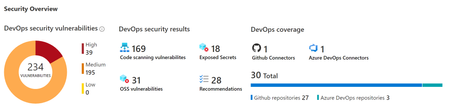
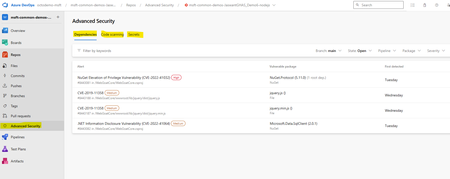
GitHub Advanced Security in Azure DevOps service has leading industry capabilities. These are natively integrated into Azure DevOps platform and into the developer workflow which helps to enhance developer productivity without sacrificing security. You can collaborate, prevent, remediate and manage without leaving Azure DevOps.
Microsoft Leads a New Era of Software Supply Chain Transparency
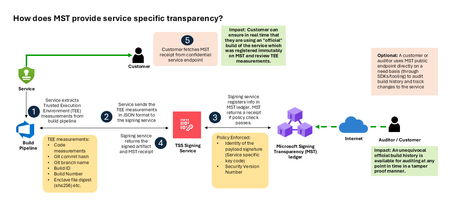
Today, Microsoft announces the general availability of Microsoft’s Signing Transparency (MST) – a first-of-its-kind capability that brings unprecedented visibility and trust to our software supply chain. With this release, Microsoft is leading the industry by recording the build of critical cloud services into a publicly readable and verifiable SCITT standard (Supply Chain Integrity, Transparency, and Trust) compliant blockchain ledger. This means every production software build for in scope services like Azure Attestation and Azure Managed HSM (Hardware Security Module), Azure confidential ledger, Microsoft Signing Transparency itself (and others over time) – is now logged in an immutable, tamper-evident record. Only builds that are in the MST ledger are deployed to production; this gives customers confidence that the supply chain for these critical services can be audited at anytime. Notably, the MST ledger is fully open source and built to align with the emerging IETF SCITT standard. By embracing SCITT’s principles and open protocols, Microsoft ensures that MST not only secures our own ecosystem but also contributes to a broader industry movement toward standardized supply chain transparency. The open-source MST ledger serves as a verifiable trust anchor that any organization or researcher can inspect, audit, or even integrate with their own tooling. MST itself meets the highest levels of transparency, backed by a tamper-proof confidential ledger, open-source, and independently verified. Specifically, we are making the foundation of our trust model transparent and accessible to everyone – reinforcing that trust must be earned through proof, not just promises. This launch marks a major milestone in our commitment to Zero Trust principles, extending “never trust, always verify” all the way into the build itself. Building on a public preview introduced late last year, MST’s general availability delivers verifiable transparency at the software level. It transforms traditional code signing with an additive trust layer that is accessible via an open verification model. Every new software update is accompanied by a publicly auditable proof of integrity, enabling security teams to proactively confirm that each update is authentic and unaltered. To help organizations get the most out of this capability, we are also introducing a free tool to explore the contents – Ledger Explorer – an offline tool that allows security teams to examine MST ledger entries, verify cryptographic proofs, and even validate the ledger’s integrity independently. This tool, combined with MST’s open design, ensures that every Microsoft customer – and the broader community – can hold us accountable in real time for the software we run on their behalf. Key Benefits of Microsoft’s Signing Transparency (MST) Verified Code Integrity – Every software release is cryptographically logged in MST’s ledgers. This makes each build tamper-evident and traceable. If an attacker attempts to inject malicious code or sign an unauthorized update, it will be evident through the well-defined validation step built into the SCITT standard. Organizations gain the assurance that code integrity can be independently confirmed at any time. Independent Verification & Zero Trust – MST enables customers and auditors to verify software authenticity on their own, without having to solely rely on vendor attestations. For each update, Microsoft provides a transparency “receipt” (proof of logging) that you can use to prove the update was officially published and unaltered. This fosters a “don’t just trust, verify” approach, empowering security teams to double-check everything running in their environment aligns with what Microsoft intended. Audit-Trail & Compliance – The transparency ledger creates a permanent, auditable timeline of code deployments. Every entry is a record of what was released and when, backed by cryptographic proofs. This simplifies compliance reporting and accelerates forensic analysis. In the event of an incident, you can quickly audit the ledger to see if any unexpected code was introduced. For highly regulated industries, MST offers concrete evidence of software integrity and policy compliance over time. Leadership & Open Standards – We are delivering real transparency now, encouraging a future where all critical software is released with verifiable integrity. MST’s open source implementation and SCITT-compliant design exemplify our commitment to openness and collaboration. We believe widespread adoption of these standards will strengthen supply chain security for everyone, making trust verification a universal practice. Next Steps Microsoft’s Signing Transparency is more than a new security feature and shapes the advances in trust technology. As threats grow more sophisticated, we must evolve the way we assure our customers about the software they depend on. With MST now generally available, we are leading by example: proving that it is possible to open up the traditionally opaque process of software deployment and turn it into a source of strength and trust, i.e., empowering each person with verifiable transparency. We invite the industry to join us on this journey and get started by reading the documentation and exploring Ledger Explorer today! Together, by embracing transparency and open standards, we can turn “trust but verify” from a slogan into an everyday reality for digital infrastructure.2.7KViews2likes3Comments