devops
63 Topics
Digital Takeover/Lockdown
My web developer has taken over my M365 & Copilot (along with my domain, google workspace, GitHub, Manus.im account, Stripe, Shopify, my financial accounts, and so on) and made has made himself Super admin and/or created an enterprise hierarchy that then turns myself, THE OWNER, into a USER; if he allows me access at all. I have been in an active digital lockout for going on 5 months now. I am at the local library currently trying to find a solution to regaining control. I have been dealing with redirected and limited browsers, blocked accounts, email accounts forwarded and new emails created, and then, even my calls and texts are being forwarded and/or blocked. From taking over my account's admin, a malicious DNS change, using rootkit malware, harmful scripts, injected code, utilizing my API's and tokens to gain access and then lock me out, to deploying autonomous ai agents onto my desktop...It only gets worse! He is also a third-party service provider and has led this persistent attack on my business by hacking EVERY mobile device I have purchased by using my location, Bluetooth, and sharing apps to hack my network and take control. No, this is not a joke. This is my VERY REAL AND VERY CURRENT NIGHTMARE! PLEASE, HELP ME! -Brittany Hamm Diary of a Momtrepreneur/Cullmanspaces.com/brittanyhamm.base44.app426Views0likes1CommentMultithreading, GIL e paralelismo no Python
Concorrência vs. paralelismo Os dois conceitos são parecidos, mas não são a mesma coisa: Concorrência: lidar com várias tarefas ao mesmo tempo, alternando entre elas. As tarefas progridem de forma intercalada, mas não necessariamente executam no mesmo instante. É ideal para trabalho I/O-bound (rede, disco, banco de dados), onde o programa passa a maior parte do tempo esperando. Paralelismo: executar várias tarefas literalmente ao mesmo tempo, em múltiplos núcleos de CPU. É o que acelera trabalho CPU-bound (cálculo pesado, compressão, hashing). Resumindo: todo paralelismo é concorrência, mas nem toda concorrência é paralelismo. Para concorrência de I/O sem threads, o Python oferece o asyncio , baseado em uma única thread com um event loop e a sintaxe async / await . Como ele não cria threads nem processos, é leve e eficiente para milhares de conexões simultâneas — mas não oferece paralelismo de CPU. Threads e o GIL: por que multithreading não paraleliza CPU O módulo threading permite criar threads reais do sistema operacional, mas o CPython usa o GIL (Global Interpreter Lock): uma trava global que garante que apenas uma thread execute bytecode Python por vez. Por que ele existe? O GIL simplifica o interpretador e torna o modelo de objetos (incluindo tipos como dict ) implicitamente seguro contra acesso concorrente, além de facilitar a integração com bibliotecas C. O preço é abrir mão de boa parte do paralelismo em máquinas multi-core. Na prática: Tarefas I/O-bound se beneficiam de threads, pois o GIL é liberado durante operações de I/O (e por extensões como hashlib / zlib em trechos pesados). Tarefas CPU-bound não escalam com threads: o GIL serializa a execução, e usar mais threads não deixa o programa mais rápido — às vezes até o deixa mais lento pelo overhead de troca de contexto. Desde o Python 3.13 existe um build experimental free-threaded (compilado com --disable-gil , descrito na PEP 703) que permite desligar o GIL. Porém isso exige um interpretador compilado especificamente para isso ( python3.14t ); as compilações padrão não permitem desabilitá-lo. O GIL não dispensa sincronização Mesmo com o GIL, ainda precisamos nos preocupar com sincronização. O GIL garante que uma instrução de bytecode não seja interrompida no meio, mas operações de alto nível (como contador += 1 ) envolvem várias instruções de bytecode e podem sofrer race conditions se uma thread for interrompida no meio delas. Por isso o módulo threading oferece primitivos de sincronização — todos usáveis com with para liberação automática: Lock / RLock — exclusão mútua. Semaphore — limita o número de acessos simultâneos. Condition / Event — coordenação entre threads. Multiprocessing: paralelismo real com processos A saída para aplicações CPU-bound é o módulo multiprocessing (ou o ProcessPoolExecutor do concurrent.futures ). Em vez de threads, ele cria processos separados, e cada processo tem seu próprio interpretador e seu próprio GIL, permitindo paralelismo real em múltiplos núcleos. O custo intrínseco é que criar um novo processo cria também um interpretador Python inteiro, o que é pesado em memória e no tempo de inicialização. Além disso, processos não compartilham memória: os dados precisam ser serializados (via pickle ) e trocados por mecanismos de comunicação entre processos como Queue e Pipe , ou por memória compartilhada. Isso torna a sincronização mais complexa e adiciona overhead de comunicação. Benchmark: medindo o impacto do GIL Para comprovar o conceito, um pequeno script calcula muitos hashes SHA-256 encadeados (uma tarefa puramente CPU-bound) e distribui esse trabalho de três formas, usando concurrent.futures : Sequencial — executa tudo em uma única thread, servindo de baseline. ThreadPoolExecutor — divide o trabalho entre várias threads. ProcessPoolExecutor — divide o trabalho entre vários processos. Cada abordagem é medida em tempo de execução e memória consumida. Rodando no Python 3.14.6 (16 núcleos), o resultado foi: Abordagem Tempo Speedup Memória ------------------------------------------------------------ Sequencial 0.79s 1.00x 0.0 MB ThreadPoolExecutor 0.80s 0.99x 0.2 MB ProcessPoolExecutor 0.31s 2.56x 148.6 MB Interpretando os números: As threads não aceleraram a tarefa (speedup ~1.0x, praticamente igual ao sequencial). O GIL serializou a execução do bytecode: mesmo com várias threads, apenas uma roda por vez, então não há ganho de paralelismo para trabalho de CPU. Os processos foram ~2.5x mais rápidos. Como cada processo tem seu próprio interpretador e seu próprio GIL, o trabalho realmente rodou em paralelo em vários núcleos. Esse paralelismo cobra um custo de memória: os 8 processos consumiram ~148 MB (~18,6 MB por interpretador novo), contra apenas ~0,2 MB das threads, que compartilham o mesmo processo. É o trade-off central entre threading e multiprocessing : velocidade real de CPU ao preço de duplicar o interpretador em memória. Conclusão: I/O-bound ou CPU-bound? O GIL é a razão pela qual multithreading no CPython não entrega paralelismo de CPU. A regra prática é: I/O-bound → use threading ou asyncio (o GIL é liberado durante a espera). CPU-bound → use multiprocessing , aceitando o custo de memória e de comunicação entre processos. No futuro, o build free-threaded (PEP 703) promete paralelismo real com threads e sem o custo de vários interpretadores — mas ainda depende de um interpretador compilado sem o GIL. Escolher a ferramenta certa depende, antes de tudo, de entender se o gargalo é de I/O ou de CPU.275Views1like0Comments🚀 Git-Driven Deployments for Microsoft Fabric Using GitHub Actions
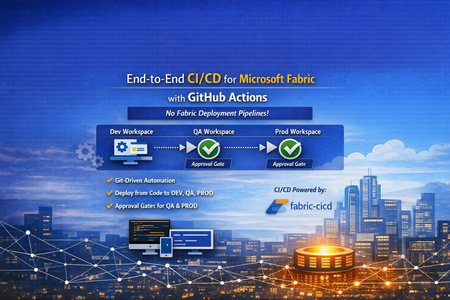
👋 Introduction If you've been working with Microsoft Fabric, you've likely faced this question: "How do we promote Fabric items from DEV → QA → PROD reliably, consistently, and with proper governance?" Many teams default to the built-in Fabric Deployment Pipelines — and they work great for simpler scenarios. But what happens when your enterprise demands: 🔒 Centralized governance across all platforms (infra, app, and data) 📜 Full audit trail of every change tied to a Git commit ✅ Approval gates with reviewer-based promotion 🔑 Per-environment service principal isolation 🧩 Alignment with your existing DevOps standards That's exactly the problem we set out to solve. In this post, I'll walk you through a production-ready, enterprise-grade CI/CD solution for Microsoft Fabric using the fabric-cicd Python library and GitHub Actions — with zero dependency on Fabric Deployment Pipelines. 🎯 What Problem Are We Solving? Traditional Fabric promotion workflows often look like this: Step Method Problem Build in DEV workspace Fabric Portal UI ✅ Works fine Promote to QA Fabric Deployment Pipeline or manual copy ⚠️ No Git traceability Promote to PROD Fabric Deployment Pipeline with approval ⚠️ Separate governance model from app/infra CI/CD Rollback 🤷 Manual recreation ❌ No deterministic rollback path Audit "Who clicked what, when?" ❌ Limited trail The Core Issue Fabric Deployment Pipelines introduce a parallel governance model that's disconnected from how your platform and application teams already work. You end up with: 🔀 Two different promotion systems (GitHub Actions for apps, Fabric Pipelines for data) 🕳️ Governance blind spots between the two 😰 Cultural friction ("Why do data teams have a different process?") Our Approach: Git as the Single Source of Truth 📖 ┌─────────────┐ push to main ┌─────────────┐ │ Developer │ ──────────────────▶ │ GitHub │ │ commits to │ │ Actions │ │ Git repo │ │ Workflow │ └─────────────┘ └──────┬──────┘ │ ┌─────────────────┼─────────────────┐ ▼ ▼ ▼ ┌──────────┐ ┌──────────┐ ┌──────────┐ │ 🟢 DEV │ │ 🟡 QA │ │ 🔴 PROD │ │ Auto │────▶│ Approval │────▶│ Approval │ │ Deploy │ │ Required │ │ Required │ └──────────┘ └──────────┘ └──────────┘ Every deployment originates from Git. Every promotion is traceable to a commit SHA. Every environment has its own approval gate. One pipeline model — across everything. 🏗️ Solution Architecture 📁 Repository Structure fabric-cicd-project/ │ ├── 📂 .github/ │ ├── 📂 workflows/ │ │ └── 📄 fabric-cicd.yml # GitHub Actions pipeline │ ├── 📄 CODEOWNERS # Review enforcement │ └── 📄 dependabot.yml # Automated dependency updates │ ├── 📂 config/ │ └── 📄 parameter.yml # Environment-specific parameterization │ ├── 📂 deploy/ │ ├── 📄 deploy_workspace.py # Main deployment entrypoint │ └── 📄 validate_repo.py # Pre-deployment validation │ ├── 📂 workspace/ # Fabric items (Git-integrated / PBIP) │ ├── 📄 .env.example # Environment variable template ├── 📄 .gitignore ├── 📄 ruff.toml # Python linting config ├── 📄 requirements.txt # Pinned dependencies ├── 📄 SECURITY.md # Vulnerability disclosure policy └── 📄 README.md 🔧 Key Components Component Purpose fabric-cicd Python library Deploys Fabric items from Git to workspaces (handles all Fabric API calls internally) deploy_workspace.py CLI entrypoint — authenticates, configures, deploys, logs parameter.yml Find-and-replace rules for environment-specific values (connections, lakehouse IDs, etc.) validate_repo.py Pre-flight checks — validates repo structure, parameter.yml presence, .platform files fabric-cicd.yml GitHub Actions workflow — orchestrates validate → DEV → QA → PROD ✨ Feature Deep Dive 1️⃣ Per-Environment Service Principal Isolation 🔐 Instead of a single shared service principal, each environment gets its own: DEV_TENANT_ID / DEV_CLIENT_ID / DEV_CLIENT_SECRET QA_TENANT_ID / QA_CLIENT_ID / QA_CLIENT_SECRET PROD_TENANT_ID / PROD_CLIENT_ID / PROD_CLIENT_SECRET Why this matters: 🛡️ Least-privilege access — the DEV SP can't touch PROD 🔍 Audit clarity — you know which identity deployed where 💥 Blast radius reduction — a compromised DEV secret doesn't affect PROD The deploy script automatically resolves the correct credentials based on TARGET_ENVIRONMENT, with fallback to shared FABRIC_* variables for simpler setups. 2️⃣ Environment-Specific Parameterization 🎛️ A single parameter.yml drives all environment differences: find_replace: - find: "DEV_Lakehouse" replace_with: DEV: "DEV_Lakehouse" QA: "QA_Lakehouse" PROD: "PROD_Lakehouse" - find: "dev-sql-server.database.windows.net" replace_with: DEV: "dev-sql-server.database.windows.net" QA: "qa-sql-server.database.windows.net" PROD: "prod-sql-server.database.windows.net" ✅ Same Git artifacts → different runtime bindings per environment ✅ No manual edits between promotions ✅ Easy to review in pull requests 3️⃣ Approval-Gated Promotions ✅ The GitHub Actions workflow uses GitHub Environments with reviewer requirements: Environment Trigger Approval 🟢 DEV Automatic on push to main None — deploys immediately 🟡 QA After successful DEV deploy ✅ Requires reviewer approval 🔴 PROD After successful QA deploy ✅ Requires reviewer approval Reviewers see a rich job summary in GitHub showing: 📌 Git commit SHA being deployed 🎯 Target workspace and environment 📦 Item types in scope ⏱️ Deployment duration ✅ / ❌ Final status 4️⃣ Pre-Deployment Validation 🔍 Before any deployment runs, a dedicated validate job checks: Check What It Does 📂 workspace exists Ensures Fabric items are present 📄 parameter.yml exists Ensures parameterization is configured 📄 .platform files present Validates Fabric Git integration metadata 🐍 ruff check deploy/ Lints Python code for syntax errors and bad imports If validation fails, no deployment runs — across any environment. 5️⃣ Full Git SHA Traceability 📜 Every deployment logs and surfaces the exact Git commit being deployed: Why this matters: 🔄 Rollback = git revert <sha> + push → pipeline redeploys previous state 🕵️ Audit = every PROD deployment tied to a specific commit, reviewer, and timestamp 🔀 Diff = git diff v1..v2 shows exactly what changed between deployments 6️⃣ Concurrency Control 🚦 concurrency: group: fabric-deploy-${{ github.ref }} cancel-in-progress: false Two rapid pushes to main won't cause parallel deployments fighting over the same workspace. The second run queues until the first completes. 7️⃣ Smart Path Filtering 🧠 paths-ignore: - "**.md" - "docs/**" - ".vscode/**" A README-only commit? A docs update? No deployment triggered. This saves runner minutes and avoids unnecessary approval requests for QA/PROD. 8️⃣ Retry Logic with Exponential Backoff 🔁 The deploy script wraps fabric-cicd calls with retry logic: Attempt 1 → fails (HTTP 429 rate limit) ⏳ Wait 5 seconds Attempt 2 → fails (HTTP 503 transient) ⏳ Wait 15 seconds Attempt 3 → succeeds ✅ Transient Fabric service issues don't break your pipeline — the deployment retries automatically. 9️⃣ Orphan Cleanup 🧹 Set CLEAN_ORPHANS=true and items that exist in the workspace but not in Git get removed: Workspace has: Notebook_A, Notebook_B, Notebook_C Git repo has: Notebook_A, Notebook_B → Notebook_C gets removed (orphan) This ensures your workspace exactly matches your Git state — no drift, no surprises. 🔟 Dependency Management with Dependabot 🤖 # .github/dependabot.yml updates: - package-ecosystem: "pip" schedule: interval: "weekly" - package-ecosystem: "github-actions" schedule: interval: "weekly" fabric-cicd, azure-identity, and GitHub Actions versions are automatically monitored. When updates are available, Dependabot opens a PR — keeping your pipeline secure and current. 1️⃣1️⃣ CODEOWNERS Enforcement 👥 # .github/CODEOWNERS /deploy/ @platform-team /config/ @platform-team /.github/workflows/ @platform-team Changes to deployment scripts, parameterization, or the workflow require review from the platform team. No one accidentally modifies the pipeline without oversight. 1️⃣2️⃣ Job Timeouts ⏱️ Job Timeout Validate 10 minutes Deploy (DEV/QA/PROD) 30 minutes A hung process won't burn 6 hours of runner time. It fails fast, alerts the team, and frees the runner. 1️⃣3️⃣ Security Policy 🛡️ A dedicated SECURITY.md provides: 📧 Responsible vulnerability disclosure process ⏰ 48-hour acknowledgement SLA 📋 Best practices for contributors (no secrets in code, least-privilege SPs, 90-day rotation) 🔄 The Complete Workflow Here's what happens end-to-end when a developer merges a PR: 1. 👨💻 Developer merges PR to main │ 2. 🔍 VALIDATE job runs │ ✅ Repo structure checks │ ✅ Python linting (ruff) │ ✅ parameter.yml validation │ 3. 🟢 DEPLOY-DEV job runs (automatic) │ 🔑 Authenticates with DEV SP │ 📦 Deploys all items to DEV workspace │ 📝 Logs commit SHA + summary │ 4. 🟡 DEPLOY-QA job waits for approval │ 👀 Reviewer checks job summary │ ✅ Reviewer approves │ 🔑 Authenticates with QA SP │ 📦 Deploys all items to QA workspace │ 5. 🔴 DEPLOY-PROD job waits for approval │ 👀 Reviewer checks job summary │ ✅ Reviewer approves │ 🔑 Authenticates with PROD SP │ 📦 Deploys all items to PROD workspace │ 6. 🎉 Done — all environments in sync with Git 🆚 Comparison: This Approach vs. Fabric Deployment Pipelines Capability Fabric Deployment Pipelines This Solution (fabric-cicd + GitHub Actions) Source of truth Workspace ✅ Git Promotion trigger UI click / API call ✅ Git push + approval Approval gates Fabric-native ✅ GitHub Environments (same as app teams) Audit trail Fabric activity log ✅ Git commits + GitHub Actions history Rollback Manual ✅ git revert + auto-redeploy Cross-platform governance Separate model ✅ Unified with infra/app CI/CD Parameterization Deployment rules ✅ parameter.yml (reviewable in PR) Secret management Fabric-managed ✅ GitHub Secrets + per-env SP isolation Drift detection Limited ✅ Orphan cleanup (CLEAN_ORPHANS=true) 🚀 Getting Started Prerequisites 3 Fabric workspaces (DEV, QA, PROD) Service principal(s) with Contributor role on each workspace GitHub repository with Actions enabled GitHub Environments configured (dev, qa, prod) Quick Setup # 1. Clone the repo git clone https://github.com/<your-org>/fabric-cicd-project.git # 2. Install dependencies pip install -r requirements.txt # 3. Copy and fill environment variables cp .env.example .env # 4. Run locally against DEV python deploy/deploy_workspace.py GitHub Actions Setup Create GitHub Environments: dev, qa (add reviewers), prod (add reviewers) Add secrets to each environment: DEV_TENANT_ID, DEV_CLIENT_ID, DEV_CLIENT_SECRET QA_TENANT_ID, QA_CLIENT_ID, QA_CLIENT_SECRET PROD_TENANT_ID, PROD_CLIENT_ID, PROD_CLIENT_SECRET DEV_WORKSPACE_ID, QA_WORKSPACE_ID, PROD_WORKSPACE_ID Push to main — the pipeline takes over! 🎉 💡 Lessons Learned After implementing this pattern across several engagements, here are the key takeaways: ✅ What Works Well Teams love the Git traceability once they experience a clean rollback Approval gates in GitHub feel natural to platform engineers Parameter.yml changes in PRs create great review conversations about environment differences Job summaries give reviewers confidence to approve without digging into logs ⚠️ Watch Out For Cultural resistance is the #1 blocker — invest in enablement, not just automation Fabric items with runtime state (data in lakehouses, refresh history) aren't captured in Git Secret rotation across 3+ environments needs process discipline (consider OIDC federated credentials) Run a "portal vs. pipeline" side-by-side demo early — it changes minds fast 🤝 For CSAs: Sharing This With Customers This solution is ideal for customers who: ☑️ Already use GitHub Actions for application or infrastructure CI/CD ☑️ Have governance requirements that demand Git-based audit trails ☑️ Operate multiple Fabric workspaces across environments ☑️ Want to standardize their promotion model across all workloads ☑️ Are moving from Power BI Premium to Fabric and want to modernize their DevOps practices 🗣️ Conversation Starters "How are you promoting Fabric items between environments today?" "Is your data team using the same CI/CD patterns as your app teams?" "If something goes wrong in production, how quickly can you roll back to the previous version?" 📚 Resources 📦 fabric-cicd on PyPI 📖 fabric-cicd Documentation 🐙 GitHub Actions Documentation 🏗️ Microsoft Fabric Git Integration 🌐Git Repository URL: vinod-soni-microsoft/FABRIC-CICD-PROJECT: Enterprise-grade CI/CD solution for Microsoft Fabric using fabric-cicd Python library and GitHub Actions. Git-driven deployments across DEV → QA → PROD with environment approval gates, per-environment service principal isolation, and parameterized promotion — no Fabric Deployment Pipelines required. 🏁 Conclusion The shift from UI-driven promotion to Git-driven CI/CD for Microsoft Fabric isn't just a technical upgrade — it's a governance and cultural alignment decision. By using fabric-cicd with GitHub Actions, you get: 📖 One source of truth (Git) 🔄 One promotion model (GitHub Actions) ✅ One approval process (GitHub Environments) 🔍 One audit trail (Git history + Actions logs) 🔐 One security model (GitHub Secrets + per-env SPs) No parallel governance. No hidden drift. No "who clicked what in the portal." Just Git, code, and confidence. 💪 Have questions or want to share your experience? Drop a comment below — I'd love to hear how your team is approaching Fabric CI/CD! 👇Step-by-Step: Deploy the Architecture Review Agent Using AZD AI CLI
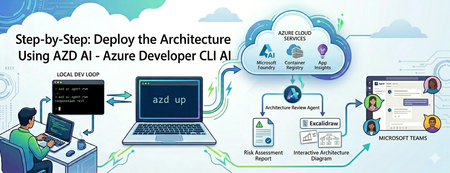
Building an AI agent is easy; operating it is an infrastructure trap. Discover how to use the azd ai CLI extension to streamline your workflow. From local testing to deploying a live Microsoft Foundry hosted agent and publishing it to Microsoft Teams—learn how to do it all without writing complex deployment scripts or needing admin permissions.897Views1like0CommentsTechnical Walkthrough: Deploying a SQL DB like it's Terraform
Introduction This post will be a union of multiple topics. It is part of the SQL CI/CD series and as such will build upon Deploying .dacpacs to Multiple Environments via ADO Pipelines | Microsoft Community Hub and Managed SQL Deployments Like Terraform | Microsoft Community Hub while also crossing over with the YAML Pipeline series This is an advanced topic in regard to both Azure DevOps YAML and SQL CI/CD. If both of these concepts are newer to you, please refer to the links above as this is not designed to be a beginner's approach in either one of these domains. Assumptions To get the most out of this and follow along we are going to assume that you are 1.) On board with templating your Azure DevOps YAML Pipelines. By doing this we will see the benefit of quickly onboarding new pipelines, standardizing our deployment steps, and increasing our security. We also are going to assume you are on board with Managed SQL Deployments Like Terraform | Microsoft Community Hub for deploying your SQL Projects. By adopting this we can increase our data security, confidence in source control, and speed our time to deployment. For this post we will continue to leverage the example cicd-adventureWorks repository for the source of our SQL Project and where the pipeline definition will live. Road mapping the Templates Just like my other YAML posts let's outline the pieces required in this stage and we will then break down each job Build Stage Build .dacpac job run `dotnet build` and pass in appropriate arguments execute a Deploy Report from the dacpac produced by the build and the target environment copy the Deploy Report to the build output directory publish the pipeline artifact Deploy Stage Deploy .dacpac job run Deploy Report from dacpac artifact (optional) deploy dacpac, including pre/postscripts Build Stage For the purposes of this stage, we should think of building our .dacpac similar to a terraform or single page application build. What I am referring to is we will produce an artifact per environment, and this will be generated from the same codebase. Additionally, we will run a 'plan' which will be the proposed result of deploying our dacpac file. Build Job We will have one instance of the build job for each environment. Each instance will produce a different artifact as they will be passing different build configurations which in turn will result in a different .dacpac per environment. If you are familiar with YAML templating, then feel free to jump to the finish job template. One of the key differences with this job structure, as opposed to the one outlined in Deploying .dacpacs to Multiple Environments via ADO Pipelines is the need for a Deploy Report. This is the key to unlocking the CI/CD approach which aligns with Terraform. This Deploy Report detects our changes on build, similar to running a terraform plan. Creating a Deploy Report is achieved by setting the DeployAction attribute in the SQLAzureDacpacDeployment@1 action to 'DeployReport' Now there is one minor "bug" in the Microsoft SQLAzureDacpacDeployment task, which I have raised with the ADO task. It appears the output path for the Deploy Report as well as the Drift Report are hardcoded to the same location. To get around this I had to find out where the Deploy Report was being published and, for our purposes, have a task to copy the Deploy Report to the same location as the .dacpac and then publish them both as a single folder. Here is the code for the for a single environment to build the associated .dacpac and produce the Deploy Repo stages: - stage: adventureworksentra_build variables: - name: solutionPath value: $(Build.SourcesDirectory)// jobs: - job: build_publish_sql_sqlmoveme_dev_dev steps: - task: UseDotNet@2 displayName: Use .NET SDK vlatest inputs: packageType: 'sdk' version: '' includePreviewVersions: true - task: NuGetAuthenticate@1 displayName: 'NuGet Authenticate' - task: DotNetCoreCLI@2 displayName: dotnet build inputs: command: build projects: $(Build.SourcesDirectory)/src/sqlmoveme/*.sqlproj arguments: --configuration dev /p:NetCoreBuild=true /p:DacVersion=1.0.1 - task: SqlAzureDacpacDeployment@1 displayName: DeployReport sqlmoveme on sql-adventureworksentra-dev-cus.database.windows.net inputs: DeploymentAction: DeployReport azureSubscription: AzureDevServiceConnection AuthenticationType: servicePrincipal ServerName: sql-adventureworksentra-dev-cus.database.windows.net DatabaseName: sqlmoveme deployType: DacpacTask DacpacFile: $(Agent.BuildDirectory)\s/src/sqlmoveme/bin/dev/sqlmoveme.dacpac AdditionalArguments: '' DeleteFirewallRule: True - task: CopyFiles@2 inputs: SourceFolder: GeneratedOutputFiles Contents: '**' TargetFolder: $(Build.SourcesDirectory)/src/sqlmoveme/bin/dev/cus - task: PublishPipelineArtifact@1 displayName: 'Publish Pipeline Artifact sqlmoveme_dev_dev ' inputs: targetPath: $(Build.SourcesDirectory)/src/sqlmoveme/bin/dev artifact: sqlmoveme_dev_dev properties: '' The end result will be similar to: (I have two environments in the screenshot below) One can see I have configured this to run a Deploy Report across each regional instance, thus the `cus` folder, of a SQL DB I do this is to identify and catch any potential schema and data issues. The Deploy Reports are the keys to tie this to the thought of deploying and managing SQL Databases like Terraform. These reports will execute when a pull request is created as part of the Build and again at Deployment to ensure changes from PR to deployment that may have occurred. For the purposes of this blog here is a deployment report indicating a schema change: This is an important artifact for organizations whose auditing policy requires documentation around deployments. This information is also available in the ADO job logs: This experience should feel similar to Terraform CI/CD...THAT'S A GOOD THING! It means we are working on developing and refining practices and principals across our tech stacks when it comes to SDLC. If this feels new to you then please read Terraform, CI/CD, Azure DevOps, and YAML Templates - John Folberth Deploy Stage We will have a deploy stage for each environment and within that stage will be a job for each region and/or database we are deploying our dacpac to. This job can be a template because, in theory, our deploying process across environments is identical. We will run a deployment report and deploy the .dacpac which was built for the specific environment and will include any and all associated pre/post scripts. Again this process has already been walked through in Deploying .dacpacs to Multiple Environments via ADO Pipelines | Microsoft Community Hub Deploy Job The deploy job will take what we built in the deployment process in Deploying .dacpacs to Multiple Environments via ADO Pipelines | Microsoft Community Hub and we will add a perquisite job to create a second Deployment Report. This process is to ensure we are aware of any changes in the deployed SQL Database that may have occurred after the original dacpac and Deployment Report were created at the time of the Pull Request. By doing this we now have a tight log identifying any changes that were being made right before we deployed the code. Next, we need to make a few changes to override the default arguments of the .dacpac publish command in order to automatically deploy changes that may result in data loss. Here is a complete list of all the available properties SqlPackage Publish - SQL Server | Microsoft Learn. The ones we are most interested in are DropObjectsNotInSource and BlockOnPossibleDataLoss. DropObjectsNotInSource is defined as: Specifies whether objects that do not exist in the database snapshot (.dacpac) file will be dropped from the target database when you publish to a database. This value takes precedence over DropExtendedProperties. This is important as it will drop and delete objects that are not defined in our source code. As I've written about previously this will drop all those instances of "Shadow Data" or copies of tables we were storing. This value, by default, is set to false as a safeguard from a destructive data action. Our intention though is to ensure our deployed database objects match our definitions in source control, as such we want to enable this. BlockOnPossibleDataLoss is defined as: Specifies that the operation will be terminated during the schema validation step if the resulting schema changes could incur a loss of data, including due to data precision reduction or a data type change that requires a cast operation. The default (True) value causes the operation to terminate regardless if the target database contains data. An execution with a False value for BlockOnPossibleDataLoss can still fail during deployment plan execution if data is present on the target that cannot be converted to the new column type. This is another safeguard that has been put in place to ensure data isn't lost in the situation of type conversion or schema changes such as dropping a column. We want this set to `true` so that our deployment will actually deploy in an automated fashion. If this is set to `false` and we are wanting to update schemas/columns then we would be creating an anti-pattern of a manual deployment to accommodate. When possible, we want to automate our deployments and in this specific case we have already taken the steps of mitigating unintentional data loss through our implementation of a Deploy Report. Again, we should have confidence in our deployment and if we have this then we should be able to automate it. Here is that same deployment process, including now the Deploy Report steps: - stage: adventureworksentra_dev_cus_dacpac_deploy jobs: - deployment: adventureworksentra_app_dev_cus environment: name: dev dependsOn: [] strategy: runOnce: deploy: steps: - task: SqlAzureDacpacDeployment@1 displayName: DeployReport sqlmoveme on sql-adventureworksentra-dev-cus.database.windows.net inputs: DeploymentAction: DeployReport azureSubscription: AzureDevServiceConnection AuthenticationType: servicePrincipal ServerName: sql-adventureworksentra-dev-cus.database.windows.net DatabaseName: sqlmoveme deployType: DacpacTask DacpacFile: $(Agent.BuildDirectory)\sqlmoveme_dev_dev\**\*.dacpac AdditionalArguments: '' DeleteFirewallRule: False - task: CopyFiles@2 inputs: SourceFolder: GeneratedOutputFiles Contents: '**' TargetFolder: postDeploy/sql-adventureworksentra-dev-cus.database.windows.net/sqlmoveme - task: SqlAzureDacpacDeployment@1 displayName: Publish sqlmoveme on sql-adventureworksentra-dev-cus.database.windows.net inputs: DeploymentAction: Publish azureSubscription: AzureDevServiceConnection AuthenticationType: servicePrincipal ServerName: sql-adventureworksentra-dev-cus.database.windows.net DatabaseName: sqlmoveme deployType: DacpacTask DacpacFile: $(Agent.BuildDirectory)\sqlmoveme_dev_dev\**\*.dacpac AdditionalArguments: /p:DropObjectsNotInSource=true /p:BlockOnPossibleDataLoss=false DeleteFirewallRule: True Putting it Together Let's put together all these pieces. This example will show an expanded pipeline that has the following stages and jobs Build a stage Build Dev job Build Tst job Deploy Dev stage Deploy Dev Job Deploy tst stage Deploy tst Job And here is the code: resources: repositories: - repository: templates type: github name: JFolberth/TheYAMLPipelineOne endpoint: JFolberth trigger: branches: include: - none pool: vmImage: 'windows-latest' parameters: - name: projectNamesConfigurations type: object default: - projectName: 'sqlmoveme' environmentName: 'dev' regionAbrvs: - 'cus' projectExtension: '.sqlproj' buildArguments: '/p:NetCoreBuild=true /p:DacVersion=1.0.1' sqlServerName: 'adventureworksentra' sqlDatabaseName: 'moveme' resourceGroupName: adventureworksentra ipDetectionMethod: 'AutoDetect' deployType: 'DacpacTask' authenticationType: 'servicePrincipal' buildConfiguration: 'dev' dacpacAdditionalArguments: '/p:DropObjectsNotInSource=true /p:BlockOnPossibleDataLoss=false' - projectName: 'sqlmoveme' environmentName: 'tst' regionAbrvs: - 'cus' projectExtension: '.sqlproj' buildArguments: '/p:NetCoreBuild=true /p:DacVersion=1.0' sqlServerName: 'adventureworksentra' sqlDatabaseName: 'moveme' resourceGroupName: adventureworksentra ipDetectionMethod: 'AutoDetect' deployType: 'DacpacTask' authenticationType: 'servicePrincipal' buildConfiguration: 'tst' dacpacAdditionalArguments: '/p:DropObjectsNotInSource=true /p:BlockOnPossibleDataLoss=false' - name: serviceName type: string default: 'adventureworksentra' stages: - stage: adventureworksentra_build variables: - name: solutionPath value: $(Build.SourcesDirectory)// jobs: - job: build_publish_sql_sqlmoveme_dev_dev steps: - task: UseDotNet@2 displayName: Use .NET SDK vlatest inputs: packageType: 'sdk' version: '' includePreviewVersions: true - task: NuGetAuthenticate@1 displayName: 'NuGet Authenticate' - task: DotNetCoreCLI@2 displayName: dotnet build inputs: command: build projects: $(Build.SourcesDirectory)/src/sqlmoveme/*.sqlproj arguments: --configuration dev /p:NetCoreBuild=true /p:DacVersion=1.0.1 - task: SqlAzureDacpacDeployment@1 displayName: DeployReport sqlmoveme on sql-adventureworksentra-dev-cus.database.windows.net inputs: DeploymentAction: DeployReport azureSubscription: AzureDevServiceConnection AuthenticationType: servicePrincipal ServerName: sql-adventureworksentra-dev-cus.database.windows.net DatabaseName: sqlmoveme deployType: DacpacTask DacpacFile: $(Agent.BuildDirectory)\s/src/sqlmoveme/bin/dev/sqlmoveme.dacpac AdditionalArguments: '' DeleteFirewallRule: True - task: CopyFiles@2 inputs: SourceFolder: GeneratedOutputFiles Contents: '**' TargetFolder: $(Build.SourcesDirectory)/src/sqlmoveme/bin/dev/cus - task: PublishPipelineArtifact@1 displayName: 'Publish Pipeline Artifact sqlmoveme_dev_dev ' inputs: targetPath: $(Build.SourcesDirectory)/src/sqlmoveme/bin/dev artifact: sqlmoveme_dev_dev properties: '' - job: build_publish_sql_sqlmoveme_tst_tst steps: - task: UseDotNet@2 displayName: Use .NET SDK vlatest inputs: packageType: 'sdk' version: '' includePreviewVersions: true - task: NuGetAuthenticate@1 displayName: 'NuGet Authenticate' - task: DotNetCoreCLI@2 displayName: dotnet build inputs: command: build projects: $(Build.SourcesDirectory)/src/sqlmoveme/*.sqlproj arguments: --configuration tst /p:NetCoreBuild=true /p:DacVersion=1.0 - task: SqlAzureDacpacDeployment@1 displayName: DeployReport sqlmoveme on sql-adventureworksentra-tst-cus.database.windows.net inputs: DeploymentAction: DeployReport azureSubscription: AzureTstServiceConnection AuthenticationType: servicePrincipal ServerName: sql-adventureworksentra-tst-cus.database.windows.net DatabaseName: sqlmoveme deployType: DacpacTask DacpacFile: $(Agent.BuildDirectory)\s/src/sqlmoveme/bin/tst/sqlmoveme.dacpac AdditionalArguments: '' DeleteFirewallRule: True - task: CopyFiles@2 inputs: SourceFolder: GeneratedOutputFiles Contents: '**' TargetFolder: $(Build.SourcesDirectory)/src/sqlmoveme/bin/tst/cus - task: PublishPipelineArtifact@1 displayName: 'Publish Pipeline Artifact sqlmoveme_tst_tst ' inputs: targetPath: $(Build.SourcesDirectory)/src/sqlmoveme/bin/tst artifact: sqlmoveme_tst_tst properties: '' - stage: adventureworksentra_dev_cus_dacpac_deploy jobs: - deployment: adventureworksentra_app_dev_cus environment: name: dev dependsOn: [] strategy: runOnce: deploy: steps: - task: SqlAzureDacpacDeployment@1 displayName: DeployReport sqlmoveme on sql-adventureworksentra-dev-cus.database.windows.net inputs: DeploymentAction: DeployReport azureSubscription: AzureDevServiceConnection AuthenticationType: servicePrincipal ServerName: sql-adventureworksentra-dev-cus.database.windows.net DatabaseName: sqlmoveme deployType: DacpacTask DacpacFile: $(Agent.BuildDirectory)\sqlmoveme_dev_dev\**\*.dacpac AdditionalArguments: '' DeleteFirewallRule: False - task: CopyFiles@2 inputs: SourceFolder: GeneratedOutputFiles Contents: '**' TargetFolder: postDeploy/sql-adventureworksentra-dev-cus.database.windows.net/sqlmoveme - task: SqlAzureDacpacDeployment@1 displayName: Publish sqlmoveme on sql-adventureworksentra-dev-cus.database.windows.net inputs: DeploymentAction: Publish azureSubscription: AzureDevServiceConnection AuthenticationType: servicePrincipal ServerName: sql-adventureworksentra-dev-cus.database.windows.net DatabaseName: sqlmoveme deployType: DacpacTask DacpacFile: $(Agent.BuildDirectory)\sqlmoveme_dev_dev\**\*.dacpac AdditionalArguments: /p:DropObjectsNotInSource=true /p:BlockOnPossibleDataLoss=false DeleteFirewallRule: True - stage: adventureworksentra_tst_cus_dacpac_deploy jobs: - deployment: adventureworksentra_app_tst_cus environment: name: tst dependsOn: [] strategy: runOnce: deploy: steps: - task: SqlAzureDacpacDeployment@1 displayName: DeployReport sqlmoveme on sql-adventureworksentra-tst-cus.database.windows.net inputs: DeploymentAction: DeployReport azureSubscription: AzureTstServiceConnection AuthenticationType: servicePrincipal ServerName: sql-adventureworksentra-tst-cus.database.windows.net DatabaseName: sqlmoveme deployType: DacpacTask DacpacFile: $(Agent.BuildDirectory)\sqlmoveme_tst_tst\**\*.dacpac AdditionalArguments: '' DeleteFirewallRule: False - task: CopyFiles@2 inputs: SourceFolder: GeneratedOutputFiles Contents: '**' TargetFolder: postDeploy/sql-adventureworksentra-tst-cus.database.windows.net/sqlmoveme - task: SqlAzureDacpacDeployment@1 displayName: Publish sqlmoveme on sql-adventureworksentra-tst-cus.database.windows.net inputs: DeploymentAction: Publish azureSubscription: AzureTstServiceConnection AuthenticationType: servicePrincipal ServerName: sql-adventureworksentra-tst-cus.database.windows.net DatabaseName: sqlmoveme deployType: DacpacTask DacpacFile: $(Agent.BuildDirectory)\sqlmoveme_tst_tst\**\*.dacpac AdditionalArguments: /p:DropObjectsNotInSource=true /p:BlockOnPossibleDataLoss=false DeleteFirewallRule: True In ADO it will look like: We can see the important Deploy Report being created and can confirm that there are Deploy Reports for each environment/region combination: Conclusion With the inclusion of deploy reports we now have the ability to create Azure SQL Deployments that adhere to modern DevOps approaches. We can ensure our environments will be in sync with how we have defined them in source control. By doing this we achieve a higher level of security, confidence in our code, and reduction in shadow data. To learn more on these approaches with SQL Deployments be sure to check out my other blog articles on the topic "SQL Database Series" in "Healthcare and Life Sciences Blog" | Microsoft Community Hub and be sure to follow me on LinkedInEngenharia de Prompt com o GitHub Copilot
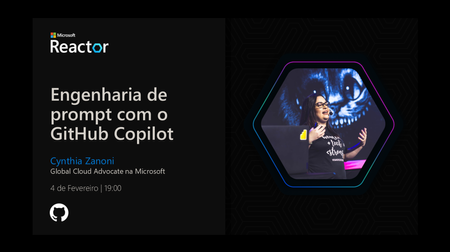
O GitHub Copilot é uma ferramenta de inteligência artificial que ajuda desenvolvedores a escrever código de forma mais rápida e eficiente. Durante o GitHub Copilot Bootcamp Brasil (acesse as gravações), reunimos conteúdos práticos para ensinar como dominar a engenharia de prompts e explorar as funcionalidades do Copilot, aumentando sua produtividade em tarefas do dia a dia, como criar rotas para APIs, automatizar testes e integrar pipelines com GitHub Actions. O GitHub Copilot é um assistente de programação baseado em IA desenvolvido pelo GitHub em parceria com a OpenAI. Ele utiliza modelos avançados de linguagem, como o GPT-4, para oferecer sugestões contextuais diretamente no editor do desenvolvedor. Seja completando funções, gerando trechos de código ou explicando blocos complexos, o Copilot atua como um parceiro que acelera tarefas repetitivas e permite que os desenvolvedores foquem em problemas estratégicos. Principais benefícios do GitHub Copilot: Sugestões Contextuais: Recomendações baseadas no código existente e nos comentários fornecidos. Compatibilidade com Diversos Editores: Funciona com IDEs populares, como Visual Studio Code, JetBrains IDEs e Neovim. Geração de Código Completo: Cria funções inteiras ou snippets com base em descrições textuais. Documentação Automatizada: Auxilia na criação de comentários e documentação alinhados ao código. Com um plano gratuito disponível, basta ter uma conta no GitHub para ativar o Copilot. Ele pode ser usado no Visual Studio Code (VSCode), via chat integrado, autocomplete enquanto você escreve ou até mesmo pela linha de comando (CLI). Também há uma extensão específica para o Azure (GitHub Copilot for Azure). De acordo com estudos realizados pelo GitHub, desenvolvedores que utilizam o Copilot relatam até 55% mais produtividade e maior satisfação no trabalho. Durante a sessão, utilizamos o GitHub Codespaces, uma versão do Visual Studio Code na nuvem. Essa ferramenta permite configurar um ambiente completo de desenvolvimento em poucos minutos, eliminando a necessidade de configurações locais demoradas. O Codespaces oferece 60 horas gratuitas por mês, permitindo pausar e retomar ambientes conforme necessário para uma gestão eficiente dos recursos. Além disso, ele suporta templates prontos para tecnologias como React, Jupyter Notebooks e .NET. Durante a demonstração, configuramos um projeto FastAPI diretamente no Codespaces e mostramos como ele facilita o desenvolvimento de APIs. O que é Engenharia de Prompts? A engenharia de prompts é a prática de estruturar comandos ou instruções para obter os melhores resultados possíveis de modelos de IA generativa. No caso do GitHub Copilot, isso significa criar descrições claras e detalhadas sobre o que você deseja que ele faça. Por exemplo: """ Crie uma função para listar cidades por país: - A função deve aceitar 'country' como parâmetro. - Retorne as cidades associadas ao país especificado. - Trate erros caso o país não seja encontrado. """ Com base nesse prompt, o Copilot pode gerar automaticamente: @app.get("/cities/{country}") def list_cities(country: str): country_cities = { "Brazil": ["São Paulo", "Rio de Janeiro", "Belo Horizonte"], "USA": ["New York", "Los Angeles", "Chicago"], "Japan": ["Tokyo", "Osaka", "Kyoto"] } if country not in country_cities: raise HTTPException(status_code=404, detail="Country not found") return {"cities": country_cities[country]} Essa abordagem economiza tempo e garante que o código gerado esteja alinhado às especificações fornecidas. Por que Engenharia de Prompts é importante? A qualidade das sugestões geradas pelo GitHub Copilot depende diretamente da clareza dos prompts fornecidos. Prompts bem elaborados ajudam a IA a entender melhor o contexto do problema, resultando em saídas mais úteis e precisas. Alguns benefícios: Maior Controle sobre as Respostas: Reduz ambiguidades e direciona a IA para produzir exatamente o que você precisa. Eficiência no Desenvolvimento: Menos ajustes manuais economizam tempo valioso. Versatilidade: Permite explorar diferentes abordagens para resolver problemas complexos. Por exemplo, ao criar uma API com FastAPI, um prompt detalhado pode gerar rotas completas com tratamento de erros: """ Crie uma rota FastAPI para listar cidades por país: - A rota deve ser '/cities/{country}'. - Aceite 'country' como string. - Retorne uma lista das cidades associadas ao país fornecido. - Trate erros caso o país não seja encontrado no dicionário. """ Resultado gerado pelo Copilot: @app.get("/cities/{country}") def list_cities(country: str): country = country.capitalize() country_cities = { "Brazil": ["São Paulo", "Rio de Janeiro", "Belo Horizonte"], "USA": ["New York", "Los Angeles", "Chicago"], "Japan": ["Tokyo", "Osaka", "Kyoto"] } if country not in country_cities: raise HTTPException(status_code=404, detail="Country not found") return {"cities": country_cities[country]} Durante esta sessão do GitHub Copilot Bootcamp Brasil, você aprenderá: Introdução ao GitHub Copilot e Engenharia de Prompts Como usar prompts eficazes para gerar código relevante. Configuração de Ambientes na Nuvem com GitHub Codespaces Criar ambientes rápidos e flexíveis na nuvem. Criação de APIs com FastAPI Desenvolver rotas robustas utilizando sugestões do Copilot. Automatização de Testes com pytest Criar testes automatizados para validar funcionalidades da API. Integração Contínua com GitHub Actions Configurar pipelines automatizados para rodar testes e builds. Conclusão A combinação entre o GitHub Copilot e a engenharia de prompts representa um salto significativo na forma como desenvolvemos software. Ferramentas como essas permitem não apenas acelerar tarefas repetitivas, mas também melhorar a qualidade do código produzido. Se você deseja aprender mais sobre essas técnicas, assista as gravações do GitHub Copilot Bootcamp disponíveis em português, comece a utilizar o GitHub Copilot gratuito e descubra como transformar sua maneira de programar utilizando inteligência artificial!1.4KViews1like0CommentsDataEX Bootcamp: Data Women Engineers 2025
DataEX Bootcamp Data Women Engineers 2025: Uma Oportunidade Imperdível para Mulheres que Querem Iniciar na Carreira de Engenharia de Dados Se você é uma mulher apaixonada por tecnologia e busca uma oportunidade para se aprofundar em Data Engineering, o DataEX Bootcamp Data Women Engineers 2025 pode ser o seu ponto de partida. Este programa exclusivo e gratuito foi desenvolvido para capacitar mulheres que desejam ingressar na área de dados, com um foco prático e realista, visando proporcionar uma imersão completa nas habilidades e ferramentas mais requisitadas pelas empresas de tecnologia. O que é o DataEX Bootcamp Data Women Engineers? O DataEX Bootcamp é um programa de capacitação totalmente gratuito que oferece 50 vagas para mulheres cisgêneras e transgêneras com interesse em aprender sobre engenharia de dados. Durante o bootcamp, as participantes terão acesso a aulas teóricas e práticas, onde serão treinadas para atuar na criação e manipulação de grandes volumes de dados, utilizando ferramentas e tecnologias de ponta como SQL Server, Microsoft Fabric, Python, e muito mais. O curso foi projetado para atender a uma demanda crescente por profissionais qualificados em Data Engineering, uma das áreas mais promissoras da tecnologia. As alunas terão a oportunidade de trabalhar com cenários reais, desenvolvendo habilidades essenciais para o mercado de trabalho. Conteúdo Programático O bootcamp vai além das aulas tradicionais. Ele foca no desenvolvimento de competências técnicas essenciais para o trabalho com engenharia de dados. Durante o curso, você aprenderá: Criação e gerenciamento de Data Warehouses e DataMarts; Processamento de dados com tecnologias avançadas; Segurança e otimização de dados em ambientes corporativos; Monitoramento de dados em tempo real; Uso do Microsoft Fabric para análise e manipulação de dados; Fundamentos de Python aplicados ao trabalho com dados. O programa combina teoria e prática, permitindo que as participantes desenvolvam seus próprios projetos e desafios, como seria o caso em um ambiente corporativo. Isso garante que as habilidades adquiridas sejam imediatamente aplicáveis no mercado de trabalho. Etapas do Processo Seletivo O processo seletivo para o DataEX Bootcamp Data Women Engineers 2025 é simples, mas exige comprometimento e dedicação. As etapas são: Inscrição Online: Você deve acessar a página do bootcamp e preencher o formulário de inscrição até o dia 31 de dezembro de 2024. É importante completar todos os campos corretamente para garantir sua candidatura. Desafio Cloud Skills: Após a inscrição, será necessário realizar o Desafio Cloud Skills. Este desafio é um teste introdutório que ajuda a avaliar seu nível de conhecimento e familiaridade com conceitos básicos de cloud computing. A conclusão deste desafio deve ser confirmada até o dia 07 de janeiro de 2025. Seleção: As participantes que cumprirem todas as etapas com sucesso receberão um e-mail de confirmação até 21 de janeiro de 2025. O bootcamp começa em 03 de fevereiro de 2025. Agenda e Modalidade O bootcamp terá aulas de 03 de fevereiro a 14 de fevereiro de 2025, com encontros programados de segunda a sexta-feira, das 13h30 às 17h30. As participantes terão que se comprometer a comparecer a todas as aulas, que ocorrerão de forma 100% online. Durante esse período, será possível aprender em tempo real e tirar dúvidas diretamente com os instrutores. Certificação e Desafio Final Ao final do bootcamp, todas as alunas que completarem o programa com sucesso receberão um certificado de participação, confirmando suas novas habilidades adquiridas. Além disso, todas as participantes serão desafiadas a realizar o Desafio Data Engineer, um teste prático que avaliará seus conhecimentos e habilidades adquiridos ao longo das aulas. O desafio ocorrerá entre 14 e 23 de fevereiro de 2025. Requisitos para Participação Para ser selecionada, você precisa atender aos seguintes critérios: Identificar-se como mulher cis ou trans; Ter mais de 18 anos; Ensino Médio completo; Disponibilidade para participar de todas as aulas durante o período de 03 a 14 de fevereiro de 2025 (exceto 08 e 09 de fevereiro, que são dias de descanso); Acesso a um computador ou notebook com conexão à internet; Interesse em trabalhar no mercado de tecnologia. Por que Participar? Este bootcamp é uma excelente oportunidade para mulheres que buscam entrar no mercado de tecnologia, especialmente em um campo de alta demanda como a engenharia de dados. Ao final do programa, as participantes estarão preparadas para enfrentar os desafios do mercado e poderão se destacar em processos seletivos de grandes empresas. Além disso, o bootcamp proporciona um ambiente de aprendizado colaborativo, onde as alunas terão a oportunidade de interagir com outras mulheres que compartilham os mesmos interesses, criando uma rede de apoio importante para o futuro profissional de cada uma. Como Se Inscrever? A inscrição para o DataEX Bootcamp Data Women Engineers 2025 pode ser feita diretamente na página oficial do programa: DataEX Bootcamp. Lembre-se de que as inscrições vão até o dia 31 de dezembro de 2024 e as vagas são limitadas, então não perca tempo! Dúvidas? Se você tem alguma dúvida ou precisa de mais informações, não hesite em entrar em contato com a equipe organizadora através do e-mail treinamentos@dataex.com.br. A equipe estará disponível para esclarecer todas as suas perguntas.6.2KViews1like3CommentsGitHub Copilot Bootcamp — Inscrições abertas
O GitHub Copilot Bootcamp é uma série de quatro aulas ao vivo em português, que ensina dicas e boas práticas para usar o GitHub Copilot. Aprenda a criar soluções rápidas, automatizar tarefas repetitivas e colaborar eficazmente em projetos. INSCREVA-SE AGORA! Por que participar? O GitHub Copilot não é apenas uma ferramenta de sugestão de código, mas sim um parceiro de programação que compreende suas necessidades e acelera seu trabalho. Participando do bootcamp, você terá a oportunidade de: Dominar a criação de prompts eficazes; Aprender a desenvolver aplicações web utilizando IA; Descobrir como automatizar testes e gerar documentação; Explorar práticas de colaboração e implantação automatizada. Cronograma de aulas 📅 04 de fevereiro de 2025 – 19 horas (Horário de Brasília) Engenharia de Prompts com o GitHub Copilot Aprenda como o Copilot funciona e domine a IA responsável para aumentar sua produtividade. 📅 06 de fevereiro de 2025 – 19 horas (Horário de Brasília) Construindo uma Aplicação Web de IA com Python e Flask Crie projetos incríveis com a integração de IA e explore o uso do Copilot para simplificar tarefas. 📅 11 de fevereiro de 2025 – 19 horas (Horário de Brasília) Crie Testes Unitários e Documentação com GitHub Copilot Automatize a documentação e desenvolva testes com eficiência, aplicando conceitos diretamente em projetos reais. 📅 13 de fevereiro de 2025 – 19 horas (Horário de Brasília) Colaboração e deploy com o GitHub Copilot Saiba como criar GitHub Actions, gerenciar solicitações de pull e usar o Copilot for Azure para implantação. Quem pode participar? Se você é desenvolvedor, estudante ou entusiasta de tecnologia, este bootcamp é para você. As aulas foram projetadas para atender tanto iniciantes quanto profissionais experientes. Como se inscrever? Garanta sua vaga agora e comece sua jornada para dominar o GitHub Copilot! 👉 Inscreva-se aqui593Views0likes0CommentsContinuous Analysis: Enhancing Reproducibility in Scientific Research
Continuous Analysis (CA) enhances reproducibility in scientific research by integrating DevOps principles, such as Continuous Integration (CI) and Continuous Deployment (CD), with DataOps and MLOps. This approach manages data and analysis lifecycles, ensuring consistent replication of results using shared data, code, and methods, thereby addressing challenges in complex workflows, software dependencies, and data sharing practices.