device provisioning service
10 TopicsResource Guide: Making Physical AI Practical for Real‑World Industrial Operations
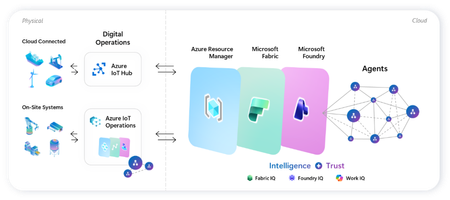
Microsoft's adaptive cloud approach brings cloud, edge, data, and AI together to help organizations turn operational technology (OT) data into intelligent action, without requiring everything to live in the cloud. At the center of this approach are key technologies that connect physical operations to cloud-scale data, analytics, and AI: Key Purpose Offering Direct-to-cloud device management + telemetry ingestion Azure IoT Hub Industrial connectivity + edge data plane Azure IoT Operations Unified analytics + real-time intelligence Microsoft Fabric On-device AI inferencing runtime Microsoft Foundry Industry recognition Microsoft named a Leader in the 2026 Gartner® Magic Quadrant™ for Global Industrial AIoT Platforms Read the announcement See it all come together Before diving into each component, watch this end-to-end demo showing how Azure IoT Operations, Azure IoT Hub, Microsoft Fabric, and Foundry Local work as one stack across the edge-to-cloud lifecycle - Making industrial AI practical for real-world operations with adaptive cloud. How these components work together Azure IoT Operations and Azure IoT Hub collect real-time data from operational assets and send semantically-ready, modeled data to Microsoft Fabric, where it's contextualized with enterprise data for downstream analytics. Microsoft Foundry extends to the edge through Foundry Local, so the same tooling used to deploy and manage AI models in the cloud applies to edge use cases. All of it integrates into Azure Resource Manager, bringing OT devices, assets, and edge AI models into the same management and security paradigm as every other Azure-managed resource. This blog walks through where to get started with each product capability: 1. Manage Cloud-Connected Devices and Telemetry with Azure IoT Hub Azure IoT Hub is a fully managed cloud service that enables secure bidirectional communication, device-to-cloud telemetry ingestion, cloud-to-device command execution, per-device authentication, remote management and more. Telemetry from IoT Hub can also be routed downstream into analytics platforms like Microsoft Fabric for visualization or AI modeling. Recommended Usage: Devices that utilize IoT Hub are distributed, stand-alone devices with fixed-functions. These devices typically do not require cloud-managed containerized workloads or cloud-managed proximal industrial protocol connectivity. Examples of appropriate device-to-cloud IoT Hub endpoint devices include water monitoring stations, vehicle telematics, distributed fluid level sensors, etc. Resources Current in-market services overview: IoT Hub: What is Azure IoT Hub? - Azure IoT Hub DPS: Overview of Azure IoT Hub Device Provisioning Service - Azure IoT Hub Device Provisioning Service ADU: Introduction to Device Update for Azure IoT Hub Building scalable solutions with Azure IoT platform: Best practices for large-scale IoT deployments - Azure IoT Hub Device Provisioning Service Scale Out an Azure IoT Hub-based Solution to Support Millions of Devices - Azure Architecture Center Azure IoT Hub scaling Try out our preview of new IoT Hub capabilities (integration with Azure Device Registry and Certificate Management) Learn more about these capabilities on our blog post: Azure IoT Hub + Azure Device Registry (Preview Refresh): Device Trust and Management at Fleet Scale… Integration with Azure Device Registry (preview): Integration with Azure Device Registry (preview) - Azure IoT Hub Microsoft-backed X.509 certificate management (preview): What is Microsoft-backed X.509 Certificate Management (Preview)? - Azure IoT Hub How to start with the preview: Deploy IoT Hub with ADR integration and certificate management (Preview) - Azure IoT Hub 2. Connect Industrial Assets with Azure IoT Operations Azure IoT Operations provides a unified data plane for the edge that runs on Azure Arc–enabled Kubernetes clusters and supports open industrial standards. It allows organizations to connect and capture equipment telemetry, normalize OT data locally, route hot-path signals to real-time analytics, securely manage layered industrial networks, and more. Edge‑processed data can then be sent upstream to Microsoft Fabric for AI‑driven analysis. Recommended Usage: Azure IoT Operations is intended to be the data plane for an adaptive cloud deployment extending the management, data, and AI capabilities of the Microsoft cloud to an on-prem device. This device binds to these cloud planes providing a platform for local data processing and intermittent connectivity. The target for these devices range from a small-gateway-style PC to a full data center. Azure IoT Operations endpoints enable cloud-managed containerized workloads and cloud-managed proximal industrial protocol connectivity. Examples of appropriate adaptive cloud and Azure IoT Operations endpoints include, on-robot computers, industrial machine controllers, retail store sensor/vision processing, and top-of-factory site infrastructure for line of business applications. Resources Azure IoT Operations Overview Azure IoT Operations Documentation Hub Releases · Azure/azure-iot-operations Quickstart: explore-iot-operations/quickstart at main · Azure-Samples/explore-iot-operations Latest release update: Open-source framework for scaling robotics from simulation to production on Azure + NVIDIA: microsoft/physical-ai-toolchain Demo video showcasing this in action: Making industrial AI practical for real-world operations with adaptive cloud How we built the demo: explore-iot-operations/quickstart at main · Azure-Samples/explore-iot-operations Edge-AI: microsoft/edge-ai: Production-ready Infrastructure as Code, applications, pluggable components, and… Latest Announcements & Blogs Making Physical AI Practical for Real-World Industrial Operations: Part 1 | Microsoft Community Hub Making Physical AI Practical for Real-World Industrial Operations: Part 2 | Microsoft Community Hub Introducing small form factor infrastructure: embed intelligence into physical systems Unlock Industrial Intelligence | Microsoft Hannover Messe 2026 From pilots to production: How Microsoft and partners are accelerating intelligent operations Partner Solutions How Mesh Systems Builds on Azure IoT Hub and Azure IoT Operations to Accelerate Industrial AI | Microsoft Community Hub Unlocking the Human Telemetry Layer for Safer Industrial Operations | Microsoft Community Hub Unlocking Smart Manufacturing: Siemens Industrial Edge Meets Azure IoT Operations Solving the Data Challenge for Manufacturers with Sight Machine & Azure IoT Operations | Microsoft Community Hub Microsoft and Rockwell Automation: Transforming Industrial AI Together | Microsoft Community Hub 3. Advanced Analytics with Microsoft Fabric Microsoft Fabric delivers a unified, end‑to‑end analytics platform that transforms streaming OT telemetry into real‑time insights and live dashboards. Fabric Operations Agents monitor industrial signals to recommend targeted actions, while Fabric IQ provides a shared semantic foundation that enables AI agents to reason over enterprise data with business context. Together, Fabric turns live industrial data into AI‑powered operational intelligence. Resources Get Started with Microsoft Fabric Learning Path Fabric Real-Time Intelligence documentation - Microsoft Fabric | Microsoft Learn Create and Configure Operations Agents - Microsoft Fabric | Microsoft Learn Fabric IQ documentation - Microsoft Fabric | Microsoft Learn 4.Run AI Models On‑Device with Foundry Local Foundry Local extends on‑device AI to Arc‑enabled Kubernetes edge clusters, providing a Microsoft‑validated inferencing layer for running AI models in industrial, disconnected or sovereign environments. Resources Foundry Local on Azure Local Documentation Participate in Foundry Local on Azure Local preview form Foundry Local on Azure Local: HELM deployment Demo Customer Stories Chevron: Chevron plans facilities of the future with Azure IoT Operations Husqvarna: Husqvarna Group Boosts Operational Efficiency with Azure Adaptive Cloud Ecopetrol: Azure IoT Operations and Azure IoT for energy help Ecopetrol optimize energy distribution while lowering operational costs P&G: Procter & Gamble cuts model deployment time up to 90% with Azure IoT Operations Toyota: Toyota Industries innovates its paint shop processes with Azure industrial AI and Azure IoT Hub1.5KViews3likes0Comments
Announcing new security enhancements across Azure IoT services
Security is foundational to the connected products and solutions our customers build. It shapes every decision, from how devices are provisioned to how they connect and receive updates. As device fleets scale and attackers probe new vectors, from the network layer to the software supply chain, customers are asking for stronger security defaults at each of these stages. Today we’re strengthening all three. Customers managing connected devices get a modern transport-security baseline with TLS 1.3 for Azure IoT Hub, identity-based provisioning that removes long-lived secrets with managed identity support for linking an IoT Hub to DPS, and encrypted update delivery with TLS downloads for Device Update for IoT Hub. TLS 1.3 and managed identity are in Public Preview; TLS downloads is Generally Available. At a glance Feature Service Status TLS 1.3 support Azure IoT Hub Public Preview Managed identity for Hub linking Azure IoT Device Provisioning Service + IoT Hub Public Preview TLS downloads (encrypted update delivery) Device Update for IoT Hub Generally Available TLS 1.3 support for Azure IoT Hub (Public Preview) Azure IoT Hub now supports TLS 1.3 through new endpoints that sit alongside the existing classic endpoint: Classic endpoint: <hub>.azure-devices.net TLS 1.3 Device endpoint: <hub>.device.azure-devices.net TLS 1.3 Service endpoint: <hub>.service.azure-devices.net The new device and service endpoints support TLS 1.3, and also support TLS 1.2 with a reduced, security-compliant cipher suite set. Devices connect through the device endpoint for device-to-cloud telemetry and cloud-to-device messages, while backend and management applications built on the service SDK connect through the service endpoint. The existing endpoint remains available, so customers can adopt the new endpoints on their own timeline rather than through a forced migration. No enablement action is needed: the new endpoints are provisioned automatically on new and existing hubs, and customers adopt TLS 1.3 by pointing their device or service clients at the new hostnames. TLS 1.3 gives customers a more modern security baseline for IoT connectivity. Just as importantly, this release introduces a clearer separation between device traffic and service traffic through dedicated endpoints, which makes the connectivity model easier to understand and evolve over time. This design also reflects how real IoT deployments work. Many customers cannot update every device or backend integration at once, so a side-by-side endpoint model helps teams test, validate, and roll out changes in stages. Learn more about Azure IoT Hub support for TLS 1.3. Managed identity support for Hub linking (Public Preview) We are also introducing managed identity support for linking an IoT Hub to DPS. DPS links to an IoT Hub securely to assign devices to the right hubs at scale, and until now, that link has relied on connection-string (shared access key) authentication. This dependency on a shared key results in customers keeping local authentication enabled on the IoT Hub, even when their security policies call for disabling it in favor of Microsoft Entra ID. Managed identity support removes that constraint: DPS can now authenticate to IoT Hub using a managed identity backed by Microsoft Entra ID so the Hub linking no longer requires a connection string. As a result, customers can disable local authentication on the IoT Hub, remove long-lived shared keys from the provisioning path, and simplify credential lifecycle management and security governance with no shared keys to rotate, store, or accidentally leak. Together, TLS 1.3 and managed identity strengthen the same Hub linking scenario: TLS 1.3 modernizes how devices and services connect to IoT Hub, while managed identity gives Azure services credential-free authentication during provisioning. Learn more about how to link an IoT Hub to DPS using managed identity. Secure update delivery: TLS downloads for Device Update for IoT Hub (Generally Available) Device Update for IoT Hub can now deliver update content over HTTPS, encrypting update content in transit between the Device Update service and your devices. For customers managing large fleets, this brings update delivery in line with the same modern transport-security expectations now applied to device and service connectivity, and helps teams meet encryption-in-transit and compliance requirements. Download security is a deployment-level setting available in Device Update data plane API version 2026-06-01. New deployments created with this version use HTTPS by default, while existing deployments continue using their current configuration. Customers that require HTTP downloads can still explicitly select HTTP. You can configure download security in the Azure portal when creating a deployment, or through the REST API, SDKs, Azure CLI, and automation workflows. Earlier API versions support HTTP downloads only. Before enabling HTTPS, confirm your devices are ready. Devices must support HTTPS downloads, trust the required root certificate authorities, and support TLS 1.2 or TLS 1.3. Some constrained or embedded devices may require code changes; see additional considerations for constrained or embedded devices. Learn more about download security for Device Update for IoT Hub. Why this matters together With these enhancements, Azure IoT services are taking another step toward secure, modern device onboarding, connectivity, and lifecycle management. TLS 1.3 modernizes how devices and services connect, managed identity removes secrets from the provisioning flow, and TLS download protects update content in transit. Each addresses a different layer of the security model, and together they reflect Microsoft's ongoing, security-first commitment to the platforms our customers build on. Customers can adopt TLS 1.3 for IoT Hub and managed identity for Hub linking in Preview today and put TLS downloads for Device Update into production right now. Get started Explore the documentation and share your feedback: TLS 1.3 for Azure IoT Hub (Preview) Managed identity for Hub linking (Preview) Download security (TLS) for Device Update for IoT Hub For questions or feedback, email us at iotdeviceonboarding@microsoft.com591Views1like0CommentsAzure IoT Hub + Azure Device Registry (Preview Refresh): Device Trust and Management at Fleet Scale
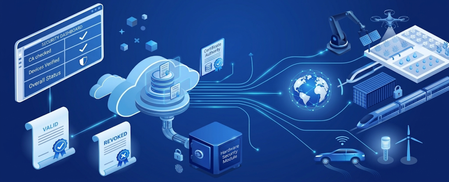
What’s New in this Preview In November 2025, we announced the preview integration of Azure IoT Hub with Azure Device Registry, marking a huge step towards integrating IoT devices into the broader Azure ecosystem. We’re grateful to the customers and partners who participated in the preview and shared valuable feedback along the way. Today, we’re expanding the preview with new capabilities to strengthen security, improve fleet management, and simplify development for connected devices. With this refresh, preview customers can: Automate device certificate renewals with zero-touch, at-runtime operations to minimize downtime and maintain a strong security posture. Integrate existing security infrastructure like private certificate authorities with your Azure Device Registry namespace. Leverage certificate revocation controls to isolate device or fleet-level risks and maintain operational continuity Utilize an improved Azure Portal experience for streamlined configuration and lifecycle management of your devices. Accelerate solution development with expanded IoT Hub and DPS Device SDK compatibility for smoother integration and faster time to value. Together, these enhancements help organizations to secure, govern, and manage their IoT deployments using familiar Azure-native tools and workflows. Why this matters: From Connected Devices to Connected Operations Operational excellence begins by bridging the gap between physical assets and digital intelligence. Consider a global logistics fleet where every vehicle is more than just a machine; it is a trusted, connected, and manageable digital entity in the cloud. As these assets move, they emit a continuous stream of telemetry - from engine vibrations to fuel consumption – directly to a unified data ecosystem, where AI agents can reason over it with greater context. Instead of waiting for a breakdown, these agents detect wear patterns, cross-reference with digital twins, and provide recommendations to reroute a vehicle for service before a failure occurs. This completes a shift from reactive troubleshooting to proactive physical operations. Yet, for many organizations, this transformation is often stalled by fragmented systems where security policies, device registries, and data streams exist in silos. Overcoming this requires a sophisticated stack designed to establish trust, manage device lifecycles, and orchestrate data flows at a global scale: The Digital Operations stack for cloud-connected devices This journey starts with having a secure foundation for fleet management. In an era where perimeter security is no longer enough, organizations need an identity foundation that is both hardware-rooted and deeply integrated with device provisioning. Utilizing robust X.509 certificate management, where keys and credentials are anchored in tamper-resistant hardware, provides high-assurance system integrity across millions of endpoints. Once trust is established, Azure Device Registry creates a unified management plane, where devices are represented as first-class Azure resources, enabling ARM-based fleet management, role-based access control for lifecycle operations, and Azure Policy for enforcement. Simultaneously, IoT Hub provides secure, bidirectional messaging for at-scale fleets. This high-fidelity data provides the essential fuel for Physical AI. By streaming trusted telemetry into Microsoft Fabric, organizations can break down data silos and allow AI agents to reason over real-world events in a centralized analytics environment. The Azure IoT stack provides the essential bridge for cloud-connected devices, enabling customers to transform their industrial environments into highly secure and intelligent ecosystems. For more information on Azure's approach to industrial AI, check out: Making Physical AI Practical for Real-World Industrial Operations. Azure IoT Hub + ADR (Preview): Expanding Fleet and Certificate Lifecycle Management The April 2026 Preview for Azure IoT Hub and Azure Device Registry (ADR) deliver key features to further standardize device identity and enable policy‑driven management for certificates at scale. You can think of device identity in Azure Device Registry like the birth record of a person. When someone is born, certain information becomes permanently associated with them - such as their date and place of birth. In the same way, a device’s identity represents its immutable existence within your solution - things like its serial number, model, or ownership context. However, as that person moves through life, they obtain different credentials that allow them to prove who they are in different situations - such as a driver’s license or passport. These credentials may expire, be renewed, or even replaced entirely over time without changing the person’s underlying identity. In IoT, devices use X.509 certificates as their credential to prove identity to services like IoT Hub. In your Azure Device Registry namespace, you can define the public key infrastructure (PKI) that manage your X.509 certificates and certificate authorities (CAs). In this preview, we are making it easier to integrate with existing security infrastructure and manage certificates at fleet scale. Certificate Management for Cloud-connected Devices in Azure Bring Your Own Certificate Authority (BYO CA) in Azure Device Registry Organizations that already operate sophisticated certificate authorities, with well‑established compliance controls, audit processes, and key custody requirements, want to integrate their trusted CA with the Azure Device Registry operating model. With BYO CA, customers can use their own private certificate authority while still benefiting from Azure’s fully managed device provisioning, and lifecycle management. Azure handles the heavy lifting of issuing, rotating, and revoking issuing certificate authorities (ICAs) and device certificates - while you stay in control of the top-most CA. Full Ownership of Trust and Keys: By bringing their own CA, organizations maintain absolute control over their private keys and security boundaries. Azure never takes custody of the external CA, ensuring existing governance, auditability, and compliance controls remain fully intact. Automated Lifecycle Management: While the CA remains customer-owned, Azure Device Registry automates the issuance, rotation, and revocation of device certificates. This eliminates the need for custom tooling or manual, per-device workflows that typically slow down deployments. Bring your own Certificate Authority in Azure Device Registry Fleet‑Wide Protection with Certificate Revocations Revocation is a mechanism for selective isolation, used to contain a single or group of devices by decommissioning a single device's certificates or the entire anchor of trust. When a single device is compromised, lost, or retired, device certificate revocation enables a precise, targeted response. This allows organizations to isolate individual devices instantly, reduce blast radius, and maintain uninterrupted operations for healthy devices - without rebuilding device identities. ADR propagates the revocation state to IoT Hub, blocking revoked devices until they’re re-provisioned. When a subset of devices requires isolation, policy revocation allows operators to decommission an entire trust anchor rather than managing individual devices. By mapping a specific Issuing CA to a single ADR policy, organizations gain a high-precision containment mechanism. In a single action, an operator can invalidate a compromised CA and then plan for a staged credential rollover across the entire segment. ADR automatically enforces this updated trust chain within IoT Hub, ensuring that only devices with newly issued certificates can connect. This makes large‑scale certificate rotation predictable, controlled, and operationally simple. Revoking the certificate for a single ADR Device on Azure Portal Flexible Options to renew Device Certificates Managing X.509 certificates at scale doesn’t stop once a device is onboarded. Operational certificates are short-lived by design, ensuring devices do not rely on long-lived credentials for authentication. In real-world IoT fleets, devices are often intermittently connected, deployed in hard-to-reach locations, and expected to run continuously - making certificate renewal one of the most operationally challenging parts of device security. Azure IoT Hub now enables device certificate renewal directly through IoT Hub, complementing the role of Device Provisioning Service (DPS). While DPS remains the solution for first-time device onboarding and certificate issuance, IoT Hub renewal is designed for the steady state - keeping already-connected devices securely authenticated over time without introducing downtime. IoT Hub certificate renewal follows similar patterns as other device-initiated operations such as twin updates and direct methods. With this capability, devices can request a new certificate as part of normal operation, using the same secure MQTT connection they already rely on. Support for IoT Hub and Device Provisioning Service (DPS) Device SDKs Managing credential issuance and renewals at scale is only possible if devices can handle their own credential lifecycles. We’ve added Certificate Signing Request (CSR) support to our C, C# (.NET), Java, Python, and Embedded device SDKs for IoT Hub and Device Provisioning Service (DPS). Beyond developer convenience, this provides multiple device-initiated paths for certificate renewal and trust-chain agility. Devices can generate CSRs and request newly signed X.509 certificates through IoT Hub or DPS as part of normal operation. This allows security teams to rotate and update certificates in the field without touching the hardware, keeping fleets secure as certificate authorities and policies evolve over time. Customer Feedback from Preview We’re grateful to the customers and partners who participated in the preview and shared valuable feedback along the way. Hear some of what our customers had to say: "The availability of a built-in certificate manager is a great upgrade in keeping the IoT space more secure."— Martijn Handels, CTO, Helin Data “Secure data is the starting line for industrial AI. With Azure certificate management, at CogitX we can ingest manufacturing signals safely and confidently - then use domain‑aware models to deliver real‑time insights and agentic workflows that improve throughput, quality, and responsiveness.” – Pradeep Parappil, CEO, CogitX Get Started Explore the new capabilities in preview today and start building the next generation of connected operations with Azure IoT Hub and Azure Device Registry: Get Started with Certificate Management in Preview.906Views2likes0CommentsAutomatic IoT Edge Certificate Management with GlobalSign EST
(Republish from Feb 15, 2023) When it comes to managing IoT devices, security is of the utmost importance. But you’d also rest easier if devices are secure without concern about manual certificate management. In this post, we'll show you a solution that streamlines IoT Edge certificate management using GlobalSign's IoT Edge Enroll EST service. An Analogy Think of each IoT Edge device as a new driver, ready to hit the road and communicate with the IoT Hub. And like a new driver, each device needs its own set of credentials that need renewal. Here's how GlobalSign's EST service makes it a breeze: Birth Certificate: During manufacturing, each device is given a unique Initial Device Identifier (IDevID) certificate and private key (ideally, something like Trusted Computing Group’s (TCG) Trusted Platform Module’s (TPM) Endorsement Key (EK) certificates with factory burnt secured hardware backed private keys). This is like the device's birth certificate, proving its identity. Driver's License: When the device connects for the first time, it uses its IDevID to authenticate with GlobalSign for certificate signing request (CSR). In return, GlobalSign provides a short-lived Locally Significant Device Identifier (LDevID) certificate from a trusted root CA. This LDevID acts as the device's driver's license, allowing it to operate for some time. The LDevID serves as the device's unique identifier in IoT Hub, registered through Device Provisioning Service (DPS). Automatic Renewal: To make sure your devices never lose their communication privileges, IoT Edge automatically renews the LDevID certificates before expiration. Like a driver license renewal, but automated! By using GlobalSign's EST service, you can enjoy secure certificate management for your IoT Edge devices. It's like having a personal assistant renewing your driver's license for you. Give it a try to start streamlining your IoT Edge certificate management. Prerequisites An IoT hub and Device Provisioning Service linked to it. A GlobalSign demo account: Sign up for Test Your Azure IoT Edge PoC with live device certificates from GlobalSign's IoT Edge Enroll. You'll receive an email with details for your EST server endpoint within a few days, including three endpoints (IDevID, LDevID, and Edge CA). Reply to the GlobalSign contact and ask to: Enable X.509 authentication (mTLS) for both the LDevID and the Edge CA endpoints Turn off “re-enrollment forcing” (the default behavior with GlobalSign IoT Edge Enroll is that it notices that a previously issued certificate was presented and "upgrade" the request to the reenrollment workflow. This overrides the subject CN to be the same as the previously issued certificate. Typically, customers would use a separate CA for the bootstrap/idevid, so in practice this outcome usually wouldn't be seen. But for simplicity of this post, it’s easier to ask GlobalSign to respect the certificate signing request (CSR) and not perform the “upgrade”). Linux machine, VM, or device with IoT Edge installed: Don't provision the IoT Edge device identity. Create the IDevID In this section, we create the IDevID certificate, which serves as the device's birth certificate. It’s a one-time process that occurs during device manufacturing, and ensures that the initial secret value for first-time authentication to GlobalSign never leaves the factory. Later, when the device wakes up, it will use the IDevID certificate to get a driver's license, or the LDevID certificate. On your local machine or SSH into the IoT Edge device, create directories to store certificates and private keys for IoT Edge and assign ownership of these directories to the "aziotcs" certificate service and "aziotks" key service. sudo mkdir -p /var/aziot/secrets sudo mkdir /var/aziot/certs -p Retrieve the GlobalSign demo root CA certificate with curl and convert it to PEM format using openssl. This certificate serves as the common root of trust between IoT Edge, GlobalSign, and DPS (and thus IoT Hub). curl https://<YOUR-IDEVID-ENDPOINT>.est.edge.dev.globalsign.com:443/.well-known/est/cacerts| openssl base64 -d | openssl pkcs7 -inform DER -outform PEM -print_certs | openssl x509 -out globalsign-root.cert.pem Use openssl to create a new private key and certificate signing request (CSR). openssl req -nodes -new -subj /CN=IDevID -sha256 -keyout IDevID.key.pem -out IDevID.csr Send the CSR to GlobalSign's simple enroll EST endpoint using curl, to obtain the IDevID certificate that is signed with the root CA and paired with the private key created earlier. curl -X POST --data-binary "@IDevID.csr" -H "Content-Transfer-Encoding:base64" -H "Secret-Value: <YOUR-SECRET-VALUE>" -H "Content-Type:application/pkcs10" https://<YOUR-IDEVID-ENDPOINT>.est.edge.dev.globalsign.com:443/.well-known/est/simpleenroll | openssl base64 -d | openssl pkcs7 -inform DER -outform PEM -print_certs | openssl x509 -out IDevID.cert.pem Move the certificates and private keys to the directories you created earlier, and give the IoT Edge certificate and key services the appropriate permissions to the PEM files and directories. sudo cp *cert.pem /var/aziot/certs sudo cp *key.pem /var/aziot/secrets sudo chown aziotcs:aziotcs /var/aziot/certs/*.cert.pem sudo chmod 644 /var/aziot/certs/*.cert.pem sudo chown aziotks:aziotks /var/aziot/secrets/*.key.pem sudo chmod 600 /var/aziot/secrets/*.key.pem sudo chown aziotcs:aziotcs /var/aziot/certs sudo chmod 755 /var/aziot/certs sudo chown aziotks:aziotks /var/aziot/secrets sudo chmod 700 /var/aziot/secrets Use the ls command to verify that the files are in place with the proper permissions and match the expected values. $ sudo ls -lR /var/aziot /var/aziot: total 8 drwxr-xr-x 2 aziotcs aziotcs 4096 Jan 11 14:38 certs drwx------ 2 aziotks aziotks 4096 Jan 11 14:38 secrets /var/aziot/certs: total 8 -rw-r--r-- 1 aziotcs aziotcs 1298 Jan 11 14:38 IDevID.cert.pem -rw-r--r-- 1 aziotcs aziotcs 1383 Jan 11 14:38 globalsign-root.cert.pem /var/aziot/secrets: total 4 -rw------- 1 aziotks aziotks 1704 Jan 11 14:38 IDevID.key.pem Prepare DPS for provisioning Here's how to get DPS ready for device provisioning: If you haven’t already done so, create an IoT hub and DPS, then link them together. Go to the DPS instance in Azure portal, then select Certificates > Add. In the pop-up, select your GlobalSign EST root CA certificate. You can use SFTP, VS Code Remote Extension to copy it from the IoT Edge device, or use curl to get it again. Select Set certificate status to verified on upload so that you can skip proof-of-possession. Click Save. Create a DPS enrollment group. Make sure attestation type is set to Certificate, IoT Edge device is set to True, certificate type is set to CA Certificate, and the root CA you just uploaded is set as the Primary Certificate. Now, your DPS is ready to provision the IoT Edge device when it wakes up, using the root CA certificate as the trusted source of authentication. Configure and start the IoT Edge device In this section, we set up the IoT Edge device with its birth certificate (IDevID) to communicate with the GlobalSign EST server and receive its driver license (LDevID). The LDevID allows the device to talk to DPS and get the proper authorization for communication with IoT Hub. On the IoT Edge device, create a config file config.toml. Replace marked parameters with details from your GlobalSign account and DPS. # The CA cert of the demo root we got from earlier [cert_issuance.est] trusted_certs = ["file:///var/aziot/certs/globalsign-root.cert.pem"] # Empty because the LDevID (device ID) and Edge CA endpoints are different [cert_issuance.est.urls] # Use the IDevID cert and private key for authentication to EST [cert_issuance.est.auth] identity_cert = "file:///var/aziot/certs/IDevID.cert.pem" identity_pk = "file:///var/aziot/secrets/IDevID.key.pem" # DPS provisioning with X.509 certificate # Replace with ID Scope from your DPS [provisioning] source = "dps" global_endpoint = "https://global.azure-devices-provisioning.net" id_scope = "<DPS-ID-SCOPE e.g 0AB12345678>" [provisioning.attestation] method = "x509" registration_id = "my-device-id" # Get LDevID (device ID) cert from EST with auto renew [provisioning.attestation.identity_cert] method = "est" common_name = "my-device-id" url = "https://<YOUR-LDEVID-ENDPOINT>.est.edge.dev.globalsign.com:443/.well-known/est/" [provisioning.attestation.identity_cert.auto_renew] threshold = "80%" retry = "4%" # Get Edge CA from EST also with auto renew [edge_ca] method = "est" url = "https://<YOUR-EDGE-CA-ENDPOINT>.est.edge.dev.globalsign.com:443/.well-known/est/" [edge_ca.auto_renew] threshold = "80%" retry = "4%" Copy the file over as root and apply configuration with iotedge config apply. This also starts the IoT Edge device. sudo cp config.toml /etc/aziot/config.toml sudo iotedge config apply Verify that the configuration was successful by using the iotedge check command. You should see successful checks on the connection with DPS and the status of certificates and keys. You can also check in your DPS Enrollment Group > Registration Records or IoT Hub to see that the IoT Edge device is registered (shown below). Note: if you haven’t configured an IoT Edge deployment, you might see an error about edgeHub container being missing in iotedge check and a 417 in IoT Hub. That’s normal until you add the deployment via Set modules. On the device, check the new certificates from the EST server. In the "/var/lib/aziot/certd/certs" directory, you should see three different certificates starting with "estid", "aziotedgeca", and "deviceid". Use OpenSSL to inspect them. Note: the certificate names are randomly generated, use "ls" to find their names and paste them into the OpenSSL command. sudo ls /var/lib/aziot/certd/certs sudo openssl x509 -text -in /var/lib/aziot/certd/certs/estid-<GUID>.cer sudo openssl x509 -text -in /var/lib/aziot/certd/certs/aziotedgedca-<GUID>.cer sudo openssl x509 -text -in /var/lib/aziot/certd/certs/deviceid-<GUID>.cer sudo openssl x509 -in /var/aziot/certs/IDevID.cert.pem -text | head -n 10 That’s it! When the time (80% to expiration) comes, IoT Edge will automatically renew both the device ID and the Edge CA certificates without manual intervention. Simplify IoT Edge Security This blog showed how to configure IoT Edge devices for secure communication using X.509 certificates without the need for manual certificate management. By using this approach, organizations can securely and efficiently manage their IoT Edge devices at scale, streamlining device enrollment and reducing the risk of security breaches. To adapt the example to fit your needs, consider the following: Security level: Your security requirements may vary based on your use case. Consider whether a unique IDevID certificate per device is necessary or if sharing the same certificate among multiple devices is acceptable. It's important to never store the initial EST secret value on the device in plaintext. Comprehensive security: For a more robust security approach, refer to The blueprint to securely solve the elusive zero-touch provisioning of IoT devices at scale | Azure. Dev/test scenarios: IoT Edge also supports basic authentication (username/password) for EST servers. To Restart If you need to restart midway through, stop the IoT Edge service first, delete any certificates and keys that were generated, reapply the config, and restart IoT Edge. sudo iotedge system stop sudo sh -c "rm /var/lib/aziot/certd/certs/*" sudo sh -c "rm /var/lib/aziot/keyd/keys/*" sudo cp config.toml /etc/aziot/config.toml sudo iotedge config apply sudo iotedge system logs -- -f1.1KViews0likes0Comments