development
150 Topics
Is the Security Graph ever going to be brought back?
Over six years ago, Microsoft explored the concept of a Security Graph, with the vision of bringing together insights from across the security ecosystem into a unified relationship-driven platform. The goal was to connect security data, signals, and intelligence from multiple vendors to provide deeper visibility, context, and understanding of complex security environments. Over time, much of this effort was consolidated into the broader Microsoft Graph strategy, which emphasized centralized data access and integration. While that approach delivered significant benefits, the emergence of AI and graph-based intelligence highlights the value of domain-specific models where relationships are intentionally defined, preserved, and analyzed rather than inferred after the fact. I believe the time has come for Microsoft to revisit and revive the concept of the Security Graph. While I understand the rationale behind consolidating security data into centralized platforms to simplify implementation and improve accessibility, the rapid advancement of AI has demonstrated the value of specialized models with purpose-built relationships and context. A dedicated Security Graph would provide significant advantages by explicitly defining relationships between security entities, events, controls, assets, identities, and findings rather than relying solely on correlation and inference. This approach would enable deeper analytics, more accurate investigations, enhanced threat detection, and improved decision-making across the security ecosystem. However, the framework should evolve beyond traditional log aggregation and align with the operational data that security vendors already generate. Each security assessment, validation, or monitoring submission should include structured metadata describing: The objective of the capability or validation being performed. The methodology used, including specific tests executed and the environments, controls, and assets evaluated. The toolset details, including product name, version, identity or service account used, supporting datasets, and systems interacted with during testing. Findings and observed results. Coverage gaps, including tests not completed, areas not evaluated, and data not analyzed. The underlying raw logs and telemetry currently generated and submitted by the tool. To ensure integrity and accountability, all submissions should be cryptographically signed, providing verifiable evidence of who performed the assessment, when it was performed, and what data was collected. With this richer, evidence-based data model, a Security Graph could be constructed that not only enables security teams to trace activities, relationships, and attack paths with greater confidence, but also provides substantial value for risk management, governance, compliance, and audit functions. The resulting graph would move beyond simple event correlation to become a trusted system of record for continuous security validation, assurance, and accountability. Thoughts???16Views0likes0Comments
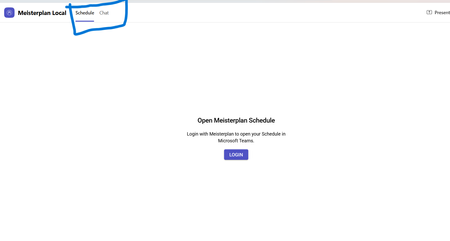
Static Tab and Chat Tab Order Is Not Persisting in Microsoft Teams
manifest file: "staticTabs": [ { "entityId": "schedule", "name": "Schedule", "contentUrl": "...", "websiteUrl": "...", "scopes": ["personal"] }, { "entityId": "conversations", "scopes": ["personal"] } ] the Schedule tab is intentionally place before conversations: it initially appears correctly, but after navigating away from the app and returning, Teams places Chat/Conversations before Shcedule. I'm using schema version 1.12. The tabs are configured in the specified order in the manifest file, and the expected tab order is displayed correctly when the app is initially opened. However, when I navigate to the Chat section, the tab order changes and does not persist as defined in the manifest file.118Views0likes0CommentsWhy can't I do a Deep Traversal (subfolder) Search on the MAPI Public Folder Tree?
I am sure many of you have at one time or another wanted to do a Deep Traversal (subfolder) Search on the MAPI Public Folder Tree. However, as many of you probably know, Exchange does not allow for Deep Traversal (subfolder) Searches on the MAPI Public Folder Tree: http://support.microsoft.com/default.aspx?scid=kb;en-us;254911. The reason you cannot do this is because when the Public Folder system was designed, it was decided that load balancing would be accomplished by putting only some of the content on some of the servers. For example, if there exists 3 folders and 3 servers. Folder1 may be replicated between servers 1 & 2, folder2 between servers 2 & 3, and folder3 between 1 & 3. If the client created a search folder that simultaneously searched all three folders, they’d get different results depending on which actual Public Folder Server they were connected to. To address this issue, search folders cannot be created that search the content of multiple folders; deep traversal, or subfolder, being a special case of “multiple folders”. One way to get around this “limitation” is by setting up a Non-MAPI Public Folder Tree because you can do a Deep Traversal (subfolder) Search against that: http://msdn.microsoft.com/library/default.asp?url=/library/en-us/e2k3/e2k3/_exch2k_specifying_a_deep_traversal.asp?frame=true. However, you cannot view this Public Folder Tree via MAPI (i.e Outlook). So what is the difference you ask? Well, the thought behind Application Public Folder Stores was that, for the most part, the content of the folders would not be replicated to any other server. There’s no actual architectural limitation to enforce this – Exchange originally just foresaw organizations would create only one Application Public Folder Store at all and so replication wouldn’t be an issue. Therefore, users can create Search Folders that can search the content of multiple folders. Given this, though, you do actually step back into the original problem. Namely, the search folder itself is replicated among servers but the content is always generated locally. Also, clients are never referred to a different server – search folders always seem (to the client) to have their exclusive replica on the server presently being queried. So, users should be aware that they will get different results depending on which server they contact for the content, and of course replication latency adds a new dimension to the differing results. - Chris Ahlers2.1KViews0likes5CommentsRemoving Reply All Functionality for Outlook Users in Reply-All Storms, via Group Policy
Just recently I was speaking to a Microsoft Premier Field Engineer (PFE) who had just returned home from a rather arduous onsite dispatch. While onsite he was tasked with unwinding a phenomenon commonly referred to as a "Reply-All" storm (defined below). This task had been so tedious that he half-jokingly mentioned that he was thinking about submitting a formal Design Change Request to the Exchange/Outlook Product Groups with a proposal to remove Reply-All functionality from within Outlook. Well this got me thinking... "could the removal of Reply-All functionality actually be done with the tools at an Administrator's immediate disposal today"? Eventually curiosity got the best of me and I started performing some basic research on the issue. Throughout the course of this research I found a jumbled set of different articles and blog posts that appeared rather half baked in scope to me. That being said, what did become abundantly clear was that there were a significant number of administrators (as well as standard users) who have expressed interest in this functionality and have actually been looking for it for some time. Presto: Blog idea. To be clear there are a number of different approaches for achieving the goal of disabling Reply-All in Outlook. The most common technique would appear to be the creation and deployment of custom Outlook toolbars. Far more infrequent are macros in Outlook as well as custom Group Policy Objects (the primary topic of this post). Additionally, while future versions of Exchange will include features to deal with this problem much better (read about Exchange 2010 Conversation View here) - I wanted something that people can use now, with versions of software they currently have. As previously noted, this post is going to focus on the use and deployment of a custom Group Policy to disable the Reply-All functionality in Outlook. This post will not focus on disabling Reply-All in OWA (which would require modifications to the ASP Pages) and will also not cover disabling this functionality in Windows/Outlook Mobile. My hope is that you will find this post interesting; that it helps clear up some of the confusion on the subject; and that you learn some new skills along the way. Should and when you choose to deploy a scenario like this, I hope this document serves to aid you in increasing the stability of your messaging environments and networks as a whole. As you will soon see, this post has a little bit of everything, Exchange, Active Directory, Group Policies, Outlook and even some "old/new school" VBA. I hope you enjoy it and learn something new in the process! Back Story: Nearly every user within a corporate messaging environment has at one time or another been the unfortunate chance victim of a "Reply-All Storm". It starts out innocently enough: Typically a formal communication it sent out to a large internal distribution list. A member of the distribution list strays off course or asks to be "taken off the distribution list". A series of people start replying "ME TOO" via a Reply-All. Another member of the list, "Replies All" to the request, and asks everyone to "PLEASE DO NOT REPLY ALL !!!!@!!@!!!". Cycle perpetuates itself over and over. Users come into the office and notice literally hundreds of emails all with the same subject sitting in their inbox. They read the most recent thread, whisper to themselves (geez...not this again), then proceed to delete the entire thread and possibly miss the actual intention of why the original mail was sent out in the first place. Not only is this extremely annoying, but obviously has larger corporate and financial implications as well: Loss of productivity for client base. Potential service interruptions for a variety of different reasons. Storage implications on the Exchange Back-End. Puts unnecessary strain on Exchange, Active Directory and network links. A host of Administrative implications ranging from increased backup times, etc. Loss of credibility (if say an external contact was a member of the list or even your immediate manager or "higher ups", etc.) Upon first read this may seem funny but it is actually a very serious problem. For a blow by blow of the infamous "BEDLAM DL3" issue that occurred internally here at Microsoft several years ago I suggest a review of the following post: http://msexchangeteam.com/archive/2004/04/08/109626.aspx. The issue is definitely real and varying degrees of the problem are most likely occurring somewhere in the world at this very second. Before Getting Started: I want to stress that the steps outlined below are not going to resolve an immediate Reply-All storm. However, it is very possible that they may help reduce or mitigate a future problem from occurring once your user base learns (either by word of mouth or "the hard way") that there are potential consequences for perpetuating one. Again, I'm talking about helping to bring about positive educational change in your user base over time. The steps outlined below will effectively remove a user's ability to use the Reply-All functionality in Outlook via creation and deployment of a custom Group Policy Object (GPO). The examples presented below will target a dedicated Active Directory Organizational Unit. This OU will ultimately become the target for the deployment of the GPO as well as the container where user objects that have Reply-All removed will be homed in the Active Directory. That being said, the techniques presented here could be adapted to a broader environmental context based upon the discretion/desire of the administrator. Thus to perform the steps here you will need at your immediate disposal: Access to the Active Directory. The ability to create a dedicated Organizational Unit. The rights to move members of your user base to said Organizational Unit. The ability to modify and/or create a new custom GPO. The ability to link/deploy said GPO. Hypothetical Scenario and Steps: You come into the office and your immediate manager mentions that the messaging group has been tasked with removing Reply-All ability for all users who participated in a recent Reply-All storm that impacted a large internal distribution list. Upper management has made a decision to not implement bulk message restrictions to the Distribution List itself (e.g. limiting who can send or reply to messages on the DL), but to simply remove Reply-All ability for all users who played a part in perpetuating the storm. The removal of this functionality will be accomplished via deployment of a GPO as opposed to leveraging other potential options. Step-1: Obtain and review the most recent thread in the Reply-All sto rm and build a list of all individual user accounts that either caused or played a part in perpetuating the storm. Build a master list of these users and denote the current location of their user objects within the Active Directory. Once done, receive "buy-off" from management that these users can and will eventually be moved into a dedicated Organizational Unit that will have a GPO applied that prevents the Reply-All button from being active within Outlook. Step-2: Once you have obtained buy-off, build a new Organizational Unit with an obvious clear name. To do so, go into Active Directory Users and Computers, right-click a user container, then select New, Organizational Unit, then provide it with a clear name. In the examples to follow my OU will be titled: "Users who have Reply All Removed" Step-3: Move the users into the new" Users who have Reply All Removed" organizational unit via Active Directory Users and Computers (or your favorite LDAP tool) created in Step-2. Step-4: If not already available proceed to download the appropriate Office Administrative Template files. In my scenario all my users can be assumed to be using Outlook 2007 Service Pack 2. The template files can be downloaded here: http://www.microsoft.com/downloads/details.aspx?FamilyId=73d955c0-da87-4bc2-bbf6-260e700519a8&displaylang=en Legacy Office Administrative Template Files can be downloaded from Office Online. So if your client base is running Outlook 2003, go here: http://www.microsoft.com/office/orkarchive/2003ddl.htm Step-5: Extract the Administrative Template files by running AdminTemplates.exe. Once extracted you should have 3 folders created (ADM, ADMIN, and ADMX): Step-6: Build a new Group Policy that links users of the "Users who have Reply All Removed" organizational unit. To do so: In Active Directory Users and Computers get Properties of the "Users who have Reply All Removed" organizational unit. Select the Group Policy Tab. On the Group Policy Tab, select New and give the policy a clear and applicable name such as "Remove Reply-All Ability" Once named, select Edit. The Group Policy Editor (GPE) opens. Step-7: Add the Office/Outlook Administrative Templates In Group Policy Editor: Navigate to User Configuration\Administrative Templates. Right-Click Administrative Templates and select Add/Remove Templates. On the Add/Remove Templates page select: Add Browse to the Outlook Administrative Template and Select Open (in my case I uncompressed the file to my desktop so the path was: c:\Documents and Settings\ericnor\Desktop\OLK2K7 Admin Templates\ADM\en-us\outlk12.adm): If performed successfully you should now see that the Microsoft Office Outlook 2007 Administrative Template files have been added in Group Policy Editor: Step-8: Once you have successfully added the Outlook Administrative Template, you need to properly define and enable the necessary policies. To successfully block "Reply All" functionality we need to enable and define two specific policies in the Administrative Template: A policy to disable the actual command button as well as the menu option. A policy to disable the keyboard shortcut. To accomplish: In Group Policy Editor navigate to the following path: User Configuration\Administrative Templates\Microsoft Office Outlook 2007\Disable Items in User Interface\Custom. Once here you will notice 2 policies that will currently show as "Not Configured": Disable Command Bar Buttons and Menu Items. Disable ShortCut Keys. To disable the Command Bar Reply-All button we need to select the Disable Command Bar Buttons and Menu Items Policy. Once the policy is open set the State of the policy to Enabled then select the "Show..." button. Any and all Outlook Command Bar Buttons that are currently disabled will be present here in a numerical context (although presumably this would be the first time working with the template so you would not see any numerical values present). Click Add, and in the "Enter the Item to Be Added" field, type 355. Once done click OK. You will be returned to the Show Contents page which should now resemble the following. Click OK: (It's worth making a note here: All command buttons and menu options are referenced by their numerical Command IDs. I will show you how to determine these values in a follow-up post, so that you can apply what you have learned to other command buttons and short-cuts should you desire). Back on the Disable Command Bar Buttons and Menu Items policy page, select Apply and OK. The "state" of the policy should now show as Enabled. Now we need to disable the keyboard shortcut for Reply All. To do so, we need to open the Disable Shortcut Keys policy, configure our settings and enable it. To do so: Select and open the"Disable Shortcut Keys" policy. Select Enable, and then click the "Show..." button. This will bring up the Show Contents page. Select Add. In the Add Item Window type the following: 82,12 Click OK which will shift the focus back to the Show Contents pane. Your value should look like this: (Short-cut keys are always distinguished via the decimal representation of their ASCII character value. In addition the keyboard modifier (e.g. the keyboard combination used to activate the short-cut) needs to be converted to decimal notation and referenced here. As previously noted, I will detail how these values are calculated and converted in a follow-up post). Back on the Disable Shortcut Keys property pages, select Apply and OK. Back in Group Policy Editor, both policies should now show as Enabled: At this point both of your policies are enabled and configured. Close Group Policy Editor. You will be returned to the Group Policy tab for the "Users who have Reply All Removed" Organizational Unit. Click Apply then Close. Step-9: Provide "The List" to Help Desk. You should inform the Help Desk that there is a very high probability that users on "the list" will be calling in to complain that their Reply-All functionality no longer works. Your Help-Desk personnel should know why. Step-10: Create a Distribution List then and add all members of "the List". Send an informational to all users informing them that their "Reply-All" functionality has been removed due to misuse and for "x" amount of time. Once the GPO has been applied to the user workstation, these users will notice that the "Reply to All" button is disabled. If one of these users were to hover their mouse over the disabled button they will be presented with the following information: They will also notice that the menu option for Reply-All is now disabled: If the user attempts to issue the keyboard shortcut for Reply-All (CTRL + SHIFT + R), nothing will happen. I will cover additional related "Techy stuff" on this process in a follow-up post! Happy Trails! - Eric Norberg91KViews0likes13CommentsRemoving Reply All Functionality for Outlook Users Who Cause Reply-All Storms, via Group Policy
This is a part 2 of blog posts on this subject, you can read part 1 here. Within the first part of this post, I showed you had to remove the Reply-All functionality via GPO. At its core the process is relatively straight forward (obtain Outlook ADM templates, define policies, link and deploy it). However you have to take some things within this article at "face value". Specifically, the values I provided for the Command Bar ID as well as the values for disabling the keyboard shortcuts within the respective policies. At this point I wanted to take some time to show you how to verify these for yourself. The benefit being that you would be able to leverage a number of the techniques presented here to successfully disable other shortcuts and/or command buttons should and when you so desire. Prior to getting started it is worth noting that two separate approaches need to be utilized to obtain the appropriate command and shortcut IDs. Out on the Internet there seems to be a lot of confusion on how to best determine the Command Bar IDs, so I'm going to start with that first as it seems to be giving the most people difficulty. Determining Command Bar IDs: In retrospect there are a number of different techniques that could be utilized to obtain the valid Command Bar IDs in Outlook. MSKB 1736004 ((http://support.microsoft.com/kb/173604), actually has a complete list for Outlook 97. I don't know about you... but that is a bit old for my taste, although obviously most of the Command-IDs will stay the same for backwards compatibility, etc. Nevertheless a simple review of that document will show that the Command ID for "Reply All" is = 355. CommandBar Control ID ------------------------------------------ Compose Reply to All 355 You could also use a tool like Outlook SPY. Once you become proficient with it the Command IDs will be easily ascertained. How I did it: A very easy way to do this is to use Outlook Visual Basic Editor. So the first thing you need to do is enable the VBA Editor if you are not already doing so (most people don't). To Enable: Open Outlook. Select the Tools menu, and then select Options. Select the "Other" tab. Select Advanced Options. Under "In all Microsoft Office Programs" section select "Show Developer tab in the Ribbon". Select OK. Then Apply and OK on the Options page. Restart Outlook. Once Outlook has been restarted, you can now use Visual Basic for Applications to determine the Command Button ID for Reply-All. The code to follow is loosely based on the sample provided in MSKB 173604 with some subtle changes. First this code when executed will create a file on the root of the d:\ named OLIDS.txt. So, if you don't have a d:\ you will need to adjust the code as appropriate to reflect a valid path. However once properly executed you will have an output file in text format with all the valid Command IDs for Outlook. Steps: Open Visual Basic in Outlook. Add a reference to the Microsoft Scripting Runtime Library (From the Tools menu in the VBA Editor, select References, and then add the Microsoft Scripting Runtime). Once located, select OK to return to the VBA Editor: Paste the following code into your project: Sub GetIDsForInspector() ' The Outlook object library must be referenced. Dim objOL As New Outlook.Application Dim objCommand As Object Set cb = objOL.ActiveExplorer.CommandBars ' We will Create a new Text document. Dim objtxt Dim txtfile Set objtxt = CreateObject("Scripting.FileSystemObject") Set txtfile = objtxt.CreateTextFile("D:\OLIDs.txt", 8) ' 3500 is the maximum # of Controls Outlook has defined. For I = 1 To 3500 Set lbl = cb.FindControl(, I) If lbl Is Nothing Then ' Do nothing. Else ' Insert CommandBar name, Command name, and ID. txtfile.WriteLine (lbl.Parent.Name & Chr(9) & lbl.Caption & Chr(9) & I) End If Next End Sub Run the Form. Once done you will notice a text file has been created on the d:\ named OLIDS.txt. Open this file in notepad. You will notice that the Standard Menu Bar has a Command ID of 355 for Reply to All: Standard Reply to A&ll 355 Note: If you didn't care about compiling an entire list of al l Command IDs but only wanted to get the value for Reply All, you could substitute the above code with what I have below. This script will simply throw the value into a message box: Sub GetIDsForInspector() ' The Outlook object library must be referenced. Dim objOL As New Outlook.Application Dim objCommand As Object Set cb = objOL.ActiveExplorer.CommandBars ' Create a new Text Document. Dim objtxt Dim txtfile Set objtxt = CreateObject("Scripting.FileSystemObject") Set txtfile = objtxt.CreateTextFile("D:\ \OLIDs.txt", 8) ' 3500 is the maximum # of Controls Outlook has defined. For I = 1 To 3500 Set lbl = cb.FindControl(, I) If lbl Is Nothing Then ' Do nothing. Else ' Insert CommandBar name, Command name, and ID. 'Uncomment next 2 lines if you want all Outlook CMD Ids 'txtfile.WriteLine (lbl.Parent.Name & Chr(9) & lbl.Caption & Chr(9) & I) If (InStr(lbl.Caption, "Reply to A&ll")) Then MsgBox lbl.Parent.Name & Chr(9) & lbl.Caption & Chr(9) & I Exit For End If End If Next End Sub So this is where the value of "355" came from in the "Disable Command Bar Buttons and Menu Items Policy" (from Part 1 of this post). Screenshot again: Determining the Short Cut Key IDs and Modifiers: As evident from above, the shortcut key consists of two independent numbers separated by a ",". The first number is the actual shortcut key (R in this scenario). To get the proper value you need to convert the ASCII character to a decimal value. This is easy enough to do by simply looking it up in an ASCII table (http://www.asciitable.com/). As you can see the capital "R" character equates to 82 in Decimal Notation: So this is how the first number set is defined for the shortcut pair. The second set of numbers (in this case 12) is determined by the fact that the CTRL + SHIFT modifiers must be used in (conjunction with the R key), to issue the short cut. The numerical equivalent for the shortcut modifiers: Alt = 16 Ctrl = 8 Shift = 4 When multiple modifiers are used (as in this case), the numerical values must be added together. So in the case of a Reply All keyboard shortcut that uses (CTRL + SHIFT + R) CTRL = 8 Shift = 4 Total: 12 This is why we needed to add the value of 82,12 to the Key and Modifier to Disable entry on the Disable Command Bar Buttons and Menu Items Policy. Screenshot again (see Part 1 of this post): As I mentioned earlier in the post you can apply this knowledge to other Outlook Command IDs and shortcuts rather easily. After deciding on what Outlook Command Button(s) or Short-Cut(s) you want to disable, you simply perform the conversions and add them to the now in-place Custom GPO. For reference these are some additional Command IDs and shortcuts that should prove as a decent guide for double-checking your understanding of how the conversions are performed: Item: Command Bar ID: Short-cut Pair: Actual Outlook Short-cut: New Mail: 1757 78,8 CTRL+N Send Email: 2617 83,16 ALT+S Forward Email: 356 70,8 CTRL+F Print: 4 8 0,8 CTRL+P Delete: 478 68,8 CTRL+D View GAL: 353 66,12 CTRL+SHIFT+B Move to Folder: 2278 86,12 CTRL+SHIFT+V Conclusion: The combination of techniques described in this post provides an easy, legitimate way of disabling Reply-All functionality within the Outlook client (no DCR required!), should and when it be called for. Additionally these techniques can be "massaged" to fit other potential needs with an Active Directory/Exchange/Outlook environment. I hope you found the post interesting and useful. If you did, please share your thoughts with me by leaving some feedback comments (I do read them!). Happy Trails! - Eric Norberg4KViews0likes8CommentsApplication Access Policy Support in EWS
Administrators who want to limit the app access to a specific set of mailboxes can create an application access policy. Application access policy support for Microsoft Graph was released in 2019. Today, we are announcing that we are adding support for application access policies to Exchange Web Services (EWS) in response to customer feedback...45KViews4likes13Comments