developer
336 TopicsIntroducing Microsoft Dev Box
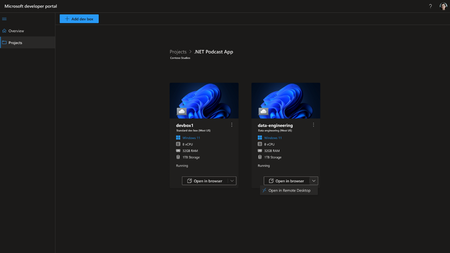
[Update: Aug 15, 2022] We’re excited to announce that the preview of Microsoft Dev Box is now available to the public. Microsoft Dev Box is a managed service that enables developers to create on-demand, high-performance, secure, ready-to-code, project-specific workstations in the cloud. Sign-in to the Azure portal and search for “dev box” to begin creating dev boxes for your organization. To learn more about Microsoft Dev Box and get started with the service, visit the Microsoft Dev Box page or find out how to deploy your own Dev Box from a pool. -------------------------------------------------------------------------------------------------------------------------------------------------------- Today, we are excited to announce Microsoft Dev Box, a new cloud service that provides developers with secure, ready-to-code developer workstations for hybrid teams of any size. You can sign up for the waiting list to evaluate the private preview at http://aka.ms/devbox-signup. Microsoft Dev Box empowers developers to focus on the code only they can write, making it easy for them to access the tools and resources they need without worrying about workstation configuration and maintenance. Dev teams preconfigure Dev Boxes for specific projects and tasks, enabling devs to get started quickly with an environment that’s ready to build and run their app in minutes. At the same time, Microsoft Dev Box ensures unified management, security, and compliance stay in the hands of IT by leveraging Windows 365 to integrate Dev Boxes with Intune and Microsoft Endpoint Manager.192KViews22likes12CommentsReimagining Developer Workstations with Microsoft Dev Box
In August 2022, we announced the public preview release of Microsoft Dev Box: self-serve, ready-to-code, cloud-based developer workstations for teams of any size. Over the last year we worked closely with more than 50 organizations across financial services, retail, automotive, and industries that provided indispensable feedback and recommendations. Internally, we deployed Dev Box to more than 9000 engineers at Microsoft in the Developer Division, Azure, Office, Bing, and Windows teams. Today, we are excited to share that Dev Box generally availability is coming July 2023.
Introducing Azure Deployment Environments
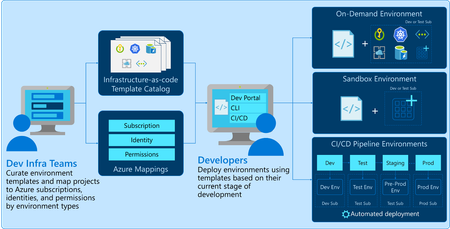
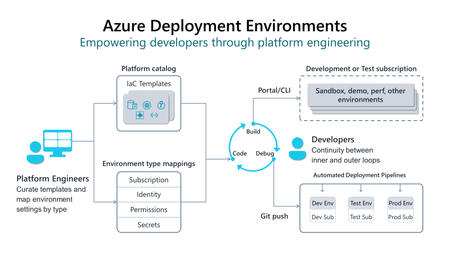
[Update: Oct 12, 2022] We’re excited to announce that the preview of Azure Deployment Environments is now available to the public. Azure Deployment Environments is a managed service that enables dev teams to quickly spin up app infrastructure with project-based templates to establish consistency and best practices while maximizing security, compliance, and cost-efficiency. Sign in to the Azure portal and search for “Deployment Environments” to begin creating environments for your organization. To learn more about Deployment Environments and getting started with the service, visit the Azure Deployment Environments page or find out how to create your own environment from a template. To view the service demo, watch the Microsoft Build session on Delivering developer velocity through the entire engineering system.New GitHub Copilot Global Bootcamp: Now with Virtual and In-Person Workshops!
From June 17 to July 10, you can learn from anywhere in the world — online or in your own city! The GitHub Copilot Global Bootcamp started in February as a fully virtual learning journey — and it was a hit. More than 60,000 developers joined the first edition across multiple languages and regions. Now, we're excited to launch the second edition — bigger and better — featuring both virtual and in-person workshops, hosted by tech communities around the globe. This new edition arrives shortly after the announcements at Microsoft Build 2025, where the GitHub and Visual Studio Code teams revealed exciting news: The GitHub Copilot Chat extension is going open source, reinforcing transparency and collaboration. AI is being deeply integrated into Visual Studio Code, now evolving into an open source AI editor. New APIs and tools are making it easier than ever to build with AI and LLMs. This bootcamp is your opportunity to explore these new tools, understand how to use GitHub Copilot effectively, and be part of the growing global conversation about AI in software development.Using Azure Notification Hubs in Apache Cordova and Ionic Apps
Many of our customers use Apache Cordova or the Ionic Framework for their mobile apps as a way to deliver cross-platform mobile apps to their customers and employees. While Azure Notification Hubs doesn’t directly support these frameworks, Ionic supports most Apache Cordova plugins and there’s an official PhoneGap Push plugin you can use as well as a community-built plugin for Azure Notification Hubs apps running on Apache Cordova. This article shows you how to use these frameworks with Azure Notification Hubs.Using Keycloak with Azure AD to integrate AKS Cluster authentication process
Integrating Azure Kubernetes Service (AKS) with Keycloak through Azure Active Directory (Azure AD) as an intermediary leverages Azure AD’s support for OpenID Connect (OIDC) to handle authentication and authorization. This integration enhances security, streamlines user management, and simplifies the authentication process for users accessing the AKS cluster.Azure Deployment Environments is now generally available
Last year at Build, we announced a new product called Azure Deployment Environments, a service that enables developers to quickly spin up app infrastructure with project-based templates. Since then, we’ve worked closely with over 30 organizations from industries like financial services, retail, automotive, and more. Thanks to their indispensable feedback, we’ve added several valuable features and capabilities that help enterprise developers maximize their productivity and focus on writing the code only they can write. Now, we’re excited to announce that Azure Deployment Environments is generally available, and you can start using the service for free today.Choosing the Right Model in GitHub Copilot: A Practical Guide for Developers
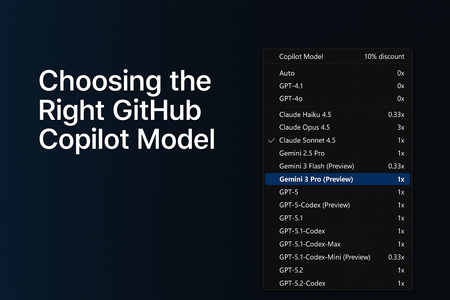
AI-assisted development has grown far beyond simple code suggestions. GitHub Copilot now supports multiple AI models, each optimized for different workflows, from quick edits to deep debugging to multi-step agentic tasks that generate or modify code across your entire repository. As developers, this flexibility is powerful… but only if we know how to choose the right model at the right time. In this guide, I’ll break down: Why model selection matters The four major categories of development tasks A simplified, developer-friendly model comparison table Enterprise considerations and practical tips This is written from the perspective of real-world customer conversations, GitHub Copilot demos, and enterprise adoption journeys Why Model Selection Matters GitHub Copilot isn’t tied to a single model. Instead, it offers a range of models, each with different strengths: Some are optimized for speed Others are optimized for reasoning depth Some are built for agentic workflows Choosing the right model can dramatically improve: The quality of the output The speed of your workflow The accuracy of Copilot’s reasoning The effectiveness of Agents and Plan Mode Your usage efficiency under enterprise quotas Model selection is now a core part of modern software development, just like choosing the right library, framework, or cloud service. The Four Task Categories (and which Model Fits) To simplify model selection, I group tasks into four categories. Each category aligns naturally with specific types of models. 1. Everyday Development Tasks Examples: Writing new functions Improving readability Generating tests Creating documentation Best fit: General-purpose coding models (e.g., GPT‑4.1, GPT‑5‑mini, Claude Sonnet) These models offer the best balance between speed and quality. 2. Fast, Lightweight Edits Examples: Quick explanations JSON/YAML transformations Small refactors Regex generation Short Q&A tasks Best fit: Lightweight models (e.g., Claude Haiku 4.5) These models give near-instant responses and keep you “in flow.” 3. Complex Debugging & Deep Reasoning Examples: Analyzing unfamiliar code Debugging tricky production issues Architecture decisions Multi-step reasoning Performance analysis Best fit: Deep reasoning models (e.g., GPT‑5, GPT‑5.1, GPT‑5.2, Claude Opus) These models handle large context, produce structured reasoning, and give the most reliable insights for complex engineering tasks. 4. Multi-step Agentic Development Examples: Repo-wide refactors Migrating a codebase Scaffolding entire features Implementing multi-file plans in Agent Mode Automated workflows (Plan → Execute → Modify) Best fit: Agent-capable models (e.g., GPT‑5.1‑Codex‑Max, GPT‑5.2‑Codex) These models are ideal when you need Copilot to execute multi-step tasks across your repository. GitHub Copilot Models - Developer Friendly Comparison The set of models you can choose from depends on your Copilot subscription, and the available options may evolve over time. Each model also has its own premium request multiplier, which reflects the compute resources it requires. If you're using a paid Copilot plan, the multiplier determines how many premium requests are deducted whenever that model is used. Model Category Example Models (Premium request Multiplier for paid plans) What they’re best at When to Use Them Fast Lightweight Models Claude Haiku 4.5, Gemini 3 Flash (0.33x) Grok Code Fast 1 (0.25x) Low latency, quick responses Small edits, Q&A, simple code tasks General-Purpose Coding Models GPT‑4.1, GPT‑5‑mini (0x) GPT-5-Codex, Claude Sonnet 4.5 (1x) Reliable day‑to‑day development Writing functions, small tests, documentation Deep Reasoning Models GPT-5.1 Codex Mini (0.33x) GPT‑5, GPT‑5.1, GPT-5.1 Codex, GPT‑5.2, Claude Sonnet 4.0, Gemini 2.5 Pro, Gemini 3 Pro (1x) Claude Opus 4.5 (3x) Complex reasoning and debugging Architecture work, deep bug diagnosis Agentic / Multi-step Models GPT‑5.1‑Codex‑Max, GPT‑5.2‑Codex (1x) Planning + execution workflows Repo-wide changes, feature scaffolding Enterprise Considerations For organizations using Copilot Enterprise or Business: Admins can control which models employees can use Model selection may be restricted due to security, regulation, or data governance You may see fewer available models depending on your organization’s Copilot policies Using "Auto" Model selection in GitHub Copilot GitHub Copilot’s Auto model selection automatically chooses the best available model for your prompts, reducing the mental load of picking a model and helping you avoid rate‑limiting. When enabled, Copilot prioritizes model availability and selects from a rotating set of eligible models such as GPT‑4.1, GPT‑5 mini, GPT‑5.2‑Codex, Claude Haiku 4.5, and Claude Sonnet 4.5 while respecting your subscription level and any administrator‑imposed restrictions. Auto also excludes models blocked by policies, models with premium multipliers greater than 1, and models unavailable in your plan. For paid plans, Auto provides an additional benefit: a 10% discount on premium request multipliers when used in Copilot Chat. Overall, Auto offers a balanced, optimized experience by dynamically selecting a performant and cost‑efficient model without requiring developers to switch models manually. Read more about the 'Auto' Model selection here - About Copilot auto model selection - GitHub Docs Final Thoughts GitHub Copilot is becoming a core part of the developer workflows. Choosing the right model can dramatically improve your productivity, the accuracy of Copilot’s responses, your experience with multi-step agentic tasks, your ability to navigate complex codebases Whether you’re building features, debugging complex issues, or orchestrating repo-wide changes, picking the right model helps you get the best out of GitHub Copilot. References and Further Reading To explore each model further, visit the GitHub Copilot model comparison documentation or try switching models in Copilot Chat to see how they impact your workflow. AI model comparison - GitHub Docs Requests in GitHub Copilot - GitHub Docs About Copilot auto model selection - GitHub Docs