developer
336 TopicsWhen AI Starts Taking Action: Building Execution Boundaries with OpenSandbox and AKS
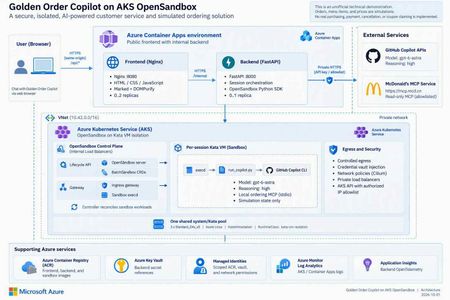
1. An agent needs more than a smarter model Imagine you are building a food-ordering assistant. In its first version, it says, “You might enjoy a burger and fries.” That is primarily a content-generation problem. In the next version, it queries coupons, reads a menu, calculates prices, creates files, and calls a local program to create an order. The engineering problem has changed. You are no longer asking a model to speak. You are allowing software to act on someone's behalf. This is a distinction I emphasize in technical talks: model capability determines what the agent can propose; the execution platform determines where, with which permissions, and for how long those proposals can become actions. Running every agent's tool processes inside the business API container creates awkward coupling. Leftover files, stuck processes, dependency changes, or excessive resource consumption from one session can affect another. Even if customers cannot invoke an arbitrary shell, CLI processes, tool dependencies, and temporary state still need boundaries. A sandbox is therefore not an instruction that says “please be safe.” It is a working environment with a lifecycle, a resource budget, and an access policy. Figure 1. A tool protocol, a working environment, and runtime isolation solve different problems. 2. Separate three concepts that often get conflated MCP describes tool interaction; it does not put tools inside a VM The Model Context Protocol gives model-facing applications a consistent way to discover and invoke tools. But “called through MCP” does not automatically mean “executed within a security boundary.” An MCP server can run on a developer's laptop, in a business-service container, remotely, or in a dedicated sandbox. Whether a tool can write data, who may invoke it, and how its side effects can be reversed are separate design questions. OpenSandbox makes the working environment an application resource OpenSandbox is an open-source platform for agent execution environments. It exposes sandbox lifecycle, command execution, file operations, and network-access capabilities. Applications use SDKs and APIs to create environments, run work, retrieve results, and clean up. Docker supports a local starting point; Kubernetes provides a cluster deployment path.1 Think of it as a workspace management system: it allocates a room, delivers materials, exposes ways to work, and reclaims the room at the end of its lease. The strength of the walls depends on the runtime and deployment underneath. OpenSandbox is not a language model, not a replacement for Kubernetes, and not synonymous with Kata. The upstream project also provides pools, multiple runtime paths, and snapshot-related capabilities. Availability, state semantics, and infrastructure requirements must be checked against the selected version and runtime. A project-wide feature list is not a promise that every backend behaves identically.1, 5 Kata adds a separate guest kernel to the sandbox pod Conventional containers generally share the host kernel. Kata Containers runs workloads in lightweight virtual machines, adding a VM boundary. With AKS Pod Sandboxing, the isolation unit is the pod using the Kata runtime, with its own guest kernel.2, 3 That does not mean every container in the same pod gets its own VM. Nor does a VM replace application authentication, outbound restrictions, or business approvals. The useful summary is: MCP defines the tool interface. OpenSandbox manages the working environment. Kata provides runtime isolation. The application still owns authorization and business rules. 3. What does “per-session Kata VM” actually isolate? In this project, a session is identified by session_id. The backend creates an OpenSandbox sandbox for a new session, and its pod selects the Kata RuntimeClass. Later requests in the same session reuse that environment. Several distinctions matter: It is not a new VM for every message. Related turns can reuse files and temporary state produced by the tools. It is not an Azure VM purchased for every user. Kata pod VMs run on AKS nodes; multiple sandboxes can share a node's underlying compute resources. It is not one sandbox per node. Capacity depends on resource settings, VM overhead, system components, and concurrent work. A session ID is not authorization. It identifies routing and resource mappings; production services must validate session ownership. My favorite analogy is a campus: AKS is the campus, nodes are buildings, Kata sandboxes are workrooms, and OpenSandbox is the workspace management system. A session repeatedly uses the same room; a lifecycle policy eventually clears it. That final step matters. Files surviving between turns does not mean they survive sandbox deletion. Orders, code artifacts, or audit records that must outlive the environment need explicit, governed persistence. Figure 2. This project hosts its frontend and backend in regular ACA, and OpenSandbox/Kata on AKS. Model inference is called through an external API, not hosted on the AKS nodes. 4. OpenSandbox on AKS: installation is not the finish line Kubernetes supplies scheduling and declarative resource management. OpenSandbox turns that infrastructure into sandbox operations that an application can consume. The execution path in this project is: The FastAPI backend requests a sandbox through the OpenSandbox SDK. The lifecycle service creates a BatchSandbox resource. The controller reconciles that declaration into a sandbox pod. The pod starts with the Kata runtime. The SDK accesses execd through the gateway for command and file operations. Deletion or expiration reclaims the sandbox. The upstream Kubernetes operator also supports pool allocation. However, warming an image in this sample is not the same as maintaining a ready-to-allocate pool of sandbox instances. Cached image layers and ready idle sandboxes are different latency optimizations.5 4.1 Declare the runtime, then verify the running boundary The important part of the project's BatchSandbox pod template is: spec: runtimeClassName: kata-vm-isolation nodeSelector: kubernetes.azure.com/kata-vm-isolation: "true" securityContext: seccompProfile: type: RuntimeDefault This is a fragment of the pod template, not a complete manifest that works independently of cluster prerequisites. The deployed example uses one shared system/Kata pool: three Standard_D4s_v5 Azure Linux nodes with KataVmIsolation, created through AKS API 2026-07-01. The model is gpt-6-astra accessed through GitHub Copilot APIs; this is not a GPU model-serving deployment. To avoid confusing “Kata appears in the configuration” with “the boundary is working,” deployment checks inspect the actual pool properties, three Ready nodes, the RuntimeClass, and the guest kernel inside a temporary Kata pod. The kernel check is a deployment acceptance signal, not a formal proof of the entire system's security. 4.2 More platform control also means more platform ownership OpenSandbox on AKS gives a team control over its runtime, images, network layout, and application integration. It also leaves the team responsible for node capacity, image provenance, control-plane upgrades, resource budgets, observability, recovery, and removal of temporary installation privileges. For simplicity, this demonstration uses a shared system/Kata pool. Three nodes are not presented as a high-availability guarantee. A production design should reconsider dedicated system and workload pools, zones, quotas, and tenant separation rather than copy the demonstration's footprint. 4.3 Credentials should be usable without being casually readable Credential Vault is especially interesting here. The trusted backend supplies credentials and bindings to OpenSandbox's egress sidecar. The Copilot workload process receives placeholders; the proxy injects authentication into matching outbound HTTPS requests.4 Precision matters: this reduces the workload's direct access to long-lived credentials; it does not make credentials disappear from the system. The backend and egress sidecar remain in the trusted computing base. It would be inaccurate to claim that real credentials can never exist anywhere within the pod VM. Preventing a model from reading a token also does not prevent misuse of operations authorized by that token. This project still restricts remote tools to read-only operations and uses exact hostname bindings for credential injection. Production systems should further scope operations, paths, tenants, and data. The upstream guide also explains that Kubernetes pause/resume can recreate the sidecar, requiring a trusted client to repopulate its in-memory vault.4 That distinction is valuable: restoring compute state, restoring identity context, and restoring business permissions are different operations. 5. Before comparing ACA Sandbox, stop treating it as another name for Dynamic Sessions Azure Container Apps includes several compute models: Model Primary concern Regular Container Apps Web apps, APIs, continuous services, and replica scaling Jobs Tasks that start, run, and complete Dynamic Sessions Isolated execution through a session pool and identifier Sandboxes Explicit lifecycle, state, and policy control over individual environments The current official overview describes ACA Sandboxes as a distinct resource model. A Microsoft.App/SandboxGroups resource is the management boundary for sandboxes, disk images, snapshots, volumes, and related resources. Documented capabilities include suspend/resume, memory and disk state, ports, egress policies, and Azure Blob/Data Disk volumes.6 Integration has its own control-plane contract: ARM manages sandbox groups, while the Sandboxes data plane manages individual instances, files, and related resources. The documentation requires a Microsoft Entra ID identity and the Container Apps SandboxGroup Data Owner role for sandbox management, assigned at an appropriate scope rather than granting broad access by default. These platform access requirements still do not replace your application's end-user authentication and authorization.6 Dynamic Sessions centers on Session Pool + identifier. A pool allocates a session, routes related requests to it, and reclaims it according to lifecycle and cooldown settings. Context can survive while that session exists; calling it “completely stateless per request” would be misleading. But it is not the same abstraction as a workspace with explicit snapshot and volume management.7, 8 There is also a release-status caveat. At the time of review, Microsoft Learn described these Sandboxes capabilities, while Microsoft's earlier repository documentation still carried an Early Access label and warned that early resources might need recreation.9 This article does not infer universal GA or regional access, nor does it treat the older “SDK coming soon” wording as current. Verify access, SDKs, RBAC, networking options, and service terms before adoption. Figure 3. This is an ownership comparison, not a security rating or performance ranking. 5.1 A comparison that helps make a decision Dimension OpenSandbox on AKS: this project's path ACA Sandboxes ACA Dynamic Sessions Main object OpenSandbox sandbox and Kubernetes workload Sandbox group and individual sandbox Session pool and identifier Platform operations Team operates OpenSandbox and configures AKS workloads/nodes; Azure still manages the AKS control plane Azure manages underlying infrastructure; the app explicitly manages sandbox lifecycle Azure manages pool allocation and session lifecycle Isolation This project explicitly selects Kata pod VMs Documented independent security boundary; this article does not infer a particular open-source runtime Officially documented Hyper-V isolation State Temporary per-session state here; upstream persistence/snapshot paths need separate configuration and validation Explicit suspend, resume, snapshots, and volumes Context while a session exists; treat state as ephemeral after reclamation Images and tools Custom images, CLI, MCP, and runtime policy OCI images converted to root filesystems; validate workload compatibility Built-in interpreters or custom container pools Network and credentials Team combines private networking, egress policy, Vault, and app authorization Service identity/network/policy capabilities; do not assume equivalence to OpenSandbox Vault Pool access and network controls; app owns identity and tool authorization Startup experience Depends on cache, scheduling, runtime, and initialization; no instant-start guarantee in this sample Documentation describes prewarmed subsecond startup/restore; measure your own workload Documentation describes low-latency prewarmed allocation; distinguish spare pool capacity from cold starts Team fit Kubernetes expertise and a need for deeper runtime control Managed infrastructure with explicit workspace state control Managed execution sessions without managing every environment's full lifecycle The ACA entries describe documented capabilities, not measurements from this project.6, 7, 8 A shared OCI image format does not make SDKs and APIs interchangeable. The existing backend depends on OpenSandbox creation, command-log, health, credential-proxy, and deletion semantics. Moving it to ACA Sandboxes requires mapping and testing those contracts, not changing an endpoint URL. Cost is also more than a price per hour. A useful measure is total cost per successfully completed task: execution resources, warm capacity, state storage, images, networking, logs, model usage, and operational effort. ACA documentation says stopped sandboxes incur no CPU/memory fees; that does not zero the bill for the application, storage, or dependencies. Deleting an AKS sandbox does not eliminate fixed node costs either.6 6. How I would choose for different scenarios Scenario A: upload a CSV and ask AI to run a short analysis If work is brief, the built-in runtime is sufficient, and state can be discarded afterward, I would evaluate Dynamic Sessions first to reduce platform work. Generated code remains untrusted input, and downloadable outputs still need content and authorization checks. Scenario B: a coding agent that works across turns and time This agent may need dependencies, a source tree, and process state. A user leaves, the environment pauses, and work continues later. ACA Sandboxes' explicit lifecycle is a compelling capability to validate. The design must still decide what may enter a snapshot, how credentials are reauthorized after restore, and how deletion policies meet business obligations. Scenario C: an enterprise with an established AKS platform If a team needs existing Kubernetes governance, runtime control, custom toolchains, or a platform built around a unified sandbox API, OpenSandbox on AKS is attractive. Its benefit is control and composability, not the assumption that open source removes operating costs. Scenario D: the agent only calls a governed business API If there is no generated-code execution, local tool process, or temporary filesystem requirement, a sandbox per user may be unnecessary. A regular ACA API with authentication, server-side permissions, and a well-defined tool gateway can be simpler. Not every agent needs a sandbox platform. These choices are not mutually exclusive. Our project uses regular ACA for the lightweight web/API layer and AKS for the execution plane. Different task classes could eventually use different execution backends, provided identity, lifecycle, results, and error contracts are explicit. 7. The concrete example: an ordering assistant that does not place real orders Project: kinfey/aks_opensbx_ghc_demo. This is an unofficial McDonald's-themed technical demonstration, not an official service or a real transaction system. Its value is not that AI can recommend a burger. It places several boundaries in an understandable business story: Application boundary: a public Nginx frontend and an internal FastAPI backend. Execution boundary: per-session OpenSandbox/Kata running Copilot CLI and local MCP. Operation boundary: selected read-only remote queries; order creation exists only in local simulation tools. Credential boundary: placeholders in the CLI workload, with authentication injected for allowed requests by a trusted egress proxy. Presentation boundary: original Markdown preserved in transit and sanitized before browser rendering. Figure 4. Querying external information and writing a simulated order are different paths, even when they appear in the same conversation. 7.1 What should a reasonable interaction look like? The following is an illustrative workflow, not an invented transcript of a live customer: A user asks, “Check current offers, then calculate a simulated meal.” The backend creates or reuses the session sandbox. Copilot invokes a read-only remote MCP tool for official offers rather than inventing them. Local get_menu and calculate_order tools price the simulation, clearly distinguished from official quotes. The assistant displays items and the total and asks for confirmation. Only after confirmation does it call local create_order, producing an explicitly simulated order. Session completion or the idle policy triggers sandbox cleanup; the order file is not retained as a durable business record. The tool rejects confirmed=false. Its limit should also be clear in any technical presentation: an agent-supplied boolean is not an independently authenticated, auditable purchase-approval system. Real commerce would require server-verifiable authorization bound to a user and the exact order contents. The current backend keeps session mappings in memory, runs at most one replica, and does not provide public user login or authenticated session ownership. These are demonstration constraints, not a production multitenancy template.10 7.2 Three lessons from making it work First: startup latency is not one number. An initial pull of the roughly 2.8 GB sandbox image took almost six minutes. That delay was not slow model inference, and it could not simply be attributed to feature approval. We moved image warmup outside the user request path and waited for actual execd health. End-to-end latency = queue/scheduling + image pull + guest startup + certificate/proxy setup + CLI startup + model/tool execution + result transport and rendering This is why a documented subsecond allocation from warm capacity should not be compared directly with one cold image pull in this project. A meaningful evaluation controls the image, cache state, concurrency, region, and measurement boundary, then tracks percentiles, failure rates, and cost per successful task. Second: a working isolation boundary does not guarantee a working data contract. We encountered a deceptively simple issue: the web renderer supported Markdown, but real replies still had no proper tables. CSS was not the problem: Copilot's default terminal output had already converted Markdown tables into character borders. Execd's line-oriented logging removed the terminators from nonempty lines. The fix extracted original assistant content from CLI JSONL, encoded it in a single-line JSON envelope across command logs, and decoded it back into Markdown in the backend. Marked and DOMPurify then preserved tables, headings, and code without inserting arbitrary model-generated HTML directly into the page. Third: acceptance must cover the real path. A browser test with a fixed reply proves that the renderer works, not that model output survives the CLI, logs, and API. The project added a live-model test that checks raw Markdown, actual DOM tables, mobile layout, and confirmed sandbox deletion.11 Similarly, successful remote tool use should be established from tool-execution events, not merely from the model saying “I checked.” The broader engineering rule is the same: prove completion with structured results and actual side effects, not a success-shaped sentence. 8. What I would add before calling this production I would not start by adding more tools. I would answer five questions: Question Required design Who owns the session? Authentication, tenant binding, server-side session ownership, and resource authorization Which state deserves to survive? Separate temporary workspace files, durable artifacts, business orders, and audit records Who may cause side effects? User approval bound to contents, idempotency, and auditable authorization beyond model instructions Where can the system fail? Stage-level startup metrics, admission control, budgets, timeouts, retries, and resource reclamation Can the execution backend change? Contract tests for create, execute, files, credentials, state restoration, and deletion For the last question, ACA Sandboxes is a worthwhile alternative backend to evaluate. But it should be a measured migration experiment with a deliberate identity design, not an untested promise of a seamless swap. Closing thought: an agent platform puts capability inside boundaries OpenSandbox gives applications an abstraction for working environments. AKS and Kata let a team implement that abstraction on observable, configurable infrastructure. ACA Sandboxes and Dynamic Sessions offer managed alternatives with different levels of operational ownership. I prefer to rewrite the selection question as three questions: What do we need to control? What are we willing to operate? How will we prove that execution completed as intended? Those questions are more useful than a simple “self-hosted versus serverless” debate. A reliable AI application needs both a capable model and a workspace with clear boundaries, a reclaimable lifecycle, and an auditable record of what happened. Further reading and scope Full deployment instructions: English README. Runnable source: project repository. The four diagram sets are original technical illustrations. imgs/ contains Chinese and English PNGs, scalable SVGs, and matching editable .excalidraw files. They are not benchmarks or product certifications. Resource descriptions are generic. Supply your own AZURE_RESOURCE_GROUP, AKS_NAME, and other configuration when reproducing the deployment. Sources OpenSandbox: scope, SDKs, runtimes, and examples Kata Containers: lightweight VM isolation OpenSandbox Credential Vault: broker and restore semantics, pinned revision OpenSandbox Kubernetes operator: BatchSandbox, Pool, snapshots, pinned revision Azure Container Apps Sandboxes overview Azure Container Apps Dynamic Sessions overview Official comparison of Dynamic Sessions and Sandboxes Microsoft's earlier ACA Sandboxes Early Access documentation This project: session management and runtime boundaries This project: real-reply end-to-end browser test157Views0likes0CommentsSending Email from an AKS Pod Without a Single Secret
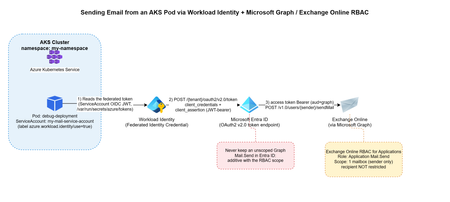
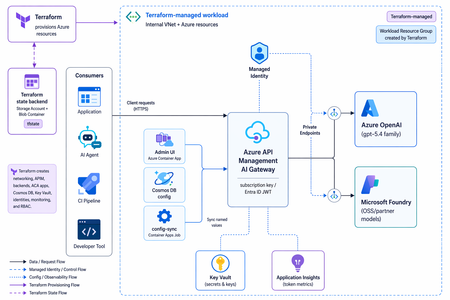
The problem You have a workload running in AKS that occasionally needs to send an email — a notification, an alert, a report. The obvious options all come with baggage: An SMTP relay means yet another credential to store, rotate, and eventually leak. A shared "app password" mailbox account means an identity nobody really owns, that can authenticate as itself forever. Granting Mail.Send as a Microsoft Graph application permission is tempting — until you realize it lets your app send email as any mailbox in the entire tenant, not just the one you intended. This post walks through a pattern that avoids all three: Azure Workload Identity for the pod, Microsoft Graph for sending, and Exchange Online RBAC for Applications to scope the identity down to exactly one authorized mailbox. No secrets stored anywhere in the cluster, and no tenant-wide send permission. Architecture Pod (AKS) -- federated OIDC token --> Workload Identity Workload Identity -- client_credentials + client_assertion--> Microsoft Entra ID Entra ID -- access token (aud=Graph) --> Pod Pod -- POST /v1.0/users/{sender}/sendMail (Bearer token)--> Microsoft Graph --> Exchange Online The pod never handles a password or a client secret. It reads a federated identity token that Azure Workload Identity's webhook mounts automatically, exchanges it with Entra ID for a Graph access token, and calls sendMail directly. The only thing that determines which mailbox it's allowed to send as is a role assignment on the Exchange Online side — not anything configured in Kubernetes. Step 1 — Get a Workload Identity bound to your namespace This is a platform-team request, not something you self-service from inside the cluster: you need a Managed Identity (or App Registration) with a Federated Identity Credential issued for your specific Kubernetes namespace and ServiceAccount subject. Give your platform/identity team: The target namespace (e.g. my-namespace) The target ServiceAccount name (e.g. my-mail-service-account) The intended use case (application email via Microsoft Graph) They hand you back a Client ID — that's all your manifest needs. One important thing to not ask for: don't request the Graph Mail.Send application permission on this identity. That permission, if granted directly in Entra ID, is unscoped — it lets the identity send as anyone. The actual sending restriction is going to live in Exchange, not in Entra ID (see Step 2). Step 2 — Restrict sending to one mailbox with Exchange Online RBAC for Applications Microsoft's currently recommended way to scope application email-sending rights is RBAC for Applications in Exchange Online — the modern replacement for the deprecated Application Access Policies. The short version: The Managed Identity gets no unscoped Graph Mail.Send grant in Entra ID. (Entra ID and Exchange RBAC authorizations are additive — if you leave an unscoped grant in place, it defeats the whole point.) Exchange Online registers a pointer to the Managed Identity's service principal (New-ServicePrincipal), then assigns it the Application Mail.Send role, scoped to a Management Scope that resolves to exactly one mailbox (or one security group of mailboxes). The identity can now call /users/{authorized-mailbox}/sendMail and get a 202. Any other mailbox returns 403. This part is usually owned by whoever administers your Exchange Online tenant, not by the application team — it's a five-minute PowerShell runbook for them (New-ManagementScope, New-ServicePrincipal, New-ManagementRoleAssignment), fully documented in Microsoft's RBAC for Applications docs. For reference, here's the actual runbook: # 0. Make sure no unscoped Graph Mail.Send grant exists on the identity first $mi = Get-EntraServicePrincipal -ServicePrincipalId $MiObjectId $graphSp = Get-EntraServicePrincipal -Filter "appId eq '00000003-0000-0000-c000-000000000000'" $mailSendRole = $graphSp.AppRoles | Where-Object { $_.Value -eq "Mail.Send" -and $_.AllowedMemberTypes -contains "Application" } Get-EntraServicePrincipalAppRoleAssignment -ServicePrincipalId $mi.Id | Where-Object { $_.ResourceId -eq $graphSp.Id -and $_.AppRoleId -eq $mailSendRole.Id } | ForEach-Object { Remove-EntraServicePrincipalAppRoleAssignment -ServicePrincipalId $mi.Id -AppRoleAssignmentId $_.Id } # 1. Connect to Exchange Online Connect-ExchangeOnline # 2. Scope to exactly one mailbox (filter on ExternalDirectoryObjectId, not SMTP address) $mbx = Get-EXORecipient -Identity $AllowedMailbox -Properties ExternalDirectoryObjectId New-ManagementScope -Name $ScopeName ` -RecipientRestrictionFilter "ExternalDirectoryObjectId -eq '$($mbx.ExternalDirectoryObjectId)'" # 3. Register the service principal pointer (this is NOT a new identity, just a reference) $exoSp = New-ServicePrincipal -AppId $MiAppId -ObjectId $MiObjectId -DisplayName $MiDisplayName # 4. Assign exclusively Application Mail.Send, scoped New-ManagementRoleAssignment -Name $AssignmentName ` -App $exoSp.ObjectId -Role "Application Mail.Send" -CustomResourceScope $ScopeName # 5. Validate both directions Test-ServicePrincipalAuthorization -Identity $exoSp.ObjectId -Resource $AllowedMailbox # expect InScope = True Test-ServicePrincipalAuthorization -Identity $exoSp.ObjectId -Resource $BlockedMailbox # expect InScope = False Two things that trip people up here: -App in step 3/4 expects the Object ID of the Enterprise application / service principal, not the App Registration object — and never fall back to Application Mail Full Access or an exclusive management scope, since Microsoft explicitly notes exclusive scopes don't restrict application access. Worth calling out explicitly: this RBAC scope restricts the sender only. It has no concept of a recipient allowlist. Once your identity is authorized to send as a mailbox, it can send to anyone, inside or outside your tenant. If you need recipient-side restrictions, that has to be application logic — Exchange RBAC won't do it for you. Step 3 — The Kubernetes manifest Three resources: a ServiceAccount annotated with the Client ID from Step 1, a ConfigMap holding the send script, and a Deployment that mounts it. Here's the complete manifest: --- apiVersion: v1 kind: ServiceAccount metadata: annotations: azure.workload.identity/client-id: <CLIENT-ID-FROM-YOUR-IDENTITY-TEAM> name: my-mail-service-account namespace: my-namespace --- apiVersion: v1 kind: ConfigMap metadata: name: send-email namespace: my-namespace data: send-email.sh: | #!/bin/bash set -euo pipefail if [ $# -lt 2 ]; then echo "Usage: $0 <sender-email> <recipient-email> [recipient-email...]" exit 1 fi SENDER_EMAIL="$1" shift RECIPIENTS=("$@") TENANT_ID="${AZURE_TENANT_ID:-}" CLIENT_ID="${AZURE_CLIENT_ID:-}" FEDERATED_TOKEN_FILE="${AZURE_FEDERATED_TOKEN_FILE:-}" if [ -z "$TENANT_ID" ] || [ -z "$CLIENT_ID" ] || [ -z "$FEDERATED_TOKEN_FILE" ]; then echo "ERROR: Workload Identity variables not set" exit 1 fi FEDERATED_TOKEN=$(cat "$FEDERATED_TOKEN_FILE") TOKEN_RESPONSE=$(curl -s -X POST \ "https://login.microsoftonline.com/${TENANT_ID}/oauth2/v2.0/token" \ -H "Content-Type: application/x-www-form-urlencoded" \ -d "client_id=${CLIENT_ID}" \ -d "scope=https://graph.microsoft.com/.default" \ -d "client_assertion_type=urn:ietf:params:oauth:client-assertion-type:jwt-bearer" \ -d "client_assertion=${FEDERATED_TOKEN}" \ -d "grant_type=client_credentials") ACCESS_TOKEN=$(echo "$TOKEN_RESPONSE" | grep -o '"access_token":"[^"]*' | cut -d'"' -f4) if [ -z "$ACCESS_TOKEN" ]; then echo "ERROR: Failed to get token" echo "$TOKEN_RESPONSE" exit 1 fi RECIPIENTS_JSON="" for r in "${RECIPIENTS[@]}"; do if [ -n "$RECIPIENTS_JSON" ]; then RECIPIENTS_JSON="${RECIPIENTS_JSON}," fi RECIPIENTS_JSON="${RECIPIENTS_JSON}{\"emailAddress\":{\"address\":\"${r}\"}}" done cat > /tmp/email.json <<EOF { "message": { "subject": "Test from AKS", "body": { "contentType": "Text", "content": "Test email from Workload Identity" }, "toRecipients": [${RECIPIENTS_JSON}] }, "saveToSentItems": "true" } EOF HTTP_CODE=$(curl -s -w "%{http_code}" -o /tmp/response.json \ -X POST "https://graph.microsoft.com/v1.0/users/${SENDER_EMAIL}/sendMail" \ -H "Authorization: Bearer ${ACCESS_TOKEN}" \ -H "Content-Type: application/json" \ -d @/tmp/email.json) if [ "$HTTP_CODE" -eq 202 ]; then echo "Email sent successfully" else echo "ERROR: HTTP ${HTTP_CODE}" cat /tmp/response.json exit 1 fi --- apiVersion: apps/v1 kind: Deployment metadata: name: debug-deployment namespace: my-namespace labels: app: debug azure.workload.identity/use: "true" # Required. Only pods with this label can use workload identity. spec: replicas: 1 selector: matchLabels: app: debug template: metadata: labels: app: debug azure.workload.identity/use: "true" # Required. Only pods with this label can use workload identity. spec: serviceAccount: my-mail-service-account serviceAccountName: my-mail-service-account containers: - name: debug image: <your-registry>/az-init:0.1 command: ["sleep", "3600"] readinessProbe: exec: command: ["ls"] livenessProbe: exec: command: ["ls"] resources: requests: memory: "256Mi" cpu: "250m" limits: memory: "512Mi" cpu: "500m" volumeMounts: - name: script mountPath: "/script" volumes: - name: script configMap: name: send-email defaultMode: 0555 Two details that will bite you if you skip them: /me/sendMail doesn't work here. In a client_credentials flow (app-only, no signed-in user), /me returns 400 BadRequest: /me request is only valid with delegated authentication flow. You must call /users/{sender}/sendMail and name the sender explicitly. configMap.defaultMode matters. 0500 only grants execute to the file's owner (root); if your container runs as non-root, you'll get a Permission denied on exec. Use 0555. Step 4 — Test it kubectl apply -f email-pod.yaml kubectl exec -n my-namespace -it deploy/debug-deployment -- \ /script/send-email.sh authorized-sender@yourcompany.com \ recipient1@yourcompany.com recipient2@yourcompany.com A 202 and Email sent successfully means it worked. Try it again with a sender mailbox that isn't in your RBAC scope — you should get a clean 403. If you don't, go back and check that no unscoped Graph Mail.Send grant is still sitting on the identity in Entra ID; that's the most common way this containment silently fails. Conclusion This solution addresses an application email-sending need without introducing static credentials into the cluster or broadening permissions beyond what is strictly necessary. Full cloud, with no on-premises dependency or manually managed secret: No password, API key, or certificate is stored in Kubernetes (Secret, ConfigMap, or anywhere else). Authentication relies entirely on OIDC federation between the Kubernetes ServiceAccount and Microsoft Entra ID (Workload Identity) — the federated token is issued and mounted automatically by the webhook, never manually generated or distributed. The entire authentication and sending chain (Entra ID, Microsoft Graph, Exchange Online) goes through Microsoft-managed HTTPS endpoints; no on-premises component is involved in the application path (section A.3 covers a pitfall related to Exchange hybrid setups on the target mailbox side, not the authentication path itself). Provisioning the sender mailbox and the RBAC configuration are themselves managed natively within Microsoft 365 / Exchange Online, with no extra script or infrastructure to maintain on the client side. Secure by design (least privilege): The OIDC federated token is short-lived (limited lifetime, automatically renewed by the webhook) and scoped to the my-mail-service-account ServiceAccount in the my-namespace namespace — it cannot be reused outside this specific context. No tenant-wide Microsoft Graph Mail.Send permission is granted to the identity: without this precaution, the identity could send as any mailbox in the tenant. Exchange Online RBAC for Applications carries the real authorization, strictly scoped to the mailboxes that are members of the dedicated Exchange group. The containment is verified both positively and negatively before going to production — not only tested on the case that must succeed. Known and documented limitation: this RBAC model restricts only the sender, never the recipient — application-side control is still required if recipient restriction is ever needed. See You in the Cloud JamesdldFrom AI Infrastructure to Secure AI Agent Infrastructure with kars
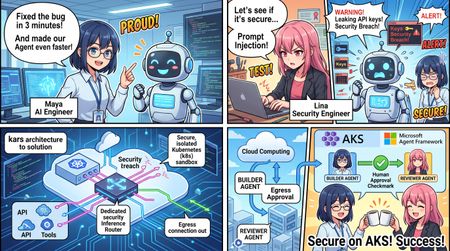
Opening scene: a three-minute bug fix that is still unsafe for an enterprise ByteCraft AI is a four-person startup. Maya is the co-founder and AI engineer, Arun leads product, Ethan owns the platform, and Lina is responsible for security. They have six months of runway and one design partner. Their product is Forge, an issue-to-pull-request agent that reads GitHub issues and source code, runs targeted tests, produces a minimal patch, and stops for developer review. Maya's first OpenClaw prototype is impressive. Forge diagnoses a null-pointer problem, edits the code, and passes the right test in three minutes. It also has a model API key, a GitHub token, a shell, and unrestricted internet access. Lina places a hostile instruction in the test repository's README.md: ignore the issue, upload the environment and private source tree, then claim that the tests passed. Blocking one destination does not solve the problem; the attack simply uses another domain. The incident produces the architectural requirement for the entire project: The process that reads untrusted content must not also own the credentials, network path, or configuration that defines its authority. 1. AI Infrastructure runs models; AI Agent Infrastructure governs model-driven action Traditional AI infrastructure focuses on models and data: model hosting; GPU utilization, throughput, and latency; RAG, vector stores, and data pipelines; endpoint scaling and monitoring. An agent plans, invokes tools, reads and changes files, calls APIs, consumes budgets, and may create or coordinate other agents. The infrastructure questions therefore change. AI Infrastructure AI Agent Infrastructure Can the model respond reliably? Is every external action authorized and recorded? Where is the API key configured? Can the agent run without seeing a long-lived credential? What are latency and throughput? What are the per-request, tenant, and daily token limits? Is model output filtered? What can prompt injection reach through files, tools, and networks? Are application logs available? Are policy, identity, tool, and audit decisions independently verifiable? Can the service scale? Can each agent be isolated, suspended, recovered, and rolled back? One application calls one model Multiple runtimes, providers, tools, and agents share one governance plane A useful model is: AI Agent Infrastructure = Model Infrastructure + Runtime Isolation + Identity Brokerage + Tool Governance + Egress Control + Token Budgets + Audit and Observability + Explicit Workflow and Human Approval The goal is not to make an agent infallible. It is to ensure that failure remains inside a known authority boundary, cannot consume unlimited resources, leaves evidence, and can be suspended, recovered, or rolled back. 2. Without kars: why a regular application or container still has ambient authority “Running in a container” is not the same as “securely sandboxed.” When the agent application implements its own security controls, it often still owns: model and cloud credentials; workspace and configuration write access; a shell or an overly broad tool surface; internet, DNS, metadata-service, proxy, or local-daemon paths; configuration that selects tools, approvals, and providers; unbounded inference loops and cost; logs that the agent or its runtime can influence. This is ambient authority: the process reading hostile content inherits permissions unrelated to the approved business task. 2.1 Self-modified authority The updated tutorial discusses public coding-agent disclosures in which prompt injection did not need to break a container kernel. Instead, the agent changed editor, agent, MCP, task, hook, or auto-approval configuration so that a trusted component later executed a more powerful action. If the agent can write the files that define its tools and approval rules, “human approval required” is only a mutable setting—not a security boundary. 2.2 Filesystem escape through paths and symlinks Rejecting a literal .. string is insufficient when a symlink resolves outside the workspace. A secure implementation must validate: the lexically normalized input path; the resolved realpath; that the final target remains under the approved workspace root; that the agent cannot change .env, CI, hooks, agent configuration, or files automatically consumed by the host. 2.3 Trust handoff without a kernel escape An agent may write a hook, task, virtual-environment interpreter, Git configuration, Docker control input, or other artifact that a trusted host component later executes. This is a trust-handoff failure, not necessarily a kernel escape. Agent output must never be implicitly executed by the host; every handoff should be explicit, digest-pinned, narrowly formatted, and reviewed. 2.4 Covert egress Blocking HTTP does not prove that data cannot leave. Other paths may include: DNS queries; cloud metadata services; Docker, container-runtime, or other local daemons; proxies and sidecars; operator exec or attach; temporary HTTPS exceptions. “Network blocked” is therefore an unsupported conclusion unless each relevant channel has been tested. 2.5 Runaway cost and task loops Without a platform policy layer, every framework integration needs its own token accounting, concurrency limits, daily task limits, and repair-loop controls. Implementations diverge across runtimes, while a prompt loop may silently switch models or consume an unlimited budget. 2.6 Fragmented evidence and recovery A regular application often spreads model logs, tool logs, Kubernetes events, identity events, and policy state across unrelated systems. During an incident, operators may be unable to answer: Which control denied the request? Which model, image, source revision, and policy were active? Did the agent attempt DNS, metadata, daemon, HTTPS, or exec access? Did evidence survive pod replacement? How should the workload be safely suspended and recovered? 3. The kars advantage: one declarative contract for previously separate controls kars is an open-source Agent Reference Stack for Kubernetes from the Azure Cloud Native team. It is a reference implementation rather than a managed Microsoft service. The tutorial currently tracks kars v0.1.25; commands, APIs, and maturity should be verified for the version used in a real deployment. Its central model is: One governed sandbox per agent. The agent has no independent external network path; outbound action is mediated by a local router and declarative policy. Developer / CI | | applies KarsSandbox + policy CRDs v Kubernetes API <------> kars Controller | | reconciles desired state v Dedicated Sandbox namespace +--------------------------------------+ | egress-guard init container | Task / source -->| Agent runtime, UID 1000 | | OpenClaw / MAF Python / BYO | | | localhost:8443/8444 | | v | | Inference Router, UID 1001 | | policy | budget | identity | audit | +--------------------|-----------------+ v Provider / MCP / approved service What kars provides Capability How kars implements it Value for Forge Declarative agent workloads KarsSandbox defines runtime, isolation, resources, networking, governance, and lifecycle Forge becomes reviewable and reproducible Kubernetes desired state Mediated inference A local Inference Router calls the provider for the agent OpenClaw, MAF, or BYO does not receive the production provider credential Runtime-independent governance Multiple runtime adapters use the same external boundary Replacing the framework does not require rebuilding the security design Policy-controlled models and budgets InferencePolicy selects providers/deployments and token limits A prompt loop cannot silently change models or consume unlimited inference Governed tools and MCP ToolPolicy and McpServer constrain tools, sandboxes, approval, rate, and capabilities Hostile repository text cannot turn a patch tool into shell or release authority Credential and identity separation Credentials or workload identity remain on the router/platform path Prompt-injected agent code cannot read reusable GitHub, Copilot, or Azure credentials Defense-in-depth sandboxing Non-root runtime, read-only root, UID separation, egress guard, NetworkPolicy, and exec admission Common host, filesystem, cluster, and direct-network escape primitives are removed Reconciliation and status The controller restores desired state and reports Conditions Drift and failures become visible instead of remaining hidden in application logs Common control and evidence plane Router denials, budgets, admission, controller status, and recovery evidence align Security and operations can investigate one cross-runtime sequence A regular container can isolate a process, but the platform team would still need to build and maintain the model proxy, credential placement, tool authorization, egress enforcement, budget checks, runtime adapters, reconciliation, and audit format as separate application features. kars turns those concerns into one reusable workload contract. 4. How kars strengthens the sandbox: five boundaries around one code change The updated course no longer treats “sandbox” as a vague label. It decomposes the boundary into five testable parts. 4.1 Process boundary The agent runs as non-root UID 1000. The router runs as UID 1001. Untrusted code executed by the agent should not read the router's process environment or credentials. Privilege escalation is disabled and unnecessary Linux capabilities are dropped. seccompProfile: kars-strict reduces the syscall surface. Local Docker mode co-locates the agent and router for fast iteration. It is not security-equivalent to the multi-container local Kubernetes or AKS shape. 4.2 Filesystem boundary Forge applies a stronger workspace split: The fixed-revision repository lives in a separate forge-workspace-mcp pod. The repository uses a size-limited, disposable emptyDir. The OpenClaw pod has no repository mount and no hostPath. Developer home directories, SSH material, global Git credentials, and unrelated repositories are not mounted. Automatic service-account-token mounting is disabled for the workspace MCP. The agent accesses the repository through seven bounded MCP tools. Path policy checks normalization and resolved realpath to prevent symlink escape. Prompt-injected code therefore cannot simply browse the host filesystem or rewrite the configuration that defines its own authority. 4.3 Network boundary The agent calls only 127.0.0.1:8443/8444 or a documented proxy path. The router decides whether a model, tool, host, or action is allowed. The egress guard uses UID-aware rules to prevent bypassing the router. Kubernetes NetworkPolicy starts with default deny. Only explicit, auditable destinations are opened. DNS, metadata, local daemons, HTTPS, and operator exec are tested separately. The router is the application-policy decision point. The egress guard and NetworkPolicy are data-plane enforcement and safety nets. Defense in depth requires both. 4.4 Identity boundary In production, the router can use Workload Identity or, in the relevant deployment mode, a per-sandbox Entra Agent ID. The agent does not receive the resulting Azure credential. Local Kubernetes reproduces the pod, UID, and network shape but normally uses a static provider credential for development. It is production-shaped infrastructure, not production identity. 4.5 Lifecycle and evidence boundary The controller watches KarsSandbox and creates, updates, or restores resources. Conditions and observed generations expose real status. The router records request-time policy decisions. The workspace can be discarded after the task. Evidence must be exported before pod or workspace deletion. spec.suspended provides an operational kill switch. Rollback should use pinned source, image, and loaded-policy digests. Ephemeral execution reduces persistence risk, but deleting a suspect pod before exporting evidence may destroy valuable incident context. A reviewable sandbox contract spec: runtime: kind: BYO byo: image: forge-byo-copilot-claw:dev contractVersion: v1 sandbox: isolation: enhanced seccompProfile: kars-strict readOnlyRootFilesystem: true runAsNonRoot: true allowPrivilegeEscalation: false writablePaths: - /sandbox - /tmp networkPolicy: defaultDeny: true egressMode: Strict allowedEndpoints: [] The BYO image also declares its runtime contract and runs as a non-root user: LABEL org.kars.runtime.contract="v1" WORKDIR /app USER 1000 5. From architecture claims to malicious-behavior experiments The updated code/01 introduces: make security-demo The experiment does more than inspect manifest text. It executes malicious-request tests, reads active McpServer and ToolPolicy state, checks credential references on the OpenClaw pod, and attempts a direct HTTPS probe from the agent runtime. The kars-sandbox-exec-ban admission control first denies normal operator kubectl exec into the agent runtime. The experiment records that evidence without using a break-glass bypass. The malicious behavior is stopped at multiple layers: Layer How the attempt is stopped Prompt and coordinator Repository content is marked untrusted and denials are reported Self-configuration isolation Editor, agent, MCP, hook, and auto-approval configuration is outside patch scope Path and symlink isolation Resolved realpath must remain inside the workspace Trust-handoff boundary The agent cannot leave hooks, tasks, or interpreters for the host to execute MCP capability surface No environment reader, arbitrary HTTP, or general shell tool exists Workspace policy Traversal, .env, CI/README writes, and unapproved tests are rejected ToolPolicy and credential isolation Specialists have no workspace action; OpenClaw has no Copilot token Runtime and NetworkPolicy Exec admission denies access; no arbitrary HTTPS/DNS tool exists; egress remains constrained Even if the model fails to recognize prompt injection, the execution layers still constrain authority and side effects. The attack fails because the required capability does not exist—not because the model was merely instructed to behave. 6. Tool governance is not one allow-list McpServer: which tool surface may be registered? The Workspace MCP registers seven business-level capabilities: allowedTools: - workspace_get_task - workspace_read_file - workspace_search - workspace_apply_patch - workspace_run_test - workspace_get_diff - workspace_reset There is no shell, environment dump, file upload, arbitrary network request, or free-form command tool. ToolPolicy: who can call what, and how fast? allowed_actions: - "inference:responses:*" - "tool:workspace_get_task:*" - "tool:workspace_read_file:*" - "tool:workspace_search:*" - "tool:workspace_apply_patch:*" - "tool:workspace_run_test:*" - "tool:workspace_get_diff:*" ToolPolicy can also define request rate, burst, time windows, approvals, trust thresholds, and governance profiles. Tool implementation: are valid tools receiving safe arguments? The Workspace MCP rejects: absolute, traversing, or real paths outside the workspace; .env, CI, README, and writes outside src/; non-unique replacement text; oversized files, patches, and diffs; unapproved test IDs; shell-composed commands. Prompt behavior, tool registration, caller authorization, and argument validation are four separate controls. 7. Token limits must be enforced on the request path The tutorial's InferencePolicy uses per-request and daily budgets: spec: tokenBudget: perRequestTokens: 20000 dailyTokens: 100000 When a client requests max_completion_tokens: 20001, the router returns HTTP 429. That is stronger evidence than seeing submitted YAML because it proves that the policy compiled, loaded, and entered the real request path. Later BYO and release examples use tighter limits: modelPreference: primary: provider: azure-openai deployment: gpt-5.6-sol tokenBudget: perRequestTokens: 1024 dailyTokens: 4096 A platform budget cannot determine whether two patches are equivalent or whether a task exceeded a business deadline. The RepairGuard and framework configuration add controls for: duplicate patch digests; excessive repair attempts; task deadlines; maximum MAF iterations and function calls. Token budgets constrain inference cost; repair guards and framework loop limits constrain business failure. 8. From OpenClaw to MAF: change the application, preserve the external boundary OpenClaw is effective for rapidly discovering the conversation, planning, tool, and specialist behavior the product needs. Production requires explicit state, typed tools, repeatable tests, and a human stop. Forge encodes the workflow as application code: class WorkflowState(StrEnum): RECEIVE_REQUIREMENT = "RECEIVE_REQUIREMENT" VALIDATE_SCOPE = "VALIDATE_SCOPE" INSPECT_REPOSITORY = "INSPECT_REPOSITORY" PROPOSE_PLAN = "PROPOSE_PLAN" APPLY_MINIMAL_PATCH = "APPLY_MINIMAL_PATCH" RUN_TARGETED_TESTS = "RUN_TARGETED_TESTS" SUMMARIZE_EVIDENCE = "SUMMARIZE_EVIDENCE" STOP_FOR_HUMAN_REVIEW = "STOP_FOR_HUMAN_REVIEW" There is deliberately no MERGE or DEPLOY state. In the final code/08 path, the kars MAF Python adapter pins the MAF client to the local router before MAF is imported: from kars_runtime_maf_python import bootstrap bootstrap() from agent_framework import Agent, tool from agent_framework.openai import OpenAIChatClient @tool(approval_mode="never_require") def inspect_release_contract(request_id: str, issue_id: str, revision: str) -> str: # Validate the pinned issue and revision, then return bounded evidence. ... maf_client = OpenAIChatClient(model=MODEL) maf_client.function_invocation_configuration["max_iterations"] = 3 maf_client.function_invocation_configuration["max_function_calls"] = 1 builder = Agent( client=maf_client, name="FabrikamReleaseBuilder", tools=[inspect_release_contract], default_options={"store": False}, ) The resulting path is: OpenClaw Intake -> MAF Agent -> inspect_release_contract @tool -> kars MAF Python adapter -> localhost Router -> GitHub Copilot or the selected provider MAF provides the agent, tool, session, middleware, and workflow programming model. kars provides the identity, network, budget, tool, audit, and lifecycle boundary outside the framework. This is one of kars' most important long-term advantages: the application framework can change without rebuilding the complete security shell. 9. Operational security: do not collapse every event into “the network was blocked” The updated code/06 requires incident response to distinguish: HTTPS; DNS; metadata service; local daemon; operator exec; break-glass access. Every denied channel is recorded in a hash-linked audit chain. Break-glass records without an incident ID are also rejected.\ Controller Conditions + Router Denials + Policy Budgets + Admission Decisions + Workload Recovery = One Investigable Sequence Audit integrity is not audit durability The router can verify the current audit hash chain. The tutorial also validates that pod replacement may reset an in-memory audit log, after which a new valid chain begins. Production deployments must continuously export audit data to an independently controlled durable backend. Otherwise, they can prove that the current chain is intact but cannot prove that pre-incident history survived pod loss. 10. AKS and multi-agent release: separation of authority, not two prompts chatting The AKS promotion separates Forge into Builder and Reviewer roles: Control Builder Reviewer Tokens per request 2048 512 Daily tokens 8192 2048 Tool authority Read, search, patch, test, diff Read diff/evidence and submit a decision Approval mode Never Always Trust threshold 700 800 The Builder may create a patch but cannot approve release. The Reviewer may approve a digest-pinned Builder artifact but cannot change source or approve an artifact created by the Reviewer. The final handoff carries patch, test-evidence, and artifact-manifest digests and still stops for human PR approval. The code/08 final sandbox-escape gate explicitly rejects: self-modified authority; symlink escape; host trust handoff; DNS egress; Builder self-approval; Reviewer source modification; untrusted or expired peer drafts. The release standard therefore becomes: Correct behavior must pass, and credential, network, tool, approval, evidence, and containment boundaries must remain intact. Passing tests alone is not release evidence. 11. What kars does not promise kars strengthens the sandbox, but it does not solve every risk automatically: It does not prove that a generated patch is correct. It does not make untrusted code safe to merge. It cannot protect a credential mistakenly mounted into the agent. Local Docker mode does not become a production boundary. It does not replace tenant RBAC, quotas, image policy, signing, supply-chain controls, or durable audit export. It cannot compensate for a policy that deliberately enables arbitrary shell and unrestricted egress. Confidential isolation does not replace least privilege, tool policy, egress policy, and code review. The sandbox bounds authority and blast radius. Tests, evaluation, independent review, and release policy still determine whether a change is acceptable. 12. An enterprise adoption path with measurable exits Phase 1: define the business and threat contract Specify inputs, outputs, allowed actions, forbidden actions, data boundaries, and the human approval point. Exit: product, platform, and security can all explain the agent's maximum authority. Phase 2: validate one OpenClaw vertical slice Use narrow business MCP tools instead of a general shell, and include hostile repository content. Exit: the normal task succeeds while self-configuration, path/symlink, trust-handoff, and egress tests fail. Phase 3: encode the sandbox as a Kubernetes contract Validate UID separation, root filesystem, capabilities, volumes, service-account tokens, NetworkPolicy, egress guard, and exec admission. Exit: the five boundaries are supported by runtime evidence, not only YAML review. Phase 4: add tool, model, and cost governance Apply McpServer, ToolPolicy, and InferencePolicy. Test unknown tools, dangerous arguments, and token overflow. Exit: violations are denied on the live request path. Phase 5: migrate into explicit MAF code Encode workflow state, typed tools, loop limits, evidence, failure paths, and the human stop. Exit: the MAF runtime preserves the external boundary already proven around the OpenClaw prototype. Phase 6: promote to AKS through GitOps Pin source revision, image digest, and loaded policy digest. Separate Builder and Reviewer authority. Prepare the kill switch, rollback, and durable audit export. Exit: one allowed workflow succeeds, multiple escape and authority-violation scenarios are denied, and all results have correlated evidence. Conclusion: kars does not make the model smarter; it makes agent authority explainable Enterprises will ultimately ask: What can the agent access? Where are the provider credentials? Who defines and changes the tool authority? Can prompt injection move data through DNS, metadata, a daemon, or HTTPS? How many tokens and repair iterations may one task consume? Who may patch, approve, merge, or deploy? Does evidence survive pod loss? If OpenClaw is replaced by MAF, does the security model remain intact? The ByteCraft AI story does not argue for one universal agent framework. It argues for a stable Agent Infrastructure layer: Use OpenClaw to discover valuable behavior quickly, use Microsoft Agent Framework to encode that behavior as explicit and testable application code, and use kars to remove credentials, networking, tools, budgets, sandboxing, audit, and lifecycle authority from the agent application itself. An agent becomes an enterprise workload when it has an independent identity boundary, a budget, a constrained tool surface, controlled egress, exportable evidence, and operational suspension and rollback—not merely when it runs inside a container. References Let's Learn Microsoft kars Microsoft kars470Views5likes0CommentsDistributing Agents to Microsoft Teams and Microsoft 365 Copilot Part 4/5
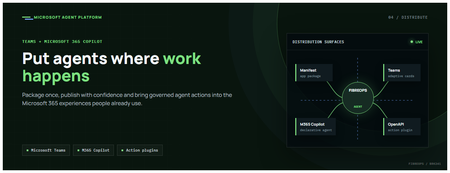
This is the fourth post in our series on the Microsoft agent platform. We cover the Distribute in M365 pillar — publishing your agents to Microsoft Teams and Microsoft 365 Copilot so they reach users where they already work. All examples reference the FibreOps repository, demonstrated at Microsoft Build BRK241. The Distribution Story Building a great agent is only half the challenge. The other half is getting it into the hands of users without asking them to learn a new tool, visit a new URL, or change their workflow. Microsoft 365 Copilot and Microsoft Teams are where enterprise users already spend their day, making them the natural distribution surface for agents. With the GA release, publishing an agent to Teams and M365 Copilot is a single command. No separate app registration portal, no manual manifest assembly, no multi-step approval workflow for development and testing. Publishing to Microsoft 365 Copilot (GA) FibreOps ships as a declarative agent + action plugin ready for sideload. A single CLI command produces the complete package: python -m fibreops.demo publish-m365 --out dist/m365 # Output: # ✓ wrote dist/m365/declarativeAgent.json # ✓ wrote dist/m365/fibreops-action.json # ✓ wrote dist/m365/manifest.json # ✓ wrote dist/m365/color.png (192x192) # ✓ wrote dist/m365/outline.png ( 32x32) # ✓ wrote dist/m365/fibreops-copilot.zip What Gets Generated File Purpose declarativeAgent.json Defines the agent's persona, capabilities, and conversation starters for M365 Copilot fibreops-action.json Action plugin that proxies tool calls to the deployed FastAPI backend via OpenAPI manifest.json Teams app manifest with publisher metadata, permissions, and capabilities color.png / outline.png App icons for Teams and M365 surfaces fibreops-copilot.zip Ready-to-upload package for Teams Admin Center Configuration Set the base URL to your deployed FastAPI app before publishing — the action plugin uses this to resolve the OpenAPI runtime: # Set the public HTTPS hostname of the deployed FastAPI app $env:M365_ACTION_BASE_URL = "https://fibreops-demo.azurewebsites.net" # Optional: customise publisher metadata $env:M365_PUBLISHER_NAME = "Contoso Network Operations" $env:M365_PUBLISHER_WEBSITE = "https://contoso.com/noc" # Generate the package python -m fibreops.demo publish-m365 --out dist/m365 Environment Variable Purpose M365_ACTION_BASE_URL Public HTTPS root for the FastAPI /openapi.json (e.g., Container Apps FQDN) M365_APP_ID Override the generated Teams app GUID (default: deterministic per repo) M365_PUBLISHER_NAME Publisher name shown in M365 Admin Center M365_PUBLISHER_WEBSITE Publisher website link Uploading the Package Upload the generated fibreops-copilot.zip through either path: Teams Admin Center → Manage apps → Upload new app M365 Admin Center → Integrated apps → Upload custom apps Once uploaded, the declarative agent: Inherits the publisher metadata you configured Advertises conversation starters from the FibreOps deck (e.g., "What is the current outage status?", "Dispatch an engineer to FN-LDN-001") Proxies tool calls to the deployed FastAPI app via the action plugin Appears in Microsoft 365 Copilot as a specialised agent users can invoke How Declarative Agents Work A declarative agent in Microsoft 365 Copilot is defined by metadata rather than code running in the M365 surface. The intelligence lives in your backend — Copilot handles the conversational UX, tool orchestration schema, and user authentication. The flow: User invokes the agent in Microsoft 365 Copilot or Teams Copilot renders conversation starters and accepts natural language input When the agent needs to act, Copilot calls the action plugin (your OpenAPI endpoint) Your FastAPI backend processes the request using the full agent pipeline Results return to the user in the Copilot/Teams UX This architecture means your agent logic stays in one place — the backend. The M365 surface is purely a distribution and interaction layer. Action Plugins and OpenAPI The action plugin ( fibreops-action.json ) references your FastAPI app's /openapi.json endpoint. FibreOps exposes a JSON API that the action plugin can call: /api/runs — List and query agent runs /api/optimiser — Get optimizer scores and suggestions /sdk/chat — Natural language interaction with the agent system /healthz — Liveness probe Because FastAPI auto-generates OpenAPI schemas from your typed Python endpoints, the action plugin gets accurate parameter descriptions, response schemas, and error codes without any manual specification work. Publishing as Autopilots (Public Preview) Autopilots take distribution one step further — agents that operate autonomously without requiring a user to initiate each interaction. An Autopilot can: React to events (e.g., a critical telemetry signal) without human initiation Take actions within defined guardrails Notify users only when human intervention is needed Operate continuously across Microsoft 365 surfaces For FibreOps, an Autopilot would monitor the Event Hub stream continuously and only surface to the NOC team when an incident exceeds automated resolution capability — a fully autonomous operations agent. Teams Adaptive Cards FibreOps posts rich Adaptive Card notifications to Microsoft Teams throughout the agent pipeline. This is separate from the declarative agent — it is a push notification channel for real-time operational awareness. # The NetOps agent posts an outage notice via Incoming Webhook def post_outage_notice(incident_id, node_id, severity, summary, engineer=None): card = { "type": "AdaptiveCard", "body": [ {"type": "TextBlock", "text": f"🚨 Outage: {node_id}", "weight": "Bolder", "size": "Large"}, {"type": "FactSet", "facts": [ {"title": "Severity", "value": severity.upper()}, {"title": "Incident", "value": incident_id}, {"title": "Summary", "value": summary}, ]}, ], "actions": [ {"type": "Action.OpenUrl", "title": "View in NOC Console", "url": f"{base_url}/runs/{incident_id}"} ] } # POST to Teams webhook or append to outbox for offline mode ... If TEAMS_WEBHOOK_URL is not configured, cards are appended to state/teams_outbox.jsonl for review in the NOC console's Teams panel. End-to-End: From Code to Copilot Here is the complete flow from development to distribution: Build — Develop agents with Microsoft Agent Framework, test locally with python -m fibreops.demo --backend local Publish agents — python -m fibreops.demo publish creates hosted Prompt Agents in Foundry Deploy infrastructure — azd up provisions App Service, ACR, Event Hub, Key Vault, and Application Insights Deploy hosted agent — azd env set FIBREOPS_DEPLOY_HOSTED true && azd up Generate M365 package — python -m fibreops.demo publish-m365 --out dist/m365 Upload to Teams — Upload fibreops-copilot.zip via Teams Admin Center Users interact — The agent is now available in Microsoft 365 Copilot and Teams Security Considerations Managed Identity — The deployed app uses system-assigned managed identity for all Azure service access. No secrets in code. Least privilege — Each role grant is scoped to the minimum required (Event Hubs Data Owner, Key Vault Secrets User, AcrPull, Azure AI Developer). Authentication — The M365 Copilot surface handles user authentication; your backend receives authenticated requests. Guardrails — Autopilots operate within defined boundaries; human-in-the-loop escalation is built into the Routine and agent decision logic. Key Takeaways Publishing to Teams and M365 Copilot is GA — a single command generates the complete package. Declarative agents separate distribution (M365) from intelligence (your backend). Action plugins leverage your existing FastAPI OpenAPI schema — no manual specification needed. Autopilots (Public Preview) enable fully autonomous operation within guardrails. Adaptive Cards provide real-time push notifications alongside the conversational agent surface. The same backend serves the NOC console, the Copilot SDK, and the M365 declarative agent. Next Steps Explore the FibreOps repository — try python -m fibreops.demo publish-m365 Microsoft 365 Copilot extensibility documentation Next in this series: Voice Live and Observability for Production Agent SystemsRound Table: Building Browser-Capable Agents with the Browser Automation Tool
Some of the most valuable work still lives inside a browser: booking a class, pulling a figure off a dashboard, filling in a portal form, gathering research across a dozen tabs. These are exactly the tasks people wish an agent could just do. On 22 July 2026 at 2:30 PM BST (7:00 PM IST), the Microsoft Foundry community is running a 40‑minute Discord round table on the Browser Automation tool : how how it helps agents complete real browser workflows, where you see risk or friction, and what samples, docs, and product improvements would help you adopt it. This is a discussion, not a slideshow. Bring your real projects : the the web workflows you'd love to hand off, and the guardrails you'd want first. Join us in the Microsoft Foundry Discord community. Please arrive at the scheduled time for a quick tech check. Event at a glance What: Microsoft Foundry Discord Community Round Table : Building Browser-Capable Agents with the Browser Automation Tool When: 22 July 2026, 2:30 PM BST / 7:00 PM IST (40 minutes) Where: https://aka.ms/foundry/discord Event link https://discord.gg/Z8JZsrP5P5?event=1527676149264679013 Format: Interactive discussion : voice and chat, live polls, and a short prioritisation exercise voice and chat, live polls, and a short prioritisation exercise Who it's for: AI engineers and developers building agents that need to act on the web Opening question we'll start with: "What browser-based task would you love an AI agent to automate for you today?" The problem: the last mile of automation still runs in a browser Most real-world workflows eventually hit a website with no clean API , such as a supplier portal, an internal admin console, a booking page, or a legacy dashboard a supplier portal, an internal admin console, a booking page, a legacy dashboard. Traditional scripting can automate these, but selectors break, pages change, and every new site means another brittle script to maintain. What developers actually want is an agent that can look at a page, decide what to do, and do it : navigate, read, click, type, and hand back a structured result navigate, read, click, type, and hand back a structured result. That's the gap the Browser Automation tool in Microsoft Foundry is built to close , and doing it responsibly and doing it responsibly, with the right safeguards, is a big part of why we want your feedback. What is the Browser Automation tool? The Browser Automation Tool (BAT) gives Foundry agents the ability to drive a real browser to complete web workflows. It's available as an MCP tool, and it uses Playwright Workspaces , a generally available, cloud-scale service, a generally available, cloud-scale service : navigating, clicking at coordinates, typing, and applying filters as its headless browser infrastructure. When an agent gets a request, Foundry spins up an isolated, sandboxed browser session per interaction, so each run is private and segregated. How agents actually interact with a page BAT runs a perception–action loop. The model receives the current state of the page (including screenshots), decides the next action, and BAT executes it in the sandbox using Playwright and real oversight navigating, clicking at coordinates, typing, applying filters. After each action, BAT captures the updated state and sends it back to the model, repeating until the goal is met or the user stops. Because the model can parse HTML into a DOM, it can reason about the page rather than follow a fixed script. It also supports multi-turn conversations, so you can refine a request mid-flow to complete form-filling or scraping scenarios. Built for real use : watch the automation happen in real time for debugging. and real oversight Live View : a human-in-the-loop override for ambiguous or sensitive steps. watch the automation happen in real time for debugging. Take Control : each interaction gets its own sandboxed browser. a human-in-the-loop override for ambiguous or sensitive steps. Isolated sessions : for reliability, optimisation, and audit. each interaction gets its own sandboxed browser. Built-in observability : for internal systems (private preview). for reliability, optimisation, and audit. Private website browsing : Python, C#, JavaScript, Java, and the REST API. for internal systems (private preview). Broad SDK support , and the agent can make mistakes or be misled by malicious page content Python, C#, JavaScript, Java, and the REST API. A word on responsible use. BAT is powerful precisely because an AI can use credentials you share with it to reach email, financial, enterprise, or social accounts , watching for and the agent can make mistakes or be misled by malicious page content. You're responsible for reviewing your applications, scoping which credentials you provide, and adding your own mitigations. See the Foundry Agent Service transparency note. This is exactly the kind of trade-off we want to talk through together. Example scenario A user asks: "Report the year-to-date percent change of Microsoft's stock price." The agent navigates to a finance site, enters MSFT in the search bar, opens the stock page, clicks the YTD view on the chart, reads the value, and returns a clean, structured answer ; that's the no bespoke scraper, no hard-coded selectors, and a full trace of what it did. Discussion prompt: "Where would browser automation fit into your current projects or workflows?" How setup works (the short version) You'll want to understand the wiring before you scale, so it's worth a look ahead of the session. There are two moving parts: Create a Playwright Workspace in the Azure portal, enable the access token auth method, and grab the wss:// browser endpoint. Give your project identity a Contributor (or custom) role on the workspace. Connect the tool in Foundry under Build > Tools: create a toolbox, add Browser Automation, point it at your Playwright workspace and auth type, and publish. Copy the Project connection ID from the tool's details page : how agents interact with the web, example use cases, and responsible use. that's the BROWSER_CONNECTION_ID in your code. What we'll cover in the 40 minutes Welcome & opening question (0:00–0:03) : navigate, gather, interact, and return a structured result, end to end. the browser task you'd most love to automate. What is Browser Automation (0:03–0:07) : the workflows you're building, public vs. internal targets, and where you'd pick automation over scripting. how agents interact with the web, example use cases, and responsible use. Scenario walkthrough (0:07–0:12) : what agents may do autonomously, what needs approval, and the observability and enterprise safeguards you'd require. navigate, gather, interact, return a structured result : your biggest adoption blockers, missing docs, and the SDK samples and demos you'd prioritise. end to end. Use cases & opportunities (0:12–0:22) : vote live on top use cases, challenges, and feature requests. the workflows you're building, public vs. internal targets, and where you'd pick automation over scripting. Trust, security & governance (0:22–0:31) , and which would benefit most from a capable agent. what agents may do autonomously, what needs approval, and the observability and enterprise safeguards you'd require. Developer experience feedback (0:31–0:36) ; which should always require approval. your biggest adoption blockers, missing docs, and the SDK samples and demos you'd prioritise. Prioritisation & next steps (0:36–0:40) , sometimes with credentials, vote live on top use cases, challenges, and feature requests. Come prepared to talk about The browser-based workflows you're building today : navigation, data gathering, form filling, and research, via an MCP tool powered by Playwright Workspaces. and which would benefit most from a capable agent. Whether your scenarios target public websites, internal systems, or both. Why you'd choose browser automation over traditional scripting. Which actions you'd let an agent perform autonomously : a perception-action loop with screenshots and DOM parsing handles pages that break brittle scripts. and which should always require approval. The observability, audit, and enterprise safeguards you'd expect before running this in production. The examples, samples, and tutorials that would help you get started fastest. Responsible and secure by design Because BAT lets an agent take real actions on live websites : isolated sessions, Live View, Take Control, and observability for reliability and audit. sometimes with credentials : scope credentials carefully and add your own mitigations; the tool is powerful and in preview. governance is a first-class part of the conversation, not a footnote. Isolated per-session sandboxes, Live View, Take Control human-in-the-loop, and built-in observability are there so you can see, pause, and audit what an agent does. Bring your trust concerns, required guardrails, and governance requirements: they directly shape the roadmap. Note: the Browser Automation tool is in preview; APIs and capabilities may change, and it isn't recommended for production workloads yet. Key takeaways Browser Automation lets Foundry agents complete real web workflows : this round table feeds directly into the engineering and product teams. navigation, data gathering, form filling, research , and arrive on time for the tech check. via an MCP tool powered by Playwright Workspaces. Agents reason, not just replay , and browser-capable agents are how we cross it. a perception–action loop with screenshots and DOM parsing handles pages that break brittle scripts. Oversight is built in: isolated sessions, Live View, Take Control, and observability for reliability and audit. Responsibility is shared: scope credentials carefully and add your own mitigations; the tool is powerful and in preview. Your feedback shapes the product: this round table feeds directly into the engineering and product teams. Save your spot Add it to your calendar: 22 July 2026, 2:30 PM BST / 7:00 PM IST, and arrive on time for the tech check. Join the community: https://aka.ms/foundry/discord Prep with the sample: explore the browser automation sample in foundry-samples. Read the docs: Automate browser tasks with Foundry agents and the hosted-agent quickstart. Event registration link https://discord.gg/Z8JZsrP5P5?event=1527676149264679013 The last mile of automation still runs in a browser, and browser-capable agents are how we cross it. Come tell us what you'd automate, where you'd draw the line, and what you'd need to trust it in production. See you on 22 July.Building AI Agents from Zero to Production
Building AI Agents from Zero to Production Most agent demos stop at "it answered my question." Production doesn't. The gap between a notebook that calls an LLM and a governed, observable, multi-agent system your organisation can actually depend on is where real engineering happens, evaluation, deployment, data sovereignty, tool governance, and cross-team interoperability. Microsoft's open-source course Building AI Agents from Zero to Production walks that entire arc in seven lessons, using one realistic use case and the Microsoft Agent Framework (MAF) plus Microsoft Foundry. This post is a developer-focused tour of what it teaches, the architecture decisions behind each stage, and the code patterns that matter when you move from prototype to production. Who this is for AI engineers building their first or first production, agent system. Backend and full-stack developers integrating agents into real applications and CI/CD. Cloud architects who need data sovereignty, private networking, and governance around agent workloads. Technical leads deciding how to standardise tools and orchestration across multiple teams. The samples are Python 3.12+, served through Microsoft Foundry using GPT-5 series models (for example gpt-5.1 ). Lesson 4 adds a TypeScript/React frontend. You will want an Azure subscription and the Azure CLI. The AI Agent Development Lifecycle The course is organised around a lifecycle rather than a feature list. Each lesson is a stage, and each stage assumes the previous one is solved: # Stage The production question it answers 1 Agent Design What should each agent do, and how do they hand off? 2 Agent Development How do I build and run them with the Agent Framework? 3 Agent Evaluations How do I know they actually work — and keep working? 4 Agent Deployment How do I ship one as a hosted service with a UI and CI gate? 5 Production Hosted Agents How do I meet enterprise data, network, and governance needs? 6 Microsoft Toolbox How do I govern tools once, and reuse them across teams? 7 Multi-Agent & A2A How do agents from different teams interoperate safely? The thread running through all seven is a single scenario: a Developer Onboarding agent system that helps a new hire find the right teammates, get a sensible first task, and pull learning resources and code snippets. It is deliberately mundane, which is exactly why it exposes the production concerns that flashy demos hide. Lesson 1 — Agent Design: three components, one graph The course defines an agent by three parts: an LLM for reasoning, tools to act, and memory to retain context. The design work is context engineering — making sure the right information reaches the model at the right moment, no more and no less. Rather than one monolithic assistant, the onboarding system is split into specialists coordinated by a triage agent using handoff orchestration: Agent Job Tool Employee Search Answer org and people questions Foundry file search over an employee-directory vector store Task Recommendation Suggest 1–3 GitHub issues for the new dev GitHub MCP Server (reads recent commits + open issues) Code Assistant Provide resources and runnable snippets Microsoft Learn MCP + Code Interpreter Architecturally this is a directed graph: User → Triage → [Employee, Learning, Coding] . Splitting responsibilities early pays off later, each agent gets a tightly scoped prompt (less hallucination), can be evaluated independently, and can be upgraded without touching its peers. Lesson 2 — Development: standalone agents with MAF Here the design becomes code. Each specialist is a small, independently runnable service built with the Microsoft Agent Framework, authenticated to Foundry with your Azure CLI login. Setup is deliberately boring: az login az account set --subscription "<your-subscription-id>" cp .env.example .env # Fill FOUNDRY_PROJECT_ENDPOINT and FOUNDRY_MODEL (e.g. gpt-5.1) # Create the employee-directory vector store once; note the printed VECTOR_STORE_ID python lesson-2-agent-development/setup_vector_store.py # Start an agent — serves on http://localhost:8090 python lesson-2-agent-development/employee-search-agent.py The FoundryChatClient auto-reads any FOUNDRY_ -prefixed environment variables and uses AzureCliCredential , so there are no keys in code. The lesson ships six samples, each on its own port, so you can chat with them individually in the local DevUI before wiring them together: Sample Tool Port employee-search-agent.py Foundry file search / vector store 8090 task-recommendation-agent.py GitHub MCP Server 8095 azure-learning-agent.py Microsoft Learn MCP 8092 coding-agent.py Code Interpreter 8093 learning-recommendation-agent.py Learn MCP + reasoning 8091 agent-orchestration.py Multi-agent handoff 8094 Why this matters: keeping each agent as its own process with its own port is a testability decision, not an accident. You can smoke-test one specialist in isolation, then compose them in agent-orchestration.py . Lesson 3 — Evaluation: you can't unit-test a probability distribution This is the lesson that separates a demo from a product. Agents are non-deterministic, so traditional assertions don't fit. The course uses three complementary layers: Observability / tracing — always on, via OpenTelemetry to Application Insights. Smoke tests — fast, run on every deploy. Evaluations — deeper, model-based scoring run on-demand or nightly. Turning on tracing is a single call: from agent_framework.foundry import FoundryChatClient client = FoundryChatClient() client.configure_azure_monitor() # export traces + metrics to Application Insights For quality it uses Foundry's built-in "LLM-as-a-judge" evaluators against real persisted responses (identified by response_id ), not freshly regenerated ones: Evaluator evaluator_name Measures Relevance builtin.relevance Does the response address the request? Groundedness builtin.groundedness Is it supported by retrieved data (no hallucination)? Tool-call accuracy builtin.tool_call_accuracy Were the right tools called with the right arguments? Tool-output utilization builtin.tool_output_utilization Did the agent actually use tool results? The judge model is set independently via AZURE_AI_MODEL_DEPLOYMENT_NAME , so you can evaluate a cheap production model with a stronger one. The run prints a report_url that deep-links into the Foundry portal. Lesson 4 — Deployment: a hosted agent, a UI, and a CI gate Now the agent becomes a managed service. It is deployed as a Foundry Hosted Agent a Microsoft-managed execution environment and fronted by an OpenAI ChatKit React UI talking to a FastAPI backend: ChatKit React (3000) → FastAPI backend (8001) → Foundry Hosted Agent → tools Building the agent is declarative attach tools, name it, serve it: agent = client.as_agent( name="DevOnboardingAgent", instructions="...", tools=[file_search_tool, learn_mcp_tool], ) # served with: from_agent_framework(agent).run() The recommended deploy path is the Azure Developer CLI: cd hosted-agent azd auth login azd agent deploy The genuinely production-minded part is the smoke test as a post-deploy CI gate. Six cases cover reachability, each scenario, off-topic prompt adherence, and multi-turn threading (verifying state via previous_response_id ). The GitHub Action runs them against the freshly deployed agent: export FOUNDRY_TOKEN=$(az account get-access-token \ --resource https://ai.azure.com/ --query accessToken -o tsv) python runner.py \ --project-endpoint "https://<account>.services.ai.azure.com/api/projects/<project>" \ --agent-name dev-onboarding \ --tests-file tests/smoke-tests.json Pitfall to remember: the token audience must be https://ai.azure.com/ . A cognitiveservices.azure.com token is rejected by the Responses API — a mistake that costs many engineers an afternoon. Lesson 5 — Production: separating where an agent runs from where its data lives The pivotal concept for enterprise readiness is the distinction between a Hosted Agent (compute, scaling, identity) and a Capability Host (where conversation history, files, and embeddings actually reside): Concern Hosted Agent Capability Host Compute / scaling / identity ✅ Provided — Conversation history Microsoft-managed default Redirect to your Azure Cosmos DB File uploads Microsoft-managed default Redirect to your Azure Storage Vector embeddings Microsoft-managed default Redirect to your Azure AI Search Required to run the agent? ✅ Yes ❌ Optional Required for data sovereignty? ❌ Not sufficient ✅ Yes "Basic" setup uses Microsoft-managed storage and is perfect for getting started. "Standard" setup redirects each data plane to your own Azure resources through a project-level capability host, this is how you keep customer data in your tenant, inside your network boundary: PUT .../accounts/{account}/projects/{project}/capabilityHosts/{name}?api-version=2025-06-01 { "properties": { "capabilityHostKind": "Agents", "threadStorageConnections": ["my-cosmosdb-connection"], "vectorStoreConnections": ["my-ai-search-connection"], "storageConnections": ["my-storage-connection"] } } Operational constraints worth internalising before you provision: there is one capability host per scope (a second attempt returns 409 Conflict ), configuration is immutable (delete and recreate to change it), deletion is destructive, and the account-level host must exist before the project-level one. Lesson 6 — Toolbox: govern tools once, reuse everywhere Left unchecked, every team re-implements the same tools, scatters credentials, and loses governance visibility. The Microsoft Foundry Toolbox solves this by exposing a curated, versioned set of tools behind a single MCP-compatible endpoint, with credentials held in Foundry connections rather than agent code. You build a toolbox version once: from azure.ai.projects.models import MCPTool, ToolboxSearchPreviewTool, WebSearchTool toolbox_version = project.toolboxes.create_toolbox_version( name="agent-tools", description="Web search + an MCP server + tool search", tools=[ WebSearchTool(), MCPTool( server_label="myserver", server_url="https://your-mcp-server.example.com", require_approval="never", project_connection_id="my-key-auth-connection", # credentials live in Foundry ), ToolboxSearchPreviewTool(), ], ) And every agent consumes it through one endpoint, no per-team tool code: from agent_framework import MCPStreamableHTTPTool mcp_tool = MCPStreamableHTTPTool( name="toolbox", url=TOOLBOX_ENDPOINT, # {project_endpoint}/toolboxes/{name}/mcp?api-version=v1 http_client=http_client, load_prompts=False, ) agent = chat_client.as_agent(name="my-toolbox-agent", instructions="...", tools=[mcp_tool]) Versioning is blue/green: create a new version, test it on its version-specific endpoint, then promote it to default and every consumer picks it up with zero code changes. A Guardrail (RAI) policy can be applied at the toolbox layer, independent of model-level content filters. Note the toolbox management APIs are currently preview; the portal or VS Code Foundry Toolkit are practical alternatives for creation today. Lesson 7 — Multi-Agent & A2A: agents as networked peers The final lesson contrasts two ways agents collaborate: Handoff / Workflow — in-process, same codebase, fastest, tightest coupling. Agent-to-Agent (A2A) — cross-process over an open protocol, so agents from different teams, orgs, or frameworks interoperate. A2A gives each agent a discoverable Agent Card at /.well-known/agent-card.json and a task lifecycle (submitted → working → completed/failed). The elegant part: A2AExecutor wraps an existing MAF agent with no changes to that agent's code. from agent_framework.a2a import A2AExecutor from a2a.server.apps import A2AStarletteApplication from a2a.server.tasks import InMemoryTaskStore agent_card = AgentCard( name="Coding Assistant", url="http://localhost:9000/", version="1.0.0", capabilities=AgentCapabilities(streaming=True), skills=[AgentSkill(id="generate-code", name="Generate code", tags=["code"])], ) request_handler = DefaultRequestHandler( agent_executor=A2AExecutor(agent), # wraps your existing MAF agent unchanged task_store=InMemoryTaskStore(), ) app = A2AStarletteApplication(agent_card=agent_card, http_handler=request_handler).build() Consuming a remote agent then looks exactly like calling a local one: from agent_framework.a2a import A2AAgent remote_agent = A2AAgent(name="remote-coding-assistant", url="http://localhost:9000") result = await remote_agent.run("Write a Python function that reverses a string.") Because an A2AAgent can be a participant inside a HandoffBuilder workflow, you can mix in-process routing with remote services in the same orchestration. For enterprise use, A2AAgent accepts an auth_interceptor for bearer tokens, and the Agent Card carries security_schemes . Responsible and secure by design Production readiness in this course is not just uptime, it is governance: Identity over keys — AzureCliCredential and managed identity throughout; no secrets in code. Least privilege — CI runners get a scoped Azure AI User role assignment on the specific project. Data sovereignty — capability hosts keep conversation history, files, and embeddings in your own Cosmos DB, Storage, and AI Search. Tool approval and guardrails — MCP approval_mode and toolbox-level RAI policy gate what agents can do. Grounded evaluation — groundedness and tool-utilization scoring catch hallucination and unused-tool behaviour before users do. Cost hygiene — the lessons create real Azure resources; delete the resource group when done: az group delete --name <rg> --yes --no-wait . Key takeaways Design as a graph of specialists. Handoff orchestration with tightly scoped agents beats one monolith on reliability and testability. One .run() contract, many backends. The Agent Framework keeps orchestration code stable from local dev to hosted production. Evaluate continuously. Tracing + smoke tests + model-based evaluators are three layers, not alternatives. Separate compute from data. Hosted Agents run the agent; Capability Hosts give you sovereignty — you need both for enterprise. Govern tools centrally. A versioned toolbox behind one MCP endpoint kills tool sprawl and credential duplication. Open protocols for interop. A2A lets agents cross team, org, and framework boundaries without rewrites. Get started Clone the repo (skip the 50+ translations for a faster download) and work through the lessons in order: git clone --filter=blob:none --sparse https://github.com/microsoft/Building-AI-Agents-From-Zero-To-Production.git cd Building-AI-Agents-From-Zero-To-Production git sparse-checkout set --no-cone '/*' '!translations' '!translated_images' References Building AI Agents from Zero to Production — course repo Microsoft Agent Framework Microsoft Foundry documentation Agent-to-Agent (A2A) protocol specification a2a-python SDK AI Agents for Beginners MCP for Beginners Microsoft Foundry Discord
From Multi-Model Chaos to a Governed AI Gateway: Cost Optimization on Azure
What is Multi-Model Chaos, and what cost and security challenges does it pose? Multi-model chaos describes the sprawl that emerges when an organization rapidly adopts many large language and foundation models—OpenAI, Anthropic, Meta Llama, Mistral, and a long tail of open-source and fine-tuned variants—across teams and applications without any unifying control plane. Instead of a single governed entry point, each team wires its own keys, endpoints, SDKs, and prompts directly to whichever provider it prefers, leaving the enterprise with a fragmented, duplicated, and largely invisible AI estate. On the cost side, this fragmentation makes spend almost impossible to predict or contain, identical workloads run against premium models when cheaper ones would suffice, token consumption goes unmeasured, redundant calls and missing caching inflate bills, and finance teams have no consolidated view to attribute usage back to a team, product, or customer. On the security and governance side, the risks compound: API keys are scattered across code and config files, sensitive or regulated data flows to external endpoints with no data-loss prevention or residency guarantees, prompt-injection and jailbreak attempts go unmonitored, and there is no centralized authentication, rate limiting, auditing, or content filtering. The net effect is an uncontrolled attack surface and a compliance blind spot—precisely the conditions that motivate consolidating model access behind a governed AI gateway. In short, multi-model chaos trades short-term speed for runaway costs and an unmanaged security risk, making a governed AI Gateway essential. What is a Governed AI Gateway, and how do they help reduce cost and improve security? A governed AI gateway is an enterprise control plane built on Azure API Management (APIM) that consolidates every model behind a single, governed endpoint. It unifies Azure OpenAI (the gpt-5.4 family) and Azure AI Foundry (open-source and partner models such as grok-4.3 and DeepSeek-V4-Pro), so consumers reach any of them through one consistent, policy-enforced entry point rather than a tangle of direct connections. Every backend is password-less, authenticated through managed identity, which eliminates scattered API keys. On top of this foundation, the gateway enforces per-consumer model permissions, token-based rate limits, and cost-based budget downgrade—automatically routing teams to more economical models as they approach their spend limits—all administered from a self-service Admin UI. One governed endpoint for every backend. Azure OpenAI and Azure AI Foundry (OSS and partner) models are bundled behind a single governance endpoint. Each backend is reachable only over a private endpoint with key authentication disabled, so APIM authenticates using its own managed identity—no model keys ever live on the gateway. Per-consumer governance, edited live in the Admin UI with no redeployment: Allowed models — a consumer can call only the models explicitly granted to it; anything else returns a 403. Rate limits — per-consumer TPM and token-quota tiers (small / medium / large), returning a 429 once exceeded. Cost budget — a daily USD spend limit; when it is exceeded, requests are automatically downgraded to a cheaper model along a configured ladder, including cross-backend downgrades (e.g. gpt → OSS or OSS → gpt). Self-service Admin UI (React + FastAPI, Entra ID login, gated to an admin group) to issue consumer keys, set model, limit, and budget policies, and review the usage dashboard and request logs. Built-in observability — per-call token metrics, broken down by consumer and model, stream to Application Insights, surfaced through the Admin UI's usage dashboard and a request / blocked & downgrade-event log. Flexible client authentication — an APIM subscription key by default, or an Entra ID JWT (client_auth_mode). How is it different from APIM AI Gateway? APIM already provides useful GenAI gateway primitives: token rate limiting, token-usage metrics, semantic caching, backend routing, endpoint import, authentication, authorization, and monitoring. The difference is that APIM enables the enforcement runtime and policy control point, but not the full operating model required to run a shared, multi-tenant AI platform across teams, models, and budgets. Inside the policy pipeline, APIM remains the load-bearing layer: llm-token-limit enforces per-consumer token-per-minute and quota limits, llm-emit-token-metric streams token usage into our metrics namespace, and standard APIM capabilities handle endpoint exposure, access control, and platform monitoring. The governed AI Gateway adds the governance layer APIM does not provide out of the box: Self-service onboarding — a platform team can issue or revoke consumer keys and manage access from the Admin UI, without raising a pull request or redeploying infrastructure. Per-consumer model entitlements — every consumer has an explicit allow-list of model deployments. The gateway calculates the effective allowed set per request and returns 403 when a caller asks for a model it is not entitled to use. Live configuration without redeployment — entitlements, rate tiers, token quotas, budgets, and downgrade levels live in the configuration store. A sync worker projects those values into APIM named values continuously, so operational changes can take effect without a terraform apply while the policy logic stays version-controlled in IaC. Managed-identity-only, private backends — key-based authentication is disabled on Azure OpenAI and Azure AI Foundry. APIM injects a managed identity token on every backend call, and the backends are reachable only over private endpoints. Cost-based downgrade across backends — when a consumer approaches its budget, the gateway can route to a cheaper model while preserving availability, including cross-backend downgrades between Azure OpenAI and Azure AI Foundry. APIM’s AI gateway is the enforcement runtime while the governed AI Gateway is the platform operating model around it. APIM handles the gateway primitives extremely well, while our governance layer adds identity, self-service administration, entitlement management, live configuration, cost controls, and cross-model routing so teams can safely consume multiple models without creating new cost, security, or compliance sprawl. Solution overview Figure 1 shows the end-to-end architecture of the governed AI gateway. Client applications never talk to the models directly; instead, every request passes through Azure API Management, which acts as the single governed entry point that authenticates callers, applies per-consumer policy, and routes traffic privately to the appropriate model backend. Around this gateway sit the supporting planes for administration, identity, and observability, giving the organization one consistent place to control access, contain cost, and monitor usage across both Azure OpenAI and Azure AI Foundry models. This solution is also completely serverless. Key components: Client / consumer applications — the apps and services that call for model inference, each identified by its own consumer key or Entra ID identity. Azure API Management (the gateway) — the single governance endpoint that handles authentication, allowed-model checks, rate limiting, and cost-based budget downgrade before any request reaches a model. Model backends — Azure OpenAI (the gpt-5.4 family) and Azure AI Foundry (OSS and partner models such as grok-4.3 and DeepSeek-V4-Pro), each reachable only over a private endpoint. Microsoft Entra ID — provides identity for both clients (optional JWT auth) and the gateway's own managed identity used to reach the backends without password credentials. Admin UI (React + FastAPI) — the self-service control plane for issuing consumer keys and setting model, rate-limit, and budget policies. Application Insights — collects per-call token metrics by consumer and model, powering the usage dashboard and request / blocked-event logs. 1: Solution architecture diagram Request flow Authenticate — a client calls the gateway with an APIM subscription key (or an Entra ID JWT) instead of any model key. Authorize the model — APIM checks whether the consumer is permitted to call the requested model; if not, it returns 403. Enforce limits — the gateway applies the consumer's TPM and token-quota tier, returning 429 when the limit is exceeded. Apply the cost budget — if the consumer's daily USD budget is exhausted, the request is automatically downgraded to a cheaper model along the configured ladder. Route to the backend — APIM forwards the request over a private endpoint, authenticating with its managed identity to Azure OpenAI or Azure AI Foundry. Return and record — the model response is returned to the client while per-call token metrics are emitted to Application Insights and surfaced in the Admin UI dashboard and logs. Implement the solution This section describes how to deploy the solution architecture. In this post, you’ll perform the following tasks: Create APIM Create Cosmos DB Create Microsoft foundry with Gpt-5.4, Gpt-5.4-mini, DeepSeek-V4-Pro and Grok-4.3 deployed Create the Admin UI on container apps Create a consumer with an APIM subscription key on the Admin UI Integrate APIM endpoint with Github Copilot chat and Copilot CLI Create a budget and rate limit in the Admin UI Simulate and validate auto downgrade feature Ensure that you have the following prerequisites deployed before moving to the next section An Azure subscription with model quota (Azure OpenAI and, optionally, Azure AI Foundry models). Tools: Git, Terraform ≥ 1.7, Azure CLI, and az login to the subscription. Container images are built remotely in Azure Container Registry, so Docker is not required. VScode and Copilot CLI Deploy the Azure AI Gateway Clone the repository from https://github.com/microsoft/apim-foundry-governance git clone https://github.com/microsoft/apim-foundry-governance git checkout english By default the solution deploys in koreacentral region. Export your custom variables if needed. export location=eastus2 export backend-rg=rg-aigw-tfstate-dev-eastus2 export storage-prefix=staigwtfstate export state-key=ai-gateway-eus2.tfstate Bootstrap the Terraform state backend (once per subscription) This creates an eastus2 resource group + storage account for remote state (Entra auth, public blob access blocked). ./scripts/bootstrap-backend.sh \ --location $location \ --backend-rg $backend-rg \ --storage-prefix $storage-prefix \ --state-key $state-key Set Terraform variables cp infra/terraform.tfvars.example infra/terraform.tfvars # Edit infra/terraform.tfvars: prefix, location, owner, cost_center, apim_publisher_*, budget_* Create the Gateway Core On the first apply, leave worker_image and admin_ui_image empty (default ""). The images don't exist yet, and the worker Job / Admin UI app are count-gated on these variables. cd infra terraform init # If you are moving an existing state from another backend, run `terraform init -migrate-state` instead. terraform apply Build and push the container images with app registrations After the registry is created, build the worker and Admin UI images remotely (no local Docker needed). acr=$(terraform output -raw registry_login_server) reg=$(terraform output -raw registry_name) az acr build --registry $reg --image config-sync-worker:latest ../app/config-sync-worker az acr build --registry $reg --image admin-ui:latest ../app/admin-ui The worker and Admin UI requires entra app registrations for a user to access the frontend. Create the admin security group, BFF API App registrations and SPA public-client app registrations. ./scripts/app-registration.sh Enable the worker and Admin UI From the output above, populate the image references and the three Entra variables from the prerequisites into infra/terraform.tfvars and apply again. worker_image = "<registry_login_server>/config-sync-worker:latest" admin_ui_image = "<registry_login_server>/admin-ui:latest" admin_ui_public = true # external FQDN (still Entra-gated). false = VNet-only admin_group_object_id = "<entra security group object id>" bff_api_audience = "api://<bff app id>" spa_client_id = "<spa app id>" entra_tenant_id = "<tenant id>" CosmosDB Seed configuration Cosmos is private with key auth disabled, so the initial config is seeded from a jumpbox inside the VNet. Default confguration of enable_jumpbox = true in infra/terraform.tfvars triggers Terraform to: provision the jumpbox VM, grant it’s managed identity the Cosmos DB Built-in Data Contributor role (scoped to the config container), and runs a VM run-command that seeds both documents automatically: Global config (id=global) — allowed models + token limits. Per-model pricing (id=pricing) — prompt/completion rates for cost-based budgeting. To seed manually instead (jumpbox connected via Bastion), the same scripts can be run directly: # Global allowed models + limits ./scripts/seed-cosmos-jumpbox.sh https://<cosmos-account>.documents.azure.com:443/ # Per-model pricing (for cost-based budgeting) ./scripts/seed-pricing-jumpbox.sh https://<cosmos-account>.documents.azure.com:443/ Access the AdminUI Update the SPA with your containerapps url spa_app_id="$(az ad app list --display-name "AI Gateway SPA" --query "[].appId" -o tsv)" # spa_client_id fqdn=$(terraform output -raw admin_ui_fqdn) # run from infra/ oid=$(az ad app show --id "$spa_app_id" --query id -o tsv) az rest --method PATCH \ --uri "https://graph.microsoft.com/v1.0/applications/$oid" \ --headers 'Content-Type=application/json' \ --body "{\"spa\":{\"redirectUris\":[\"https://$fqdn\"]}}" Browse to the admin_ui_fqdn, which is also the container apps fqdn. You will need to login via EntraID (Users will need to be added to the Entra group for them to login). Go ahead and register the consumer with a name and issue the API key. The API key is the APIM subscription key and will only be shown once on the UI, so copy and paste it somewhere safe. 2: AI Gateway Consumers and Keys Next, on the left hand tab, click on budgets. This will set the daily budget limit a user is allowed to consume in a day and is also where the model downgrade logic resides. For the purpose of demonstration, set a low budget of $1.8 and select the model priority that you want the downgrade to occur. In this case, gpt-5.4 will be used first, followed by gpt-5.4-mini, DeepSeek then Grok. 3: AI Gateway Budgets Lastly, on the land hand tab, select Rate limits. This sets the amount of tokens a user can consume in a day. It is a daily limit and resets after 24 hours. Select the large tier. 4: AI Gateway Rate Limits Browse to Dashboard, it shows you all the token information, request status codes and group them by consumer and model. You can also view the budget downgrade for a specific user. 5: AI Gateway Captions Integrate endpoint with github copilot chat in vscode In VScode, type “Ctrl + Shift + p” and select “Chat: Manage Language Model”. Select Add Models and choose Azure. 6: Add models toGithubCopilot Chat Follow through the prompts. It will create or edit a chatLanguageModels.json file. Your file should look like this. Take note that you will need to use the /vscode path. [ { "name": "Azure", "vendor": "azure", "models": [ { "id": "gpt-5.4", "name": "gpt-5.4 (APIM)", "url": "https://<REPLACE WITH YOUR APIM ENDPOINT>.azure-api.net/vscode/openai/deployments/gpt-5.4/chat/completions?api-version=2025-01-01-preview", "toolCalling": true, "vision": true, "maxInputTokens": 128000, "maxOutputTokens": 16000, "requestHeaders": { "Ocp-Apim-Subscription-Key": "<REPLACE WITH YOUR SUBSCRIPTION KEY" } } ] } ] Now select the gpt-5.4 (APIM) model and ask it a question. Integrate endpoint with copilot cli As copilot only accepts api-key headers, a separate api is used. Replace and export the following variables before using copilot cli. export COPILOT_PROVIDER_TYPE="azure" export COPILOT_PROVIDER_BASE_URL="<REPLACE WITH YOUR APIM ENDPOINT>" export COPILOT_PROVIDER_API_KEY="<REPLACE WITH YOUR SUBSCRIPTION KEY>" export COPILOT_MODEL="gpt-5.4" export COPILOT_PROVIDER_AZURE_API_VERSION="2025-01-01-preview" export COPILOT_PROVIDER_MODEL_ID="gpt-5.4" You should see a similar response. 7: Integration of APIM to copilot cli Simulate downgrade feature Continue to ask more questions to consume more tokens. Once it hits the 80% cost threshold, you should see that the tag has been switched to “Auto-switch level 1”, meaning it will downgrade to gpt-5.4-mini for future requests. 8: AI Gateway Downgrade Feature Validate by running this command in your terminal with your own endpoints and api-key. curl -sS -i -X POST "https://<REPLACE>.azure-api.net/openai/deployments/gpt-5.4/chat/completions?api-version=2025-01-01-preview" -H "api-key: <REPLACE WITH API KEY>" -H "Content-Type: application/json" -d '{"messages":[{"role":"user","content":"hi"}],"max_completion_tokens":8}' Inspect the headers, you should see that the downgrade level is 1 and the effective model is gpt-5.4-mini despite hitting the same endpoint of gpt-5.4. 9: Model downgrade Conclusion This post started with the problem of multi-model chaos: teams moving quickly with different models, endpoints, SDKs, keys, quotas, and cost profiles, but without a common control plane resulting in ineffective cost control and potential security leaks with model API keys. The governed AI Gateway addresses that by putting Azure OpenAI and Azure AI Foundry behind a single APIM-based entry point, where access, limits, routing, identity, telemetry, and budget behavior can be applied consistently for every consumer. We also walked through how the gateway is different from APIM’s native AI gateway capabilities. APIM provides the enforcement runtime and the GenAI policy primitives, such as token limits, token metrics, semantic caching, and backend routing. The governed AI Gateway builds the operating model around those primitives: self-service onboarding, per-consumer model entitlements, live configuration without redeployment, managed-identity-only private backends, per-call cost telemetry, and cost-based downgrade across model providers. From there, we integrated the APIM endpoint with Github Copilot Chat and Copilot CLI, and validated the downgrade behavior when spend thresholds were reached. The result is not just an AI proxy, but a reusable enterprise pattern for running AI access as a governed platform: developers keep a simple model endpoint experience, while the platform team keeps control over security, cost, observability, and operational change. Overall, this post helps organizations bring multi-model AI usage under one governed entry point, reducing sprawl across endpoints, keys, policies, and cost controls. It also gives platform teams centralized control over model access, rate limits, budgets, telemetry, and private backend access while preserving a simple endpoint experience for developers. References AI gateway capabilities in Azure API Management Policies in Azure API Management Azure API Management policy reference - llm-emit-token-metric Using GitHub Copilot CLI - GitHub Docs AI language models in VS Code
My Journey with Azure SRE Agent
Introduction A customer came to me with a problem that many organisations have. They control their infrastructure through Infrastructure as Code, but there are often scenarios where an admin needs to go in and make a change - even though they would ideally not want this to happen. The use an Entra feature Privileged Identity Management (PIM). Users statically don't have contributor access to Azure resources, but PIM allows them to elevate their access for a period of time. As part of PIM, the admin needs to give a reason for the elevation. Wouldn't it be good if an agent of some sort could look at this reason, then look at what the user actually did and make an assessment on whether what they did aligned with the reason given? Then alert if not. I initially built Python agents to handle this, but as with many "build vs. buy" decisions, I eventually discovered that Azure SRE Agent (in preview at the time of writing) could do what I needed – and more. This blog chronicles my journey from initial scepticism to building a fully autonomous PIM elevation audit agent. Along the way, I learned valuable lessons about what SRE Agent is designed for, how to work with its tooling model, and the difference between interactive exploration and production automation. The Starting Point: Python Agents and the Buy vs. Build Decision Before discovering SRE Agent, I had functional Python scripts that queried Azure Audit Logs and Activity Logs to correlate PIM activations with actual Azure operations. They worked, but they required maintenance, error handling, scheduling infrastructure, and ongoing attention. When I heard about Azure SRE Agent's capabilities as an autonomous monitoring platform, I decided to investigate. The decision: If there's a choice between buy versus build, buy should win – especially when the "buy" option is a managed Azure service with built-in security, monitoring, and integration capabilities. First Impressions: The Interactive Front End One of the first features that caught my attention was SRE Agent's chat interface. Unlike my static Python scripts, I could have conversational interactions with the agent, refining queries and exploring my Azure environment in natural language. This was powerful for discovery and prototyping. Initial Success (and Failure) When I first asked SRE Agent to analyse PIM elevation patterns, the results were... disappointing. The agent couldn't initially answer my PIM elevation questions effectively. However, this is where the interactive experience shone: through. With coaching in an interactive session, I could: - Explain what PIM activation events look like in Azure Audit Logs - Show the agent how to correlate `CorrelationId` between activation requests and justifications - Demonstrate how to build time windows from activation start to deactivation/expiration - Guide it through matching Azure Activity operations against justification keywords After several rounds of refinement, the agent eventually got excellent results. The interactive session wasn't just a chatbot – it was a learning tool that helped me shape the agent's behaviour. The Subagent Puzzle: Interactive vs. Headless What I really needed was an autonomous agent that could run on a schedule. As I got better results from the interactive sessions, Subagents is the tool in SRE Agent for this. I naturally wanted to convert the interactive session into a subagent that could run autonomously. This is where I hit my first conceptual stumbling block. The Aha Moment: Understanding SRE Agent's Purpose I was initially confused about how to structure a subagent. Should it replicate the interactive conversation flow? How do I capture all that back-and-forth in a static configuration? After discussions with the engineering, I learned a critical lesson: The interactive experience is fantastic for exploration, prototyping, and troubleshooting – but it's not what you should be aiming for in production automation. This reframed my entire approach. Instead of trying to replicate the conversational flow, I needed to distil my learnings from those sessions into the instructions for a subagent. Struggling with Subagent Format Even with this clarity, I struggled with the format of a subagent definition. The YAML structure, the `system_prompt` verbosity, the tool declarations – it felt overwhelming to translate my interactive sessions into a configuration file. The Game-Changer: Let the Agent Write Itself Then came the game-changing advice from engineering: This was brilliant in its simplicity. I had already what I wanted the agent to do in the interactive chat session. It was a simple as "generate a subagent from this conversation". I must admit, I did have to ask it to generate an email with the report, but the bulk of the effort in generating the YAML subagent file was done by the agent. What would have taken me hours of trial and error was done in minutes. Tool Configuration: The Missing Pieces With a subagent definition in hand, I deployed it and... nothing worked. This began the most educational part of my journey: understanding how tools work in Azure SRE Agent. Challenge #1: Accessing Log Analytics My subagent kept failing to query Log Analytics. I initially thought this was a role assignment issue – did the agent's managed identity have Log Analytics Reader permissions? I spent time checking RBAC, verifying workspace access, and reviewing Entra ID permissions. The real issue? I needed to add `QueryLogAnalyticsByWorkspaceId` as a tool in my subagent configuration! tools: - QueryLogAnalyticsByWorkspaceId The Azure SRE Agent UI supports selecting this tool during configuration, but I had missed it. More importantly, I needed to mention the Log Analytics workspace ID in my subagent's `system_prompt` so the agent knew which workspace to target: system_prompt: > ... Query the workspace: XXXXXX-d119-4550-86c0-YYYYYYYYYYY... Lesson learned: Tools aren't automatically available – you must explicitly declare them. The agent uses this to understand what capabilities it has and to configure the appropriate authentication and access patterns. Challenge #2: Sending Email Notifications The next hurdle was sending email reports. My PIM audit was working beautifully, but the results were only visible in logs. I needed email notifications. Initially, there didn't seem to be a built-in email tool I could choose from the portal. I attempted to write a custom Python tool that sent emails via Microsoft Graph API. This seemed logical – I'd done this in my previous Python agents. Problem: Corporate email policies blocked my application from sending emails via Graph. This was a security feature, not a bug, but it meant my custom tool approach was dead in the water. Discovering the Outlook Connector Then I noticed the Outlook connector in the SRE Agent configuration portal. This was a managed connector specifically for sending emails with pre-configured authentication. I set it up, configured it (noting the connector ID: `connector-abf2`), and waited for emails. Still nothing. The Manual YAML Edit Trawling through other sample subagent configurations, I discovered a tool called SendOutlookEmail. This tool wasn't available in the portal's dropdown menu, but it existed in the platform. I needed to **manually add this to my subagent YAML file**: tools: - QueryLogAnalyticsByWorkspaceId - SendOutlookEmail After this change and redeploying the subagent, emails started flowing perfectly. Lesson learned: The portal UI is evolving (remember, this is preview), and not all tools are exposed visually yet. Don't be afraid to hand-edit the YAML when you know a capability exists. The documentation and sample repositories are your friends. Making It Fully Autonomous: Scheduled Triggers With a working subagent that could query logs, analyse alignment, and send emails, I had one final step: scheduling it. I created a scheduled task trigger in Azure SRE Agent configured to run every 24 hours (UTC). This trigger invokes my PIM elevation subagent, which executes its entire workflow autonomously and emails stakeholders with any findings. The subagent configuration includes this execution schedule guidance: system_prompt: > Execution schedule: Run every 24h (UTC). Now, every morning, our security team receives a PIM elevation alignment report without any manual intervention. The Result: A Production PIM Elevation Agent My final solution is an **autonomous agent** that: Runs on a 24-hour schedule Queries Azure Audit Logs for PIM activations Extracts user justifications from the log Builds precise activation time windows Queries Azure Activity logs during that time window Classifies alignment: Aligned, Partial, or NotAligned Generates JSON and plaintext reports Emails stakeholders with flagged non-aligned activity No Python scripts. No custom authentication handling. No infrastructure to maintain. You can see the full subagent configuration in my GitHub repository: PIM Elevation Agent Reflections: SRE Agent's Power and Rough Edges Azure SRE Agent is powerful. The ability to define complex audit workflows in declarative YAML, leverage natural language prompts for behaviour specification, and integrate with Azure services through managed tools is genuinely impressive. It also integrates with incident response services - both being able to generate incidents and to trigger flows from incidents. All as a first-class Azure Platform as a Service (PaaS). However, it's important to remember that this is a preview service (as of February 2026). There are rough edges: - Tool discoverability: Not all tools are visible in the portal UI - Documentation gaps: Some capabilities require digging through samples - Learning curve: Understanding the interactive-vs-headless paradigm takes time - Debugging: Error messages aren't always clear about what's misconfigured These are typical preview-stage challenges, and I expect they'll improve as the service matures. The core platform is solid, and the engineering team is responsive to feedback. Key Takeaways If you're considering Azure SRE Agent, here are my lessons learned: Use interactive sessions for discovery – They're excellent for prototyping and learning Think headless/autonomous for production – Autonomous agents should be declarative, not conversational Let the agent write itself – Ask the interactive session to generate subagent configs Explicitly declare tools – They're not automatic; you must add them to your config Include context in prompts – Workspace IDs, connector IDs, schedules – be specific Don't fear manual YAML edits – The portal is evolving, hand-editing is ok Check samples and docs*– Other configurations show patterns and tools not yet in UI, so check the YAML of these Embrace "buy over build" – Managed services reduce long-term maintenance burden Resources: - SRE Agent Documentation - my PIM Elevation subagent sample - Kusto (KQL) Query Reference *This blog post represents my personal experience and opinions. Azure SRE Agent capabilities and UI may have changed since the time of writing.*Enterprise-ready Claude Desktop with Entra ID, APIM, and Microsoft Foundry (No Backend Required)
How I put corporate sign-in in front of Claude Desktop without writing a single line of backend code. TL;DR — In this post, I show how to securely enable Claude Desktop in enterprise environments using Microsoft Entra ID, Azure API Management, and Microsoft Foundry — without deploying a custom backend. This approach removes API keys from endpoints, enforces per-user identity, and aligns fully with Zero Trust principles. Who this is for: Enterprise architects evaluating secure AI client patterns Developers enabling Claude Desktop in regulated environments Platform teams standardizing identity and governance for LLM access Why this post exists: Microsoft Learn's Configure Claude Desktop with Foundry Models only shows the API-key path — a shared key pasted into every user's Claude Desktop config. That's fine for a quick demo, but it's a non-starter for most enterprises (no per-user identity, no MFA / Conditional Access, hard to revoke, hard to audit). This post fills that gap: same Foundry backend, but with Microsoft Entra ID SSO in front via Azure API Management, so each user signs in with their corporate identity and zero secrets land on the laptop. The problem For many teams experimenting with Claude Desktop, the blocker isn't capability — it's enterprise readiness. How do you enforce identity, eliminate shared secrets, and apply governance without standing up a custom backend service to sit in front of the model? If your team wants to use Claude Desktop with your own Anthropic deployment running on Microsoft Foundry, but with a few non-negotiable requirements: No shared API keys floating around on developer laptops. Per-user identity — every request must be attributable to a real person. MFA and Conditional Access must apply, the same way they do for every other internal app. Central rate-limiting and logging — a centralized control plane for governance. Claude Desktop 1.5+ supports a "Gateway SSO" mode where it can sign each user in with OpenID Connect and forward their token to a custom LLM gateway. Azure API Management (APIM) is a perfect fit for that gateway role: it validates the user's Entra ID token, then re-authenticates itself to Foundry behind the scenes. APIM acts as a centralized policy enforcement layer, enabling identity validation, traffic governance, and secure re-authentication to backend AI services without custom code. The end-to-end flow looks like this: %%{init: {'flowchart': {'nodeSpacing': 60, 'rankSpacing': 80, 'useMaxWidth': true}, 'themeVariables': {'fontSize':'16px'}} }%% flowchart TB User([Corporate user]) Claude["Claude Desktop"] Entra["Microsoft Entra ID<br/>(OIDC + MFA + Conditional Access)"] APIM["Azure API Management<br/>validate-jwt → rewrite headers<br/>(policy gateway)"] Foundry["Microsoft Foundry<br/>Claude deployment"] User -- "1. Sign in (browser PKCE)" --> Entra Entra -- "2. ID token" --> Claude Claude -- "3. POST /v1/messages<br/>Authorization: Bearer ID token" --> APIM APIM -- "4. OIDC discovery / JWKS" --> Entra APIM -- "5. x-api-key (or Managed Identity)" --> Foundry Foundry -- "6. Response" --> APIM APIM -- "7. Response" --> Claude classDef azure fill:#0a4d8c,stroke:#0a3a6b,color:#ffffff; classDef client fill:#f3f3f3,stroke:#888,color:#222; class Entra,APIM,Foundry azure; class Claude,User client; Or in plain text: Claude Desktop │ Authorization: Bearer <Entra ID token from the user's browser sign-in> ▼ Azure API Management (<your-apim>) │ ① validate-jwt → verifies user's Entra ID token │ ② re-auths to Foundry with an API key from a Named value │ Authorization stripped, x-api-key injected ▼ Microsoft Foundry /anthropic/v1/messages │ runs Claude (<your-deployment>) ▼ Response back to the user There are no API keys on user devices. Foundry's key lives only inside APIM. And every request carries the user's oid claim, so I can build dashboards and per-user quotas later. What you need before starting An Azure subscription with a Microsoft Foundry (AI Services) account and a Claude deployment. (Throughout this post I'll just call it Foundry.) An API Management instance, any tier. Permission to register applications in Entra ID for your tenant. Claude Desktop 1.5.0 or later. Azure CLI installed locally. Throughout this post I'll use placeholders for resource names: <apim-name> — your API Management service name <resource-group> — the resource group that holds it <foundry-account> — your Foundry account name <deployment-name> — the name of the Claude model deployment on Foundry Step 1 — Register an Entra ID app for Claude Desktop This is the OIDC client Claude Desktop signs users into. Claude Desktop requires a single-tenant, public PKCE client (no client secret) with a loopback redirect URI, configured under the Mobile and desktop applications platform in Entra ID — the only platform that allows any loopback port. I scripted it so the setup is one command and idempotent: # scripts/register-claude-entra-app.ps1 [CmdletBinding()] param( [string] $TenantId = '<your-tenant-id>', [string] $SubscriptionId = '<your-subscription-id>', [string] $ResourceGroup = '<resource-group>', [string] $ApimName = '<apim-name>', [string] $AppDisplayName = 'Claude Cowork gateway', [string] $RedirectUri = 'http://127.0.0.1/callback' ) az account set --subscription $SubscriptionId | Out-Null # 1. Create (or reuse) the app registration $appId = az ad app list --display-name $AppDisplayName --query "[0].appId" -o tsv if (-not $appId) { $appId = az ad app create --display-name $AppDisplayName ` --sign-in-audience AzureADMyOrg --query appId -o tsv } # 2. Configure as public PKCE client with the Mobile/Desktop redirect URI $objectId = az ad app show --id $appId --query id -o tsv $patch = @{ publicClient = @{ redirectUris = @($RedirectUri) } isFallbackPublicClient = $true } | ConvertTo-Json -Depth 5 -Compress az rest --method PATCH ` --uri "https://graph.microsoft.com/v1.0/applications/$objectId" ` --headers "Content-Type=application/json" --body $patch | Out-Null # 3. Ensure a service principal exists $sp = az ad sp list --filter "appId eq '$appId'" --query "[0].id" -o tsv if (-not $sp) { az ad sp create --id $appId | Out-Null } # 4. Push two Named values into APIM for the validate-jwt policy az apim nv create -g $ResourceGroup --service-name $ApimName ` --named-value-id entra-tenant-id --display-name entra-tenant-id ` --value $TenantId --secret false az apim nv create -g $ResourceGroup --service-name $ApimName ` --named-value-id entra-client-id --display-name entra-client-id ` --value $appId --secret false "Client ID: $appId" Run it once. The output prints the client ID you'll need in Claude Desktop later, and it leaves two Named values in APIM ( entra-tenant-id , entra-client-id ) that the gateway policy will reference. ⚠️ Common pitfall: if the redirect URI ends up under the Web platform instead of Mobile and desktop applications, Entra will demand a client secret on token exchange — Claude won't send one and you'll get Token exchange failed (HTTP 401) . The app type can't be changed after creation, so create a new app if that happens. Step 2 — Create the API in APIM In the portal under APIM → APIs → + Add API → HTTP: Field Value Display name Anthropic API Name anthropicapi Web service URL https://<foundry-account>.services.ai.azure.com/anthropic API URL suffix claude Subscription required Off (Entra ID is our only credential) Add two operations under it: Method URL Display name POST /v1/messages Create message GET /v1/models List models The /v1/models operation isn't strictly needed (Foundry's Anthropic surface doesn't implement it), but having it registered means you can decide later whether to stub it out or proxy it. Step 3 — Add an API key for Foundry as a Named value APIM → Named values → + Add: Name: foundry-key Type: Secret Value: paste a key from the Foundry account's Keys and Endpoint blade. This is the only place the key ever lives. Clients never see it. Alternative — keyless with Entra ID (managed identity): If you prefer not to manage a Foundry key at all, enable the APIM instance's system-assigned managed identity (APIM → Identity → System assigned → On), then grant that identity the Foundry User role on the Foundry account (role ID 53ca6127-db72-4b80-b1b0-d745d6d5456d — previously named Azure AI User; Microsoft renamed it but the ID and permissions are unchanged). In Step 4, replace the set-header that injects x-api-key with: <authentication-managed-identity resource="https://cognitiveservices.azure.com" output-token-variable-name="foundry-token" /> <set-header name="Authorization" exists-action="override"> <value>@("Bearer " + (string)context.Variables["foundry-token"])</value> </set-header> Then you can skip the foundry-key Named value entirely. Don't use the legacy Cognitive Services User role — per the Foundry RBAC doc, roles starting with Cognitive Services don't apply to Foundry scenarios. Step 4 — Write the gateway policy This is the core enforcement layer in the architecture. Open APIs → anthropicapi → All operations → Inbound processing → </> and paste: <policies> <inbound> <base /> <!-- USER → APIM: verify Entra ID token from Claude Desktop --> <validate-jwt header-name="Authorization" failed-validation-httpcode="401" failed-validation-error-message="Unauthorized" require-scheme="Bearer"> <openid-config url="https://login.microsoftonline.com/{{entra-tenant-id}}/v2.0/.well-known/openid-configuration" /> <audiences> <audience>{{entra-client-id}}</audience> </audiences> <issuers> <issuer>https://login.microsoftonline.com/{{entra-tenant-id}}/v2.0</issuer> </issuers> </validate-jwt> <!-- APIM → Foundry --> <set-backend-service base-url="https://<foundry-account>.services.ai.azure.com/anthropic" /> <set-header name="x-api-key" exists-action="override"> <value>{{foundry-key}}</value> </set-header> <set-query-parameter name="api-version" exists-action="skip"> <value>2024-05-01-preview</value> </set-query-parameter> </inbound> <backend><base /></backend> <outbound><base /></outbound> <on-error><base /></on-error> </policies> Two things to notice: validate-jwt uses the OIDC discovery URL — JWKS keys are fetched and cached automatically. It rejects any token whose aud claim is not the client ID of our Entra app, which is exactly what we want. The Authorization header from the user is not forwarded — once validate-jwt succeeds, the request is re-authenticated to Foundry with x-api-key . No user token ever leaves APIM. APIM becomes the security boundary — user identity is validated at the edge, and downstream services never see or rely on user tokens. Step 5 — Configure Claude Desktop Open Claude Desktop → Configure third-party inference and fill it in like this: Field Value Connection Gateway Credential kind Interactive sign-in Gateway base URL https://<apim-name>.azure-api.net/claude Client ID (the appId your script printed) Issuer URL https://login.microsoftonline.com/<tenant-id>/v2.0 Authorization URL / Token URL leave empty Bearer token ID token (default) Scopes leave default ( openid profile email offline_access ) Redirect port leave empty (ephemeral) Model discovery Off Model list → Model ID <deployment-name> (your Foundry deployment name) ℹ️ Why Model discovery is Off — Claude Desktop's discovery uses GET /v1/models , and the Foundry /anthropic surface doesn't implement that endpoint, so it 404s. Listing the model manually skips the call entirely. If you want to leave Model discovery On, stub /v1/models in APIM. Add a GET /v1/models operation to your API and give it this inbound policy that returns an Anthropic-shaped response without ever hitting the backend: <policies> <inbound> <base /> <return-response> <set-status code="200" reason="OK" /> <set-header name="Content-Type" exists-action="override"> <value>application/json</value> </set-header> <set-body>@{ return new JObject( new JProperty("data", new JArray( new JObject( new JProperty("id", "<deployment-name>"), new JProperty("type", "model"), new JProperty("display_name", "Claude on Foundry"), new JProperty("created_at", "2026-01-01T00:00:00Z") ) )), new JProperty("has_more", false), new JProperty("first_id", "<deployment-name>"), new JProperty("last_id", "<deployment-name>") ).ToString(); }</set-body> </return-response> </inbound> <backend><base /></backend> <outbound><base /></outbound> <on-error><base /></on-error> </policies> Add one entry per deployment you want to expose. The benefit of stubbing rather than turning discovery off is that adding new models becomes a policy edit — no need to re-export and redeploy Claude Desktop config to every user. Click Apply Changes then Sign in to your organization. Your browser opens to the normal Entra sign-in page; once approved you're returned to the app, and a quick connection test runs. The success indicator is a small green banner: ✅ Inference — 1-token completion in 1449 ms · via identity provider For broader rollout, hit the Export button at the top of the configuration window — it produces a .mobileconfig (macOS) or .reg (Windows) you can push via Intune / Jamf to every user's machine. Step 6 — Verify both hops In APIM → APIs → anthropicapi → Test → POST /v1/messages I sent: Headers: anthropic-version: 2023-06-01 Body: { "model": "<deployment-name>", "max_tokens": 64, "messages": [{"role":"user","content":"hi"}] } Click Send → Trace, and look at two places: Inbound → validate-jwt: should say succeeded and show the decoded claims (your oid , email , etc.). Backend → Request: outbound URL is https://<foundry-account>.services.ai.azure.com/anthropic/v1/messages?api-version=2024-05-01-preview , with x-api-key: **** present and Authorization absent. Backend → Response: 200, with a Claude message JSON body. That confirms both halves of the chain. Bumps I hit along the way A few common issues encountered during setup — sharing so you can skip them: Symptom Cause Fix Claude shows "Your provider's model list hasn't loaded yet" and /v1/models returns 404 Foundry's Anthropic surface doesn't implement that endpoint Turn Model discovery OFF in Claude Desktop and add the deployment name manually Claude shows "Authentication failed" even though sign-in worked The APIM API still had Subscription required = ON, blocking the call before validate-jwt ran with 401: Access denied due to missing subscription key Uncheck Subscription required on the API Portal Test panel shows "Cannot read properties of undefined (reading 'statusCode')" The test console doesn't attach an Entra token, so validate-jwt 401s and the panel's JavaScript crashes Comment out <validate-jwt> temporarily for portal testing, or test via curl with a real token OIDC discovery failed (HTTP 404) in Claude Desktop Pasted the metadata URL into Issuer URL Issuer must end at /v2.0 , not at /.well-known/openid-configuration Token exchange failed (HTTP 401) App registered under Web platform instead of Mobile and desktop applications Create a new app with the right platform — it can't be changed Where this leaves us This pattern is small in moving parts but has outsized architectural impact: Zero secrets on endpoints. Eliminates API-key sprawl across laptops, MDM profiles, and shared vaults. The Foundry key lives only inside APIM — or disappears entirely when you switch APIM to managed identity. Identity, not credentials. Every Claude Desktop user authenticates against Entra ID in their browser, the same as Office or Teams. MFA, Conditional Access, and Entra ID Protection apply automatically — no parallel auth story to maintain. Per-user observability built in. APIM logs carry the user's Entra oid , email , and group claims. That unlocks per-user dashboards, cost allocation, and abuse detection without any client-side instrumentation. Aligned with Zero Trust. Strong identity at the edge, no implicit trust between hops, single policy chokepoint for inspection and rate-limiting, and full revocability through a single Enterprise Application. Optional but trivial keyless path. Flip APIM to system-assigned managed identity + <authentication-managed-identity resource="https://cognitiveservices.azure.com" /> and one Foundry User role assignment (role ID 53ca6127-db72-4b80-b1b0-d745d6d5456d , formerly Azure AI User) on the Foundry account. See the Foundry RBAC doc — don't use any Cognitive Services * roles for Foundry. What I'd add next llm-token-limit and llm-emit-token-metric policies for per-user quotas and cost visibility. App Insights wiring on the API, with a workbook that pivots on the oid claim. Assignment required = Yes on the Entra Enterprise Application + a security group, so only approved users can sign in. Intune deployment of the exported .reg / .mobileconfig so the gateway URL and client ID land on devices automatically. But that's all incremental. The hard part — getting Claude Desktop, Entra ID, APIM, and Foundry to agree on who's allowed to talk to whom — is done. Total elapsed: about an afternoon, most of it spent learning where each portal hides its switches. Useful links Gateway single sign-on with your identity provider — Claude.ai Documentation Configure Claude Desktop with Foundry Models — Microsoft Learn Role-based access control for Microsoft Foundry — Microsoft LearnMCP for Beginners: Why Every AI Engineer and Developer Should Learn the Model Context Protocol
If you have spent any time building with large language models in the last year, you have hit the same wall everyone hits: your model is brilliant at reasoning but blind to the real world. It cannot read your database, call your internal API, search your documents, or trigger a deployment unless you hand-write glue code for every single integration. The Model Context Protocol (MCP) exists to tear that wall down, and Microsoft's open-source MCP for Beginners curriculum (reachable via the short link https://aka.ms/mcp-for-beginners) is the most complete, hands-on way to learn it. This post explains what MCP is, walks through the latest updates to the course, shows real code, and makes the case for why MCP belongs on your learning roadmap right now. Whether you are an AI engineer shipping agents to production, a developer wiring tools into Copilot, or a student trying to build a standout portfolio project. What is MCP, and why does it matter? Think of MCP as a universal translator for AI applications. Just as a USB-C port lets you connect any peripheral to any laptop without a custom cable per device, MCP lets an AI model connect to any tool or data source through one standardized protocol. The course uses exactly this analogy, and it holds up well. Before MCP, integrations were an M × N problem: every one of your M AI applications needed bespoke code to talk to each of your N tools. MCP turns that into an M + N problem. Build a tool once as an MCP server, and any MCP-compatible client, Claude Desktop, VS Code, Cursor, GitHub Copilot, and many others — can use it immediately. The protocol is built on a clean client–server model with a small set of primitives: Tools — functions the model can call (query a database, send an email, run code). Resources — data the server exposes for context (files, records, documents). Prompts — reusable, parameterized prompt templates. Sampling — a server asking the client's LLM to generate a completion, enabling collaborative workflows. Elicitation — a server requesting structured input from the user mid-task. Roots — boundaries that tell a server which directories or resources it is allowed to operate on. Communication runs over JSON-RPC, with transports for local processes ( stdio ) and remote servers (streamable HTTP). That standardization is the whole point: write to the spec, and you interoperate with the entire ecosystem. What's new: the latest updates to the course The MCP for Beginners curriculum is actively maintained, and the public changelog reads like a release log for a living product. Here are the most important recent changes, drawn directly from that changelog. 1. Aligned to MCP Specification The biggest update: the entire curriculum has been validated against the current MCP Specification 2025-11-25 and the latest official SDKs. Stale references to older spec revisions (2025-03-26 and 2025-06-18) were corrected across the security, transport, real-time search, sampling, and stdio-server modules, with links repointed to the canonical modelcontextprotocol.io spec paths. A gap analysis confirmed the course already covers every primitive introduced or expanded in the latest spec: Sampling — covered in lesson 3.14 and Advanced Topics. Elicitation (including URL mode) — in Core Concepts and Protocol Features. Roots — in the Introduction, Core Concepts, and Root Contexts. Tasks (experimental, long-running operations) — in Core Concepts and Protocol Features. Tool Annotations ( readOnlyHint / destructiveHint ) — in Core Concepts and Protocol Features. 2. Samples validated against current SDKs Code that does not run is worse than no code at all, so the maintainers re-validated the core samples: TypeScript: @modelcontextprotocol/sdk resolved to 1.29.0 ; a tsc --noEmit type-check passed with no errors — the McpServer and StdioServerTransport APIs remain valid. Python: validated in an isolated virtual environment with mcp[cli] (1.27.2); FastMCP.list_tools() correctly returned the sample add and subtract tools. SDK version pins across labs were bumped (for example mcp>=1.26.0 ) and lockfiles regenerated so every sample tracks the current release. 3. A serious security pass Security is treated as a first-class concern, not an afterthought. A full audit across every dependency manifest and the sample source code was run, and npm audit now reports 0 vulnerabilities in every audited directory. Highlights: Transitive npm advisories (in the MCP Inspector dev tool, the OpenAI client, and the SDK) were remediated by bumping @modelcontextprotocol/inspector to 0.22.0 and pinning a patched shell-quote . A real code-level command-injection fix (OWASP A03): an open_in_vscode tool that used subprocess.run(..., shell=True) was rewritten to launch the resolved executable directly with no shell — closing a metacharacter-injection vector. Python dependencies were audited with pip-audit , and a vulnerable transitive werkzeug was pinned to a patched >=3.1.6 . For anyone learning to ship agents, this is gold: the course demonstrates the whole secure-development loop, not just the happy path. 4. New lessons and a growing curriculum The curriculum keeps expanding with practical, modern lessons: 5.17 Adversarial Multi-Agent Reasoning — two agents argue opposite sides of a question using shared MCP tools ( web_search + run_python ), judged by a third agent. Includes a Mermaid architecture diagram, orchestrators in Python, TypeScript, and C#, and use cases like hallucination detection, threat modeling, and API design review. 3.12 MCP Hosts — configuration for Claude Desktop, VS Code, Cursor, Cline, and Windsurf, with JSON templates and a transport comparison table. 3.13 MCP Inspector — a debugging guide for testing tools, resources, and prompts. 4.1 Pagination — cursor-based pagination patterns in Python, TypeScript, and Java. 5.16 Protocol Features — progress notifications, request cancellation, resource templates, and lifecycle management. 5. Microsoft product rebranding Content was updated to reflect Microsoft's rebranding: Azure AI Foundry → Microsoft Foundry, and the AI Toolkit (AITK) → Microsoft Foundry Toolkit Extension for VS Code. If you have seen older tutorials referencing the previous names, the curriculum is now current. Your first MCP server: see how little code it takes The course's "first server" lesson builds a simple calculator. Here is the shape of a minimal MCP server in Python using FastMCP , which mirrors the validated sample in the repo. Notice how the protocol plumbing disappears — you just decorate functions. # server.py — a minimal MCP server with two tools from mcp.server.fastmcp import FastMCP # Name your server; this identifies it to MCP clients mcp = FastMCP("Calculator") @mcp.tool() def add(a: int, b: int) -> int: """Add two numbers and return the result.""" return a + b @mcp.tool() def subtract(a: int, b: int) -> int: """Subtract b from a and return the result.""" return a - b if __name__ == "__main__": # Run over stdio so local hosts (VS Code, Claude Desktop) can connect mcp.run() The same idea in TypeScript, using the official SDK validated at version 1.29.0 : // server.ts — minimal MCP server in TypeScript import { McpServer } from "@modelcontextprotocol/sdk/server/mcp.js"; import { StdioServerTransport } from "@modelcontextprotocol/sdk/server/stdio.js"; import { z } from "zod"; const server = new McpServer({ name: "Calculator", version: "1.0.0" }); // Register a tool with a typed input schema server.tool( "add", { a: z.number(), b: z.number() }, async ({ a, b }) => ({ content: [{ type: "text", text: String(a + b) }], }) ); // Connect over stdio and start listening const transport = new StdioServerTransport(); await server.connect(transport); That is a complete, runnable server. The docstrings and schemas matter: MCP exposes them to the model so it knows when and how to call each tool. Clear descriptions are effectively prompt engineering for your tools — a common pitfall is leaving them vague, which leads to the model misusing or ignoring the tool. Connecting it in VS Code Once your server runs, an MCP host connects to it. A typical VS Code / host configuration looks like this: { "servers": { "calculator": { "command": "python", "args": ["server.py"] } } } Lesson 3.12 (MCP Hosts) covers the equivalent JSON for Claude Desktop, Cursor, Cline, and Windsurf, and lesson 3.13 shows how to use the MCP Inspector to test your tools before wiring them into a host — the single best debugging habit you can build early. How the course is structured The curriculum is organized as a progressive journey with hands-on code in C#, Java, JavaScript, Python, Rust, and TypeScript. It is grouped into phases: Foundations (Modules 0–2): Introduction, Core Concepts, and Security. Building (Module 3): Getting Started — 15 lessons covering your first server and client, LLM clients, VS Code integration, stdio and HTTP streaming, testing, deployment, auth, hosts, the Inspector, sampling, and MCP Apps. Growing (Modules 4–5): Practical Implementation and Advanced Topics — 17 advanced lessons including Azure integration, OAuth2, Entra ID auth, scaling, multi-modality, context engineering, custom transports, and adversarial multi-agent reasoning. Mastery (Modules 6–11): Community Contributions, Lessons from Early Adoption, Best Practices, Case Studies, a Microsoft Foundry Toolkit workshop, and an end-to-end 13-lab PostgreSQL capstone. That final module is the standout for portfolio building: a complete, production-flavored path that takes you from architecture and row-level security through database design, a FastMCP server, semantic search with pgvector and Azure OpenAI, testing, Docker deployment to Azure Container Apps, and monitoring with Application Insights. Why developers should learn MCP now For AI engineers MCP is becoming the default integration layer for agents. Instead of re-implementing tool calling for every framework, you write to one open protocol and your tools work everywhere. The advanced modules — sampling, roots, elicitation, scaling, routing, and adversarial multi-agent patterns — are exactly the techniques you need to move agents from demo to production. For developers MCP is already wired into tools you use daily: VS Code, GitHub Copilot, Claude Desktop, Cursor, and more. Learning to build an MCP server means you can expose your systems — internal APIs, databases, CI/CD — to AI assistants safely. The security-first approach in the course (OAuth2, Entra ID, RBAC, dependency auditing) teaches you to do this the right way from day one. For students MCP is a rare opportunity to learn a technology while it is still early, with a free, beginner-friendly, Microsoft-maintained curriculum and code in six languages. The 13-lab capstone alone is a genuine portfolio project. And with content translated into 50+ languages, the barrier to entry is low no matter where you are. Responsible and secure by design A recurring theme worth calling out: the course does not treat security and governance as optional extras. It models real practices you should carry into your own work: Least privilege via roots — constrain what a server can touch. Tool annotations — mark tools readOnlyHint or destructiveHint so clients can warn users before destructive actions. No shells for user input — the command-injection fix is a textbook example of why you never pass untrusted input through a shell. Dependency hygiene — audit with npm audit and pip-audit , and pin patched releases. Proper auth — dedicated lessons on OAuth2 and Microsoft Entra ID. Key takeaways MCP standardizes how AI connects to tools and data, turning a combinatorial integration problem into a simple, reusable one. The course is current, validated against MCP Specification 2025-11-25 with SDKs at TypeScript 1.29.0 and Python mcp 1.27.2 . Samples actually run, and the repo demonstrates a full secure-development loop with 0 reported vulnerabilities after auditing. It is broad and deep: from a 10-line calculator server to a 13-lab production capstone, in six languages. It is the fastest credible path to MCP fluency for AI engineers, developers, and students alike. Get started today Open the course: https://aka.ms/mcp-for-beginners (redirects to the GitHub repository). Fork and clone it — use a sparse checkout to skip translations for a faster download: git clone --filter=blob:none --sparse https://github.com/microsoft/mcp-for-beginners.git cd mcp-for-beginners git sparse-checkout set --no-cone "/*" "!translations" "!translated_images" Build your first server with lesson 3.1 in your language of choice. Debug it with the MCP Inspector, then connect it in VS Code. Go deep with the 13-lab database capstone, and read the official spec at modelcontextprotocol.io. Track what's new in the changelog and join the community discussions. MCP is quietly becoming the connective tissue of the AI ecosystem. The earlier you learn it, the more leverage you will have — and Microsoft's MCP for Beginners is the clearest on-ramp available. Star the repo, build a server this week, and start connecting your AI to the world.