developer productivity
10 TopicsMCP safety & evaluation with the Agent 365 CLI & Agent Governance Toolkit
Co Author: JiteshThakur AI agents are useful because they can act. They call tools, query databases, send messages, and hand work to other agents. That same freedom creates a problem: access control can tell you which service an agent may reach, but it does not always tell you whether a particular action is sensible, safe, or permitted. MCP is how most agents now act. Two Control Points: This post examines two control points that address different parts of the MCP lifecycle. Agent 365 CLI evaluates the MCP server before an agent uses it. Agent Governance Toolkit (AGT) governs sensitive tool calls while the agent runs. One improves what the agent sees. The other governs what the agent does. The Agent 365 CLI is a cross-platform command-line tool for Agent 365 applications on Azure. Its evaluation command examines MCP tool definitions and scores their quality. AGT evaluates actions against policy and records each decision. Together, these tools support a practical model: evaluate the server first, then provide proper scaffolding for the developer to test this in a dry run. Agent 365 CLI: Score an MCP server from the command line: The Agent 365 CLI can evaluate an MCP server against research-based practices for production readiness. The result is more useful than a simple pass or fail. The evaluation gives you: A score for each tool name, description, and parameter schema; A prioritized list of improvements; An overall maturity score for the server; and Local output that you can use early in development. This report turns a vague question, "Is this MCP server ready?", into a concrete list of work. The evaluate command a365 develop-mcp evaluate --server-url <server-url> [--auth-token <auth-token>] [options] The command reads the tool schemas from the server. It then produces guidance for names, descriptions, parameters, and schema structure. A local coding-agent CLI scores the semantic checks. You can use GitHub Copilot CLI or Claude Code under your account and AI subscription. The command does not send tool-schema data to Microsoft. Prerequisites: Install the following software: Agent 365 CLI; Node.js 18 or later for GitHub Copilot CLI; and A supported coding-agent CLI for semantic scoring. For example, install GitHub Copilot CLI with this command: powershell npm install -g @github/copilot This bring-your-own-LLM model keeps the scoring step in your local development environment. It is useful when model calls must remain inside an approved deployment. How the evaluation works The command runs a five-step pipeline and logs progress as it goes. Fig 1: MCP Evaluation using Agent 365 Cli Connect to the MCP server and collect its tool schemas. Generate an evaluation checklist in the output directory. Score the semantic checks with the selected coding agent. Calculate the maturity level and action priorities. Write the JSON and HTML reports. The evaluation contains two types of checks: Deterministic checks use exact rules in the CLI. For example, a tool name cannot be empty. Semantic checks use a coding agent to score clarity and meaning. Each result includes a reason for the score. Examples Set the authentication token in an environment variable. Then evaluate an authenticated server and write the artifacts to a subfolder. powershell $env:A365_MCP_AUTH_TOKEN = "<bearer-token>" a365 develop-mcp evaluate --server-url "https://my-mcp-server.contoso.com/mcp" --output-dir "./eval" Use a specific scoring engine with the `--eval-engine` option: powershell a365 develop-mcp evaluate --server-url "http://localhost:5000/mcp" --eval-engine claude-code Scenario: Evaluate a malicious MCP server For this demonstration, we hosted a deliberately malicious MCP server at `http://127.0.0.1:8124/`. It exposes tools that demonstrate tool poisoning, credential leakage, prompt injection, schema mismatch, sandbox escape, and other attacks. The server is intentionally unsafe and is for demonstration only. Fig 2: Setting up a test MCP server for evaluation We ran the evaluation in two steps. First, we generated the checklist without automatic semantic scoring: a365 develop-mcp evaluate --server-url "http://127.0.0.1:8124/" --eval-engine none Fig 3: Agent365CLI MCP Evaluation The command wrote the checklist and a semantic-evaluation prompt to the output directory. It also displayed the next steps. Second, we gave the prompt and checklist to a coding agent. The agent completed each unscored semantic check with a Boolean score and a short reason. After we saved the completed checklist, we ran the command again to generate the report: a365 develop-mcp evaluate --server-url "http://127.0.0.1:8124/" --output-dir "C:\temp\MaliciousMCP" Fig 4: Creating the report with Agent365 CLI MCP Evaluate command Understanding the evaluation report Open `<server-name>_eval_report.html` from the output directory. The report contains: The overall score from 0 to 100; The maturity level from 0 to 4; Scores for each tool and quality category; and A prioritized action list for the next maturity level. Fig 5: MCP Evaluation Report In our demonstration, the server scored 86.0 and reached Level 3: Optimized for AI. That strong overall score did not mean that every tool was safe or clear. The report found 58 action items, including one critical item and 33 high-priority items. That contrast matters. A server can have valid schemas and consistent names while still exposing misleading or dangerous tools. Fig 6: MCP Evaluation Report - Tool-By-Tool Detail What to look for Read the per-tool results before the overall score. A single weak tool can create more risk than the server average suggests. Focus on these report sections: Tool names: Can an agent select the correct tool from its name? Tool descriptions: Does each description explain the purpose and correct use? Parameter names: Do the names identify the data that the tool requires? Parameter descriptions: Do they explain the format, type, and constraints? Schema structure: Are the schemas valid and processable? Action items: Which changes have the highest effect on tool selection and use? The command processes static tool schemas from `tools/list`. It does not process runtime payloads, end-user data, or personal data. The command keeps the `--auth-token` value in memory. It sends the value only in the HTTP `Authorization` header. It does not write the token to disk or give it to the coding agent. AGT: Put governance in the execution path: Microsoft's open-source Agent Governance Toolkit (AGT) evaluates an action before execution. It adds identity and policy context, records the decision, and can send risky work for approval. This can be used by developers during the build time for dynamic evaluation of the MCP server. AGT lets developers put part of that intent into the execution path. Remote tools still need secure implementations, sandboxes need hard boundaries, and audit records need appropriate storage and access controls. You do not need to replace your agent framework to use it. What sits in the decision path? AGT wraps the tools that an agent already uses. You can start to govern a tool with two lines of Python: python from agentmesh.governance import govern safe_tool = govern(my_tool, policy="policy.yaml") On each call, `safe_tool` evaluates the configured policy. An allowed action reaches the original tool. A denied action raises `GovernanceDenied` and creates a decision record. This wrapper model reduces the cost of adoption. Teams can add governance to an existing agent stack without rebuilding it. AGT supports Python, TypeScript, .NET, Rust, and Go. Its documented integrations include popular agent frameworks, MCP, and A2A. Teams can also adopt AGT in stages. A team can begin with policy checks and audit records. It can add identity, approvals, sandboxing, and operational controls as risk increases. Each control answers a different question: Policy: Is this action allowed? Identity and trust: Which agent made the request? Runtime controls: What limits apply to execution? Audit evidence: Why did AGT allow or deny the action? A low-risk assistant can need only a deny rule and basic logging. An agent that moves money or changes production systems needs stronger controls. Fig 7: AGT Architecture Scenario: Govern the same malicious MCP server For this scenario demonstration, we used AGT Python packages as an MCP gateway. The gateway sat between an agent and the same malicious server from the earlier evaluation. This setup let us examine both control points against one target. The Agent 365 CLI examined the server's static tool definitions. The AGT gateway examined real requests and responses for the developer during its testing. Fig 8: AGT findings at runtime In the policy interface, a developer can edit runtime limits and detection rules. The developer can also validate the policy against sample tool metadata, save a revision, and activate it with a recorded reason. Fig 9: AGT control coverage The control-coverage view shows which AGT capabilities are active in the gateway. It also links each capability to package checks and end-to-end evidence. In our demonstration, we included the following controls: Tool metadata poisoning detection; Tool change and rug-pull detection; Dangerous argument blocking; Tool-response content scanning; Per-client tool-call budgets; and A redacted decision audit trail. You can build your detection & input security by reading more about it here. The gateway detected malicious content. For one blocked `tools/list` request, it recorded the findings. The important result was not only that AGT blocked the request. It also preserved the matched evidence, affected tool locations, policy modes, and request context. Fig 10: Example detection via AGT The dashboard then summarized block-mode findings, leading risk drivers, and tools that required review. This evidence can help a team prioritize policy changes and investigate repeated attacks. Fig 11: Sample AGT metrics AGT does not require this UI, gateway, or architecture. Its structured decisions can feed an admin console, SIEM, incident workflow, or approval queue. AGT also includes an Agent Compliance package with mappings for OWASP and other controls. These mappings give developers and governance teams a common record of applied controls. Teams do not need to reconstruct the agent's behavior after an incident. Check Compliance - Agent Governance Toolkit for more information. Conclusion: MCP safety needs controls before and during execution. The Agent 365 CLI improves the MCP interface before deployment. It exposes unclear tool definitions, scores server maturity, and turns quality gaps into prioritized work. While AGT is implemented at the build phase, it provides developers the ability to test policy, identity, execution context & preserve evidence for allowed or denied decisions. Neither tool replaces secure server code, strong sandbox boundaries, or protected audit storage. Instead, they make those controls easier to evaluate and explain. Start with one MCP server and one consequential tool call. Evaluate the server with the Agent 365 CLI. Then put an AGT policy around the action that carries the most risk. While these controls help secure the build phase of an agent, once agents move into production, runtime controls become essential. Agent365 provides those controls at runtime. With thanks to Ashik Kuppil for his inputs and collaboration on this post.
Microsoft Leads a New Era of Software Supply Chain Transparency
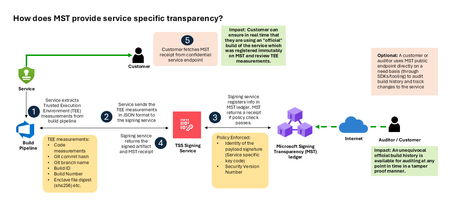
Today, Microsoft announces the general availability of Microsoft’s Signing Transparency (MST) – a first-of-its-kind capability that brings unprecedented visibility and trust to our software supply chain. With this release, Microsoft is leading the industry by recording the build of critical cloud services into a publicly readable and verifiable SCITT standard (Supply Chain Integrity, Transparency, and Trust) compliant blockchain ledger. This means every production software build for in scope services like Azure Attestation and Azure Managed HSM (Hardware Security Module), Azure confidential ledger, Microsoft Signing Transparency itself (and others over time) – is now logged in an immutable, tamper-evident record. Only builds that are in the MST ledger are deployed to production; this gives customers confidence that the supply chain for these critical services can be audited at anytime. Notably, the MST ledger is fully open source and built to align with the emerging IETF SCITT standard. By embracing SCITT’s principles and open protocols, Microsoft ensures that MST not only secures our own ecosystem but also contributes to a broader industry movement toward standardized supply chain transparency. The open-source MST ledger serves as a verifiable trust anchor that any organization or researcher can inspect, audit, or even integrate with their own tooling. MST itself meets the highest levels of transparency, backed by a tamper-proof confidential ledger, open-source, and independently verified. Specifically, we are making the foundation of our trust model transparent and accessible to everyone – reinforcing that trust must be earned through proof, not just promises. This launch marks a major milestone in our commitment to Zero Trust principles, extending “never trust, always verify” all the way into the build itself. Building on a public preview introduced late last year, MST’s general availability delivers verifiable transparency at the software level. It transforms traditional code signing with an additive trust layer that is accessible via an open verification model. Every new software update is accompanied by a publicly auditable proof of integrity, enabling security teams to proactively confirm that each update is authentic and unaltered. To help organizations get the most out of this capability, we are also introducing a free tool to explore the contents – Ledger Explorer – an offline tool that allows security teams to examine MST ledger entries, verify cryptographic proofs, and even validate the ledger’s integrity independently. This tool, combined with MST’s open design, ensures that every Microsoft customer – and the broader community – can hold us accountable in real time for the software we run on their behalf. Key Benefits of Microsoft’s Signing Transparency (MST) Verified Code Integrity – Every software release is cryptographically logged in MST’s ledgers. This makes each build tamper-evident and traceable. If an attacker attempts to inject malicious code or sign an unauthorized update, it will be evident through the well-defined validation step built into the SCITT standard. Organizations gain the assurance that code integrity can be independently confirmed at any time. Independent Verification & Zero Trust – MST enables customers and auditors to verify software authenticity on their own, without having to solely rely on vendor attestations. For each update, Microsoft provides a transparency “receipt” (proof of logging) that you can use to prove the update was officially published and unaltered. This fosters a “don’t just trust, verify” approach, empowering security teams to double-check everything running in their environment aligns with what Microsoft intended. Audit-Trail & Compliance – The transparency ledger creates a permanent, auditable timeline of code deployments. Every entry is a record of what was released and when, backed by cryptographic proofs. This simplifies compliance reporting and accelerates forensic analysis. In the event of an incident, you can quickly audit the ledger to see if any unexpected code was introduced. For highly regulated industries, MST offers concrete evidence of software integrity and policy compliance over time. Leadership & Open Standards – We are delivering real transparency now, encouraging a future where all critical software is released with verifiable integrity. MST’s open source implementation and SCITT-compliant design exemplify our commitment to openness and collaboration. We believe widespread adoption of these standards will strengthen supply chain security for everyone, making trust verification a universal practice. Next Steps Microsoft’s Signing Transparency is more than a new security feature and shapes the advances in trust technology. As threats grow more sophisticated, we must evolve the way we assure our customers about the software they depend on. With MST now generally available, we are leading by example: proving that it is possible to open up the traditionally opaque process of software deployment and turn it into a source of strength and trust, i.e., empowering each person with verifiable transparency. We invite the industry to join us on this journey and get started by reading the documentation and exploring Ledger Explorer today! Together, by embracing transparency and open standards, we can turn “trust but verify” from a slogan into an everyday reality for digital infrastructure.2.8KViews2likes3CommentsUnlocking the next frontier of Local AI on Windows for Telecommunications
At Build 2026, we announced significant new capabilities across our on-device AI platform that expand what’s possible at the edge, in the field, and in the network operations center. This post covers two key areas and what they mean for telecom: new capabilities in Microsoft Foundry on Windows, and the introduction of secure agent execution and governance on Windows. Before we go further, let’s be clear about one thing: this is not a cloud-versus-device story. Cloud remains essential for training, orchestration, and shared intelligence across the network. What on-device AI does is expand the operating model. It adds a new execution tier that unlocks scenarios that were harder to deliver before because of latency, resiliency, privacy, or runtime constraints. The goal is to place AI where it creates the most value, and for many telecom workloads, that’s closer to the point of action. What Local AI unlocks for telecom When you bring AI inference to the device, it opens up scenarios that may have been limited in cloud-only architectures: Customer care at the point of interaction. Agents that can respond faster, with richer context, without round-tripping to a data center. Field and frontline continuity. Workflows that keep working when connectivity is weak, inconsistent, or unavailable: remote cell sites, underground facilities, rural deployments. Time-sensitive network operations. Decisions that need to happen quickly at the edge without cloud latency. Privacy and sovereignty by default. Inference on sensitive telemetry and customer data without it leaving the jurisdiction. Local agents that act, not just advise. A shift from generic copilots to agents that take action on the device, with better support for long-running execution, tool use, and reliable runtime behavior. Windows is where much of telecom’s enterprise and operational work already happens. NOC workstations, field technician laptops, back-office systems, retail point-of-sale. That installed base creates an opportunity: make the existing device a better surface for local AI execution without requiring new hardware or new deployment footprints. The differentiator isn’t just model runtime. It’s the complete environment: model execution, agent runtime, containment, and governance, integrated at the OS level. At Build 2026, we shipped the next wave of platform capabilities that make this concrete. Microsoft Foundry on Windows: new capabilities at Build 2026 Microsoft Foundry on Windows is our unified local AI platform, first introduced at Build 2025 and generally available since earlier this year. It gives developers and operations teams three complementary ways to run AI on-device, with hardware abstraction across NPU, GPU, and CPU. At Build 2026, we announced new capabilities across each layer of the stack that significantly expand what’s possible for telecom workloads. Windows AI APIs: expanding reach and capability Windows AI APIs provide the fastest path to integrating local AI into applications. These are ready-to-use, OS-managed capabilities powered by on-device models. These are the same capabilities that power Copilot+ local AI experiences today. Outlook Summarize, Alt Text Generation, and Teams video upscaling all run through these APIs locally on Copilot+ PCs. When you build with Windows AI APIs, you’re tapping into the same proven inference pipeline that millions of Windows users already rely on daily. New at Build 2026: We are expanding Windows AI APIs beyond NPUs to CPUs and GPUs, bringing local AI experiences to a much broader set of Windows 11 devices. We’re also introducing a new Speech Recognition API (aka.ms/speech-recognition-api) for real-time on-device speech-to-text. Unlocked potential for telecom: Field technicians use on-device OCR to read equipment serial numbers, fiber labels, and antenna configurations offline at remote cell sites. No connectivity, no cloud dependency, no delay. NOC analysts run local semantic search across alarm logs and trouble tickets for faster root-cause analysis, without sending sensitive network data off-premises. The new Speech Recognition API enables on-device transcription of field calls, dispatch audio, and customer interactions, even without network connectivity. This unlocks new workflows for dictation-enabled maintenance reports and real-time captioning in operations centers. With GPU and CPU expansion, these capabilities now reach the broader fleet of Windows devices already deployed across telecom operations, beyond Copilot+ PCs. Learn more at aka.ms/WinAI/APIs. Foundry Local: flexible local inference on standard enterprise hardware Foundry Local is Microsoft’s cross-platform local AI runtime that lets developers run AI directly into their applications without cloud dependency and cloud token costs. First previewed at Build 2025 and generally available since April 2026, Foundry Local is designed for scenarios where you need more flexibility than a pre-built API: running open-source language and vision models on-device with full control over inference and acceleration. Foundry Local supports five SDKs (C#, Python, JavaScript, Rust, and C++) and works on standard enterprise hardware. It is not limited to Copilot+ PCs. It handles model packaging, runtime fragmentation, hardware differences, and deployment complexity so teams can focus on shipping features rather than stitching infrastructure together. With access to the Foundry model catalog, developers can run models for chat completions, embeddings, live audio transcription, and vision-language tasks entirely on-device. New at Build 2026: The 1.2.0 release expands language support in the Live Transcription API, introduces inference cancellation for cleanly stopping in-flight requests, and upgrades to Windows ML (WinML) 2.0 for NPU and GPU acceleration without extra installation steps. Cross-region catalog routing now delivers faster model downloads for end users. Foundry Local also adds a Responses API for structured agentic interactions including tool calling and multimodal vision-language input. Foundry Local is already being used across privacy-sensitive, performance-sensitive, and hardware-diverse scenarios. From local assistants and document workflows to multimodal context collection and enterprise AI pipelines, developers are using it to reduce platform complexity and deliver production-ready AI experiences faster. Learn more at devblogs.microsoft.com/foundry. Unlocked potential for telecom: Data sovereignty. Run inference on network telemetry, customer records, and performance data without it leaving your data center or jurisdiction. Critical for regulated markets and government contracts. Autonomous network operations. Deploy local models that triage alarms, correlate events across network domains (transport, IP, radio), and recommend remediation actions, all on-prem with enterprise-grade privacy and offline operation. Disconnected scenarios. Field crews in rural tower deployments or underground facilities get full AI-assisted workflows without depending on backhaul connectivity. Custom model flexibility. Fine-tune models on your proprietary network data (topology, KPIs, fault patterns) and deploy them locally through Foundry without vendor lock-in. Windows ML: the foundation for local AI at scale Windows ML, generally available since September 2025, is the native ONNX Runtime-based engine for deploying custom AI models across Windows devices. It acts as a hardware abstraction layer to easily distribute models across CPUs, GPUs, and NPUs while ensuring the best on-device performance. Windows ML is also the foundational layer that powers Foundry Local, providing broad silicon support and a consistent deployment experience. At Build 2026, Windows ML continues to expand its silicon support and serves as the engine delivering unmetered intelligence on Windows, enabling the new Aion models and expanded API reach described above. Unlocked potential for telecom: Predictive maintenance. Deploy custom ONNX models trained on your specific equipment failure data to field devices or edge nodes. Predict faults before they become outages. RF optimization. Run propagation models or beamforming optimization algorithms on-device at cell sites for real-time RAN tuning without cloud latency. Anomaly detection. Deploy bespoke network anomaly detection models, trained on your traffic baselines, to edge servers for instant threat and fraud identification. Bring-your-own-model. CSPs with mature data science teams deploy proprietary models across their Windows fleet without being constrained by a single vendor ecosystem. Local AI Telecommunications App demo We’ve built a sample field technician application that combines Windows AI APIs (on-device OCR for reading equipment labels) with Foundry Local (a workflow that diagnoses the fault, recommends a fix, and generates a work order), all running locally with zero cloud dependency. (Note: This is NOT a Microsoft licensed product or application. This is NOT an officially supported Microsoft offering. Microsoft assumes no responsibility or liability for any use of this code.) GitHub: https://github.com/opesam/LocalAIDevelopment/tree/telecom-field-ai Introducing Aion: a new family of models for local AI At Build 2026, we introduced Aion, a new family of on-device models purpose-built for local execution on Windows. Aion represents a new generation of small language models that are smaller, faster, and more efficient than our previous Windows OS SLMs. Over time, Aion models across multiple parts of the on-device AI stack, though they have not yet been fully productized into specific APIs or features. Try Aion at aka.ms/tryaion The Aion family includes two models at launch: Aion 1.0 Instruct is optimized for instruction-following tasks: summarization, text generation, classification, and general-purpose language understanding. It is smaller and more efficient than our previous Windows OS SLM, delivering improved quality at lower compute cost. Aion 1.0 Plan is a 14-billion parameter reasoning and tool-calling model with 32K context, designed for agentic workflows. It can reason over user intent, invoke tools, manage files, and orchestrate sub-agents, enabling fully agentic execution on-device without cloud dependency. These models point toward a future where the full local AI stack benefits from purpose-built, efficient on-device intelligence. As they are integrated across APIs and features, they will unlock new classes of experiences for developers building on Windows Unlocked potential for telecom: A path to agentic network operations. As Aion models mature and integrate across the platform, they open the door to local agents that can triage alarms, correlate events across network domains, and recommend remediation actions entirely on-prem. On-device planning and orchestration. Aion’s reasoning and tool-calling direction enables multi-step workflows: a field technician’s device diagnosing a fault, looking up parts inventory, generating a work order, and scheduling a follow-up, all locally without waiting for a cloud round-trip. Efficient local intelligence. Aion’s smaller footprint and improved efficiency mean these capabilities will run well on the existing Windows hardware already deployed across telecom operations, without requiring top-tier GPU resources. Secure agent execution and governance on Windows Running models on-device is one thing. Running agents on-device, agents that take actions, access systems, and operate continuously, is a different challenge entirely. The question every CSP asks is the same: how do we let agents operate with enough autonomy to be useful, while maintaining the governance and security posture our business demands? At Build 2026, we introduced new capabilities that address this directly. Introducing Microsoft Execution Containers (MXC) Microsoft Execution Containers (MXC), introduced at Build 2026, is a policy-driven execution layer integrated into Windows and WSL. Developers declare what an agent can access (files, network, system resources) and MXC enforces those boundaries at runtime. It is not a single isolation technology. It is a composable spectrum: from lightweight process isolation to session isolation to full micro-VMs, dynamically matched to the risk profile of the workload. Get started at github.com/microsoft/mxc. Every agent running inside MXC is bound to an identity, either local or cloud-provisioned through Entra, so every action is attributable, auditable, and governed at the kernel level. MXC is delivered as an SDK, now available in early preview. OpenAI and NVIDIA are already building on it. Unlocked potential for telecom: OSS/BSS protection. Constrain agents that interact with production network management systems to read-only access. Prevent accidental or malicious configuration changes to live network elements. Multi-vendor agent isolation. When you deploy AI agents from multiple vendors (RAN analytics, transport optimization, independent fault correlation), each operates within strict boundaries. No cross-contamination of data or access between vendor agents. Regulatory auditability. Every agent action is attributable to a governed identity. Essential for telecom regulatory compliance: data retention, lawful intercept boundaries, GDPR, local privacy regulations. Zero-trust agent architecture. MXC enables a zero-trust posture for AI agents: assume breach, verify continuously, limit blast radius. This maps directly to the security frameworks telecom already operates within (3GPP, NIST CSF). Edge deployment security. Agents running at cell sites or multi-access edge compute nodes operate within kernel-enforced boundaries, even in physically less secure environments. Learn more at: Windows Platform Security for AI Agents and aka.ms/BUILD_SecurityBlog Windows 365 for Agents: enterprise governance for agent fleets Windows 365 for Agents, generally available since May 2026, provides computer-using agents with secure, managed Cloud PCs to execute enterprise workflows. It is the enterprise-grade platform for discovering, governing, and securing AI agents at scale, whether those agents are built by Microsoft, third parties, or your own teams. New at Build 2026: Windows 365 for Agents now integrates natively with MXC on Windows, delivering Defender, Entra, Intune, and Purview protections so that security and IT teams can constrain and secure local agents to prevent enterprise risk. This integration is available in preview starting July 2026. Windows 365 for Agents provides end-to-end observability across your entire agent estate. It surfaces “shadow AI”: agents that have been deployed across the organization without IT visibility or approval. Agents run in secure, managed Cloud PC environments (learn more), fully separate from user machines, for executing enterprise workflows that require a full desktop context. Unlocked potential for telecom: Agent fleet management at scale. CSPs may operate hundreds or thousands of AI agents across network domains: core, transport, access, customer operations. Windows 365 for Agents provides a single pane of glass for visibility and governance. Think of it as a network management system, but for AI agents. Shadow AI discovery. Identify agents that business units or vendors have deployed without IT approval, a growing risk in large telecom organizations where multiple vendor ecosystems operate simultaneously. Policy-driven autonomy. Define precisely what each class of agent can do. A network healing agent can restart services but cannot modify routing tables. A customer service agent can access CRM but cannot process billing adjustments above a threshold. Compliance and data governance. Purview integration ensures that agents handling customer PII (call detail records, location data, subscriber information) comply with GDPR, local telecom regulations, and data residency requirements. Operational continuity. If an autonomous agent misbehaves in a live network, operators can detect, halt, and remediate before customer impact. Mission-critical for the five-nines availability telecom demands. Why Local AI matters now for Telecommunications Local AI is not a retreat from cloud. It is an expansion of what AI can do across the telecom operating model. Build 2026 delivered the next wave of capabilities CSPs need to move from experimentation to execution: expanded local inference that reaches more devices and more scenarios, a new generation of on-device models purpose-built for agentic reasoning, and for the first time, OS-level containment and governance for autonomous agents. Microsoft Foundry on Windows gives you the inference engine: pre-built APIs for quick wins, an open-source runtime for agentic workflows, and a custom model deployment layer for your proprietary workloads. MXC and Windows 365 for Agents give you the guardrails: containment, identity, policy, and observability for every agent in your fleet. Telecom has always operated at the intersection of scale, reliability, and trust. The scenarios where on-device AI creates the most value (customer operations, field workflows, network operations, autonomous remediation) are exactly the scenarios where latency, resiliency, privacy, and governance matter most. The question for CSPs is no longer whether to run AI locally. It’s which workloads benefit most from this new execution tier, and how quickly you can get started. Get started Visit the Microsoft booth at DTW Ignite 2026 in Copenhagen (June 23–25) Reach out for a Local AI pitch and envisioning conversation: aka.ms/opesamolowu Explore Microsoft Foundry on Windows: learn.microsoft.com/windows/ai Get started with MXC: github.com/microsoft/mxc Learn more about Windows 365 for Agents: Windows 365 for Agents documentation Read the full Build 2026 Windows platform blog: Build 2026: Furthering Windows as the trusted platform for development
From Idea to Production — Building Microsoft Security Store Advisor with an Agentic SDLC
From AI-assisted coding to Agentic SDLC: Lessons from Microsoft Security Store If every developer on your team is using AI, why does the team still feel like it's starting from scratch on every feature? In this post, the Microsoft Security Store engineering team shares how we moved beyond one-off AI assists to an Agentic SDLC — a repeatable system where prompts, patterns, and reviews compound into team-wide velocity, quality, and security.
Accelerating revenue in telecommunications through Agentic Sales Processes
Executive Summary Telecommunications providers are under unprecedented pressure to reignite revenue growth amid market saturation, commoditization of core services, rising infrastructure costs, and intensifying competition from digital‑native players. At the same time, customers demand seamless, personalized, digital‑first experiences—while regulatory constraints, legacy systems, and talent gaps limit agility and innovation. These forces require a fundamental shift in how telecoms generate, manage, and scale revenue. Whitepaper This whitepaper presents a practical framework for accelerating revenue generation through agentic AI—intelligent, autonomous agents embedded across sales, marketing, and post‑sale processes. These agents augment human teams by analyzing data, orchestrating workflows, recommending next‑best actions, and automating routine tasks across the lead‑to‑cash lifecycle. By integrating agentic capabilities into existing CRM and business systems and aligning with TM Forum ODA and eTOM standards, service providers can modernize commercial operations without disrupting core platforms. The result is faster deal velocity, more personalized customer engagement, improved conversion and retention, and a scalable foundation for monetizing 5G, IoT, and emerging services. Agentic AI enables telecom leaders to move from reactive, cost‑driven models to intelligent, outcome‑driven revenue engines built for long‑term growth. eBook The eBook explores how agentic AI, based on Copilot Studio, can fundamentally reinvent telecom sales, marketing, and customer engagement by shifting organizations from reactive, manual processes to autonomous, intelligent, and continuously learning sales systems. Specifically, this eBook examines: Why traditional telecom sales models are failing. What “agentic sales systems” are. How agentic AI transforms the sales lifecycle. The business impact for telecom operators. Agentic AI is redefining how telecom providers grow, engage, and compete in an increasingly digital market. By moving beyond reactive, manual sales models and embracing intelligent, autonomous and adaptive agents, operators can unlock faster revenue growth, deeper customer relationships, and more agile go‑to‑market execution. The journey does not require a wholesale transformation—success starts with focused, modular deployments that deliver measurable impact and scale over time. Those who act now will position themselves as future‑ready, customer‑centric organizations, equipped to lead in the next era of telecom sales and engagement. Start small, scale fast, and lead the next wave of telecom innovation.The Rise of Agentic BSS in the IQ Era: from Systems of Record to Systems of Outcome
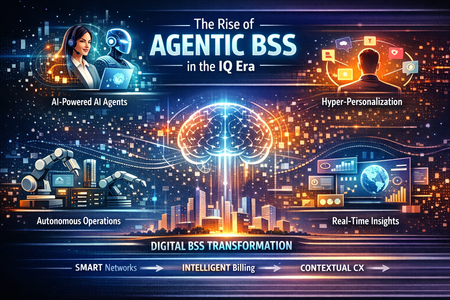
Authors: Rode Kirk and Rick Lievano Telecom Business Support Systems (BSS) are entering their most consequential transformation since digital billing. As networks become programmable, products become composable, and customers expect real‑time, personalized experiences, the traditional BSS stack—designed for linear processes and human‑driven workflows—has reached its limits. Agentic AI changes this equation. Agentic BSS represents a new operating model where intelligent agents continuously sense, decide, and act across the commercial lifecycle—turning BSS from a system of record into a system of outcome. What the BSS Layer Signifies in Telecom The BSS layer is the commercial and customer‑facing brain of a communications service provider. It governs how services are designed, sold, priced, ordered, billed, assured, and monetized across consumer, enterprise, and partner ecosystems. Core BSS domains include: Product and offer catalog management. Customer and account management Order management and orchestration. Charging, billing, and revenue management Partner and ecosystem settlement Modern BSS determines a Communications Service Provider’s (CSP) ability to launch new services quickly, monetize 5G and IoT, support B2B2X ecosystems, and deliver personalized digital experiences. Why BSS Is Both Vital—and Inherently Complex BSS complexity is not accidental; it reflects telecom reality: Extreme process coupling across sales, fulfillment, billing, and care. High‑volume, real‑time transactions at massive scale Regulatory and financial precision with zero tolerance for error Multi‑vendor stacks accumulated over decades. Constant change driven by new pricing models, partners, and technologies. Legacy BSS platforms were never designed for continuous optimization or autonomous decision making. As a result, CSPs often experience slow product launches, high operational costs, and fragmented customer journeys, as legacy technical debt persists—even after modernization efforts. The Top Five Agentic BSS Use Cases Agentic BSS introduces goal‑driven AI agents that operate across BSS domains, rather than within single applications. Autonomous Quote‑to‑Order Orchestration - Agents interpret intent, validate eligibility, configure products, orchestrate orders across domains, and resolve exceptions in real time—dramatically reducing cycle times (see T-Mobile US Retail story). Intelligent Revenue Assurance & Leakage Prevention - Agents continuously monitor usage, billing, and settlement patterns, detect anomalies, and initiate corrective actions before revenue is lost. Adaptive Product & Pricing Optimization - Agents analyze demand, usage, and margin signals to dynamically recommend pricing, bundles, and promotions aligned to customer and market conditions. Proactive Customer Lifecycle Management - Agents predict churn, trigger retention actions, personalize offers, and coordinate care interventions across channels. Partner & Ecosystem Automation - Agents manage onboarding, contract compliance, usage settlement, and dispute resolution across B2B2X ecosystems—at machine speed. These use cases shift BSS from reactive processing to continuous value optimization. AI-powered agents are transforming T‑Mobile US retail operations by acting as real-time copilots for frontline employees, helping them serve customers faster, smarter, and with greater confidence. Embedded directly into point-of-sale and service workflows, these agents surface personalized recommendations, explain complex plans and promotions in plain language, and guide associates’ step‑by‑step through upgrades, activations, and troubleshooting. By instantly pulling from customer history, device data, and current offers, agents reduce training dependency, shorten transaction times, and ensure consistent, policy‑aligned interactions across stores. The result is a more empowered retail workforce—able to focus less on navigating systems and more on delivering the high‑touch, consultative experience that drives customer satisfaction, loyalty, and sales. To learn more, see the full interview with T-Mobile’s Brian Hodel How Microsoft Copilot Studio Enables Agentic BSS Microsoft Copilot Studio (MCS) provides the orchestration layer for building, governing, and scaling agentic business processes. MCS democratizes AI by empowering every line‑of‑business owner to create AI agents that streamline and automate their work, turning domain expertise into measurable outcomes. It enables organizations to: Design goal‑oriented agents that reason across BSS workflows. Connect securely to enterprise systems using connectors and APIs. Govern actions with enterprise‑grade security, identity, and compliance. Deploy agents across channels including Microsoft Teams and digital front ends. With Model Context Protocol (MCP) now generally available in Microsoft’s Copilot Studio, agents can dynamically connect to external tools, knowledge servers, and APIs—automatically inheriting actions as systems evolve. This significantly reduces time to value, eliminates brittle point integrations, and allows BSS innovation to move at cloud speed. TM Forum, Open APIs, and Interoperability at Scale Microsoft is an active participant in the TM Forum Open Digital Architecture (ODA) ecosystem. TM Forum Open APIs provide standardized interfaces for customer, product, order, and billing domains—forming the interoperability foundation for Agentic BSS. Microsoft and TM Forum have demonstrated how Copilot technologies accelerate TM Forum Open API development, reducing boilerplate code and improving consistency across multi‑vendor environments. In practice: Copilot Studio agents invoke TM Forum Open APIs via secure connectors. MCP enables dynamic discovery and execution of BSS actions. Agents remain decoupled from vendor‑specific implementations. TM Forum states that MCP is becoming a foundational requirement for telecom, particularly for AI‑driven automation across BSS systems. As telecom operators and vendors experiment with agentic AI, the limiting factor is no longer AI’s ability to understand intent—but its inability to reliably and safely act on BSS systems without extensive custom integration. As explored in a recent article, MCP is a protocol must for telecommunications. IG1445 Open API & Model Context Protocol v1.0.0 explores how MCP complements and accelerates the vision of the TM Forum's Open Digital Architecture (ODA) Open API program. Leading BSS Vendors in the Agentic Ecosystem By leveraging connectors, exposed APIs or MCP Servers, Copilot Studio easily and securely integrates with leading third‑party BSS platforms, including: These platforms increasingly expose TM Forum aligned Open APIs and MCP Servers, enabling agentic orchestration without replacing core systems. Where MCP Accelerates Innovation Model Context Protocol (MCP) acts as the agentic control plane between Copilot Studio and the BSS ecosystem. MCP enables: Real‑time access to BSS tools and data Automatic synchronization as APIs evolves. Secure, governed, low‑maintenance integrations. This allows CSPs and partners to innovate above the BSS layer, without destabilizing it—unlocking faster experimentation, safer automation, and measurable business outcomes. Putting it All Together: Microsoft Copilot Studio in Action In partnership with Exos Systems, we have created an agentic BSS platform that demonstrates how AI agents built in Microsoft Copilot Studio can streamline and modernize core telecom BSS workflows. Refer to Exos Systems’ blog for additional insight into the TM Forum Open API MCP & API configuration and integration. Exos Systems delivers telecom‑focused IT services and BSS/OSS integration, powered by Exosphere—its cloud‑native, AI‑ready digital platform built on TM Forum Open API and ODA standards and strengthened through a Microsoft partnership. By integrating with TM Forum Open APIs and exposing capabilities through Microsoft 365 Copilot and Teams, the platform shows how conversational, human‑in‑the‑loop experiences can coexist with selective autonomous execution for event‑driven scenarios. The platform uses the Model Context Protocol (MCP) to decouple agents from vendor‑specific BSS implementations, enabling portability across BSS environments while maintaining governance, orchestration, and enterprise-grade access through Copilot Studio. “With Microsoft Copilot Studio, telcos can rapidly create BSS agents that connect via MCP servers to leverage TM Forum Open APIs, delivering interoperability and simplicity—turning industry standards into real‑time, intelligent customer and business experiences in days rather than months. Exos Systems is delighted to partner with Microsoft to facilitate this journey.” -Saleh Bari, CTO & Co-Founder The initial scope is anchored by three role‑aligned agents that illustrate practical, high‑value BSS use cases: Product Expert. Provides conversational access to product catalogs, eligibility, and guided upgrades. Billing Expert. Help customer service representatives explain billing anomalies by correlating bills and usage data. Order Expert. Supports both conversational order inquiries and autonomous remediation of failed orders. Together, these agents demonstrate how agentic AI can reduce friction across products, billing, and order operations while accelerating time to value. To see Copilot Studio in action and learn more about how agentic BSS can transform telecom operations, visit the Microsoft booth at Mobile World Congress for a live demo – and see how everyone in your organization can create agents that transform their work. Build Your Own Agent @ Mobile World Congress 2026 Step into the Microsoft booth and experience the future of AI firsthand with Build Your Own Agent. This interactive, hands-on experience puts you in the driver’s seat—showing how quickly you can design, customize, and deploy an AI agent tailored to your real business needs. In minutes, you will move from idea to action, connecting data, workflows, and intelligence to create an agent that works the way you do. Whether you are exploring AI for the first time or looking to scale agentic solutions across your organization, this is your chance to build, test, and walk away with a practical understanding of how AI agents can deliver real outcomes. Join us at MWC for a fast-paced, hands-on workshop where you will build a fully functional Billing Analysis AI Agent from scratch using Microsoft Copilot Studio. Move beyond the hype and build agents to solve complex telecom challenges using no-code/low-code orchestration. In this hands-on session, you will use Microsoft Copilot Studio to create an enterprise-grade agent that analyzes telecom billing data, detects anomalies, flags churn risks, and delivers role-specific insights—then publish it and access directly into Microsoft 365 Copilot. What you will accomplish Accelerated launch: You will build, fine-tune, test, and deploy the agent in under 45 mins. Insight Focused: Train your agent to do real-world tasks like detect anomalies, predict churn risks, generate reports and more. Advanced Orchestration: Ground agents in data and fine-tune prompt reasoning. Enterprise Activation: Publish your agent across organization and access using Microsoft 365 Copilot (UI for AI). Walk away with a proven, repeatable architectural pattern you can apply to countless AI use cases across your business. Hardware Microsoft will provide laptops for all participants. Participants may use their own devices if preferred; however, Microsoft will be unable to support any connectivity or device-related issues on personal equipment. REGISTER HERE or visit the Microsoft booth (Hall 3 3H30) during the event if you are interested in participating in the workshop. The Strategic Takeaway Agentic BSS is not about replacing BSS platforms. It is about elevating them—from transaction engines to intelligent, outcome‑driven systems. With Copilot Studio, TM Forum Open APIs, and MCP, Microsoft enables telecom providers to industrialize AI across the commercial core—driving speed, agility, and sustainable differentiation in the AI‑native telecom era.
AI-Powered RAN and the Intelligent Edge: Microsoft’s Vision for the Future of Telecom
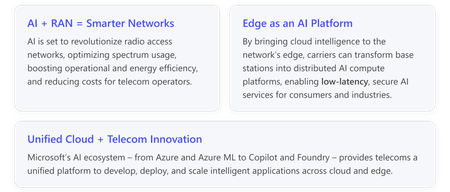
Artificial intelligence (AI) is rapidly converging with telecommunications infrastructure, promising to transform how networks are built, optimized, and monetized. Nowhere is this more evident than in the radio access network (RAN) – the crucial “last mile” that connects our devices to the digital world. At Mobile World Congress, Microsoft is sharing a strategic vision for AI in the RAN (AI-RAN) and intelligent edge computing. This vision centers on harnessing cloud and AI technologies to make telecom networks smarter, more efficient, and ready for new services. With decades of wireless research and a broad AI ecosystem spanning Azure to Copilot and Microsoft Foundry, Microsoft is partnering with the telecom industry to enable a new generation of AI-powered networks. A New Era of AI-RAN: AI Meets the Radio Network The concept of AI-RAN captures a threefold innovation in telecom networks, where AI and RAN technology intersect: AI for RAN: using advanced machine learning and AI algorithms to improve how RANs operate. By leveraging AI-based analytics and control, operators can dynamically optimize spectrum usage, network performance, and energy efficiency, leading to lower operational and capital expenditures. In practice, this means mobile networks that self-optimize – automatically adjusting parameters to reduce interference, enhance coverage, and cut power consumption without human intervention. AI on RAN: turning the RAN itself into a distributed AI computing engine. In this paradigm, the thousands of cell sites and edge data centers in a network can host AI inference workloads closer to end users. This intelligent edge approach allows telecom providers to offer new AI-driven services – from real-time translation to AR/VR and interactive gaming – with the ultra-low latency and data sovereignty that cloud alone cannot achieve. AI and RAN: creating a shared infrastructure where AI platforms and the RAN co-exist and collaborate. By co-locating AI resources with telecom network functions, operators unlock synergies like integrated sensing and communications (for example, using 5G cells as distributed sensors), and they can support “physical AI” use cases such as autonomous robots and smart factories at the edge. This convergence of AI and telecom infrastructure not only improves the network itself but also opens new revenue streams through innovative services delivered over 5G and future 6G networks. Microsoft envisions AI-infused RANs that are more than just communication channels – they become intelligent platforms for innovation. For instance, in recent trials, Microsoft researchers demonstrated AI systems that detect radio interference in real time by turning a 5G base station into a wideband spectrum analyzer. Similarly, an AI-driven anomaly detection system can continuously learn a network’s normal behavior and spot irregularities before they cause outages, helping prevent failures and improve reliability. These examples illustrate how applying AI to RAN data can translate into more resilient networks and better user experiences. Edge AI: Bringing Cloud Intelligence Closer The push for edge AI in telecom is about extending the power of the cloud out to the network’s edge, closer to where data is generated and consumed. This is crucial for applications that demand instantaneous processing and response, or that must keep data local for privacy and security. In a traditional setup, complex AI models live in the cloud, and lightweight AI runs on devices. But many new scenarios – such as unmanned aerial vehicle, autonomous mobile robot, or industrial IoT – require a middle ground. The telecom network’s edge (for example, in 5G base stations or nearby edge data centers) can serve as that ideal “in-between” AI execution layer. Edge AI offers several strategic advantages for operators and enterprises: Ultra-low latency: By processing data on edge servers just one “hop” away from end-users, critical applications (like autonomous driving or remote robotic control) can respond in milliseconds, far faster than sending data to distant cloud servers. Data sovereignty and privacy: Keeping sensitive data (such as video feeds, industrial sensor data, or health information) within local networks or on-premises helps meet regulatory and privacy requirements. AI at the edge can analyze data without that data ever leaving the telecom’s domain. Bandwidth optimization: By processing and filtering data locally, only the most important insights (or lightly compressed data) are sent to the cloud. This reduces backhaul traffic and lowers costs. Resilience and continuity: Edge AI systems can continue to operate even when connectivity to cloud is limited, ensuring critical services remain available. In short, intelligent edge computing transforms telecom networks into platforms for innovation. A prime example is the concept of “physical AI” – where AI-driven services control physical devices in real time via the network. Imagine factory robots or autonomous drones connected to a 5G network: with edge AI, heavy computation (like computer vision or coordination algorithms) can run on nearby servers, leveraging GPUs at the base station or aggregation site. Microsoft’s research has shown that offloading robotics AI workloads from onboard devices to edge GPUs can improve response times dramatically – in one scenario, cutting inference latency from over a second on a device to under 100 milliseconds at the edge. This kind of performance boost can make previously impossible applications feasible, from real-time hazard detection in smart cities to advanced augmented reality experiences. Unifying Cloud and Telecom through Microsoft’s AI Ecosystem Achieving the AI-RAN and edge vision requires more than just ideas – it demands a cohesive platform that brings cloud technology into the heart of telecom networks. This is where Microsoft’s broad AI and cloud ecosystem plays a pivotal role. Azure’s cloud platform provides the robust, scalable foundation. Telecom operators can run key network functions in Azure (such as 4G/5G core networks) and leverage Azure’s global infrastructure for high performance and elasticity. At the same time, Azure’s capabilities extend on-premises and to the edge via Azure Arc, enabling a single pane of glass for managing resources across public cloud, private data centers, and network edge sites. This means operators can deploy and manage AI models or applications on distributed RAN edge servers as easily as in the cloud – achieving “zero-touch” automation and unified operations across their entire network. Microsoft’s AI platforms and tools further empower telecom innovation. With Azure Machine Learning and the new Microsoft Foundry platform, operators and partners can train, fine-tune, and deploy state-of-the-art AI models for their unique needs. In fact, Microsoft’s AI ecosystem includes thousands of advanced models – from the latest OpenAI GPT-5.2 and domain-specific models, to a vast catalog of open-source models from partners like Anthropic, Meta, and Mistral – all available through Foundry for use in custom solutions. Likewise, Microsoft’s growing family of Copilot experiences and AI agent services can be harnessed to improve telecom operations and customer experiences. For example, the Network Operations Agent (NOA) Framework demonstrates how a service desk AI agent might assist network engineers by intelligently parsing through network alerts and suggesting fixes, while different agents could help automate customer support with industry-specific expertise. Under the hood, developers have access to powerful frameworks like the Semantic Kernel and Azure’s AI libraries to build their own telecom-focused AI applications and xApps (RAN applications) that run on cloud or edge infrastructure. Microsoft’s vision is to make developing AI-driven network solutions as seamless as any cloud application development – develop in Azure, deploy to the RAN. Crucially, all these capabilities are grounded in an open, standards-based approach. Microsoft is working closely with the industry to support Open RAN standards and has collaborated with leading operators and vendors on initiatives like Project Janus – an open RAN programmability platform that exposes rich RAN telemetry and control to AI algorithms. By embracing open interfaces and partnering across the telecom ecosystem, Microsoft ensures that AI solutions can plug into existing networks and equipment regardless of vendor, protecting operators’ investments while extending their capabilities. Microsoft is also a founding member of the global AI-RAN Alliance, a cross-industry effort to accelerate AI-native RAN technologies and establish best practices for integrating AI into next-generation networks. From Research to Reality: Innovation with Partners Microsoft’s leadership in AI and cloud is backed by deep research and real-world experimentation. Microsoft Research has been pushing the boundaries of wireless networking for over 20 years. Today, that research is yielding dividends in the form of new telecom technologies: Microsoft’s researchers have constructed a live AI-RAN testbed network across two global innovation hubs. This 24/7 private 5G network – spanning more than 30 cloud-controlled cell sites on Microsoft’s Redmond (USA) and Cambridge (UK) campuses – serves as a blueprint for the future RAN. It is fully software-defined, cloud-managed, and open, allowing internal teams to develop and test advanced 5G/6G capabilities like AI-driven optimization, edge robotics, and healthcare applications in a real-world environment. Insights from these efforts are shared with the industry and academy, helping define 6G-era concepts such as real-time RAN intelligent control and AI-native RAN architectures. Microsoft’s research prototypes (including reference designs and proofs-of-concept) offer operators a head start in understanding how to implement AI in their networks – from intelligent resource allocation to network slicing and beyond. Collaboration is key: Microsoft works hand-in-hand with major communication service providers (CSPs), network equipment manufacturers, and startups to bring these innovations to production. Joint trials and proof-of-concepts have demonstrated use cases like interference detection, energy-efficient RAN automation, and near-real-time network anomaly detection in live networks. By co-innovating with the telecom community, Microsoft ensures that its AI solutions align with real operational needs and can be deployed in multivendor environments. A Strategic Path Forward for the Telecom Industry As the telecom sector looks to the future, the message is clear: AI and the network are no longer separate – they are becoming one and the same. Operators that embrace AI-powered RAN and edge computing stand to benefit from significant gains in efficiency and customer experience. They will be able to optimize network performance in ways not possible before, from squeezing more capacity out of spectrum to slashing energy usage during off-peak hours. At the same time, these intelligent networks can unlock new revenue opportunities by offering differentiated services – think of carriers providing AI-powered insights or automation services to enterprise customers, or delivering rich digital experiences (from cloud gaming to mixed reality) with quality guaranteed by AI-driven network slices. Microsoft’s role is to serve as a platform and partner for this industry-wide transformation. By bringing its unparalleled cloud and AI ecosystem to the telecom domain, Microsoft is helping operators transform into hyperscale tech-driven enterprises. That means Azure infrastructure for carrier-grade reliability and scale, Azure ML and data platforms to train models on telecom data, Copilot and agent technologies to augment both network operations and customer-facing services, and the Foundry catalog of AI models and tools to jumpstart innovation. All of these building blocks are designed to work in a hybrid, open environment – spanning public and private clouds, the network core, and the far edge – so that AI can run wherever it creates the most value, even directly in the RAN. The convergence of AI and telecom infrastructure is poised to define the next decade of networks. Microsoft’s strategic investments in AI-RAN and edge computing, combined with deep partnerships across the telecom ecosystem, position it as a key enabler of this transformation. As the industry gathers at MWC to discuss what’s next, Microsoft reaffirms its commitment to helping telecom operators and partners harness the power of AI, from the cloud to the intelligent edge, and to jointly create a future where networks aren’t just faster or more open – but truly smarter.Reimagining Telco with Microsoft: AI, TM Forum ODA, and Developer Innovation
The telecom industry is undergoing a seismic shift—driven by AI, open digital architectures, and the urgent need for scalable, customer-centric innovation. At the heart of this transformation is TM Forum Innovate Americas 2025, a flagship event bringing together global leaders to reimagine the future of connectivity. Microsoft’s presence at this year’s event is both strategic and visionary. As a key partner in the telecom ecosystem, Microsoft is showcasing how its technologies—spanning AI, cloud, and developer tools—are enabling Communication Service Providers (CSPs) to modernize operations, accelerate innovation, and deliver exceptional customer experiences. 🔑 Key Themes Shaping the Conversation Connected Intelligence: Microsoft is championing a new model of collaboration—one where AI systems, teams, and technologies work together seamlessly to solve real-world problems. This approach breaks down silos and enables intelligent decision-making across the enterprise. AI-First Mindset: From network optimization to customer service, Microsoft is helping telcos embed AI into the fabric of their operations. The focus is on building shared data platforms, connected models, and orchestration frameworks that scale. Customer Experience & Efficiency: With rising expectations and increasing complexity, CSPs must deliver faster, smarter, and more personalized services. Microsoft’s solutions are designed to enhance agility, reduce friction, and elevate the end-user experience. As the event unfolds, Microsoft’s sessions and showcases will highlight how these themes come to life—through real-world implementations, collaborative frameworks, and developer-first tools. Thought Leadership & Sessions At TM Forum Innovate Americas 2025, Microsoft is not just showcasing technology—it’s sharing a bold vision for the future of telecom. Through a series of thought-provoking sessions led by industry experts, Microsoft is demonstrating how AI, open standards, and developer tools can converge to drive meaningful transformation across the telco ecosystem. From enabling intelligent collaboration through the Azure AI Foundry, to operationalizing AI and Open Digital Architecture (ODA) for autonomous networks, and empowering developers with GitHub Copilot, Microsoft’s contributions reflect a deep commitment to innovation, scalability, and interoperability. Each session offers a unique lens into how Microsoft is helping Communication Service Providers (CSPs) modernize their IT stacks, accelerate development, and deliver exceptional customer experiences. Microsoft Thought Leadership Sessions CASE STUDY: Connected Intelligence: multiplying AI value across the enterprise 📅Sep 10 1:30pm CDT Peter Huang, Senior Director, Technology, Network Data and AI T-Mobile Andres Gil, Industry Advisor/Business Developer, Telco, Media and Gaming Industry Microsoft CASE STUDY: From hype to impact: operationalizing AI in telco with TM Forum’s ODA and Open APIs 📅Sep 11 1:30pm CDT Puja Athale, Director - Telco Global Azure AI Lead Microsoft Connected Intelligence & Azure AI Foundry: Scaling AI Across the Telco Enterprise T-Mobile and Microsoft are spotlighting a transformative approach to enterprise AI: Connected Intelligence. The joint session explores how telcos can break down silos and unlock the full potential of AI by enabling strategic collaboration across systems, teams, and technologies. The core challenge they address is clear: AI in isolation cannot answer even the simplest customer questions. Whether it's billing, device performance, or network coverage, fragmented systems lead to blind spots, duplication, and poor customer outcomes. To overcome this, they propose a unified framework that blends technology and culture—because tech alone doesn’t scale, and culture alone doesn’t transform. Azure AI Foundry: The Engine Behind Connected Intelligence At the heart of this vision is Microsoft’s Azure AI Foundry, a shared AI platform designed to scale intelligence across the enterprise and a core component of Microsoft’s recently announced Network Operations Agent Framework. Connected Intelligence integrates: Agent Frameworks and Agent Catalogs for modular AI deployment Hundreds of TBs of daily data from network switches, device logs, and location records Enterprise-grade orchestration and data governance AI/ML models aligned with customer-level time series events This architecture enables reuse, speed, and alignment across people, organizations, and systems—turning data into actionable intelligence. Model Context Protocol (MCP): AI-to-AI Collaboration A standout innovation is the Model Context Protocol (MCP), which goes beyond traditional APIs. While APIs connect systems through data, MCP connects intelligence through context. It allows AI agents to dynamically discover and chain APIs without custom coding, enabling real-time collaboration across network operations, device management, and deployment workflows. By integrating MCP into the API fabric, Microsoft is laying the groundwork for agentic AI—where intelligent systems can autonomously interact, adapt, and scale across the telco ecosystem. From Hype to Impact: Operationalizing AI in Telco with TM Forum’s ODA and Open APIs The telecom industry is moving from hype to impact by operationalizing AI through TM Forum’s Open Digital Architecture (ODA) and Open APIs. The session, From hype to impact: operationalizing AI in telco with TM Forum’s ODA and Open APIs, explores how telcos can build AI-ready architectures, unlock data value for automation and AI agents, and scale responsibly with governance and ethics at the core. Microsoft’s collaboration with TM Forum is enabling telcos to modernize OSS/BSS systems using the ODA Canvas—a modular, cloud-native execution environment orchestrated with AI and powered by Microsoft Azure. This architecture supports plug-and-play integration of differentiated services, reduces integration costs by over 30%, and boosts developer productivity by more than 40% with GitHub Copilot. Learn how leading telcos like Telstra are scaling AI solutions such as “One Sentence Summary” and “Ask Telstra” across their contact centers and retail teams. These solutions, built on Azure AI Foundry, have delivered measurable impact: 90% of employees reported time savings and increased effectiveness, with a 20% reduction in follow-up contacts. Telstra’s success is underpinned by a modernized data ecosystem and strong governance frameworks that ensure ethical and secure AI deployment. From Chaos to Clarity with Observability Despite advances in operational tooling, fragmented observability remains a persistent challenge. Vendors often capture telemetry in incompatible formats, forcing operations teams to rely on improvised log aggregators and custom parsers that drive up costs and hinder rapid incident resolution. Microsoft’s latest contribution to the Open Digital Architecture (ODA) initiative directly tackles this issue with the ODA Observability Operator, now available as open source on GitHub. By enforcing a standardized logging contract, integrating seamlessly with Azure Monitor, and surfacing health metrics through TM Forum nonfunctional APIs, the operator streamlines telemetry across systems. Early trials have shown promising results—carriers significantly reduced the time needed to detect billing anomalies, enabling teams to shift from reactive troubleshooting to proactive optimization. Accelerating TM Forum Open API Development with GitHub Copilot As the telecom industry embraces open standards and modular architectures, Microsoft is empowering developers to move faster and smarter with GitHub Copilot—an AI-powered coding assistant that’s transforming how TM Forum (TMF) Open APIs are built and deployed. Why GitHub Copilot for TM Forum Open APIs? TMF Open APIs are a cornerstone of interoperability in telecom, offering over 100 standardized RESTful interfaces across domains like customer management, product catalog, and billing. But implementing these APIs can be time-consuming and repetitive. GitHub Copilot streamlines this process by: Autocompleting boilerplate code for TMF endpoints Suggesting API handlers and data models aligned with TMF specs Generating test plans and documentation Acting as an AI pair programmer that understands your code context This means developers can focus on business logic while Copilot handles the heavy lifting. Real-World Uses Telco developers benefit from powerful features in GitHub Copilot that streamline the development of TMF Open API services. One such feature is Agent Mode, which automates complex, multi-step tasks such as implementing TMF API flows, running tests, and correcting errors—saving developers significant time and effort. Another key capability is Copilot Chat, which provides conversational support directly within the IDE, helping developers debug code, validate against TMF specifications, and follow best practices with ease. Together, these tools enhance productivity and reduce friction in building compliant, scalable telecom solutions. For example, when building a Customer Management microservice using the TMF629 API, Copilot can suggest endpoint handlers, validate field names against the spec, and even help write README documentation or unit tests. 📈 Proven Productivity Gains CSPs like Proximus have reported significant productivity improvements using GitHub Copilot in their Network IT functions: 20–30% faster code writing 25–35% faster refactoring 80–90% improvement in documentation 40–50% gains in code compliance Other telcos like Vodafone, NOS, Orange, TELUS, and Lumen Technologies are also leveraging Copilot to accelerate innovation and reduce development friction. Best Practices for TMF API Projects To get the most out of Copilot: Use it for repetitive tasks and pattern recognition Always validate generated code against TMF specs Keep relevant spec files open to improve suggestion accuracy Use Copilot Chat for guidance on security, error handling, and optimization GitHub Copilot is more than a coding assistant—it’s a catalyst for telco transformation. By combining AI with TMF’s open standards, Microsoft is helping developers build faster, smarter, and more consistently across the telecom ecosystem. Learn more about how to configure and use GitHub Copilot in your own TMF Open API projects in our latest tech community blog. Microsoft’s Broader Vision for Telco Transformation Microsoft’s contributions reflect a comprehensive strategy to reshape the telecom landscape through scalable intelligence, open collaboration, and developer empowerment. At the core of Microsoft’s vision is the idea that AI must be connected, contextual, and reusable. The Azure AI Foundry and Model Context Protocol (MCP) exemplify this approach by enabling telcos to: Harness massive volumes of time-series data from networks, devices, and customer interactions Deploy modular AI agents that can collaborate across systems Orchestrate workflows that adapt in real time to changing conditions This architecture transforms fragmented data into actionable insights, allowing CSPs to move from reactive operations to proactive intelligence. Conclusion: Microsoft’s Strategic Alignment with TM Forum Microsoft’s participation at TM Forum Innovate Americas 2025 reflects a deep commitment to transforming the telecom industry through AI-first innovation, open collaboration, and developer empowerment. From T-Mobile’s vision for Connected Intelligence, to Microsoft’s roadmap for operationalizing AI and ODA, and the developer-centric acceleration enabled by GitHub Copilot, Microsoft is helping Communication Service Providers (CSPs) move faster, scale smarter, and deliver better customer experiences. By aligning with TM Forum’s goals—standardization, interoperability, and autonomous operations—Microsoft is not just participating in the conversation; it’s helping lead it. 📣 Call to Action Join Microsoft and other industry leaders at TM Forum Innovate Americas 2025 to explore the future of telco transformation. Whether you're a strategist, technologist, or developer, this is your opportunity to connect, learn, and shape what’s next.Supercharge Your TM Forum Open API Development with GitHub Copilot
Developing applications that implement TM Forum (TMF) Open APIs can be greatly accelerated with the help of GitHub Copilot, an AI-based coding assistant. By combining Copilot’s code-generation capabilities with TMF’s standardized API specifications, developers can speed up coding while adhering to industry standards. In this blog post, we’ll walk through how to set up a project with GitHub Copilot to write TMF Open API-based applications, including prerequisites, configuration steps, an example workflow for building an API, best practices, and additional tips. Introduction: GitHub Copilot and TM Forum Open APIs GitHub Copilot is an AI-powered coding assistant developed by GitHub and OpenAI. It integrates with popular editors (VS Code, Visual Studio, JetBrains IDEs, etc.) and uses advanced language models to autocomplete code and even generate entire functions based on context and natural language prompts. For example, Copilot can turn a comment like “// fetch customer by ID” into a code snippet that implements that logic. It was first introduced in 2021 and is available via subscription for developers and enterprises. Copilot has the ability to interpret the code and comments in your current file and suggest code that fits, essentially acting as an AI pair programmer. TMF Open APIs refers to a set of standardized REST APIs for telecom and digital service providers. The APIs are designed to enable seamless connectivity and interoperability across complex service ecosystems. In practice, the TMF Open API program has defined over 100 RESTful interface specifications covering various domains (such as customer management, product catalog, billing, etc.). These APIs share a common design guideline (TMF630) and data model, ensuring that services can be managed end-to-end in a consistent way. Why use GitHub Copilot for TMF Open API development? Integrating Copilot with TMF Open API streamlines telecom app development. Copilot helps generate boilerplate code, suggests API handling snippets, and provides usage examples, all in line with TMF specs. For developers building services like Customer Management or Product Catalog, Copilot autocompletes endpoints, models, and business logic based on learned standards, maintaining TMF consistency. Developers review and edit outputs, but Copilot eases repetitive tasks. The following sections will guide you on setup and practical use with TMF Open API. "With GitHub Copilot, TM Forum members can accelerate API development — reducing boilerplate coding, improving consistency with our Open API standards, and freeing developers to focus on innovation rather than routine tasks. We’d love to hear from members already experimenting with Copilot — your experiences, lessons, and best practices will help shape how we embed AI-assisted coding into the wider TM Forum Open API community." - Ian Holloway, Chief Architect, TM Forum Prerequisites for Setting Up the Project Before configuring GitHub Copilot in your project, make sure you have the following prerequisites in place: GitHub Copilot Access: You will need an active GitHub Copilot subscription or trial linked to your GitHub account. Copilot is a paid service (with a free trial for new users), so ensure your account is signed up for Copilot access. If you haven’t done this, go to the https://github.com/features/copilot and activate your subscription or trial. Supported IDE or Code Editor: Copilot works with several development environments. For the best experience, use a supported editor such as Visual Studio Code, Visual Studio 2022, Neovim, or JetBrains IDEs (like IntelliJ, PyCharm, etc) GitHub Account: Obviously, you need a GitHub account to use Copilot (since you must sign in to authorize the Copilot plugin). Ensure you have your GitHub credentials handy. Programming Language Environment: Set up the programming language/framework you plan to use for your TMF Open API application. Copilot supports a wide range of languages, including JavaScript/TypeScript, Python, Java, C#, etc., so choose one that suits your project. TMF Open API Specification: Obtain the TMF Open API specifications or documentation for the APIs you plan to implement. TM Forum provides downloadable Open API (Swagger) specs for each API (for example, the Customer Management API, Product Catalog API, etc.). Basic Domain Knowledge: While not strictly required, it helps to have a basic understanding of the TMF Open API domain you're working with. For example, know what “Customer Management API” or “Product Catalog API” is supposed to do at a high level (reading the TMF user guide can help). This will make it easier to prompt Copilot effectively and to validate its suggestions. For more training, please refer to the TM Forum Education Programs. With these prerequisites met, you’re ready to configure GitHub Copilot in your development environment and integrate it into your project workflow. Step-by-Step Guide: Configuring GitHub Copilot in Your IDE Setting up GitHub Copilot for your project is a one-time process. Here is a step-by-step guide using Visual Studio Code as the example IDE: Step 1: Install the GitHub Copilot Extension. Open Visual Studio Code and navigate to the Extensions view (you can click the Extensions icon on the left toolbar or press Ctrl+Shift+X on Windows / Cmd+Shift+X on Mac). In the Extensions marketplace search bar, type “GitHub Copilot”. You should see the GitHub Copilot extension by GitHub. Click Install to add it to VS Code. This will download and enable the Copilot plugin in your editor. Step 2: Authenticate with GitHub. After installation, Copilot will prompt you to sign in to GitHub to authorize the extension. Click “Sign in with GitHub”. Log in with your GitHub credentials and grant permission to the Copilot extension. Step 3: Enable Copilot in your Workspace/Project. Now that Copilot is installed and linked to your account, you should ensure it’s enabled for your current project. In VS Code, open the command palette (Ctrl+Shift+P / Cmd+Shift+P) and type “Copilot”. Look for a command like “GitHub Copilot: Enable/Disable”. Make sure it’s enabled (it should be by default after installation). At this point, GitHub Copilot is fully configured in your development environment. The next step is to actually use it in developing a TMF Open API application. We will now walk through writing code with Copilot’s assistance, focusing on a TMF Open API use case. Writing TMF Open API Apps Using GitHub Copilot Now for the fun part – using GitHub Copilot to help write an application that implements a TMF Open API. In this section, we’ll provide a step-by-step example of how you might develop a simple service using a TMF Open API (say, a Customer Management API) with Copilot’s assistance. The principles can be applied to any TMF API or indeed any standard API. Scenario: Let’s assume we want to build a minimal Customer Management microservice that conforms to the TMF629 Customer Management API (version 5.0) – which manages customer records. We will implement a simple endpoint to retrieve customer information by ID, as defined in the TMF API spec. We’ll use Node.js with an Express framework for this example, but you could choose Python (FastAPI/Flask) or Java (Spring Boot) similarly. The emphasis is on how Copilot assists with the coding. Step 1: Referring to TMF Open API GitHub API specifications Before coding, ensure you have the TMF629 API specification open or accessible for reference. For example, the spec might say there’s a GET operation at /tmf-api/customerManagement/v5/customer/{id} for retrieving a customer, and defines a Customer data model. If you have the YAML/JSON file, open it in a VS Code tab – this provides Copilot with a bunch of context (resource paths, field names, etc.). Copilot can use this textual context to inform its suggestions. The spec files can be downloaded from below link (needs a TM Forum registration and login): Customer Management API REST API v5.0 Open API Directory (Link for all API specifications) Step 2: Set up the project scaffolding. Initialize a new Node.js project (e.g., run npm init -y for a Node project, and install Express by running npm install express). Then create a file index.js (or app.js). In that file, start with the basic Express server setup: const express = require('express'); const app = express(); app.use(express.json()); // Start server on port 3000 app.listen(3000, () => { console.log('TMF Customer API service is running on port 3000'); }); As you type the above, Copilot may autocomplete parts of it. For instance, after writing app.listen(3000, () => {, you might see it suggest a console.log line. It’s standard boilerplate, so nothing magical yet, but it confirms Copilot is active. Step 3: Implement an API endpoint using Copilot. Consider the TMF629 Customer Management API Customer Management API TMF629-v5.0 Now, according to the TMF specification, the GET Customer by ID endpoint should be something like: GET https://host:port/tmf-api/customerManagement/v5/customer/{customerId} -> returns customer details. Let’s write a handler for this. Start typing the Express route definition. For example: // GET customer by ID app.get('/tmf-api/customerManagement/v5/customer/:id', (req, res) => { // }); The moment you write the path string and arrow function, Copilot is likely to recognize this as a request handler and may suggest code inside. It has context from the route path (which is quite specific and likely uncommon except from the TMF spec) and the comment. Copilot might suggest something like: fetching the customer by ID from a database or returning a placeholder. Since we haven’t defined a database in this simple scenario, let’s see what it does. Often, for a new route, Copilot might guess you want to send a response. It could for example suggest: // ... inside the handler: const customerId = req.params.id; // TODO: fetch customer from database (this is a Copilot suggestion comment) res.status(200).json({ id: customerId, name: "Sample Customer" }); }); Of course, this is just an example of what Copilot might do. In practice Copilot may complete the code differently. The key is that Copilot can help stub out the logic. If it doesn’t automatically fill it, you can nudge it by writing a comment or function description inside the handler, such as: // Find customer by ID and return as JSON After writing that comment, pause and see if Copilot suggests a code block that finds a customer. If we had more context (like a Customer array or database connector imported), it might try to use it. For now, you can accept a basic implementation (like returning a dummy object as above). Accepting the suggestion, our route becomes: // GET customer by ID app.get('/tmf-api/customerManagement/v5/customer/:id', (req, res) => { const customerId = req.params.id; // For demo, return a dummy customer object res.json({ id: customerId, name: "John Doe", status: "ACTIVE" }); }); Here we assumed Copilot suggested returning an object with some fields. If the TMF spec defines fields for a Customer (e.g., name, status), and especially if the spec file is open in another tab, Copilot might use actual field names from the spec in its suggestion because it “saw” them in the YAML. This is a huge win: it helps ensure your code uses correct field names and structure as per the standard. For instance, if the spec says a Customer resource has id, name, status, Copilot might include those. Always verify against the spec, but it often aligns. You continue this way for other operations (PUT/PATCH to update a customer, etc.), each time leveraging Copilot to write the initial code which you then adjust. Copilot can also help with non-HTTP logic: for example, if you need a function to validate an email address, just write the function signature and a comment, and it will likely fill it in (because such patterns are common in its training). Step 5: Use Copilot for documentation and examples. Copilot can even assist in writing documentation-like content or tests for your API. For instance, you could create a README.md for your project. Step 6: Iterate and refine with Copilot Chat (if available). GitHub Copilot includes a Chat mode (Copilot Chat) in VS Code, which acts like an assistant you can converse with in natural language. If you have Copilot Chat enabled, you can ask it things like “How do I implement pagination in this API according to TMF guidelines?” or “Suggest improvements for error handling in my code”. The chat can analyze your code base and provide guidance or even write code snippets to apply. GitHub Copilot provides the capability to choose your own model (e.g. GPT-4.1, GPT-4o, GPT-5 or Claude 3.5 Sonnet, etc.). This provides additional flexibility to Telco developers building solutions on TM Forum (TMF) Open APIs. This flexibility means developers aren’t limited to one generic AI assistant – they can select the model best suited to each coding task, whether for rapid code suggestions or complex problem-solving. Step 7: Test and validate against the TMF spec. Once you have your endpoints coded with Copilot’s help, it’s crucial to test them against the TMF specification to ensure correctness. Use tools like Postman or curl to call your API endpoints. For instance, GET http://localhost:3000/tmf-api/customerManagement/v5/customer/123 should return either a dummy customer (if using in-memory data as above) or a 404 if not found, as per spec expectations. Compare response structures to the TMF API definition. If something is missing or named incorrectly (say Copilot used customerName but spec expects name), adjust your code accordingly. Copilot is not guaranteed to produce 100% correct or updated spec implementations – it provides a helpful draft, but you are responsible for aligning it exactly with TMF’s definitions. During testing, you might encounter bugs or mismatches. This is another point where Copilot can assist: if you get an error or exception, you can paste it into Copilot Chat or as a comment and prompt Copilot to help fix it. For example, if you see your server crashes on a null reference, you can write a comment // Copilot: fix null reference in customer lookup near the code, and it might suggest a null-check. Best Practices and Tips for Using Copilot with TMF Open APIs To use GitHub Copilot efficiently for TMF Open API development, follow these key practices: Apply Copilot for Repetitive Tasks: When implementing endpoints with similar logic (e.g., CRUD operations), use an initial example as a template. Copilot will recognise patterns and help adapt code for new entities. Prompt Clearly and Iterate: Refine prompts to get better suggestions; add specifics in comments for improved results. If output isn't right, adjust your instructions for more detail. Verify Against TMF Standards: Copilot's knowledge may not reflect the latest TMF specs. Double-check generated code against official documentation and provide context from newer specs when necessary. Incorporate Security and Quality Checks: Always validate Copilot’s code for security and proper input handling. Use Copilot Chat for advice on improving validation and ensure you meet industry standards (e.g., OAuth). Learn From Suggestions: Use Copilot to expand your skills, especially if you're new to a language or framework, but confirm that its examples suit your use case. Don’t Over Rely on Automation: Copilot is best for boilerplate and common patterns; customise business logic and architecture-specific code yourself. Keep Relevant Files Open: Copilot works best with focused context. Close unrelated files to improve suggestion quality. Update Copilot Regularly: Keep your extension up-to-date and try different AI models for improved performance. Following these principles will help make Copilot a productive partner in TMF Open API projects, offering speed while maintaining adherence to standards. CSPs Leveraging GitHub Copilot Multiple Telco customers across the globe have adopted GitHub Copilot and have achieved a significant boost in their developer productivity. In particular, Proximus has achieved below productivity benefits by adopting GitHub Copilot in their Network IT function. Code Test Write Code Refactor Code Documentation Code Review Code Compliance Unit Test ↑20-30% ↑25-35% ↑80 - 90% ↑5-10% ↑40 – 50% ↑20-30% More details here: (2) Transforming Telecommunications with Generative AI: Proximus and TCS's GitHub Copilot Journey | LinkedIn Other Telco Customer Stories NOS empowers developer collaboration and innovation on GitHub | Microsoft Customer Stories Orange: creating value for its lines of businesses in the age of generative AI with Azure OpenAI Service and GitHub Copilot | Microsoft Customer Stories With GitHub, Canadian company TELUS aims to bring ‘focus, flow and joy’ to developers - Source https://github.com/customer-stories/telus Lumen Technologies accelerates dev productivity, sees financial gains with GitHub Copilot, Azure DevOps, and Visual Studio | Microsoft Customer Stories Vodafone What's Next? Agent mode to autonomously complete tasks Telco developers can boost productivity with GitHub Copilot’s Agent Mode, which acts as an autonomous coding partner. Agent Mode handles multi-step coding tasks—such as implementing TMF Open API flows—reducing manual effort and speeding up feature delivery. It automates complex processes like file selection, testing, and error correction, allowing developers to concentrate on higher-level design while routine tasks run in the background. Write and execute test plans GitHub Copilot Chat can quickly generate test plans. Acting as an AI pair-tester, Copilot produces unit tests from your existing code or specs. Telco developers can highlight a method, request test generation, and instantly receive comprehensive test suggestions for different scenarios. Conclusion Setting up GitHub Copilot for TMF Open API projects streamlines productivity. This blog covered Copilot’s setup, its application to TMF-compliant services, and provided best practices like offering context and reviewing AI-generated code. Copilot speeds up development by handling boilerplate and suggesting standard patterns so you can focus on business logic. It fits seamlessly into your workflow, producing helpful suggestions when guided with clear specs and prompts. Developers report saving time and reducing complexity. Still, Copilot shouldn’t replace understanding TMF APIs or good engineering habits; always verify code accuracy. Combining your expertise with Copilot’s capabilities leads to efficient, high-quality implementations. Explore features like Copilot CLI and keep up-to-date via TM Forum resources, including the Open API Table and community forums. With the right setup and practices, you’re ready to develop robust TMF Open API apps, leveraging AI for faster results.