delve
127 Topics
Item Insight UI question
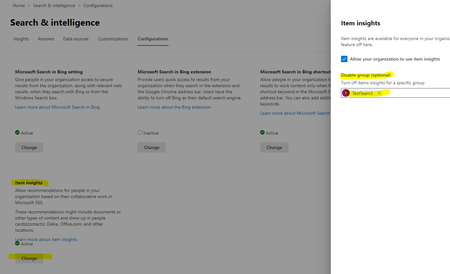
We disabled Item Insight for an O365 group of users in the Organizational settings UI. Now we would expect to see the Item Insight Setting in the profile-privacy settings of a specific user to be turned off and greyed out. But after (almost) 24 hours this is still turned on. Is this setting supposed to be change when the deactivation of Item Insight is applied to a group? Thanks, Franck665Views0likes0CommentsFinding Expertise in Search
Reading through this article I've discovered the following: "Finding expertise has been a constant challenge, both outside and within organizations. Expertise has long been dependent on self-nomination and identification; however, these skills often aren't verifiable or have aged to the extent to which they're no longer relevant. Available in Q1 CY20 as preview, in Microsoft Search you’ll be able discover instant answers for people results based on their skill matches. Answers are high confidence results that satisfy your intent directly, or help you navigate to your intended result(s) quickly. Answers can be either based on personal, organizational-wide or world content; they can be related to primary content from your current workload such as a file in SharePoint, or could introduce other content from outside of your current workload such as a personal flight answer based on Outlook content appearing in SharePoint." What is the difference between this feature and the currently available feature in Delve for searching based on Skills, Education and Projects?1.1KViews0likes0CommentsDelve roadmap?
Delve was kind of the first pass at a display interface for all the cool things happening in the Graph, but there seems to be a slowdown in new development and extending the functionality. I could be imagining that or reading too much into this, but I suspect that Delve's replacement (Delve 2.0 if there is one) is where the development efforts are being placed. Can anyone else confirm this? Are new and better interfaces for the Graph on the horizon?Solved11KViews0likes4CommentsCan I see whom to contact(among my organization) for a particular software related issue
With office 365 subscription we can add our own interests and skills in https://nam.delve.office.com/, but how can this be helpful for our organization? Can we search for whom to contact for a particular software related question? I have updated my skills in my profile, but how will my colleagues know that they can contact me for a particular issue?1.3KViews0likes4CommentsUsers get "old" user profile (personimmersive.aspx) instead of Delve profile
Hi all, A customer of mine would like to use the Delve profiles more, but the "my profile" link in Office 365 redirects them to the old experience. Currently, they have to go to Delve > Me to see their Delve profile. I checked to see if there is a setting for that, but I can't find anything. By the way, of course we have the Office Graph enabled, otherwise we probably couldn't even see Delve in the app launcher. Is there a way to force the Delve profile for them? Thanks, DanielSolved3.1KViews1like3Comments
How to show a pop-up when change the profile photo in delve
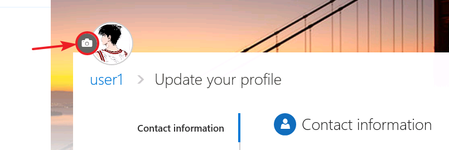
Hi Guys! I found that when user click the camera icon for uploading a new photo in delve , the two users have the different scenario below. So I want to know what's the difference between user1 and user2? How can I make use2 show a pop-up as the same as use1 when he clicks the camera icon? User1: then the pop-up is shown to upload a new photo. User2: then redirect to my-site Edit Details page… I don't like this... Thanks! Tobey1.1KViews0likes1CommentDelve - Relevent
Should we even be promoting Delve anymore? I thought I saw somewhere that Delve was being retired and no updates are even being done. Especially after they removed the Windows 10 Store App. Only place to access Delve is via the web interface and at least 50% of my users only use the desktop versions of the office 365 clients.1.5KViews0likes2CommentsDelve Board - Docs in Asian languages are disappearing
We have an important corporate document which is translated into 30 languages. All the translated versions (including the original EN-UK) docs are put as cards on a dedicated Delve board. For 26 languages the cards stay on the board. For 4 languages (Korean, Chinese Traditional & Simplified, Thai) the cards are removed from the board over and over again (we've added them on the board already 3x times and every time they disappear after a few days). I've bookmarked these documents as well, but they also disappear from my list of bookmarks in Delve. Is Delve having issues with documents written in foreign Asian languages?1.4KViews0likes5CommentsUser / Project Directory Options
We have a very outdated employee directory here that we are looking to update. We're a construction company so it's important that we are not only keeping track of employee contact information, but also current projects, past projects, and project addresses. The ideal scenario is one where you could easily find all the projects a user has worked on as well as find all the users that are working on or have worked on a project. The project information would most likely come from our Oracle HR system or Salesforce. I don't think Delve the way it is, is a good fit, but wondering if anyone has done something similar by perhaps extending Delve (if even possible) in some way or creating some other search based directory that puts these two pieces of information together. Any thoughts? Ideas?1.3KViews0likes3Comments