delta lake
23 TopicsClosing the loop: Interactive write-back from Power BI to Azure Databricks
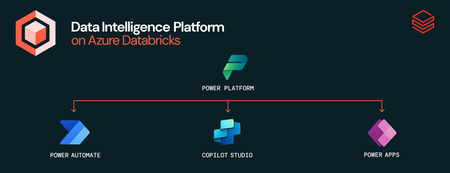
This is a collaborative post from Microsoft and Databricks. We thank Toussaint Webb, Product Manager at Databricks, for his contributions. We're excited to announce that the Azure Databricks connector for Power Platform is now Generally Available. With this integration, organizations can seamlessly build Power Apps, Power Automate flows, and Copilot Studio agents with secure, governed data and no data duplication. A key functionality unlocked by this connector is the ability to write data back from Power BI to Azure Databricks. Many organizations want to not only analyze data but also act on insights quickly and efficiently. Power BI users, in particular, have been seeking a straightforward way to “close the loop” by writing data back from Power BI into Azure Databricks. This capability is now here - real-time updates and streamlined operational workflows with the new Azure Databricks connector for Power Platform. With this connector, users can now read from and write to Azure Databricks data warehouses in real time, all from within familiar interfaces — no custom connectors, no data duplication, and no loss of governance. How It Works: Write-backs from Power BI through Power Apps Enabling writebacks from Power BI to Azure Databricks is seamless. Follow these steps: Open Power Apps and create a connection to Azure Databricks (documentation). In Power BI (desktop or service), add a Power Apps visual to your report (purple Power Apps icon). Add data to connect to your Power App via the visualization pane. Create a new Power App directly from the Power BI interface, or choose an existing app to embed. Start writing records to Azure Databricks! With this integration, users can make real-time updates directly within Power BI using the embedded Power App, instantly writing changes back to Azure Databricks. Think of all the workflows that this can unlock, such as warehouse managers monitoring performance and flagging issues on the spot, or store owners reviewing and adjusting inventory levels as needed. The seamless connection between Azure Databricks, Power Apps, and Power BI lets you close the loop on critical processes by uniting reporting and action in one place. Try It Out: Get started with Azure Databricks Power Platform Connector The Power Platform Connector is now Generally Available for all Azure Databricks customers. Explore more in the deep dive blog here and to get started, check out our technical documentation. Coming soon we will add the ability to execute existing Azure Databricks Jobs via Power Automate. If your organization is looking for an even more customizable end-to-end solution, check out Databricks Apps in Azure Databricks! No extra services or licenses required.5.3KViews2likes2CommentsPower BI & Azure Databricks: Smarter Refreshes, Less Hassle
We are excited to extend the deep integration between Azure Databricks and Microsoft Power BI with the Public Preview of the Power BI task type in Azure Databricks Workflows. This new capability allows users to update and refresh Power BI semantic models directly from their Azure Databricks workflows, ensuring real-time data updates for reports and dashboards. By leveraging orchestration and triggers within Azure Databricks Workflows, organizations can improve efficiency, reduce refresh costs, and enhance data accuracy for Power BI users. Power BI tasks seamlessly integrate with Unity Catalog in Azure Databricks, enabling automated updates to tables, views, materialized views, and streaming tables across multiple schemas and catalogs. With support for Import, DirectQuery, and Dual Storage modes, Power BI tasks provide flexibility in managing performance and security. This direct integration eliminates manual processes, ensuring Power BI models stay synchronized with underlying data without requiring context switching between platforms. Built into Azure Databricks Lakeflow, Power BI tasks benefit from enterprise-grade orchestration and monitoring, including task dependencies, scheduling, retries, and notifications. This streamlines workflows and improves governance by utilizing Microsoft Entra ID authentication and Unity Catalog suite of security and governance offerings. We invite you to explore the new Power BI tasks today and experience seamless data integration—get started by visiting the [ADB Power BI task documentation].2.9KViews0likes2CommentsAnthropic State-of-the-Art Models Available to Azure Databricks Customers
Our customers now have greater model choices with the arrival of Anthropic Claude 3.7 Sonnet in Azure Databricks. Databricks is announcing a partnership with Anthropic to integrate their state-of-the-art models into Databricks Data Intelligence Platform as a native offering, starting with Claude 3.7 Sonnet http://databricks.com/blog/anthropic-claude-37-sonnet-now-natively-available-databricks. With this announcement, Azure customers can use Claude Models directly in Azure Databricks. Foundation model REST API reference - Azure Databricks | Microsoft Learn With Anthropic models available in Azure Databricks, customers can use the Claude "think" tool with business data optimized promote to guide Claude efficiently perform complex tasks. With Claude models in Azure Databricks, enterprises can deliver domain-specific, high quality AI agents more efficiently. As an integrated component of the Azure Databricks Data Intelligence Platform, Anthropic Claude models benefit from comprehensive end-to-end governance and monitoring throughout the entire data and AI lifecycle with Unity Catalog. With Claude models, we remain committed to providing customers with model flexibility. Through the Azure Databricks Data Intelligence Platform, customers can securely connect to any model provider and select the most suitable model for their needs. They can further enhance these models with enterprise data to develop domain-specific, high-quality AI agents, supported by built-in custom evaluation governance across both data and models.12KViews2likes0CommentsPart 1: Migrate Azure Analysis Services to Power BI Premium using Azure Databricks - Why
The migration from Azure Analysis Services to Power BI Premium and the move to Azure Databricks SQL as the underlying data source for Power BI leads to great performance, enhanced features, and cost savings.3.4KViews0likes0CommentsRevolutionizing Data Intelligence: Azure Databricks Updates
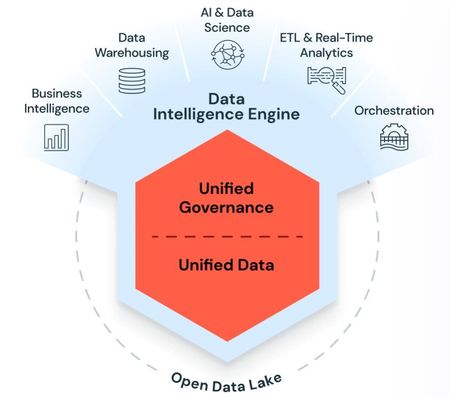
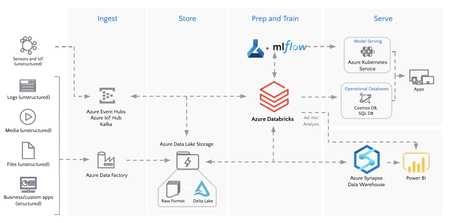
Data Intelligence Platform in Azure Databricks is revolutionizing the Data and AI landscape. This fully managed service, which is built on Lakehouse architecture supported by Delta Lake, and is integrated with Microsoft Azure cloud capabilities, streamlines data, analytics, and AI initiatives by removing infrastructure concerns. The close partnership between Databricks and Microsoft enhances this integration, enabling users to focus on their data and AI goals and makes Azure the optimal public cloud for Databricks.4.2KViews2likes0CommentsAnnouncing Mosaic AI Vector Search General Availability in Azure Databricks
Today, at Microsoft Build, we are thrilled to announce the general availability of Mosaic AI Vector Search in Azure Databricks. Vector Search is a serverless vector database that helps customers build high-quality Generative AI applications using Retrieval Augmented Generation (RAG). With its native integration in Azure Databricks, Vector Search supports automatic data synchronization from source to index, eliminating complex and costly pipeline maintenance. It also leverages the same security and data governance tools organizations have already built for peace of mind.4.6KViews2likes0Comments