delta lake
28 Topics
Secure Medallion Architecture Pattern on Azure Databricks (Part I)
This article presents a security-first pattern for Azure Databricks: a Medallion Architecture where Bronze, Silver and Gold each run as their Lakeflow Job and cluster, orchestrated by a parent job. Run-as identities are Microsoft Entra service principals; storage access is governed via Unity Catalog External Locations backed by the Access Connector’s managed identity. Least-privilege is enforced with cluster policies and UC grants. Prefer managed tables to unlock Predictive Optimisation, Automatic liquid clustering and Automatic statistics. Secrets live in Azure Key Vault and are read at runtime. Monitor reliability and cost with system tables and Jobs UI. Part II covers more low-level concepts and CI/CD.2.2KViews13likes0CommentsExternal Data Sharing With Microsoft Fabric
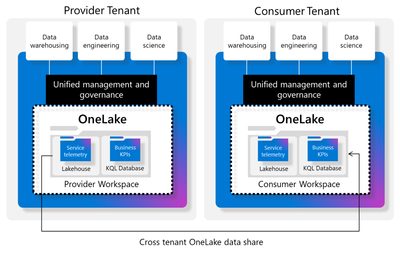
The demands and growth of data for external analytics consumption is rapidly growing. There are many options to share data externally and the field is very dynamic. One of the most frictionless and easy onboarding steps for external data sharing we will explore is with Microsoft Fabric. This external data allows users to share data from their tenant with users in another Microsoft Fabric tenant.6.7KViews3likes2CommentsDelta Lake on HDInsight
Introduction Azure HDInsight is a managed, full-spectrum, open-source analytics service in the cloud for enterprises. HDInsight Apache Spark cluster is parallel processing framework that supports in-memory processing, it is based on Open-Source Apache Spark. Apache Spark is evolving; it’s efficiency and ease of use makes it a preferred big data tool among big data engineers and data scientists. There are few essential features missing from the Spark, one of them is A(Atomicity)C(Consistency)I(Isolation)D(Durability) transaction. Majority of databases supports ACID feature out of the box, when it comes to Storage layer (ADLS Gen2) it is hard to support similar level of ACID feature provided by databases. Delta Lake is a storage layer that brings ACID transactions to Apache Spark and big data workloads - for both streaming and batch operations. Delta Lake uses versioned Parquet files to store your data in your cloud storage. Apart from the versions, Delta Lake also stores a transaction log to keep track of all the commits made to the table or blob store directory to provide ACID transactions. This blog is not about Delta Lake; we will talk more about how you can leverage delta with HDInsight Spark Cluster, few code snippet and require configurations. Before we jump into code and require configurations, it is good for you check your Spark version from Ambari user interface from the HDI cluster. You need to pick the right delta lake versions based on your cluster Spark Version. The following table lists Delta Lake versions and their compatible Apache Spark versions: HDI Version Spark Version Delta Lake Version API URL 4.0 Spark 2.4.4 < 0.7.0 0.6.1 API Doc 5.0 Spark 3.1.2 1.0.x 1.0.1 API Doc HDInsight - Delta Lake Configuration Before we jump into code and configurations; we need to look into the below mentioned extendibility configurations provided by Spark: spark.sql.extensions – It is used to configure Spark Session extensions, by providing the name of the extension class. spark.sql.catalog.spark_catalog – This plugin configuration is used to configure custom catalog implementation. You can find the current catalog implementation from CatalogManager spark.sessionState.catalogManager.currentCatalog. The Spark 3.x uses SessionCatalog as default catalog. When you would like to use Delta Lake on Spark 3.x on HDI 5.0, you need to configure sql extensions and delta lake catalog with following values: Configuration Property Delta Lake Value Description spark.sql.extensions io.delta.sql.DeltaSparkSessionExtension An extension for Spark SQL to activate Delta SQL parser to support Delta SQL grammar. spark.sql.catalog.spark_catalog org.apache.spark.sql.delta.catalog.DeltaCatalog This replaces Spark’s default catalog by Delta Lake DeltaCatalog. The above configurations need to be provided as part of the Spark Configuration before any Spark session is created. Apart from the above Spark configurations, the Spark Application uber jar should provide Delta Lake dependency. Working with Spark 2.4.x with HDI 4.0 we just need to supply Delta Lake dependency, no additional spark configurations. To avoid class loading conflicts due to duplicate classes on the cluster classpath, we need to use the maven-shade-plugin to create an uber-jar with jackson dependencies. Example Code You can clone the example code from GitHub, the code is written in Scala. You can run example code using anyone of this option: Copy the application jar to the Azure Storage blob associated with the cluster. SSH to Headnode and run Spark-Submit from the headnode Or Using Livy API or Use Azure Toolkit for IntelliJ The example application will generate stdout logs and delta lake parquet files with commit logs. The output examples are listed on GitHub. Summary Delta Lake is an open-source storage framework that extends parquet data files with a file-based transaction log for ACID transactions and scalable metadata handling. Delta lake is fully compatible with Apache Spark APIs. Since the HDInsight Spark cluster is an installation of the Apache Spark library onto an HDInsight Hadoop cluster, the user can use compatible Delta Lake versions to take benefits of Delta Lake on HDInsight.5.8KViews3likes0CommentsEnhanced autoscale capabilities in HDInsight clusters
HDInsight now has enhanced capabilities which include improved latency, and feedback loop alongside support for recommissioning nodemanagers in case of load-aware autoscale which improves cluster utilization massively and lowers the total cost of ownership significantly.5.2KViews2likes0CommentsA Technical Implementation Guide for Multi-Store Retail Environments
Understanding the Problem Space When organizations first approach multi-source data ingestion, they typically start with explicit configuration. Each database connection is defined individually, each table mapping is specified, and each destination partition is created manually. This works reasonably well for five or ten sources. It becomes painful at twenty. It becomes nearly unmanageable at fifty or more. The operational cost manifests in several ways. Every new store requires a ticket to the data engineering team. Someone must configure the connection, verify the schema compatibility, set up the ingestion pipeline, create the destination structures, and validate the data flow. In a fast-growing retail operation, this creates a bottleneck that delays time-to-insight for new locations. Beyond the immediate operational burden, there is also the risk of configuration drift. When each source is configured individually, small inconsistencies creep in over time. One store might have slightly different table names. Another might be ingesting an extra column that was added during a schema migration. These inconsistencies compound, making the overall system harder to maintain and debug. The solution presented here eliminates most of this manual work by implementing two complementary patterns: automatic source detection through regex-based CDC configuration, and dynamic partition creation through Delta Lake's native capabilities. Architecture Overview The proposed architecture places Debezium as the CDC engine, reading from PostgreSQL databases and publishing change events to Azure Event Hubs. Fabric EventStream consumes these events and writes them to a Delta Lake table in the Lakehouse. The key insight is that neither Debezium nor Delta Lake requires explicit enumeration of every data source. Both can operate on patterns rather than explicit lists. At the source layer, Debezium connects to PostgreSQL and monitors the write-ahead log for changes. Rather than configuring a separate connector for each store database, a single connector is configured with a regex pattern that matches all store databases. When a new database is created that matches this pattern, Debezium automatically begins capturing its changes without any configuration update. At the destination layer, Delta Lake tables are defined with partition columns but without explicit partition values. When a record arrives with a previously unseen partition value, Delta Lake automatically creates the necessary directory structure and begins writing data to the new partition. No DDL statement is required, no manual intervention is needed. The combination of these two behaviors creates an end-to-end pipeline where adding a new store database is as simple as creating the database itself. Everything downstream happens automatically. Implementation Details Configuring Debezium for Automatic Source Detection The critical configuration element in Debezium is the database include list parameter. Rather than specifying each database explicitly, this parameter accepts a regular expression that defines which databases should be monitored. For a retail environment where store databases follow a naming convention such as store_001, store_002, and so forth, the configuration would specify a pattern like store_.* as the include list. This pattern matches any database whose name begins with store_ followed by any characters. When the DBA creates store_058, Debezium detects this new database during its periodic metadata refresh and automatically begins capturing changes from it. The connector configuration should also specify which tables within each database to monitor. In most retail scenarios, the schema is standardized across all stores, so this can be a fixed list such as public.transactions, public.inventory, and public.products. If schema variations exist between stores, additional filtering logic may be required, but this is generally a sign that the source systems need standardization rather than accommodation of inconsistency. The topic routing configuration is equally important. All CDC events should be routed to a single Event Hubs topic, with the store identifier included in the message payload. This allows a single EventStream to process all store data while preserving the ability to identify which store each record originated from. The source metadata that Debezium includes with each change event contains the database name, which serves as the natural store identifier. Initial snapshot behavior must be considered carefully. When Debezium detects a new database, it will perform an initial snapshot to capture the current state before beginning to track incremental changes. For a store with substantial historical data, this snapshot may take anywhere from a few minutes to several hours. During this period, the connector is occupied with the snapshot and may exhibit increased latency for change events from other databases. Scheduling new store database creation during off-peak hours helps mitigate this impact. Configuring Delta Lake for Dynamic Partitioning Delta Lake supports dynamic partition creation as a default behavior. When a table is created with partition columns specified, any INSERT operation that includes a previously unseen partition value will automatically create the corresponding partition directory. The table definition should include the store identifier as the primary partition column. A secondary partition on date is typically advisable for managing data lifecycle and optimizing query performance. The combination of store_id and event_date provides a natural organization that supports both store-specific queries and time-range queries efficiently. The table should be created with automatic optimization enabled. The autoOptimize.optimizeWrite property causes Delta Lake to automatically coalesce small files during write operations, reducing the small file problem that frequently plagues streaming ingestion workloads. The autoOptimize.autoCompact property enables background compaction of files that have accumulated between optimization runs. When EventStream writes a record with store_id equal to store_058 and this value has never been seen before, Delta Lake creates the partition directory structure automatically. The first write creates the directory, and subsequent writes append to files within that directory. From the perspective of downstream queries, the new store's data is immediately available without any schema changes or administrative intervention. EventStream Processing Logic The EventStream configuration bridges the gap between Event Hubs and the Lakehouse. It must parse the Debezium change event format, extract the relevant fields including the store identifier, and route the data to the appropriate Delta table. The transformation logic should extract the store identifier from the source metadata section of the Debezium payload. This is typically found at a path like source.db within the JSON structure. The operation type indicating whether the change is an insert, update, or delete should be preserved for downstream CDC merge processing. A derived column for the event date should be computed from the event timestamp. This serves as the secondary partition key and enables time-based data management. The date extraction should use the source system timestamp rather than the ingestion timestamp to ensure that data is partitioned based on when the business event occurred rather than when it was processed. The destination configuration specifies the Delta table and the partition columns. EventStream handles the actual write operations, and Delta Lake handles the partition management automatically based on the values present in each record. Best Practices for Production Deployment Naming Convention Enforcement The automatic detection pattern is only as reliable as the naming convention it depends on. Before implementing this architecture, establish and enforce a strict naming convention for store databases. Document the convention, communicate it to all teams that provision databases, and implement validation checks in the database provisioning process. The naming convention should be simple and unambiguous. A pattern like store_NNN where NNN is a zero-padded three-digit number provides clear structure and allows for up to 999 stores without format changes. Avoid conventions that might conflict with other databases or that include characters with special meaning in regex patterns. Schema Standardization Automatic source detection assumes that all detected sources share a compatible schema. If store_058 has different table structures than store_001, the downstream processing will fail or produce incorrect results. Schema standardization must be enforced at the source system level before relying on automatic detection. Implement schema validation as part of the store database provisioning process. When a new store database is created, it should be created from a template that guarantees schema compatibility. If schema migrations are necessary, they should be applied uniformly across all store databases before being reflected in the CDC configuration. Partition Key Selection The choice of partition keys has significant implications for both storage efficiency and query performance. The store identifier is the natural first-level partition because it provides the strongest cardinality and aligns with common query patterns such as analyzing a specific store's performance. Date as a secondary partition enables efficient time-range queries and simplifies data lifecycle management. Retention policies can be implemented by dropping old date partitions rather than scanning and deleting individual records. However, the combination of store and date partitions can produce a large number of partition directories. With 100 stores and 365 days of retained data, the table would have 36,500 partitions. While Delta Lake handles this reasonably well, query planning overhead increases with partition count. Consider using month rather than date as the secondary partition if the total partition count becomes problematic. This reduces the partition count by a factor of roughly 30 while still enabling reasonably efficient time-based queries and lifecycle management. Monitoring and Alerting Automatic detection reduces operational burden but does not eliminate the need for monitoring. Implement alerting for several key scenarios. First, monitor for new store detection. While the system handles new stores automatically, operations teams should be notified when a new store begins ingesting data. This serves as a sanity check that the detection is working and provides visibility into the growth of the system. Second, monitor for schema compatibility failures. If a new database is detected but its schema does not match expectations, the CDC process may fail or produce malformed data. Alerting on processing errors helps catch these issues quickly. Third, monitor for snapshot completion. When a new store database triggers an initial snapshot, track the snapshot progress and completion. Extended snapshot times may indicate unusually large source tables or performance issues that warrant investigation. Fourth, monitor partition growth. While dynamic partitioning is convenient, runaway partition creation can indicate a problem such as incorrect store identifiers being generated. Alert if the number of distinct store partitions grows faster than expected based on the known rate of new store openings. Initial Snapshot Planning The initial snapshot that occurs when a new database is detected can be resource-intensive for both the source database and the CDC infrastructure. Plan for this by establishing a new store onboarding window during off-peak hours when the impact of snapshot processing is minimized. Consider implementing a two-phase onboarding process for stores with large historical datasets. In the first phase, configure the database but exclude it from the Debezium include pattern. Perform a bulk historical load using batch processing, which can be throttled and scheduled more flexibly than the streaming snapshot. In the second phase, add the database to the include pattern to begin capturing incremental changes. This approach reduces the load on the streaming infrastructure while still achieving complete data capture. Capacity Planning Dynamic detection and partitioning enable easy scaling in terms of configuration, but the underlying infrastructure must still be sized appropriately. Event Hubs throughput units must accommodate the aggregate event volume from all stores. Fabric capacity units must handle the combined processing load of EventStream and Delta Lake operations. Develop a capacity model that estimates resource requirements per store. Multiply by the current store count plus a growth buffer to determine infrastructure sizing. Review and adjust this model as actual usage patterns become clear. Risk Assessment and Mitigation Uncontrolled Source Proliferation The convenience of automatic detection carries a risk of unintended sources being captured. If the naming convention is not strictly enforced, or if the regex pattern is too broad, databases that should not be ingested may be detected and processed. Mitigation involves implementing strict naming convention governance and using precise regex patterns. The pattern should be as specific as possible while still accommodating legitimate variations. Consider implementing a whitelist in addition to the pattern match, where new databases matching the pattern are flagged for approval before ingestion begins. This adds a manual step but provides a safety checkpoint. Schema Drift Between Sources Over time, individual store databases may drift from the standard schema due to local modifications, failed migrations, or version inconsistencies. When the CDC process encounters unexpected schema elements, it may fail or produce incorrect data. Mitigation requires implementing schema validation at both the source and destination. At the source, periodic schema audits should compare each store database against the canonical schema and flag deviations. At the destination, schema evolution policies in Delta Lake should be configured to reject incompatible changes rather than silently accepting them. The merge schema option should be used cautiously and only when schema evolution is intentional. Partition Explosion Dynamic partition creation can lead to an excessive number of partitions if the partition key has unexpectedly high cardinality or if erroneous data introduces spurious partition values. A misconfigured pipeline might create thousands of partitions, degrading query performance and complicating data management. Mitigation involves implementing partition count monitoring with alerts at defined thresholds. Additionally, validate partition key values before writing to Delta Lake. If a store identifier does not match the expected format, reject the record or route it to an error table for investigation rather than creating an erroneous partition. CDC Lag During Snapshot When a new database triggers an initial snapshot, the Debezium connector dedicates resources to reading the full table contents. During this period, change events from other databases may experience increased latency. In severe cases, the replication slot lag may grow to problematic levels. Mitigation involves scheduling new database provisioning during low-activity periods, sizing the CDC infrastructure with headroom for snapshot operations, and monitoring replication slot lag with alerts at defined thresholds. For very large initial loads, consider the two-phase onboarding approach described earlier. Event Hubs Partition Affinity Event Hubs uses partitions to parallelize message processing. If all messages are routed to a single partition, throughput is limited to what that partition can handle. If messages are distributed across partitions without regard to ordering requirements, related events may be processed out of order. Mitigation involves configuring the Debezium producer to use the store identifier as the partition key. This ensures that all events for a given store are routed to the same Event Hubs partition, preserving ordering within each store while distributing load across partitions for different stores. The number of Event Hubs partitions should be set high enough to accommodate the expected number of stores with room for growth. Unlike some properties, partition count cannot be increased after the Event Hub is created. Orphaned Replication Slots If a store database is decommissioned but the replication slot is not cleaned up, PostgreSQL continues to retain write-ahead log segments for the orphaned slot. Over time, this can fill the disk and cause database outages. Mitigation requires implementing a decommissioning procedure that includes replication slot cleanup. Monitor for inactive replication slots and alert when a slot has not been read from in an extended period. Consider implementing automatic slot cleanup for slots that have been inactive beyond a defined threshold, though this should be done cautiously to avoid accidentally removing slots that are temporarily inactive due to maintenance. Operational Procedures Adding a New Store The procedure for adding a new store is intentionally minimal. The DBA creates the store database following the established naming convention. The database should be created from the standard template to ensure schema compatibility. Within minutes of database creation, Debezium detects the new database and begins the initial snapshot. Operations teams receive a notification of the new store detection. The snapshot progresses, with completion typically occurring within 30 minutes for a standard store data volume. Once the snapshot completes, incremental CDC begins. The first records arriving at the Lakehouse trigger automatic partition creation. From this point forward, the new store's data is fully integrated into the analytics platform with no additional intervention required. Removing a Store Store removal requires more deliberate action than store addition. First, stop ingesting new data by either renaming the database to no longer match the include pattern or by dropping the database entirely. Second, drop the replication slot associated with the store to prevent WAL retention issues. Third, decide whether to retain or purge historical data in the Lakehouse. If historical data should be retained, no action is needed at the Lakehouse level. The partition remains but simply receives no new data. If historical data should be purged, drop the partition using Delta Lake's partition drop capability. This removes the data files and the partition metadata in a single atomic operation. Handling Schema Changes Schema changes require coordination across all store databases and the downstream processing logic. Minor additive changes such as new nullable columns can often be handled through Delta Lake's schema evolution capabilities. The merge schema option allows new columns to be added automatically when encountered. Breaking changes such as column renames, type changes, or column removals require a more deliberate migration process. First, update the downstream processing logic to handle both the old and new schemas. Deploy this change and verify it works with existing data. Then, apply the schema change to source databases in a rolling fashion. Finally, once all sources have been migrated, remove support for the old schema from the processing logic. Disaster Recovery The architecture provides several recovery options depending on the failure scenario. If Event Hubs experiences an outage, Debezium buffers changes locally and resumes publishing when connectivity is restored. The replication slot ensures no changes are lost during the outage, though extended outages may cause WAL accumulation on the source database. If Fabric experiences an outage, events accumulate in Event Hubs up to the retention period. Once Fabric recovers, EventStream resumes processing from its last checkpoint, catching up on accumulated events. The Delta Lake table remains consistent due to its transactional nature. If a source database is lost, recovery depends on backup strategy. The Lakehouse contains a copy of all ingested data, which can serve as a read-only recovery source. Full database recovery requires restoring from PostgreSQL backups. Dynamic partitioning and automatic source detection transform multi-store data ingestion from an operational burden into a largely self-managing system. The combination of Debezium's pattern-based database detection with Delta Lake's dynamic partition creation eliminates most manual configuration work while maintaining the flexibility to accommodate growth. The implementation requires careful attention to naming conventions, schema standardization, and monitoring. The risks are real but manageable with appropriate governance and operational procedures. For organizations operating at scale with dozens or hundreds of similar data sources, this architecture provides a sustainable path to unified analytics without proportional growth in operational overhead. The key principle underlying this approach is that systems should adapt to data rather than requiring data to conform to rigid system configurations. By designing for automatic detection and dynamic accommodation, the data platform becomes a utility that business operations can leverage without constant engineering involvement. This shift from explicit configuration to pattern-based adaptation is essential for organizations seeking to derive value from data at scale.620Views1like0CommentsSecure Delta Sharing Between Databricks Workspaces Using NCC and Private Endpoints
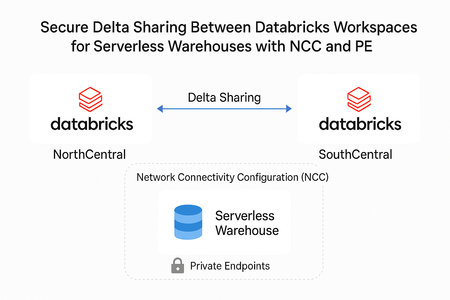
This guide walks you through the steps to share Delta tables between two Databricks workspaces (NorthCentral and SouthCentral) and configure Network Connectivity Configuration (NCC) for a Serverless Warehouse. These steps ensure secure data sharing and connectivity for your workloads. Part 1: Delta Sharing Between Workspaces Access Delta Shares From your NorthCentral Workspace, go to Catalog. Hover over Delta Shares Received. When the icon appears, click it. → This will redirect you to the Delta Sharing page. Create a New Recipient On the Delta Sharing page, click Shared by me. Click New Recipient. Fill in the details: Recipient Name: (Enter your recipient name) Recipient Type: Select Databricks Sharing Identifier: azure:southcentralus:3035j6je88e8-91-434a-9aca-e6da87c1e882 To get the sharing identifier using a notebook or Databricks SQL query: (SQL) SELECT CURRENT_METASTORE(); Click Create. Share Data Click "Share Data". Enter a Share Name. Select the data assets you want to share. Note: Please disable History for the selected data assets, as the current data snapshot. Disabling the History option on the Delta Share will simplify the share and prevent unnecessary access to historical versions. Additionally, review whether you can further simplify your share by partitioning the data where appropriate. Add the recipient's name you created earlier. Click Share Data. Add Recipient From the newly created share, click Add Recipient. Select your South-Central Workspace Metastore ID. South-CentralWorkspace In your South-Central Workspace, navigate to the Delta Sharing page. Under Shared with me tab, locate your newly created share and click on it. Add the share to a catalog in Unity Catalog. Part 2: Enable NCC for Serverless Warehouse 6. Add Network Connectivity Configuration (NCC) Go to the Databricks Account Console: https://accounts.azuredatabricks.net/ Navigate to Cloud resources, click Add Network Connectivity Configuration. Fill in the required fields and create a new NCC for SouthCentral. 7. Associate NCC with Workspace In the Account Console, go to Workspaces. Select your SouthCentral workspace, click Update Workspace. From the Network Connectivity Configuration dropdown, select the NCC you just created. 8. Add Private Endpoint Rule In Cloud resources, select your NCC, select Private Endpoint Rules and click Add Private Endpoint Rule. Provide: Resource ID: Enter your Storage Account Resource ID in NorthCentral. Note: This can be found in your storage account (NorthCentral). Click on “JSON View” top right. Azure Subresource type: dfs & blob. 9. Approve Pending Connection Go to your NorthCentral Storage Account, Networking, Private Endpoints. You will see a Pending connection from Databricks. Approve the connection and you will see the Connection status in your Account Console as ESTABLISHED. You will now see your share listed under “Delta Shares Received” Note: If you cannot view your share, run the following SQL command: GRANT USE_PROVIDER ON METASTORE TO `username@xxxx.com`.1.5KViews1like0CommentsAnnouncing general availability of Cross-Cloud Data Governance with Azure Databricks
We are excited to announce the general availability of accessing AWS S3 data in Azure Databricks Unity Catalog. This release simplifies cross-cloud data governance by allowing teams to configure and query AWS S3 data directly from Azure Databricks without migrating or duplicating datasets. Key benefits include unified governance, frictionless data access, and enhanced security and compliance.1.1KViews1like0Comments
Creating a AI-Driven Chatbot to Inquire Insights into business data
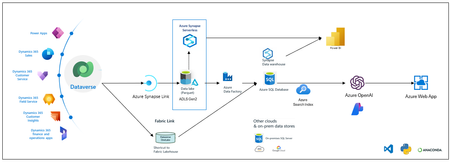
Introduction In the fast-paced digital era, the ability to extract meaningful insights from vast datasets is paramount for businesses striving for a competitive edge. Microsoft Dynamics 365 Finance and Operations (D365 F&O) is a robust ERP platform, generating substantial business data. To unlock the full potential of this data, integrating it with advanced analytics and AI tools such as Azure OpenAI, Azure Synapse Workspace, or Fabric Workspace is essential. This blog will guide you through the process of creating a chatbot to inquire insights using Azure OpenAI with Azure Synapse Workspace or Fabric Workspace. Architecture Natural Language Processing (NLP): Enables customers to inquire about business data such as order statuses, item details, and personalized order information using natural language. Seamless Data Integration: Real-time data fetching from D365 F&O for accurate and up-to-date information. Contextual and Personalized Responses: AI provides detailed, context-rich responses to customer queries, improving engagement and satisfaction. Scalability and Efficiency: Handles multiple concurrent inquiries, reducing the burden on customer service teams and improving operational efficiency. Understanding the Components Microsoft Dynamics 365 Finance and Operations (D365 F&O) D365 F&O is a comprehensive ERP solution designed to help businesses streamline their operations, manage finances, and control supply chain activities. It generates and stores vast amounts of transactional data essential for deriving actionable insights. Dataverse Dataverse is a cloud-based data storage solution that allows you to securely store and manage data used by business applications. It provides a scalable and reliable platform for data integration and analytics, enabling businesses to derive actionable insights from their data. Azure Synapse Analytics Azure Synapse Analytics is an integrated analytics service that brings together big data and data warehousing. It allows users to query data on their terms, deploying either serverless or provisioned resources at scale. The service provides a unified experience to ingest, prepare, manage, and serve data for instant business intelligence and machine learning requirements. Fabric Workspace Fabric Workspace provides a collaborative platform for data scientists, analysts, and business users to work together on data projects. It facilitates the seamless integration of various data sources and advanced analytics tools to drive innovative solutions. Azure SQL Database Azure SQL Database is a cloud-based relational database service built on Microsoft SQL Server technologies. It offers a range of deployment options, including single databases, elastic pools, and managed instances, allowing you to choose the best fit for your application needs. Azure SQL Database provides high availability, scalability, and security features, making it an ideal choice for modern applications. Data from Dynamics 365 Finance and Operations (F&O) is copied to an Azure SQL Database using a flow that involves Azure Data Lake Storage (ADLS) and Azure Data Factory (ADF) Azure OpenAI Azure OpenAI enables developers to build and deploy intelligent applications using powerful AI models. By integrating OpenAI’s capabilities with Azure’s infrastructure, businesses can create sophisticated solutions that leverage natural language processing, machine learning, and advanced analytics. Step-by-Step Guide to Creating the Chatbot Step 1: Export Data from D365 F&O To begin, export the necessary data from your D365 F&O instance. This data will serve as the foundation for your analytics and AI operations. Ensure the exported data is in a format compatible with Azure Synapse or Fabric Workspace. Step 2: Ingest Data into Azure Synapse Workspace or Fabric Workspace Next, ingest the exported data into Azure Synapse Workspace or Fabric Workspace. Utilize the workspace’s capabilities to prepare, manage, and optimize the data for further analysis. This step involves setting up data pipelines, cleaning the data, and transforming it into a suitable format for processing. Step 3: Set Up Azure OpenAI With your data ready, set up Azure OpenAI in your environment. This involves provisioning the necessary resources, configuring the OpenAI service, and integrating it with your Azure infrastructure. Ensure you have the appropriate permissions and access controls in place. Step 4: Develop the Chatbot Develop the chatbot using Azure OpenAI’s capabilities. Design the chatbot to interact with users naturally, allowing them to inquire insights and receive valuable information based on the data from D365 F&O. Utilize natural language processing to enhance the chatbot’s ability to understand and respond to user queries effectively. Step 5: Integrate the Chatbot with Azure Synapse or Fabric Workspace Integrate the developed chatbot with Azure Synapse Workspace or Fabric Workspace. This integration will enable the chatbot to access and analyze the ingested data, providing users with real-time insights. Set up the necessary APIs and data connections to facilitate seamless communication between the chatbot and the workspace. Step 6: Test and Refine the Chatbot Thoroughly test the chatbot to ensure it functions as expected. Address any issues or bugs, and refine the chatbot’s responses and capabilities. This step is crucial to ensure the chatbot delivers accurate and valuable insights to users. Best Practices for Data Access Data Security Data security is paramount when exporting sensitive business information. Implement the following best practices: Ensure that all data transfers are encrypted using secure protocols. Use role-based access control to restrict access to the data exported. Regularly audit and monitor data export activities to detect any unauthorized access or anomalies. Data Transformation Transforming data before accessing it can enhance its usability for analysis: Use Synapse data flows to clean and normalize the data. Apply business logic to enrich the data with additional context. Aggregate and summarize data to improve query performance. Monitoring and Maintenance Regular monitoring and maintenance ensure the smooth operation of your data export solution: Set up alerts and notifications for any failures or performance issues in the data pipelines. Regularly review and optimize the data export and transformation processes. Keep your Azure Synapse environment up to date with the latest features and enhancements. Benefits of Integrating AI and Advanced Analytics Enhanced Decision-Making By leveraging AI and advanced analytics, businesses can make data-driven decisions. The chatbot provides timely insights, enabling stakeholders to act quickly and efficiently. Improved Customer Experience A chatbot enhances customer interactions by providing instant responses and personalized information. This leads to higher satisfaction and engagement levels. Operational Efficiency Integrating AI tools with business data streamlines operations, reduces manual efforts, and increases overall efficiency. Businesses can optimize processes and resource allocation effectively. Scalability It can handle multiple concurrent inquiries, scaling as the business grows without requiring proportional increases in customer service resources. Conclusion Creating a chatbot to inquire insights using Azure OpenAI with Azure Synapse Workspace or Fabric Workspace represents a significant advancement in how businesses can leverage their data. By following the steps outlined in this guide, organizations can develop sophisticated AI-driven solutions that enhance decision-making, improve customer experiences, and drive operational efficiency. Embrace the power of AI and advanced analytics to transform your business and unlock new opportunities for growth.1.5KViews1like0Comments
Efficient Log Management with Microsoft Fabric
Introduction In the era of digital transformation, managing and analyzing log files in real-time is essential for maintaining application health, security, and performance. There are many 3rd party solutions in this area allowing collecting / processing storing, analyzing and acting upon this data source. But sometimes as your systems scale, those solution can become very costly, their cost model increases based on the amount of ingested data and not according to the real resources utilization or customer value This blog post explores a robust architecture leveraging Microsoft Fabric SaaS platform focused on its Realtime Intelligence capabilities for efficient log files collection processing and analysis. The use cases can vary from simple application errors troubleshooting, to more advanced use case such as application trends detection: detecting slowly degrading performance issues: like average user session in the app for specific activities last more than expected to more proactive monitoring using log based KPIs definition and monitoring those APIS for alerts generation Regarding cost , since Fabric provides a complete separation between compute and storage you can grow your data without necessarily growing your compute costs and you still pay for the resources that re used in a pay as you go model. Architecture Overview The proposed architecture integrates Microsoft Fabric’s Real time intelligence (Realtime Hub) with your source log files to create a seamless, near real-time log collection solution It is based on Microsoft Fabric: a SAAS solution which is a unified suite integrating several best of breed Microsoft analytical experiences. Fabric is a modern data/ai platform based on unified and open data formats (parquet/delta) allowing both classical data lakes experiences using both traditional Lakehouse/warehouse SQL analytics as well as real-time intelligence on semi structured data , all in on a lake-centric SaaS platform. Fabric's open foundation with built-in governance enables you to connect to various clouds and tools while maintaining data trust. This is High level Overview of Realtime Intelligence inside Fabric Log events - Fabric based Architecture When looking in more details a solution for log collection processing storage and analysis we propose the following architecture Now let's discuss it in more details: General notes: Since Fabric is a SAAS solution, all the components can be used without deploying any infrastructure in advance, just by a click of a button and very simple configurations you can customize the relevant components for this solution The main components used in this solution are Data Pipeline Onelake and Eventhouse Our data source for this example is taken from this public git repo: https://github.com/logpai/loghub/tree/master/Spark The files were taken and stored inside an S3 bucket to simulate the easiness of the data pipeline integration to external data sources. A typical log file looks like this : 16/07/26 12:00:30 INFO util.Utils: Successfully started service 'sparkDriverActorSystem' on port 59219. 16/07/26 12:00:30 INFO spark.SparkEnv: Registering MapOutputTracker 16/07/26 12:00:30 INFO spark.SparkEnv: Registering BlockManagerMaster 16/07/26 12:00:30 INFO storage.DiskBlockManager: Created local directory at /opt/hdfs/nodemanager/usercache/curi/appcache/application_1460011102909_0176/blockmgr-5ea750cb-dd00-4593-8b55-4fec98723714 16/07/26 12:00:30 INFO storage.MemoryStore: MemoryStore started with capacity 2.4 GB Components Data Pipeline First challenge to solve is how to bring the log files from your system into Fabric this is the Log collection phase: many solutions exist for this phase each with its pros and cons In Fabric the standard approach to bring data in is by use of Copy Activity in ADF or in its Fabric SAAS version is now called Data Pipeline: Data pipeline is a low code / no code tool allowing to manage and automate the process of moving and transforming data within Microsoft Fabric, a serverless ETL tool with more than 100 connectors enabling integration with a wide variety of data sources, including databases, cloud services, file systems, and more. In addition, it supports an on prem agent called self-hosted integration runtime, this agent that you install on a VM, acts as a bridge allowing to run your pipeline on a local VM and securing your connection from on prem network to the cloud Let’s describe in more details our solution data pipeline: Bear in mind ADF is very flexible and supports reading at scale from a wide range of data sources / files integrated as well to all major cloud vendors from blob storage retrieval : like S3, GCS, Oracle Cloud, File systems, FTP/SFTP etc so that even if your files are generated externally to Azure this is not an issue at all. Visualization of Fabric Data Pipeline Log Collection ADF Copy Activity: Inside Data pipeline we will create an Activity called Copy Activity with the following basic config Source: mapped to your data sources: it can be azure blob storage with container containing the log files, other cloud object storage like S3 or GCS , log files will be retrieved in general from a specific container/folder and are fetched based on some prefix/suffix in the file name. To support incremental load process we can configure it to delete the source files that it reads so that once the files are successfully transferred to their target they will be automatically deleted from their source . On the next iteration pipeline will not have to process the same files again. Sink: Onelake/Lakehouse folder: we create ahead of time a Lakehouse which is an abstract data container allowing to hold and manage at scale your data either structured or unstructured, we will then select it from the list of connectors (look for Onelake/Lakehouse) Log Shippers: This is an optional component, sometimes it is not allowed for the ETL to access your OnPrem Vnet , in this case tools like Fluentd , Filebeat , Open Telemetry collector used to forward your application collected logs to the main entry point of the system: the Azure Blob Storage. Azcopy CLI: if you don’t wish to invest into expensive tools and all you need to copy your data in a scale/secure manner to Azure Storage, you might consider create your own log shipping solution based on the free Azcopy tool together withs some basic scripting around it for scheduling: Azcopy is a command-line utility designed for high-performance uploading, downloading, and copying data to and from Microsoft Azure Blob and File storage. Fabric first Activity : Copy from Source Bucket to Lakehouse Log Preparation Upon log files landing in the azure blob storage, EventStream can be used to trigger the Data Pipeline that will handle the data preparation and loading phase. So what is Data preparation phase’s main purpose? After the log files land in the storage and before they are loaded to the realtime logs database the KQL Database , it might be necessary to transform the data with some basic manipulations . The reasons for that might be different A Few examples Bad data formats: for example, sometimes logs files contain problematic characters like new lines inside a row (stack trace error message with new lines as part of the message field of the record) Metadata enrichment: sometimes the log file names contain in their name some meaningful data : for example file name describes the originating process name / server name , so this metadata can be lost once the file content is loaded into database Regulation restrictions: sometimes logs contain private data like names, credit card numbers, social security number etc called PII that must be removed , hashed or encrypted before the load to database In our case we will be running a pyspark notebook who reads the files from Onelake folder, fixes the new lines inside a row issue, and create new files in another Onelake folder, we call this notebook with a base parameter called log_path that defines the log files location on the Onelake to read from Fabric second Activity : Running the Notebook Log Loading Inside Data pipeline , the last step, after the transformation phase, we call again the Copy data activity but this time source and sink are differen: Source: Lakehouse folder (previous notebook output) Sink: Evenhouse specific Table (created ahead of time): it is basically an empty table (lograw) Visualization of Fabric last Activity : Loading to EventHouse In summary for this stage the log collection and preparation: we broke this into 3 data pipeline activities: Copy Activity: Read the log files from source: This is the first step of the log ingestion pipeline it is running inside our orchestrator Data pipeline. Run Notebook Activity : Transform the log files : this is the execution of a single or chain of notebooks Copy Activity : Load the log files into destination datatbase : KQL inside Evenhouse : the logs database table called lograw, it is a specific table created ahead of time inside EventHouse Database Inside The Eventhouse We needed to create a KQL database with a table to hold the raw ingested log records KQL datbase is a scalable and efficient storage solution for log files, optimized for high-volume data ingestion and retrieval. Eventhouses and KQL databases operate on a fully managed Kusto engine. With an Eventhouse or KQL database, you can expect available compute for your analytics within 5 to 10 seconds. The compute resources grow with your data analytic needs. Log Ingestion to KQL Database with Update Policy We can separate the ETL transformation logic of what happens to the data before, it reaches the Eventhouse KQL database and after that. Before it reached the database , the only transformation we did was calling during the data pipeline a notebook to handle the new lines merge logic, This cannot be easily done as part of the database ingestion logic simply because when we try to load the files with new lines as part of a field of a record , it breaks the convention and what happens is that the ingestion process creates separate table records for each new line of the exceptions stacktrace. On the other hand, we might need to define basic transformation rules: such as date formatting, type conversion (string to numbers) , parse and extract some interesting value from a String based on regular exception, create JSON (dynamic type) of a hierarchical string (XML / JSON string etc) for all these transformations we can work with what is called an update policy we can define a simple ETL logic inside KQL database as explained here During this step we create from logsraw staging table a new table called logparsed , that will be our destination final table for the log queries. Those are the KQL Tables defined to hold the log files .create table logsraw ( timestamp:string , log_level:string, module:string, message:string) .create table logsparsed ( formattedDatetime:datetime , log_level:string, log_module:string, message:string) This is the update policy that automatically converts data from, the staging table logsraw to the destination table logparsed .create-or-alter function parse_lograw() { logsraw | project formattedtime = todatetime(strcat("20", substring(timestamp, 0, 2), "-", substring(timestamp, 3, 2), "-", substring(timestamp, 6, 2), "T", substring(timestamp, 9, 8))), log_level, logmodule=module, message } .alter table logsparsed policy update @'[{ "IsEnabled": true, "Source": "logsraw", "Query": "parse_lograw()", "IsTransactional": true, "PropagateIngestionProperties": true}]' Since we don't need to retain the data in the staging table (lograw) we can define a retention policy of 0 TTL like this : .alter-merge table logsraw policy retention softdelete = 0sec recoverability = disabled Query Log files After data is ingested and transformed it lands in a basic logs table that is schematized : logparsed, in general we have some common fields that are mapped to their own columns like : log level (INFO/ ERROR/ DEBUG) , log category , log timestamp (a datetime typed column) and log message which can be in general either a simple error string or a complex JSON formatted string in which case it is usually preferred to be converted to dynamic type that will bring additional benefits like simplified query logic, and reduced data processing (to avoid expensive joins) Example for Typical Log Queries Category Purpose KQL Query Troubleshooting Looking for an error at specific datetime range logsparsed | where message contains "Exception" and formattedDatetime between ( datetime(2016-07-26T12:10:00) .. datetime(2016-07-26T12:20:00)) Statistics Basic statistics Min/Max timestamp of log events logsparsed | summarize minTimestamp=min(formattedDatetime), maxTimestamp=max(formattedDatetime) Exceptions Stats Check Exceptions Distributions logsparsed | extend exceptionType = case(message contains "java.io.IOException","IOException", message contains "java.lang.IllegalStateException","IllegalStateException", message contains "org.apache.spark.rpc.RpcTimeoutException", "RpcTimeoutException", message contains "org.apache.spark.SparkException","SparkException", message contains "Exception","Other Exceptions", "No Exception") | where exceptionType != "No Exception" | summarize count() by exceptionType Log Module Stats Check Modules Distribution logsparsed | summarize count() by log_module | order by count_ desc | take 10 Realtime Dashboards After querying the logs, it is possible to visualize the query results in Realtime dashboards, for that all what’s required Select the query Click on Pin to Dashboard After adding the queries to tiles inside the dashboard this is a typical dashboard we can easily build: Realtime dashboards can be configured to be refreshed in Realtime like illustrated here: in which case user can very easily configure how often to refresh the queries and visualization : at the extreme case it can be as low as Continuus There are many more capabilities implemented in the Real-Time Dashboard, like data exploration Alerting using Data Activator , conditional formatting (change items colors based on KPIs threshold) and this framework and capabilities are heavily invested and keep growing. What about AI Integration ? Machine Learning Models: Kusto supports out of the box time series analysis allowing for example anomaly detection: https://learn.microsoft.com/en-us/fabric/real-time-intelligence/dashboard-explore-data and clustering but if it’s not enough for you, you can always mirror the data of your KQL tables into Onelake delta parquet format by selecting OneLake availability This configuration will create another copy of your data in open format delta parquet : you have it available for any Spark/Python/SparkML/SQL analytics for whatever machine learning exploration and ML modeling you wish to explore train and serve This is illustrated here : Bear in mind , there is no additional storage cost to turn on OneLake availability Conclusion A well-designed real-time intelligence solution for log file management using Microsoft Fabric and EventHouse can significantly enhance an organization’s ability to monitor, analyze, and respond to log events. By leveraging modern technologies and best practices, organizations can gain valuable insights and maintain robust system performance and security.7.3KViews1like0Comments