database
97 TopicsDeploying Moodle on Azure – things you should know
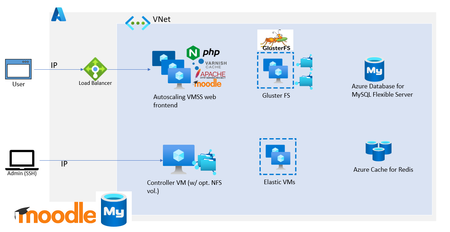
Moodle is one of the most popular open-source learning management platform empowering educators and researchers across the world to disseminate their work efficiently. It is also one of the most mature and robust OSS applications that the community has developed and improvised over the years. We have seen customers from small, medium, and large enterprises to schools, public sector, and government organizations deploying Moodle in Azure. In this blog post, I’ll share some best practices and tips for deploying Moodle on Azure based on our experiences working with several of our customers.70KViews14likes25CommentsAnnouncing Azure HorizonDB
Affan Dar, Vice President of Engineering, PostgreSQL at Microsoft Charles Feddersen, Partner Director of Program Management, PostgreSQL at Microsoft Today at Microsoft Ignite, we’re excited to unveil the preview of Azure HorizonDB, a fully managed Postgres-compatible database service designed to meet the needs of modern enterprise workloads. The cloud native architecture of Azure HorizonDB delivers highly scalable shared storage, elastic scale-out compute, and a tiered cache optimized for running cloud applications of any scale. Postgres is transforming industries worldwide and is emerging as the foundation of modern data solutions across all sectors at an unprecedented pace. For developers, it is the database of choice for building new applications with its rich set of extensions, open-source API, and expansive ecosystems of tools and libraries. At the same time, but at the opposite end of the workload spectrum, enterprises around the world are also increasingly turning to Postgres to modernize their existing applications. Azure HorizonDB is designed to support applications across the entire workload spectrum from the first line of code in a new app to the migration of large-scale, mission-critical solutions. Developers benefit from the robust Postgres ecosystem and seamless integration with Azure’s advanced AI capabilities, while enterprises can gain a secure, highly available, and performant cloud database to host their business applications. Whether you’re building from scratch or transforming legacy infrastructure, Azure HorizonDB empowers you to innovate and scale with confidence, today and into the future. Azure HorizonDB introduces new levels of performance and scalability to PostgreSQL. The scale-out compute architecture supports up to 3,072 vCores across primary and replica nodes, and the auto-scaling shared storage supports up to 128TB databases while providing sub-millisecond multi-zone commit latencies. This storage innovation enables Azure HorizonDB to deliver up to 3x more throughput when compared with open-source Postgres for transactional workloads. Azure HorizonDB is enterprise ready on day one. With native support for Entra ID, Private Endpoints, and data encryption, it provides compliance and security for sensitive data stored in the cloud. All data is replicated across availability zones by default and maintenance operations are transparent with near-zero downtime. Backups are fully automated, and integration with Azure Defender for Cloud provides additional protection for highly sensitive data. All up, Azure HorizonDB offers enterprise-grade security, compliance, and reliability, making it ready for business use today. Since the launch of ChatGPT, there has been an explosion of new AI apps being built, and Postgres has become the database of choice due in large part to its vector index support. Azure HorizonDB extends the AI capabilities of Postgres further with two key features. We are introducing advanced filtering capabilities to the DiskANN vector index which enable query predicate pushdowns directly into the vector similarity search. This provides significant performance and scalability improvements over pgvector HNSW while maintaining accuracy and is ideal for similarity search over transactional data in Postgres. The second feature is built-in AI model management that seamlessly integrates generative, embedding, and reranking models from Microsoft Foundry for developers to use in the database with zero configuration. In addition to enhanced vector indexing and simplified model management to build powerful new AI apps, we’re also pleased to announce the general availability of Microsoft’s PostgreSQL Extension for VS Code that provides the tooling for Postgres developers to maximize their productivity. Using this extension, GitHub Copilot is context aware of the Postgres database which means less prompting and higher quality answers, and in the Ignite release, we’ve added live monitoring with one-click GitHub Copilot debugging where Agent mode can launch directly from the performance monitoring dashboard to diagnose Postgres performance issues and guide users to a fix. Alpha Life Sciences are an existing Azure customers “I’m truly excited about how Azure HorizonDB empowers our AI development. Its seamless support for Vector DB, RAG, and Agentic AI allows us to build intelligent features directly on a reliable Postgres foundation. With Azure HorizonDB, I can focus on advancing AI capabilities instead of managing infrastructure complexities. It’s a smart, forward-looking solution that perfectly aligns with how we design and deliver AI-powered applications.” Pengcheng Xu, CTO Alpha Life Sciences For enterprises that are modernizing their applications to Postgres in the cloud, the security and availability of Azure HorizonDB make it an ideal platform. However, these migrations are often complex and time consuming for large legacy codebase conversions. To simplify this and reduce the risk, we’re pleased to announce the preview of GitHub Copilot powered Oracle migration built into the PostgreSQL Extension for VS Code. Built into VS Code, teams of engineers can work with GitHub Copilot to automate the end-to-end conversion of complex database code using rich code editing, version control, text authoring, and deployment in an integrated development environment. Azure HorizonDB is the next generation of fully managed, cloud native PostgreSQL database service. Built on the latest Azure infrastructure with state-of-the-art cloud architecture, Azure HorizonDB is ready to for the most demanding application workloads. In addition to our portfolio of managed Postgres services in Azure, Microsoft is deeply invested into the open source Postgres project and is one of the top corporate upstream contributors and sponsors for the PostgreSQL project, with 19 Postgres project contributors employed by Microsoft. As a hyperscale Postgres vendor, it’s critical to actively participate in the open-source project. It enables us to better support our customers down to the metal in Azure, and to contribute our learnings from running Postgres at scale back to the community. We’re committed to continuing our investment to push the Postgres project forward, and the team is already active in making contributions to Postgres 19 to be released in 2026. Ready to explore Azure HorizonDB? Azure HorizonDB is initially available in Central US, West US3, UK South and Australia East regions. Customers are invited to apply for early preview access to Azure HorizonDB and get hands-on experience with this new service. Participation is limited, apply now at aka.ms/PreviewHorizonDBTips and Tricks in using mysqldump and mysql restore to Azure Database for MySQL
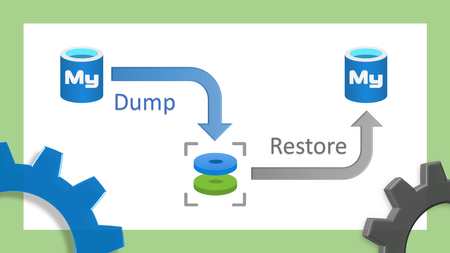
While importing data into Azure Database for MySQL, errors may occur. This blog will walk through common issues that you may face and how to resolve it. Access denied; you need (at least one of) the SUPER privilege(s) for this operation: Error ERROR 1227 (42000) at line 101: Access denied; you need (at least one of) the SUPER privilege(s) for this operation Operation failed with exitcode 1 Issue Importing a dump file that contains definers will result in the above error. As all of us know, only super users can perform and create definers in other schemas. Azure Database for MySQL is a managed PaaS solution and SUPER privileges is restricted. Solution Either replace the definers with the name of the admin user that is running the import process or remove it. The admin user can grant privileges to create or execute procedures by running GRANT command as in the following examples: GRANT CREATE ROUTINE ON mydb.* TO 'someuser'@'somehost'; GRANT EXECUTE ON PROCEDURE mydb.myproc TO 'someuser'@'somehost'; Example: Before: DELIMITER ;; /*!50003 CREATE*/ /*!50017 DEFINER=`root`@`127.0.0.1`*/ /*!50003 …… DELIMITER ; After: DELIMITER ;; /*!50003 CREATE*/ /*!50017 DEFINER=`AdminUserName`@`ServerName`*/ /*!50003 …… DELIMITER ; importing triggers while binary logging is enabled: Error ERROR 1419 (HY000) at line 101: You do not have the SUPER privilege and binary logging is enabled (you *might* want to use the less safe log_bin_trust_function_creators variable) Operation failed with exitcode 1 Issue Importing a dump file that contains triggers will result in the above error if binary logging is enabled. Solution To mitigate the issue, you need to enable the parameter “log_bin_trust_function_creators” from Azure portal parameters blade. storage engine not supported: Error ERROR 1030 (HY000) at line 114: Got error 1 from storage engine Operation failed with exitcode 1 Issue You will see the above error when you use a storage engine other than InnoDB and MEMORY. Read more on support engine types here: Storage engine support Solution Before the import process make sure that you are using a supported engine type; InnoDB and MEMORY are the only supported engine types in Azure Database for MySQL. If you dumped the data from a different engine type, edit the file and replace the storage engine. For example, exchange ENGINE=MYISAM with ENGINE=InnoDB. Note: You can always dump the schema first using the command: mysqldump --no-data option, and then dump the data using option: mysqldump --no-create-info option Example : Before: CREATE TABLE `MyTable` ( `ID` bigint(20) NOT NULL AUTO_INCREMENT, `DeviceID` varchar(50) NOT NULL, PRIMARY KEY (`ID`) ) ENGINE=MyISAM DEFAULT CHARSET=utf8; After: CREATE TABLE `MyTable` ( `ID` bigint(20) NOT NULL AUTO_INCREMENT, `DeviceID` varchar(50) NOT NULL, PRIMARY KEY (`ID`) ) ENGINE=InnoDB DEFAULT CHARSET=utf8; InnoDB storage engine row format: Error ERROR 1031 (HY000) at line 114: Table storage engine for 'mytable' doesn't have this option Operation failed with exitcode 1 Issue In Azure Database for MySQL, four row format options are supported: DYNAMIC, COMPACT and REDUNDANT, the COMPRESSED row format is supported under certain conditions. Solution We support compressed format on General Purpose or Memory Optimized. Customer needs to enable the parameter “innodb_file_per_table” from Azure portal parameters blade, and key_block_size must be 8 or greater than 8. In default, key_block_size is 8. Please visit the Performance considerations guide for best practices while migrating into Azure Database for MySQL. Thank You !14KViews4likes2CommentsSelecting the best tool for migrating to Azure Database for MySQL – Flexible Server
This blog post covers the various tools available for performing custom migrations from MySQL running on-premises, in Virtual Machines or a third-party cloud, or from Azure Database for MySQL – Single Server to Azure Database for MySQL – Flexible Server.13KViews1like2CommentsMigrating from AWS RDS for MySQL to Azure Database for MySQL - Considerations and Approaches
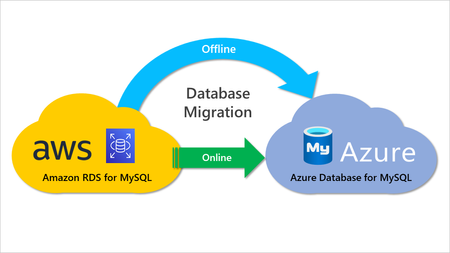
This post covers various strategies for migrating AWS RDS for MySQL to Azure Database for MySQL, how to use them to maximize efficiency and cost savings, different migration considerations, the importance of proper planning and preparation, and potential pitfalls that can arise during the process.9.7KViews3likes0CommentsMicrosoft Defender for Cloud support for Azure Database for MySQL - Flexible Server - GA
We’re excited to announce general availability of Microsoft Defender for Cloud support for Azure Database for MySQL - Flexible Server. Defender for Cloud provides Advanced Threat Protection (ATP), simplifying security management of your MySQL flexible server by enabling effortless threat prevention, detection, and mitigation through increased visibility into and control over harmful events.9.5KViews1like0Comments