data quality
27 TopicsShould CRM Users Be Measured on Data Quality KPIs?
Most Organisations agree that high-quality data is essential for getting value from Dynamics 365. Accurate customer information supports better reporting, improved customer experiences, more reliable forecasting, and increasingly more effective AI-driven insights. Yet many Organisations continue to struggle with incomplete records, duplicate data, missing activities, and inconsistent data entry practices. This raises an interesting question: Should CRM users be measured on data quality KPIs? Consider a situation many Organisations have experienced. A sales team is expected to maintain customer records, update opportunities, and log key customer interactions in Dynamics 365. However, users are primarily measured on revenue, pipeline growth, and sales performance. As a result, CRM updates are often treated as a secondary task. During a quarterly sales review, leadership discovers that several opportunities forecasted as active were closed weeks earlier, while others had not been updated since the previous reporting cycle. Customer records are missing key information, activities have not been logged consistently, and reporting accuracy begins to suffer. The issue is often viewed as a reporting problem, but in reality, it starts with the quality and consistency of the data being maintained in Dynamics 365. To address these challenges, some Organisations introduce data quality metrics such as: Record completeness Duplicate record reduction Activity logging compliance Opportunity update accuracy Customer data validation rates Supporters argue that what gets measured gets managed, and that data quality should be considered part of everyone's responsibility. Others believe that introducing data quality KPIs may create an additional administrative burden, reduce user adoption, and shift focus away from core business objectives. There is also the question of whether users should carry the full responsibility. Modern Dynamics 365 environments include validation rules, duplicate detection, business process flows, Power Automate workflows, and governance frameworks that can help improve data quality. Some Organisations, therefore, argue that technology and governance should do more of the heavy lifting rather than relying solely on user behaviour. From your experience: Should CRM users be measured on data quality KPIs? Have data quality metrics improved CRM adoption or data accuracy in your Organisation? What KPIs have been most effective? Is data quality primarily a user responsibility, or should technology and governance frameworks carry most of the burden? Have you found a balance that improves data quality without creating additional friction for users? I'm interested in hearing how different Organisations balance user accountability, adoption, and data quality within Dynamics 365 environments.
Struggling with running DQ Scans (Long queuing and Retry Count Error Issues)
Hi everyone, I have been exploring Microsoft Purview Data Quality quite extensively. At this point, I have configured more than 4,000 data quality rules across more than 10 Microsoft Fabric capacities, each with a minimum capacity of F16. Fabric is the source for all assets registered in Purview. I have identified several issues with the product, but the two that are currently impacting me the most are the following: DQ scans failing with a generic error“Max Retry Count Reached. Ending Workflow. Current Task HandleError”The challenge is that the error message does not identify which rule is causing the failure. As a result, I have to troubleshoot manually by disabling groups of rules, rerunning the scans, and repeating the process until I find the problematic rule. This trial-and-error approach is very time-consuming, especially at this scale. This seems to be caused by issues in some of the DQ rules, even though all rules are marked as “Good to go” in Purview. When running Data Quality scans, I often receive the following error: DQ scans remain queued for a long timeI am not sure why this happens or what resource, orchestration, or scheduling constraint is causing the delay. Whenever I run these DQ scans, they remain in a Queued state for at least 10 minutes, even when there is nothing running on the Fabric capacities. Has anyone experienced similar behavior with Purview Data Quality at this scale? Specifically, I would appreciate any guidance on: How to identify which DQ rule is causing a scan failure Why scans remain queued even when Fabric capacity appears to be idle Whether there are known limitations or best practices for running thousands of DQ rules in Purview Thank you.353Views0likes1CommentWho Should Be Accountable for Data Quality in Dynamics 365: IT or the Business?
Data quality remains one of the most common challenges in Dynamics 365 environments, regardless of industry or organisation size. When customer records are incomplete, duplicate data exists, or reporting becomes unreliable, the conversation often turns to ownership and accountability. Consider a simple example: A sales team creates customer records in Dynamics 365, while customer service updates contact details and finance systems synchronize billing information through integrations. Over time, duplicate records appear, customer information becomes inconsistent, and management reports start showing conflicting results. When this happens, who is accountable? Are the business users entering the data? Is the IT team managing the platform? The integration owners? Or should there be dedicated data stewards responsible for maintaining data quality standards? Some argue that data quality is primarily a business responsibility because users create and maintain most of the information stored in Dynamics 365. Others believe IT teams should take greater ownership through governance frameworks, validation rules, integrations, monitoring, and automated controls. In practice, many organisations struggle to find the right balance. When data issues arise, responsibility can become unclear, making it difficult to drive long-term improvements. From your experience: Who should ultimately be accountable for data quality in Dynamics 365? Should ownership sit with business teams, IT, dedicated data stewards, or a shared governance model? What approaches have worked well in your organisation? Have you seen a particular governance model deliver better results? I'm interested in hearing different perspectives and learning how others are addressing this challenge.161Views0likes0CommentsWorkaround Enabling Purview Data Quality & Profiling for Cross-Tenant Microsoft Fabric Assets
The Challenge: Cross-Tenant Data Quality Blockers Like many of you, I have been managing a complex architecture where Microsoft Purview sits in Tenant A and Microsoft Fabric resides in Tenant B. While we can achieve basic metadata scanning (with some configuration), I hit a hard wall when trying to enable Data Quality (DQ) scanning. Purview's native Data Quality scan for Fabric currently faces limitations in cross-tenant scenarios, preventing us from running Profiling or applying DQ Rules directly on the remote Delta tables. The Experiment: "Governance Staging" Architecture rather than waiting for a native API fix, I conducted an experiment to bridge this gap using a "Data Staging" approach. The goal was to bring the data's "physicality" into the same tenant as Purview to unlock the full DQ engine. The Solution Steps: Data Movement (Tenant B to Tenant A): Inside the Fabric Workspace (Tenant B), I created a Fabric Data Pipeline. I used this to export the critical Delta Tables as Parquet files to an ADLS Gen2 account located in Tenant A (the same tenant as Purview). Note: You can schedule this to run daily to keep the "Governance Copy" fresh. Native Scanning (Tenant A): I registered this ADLS Gen2 account as a source in Purview. Because both Purview and the ADLS account are in the same tenant, the scan was seamless, instantaneous, and required no complex authentication hurdles. Activating Data Quality: Once the Parquet files were scanned, I attached these assets to a Data Product in the Purview Data Governance portal. The Results: The results were immediate and successful. Because the data now resides on a fully supported, same-tenant ADLS Gen2 surface: ✅ Data Profiling: I could instantly see column statistics, null distributions, and value patterns. ✅ DQ Rules: I was able to apply custom logic and business rules to the data. ✅ Scans: The DQ scan ran successfully, generating a Data Quality Score for our Fabric data. Conclusion: While we await native cross-tenant "Live View" support for DQ in Fabric, this workaround works today. It allows you to leverage the full power of Microsoft Purview's Data Quality engine immediately. If you are blocked by tenant boundaries, I highly recommend setting up a lightweight "Governance Staging" container in your primary tenant. Has anyone else experimented with similar staging patterns for Governance? Let's discuss below.Solved552Views2likes3Comments
Data Quality Error (Internal Service Error)
I am facing an issue while running the DQ scan, when i tried doing manual scan and scheduled scans both time i faced Internal Service Error. ( DataQualityInternalError Internal service error occurred .Please retry or contact Microsoft support ) Data Profiling is running successfully but for none of the asset, DQ is working. After the lineage patch which MS had fixed, they had introduced Custom SQL option to create a rule, and after that only i am facing this issue. Is anyone else also facing the same? I tried with different data sources (ADLS, and Synapse) its same for both. If anyone has an idea, do share it here, it will be helpful.281Views0likes1Comment
Purview Data Quality Dashboard/ Report - Refresh
Hi All, Currently I am getting all blank in Purview Data quality dashboard, before two months dashboard shows all values across each data quality dimensions and showed graph for each quadrant in a dashboard. After two months when checked the dashboard everything is blank nothing is shown in the report. (Note : I have created two governance domain and each domain has five data products assigned with data assets, implemented data quality rules on top of each data assets that time scores were reflected in the Purview data quality dashboard), but suddenly now it all went blank scores showing as 'blank' Note : None of the data quality assessment were not deleted during that two months, data quality rules are still active and its still showing scores at data asset level. But its not showing in the dashboard currently. Can you please help me to sort out, is there any refresh policy associated for Purview Data quality dashboard.521Views1like8Comments
Microsoft Purview Data Quality Report "Not-Available Data"
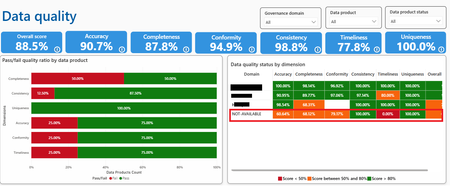
Hello! I'm working with data quality of Microsoft Purview. I have created a "Test Domain" and have data quality on its data assets. I have decided to delete the quality data as well as deleting the domain. It's been a week and the DQ Report is still like this. I think this comes from the deleted Test Domain. It affects the score in the report. Is there any way to remove the Not-Available Data? Thanks in advance!375Views0likes2Comments
Microsoft Purview - Establishing Data Quality Connection on Azure SQL Database
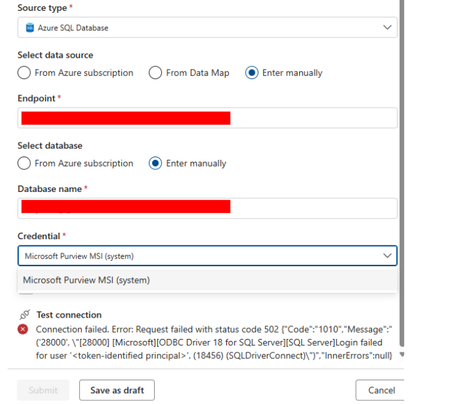
I have a service principal and already using it on the Data Map Solutions to scan and register Azure SQL Database as the source. It worked. Now, I am in the Unified Catalog and I am trying to establish a data quality connection on Microsoft purview for Azure SQL Database as its source type to run data quality scans. Why can't I use the Service Principal for the credential? Is there another way to establish the connection?360Views0likes1Comment