data collection
293 TopicsManage all your Microsoft Sentinel data in one place with Unified Data Management (Public Preview)
As security teams bring in more data from more sources and use it across SIEM and XDR workflows, decisions about connector health, ingestion volume, and cost optimization get harder. Today, we’re announcing the public preview of Unified Data Management for Microsoft Sentinel, available in the new Data & connectors experience in the Microsoft Defender portal, so you can monitor and manage your data from a single place. What Unified Data Management is and why it matters Unified Data Management brings connectors, tables, and ingestion health together. Instead of moving between separate pages, you can see your full data landscape, spot issues, and act on them from one view. It’s designed to help you quickly answer questions like: Which connectors are configured and which need attention? Which tables are receiving data? Are there ingestion spikes, drops, or stale data patterns? Which tables drive the most ingestion volume? What schema, transformations, and retention settings apply to a table? You’ll find it under Setup & configuration > Data & connectors, organized into three tabs: Overview, Connectors, and Tables. Overview: See health at a glance The Overview tab gives you a workspace-level snapshot of ingestion and health, so you can catch data issues before they impact analytics, detections, investigations, or reporting. It surfaces: Ingestion volume: Daily ingestion split by Analytics tier and Data Lake tier for your selected time range. Connectors that need attention: Connectors with credential errors, ingestion failures, or outages, including error type, failure count, and last successful ingestion. Table ingestion fluctuations: Tables with unexpected volume changes, grouped into spikes and drops. Data ingestion volume by table: Your top ingesting tables, ranked by daily volume. Ingestion latency by table: How long it takes for data to become available after it’s generated. Together, these insights help you troubleshoot connector failures, track down cost spikes, validate that new connectors are flowing, and catch unexpected changes in volume. Figure 1: The Overview tab shows daily ingestion volume by tier alongside data health insights, including connectors that need attention and tables with unexpected volume spikes or drops. Connectors: One inventory for unified and classic connectors The Connectors tab puts unified data connectors and Sentinel classic data connectors side by side, so it’s easier to see which data sources are onboarded and how they're connected. From here, you can: View onboarded connectors with their status, provider, content source, and available updates. Switch between unified connectors and Sentinel classic connectors. Search and filter connectors by provider, data type, and status. Open connector details to review configuration and health. Unified connectors reduce duplication by allowing supported data sources to connect once and feed data across Microsoft security products. Sentinel classic connectors continue to support the broad connector ecosystem, including connectors built with the Codeless Connector Framework (CCF). Figure 2: The Connectors tab brings unified and Sentinel classic connectors into a single inventory, with counts for onboarded and connected connectors, available updates, and filters for provider, data type, and status. Tables: Health, schema, transformations, and retention in one place The Tables tab brings Microsoft Sentinel and Microsoft Defender XDR tables together with their health signals, schema, transformations, and retention settings. Key insights now appear right in the grid, so you can compare tables side by side: last data received, average daily ingestion volume, estimated daily ingestion cost, volume anomaly, tier, and retention settings. This makes it easier to spot tables that have gone stale, are growing unexpectedly, or are driving a big share of your ingestion volume. Select any table to open the details panel, which organizes everything about that table into tabs: Details panel tab What it shows Overview Table type, tier, analytics retention, total retention, and other table metadata. Schema Column names, data types, and descriptions, with no KQL query required. Transformations Filter, Split, and Scope Tag transformation rules applied to the table. Retention Analytics retention and total retention settings. Figure 3: The Tables tab opens a details panel for any selected table. The Schema tab is especially useful when you need to understand incoming data, validate table fields, or create transformation logic without first writing schema-discovery queries. Built for everyday data operations in the Microsoft Defender portal Data management touches nearly every part of security operations, from detection and investigation to hunting, retention, and cost optimization. By bringing these tasks into the Microsoft Defender portal, Unified Data Management cuts down on context switching and makes it clearer how connectors, tables, health, transformations, and retention fit together. It’s one more step in Microsoft Sentinel’s investment in a unified security operations experience, where SIEM and XDR data can be managed and used together. Preview availability and prerequisites Unified Data Management is now available in public preview in commercial cloud environments. To experience it, you’ll need: Microsoft Sentinel onboarded to the Microsoft Defender portal. Unified role-based access control (URBAC) enabled in the Microsoft Defender portal. Data (manage) permission in the Data Operations permission group. Workspace permissions equivalent to Log Analytics Contributor, including permissions to write workspace and table settings. Get started Ready to try it? Open the Microsoft Defender portal and go to Setup & configuration > Data & connectors. From there: Start on the Overview tab to check ingestion volume and data health. Use the Connectors tab to view your unified and classic connectors. Explore the Tables tab to review table health, schema, transformations, and retention. For implementation and configuration guidance, see: Manage data in Microsoft Sentinel and Defender Configure data connectors Manage your existing tables and data Monitor the health of your Microsoft Sentinel data connectors Unified connectors overview Microsoft Sentinel data connectors More Microsoft Sentinel data integration news Public Preview: Nested API Support Comes to Microsoft Sentinel CCF Create a pull codeless connector for Microsoft Sentinel Logs Ingestion API in Azure Monitor411Views0likes0CommentsIntroducing the Microsoft Sentinel ASIM EmailEvent schema
Email remains one of the most common entry points for security threats. Yet email products often describe the same activity with different table names, fields, and values. This makes it harder to build detections and investigations that work consistently across data sources. The Microsoft Sentinel Advanced Security Information Model, or ASIM, EmailEvent schema is now available. It provides a common structure for email delivery and inspection events, helping customers and partners create security content that works across supported email data sources. A consistent view of email security activity EmailEvent standardizes the information analysts need to understand what happened to an email and why. It covers: Email delivery and inspection events Sender, source, and recipient information Message subject, size, direction, and delivery location URLs and file attachments SPF, DKIM, and DMARC authentication results Delivery actions such as delivered, blocked, quarantined, or deleted Threat, risk, confidence, tactic, technique, and remediation details Instead of learning a different data model for every product, analysts can query the normalized EmailEvent fields. Parser developers map each source's native data to the same schema. How it works Consider an email that contains a suspicious attachment. The email security product records the sender, recipients, attachment, authentication results, inspection verdict, and final action. A connector collects that event. A parser or Data Collection Rule maps the source fields to EmailEvent. Microsoft Sentinel can then query the normalized record using the same field names used for other supported email sources. This common structure separates security content from the details of a specific product. When another source adds an EmailEvent parser, existing source-independent queries and detections can work with that source without being rewritten around its native field names. Why it matters Simpler analytics: Write queries against one consistent set of email fields. Broader coverage: Apply source-independent security content across normalized email sources. Faster investigations: Compare delivery, authentication, attachment, URL, and threat details without translating different data models. Easier integration: Give connector and parser developers a defined contract for bringing new email telemetry into ASIM. EmailEvent does not replace the rich native data produced by email security products. It provides a consistent security layer that makes that data easier to use together. Build on EmailEvent The EmailEvent release includes the schema definition, source-independent parser framework, filtering parser, deployment templates, and validation support in the Azure-Sentinel repository. The schema version is 1.0.0. Customers can use normalized EmailEvent data to develop hunting queries, analytics rules, workbooks, and investigation experiences. Partners and community contributors can create source-specific parsers that map their email data to the schema. Get started Normalization Email Schema MS Learn Learn about normalization and ASIM Explore the EmailEvent implementation in Azure-Sentinel Deploy ASIM parsers Thank you to the ASIM engineering and partner teams who contributed to the schema, deployment path, validation, and release.673Views1like0Comments
Cloudflare Log ingestion in Sentinel with CCF
Hi all, I built a connector to ingest cloudflare firewall logs using CCF. The reason why I had to build this custom one while the official one was available was because official one uses Logpush which is a service that is available only on Enterprise plan, so if you are on pro or business plan you can not use it. Putting it out here in case anyone wants to try. https://amankhan.net/posts/Cloudflare-CCF-Connector/317Views0likes1CommentBuilding Microsoft Sentinel Connectors in Minutes with the Sentinel Connector Builder Agent
Overview We previously announced the public preview of the Microsoft Sentinel connector builder agent via VS code extension, that helps developers build Microsoft Sentinel codeless connectors faster with low-code and AI-assisted prompts. This post walks through a hands-on lab using a mock Network Log API to demonstrate how the Sentinel connector builder agent simplifies building Codeless Connector Framework (CCF) pull connectors. Instead of manually creating ingestion infrastructure and configuration files, you’ll use a guided, conversational workflow in VS Code to generate connector artifacts, test them against a live API, and deploy them into Microsoft Sentinel. The lab focuses on the end-to-end experience ranging from API setup to validated connector deployment so you can see how quickly a working integration can be produced. For additional guidance beyond this lab, refer to our MS Learn documentation. The Lab Environment This lab is built around a mock Network Log API hosted as an Azure Function App. The purpose of the lab environment is to give us a live API that we can use to build, validate, and test the Sentinel CCF connector builder agent against end to end. The API exposes 50 synthetic network activity records that look and behave like a real product data source, including web traffic, DNS requests, blocked remote access attempts, malware command-and-control blocks, VPN activity, and other common network events. That makes it a useful stand-in for the type of telemetry many teams want to onboard into Microsoft Sentinel. The API is intentionally shaped like the kind of source a customer might expose for telemetry retrieval. It uses API key authentication through the X-API-Key header, returns paginated results through a nextLink model, and provides a predictable response structure that the builder agent can map into a pull connector configuration. The repo contains everything needed for the walkthrough. There is an ARM template to deploy the Function App, reference documentation for the API, and a sample connector package showing the generated polling config, table schema, DCR, and connector definition. The end goal of the lab is straightforward: use the builder agent to generate a CCF pull connector that ingests this API into the custom NetworkLogAPIGetNetworkLogs_CL table in Sentinel. Prerequisites Before starting, make sure you have the following: Azure subscription -- with Contributor access on a resource group (for deploying the Function App) and Microsoft Sentinel Contributor access on a Sentinel-enabled workspace (for deploying the connector) Microsoft Sentinel workspace -- an existing Log Analytics workspace with Sentinel enabled. See Onboard Microsoft Sentinel to a Log Analytics workspace for more information. Azure CLI -- See How to install the Azure CLI for more information. VS Code with the Microsoft Sentinel for Visual Studio Code extension installed. GitHub Copilot -- with access to premium models. The connector builder agent requires Claude Sonnet 4.5 or 4.6, which uses Copilot premium model credits. Lab Repository -- Once the aforementioned prerequisites are met, you can access the lab repository here: Azure-Sentinel/Tools/CCF-Connector-Builder-Agent-Accelerator at master · Azure/Azure-Sentinel Deploying the Mock API The full CLI commands for this section are available in the repo. For a simpler option, you can use GitHub Copilot to handle the deployment. Enter this prompt: Follow the deployment instructions in Sentinel-CCF-Pull-Connector-Builder-Agent-Accelerator/agent-instructions.md. Let’s deploy the Network Log API and build a CCF pull connector. At a high level, the setup is four steps: clone the repo, create a resource group, ensure you have a Sentinel-enabled workspace, and deploy the Function App using the included ARM template. The template takes two parameters: an ApiKey of your choice (the secret the CCF connector will use to authenticate) and your Log Analytics workspace resource ID for Application Insights. Deployment takes about two to three minutes and outputs the FunctionAppName and endpoint URLs you will need later. Once deployed, verify the API is live: curl -s -H "X-API-Key: <your-api-key>" \ "https://<functionappname>.azurewebsites.net/api/GetNetworkLogs?page=1&pageSize=3" </functionappname></your-api-key> You should see a response like this: The API also exposes an /api/RefreshData endpoint that regenerates the 50 sample records with fresh timestamps. This is useful later in the walkthrough when you want to produce new events and trigger an immediate ingestion cycle without waiting for the next polling interval: curl -s -X POST -H "X-API-Key: <your-api-key>" \ "https://<functionappname>.azurewebsites.net/api/RefreshData" </functionappname></your-api-key> Building the Connector with the Sentinel Connector Builder Agent With the Microsoft Sentinel extension installed and GitHub Copilot running in agent mode, open a Copilot chat and enter a single prompt pointing at the API documentation file: That is the entire invocation. The agent takes it from there. It works through a structured seven-step sequence: preparation, polling config, table schema, DCR, connector definition, package validation, and summary. The agent produces four files in a sentinel-connectors/NetworkLogAPI_CCF/ output folder: NetworkLogAPI_PollingConfig.json – This is the API poller configuration. The agent reads the documentation and correctly identifies the GET /api/GetNetworkLogs endpoint, configures API Key authentication via the X-API-Key header, sets up NextPageUrl pagination using $.metadata.nextLink with a $.metadata.hasNextPage stop condition, and wires up the since query parameter for incremental delta pulls using the timestamp field. The RefreshData endpoint is correctly excluded, which the agent recognizes as a maintenance operation, not a security data stream. NetworkLogAPI_Table.json – This is the custom Log Analytics table schema for NetworkLogAPIGetNetworkLogs_CL . All 20 fields from the API response are mapped to the correct column types, with timestamp promoted to TimeGenerated as the standard Sentinel time column. NetworkLogAPI_DCR.json – This is the Data Collection Rule. This defines the stream declaration, the workspace destination, and the KQL transform that maps the raw snake_case API fields ( sourceIp , destinationIp , threatIndicator , etc.) to their PascalCase table columns. NetworkLogAPI_ConnectorDefinition.json – This is the connector UI configuration. This drives what the connector page looks like in Microsoft Sentinel: the title, description, prerequisite instructions, the BaseUrl and ApiKey input fields, sample KQL queries, and the connectivity status logic. The only point where the agent paused for input was to propose a connector description and ask for confirmation before writing it to the file. Everything else such as endpoint selection, auth type, pagination pattern, schema mapping, KQL transform, cross-file consistency was selected autonomously. To put that in perspective: without the agent, a developer building this connector from scratch would need to manually author four JSON files, understand the CCF schema for polling configs, DCRs, and connector definitions, write the KQL transform by hand, and validate that every cross-file reference lines up correctly. The agent compresses that work, typically hours of reading documentation, trial-and-error, and portal debugging, into a single prompt. Testing the Connector Before deploying anything to a Sentinel workspace, the Microsoft Sentinel connector builder agent lets you validate the generated polling config against the live API directly from your editor. Right-click the sentinel-connectors/NetworkLogAPI_CCF folder, select Microsoft Sentinel → Test Connector (Preview), and a Configuration Variables panel opens asking for the two template variables from the polling config: BaseUrl and apiKey . For other API patterns, there may be additional and different inputs. For example, apiKey input could be swapped with clientID and secret if the API supports OAUTH. Enter the Function App base URL and your API key, and the test runner connects immediately. The panel shows a live polling session. Poll #1 returns HTTP 200 with 50 events, and a countdown timer shows when the next poll will fire. Switching to the Events tab displays the ingested records in a tabular view with columns for timestamp , severity , action , bytesIn , bytesOut , category , and the rest of the mapped fields fresh from the API. Additionally, there are tabs for Headers, Payload, and Response, which can be useful for verifying that your pollerconfig.json configuration provides the expected request to your api with a working response. Data Extracted: The Test Connector feature can be used to visualize the response data in a table format to verify that data will land in a Sentinel table based on your configuration. Request from Poller: The Test Connector feature can be used to validate the request and response headers that will go out to the API based on the generated poller configuration. Request Response: The Test Connector feature shows you the live response from the API with respect to the request going to the API based on the poller configuration. This is a meaningful pre-flight check. It confirms that auth is working, the $.data events path resolves correctly, pagination is functional, and the polling interval fires as configured all before a single file is deployed to Azure. The most common connector configuration issues (wrong base URL, incorrect header name, mismatched JSON path) surface here in seconds rather than after a failed deployment and a 20-minute wait for Sentinel to attempt its first ingestion cycle. It is also the fastest way to troubleshoot if something goes wrong after deployment, far quicker than pushing changes to Azure and waiting for the connector to poll again. Deploying and Enabling the Connector With the connector tested and passing, deployment is the same right-click menu: right-click the sentinel-connectors/NetworkLogAPI_CCF folder, select Microsoft Sentinel → Deploy Connector (Preview). If you are not already signed in to Azure, the extension will prompt you to authenticate. The agent will also provide a clickbox in the chat window to invoke a connector deployment. Right Click Deploy Connector: UI Prompt Based Deploy Method: Once signed in, a workspace picker lists all available Log Analytics workspaces across your subscriptions. Select the one with Sentinel enabled and click Deploy. The extension deploys all four files to the workspace in the correct order: table schema first, then DCR, polling config, and connector definition. Once deployed, navigate to your Sentinel workspace via https://security.microsoft.com, go to Data Connectors, and find the Network Log API connector. The connector page shows the description, prerequisite notes, and the two credential fields generated by the agent: API Base URL and API Key. Enter your Function App base URL and API key and click Connect. The status updates to show the connector is connected and the deployment succeeded. Note: Data will appear in the workspace within 5 to 30 minutes depending on the polling interval. Run this query in Log Analytics to confirm ingestion. Note that the agent derives the table name from the vendor name and endpoint, so yours may differ slightly from the example below. Check the agent's summary output or the NetworkLogAPI_Table.json file for the exact name: NetworkLogAPIGetNetworkLogs_CL | sort by TimeGenerated desc | take 10 If you want to generate a fresh batch of events immediately rather than waiting for the next polling cycle, use the RefreshData endpoint to reset the sample records with new timestamps: curl -s -X POST -H "X-API-Key: " \ "https://.azurewebsites.net/api/RefreshData" Next Steps If you want to go further: Try it with your own API. The lab repo includes documentation on adapting the polling config, schema, and KQL transform to a real data source. Review the CCF connector schema documentation to understand the full range of supported configurations: pagination patterns, auth types, incremental pull strategies, and delta filter expressions. Explore the Microsoft Sentinel content hub to see how published connectors are structured and what the certification requirements look like for production submissions. Conclusion Following these steps, you saw how a working Sentinel connector can be generated, tested, and deployed in minutes rather than requiring days of manual configuration and infrastructure setup. If you are an ISV building a Sentinel integration and want hands-on support, Microsoft’s App Assure program is available to help. We partner with ISVs on connector development, validation, and deployment and provide guidance through implementation, testing, and readiness for production. You can get started by reaching out through our intake form. See our other Sentinel connector feature’s hands-on labs Building a CCF Nested API Pull Connector: A Technical Lab Walkthrough1.1KViews0likes0CommentsSentinel - Defender for Cloud P2 Benefit
Hi all, To receive the the benefit of the Sentinel / Defender for Cloud P2 500mb benefit is the following correct: Enabled Defender for Cloud P2 on the server or via Azure Arc (these are mainly on-prem servers. Create a DCR rule to collect events and send to our Sentinel Workspace. Enable Defender on the Sentinel workspace (not subscription) Defender for Servers is far more work than it should be!406Views0likes2CommentsWhat’s new in Microsoft Sentinel: May 2026
Welcome to the May edition of What's new in Microsoft Sentinel. This month’s updates focus on unified role-based access control (RBAC), ecosystem breadth, AI-agent security, and high-assurance identity. RBAC and row-level scoping are now generally available, giving security teams a single, granular permissions model across Sentinel and the Microsoft Defender portal and enabling multi-team SOC collaboration. The Sentinel connector catalog has passed 400 connectors, expanding coverage across Microsoft and third-party data sources and helping customers and partners onboard new data faster with the Codeless Connector Framework (CCF). The Agent 365 connector, now in public preview, brings AI agent telemetry into Sentinel data lake as first-class standardized signals so you can monitor agent behavior alongside identity, endpoint, and cloud activity. Finally, Entra Verified ID partner integrations in Microsoft Security Store are now generally available, delivering high‑assurance identity verification that makes account recovery after compromise far safer and significantly reduces the risk of re‑compromise. Read on for the full list of updates across Sentinel in May. Sentinel innovations: Sentinel SIEM Sentinel data lake Microsoft Security Store Sentinel SIEM Unified role-based access controls and row level scoping [Generally available] Sentinel now delivers general availability of two powerful access management capabilities: Unified RBAC and row-level data scoping. Together, these innovations provide a consistent, end-to-end model for controlling who can access data and what actions they can take — extending unified permissions management across the Defender portal while enabling granular, row-level visibility within a single Sentinel workspace. With Unified RBAC, organizations can simplify and centralize permissions across security workloads, reducing operational overhead, while row-level scoping enables secure collaboration across multiple teams by ensuring users only see data aligned to their role or scope. This milestone unlocks more scalable, multi-team SOC operations without the need for workspace segmentation, helping us to advance toward fully unified, granular access control across Microsoft Security. Tenant groups [Public preview] Managing security across multiple tenants just got simpler. Tenant Groups in the Microsoft Defender multi-tenant portal (MTO) give managed security service providers (MSSPs), cloud service partners (CSPs), and multi-tenant security teams a flexible way to organize tenants into logical groupings such as customer segment, geography, or operational priority, and instantly switch views with a single click. This streamlined experience reduces noise, improves investigation focus, and aligns to how teams actually work, all while respecting existing permissions and access controls. Learn more. Out-of-the-box integrations for Sentinel automation [Public preview] Out-of-the-box (OOTB) integrations for Sentinel automation brings a centralized catalog to easily discover, configure, and manage both Microsoft and third-party integrations. With simple, authentication-based setup, users can quickly add integrations and seamlessly incorporate them into playbooks. The experience places OOTB and custom integrations side by side, with enhanced with smart search, recommendations, and duplicate prevention to streamline automation workflows end to end. Learn more. UEBA enhancements [Public preview] Microsoft Sentinel UEBA continues to evolve with improvements that simplify management and expand detection coverage. A dedicated UEBA tab view in the Sentinel settings page consolidates UEBA and behaviors settings, making configuration easier to find and manage. Learn more. UEBA insights and anomalies now support the OktaV2_CL table alongside the existing Okta_CL table, extending anomalous activity and anomalous MFA failures detections to customers using the newer Okta connector format, without requiring new anomaly types. Learn more. UEBA extends GCP Audit Logs coverage with five anomaly detections for login activity, privileged actions, resource deployments, secret/KMS key access, and infrastructure usage. Learn more. Together, these updates make UEBA easier to operate while extending its visibility into identity and behavior signals from additional cloud and identity providers. Read the latest blog from the Microsoft Defender Research Team to learn more about Microsoft Sentinel UEBA and binary feature stacking, which uses clear binary signals to help establish behavioral context and inform investigation and detection decisions. Threat Intelligence – TAXII Export connector [Generally available] Sentinel supports threat intelligence export through the built-in Threat Intelligence – Trusted Automated Exchange of Intelligence Information (TAXII) Export connector, giving customers a standards-based way to share curated Structured Threat Information Expression (STIX) objects with supported TAXII 2.1 platforms. Configured from the Defender portal, the connector handles destination setup and intelligence delivery to external platforms. The capability supports cross-organization intelligence sharing for collective defense and centralized management in multi-tenant environments, with use cases across government, critical infrastructure, and large distributed organizations. Additional enhancements are planned, including more export options and expanded destination support. Learn more. Decision-stage resources for SIEM migration to Sentinel The AI-powered SIEM migration experience helps teams analyze detections, identify required data sources and connectors, and plan a phased move to Sentinel. But, customers still need help turning that analysis into a clear decision. To support that step, we’re introducing two new customer-facing resources: the Sentinel SIEM Migration Decision and Planning Guide, which explains the migration journey, outputs, and decision checkpoints before execution, and the Decision-Stage Customer FAQ, which answers common questions around disruption, cost, dual running, detection coverage, and delivery support. Together, these resources help make migration conversations more concrete and move teams more quickly from evaluation to a clearer, lower-risk next step. Learn more: Read the blog: AI-powered SIEM migration experience announcement Download the guide: Decision and planning guide Download the FAQ: Decision-stage customer FAQ Learn more: SIEM migration experience documentation Register for live AMA (Jun 23 at 9am PT): Live Microsoft Tech Community AMA on SIEM migration Sentinel data lake 400+ Sentinel data connectors The Sentinel connector catalog now includes 400+ connectors, providing broad, ready-to-deploy coverage across Microsoft and third-party data sources. Customers can flexibly ingest security data into Microsoft Sentinel analytics tier or the data lake tier. The Codeless Connector Framework (CCF) and VS code-based connector builder agent enables partners and customers to onboard new data sources faster and scale the catalog. Discover connectors in the Sentinel Content hub within the Defender portal or build custom connectors when needed. Learn more. Agent 365 connector [Public preview] Agent 365 connector streams AI agent telemetry from Agent 365 into Sentinel data lake, giving SOC teams visibility into agent behavior alongside identity, endpoint, and cloud signals. With the Agent 365 connector in place, Sentinel data lake becomes the system of record for agent security, turning activity such as data exposure or access drift into first-class security signals that analysts can correlate, hunt across, and investigate. Telemetry is normalized and to mapped to standard Advanced Security Information Model (ASIM) schemas, ready for analytics and detections, and end-to-end investigations can run through KQL, graph, and MCP-powered workflows. Install the connector with a single click from Sentinel Content Hub in the Defender portal. Learn more. CCF support for Azure Blob Storage [Public preview] Sentinel Codeless Connector Framework (CCF) supports Azure Blob Storage as a data source, providing an ingestion pattern designed for high-volume security data. Partners and customers can build CCF connectors that read from Blob Storage through a durable architecture that buffers spikes, handles backpressure, and reduces data loss risk during outages or throttling, making ingestion more reliable for variable or distributed pipelines. The pattern broadens compatibility with partners already streaming logs to Azure as part of their audit data delivery, with Cloudflare and Netskope as early adopters. App Assure further provides engineering-backed support for designing, validating, and remediating the Azure Blob Storage CCF connector integration. Learn more. Data filtering and splitting [Generally available] At RSAC, we announced built‑in filtering and splitting capabilities in Microsoft Sentinel, which is now generally available. As security teams ingest more data, it is important to optimize security data pipeline by controlling what data is ingested and in which tier. With filtering and splitting natively integrated into the Defender portal, security teams can shape data before it reaches Sentinel, without switching tools or managing custom JSON files. Using simple KQL‑based transformations directly in the UI, you can filter low‑value events and intelligently route data, making ingestion optimization faster, more intuitive, and easier to manage at scale. Filtering at ingest time allows you to remove low‑value or benign events to reduce noise, lower unnecessary processing, and ensure high‑signal data drives detections and investigations. Splitting enables intelligent routing of data between the analytics tier and the data lake tier based on relevance and usage. Together, these capabilities help you balance cost and performance while scaling data ingestion sustainably as your digital estate grows. Learn more. Transition your Sentinel connectors to the Codeless Connector Framework (CCF) [Action required] Azure has announced that the legacy Azure Data Collection API will be deprecated on September 14, 2026. Sentinel recommends customers review existing connectors and upgrade to the latest Codeless Connector Framework (CCF) versions to ensure continued access to the newest Sentinel capabilities. CCF delivers a fully managed SaaS experience with built-in health monitoring, centralized credential management, and improved performance. This enables partners and customers to onboard new data sources faster and at scale. Microsoft Security Store Entra Verified ID partner integrations via Security Store [Generally available] Security Store helps organizations secure one of the most critical steps in incident response: safe account recovery after compromise. Once a SOC team detects and contains a potential account takeover (ATO), restoring access requires high confidence that the user is legitimate. Through partner integrations with IDEMIA, AU10TIX, CLEAR, 1Kosmos, and WhoAmI, customers can extend Entra Verified ID with high-assurance identity verification (such as document and biometric checks) to validate users during recovery, onboarding, or helpdesk workflows. This helps replace weaker fallback methods that attackers often exploit, enabling SOC and IT teams to safely restore access while reducing risk of re-compromise. Learn more. Purview Data Security Triage Agent in Defender [Public preview] Security Store powers how customers discover and activate data security agents across Defender and Microsoft Purview, starting with the Data Security Triage Agent. This capability delivers AI-generated summaries and prioritization of Data Loss Prevention (DLP) alerts directly into Defender XDR, helping security teams reduce noise and focus on the incidents that matter most. By unifying discovery and activation through Security Store, customers can deploy data security agents in fewer steps and enable more integrated workflows across threat and data protection surfaces. Learn more. Additional resources Blogs and documentation: From idea to production: Building Security Store Advisor with an agentic SDLC Upcoming webinars: June 4: End-to-End Security in the Age of Agentic AI June 10: Deploy, optimize, and implement threat protection with Sentinel June 10: Security Foundations for AI Adoption June 24: Modern Security Made Simple: Stay Ahead of Threats with Sentinel Upcoming events: June 2–3: Microsoft Build, San Francisco (and free online) CEO Satya Nadella Day 1 keynote 90+ sessions, Microsoft Security experts onsite Register: build.microsoft.com Stay connected Check back each month for the latest innovations, updates, and events to ensure you’re getting the most out of Microsoft Sentinel. We’ll see you in the next edition!1.6KViews3likes0Comments
XdrLogRaider Defender XDR portal telemetry
A Microsoft Sentinel custom data connector that ingests Microsoft Defender XDR portal-only telemetry — configuration, compliance, drift, exposure, governance — that public Microsoft APIs (Graph Security, Microsoft 365 Defender, MDE) don't expose. https://github.com/akefallonitis/xdrlograider— Defender XDR portal telemetry Happy Hunting 🥳 🎉510Views0likes2CommentsSentinel Foundry - MCP Server (Github Community Release)
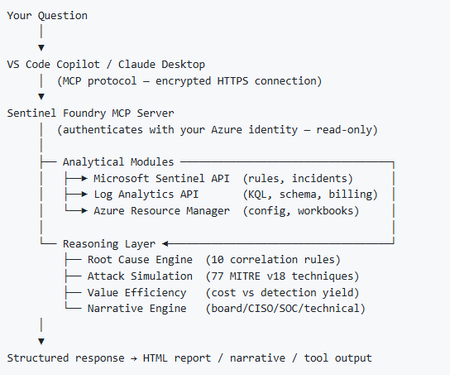
I’ve been cooking something that a lot of people in SOC have been struggling with — especially on the engineering side of Microsoft Sentinel. Thanks to the Microsoft Security team for shaping the capabilities of Sentinel even better with Sentinel Data Lake & Modern SecOps. Today’s the day I can finally share it. Note: This is not an official Microsoft product, but it is designed to make the Sentinel Build even better (complement) with much more intelligence. 🚀 Sentinel Foundry is now in public preview with 43 tools. (Sentinel Foundry - MCP Server) It’s an MCP server built to act like the brain of a strong Sentinel engineer — helping make building, improving, and operating Sentinel far more practical, faster, and honestly more enjoyable. For a lot of teams, the challenge is not understanding what Sentinel can do. The hard part is the engineering work around it: -> Deciding what data should actually be ingested -> Building a clean, scalable Sentinel foundation -> Writing useful detections instead of noisy ones -> Balancing security value with cost -> Turning ideas into deployable engineering outputs That is exactly why I built Sentinel Foundry to help communities grow stronger. It helps with the real engineering tasks behind Sentinel — from architecture thinking to detection design, deployment planning, ingestion strategy, automation ideas, and many of the workflows outlined in the GitHub project. How does it work? Here’s one of the flagship prompts I ran with it: “Give me a complete security posture report for our workspace. Score each pillar and tell me what to prioritise.” And within seconds, it produced a structured engineering blueprint that would normally take a lot longer to pull together manually. You can see the example prompts here in what it can do: https://github.com/prabhukiranveesam/Sentinel-Foundry#what-can-it-do I want building Sentinel to feel less like repetitive engineering overhead — and more like real security engineering that is fast, creative, and enjoyable. If you work with Sentinel as a SOC L2 analyst, engineer, detection engineer, consultant, or architect, I’d genuinely love for you to try it and tell me what you think. 🔗 Public Preview: https://github.com/prabhukiranveesam/Sentinel-Foundry This is just the start of an AI era — and I’m excited to keep shaping it with more powerful features over the coming days. This is very easy to set up and will be available to all of you at no cost during this month as part of the public preview, and your feedback is extremely valuable to shape this as a powerful solution.1.2KViews0likes2CommentsExtending Sentinel Data Integration: Azure Blob Storage Support for CCF Connectors
As organizations scale their security operations, the ability to ingest, process, and analyze high volumes of data reliably becomes increasingly critical. Microsoft Sentinel continues to expand its ecosystem through the Codeless Connector Framework (CCF), enabling ISVs to build and deliver integrations with Sentinel faster while simplifying deployment for customers. Today, CCF extends even further with support for Azure Blob Storage, introducing a new pattern for how data can be delivered into Sentinel. Expanding Connector Patterns with Azure Blob Storage CCF has traditionally enabled connectors that integrate directly with partner APIs and data sources. With this latest enhancement, ISVs can now build connectors that read data from Azure Blob Storage—unlocking new flexibility in how security data is collected and delivered. In this model, an ISV writes data to an Azure Blob Storage account. The Sentinel connector then reads from that storage layer, using Azure-native components such as Event Grid and storage queues to process events and forward them through data collection rules (DCR) into Log Analytics workspace. This approach introduces a durable data layer between the data source and Sentinel, enabling more resilient and scalable ingestion scenarios. Why a durable data layer matters By leveraging Azure Blob Storage as part of the ingestion pipeline, CCF connectors gain important operational advantages. This architecture allows data to be buffered and processed asynchronously, helping manage fluctuations in data volume and ensuring consistent delivery. Key benefits include: Resilience: Buffers spikes and handles backpressure to maintain steady ingestion Improved Compatibility: Supports widely adopted Azure Blob-based log streaming, enabling seamless integration with partners that already use Azure for audit data delivery Data protection: Reduces risk of data loss during outages or throttling Scalability: Supports high-volume ingestion scenarios across tenants Flexibility: Enables architectures that can support multiple SIEMs or data consumers Together, these capabilities make CCF Azure Blob Storage based connectors a strong fit for partners managing large, variable, or distributed data pipelines. Partner adoption Early partners are already taking advantage of this capability to modernize their integrations and support evolving customer needs. Cloudflare Cloudflare integrates with Microsoft Sentinel using the Codeless Connector Framework (CCF) to bring Cloudflare log data into centralized security operations workflows. The connector ingests Cloudflare logs—delivered via Logpush to Azure Blob Storage—into Sentinel for analysis, enabling security teams to correlate web, network, and application activity with other security signals. By combining Cloudflare’s global threat visibility with Sentinel analytics and automation, this integration supports more effective threat detection, investigation, and incident response across Cloudflare‑protected environments. Netskope Web Transaction Events Netskope integrates with Microsoft Sentinel to provide detailed visibility into web and cloud activity across users, applications, and SaaS services. The connector ingests Netskope web transaction logs into Sentinel—leveraging Azure Blob Storage as a staging layer for log streaming and ingestion—to enable near real‑time analysis of user behavior, policy violations, and potential threats. By combining Netskope’s inline web inspection with Sentinel’s analytics and correlation capabilities, this integration helps security teams detect risky activity, investigate incidents, and strengthen monitoring across modern cloud environments. These integrations demonstrate how Azure Blob Storage support can simplify ingestion architectures while improving reliability and scalability for customers. Here is what our partners say about the functionality. Cloudflare: Netskope: Get started Developers can begin building CCF Azure Blob Storage -enabled connectors today using the guidance on Microsoft Learn. This documentation provides step-by-step instructions for configuring storage, processing events, and connecting data to Sentinel. In the unlikely event that you encounter any issues in building or updating your connector, App Assure is here to help. We are an engineering-backed team committed to supporting customers and software development companies throughout their journey with Sentinel to streamline integration and accelerate time to market. Reach out to us via our intake form for assistance.1.2KViews0likes0CommentsIntroducing the New Microsoft Sentinel Logstash Output Plugin (Public Preview!)
Many organizations rely on Logstash as a flexible, trusted data pipeline for collecting, transforming, and forwarding logs from on-premises and hybrid environments. Microsoft Sentinel has long supported a Logstash output plugin, enabling customers to send data directly into Sentinel as part of their existing pipelines. The original plugin was implemented in Ruby, and while it has served its purpose, it no longer meets Microsoft’s Secure Future Initiative (SFI) standards and has limited engineering support. To address both security and sustainability, we have rebuilt the plugin from the ground up in Java, a language that is more secure, better supported across Microsoft, and aligned with long-term platform investments. To ensure a seamless transition, the new implementation is still packaged and distributed as a standard Logstash Ruby gem. This means the installation and usage experience remains unchanged for customers, while benefiting from a more secure and maintainable foundation. What's New in This Version Java‑based and SFI‑compliant Same Logstash plugin experience, now rebuilt on a stronger foundation. The new implementation is fully Java‑based, aligning with Microsoft’s Secure Future Initiative (SFI) and providing improved security, supportability, and long-term maintainability. Modern, DCR‑based ingestion The plugin now uses the Azure Monitor Logs Ingestion API with Data Collection Rules (DCRs), replacing the legacy HTTP Data Collection API (For more info, see Migrate from the HTTP Data Collector API to the Log Ingestion API - Azure Monitor | Microsoft Learn). This gives customers full schema control, enables custom log tables, and supports ingestion into standard Microsoft Sentinel tables as well as Microsoft Sentinel data lake. Flexible authentication options Authentication is automatically determined based on your configuration, with support for: Client secret (App registration / service principal) Managed identity, eliminating the need to store credentials in configuration files Sovereign cloud support: The plugin supports Azure sovereign clouds, including Azure US Government, Azure China, and Azure Germany. Standard Logstash distribution model The plugin is published on RubyGems.org, the standard distribution channel for Logstash plugins, and can be installed directly using the Logstash plugin manager, no change to your existing installation workflow. What the Plugin Does Logstash plugin operates as a three-stage data pipeline: Input → Filter → Output. Input: You control how data enters the pipeline, using sources such as syslog, filebeat, Kafka, Event Hubs, databases (via JDBC), files, and more. Filter: You enrich and transform events using Logstash’s powerful filtering ecosystem, including plugins like grok, mutate, and Json, shaping data to match your security and operational needs. Output: This is where Microsoft comes in. The Microsoft Sentinel Logstash Output Plugin securely sends your processed events to an Azure Monitor Data Collection Endpoint, where they are ingested into Sentinel via a Data Collection Rule (DCR). With this model, you retain full control over your Logstash pipeline and data processing logic, while the Sentinel plugin provides a secure, reliable path to ingest data into Microsoft Sentinel. Getting Started Prerequisites Logstash installed and running An Azure Monitor Data Collection Endpoint (DCE) and Data Collection Rule (DCR) in your subscription Contributor role on your Log Analytics workspace Who Is This For? Organizations that already have Logstash pipelines, need to collect from on-premises or legacy systems, and operate in distributed/hybrid environments including air-gapped networks. To learn more, see: microsoft-sentinel-log-analytics-logstash-output-plugin | RubyGems.org | your community gem host1.7KViews1like2Comments