data + storage
116 TopicsHybrid Cloud Architecture: What Should Enterprises Keep On-Premises?
Over the years, I have seen enterprise environments evolve from traditional infrastructure toward hybrid cloud architectures. One important architectural decision is determining which workloads should move to Azure and which should remain on-premises. In my view, this decision should consider: Application dependencies and compatibility. Security and regulatory requirements. Network connectivity and latency. Availability and disaster recovery. Operational complexity and total cost. There is no universal answer. The right architecture depends on the business requirements and the technical realities of each environment. For the Azure community: How do you approach workload placement when designing hybrid cloud environments? Do you start with application dependency mapping, security requirements, cost analysis, or another factor? I'd be interested in hearing your experiences and architectural approaches.74Views0likes2Comments
URGENT: Microsoft Edge incorrectly flags paytracc.com as typosquatting after multiple reports
Microsoft Edge Website Typo Protection incorrectly flags https://paytracc.com as a possible misspelling of paytrace.com. Paytracc.com is the legitimate official domain of PayTracc, an independent financial technology product. “PayTracc” is the intentional registered brand spelling and is not impersonating or affiliated with PayTrace. The warning has continued despite repeated reports through the “Report that this site URL is not a misspelling” option. Technical verification: • https://paytracc.com returns HTTP 200 OK. • http://paytracc.com returns HTTP 301 and redirects to HTTPS. • A valid TLS certificate and HSTS are enabled. • Chrome and other browsers do not display this warning. • The issue is reproducible only in Microsoft Edge Website Typo Protection. This false positive is discouraging customers from accessing the website. Anyways to resolve this please? Affected domain: https://paytracc.com Incorrect suggested domain: paytrace.com296Views0likes2Comments
A streaming pipeline can be healthy even when the data isn't complete yet.
One thing worth separating in streaming systems is processing time from event time. A message can arrive late because of a disconnected device, a network delay or an upstream system that buffers events. If downstream aggregations assume every event arrives in chronological order, the resulting windows can be misleading. In event-stream processing, event-time windows and watermarks help define how long the system waits for late events before considering a window sufficiently complete. The exact behaviour depends on the processing engine and its configuration. A few questions come up when designing these pipelines: How late can events realistically arrive? What should happen to events that arrive after the allowed lateness? Does the business require corrected historical aggregates? How do you monitor event-time lag separately from processing latency? There is not one watermark setting that fits every workload. A short delay may reduce reporting latency but increase the number of late events that need separate handling. How do you choose the lateness threshold for Azure streaming workloads, especially when the business expects both low latency and accurate historical results?213Views0likes1CommentEngineering an Azure Data Layer for Odoo Analytics Without Changing the ERP
One thing I have learned from working on ERP-driven data projects is that the ERP is rarely the place where you want to solve every analytics problem. We saw this firsthand in a manufacturing engagement where Odoo was being used across finance, inventory, procurement, and manufacturing, but reporting still involved substantial manual extraction and Excel-based consolidation. The interesting engineering question wasn't “How do we replace the ERP?” It was: “How do we build a reliable analytical layer around it without changing the transactional system?” That shaped the architecture. We used Odoo APIs and Azure Data Factory for ingestion, landing the data in Azure Data Lake Storage Gen2. From there, the data was organized into Bronze, Silver, and Gold layers: Bronze: Source-aligned Odoo data was retained with minimal transformation. Silver: Data was cleansed, standardized, and prepared across finance, inventory, procurement, and manufacturing domains. Gold: Analytics-ready data was prepared for downstream reporting and consumption. Azure Databricks with Spark handled transformation and KPI standardization, while Synapse/SQL layers provided structured analytical models for reporting. Power BI datasets consumed the prepared data, with Row-Level Security applied for role-based access. Why did this separation matter for the project? The important architectural boundary was: Odoo → transactional operations Azure data platform → ingestion, storage, transformation, standardization Power BI → analytical consumption That separation meant the reporting layer did not have to repeatedly extract and reshape data directly from the ERP. It also gave us a dedicated place to handle historical data and standardize information across business domains before it reached the reporting layer. What changed? The implementation automated 15+ Odoo-based reports and provided governed Power BI dashboards to 60+ business users. More importantly, teams moved away from repeated ERP extraction and spreadsheet consolidation toward a reusable analytical data layer. For our team, the bigger takeaway was that ERP modernization does not necessarily mean modifying the ERP. For teams building Azure data platforms around ERP systems, how are you drawing the boundary between API ingestion, historical storage, transformation, and analytical modeling?181Views0likes0Comments
Azure support team not responding to support request
I am posting here because I have not received a response to my support request despite my plan stating that I should hear back within 8 hours. It has now gone a day beyond that limit, and I am still waiting for assistance with this urgent matter. This issue is critical for my operations, and the delay is unacceptable. The ticket/reference number for my original support request was 2410100040000309. And I have created a brand new service request with ID 2412160040010160. I need this addressed immediately.1.8KViews2likes12CommentsApplying DevOps Principles on Lean Infrastructure. Lessons From Scaling to 102K Users.
Hi Azure Community, I'm a Microsoft Certified DevOps Engineer, and I want to share an unusual journey. I have been applying DevOps principles on traditional VPS infrastructure to scale to 102,000 users with 99.2% uptime. Why am I posting this in an Azure community? Because I'm planning migration to Azure in 2026, and I want to understand: What mistakes am I already making that will bite me during migration? THE CURRENT SETUP Platform: Social commerce (West Africa) Users: 102,000 active Monthly events: 2 million Uptime: 99.2% Infrastructure: Single VPS Stack: PHP/Laravel, MySQL, Redis Yes - one VPS. No cloud. No Kubernetes. No microservices. WHY I HAVEN'T USED AZURE YET Honest answer: Budget constraints in emerging market startup ecosystem. At our current scale, fully managed Azure services would significantly increase monthly burn before product-market expansion. The funding we raised needs to last through growth milestones. The trade: I manually optimize what Azure would auto-scale. I debug what Application Insights would catch. I do by hand what Azure Functions would automate. DEVOPS PRACTICES THAT KEPT US RUNNING Even on single-server infrastructure, core DevOps principles still apply: CI/CD Pipeline (GitHub Actions) • 3-5 deployments weekly • Zero-downtime deploys • Automated rollback on health check failures • Feature flags for gradual rollouts Monitoring & Observability • Custom monitoring (would love Application Insights) • Real-time alerting • Performance tracking and slow query detection • Resource usage monitoring Automation • Automated backups • Automated database optimization • Automated image compression • Automated security updates Infrastructure as Code • Configs in Git • Deployment scripts • Environment variables • Documented procedures Testing & Quality • Automated test suite • Pre-deployment health checks • Staging environment • Post-deployment verification KEY OPTIMIZATIONS Async Job Processing • Upload endpoint: 8 seconds → 340ms • 4x capacity increase Database Optimization • Feed loading: 6.4 seconds → 280ms • Strategic caching • Batch processing Image Compression • 3-8MB → 180KB (94% reduction) • Critical for mobile users Caching Strategy • Redis for hot data • Query result caching • Smart invalidation Progressive Enhancement • Server-rendered pages • 2-3 second loads on 4G WHAT I'M WORRIED ABOUT FOR AZURE MIGRATION This is where I need your help: Architecture Decisions • App Service vs Functions + managed services? • MySQL vs Azure SQL? • When does cost/benefit flip for managed services? Cost Management • How do startups manage Azure costs during growth? • Reserved instances vs pay-as-you-go? • Which Azure services are worth the premium? Migration Strategy • Lift-and-shift first, or re-architect immediately? • Zero-downtime migration with 102K active users? • Validation approach before full cutover? Monitoring & DevOps • Application Insights - worth it from day one? • Azure DevOps vs GitHub Actions for Azure deployments? • Operational burden reduction with managed services? Development Workflow • Local development against Azure services? • Cost-effective staging environments? • Testing Azure features without constant bills? MY PLANNED MIGRATION PATH Phase 1: Hybrid (Q1 2026) • Azure CDN for static assets • Azure Blob Storage for images • Application Insights trial • Keep compute on VPS Phase 2: Compute Migration (Q2 2026) • App Service for API • Azure Database for MySQL • Azure Cache for Redis • VPS for background jobs Phase 3: Full Azure (Q3 2026) • Azure Functions for processing • Full managed services • Retire VPS QUESTIONS FOR THIS COMMUNITY Question 1: Am I making migration harder by waiting? Should I have started with Azure at higher cost to avoid technical debt? Question 2: What will break when I migrate? What works on VPS but fails in cloud? What assumptions won't hold? Question 3: How do I validate before cutting over? Parallel infrastructure? Gradual traffic shift? Safe patterns? Question 4: Cost optimization from day one? What to optimize immediately vs later? Common cost mistakes? Question 5: DevOps practices that transfer? What stays the same? What needs rethinking for cloud-native? THE BIGGER QUESTION Have you migrated from self-hosted to Azure? What surprised you? I know my setup isn't best practice by Azure standards. But it's working, and I've learned optimization, monitoring, and DevOps fundamentals in practice. Will those lessons transfer? Or am I building habits that cloud will expose as problematic? Looking forward to insights from folks who've made similar migrations. --- About the Author: Microsoft Certified DevOps Engineer and Azure Developer. CTO at social commerce platform scaling in West Africa. Preparing for phased Azure migration in 2026. P.S. I got the Azure certifications to prepare for this migration. Now I need real-world wisdom from people who've actually done it!507Views0likes1CommentStorage Accounts - Networking
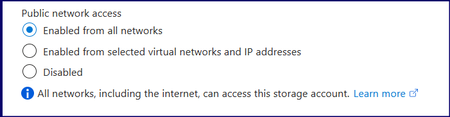
Hi All, Seems like a basic issue, however, I cannot seem to resolve the issue. In a nutshell, a number of storage accounts (and other resources) were created with the Public Network Access set as below: I would like to change them all to them all to Enabled from selected virtual networks and IP addresses or even Disabled. However, when I change to Enabled from selected virtual networks and IP addresses, connectivity from, for example, Power Bi to the Storage Account fails. I have added the VPN IP's my local IP etc. But all continue to fail connection or authentication. Once it is changed back to Enabled for All networks everything works, i.e. Power Bi can access the Azure Blob Storage and refresh successfully. I have also enabled 'Allow Azure services on the trusted services list to access this storage account'. But PBI fails to have access to the data. data Source Credentials error, whether using Key, Service Principal etc, it fails. As soon as I switch it back to Enable From All Networks, it authenticates straight away. One more idea I had was to add ALL of the Resource Instances, as this would white list more Azure services, although PBI should be covered by enabling 'Allow Azure services on the trusted services list to access this storage account'. I thought I might give it a try. Also, I created an NSG and used the ServiceTags file to create an inbound rule to allow Power BI from UK South. Also, I have created a Private Endpoint. This should all have worked but still can’t set it to restricted networks. I must be missing something fundamental or there is something fundamentally off with this tenant. When any of the two restrictive options are selected, do they also block various Microsoft services? Any help would be gratefully appreciated.855Views1like3Comments
Understanding Storage Account replication downtime
I have a Storage account that's used as a CDN to host a lot of generally small files which occupy about 2GB. This is a small but critical part of our application which is used heavily by our app but which has no redundancy (it currently only has LRS replication). It's hosted in UK South and while Storage Accounts are very reliable, I'm concerned that if there's ever a regional outage there's nothing I'd be able to do. The requirements therefore are: Convert it from LRS to GZRS i.e. actively replicating from UK South to UK West. No app changes required to detect when the primary goes down and to switch to the secondary-this needs to be transparent. No or low downtime when the change is made. We need to be able to write to the secondary after failover. As a software company anything that limits our ability to push code changes is not acceptable, so RA-GZRS is off the table. After doing a bit of reading, I found the following warning in the docs: If you choose to perform a manual migration, downtime is required but you have more control over the timing of the migration process. https://learn.microsoft.com/en-us/azure/storage/common/redundancy-migration?tabs=portal#downtime-requirements This is typically light on detail and leaves some critical questions unanswered: Is there any way of estimating how long the downtime will be so I can appropriately set expectations of management and customers when scheduling the maintenance window needed? It specifically mentions manual migrations i.e. making the change through the Azure Portal, would making the change through IAC e.g. Bicep or Terraform be any different? Any input from anyone who's made any similar changes will also be appreciated. Edit: I've just checked and found that UK West still doesn't have Availability Zone support, is my best option for reducing the risk of this single point of failure to set the replication to GRS? https://learn.microsoft.com/en-us/azure/reliability/regions-list#azure-regions-list-1274Views0likes3Comments
PAAS resource metrics using Azure Data Collection Rule to Log Analytics Workspace
Hi Team, I want to build a use case to pull the Azure PAAS resources metrics using azure DCR and push that data metrics to log analytics workspace which eventually will push the data to azure event hub through streaming and final destination as azure postgres to store all the resources metrics information in a centralized table and create KPIs and dashboard for the clients for better utilization of resources. I have not used diagnose setting enabling option since it has its cons like we need to manually enable each resources settings also we get limited information extracted from diagnose setting. But while implementing i saw multiple articles stating DCR is not used for pulling PAAS metrics its only compatible for VM metrics. Want to understand is it possible to use DCR for PAAS metrics? Thanks in advance for any inputs.Solved441Views0likes2CommentsMine your Azure backup data, it could save you 💰💡
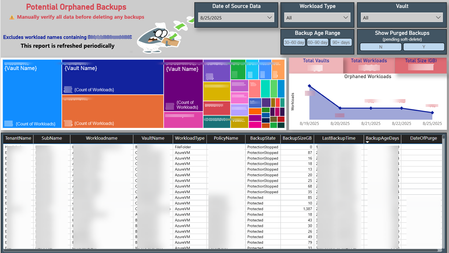
Your data has a story to tell. Mine it, decipher it, and turn it into actionable outcomes. 📊🔍 Azure backups can become orphaned in several ways (I'll dive into that in a future post). But here’s a key point: orphaned doesn’t always mean useless, hence the word “Potential” in the title of my Power BI report. Each workload needs to be assessed individually. If a backup is no longer needed, you might be paying for it - unnecessarily and unknowingly. 🕵️♂️💸 To uncover these hidden costs, I combined data from the Azure Business Continuity Center with a PowerShell script I wrote to extract LastBackupTime and other metadata. This forms the foundation of my report, helping visualize and track backup usage over time. This approach helped me identify forgotten one-time backups, VMs deleted without stopping the backup, workloads excluded due to policy changes, and backups left behind after resource migrations. If you delete unneeded backups and have soft-delete enabled, the backup size drops to zero and Azure stops charging for it. ✅🧹 💡 Do your Azure backups have their own untold story to tell? 📸 Here's a snapshot of my report that helped me uncover these insights 👇276Views0likes0Comments