cybersecurity incident response
30 Topics
Cloud forensics: Prepare for the worst -implement security baselines for forensic readiness in Azure
Forensic readiness in the cloud Forensic readiness in the cloud refers to an organization’s ability to collect, preserve, and analyze digital evidence in preparation for security incidents. Forensic readiness is increasingly important as more organizations migrate workloads to the cloud. Achieving an appropriate security posture ensures that organizations are adequately equipped for forensic investigations. This requires more than just the presence of logs; logging and monitoring configurations must be thoughtfully scoped and proactively enabled. Additionally, the adoption of cloud environments presents unique challenges for forensic investigations. First, capturing the right evidence can be difficult due to the dynamic nature of cloud data. Second, in a shared responsibility model, organizations must work closely with their cloud providers to ensure preparedness for forensic investigations. Azure’s multi-tenant architecture adds another layer of complexity, as data from multiple customers may reside on the same physical hardware. Therefore, strict access controls and robust logging are essential. To maintain forensic readiness, organizations must implement comprehensive monitoring and logging across all cloud services to ensure evidence is available when needed. Preparing your Azure environment for forensic readiness When the Azure environment is set up correctly and configured with accurate logging in place, it becomes easier to quickly identify the scope of a security breach, trace the attacker’s actions, and identify the Tactics, Techniques, and Procedures (TTP) employed by a threat actor. Through the implementation of these measures, organizations can ensure that data required to support forensic investigations is available, hence ensuring compliance with auditing requirements, improving security, and ensuring security incidents are resolved efficiently. With that granularity of log data in the environment, organizations are more well-equipped to respond to an incident if it occurs. Case study: Forensic investigation disrupted due to lack of forensic readiness in Azure In a recent cybersecurity incident, a large company utilizing Azure experienced a major setback in its forensic investigation. This case study outlines the critical steps and logs that were missed, leading to a disrupted investigation. Step 1: Initial detection of the compromise The organization’s Security Operations Centre (SOC), identified anomalous outbound traffic originating from a compromised Azure virtual machine (VM) named “THA-VM.” Unfortunately, the absence of diagnostic settings significantly hindered the investigation. Without access to Guest OS logs and data plane logs, the team was unable to gain deeper visibility into the threat actor’s activities. The lack of critical telemetry—such as Windows Event Logs, Syslog, Network Security Group (NSG) flow logs, and resource-specific data plane access logs—posed a major challenge in assessing the full scope of the compromise. Had these diagnostic settings been properly configured, the investigation team would have been better equipped to uncover key indicators of compromise, including local account creation, process execution, command-and-control (C2) communications, and potential lateral movement. Figure 1: Diagnostic settings not configured on the virtual machine resource Step 2: Evidence collection challenges During the forensic analysis of the compromised virtual machine, the team attempted to capture a snapshot of the OS disk but discovered that restore points had not been configured and no backups were available—severely limiting their ability to preserve and examine critical disk-based artefacts such as malicious binaries, tampered system files, or unauthorized persistence mechanisms. Restore points, which are not enabled by default in Azure virtual machines, allow for the creation of application-consistent or crash-consistent snapshots of all managed disks, including the OS disk. These snapshots are stored in a restore point collection and serve as a vital tool in forensic investigations, enabling analysts to preserve the exact state of a VM at a specific point in time and maintain evidence integrity throughout the investigation process. Step 3: Analysis of the storage blob The team then turned to storage blobs after identifying unusual files that appeared to be associated with threat actor tool staging such as scanning utilities and credential dumping tools. However, because diagnostic settings for the storage account had not been enabled, the investigators were unable to access essential data plane logs. These logs could have revealed who uploaded or accessed the blobs and when those actions occurred. Since storage diagnostics are not enabled by default in Azure, this oversight significantly limited visibility into attacker behavior and impeded efforts to reconstruct the timeline and scope of malicious activity—an essential component of any effective forensic investigation. Step 4: Slow response and escalation In the absence of tailored logging and monitoring configurations, response timelines were delayed, and the full incident response process that was required was not initiated quickly enough to minimize the impact. Step 5: Recovery and lessons learned Despite the delays, the team pieced together elements of the story based on the data they had available, without determining the initial access vector largely because the necessary diagnostic data wasn't available. This absence of forensic readiness highlights the importance of configuring diagnostic settings, enabling snapshots, and using centralized logging solutions like Microsoft Sentinel, which will bring all this telemetry into a single pane of glass, providing real-time visibility and historical context in one place. This unified view enables faster incident detection, investigation, and response. Its built-in analytics and AI capabilities help surface anomalies that might otherwise go unnoticed, while retaining a searchable history of events for post-incident forensics. Recommended practices for forensic readiness in Azure The table below outlines key recommendations for deploying and administering workloads securely and effectively in Azure. Each recommendation is categorized by focus area and includes a best practice description, specific action to take, and a reference to supporting documentation or resources to assist with implementation. Category Best Practice Recommended Action Resource/Link Identity and Access Enable MFA for all users. [ ] Enable Multi-Factor Authentication (MFA) for all Azure AD Users. MFA in Azure AD Monitor Access Review and Role Assignments [ ] Regularly review identities (SPNs, Managed Identities, Users), role assignments and permissions for anomalies. Azure Identity Protection Implement RBAC with least privilege. [ ] Use Role-Based Access Control (RBAC) and assign least-privilege roles to users. Azure RBAC Overview Configure PIM for privileged roles. [ ] Configure Privileged Identity Management (PIM) for all privileged roles. Require approval for high privilege roles. PIM in Azure AD Enable Sign-in and Audit Logs. [ ] Ensure all sign-in activities and audit logs are enabled and logging in Azure AD. Azure Entra (AD) Sign-In Logs Conditional Access Policies: Protect high-risk resources from unauthorized access. [ ] Set Conditional Access policies to enforce MFA or access restrictions based on conditions like risk or location. Conditional Access in Azure Entra (AD) Logging and Monitoring Enable Azure Monitor [ ] Enable Azure Monitor to collect telemetry data from resources. Azure Monitor Overview Activate Microsoft Defender for Cloud. [ ] Activate and configure Microsoft Defender for Cloud for enhanced security monitoring. Microsoft Defender for Cloud Enable Diagnostic logging for VM and Applications. [ ] Configure Diagnostic logging for Azure VMs, and other critical resources. Azure Diagnostics Logging Centralize Logs in Log Analytics Workspace. [ ] Consolidate all logs into a Log Analytics Workspace for centralized querying. Log Analytics Workspace Set Audit logs retention to 365+ days. [ ] Ensure audit logs are retained for a minimum of 365 days to meet Forensic needs. Audit Log Retention Enable Advanced Threat Detection. [ ] Enable Microsoft Defender for Cloud and Sentinel to detect anomalous behavior and security threats in real time. Azure Sentinel Overview Data Protection Ensure Data encrypted at rest and in transit. [ ] Enable encryption for data at rest and in transit for all Azure resources. Azure Encryption Use Azure Key Vault for Key management. [ ] Store and manage encryption key, certificates and secrets in Azure Key Vault. Azure Key Vault Rotate Encryption Keys Regularly. Regularly rotate encryption key, certificates and secrets in Azure Key Vault. Manage Keys in Key Vault Configure Immutable Backups. [ ] Set up immutable backups for critical data to prevent tampering. Immutable Blob Storage Implement File Integrity Monitoring [ ] Enable File Integrity Monitoring in Azure Defender for Storage to detect unauthorized modifications. Azure Defender for Storage Network Security Configure Network Security Groups (NSGs). [ ] set up NSGs to restrict inbound/outbound traffic for VM’s and services. Network Security Groups Enable DDoS Protection. [ ] Implement DDoS Protection for critical resources to safeguard against distributed denial-of-service attacks. DDoS Protection in Azure Use VPNs or ExpressRoute for secure connectivity. [ ] Establish VPNs or ExpressRoute for secure, private network connectivity. Azure VPN Gateway Incident Response Set Up Alerts for suspicious activities. [ ] Configure alerts for suspicious activities such as failed login attempts or privilege escalation. Create Alerts in Azure Sentinel Automate incident response. [ ] Automate incident response workflows using Azure Automation or Logic Apps. Azure Logic Apps Integrate Threat intelligence with Sentinel. [ ] Integrate external threat intelligence feeds into Microsoft Sentinel to enrich detection capabilities Threat Intelligence in Azure Sentinel Run Advanced KQL Queries for Incident Investigations. [ ] Use Kusto Query Language (KQL) queries in Sentinel to investigate and correlate incidents. KQL Queries in Sentinel Establish Incident Response Plan [ ] Document and formalize your organization’s incident response plan with clear steps and procedures. Incident Response in Azure Policies and Processes Define a Forensic Readiness Policy. [ ] Establish and document a Forensic Readiness policy that outlines roles, responsibilities, and procedures. Azure Security Policies Conduct Administrator training. [ ] Provide regular training for administrators on security best practices, forensic procedures, and incident response. Azure Security Training By using Microsoft’s tools and implementing these recommended best practices, organizations can improve their forensic readiness and investigation capabilities in Azure. This approach not only helps in responding effectively to incidents but also enhances an organization’s overall security posture. By staying ahead of potential threats and maintaining forensic readiness, you’ll be better equipped to protect your organization and meet regulatory requirements. Conclusion Forensic readiness in Azure is not a one-time effort, it is an ongoing commitment that involves proactive planning, precise configuration, and strong coordination across security, operations, and governance teams. Key practices such as enabling diagnostic logging, centralizing telemetry, enforcing least-privilege access, and developing cloud-tailored incident response playbooks are essential. Together, these measures improve your ability to detect, investigate, and respond to security incidents in a timely and effective manner.2.9KViews5likes1CommentRecover an ADCS platform from compromise
Discover how Microsoft DART executes the recovery of an Active Directory Certificate Services server amidst a ransomware incident. Gain insights into the vital components necessary for a successful restoration, enabling ongoing recovery efforts for infrastructure, data, and applications affected by this threat.8.9KViews3likes0CommentsA BlackByte Ransomware intrusion case study
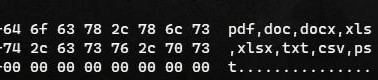
Introduction As ransomware attacks grow in number and sophistication every year, threat actors can quickly impact business operations if organizations are not well prepared. In this blog, we detail an investigation into a ransomware event. During this intrusion the threat actor progressed through the full attack chain, from initial access through to impact, in less than five days, causing significant business disruption for the victim organization. During the investigation, the Microsoft Incident Response team (formerly known as DART) identified the threat actor employing a range of tools & techniques to achieve their objectives, including: Exploitation of unpatched internet exposed Microsoft Exchange Servers Web Shell deployment facilitating remote access Use of living of the land tools for persistence and reconnaissance Cobalt Strike beacons for command and control Process Hollowing and the use of vulnerable drivers for defense evasion Deployment of custom developed backdoors to facilitate persistence Deployment of a custom developed data collection and exfiltration tool Forensic analysis Initial Access In order to obtain initial access into the victim’s environment, the Threat Actor was observed exploiting known vulnerabilities (ProxyShell) on unpatched Microsoft Exchange Servers: CVE-2021-34473 CVE-2021-34523 CVE-2021-31207 The exploitation of these vulnerabilities allowed the Threat Actor to: Attain SYSTEM level privileges on the compromised Exchange host Enumerate LegacyDN of users by sending an Autodiscover requests, including SIDs of users Construct a valid authentication token and use it against the Exchange Powershell backend Impersonate domain admin users and creates a web shell by using the New-MailboxExportRequest cmdlet Create web shells in order to obtain remote control on the affected servers The Threat Actor was observed operating from the following IP to exploit ProxyShell and access the web shell: 185.225.73[.]244 Persistence Backdoor Microsoft IR identified the creation of Registry Run Keys, a common persistence mechanism employed by threat actors to maintain access to a compromised device, where a payload is executed each time a specific user logs in. Registry Key ValueName ValueData HKEY_CURRENT_USER\Software\Microsoft\Windows\CurrentVersion\Run MsEdgeMsE rundll32 C:\Users\user\Downloads\api-msvc.dll,Default HKEY_CURRENT_USER\Software\Microsoft\Windows\CurrentVersion\Run MsEdgeMsE rundll32 C:\temp\api-msvc.dll,Default HKEY_CURRENT_USER\Software\Microsoft\Windows\CurrentVersion\Run MsEdgeMsE rundll32 C:\systemtest\api-system.png,Default api-msvc.dll, detected by Microsoft Defender Antivirus as Trojan:Win32/Kovter!MSR, was determined to be a backdoor capable of collecting system information such as installed antivirus products, device name and IP address. This information is then sent via HTTP POST request to a command and control (C2) channel: hxxps://myvisit[.]alteksecurity[.]org/t FileName SHA-256 api-msvc.dll 4a066569113a569a6feb8f44257ac8764ee8f2011765009fdfd82fe3f4b92d3e Unfortunately, the organization was not using Microsoft Defender as the primary AV/EDR solution, preventing to take action against the malicious code. An additional file name, api-system.png, was identified with similarities to api-msvc.dll. This file behaved like a DLL, had the same default export function, and also leveraged Run Keys for persistence. Cobalt Strike Beacon The threat actor leveraged Cobalt Strike, a common commercial penetration testing tool, to achieve persistence. The file sys.exe, detected by Microsoft Defender Antivirus as Trojan:Win64/CobaltStrike!MSR, was determined to be a Cobalt Strike beacon and was downloaded directly from the file sharing service temp.sh: hxxps://temp[.]sh/szAyn/sys.exe This beacon was configured to communicate with the following command and control (C2) channel: 109.206.243[.]59:443 FileName SHA-256 sys.exe 5f37b85687780c089607670040dbb3da2749b91b8adc0aa411fd6280b5fa7103 AnyDesk Microsoft IR frequently observes threat actors leveraging legitimate remote access during an intrusion, in an effort to blend in on a victim network. In this case, the threat actor utilized AnyDesk, a common remote administration tool to maintain persistence and move laterally within the network. AnyDesk was installed as a Service and was executed from the following paths: C:\systemtest\anydesk\AnyDesk.exe C:\Program Files (x86)\AnyDesk\AnyDesk.exe C:\Scripts\AnyDesk.exe Successful connections were observed in AnyDesk Logs (ad_svc.trace) involving anonymizer service IP addresses linked to TOR and MULLVAD VPN. This is a common technique that actors employ to obscure their source IP ranges. Reconnaissance and Privilege Escalation Microsoft IR found the presence and execution of the network discovery tool NetScan being used by the threat actor to perform network enumeration, under the following executable names: netscan.exe netapp.exe FileName SHA-256 netscan.exe 1b9badb1c646a19cdf101ac4f6fdd23bc61eaab8c9f925eb41848cea9fd0738e netapp.exe 1b9badb1c646a19cdf101ac4f6fdd23bc61eaab8c9f925eb41848cea9fd0738e In addition, execution of AdFind, an Active Directory reconnaissance tool, was observed in the environment. FileName SHA-256 adfind.exe f157090fd3ccd4220298c06ce8734361b724d80459592b10ac632acc624f455e Credential Access Evidence of likely Mimikatz usage, a credential theft tool commonly used by threat actors, was also uncovered, through the presence of a related log file mimikatz.log. Microsoft IR assesses that Mimikatz was likely used to attain credentials for privileged accounts. Lateral Movement Using compromised domain admin credentials, the threat actor used Remote Desktop Protocol and Powershell Remoting to obtain access to other servers in the environment, including Domain Controllers. Data Staging and Data Exfiltration A suspicious file named “explorer.exe” was identified. The file was recognized by Microsoft Defender Antivirus as “Trojan:Win64/WinGoObfusc.LK!MT” and quarantined, but after disabling Windows Defender Antivirus service, the threat actor was able to execute the file using the following command: explorer.exe P@$$w0rd FileName SHA-256 explorer.exe 2d078d18e64c0085278245e284112e01aa64c69a1485bf07a6d649773293faf6 Explorer.exe was reverse engineered by Microsoft IR and determined to be ExByte, a GoLang based tool developed and commonly used in BlackByte ransomware attacks for collection and exfiltration of files from victim networks. The binary is capable of enumerating files of interest across the network, and upon execution creates a log file containing a list of files and associated metadata. Multiple log files were uncovered during the investigation in the path: C:\Exchange\MSExchLog.log Analysis of the binary revealed a list of file extensions which are targeted for enumeration. Binary analysis showing file extensions enumerated by explorer.exe Forensic analysis identified a file named data.txt that was created and later deleted after ExByte execution. This file contained obfuscated credentials which ExByte leveraged to authenticate to the popular file sharing platform Mega NZ, via it’s API at: hxxps://g.api.mega.co[.]nz Binary analysis showing explorer.exe functionality for connecting to file sharing service MEGA NZ Microsoft IR also determined that this tool was crafted specifically for the victim, as it contained a hardcoded device name belonging to the victim and an internal IP address. Execution Flow Upon execution ExByte decodes several strings and checks if the process is running with privileged access by reading \\.\PHYSICALDRIVE0: If this check fails, ShellExecuteW is invoked with IpOperation parameter RunAs which runs explorer.exe with elevated privilege. After this access check, explorer.exe attempts to read data.txt file in the current location: If the text file doesn’t exist, it invokes a command for self-deletion and exits from memory: C:\Windows\system32\cmd.exe /c ping 1.1.1.1 -n 10 > nul & Del <PATH>\explorer.exe /F /Q If data.txt exists, explorer.exe reads the file, passes the buffer to Base64 decode function and then decrypts the data using the key provided in the command-line. The decrypted data is then parsed as JSON below and fed for login function: { “a”:”us0”, “user”:”<CONTENT FROM data.txt>” } Finally, it then forms an URL for login to the API of file sharing service MEGA NZ: hxxps://g.api.mega.co[.]nz/cs?id=1674017543 Data Encryption and Destruction MICROSOFT IR found several devices where files had been encrypted and identified suspicious executables, detected by Microsoft Defender Antivirus as Trojan:Win64/BlackByte!MSR, with the following names: wEFT.exe schillerized.exe The files were analyzed and determined to be BlackByte 2.0 binaries responsible for encryption across the environment. This binary requires an 8-digit key number to encrypt files. Two modes of execution were identified: When the -s parameter is provided, the ransomware self-deletes and encrypts the machine it was executed on When the -a parameter is provided, the ransomware conducts enumeration and uses an UPX packed version of PsExec to deploy across the network. Several domain admin credentials were hardcoded in the binary, facilitating the deployment of the binary across the network. Depending on the switch (-s or -a), execution may create below files: C:\SystemData\M8yl89s7.exe (Random Name – UPX Packed PsExec) C:\SystemData\wEFT.exe (Additional BlackByte binary) C:\SystemData\MsExchangeLog1.log (Log file) C:\SystemData\rENEgOtiAtES A Vulnerable (CVE-2019-16098) driver RtCore64.sys, used to evade detection by installed AV/EDR software C:\SystemData\iHu6c4.ico (Random Name – BlackBytes icon) C:\SystemData\BB_Readme_file.txt (BlackByte ReadMe File) C:\SystemData\skip_bypass.txt (Unknown) FileName SHA-256 M8yl89s7.exe (RANDOM NAME) ba3ec3f445683d0d0407157fda0c26fd669c0b8cc03f21770285a20b3133098f rENEgOtiAtES 01aa278b07b58dc46c84bd0b1b5c8e9ee4e62ea0bf7a695862444af32e87f1fd Some capabilities identified for the BlackByte 2.0 ransomware were: AV/EDR Bypass: The file rENEgOtiAtES created matches RTCore64.sys, a vulnerable driver (CVE-2049-16098) that allows any authenticated user to read/write to arbitrary memory. The BlackByte binary then creates and starts a service named RABAsSaa calling rENEgOtiAtES, and exploits this service to evade detection by installed AV/EDR software. Process Hollowing Invokes svchost.exe, injects to it to complete device encryption, and self-deletes by executing the following command: cmd.exe /c ping 1.1.1.1 -n 10 > Nul & Del “PATH_TO_BLACKBYTE” /F /Q Modification / Disabling of Windows Firewall The following commands are executed to either modify existing Windows Firewall rules, or to disable Windows Firewall entirely: cmd /c netsh advfirewall set allprofiles state off cmd /c netsh advfirewall firewall set rule group=”File and Printer Sharing” new enable=Yes cmd /c netsh advfirewall firewall set rule group=”Network Discovery” new enable=Yes Modification of Volume Shadow Copies The following commands are executed to destroy volume shadow copies on the machine: cmd /c vssadmin Resize ShadowStorge /For=B:\ /On=B:\ /MaxSuze=401MB cmd /c vssadmin Resize ShadowStorage /For=B:\ /On=B:\ /MaxSize=UNBOUNDED Modification of Registry Keys/Values The following commands are executed to modify the registry, facilitating elecated execution on the device: cmd /c reg add HKLM\SOFTWARE\Microsoft\Windows\CurrentVersion\Policies\System /v LocalAccountTokenFilterPolicy /t REG_DWORD /d 1 /f cmd /c reg add HKLM\SOFTWARE\Microsoft\Windows\CurrentVersion\Policies\System /v EnableLinkedConnections /t REG_DWORD /d 1 /f cmd /c reg add HKLM\\SYSTEM\\CurrentControlSet\\Control\\FileSystem /v LongPathsEnabled /t REG_DWORD /d 1 /f Additional Functionality Ability to terminate running services and processes. Ability to enumerate and mount volumes and network shares for encryption. Perform anti-forensics technique time-stomping (sets the file time of encrypted and ReadMe file to 2000-01-01 00:00:00) Ability to perform anti-debugging techniques. Recommendations To guard against BlackByte ransomware attacks, Microsoft IR recommends the following: Ensure that you have a patch management process in place and that patching for internet exposed devices is prioritized. Implement an EDR solution like Microsoft Defender for Endpoint to gain visibility of malicious activity in real time across your network Ensure antivirus signatures are updated regularly and that your AV solution is configured to block threats Block inbound traffic from Ips specified in the Indicators of Compromise table Block inbound traffic from TOR Exit Nodes Block inbound access from unauthorized public VPN services Enable tamper protection to prevent components of Microsoft Defender Antivirus from being disabled Understand and assess your cyber exposure with advanced vulnerability and configuration assessment tools Indicators of compromise (IOC) The table below shows IOCs observed during our investigation. We encourage our customers to investigate these indicators in their environments and implement detections and protections to identify past related activity and prevent future attacks against their systems. Indicator Type Description api-msvc.dll (Backdoor installed through RunKeys) SHA-256 4a066569113a569a6feb8f44257ac8764ee8f2011765009fdfd82fe3f4b92d3e sys.exe (Cobalt Strike Beacon) SHA-256 5f37b85687780c089607670040dbb3da2749b91b8adc0aa411fd6280b5fa7103 explorer.exe (Exbyte, file enumeration and exfiltration tool) SHA-256 2d078d18e64c0085278245e284112e01aa64c69a1485bf07a6d649773293faf6 rENEgOtiAtES (Vulnerable driver RtCore64.sys created by BlackByte binary) SHA-256 01aa278b07b58dc46c84bd0b1b5c8e9ee4e62ea0bf7a695862444af32e87f1fd [RANDOM_NAME].exe (UPX Packed PsExec created by BlackByte binary) SHA-256 ba3ec3f445683d0d0407157fda0c26fd669c0b8cc03f21770285a20b3133098f “netscan.exe”, “netapp.exe (Netscan network discovery tool) SHA-256 1b9badb1c646a19cdf101ac4f6fdd23bc61eaab8c9f925eb41848cea9fd0738e AdFind.exe (Active Directory information gathering tool) SHA-256 f157090fd3ccd4220298c06ce8734361b724d80459592b10ac632acc624f455e hxxps://myvisit[.]alteksecurity[.]org/t URL C2 for backdoor api-msvc.dll hxxps://temp[.]sh/szAyn/sys.exe URL Download URL for sys.exe 109.206.242[.]59 IP Address C2 for Cobalt Strike beacon sys.exe 185.225.73[.]44 IP Address Originating IP address for ProxyShell exploitation and web shell interaction NOTE: These indicators should not be considered exhaustive for this observed activity. Detections Microsoft 365 Defender Microsoft Defender Antivirus Trojan:Win32/Kovter!MSR Trojan:Win64/WinGoObfusc.LK!MT Trojan:Win64/BlackByte!MSR HackTool:Win32/AdFind!MSR Trojan:Win64/CobaltStrike!MSR Microsoft Defender for Endpoint Microsoft Defender for Endpoint customers should watch for these alerts that can detect behavior observed in this campaign. Note however that these alerts are not indicative of threats unique to the campaign or actor groups described in this report. 'CVE-2021-31207' exploit malware was detected An active 'NetShDisableFireWall' malware in a command line was prevented from executing. Suspicious registry modification. ‘Rtcore64’ hacktool was detected Possible ongoing hands-on-keyboard activity (Cobalt Strike) A file or network connection related to a ransomware-linked emerging threat activity group detected Suspicious sequence of exploration activities A process was injected with potentially malicious code Suspicious behavior by cmd.exe was observed 'Blackbyte' ransomware was detected Microsoft Defender Vulnerability Management Microsoft Defender Vulnerability Management surfaces impacted devices that may be affected by the Exchange (ProxyShell) and drivers vulnerabilities used in the attack: CVE-2021-34473 CVE-2021-34523 CVE-2021-31207 CVE-2019-16098 Advanced hunting queries Microsoft 365 Defender and Microsoft Sentinel ProxyShell Web Shell Creation Events DeviceProcessEvents | where ProcessCommandLine has_any ("ExcludeDumpster","New-ExchangeCertificate") and ProcessCommandLine has_any (("-RequestFile","-FilePath") Suspicious Vssadmin Events DeviceProcessEvents | where ProcessCommandLine has_any ("vssadmin","vssadmin.exe") and ProcessCommandLine has "Resize ShadowStorage" and ProcessCommandLine has_any ("MaxSize=401MB"," MaxSize=UNBOUNDED") Conclusions BlackByte Ransomware attacks are still targeting organizations having infrastructure with old unpatched vulnerabilities, allowing them to accomplish their objectives with a minimum effort. According to Shodan, at the time this blog was written, there are nearly 3300 public facing servers still affected to ProxyShell vulnerabilities, making this an easy target for threat actors looking to impact organizations around the world. As Microsoft shows in the Microsoft Digital Defense Report, key practices like “Keep up to date” in conjunction to other good practices mentioned from a basic security hygiene strategy, could protect against 98 percent of attacks. As new tools are being developed by threat actors, a modern threat protection solution M365 Defender is necessary to prevent and detect the multiple techniques used in the attack chain, especially where the threat actor attempts to evade or disable specific defense mechanisms. Hunting for malicious behavior should be performed regularly in order to detect potential attacks that could evade detections, as a complementary activity for continuous monitoring from security tools alerts and incidents. To understand how Microsoft can help you secure your network and respond to network compromise, visit https://aka.ms/MicrosoftIR. Appendix Encryption Different file extensions are targeted by BlackByte binary for Encryption: .4dd .4dl .accdb .accdc .accde .accdr .accdt .accft .adb .ade .adf .adp .arc .ora .alf .ask .btr .bdf .cat .cdb .ckp .cma .cpd .dacpac .dad .dadiagrams .daschema .db .db-shm .db-wal .db3 .dbc .dbf .dbs .dbt .dbv . dbx . dcb . dct . dcx . ddl . dlis . dp1 . dqy . dsk . dsn . dtsx . dxl . eco . ecx . edb . epim . exb . fcd . fdb . fic . fmp . fmp12 . fmpsl . fol .fp3 . fp4 . fp5 . fp7 . fpt . frm . gdb . grdb . gwi . hdb . his . ib . idb . ihx . itdb . itw . jet . jtx . kdb . kexi . kexic . kexis . lgc . lwx . maf . maq . mar . masmav . mdb . mpd . mrg . mud . mwb . myd . ndf . nnt . nrmlib . ns2 . ns3 . ns4 . nsf . nv . nv2 . nwdb . nyf . odb . ogy . orx . owc . p96 . p97 . pan . pdb . pdm . pnz . qry . qvd . rbf . rctd . rod . rodx . rpd . rsd . sas7bdat . sbf . scx . sdb . sdc . sdf . sis . spg . sql . sqlite . sqlite3 . sqlitedb . te . temx . tmd . tps . trc . trm . udb . udl . usr . v12 . vis . vpd . vvv . wdb . wmdb . wrk . xdb . xld . xmlff . abcddb . abs . abx . accdw . and . db2 . fm5 . hjt . icg . icr . kdb . lut . maw . mdn . mdt File extensions targeted by BlackByte binary for encryption Also, the following Shared Folders are targeted to encrypt: Users Backup Veeam homes home media common Storage Server Public Web Images Downloads BackupData ActiveBackupForBusiness Backups NAS-DC DCBACKUP DirectorFiles share Example: \\IP_Address\Downloads Extensions ignored: .ini .url .msilog .log .ldf .lock .theme .msi .sys .wpx .cpl .adv .msc .scr .key .ico .dll .hta .deskthemepack .nomedia .msu .rtp .msp .idx .ani .386 .diagcfg .bin .mod .ics .com .hlp .spl .nls .cab .exe .diagpkg .icl .ocx .rom .prf .thempack .msstyles .icns .mpa .drv .cur .diagcab .cmd .shs Folders ignored: windows boot program files (x86) windows.old programdata intel bitdefender trend micro windowsapps appdata application data system volume information perflogs msocache Files ignored: bootnxt ntldr bootmgr thumbs.db ntuser.dat bootsect.bak autoexec.bat iconcache.db bootfont.bin Process terminated by BlackByte binary teracopy teamviewer nsservice nsctrl uranium processhacker procmon pestudio procmon64 x32dbg x64dbg cff explorer procexp pslist tcpview tcpvcon dbgview rammap rammap64 vmmap ollydbg autoruns autorunssc filemon regmon idaq idaq64 immunitydebugger wireshark dumpcap hookexplorer importrec petools lordpe sysinspector proc_analyzer sysanalyzer sniff_hit windbg joeboxcontrol joeboxserver resourcehacker fiddler httpdebugger dumpit rammap rammap64 vmmap agntsvc cntaosmgr dbeng50 dbsnmp encsvc infopath isqlplussvc mbamtray msaccess msftesql mspub mydesktopqos mydesktopservice mysqld mysqld-nt mysqld-opt Ntrtscan ocautoupds ocomm ocssd onenote oracle outlook PccNTMon powerpnt sqbcoreservice sql sqlagent sqlbrowser sqlservr sqlwriter steam synctime tbirdconfig thebat thebat64 thunderbird tmlisten visio winword wordpad xfssvccon zoolz Services terminated by BlackByte binary CybereasonRansomFree vnetd bpcd SamSs TeraCopyService msftesql nsService klvssbridge64 vapiendpoint ShMonitor Smcinst SmcService SntpService svcGenericHost Swi_ TmCCSF tmlisten TrueKey TrueKeyScheduler TrueKeyServiceHelper WRSVC McTaskManager OracleClientCache80 mfefire wbengine mfemms RESvc mfevtp sacsvr SAVAdminService SepMasterService PDVFSService ESHASRV SDRSVC FA_Scheduler KAVFS KAVFS_KAVFSGT kavfsslp klnagent macmnsvc masvc MBAMService MBEndpointAgent McShield audioendpointbuilder Antivirus AVP DCAgent bedbg EhttpSrv MMS ekrn EPSecurityService EPUpdateService ntrtscan EsgShKernel msexchangeadtopology AcrSch2Svc MSOLAP$TPSAMA Intel(R) PROSet Monitoring msexchangeimap4 ARSM unistoresvc_1af40a ReportServer$TPS MSOLAP$SYSTEM_BGC W3Svc MSExchangeSRS ReportServer$TPSAMA Zoolz 2 Service MSOLAP$TPS aphidmonitorservice SstpSvc MSExchangeMTA ReportServer$SYSTEM_BGC Symantec System Recovery UI0Detect MSExchangeSA MSExchangeIS ReportServer MsDtsServer110 POP3Svc MSExchangeMGMT SMTPSvc MsDtsServer IisAdmin MSExchangeES EraserSvc11710 Enterprise Client Service MsDtsServer100 NetMsmqActivator stc_raw_agent VSNAPVSS PDVFSService AcrSch2Svc Acronis CASAD2DWebSvc CAARCUpdateSvc McAfee avpsus DLPAgentService mfewc BMR Boot Service DefWatch ccEvtMgr ccSetMgr SavRoam RTVsc screenconnect ransom sqltelemetry msexch vnc teamviewer msolap veeam backup sql memtas vss sophos svc$ mepocs wuauserv EDR/AV drivers Blackbyte can bypass 360avflt.sys 360box.sys 360fsflt.sys 360qpesv.sys 5nine.cbt.sys a2acc.sys a2acc64.sys a2ertpx64.sys a2ertpx86.sys a2gffi64.sys a2gffx64.sys a2gffx86.sys aaf.sys aalprotect.sys abrpmon.sys accessvalidator.sys acdriver.sys acdrv.sys adaptivaclientcache32.sys adaptivaclientcache64.sys adcvcsnt.sys adspiderdoc.sys aefilter.sys agentrtm64.sys agfsmon.sys agseclock.sys agsyslock.sys ahkamflt.sys ahksvpro.sys ahkusbfw.sys ahnrghlh.sys aictracedrv_am.sys airship-filter.sys ajfsprot.sys alcapture.sys alfaff.sys altcbt.sys amfd.sys amfsm.sys amm6460.sys amm8660.sys amsfilter.sys amznmon.sys antileakfilter.sys antispyfilter.sys anvfsm.sys apexsqlfilterdriver.sys appcheckd.sys appguard.sys appvmon.sys arfmonnt.sys arta.sys arwflt.sys asgard.sys ashavscan.sys asiofms.sys aswfsblk.sys aswmonflt.sys aswsnx.sys aswsp.sys aszfltnt.sys atamptnt.sys atc.sys atdragent.sys atdragent64.sys aternityregistryhook.sys atflt.sys atrsdfw.sys auditflt.sys aupdrv.sys avapsfd.sys avc3.sys avckf.sys avfsmn.sys avgmfi64.sys avgmfrs.sys avgmfx64.sys avgmfx86.sys avgntflt.sys avgtpx64.sys avgtpx86.sys avipbb.sys avkmgr.sys avmf.sys awarecore.sys axfltdrv.sys axfsysmon.sys ayfilter.sys b9kernel.sys backupreader.sys bamfltr.sys bapfecpt.sys bbfilter.sys bd0003.sys bddevflt.sys bdfiledefend.sys bdfilespy.sys bdfm.sys bdfsfltr.sys bdprivmon.sys bdrdfolder.sys bdsdkit.sys bdsfilter.sys bdsflt.sys bdsvm.sys bdsysmon.sys bedaisy.sys bemk.sys bfaccess.sys bfilter.sys bfmon.sys bhdrvx64.sys bhdrvx86.sys bhkavka.sys bhkavki.sys bkavautoflt.sys bkavsdflt.sys blackbirdfsa.sys blackcat.sys bmfsdrv.sys bmregdrv.sys boscmflt.sys bosfsfltr.sys bouncer.sys boxifier.sys brcow_x_x_x_x.sys brfilter.sys brnfilelock.sys brnseclock.sys browsermon.sys bsrfsflt.sys bssaudit.sys bsyaed.sys bsyar.sys bsydf.sys bsyirmf.sys bsyrtm.sys bsysp.sys bsywl.sys bwfsdrv.sys bzsenspdrv.sys bzsenth.sys bzsenyaradrv.sys caadflt.sys caavfltr.sys cancelsafe.sys carbonblackk.sys catflt.sys catmf.sys cbelam.sys cbfilter20.sys cbfltfs4.sys cbfsfilter2017.sys cbfsfilter2020.sys cbsampledrv.sys cdo.sys cdrrsflt.sys cdsgfsfilter.sys centrifyfsf.sys cfrmd.sys cfsfdrv cgwmf.sys change.sys changelog.sys chemometecfilter.sys ciscoampcefwdriver.sys ciscoampheurdriver.sys ciscosam.sys clumiochangeblockmf.sys cmdccav.sys cmdcwagt.sys cmdguard.sys cmdmnefs.sys cmflt.sys code42filter.sys codex.sys conduantfsfltr.sys containermonitor.sys cpavfilter.sys cpavkernel.sys cpepmon.sys crexecprev.sys crncache32.sys crncache64.sys crnsysm.sys cruncopy.sys csaam.sys csaav.sys csacentr.sys csaenh.sys csagent.sys csareg.sys csascr.sys csbfilter.sys csdevicecontrol.sys csfirmwareanalysis.sys csflt.sys csmon.sys cssdlp.sys ctamflt.sys ctifile.sys ctinet.sys ctrpamon.sys ctx.sys cvcbt.sys cvofflineflt32.sys cvofflineflt64.sys cvsflt.sys cwdriver.sys cwmem2k64.sys cybkerneltracker.sys cylancedrv64.sys cyoptics.sys cyprotectdrv32.sys cyprotectdrv64.sys cytmon.sys cyverak.sys cyvrfsfd.sys cyvrlpc.sys cyvrmtgn.sys datanow_driver.sys dattofsf.sys da_ctl.sys dcfafilter.sys dcfsgrd.sys dcsnaprestore.sys deepinsfs.sys delete_flt.sys devmonminifilter.sys dfmfilter.sys dgedriver.sys dgfilter.sys dgsafe.sys dhwatchdog.sys diflt.sys diskactmon.sys dkdrv.sys dkrtwrt.sys dktlfsmf.sys dnafsmonitor.sys docvmonk.sys docvmonk64.sys dpmfilter.sys drbdlock.sys drivesentryfilterdriver2lite.sys drsfile.sys drvhookcsmf.sys drvhookcsmf_amd64.sys drwebfwflt.sys drwebfwft.sys dsark.sys dsdriver.sys dsfemon.sys dsflt.sys dsfltfs.sys dskmn.sys dtdsel.sys dtpl.sys dwprot.sys dwshield.sys dwshield64.sys eamonm.sys easeflt.sys easyanticheat.sys eaw.sys ecatdriver.sys edevmon.sys ednemfsfilter.sys edrdrv.sys edrsensor.sys edsigk.sys eectrl.sys eetd32.sys eetd64.sys eeyehv.sys eeyehv64.sys egambit.sys egfilterk.sys egminflt.sys egnfsflt.sys ehdrv.sys elock2fsctldriver.sys emxdrv2.sys enigmafilemondriver.sys enmon.sys epdrv.sys epfw.sys epfwwfp.sys epicfilter.sys epklib.sys epp64.sys epregflt.sys eps.sys epsmn.sys equ8_helper.sys eraser.sys esensor.sys esprobe.sys estprmon.sys estprp.sys estregmon.sys estregp.sys estrkmon.sys estrkr.sys eventmon.sys evmf.sys evscase.sys excfs.sys exprevdriver.sys failattach.sys failmount.sys fam.sys fangcloud_autolock_driver.sys fapmonitor.sys farflt.sys farwflt.sys fasdriver fcnotify.sys fcontrol.sys fdrtrace.sys fekern.sys fencry.sys ffcfilt.sys ffdriver.sys fildds.sys filefilter.sys fileflt.sys fileguard.sys filehubagent.sys filemon.sys filemonitor.sys filenamevalidator.sys filescan.sys filesharemon.sys filesightmf.sys filesystemcbt.sys filetrace.sys file_monitor.sys file_protector.sys file_tracker.sys filrdriver.sys fim.sys fiometer.sys fiopolicyfilter.sys fjgsdis2.sys fjseparettifilterredirect.sys flashaccelfs.sys flightrecorder.sys fltrs329.sys flyfs.sys fmdrive.sys fmkkc.sys fmm.sys fortiaptfilter.sys fortimon2.sys fortirmon.sys fortishield.sys fpav_rtp.sys fpepflt.sys fsafilter.sys fsatp.sys fsfilter.sys fsgk.sys fshs.sys fsmon.sys fsmonitor.sys fsnk.sys fsrfilter.sys fstrace.sys fsulgk.sys fsw31rj1.sys gagsecurity.sys gbpkm.sys gcffilter.sys gddcv.sys gefcmp.sys gemma.sys geprotection.sys ggc.sys gibepcore.sys gkff.sys gkff64.sys gkpfcb.sys gkpfcb64.sys gofsmf.sys gpminifilter.sys groundling32.sys groundling64.sys gtkdrv.sys gumhfilter.sys gzflt.sys hafsnk.sys hbflt.sys hbfsfltr.sys hcp_kernel_acq.sys hdcorrelatefdrv.sys hdfilemon.sys hdransomoffdrv.sys hdrfs.sys heimdall.sys hexisfsmonitor.sys hfileflt.sys hiofs.sys hmpalert.sys hookcentre.sys hooksys.sys hpreg.sys hsmltmon.sys hsmltwhl.sys hssfwhl.sys hvlminifilter.sys ibr2fsk.sys iccfileioad.sys iccfilteraudit.sys iccfiltersc.sys icfclientflt.sys icrlmonitor.sys iderafilterdriver.sys ielcp.sys ieslp.sys ifs64.sys ignis.sys iguard.sys iiscache.sys ikfilesec.sys im.sys imffilter.sys imfilter.sys imgguard.sys immflex.sys immunetprotect.sys immunetselfprotect.sys inisbdrv64.sys ino_fltr.sys intelcas.sys intmfs.sys inuse.sys invprotectdrv.sys invprotectdrv64.sys ionmonwdrv.sys iothorfs.sys ipcomfltr.sys ipfilter.sys iprotect.sys iridiumswitch.sys irongatefd.sys isafekrnl.sys isafekrnlmon.sys isafermon isecureflt.sys isedrv.sys isfpdrv.sys isirmfmon.sys isregflt.sys isregflt64.sys issfltr.sys issregistry.sys it2drv.sys it2reg.sys ivappmon.sys iwdmfs.sys iwhlp.sys iwhlp2.sys iwhlpxp.sys jdppsf.sys jdppwf.sys jkppob.sys jkppok.sys jkpppf.sys jkppxk.sys k7sentry.sys kavnsi.sys kawachfsminifilter.sys kc3.sys kconv.sys kernelagent32.sys kewf.sys kfac.sys kfileflt.sys kisknl.sys klam.sys klbg.sys klboot.sys kldback.sys kldlinf.sys kldtool.sys klfdefsf.sys klflt.sys klgse.sys klhk.sys klif.sys klifaa.sys klifks.sys klifsm.sys klrsps.sys klsnsr.sys klupd_klif_arkmon.sys kmkuflt.sys kmnwch.sys kmxagent.sys kmxfile.sys kmxsbx.sys ksfsflt.sys ktfsfilter.sys ktsyncfsflt.sys kubwksp.sys lafs.sys lbd.sys lbprotect.sys lcgadmon.sys lcgfile.sys lcgfilemon.sys lcmadmon.sys lcmfile.sys lcmfilemon.sys lcmprintmon.sys ldsecdrv.sys libwamf.sys livedrivefilter.sys llfilter.sys lmdriver.sys lnvscenter.sys locksmith.sys lragentmf.sys lrtp.sys magicbackupmonitor.sys magicprotect.sys majoradvapi.sys marspy.sys maxcryptmon.sys maxproc64.sys maxprotector.sys mbae64.sys mbam.sys mbamchameleon.sys mbamshuriken.sys mbamswissarmy.sys mbamwatchdog.sys mblmon.sys mcfilemon32.sys mcfilemon64.sys mcstrg.sys mearwfltdriver.sys message.sys mfdriver.sys mfeaack.sys mfeaskm.sys mfeavfk.sys mfeclnrk.sys mfeelamk.sys mfefirek.sys mfehidk.sys mfencbdc.sys mfencfilter.sys mfencoas.sys mfencrk.sys mfeplk.sys mfewfpk.sys miniicpt.sys minispy.sys minitrc.sys mlsaff.sys mmpsy32.sys mmpsy64.sys monsterk.sys mozycorpfilter.sys mozyenterprisefilter.sys mozyentfilter.sys mozyhomefilter.sys mozynextfilter.sys mozyoemfilter.sys mozyprofilter.sys mpfilter.sys mpkernel.sys mpksldrv.sys mpxmon.sys mracdrv.sys mrxgoogle.sys mscan-rt.sys msiodrv4.sys msixpackagingtoolmonitor.sys msnfsflt.sys mspy.sys mssecflt.sys mtsvcdf.sys mumdi.sys mwac.sys mwatcher.sys mwfsmfltr.sys mydlpmf.sys namechanger.sys nanoavmf.sys naswsp.sys ndgdmk.sys neokerbyfilter netaccctrl.sys netaccctrl64.sys netguard.sys netpeeker.sys ngscan.sys nlcbhelpi64.sys nlcbhelpx64.sys nlcbhelpx86.sys nlxff.sys nmlhssrv01.sys nmpfilter.sys nntinfo.sys novashield.sys nowonmf.sys npetw.sys nprosec.sys npxgd.sys npxgd64.sys nravwka.sys nrcomgrdka.sys nrcomgrdki.sys nregsec.sys nrpmonka.sys nrpmonki.sys nsminflt.sys nsminflt64.sys ntest.sys ntfsf.sys ntguard.sys ntps_fa.sys nullfilter.sys nvcmflt.sys nvmon.sys nwedriver.sys nxfsmon.sys nxrmflt.sys oadevice.sys oavfm.sys oczminifilter.sys odfsfilter.sys odfsfimfilter.sys odfstokenfilter.sys offsm.sys omfltlh.sys osiris.sys ospfile_mini.sys ospmon.sys parity.sys passthrough.sys path8flt.sys pavdrv.sys pcpifd.sys pctcore.sys pctcore64.sys pdgenfam.sys pecfilter.sys perfectworldanticheatsys.sys pervac.sys pfkrnl.sys pfracdrv.sys pgpfs.sys pgpwdefs.sys phantomd.sys phdcbtdrv.sys pkgfilter.sys pkticpt.sys plgfltr.sys plpoffdrv.sys pointguardvista64f.sys pointguardvistaf.sys pointguardvistar32.sys pointguardvistar64.sys procmon11.sys proggerdriver.sys psacfileaccessfilter.sys pscff.sys psgdflt.sys psgfoctrl.sys psinfile.sys psinproc.sys psisolator.sys pwipf6.sys pwprotect.sys pzdrvxp.sys qdocumentref.sys qfapflt.sys qfilter.sys qfimdvr.sys qfmon.sys qminspec.sys qmon.sys qqprotect.sys qqprotectx64.sys qqsysmon.sys qqsysmonx64.sys qutmdrv.sys ranpodfs.sys ransomdefensexxx.sys ransomdetect.sys reaqtor.sys redlight.sys regguard.sys reghook.sys regmonex.sys repdrv.sys repmon.sys revefltmgr.sys reveprocprotection.sys revonetdriver.sys rflog.sys rgnt.sys rmdiskmon.sys rmphvmonitor.sys rpwatcher.sys rrmon32.sys rrmon64.sys rsfdrv.sys rsflt.sys rspcrtw.sys rsrtw.sys rswctrl.sys rswmon.sys rtologon.sys rtw.sys ruaff.sys rubrikfileaudit.sys ruidiskfs.sys ruieye.sys ruifileaccess.sys ruimachine.sys ruiminispy.sys rvsavd.sys rvsmon.sys rw7fsflt.sys rwchangedrv.sys ryfilter.sys ryguard.sys safe-agent.sys safsfilter.sys sagntflt.sys sahara.sys sakfile.sys sakmfile.sys samflt.sys samsungrapidfsfltr.sys sanddriver.sys santa.sys sascan.sys savant.sys savonaccess.sys scaegis.sys scauthfsflt.sys scauthiodrv.sys scensemon.sys scfltr.sys scifsflt.sys sciptflt.sys sconnect.sys scred.sys sdactmon.sys sddrvldr.sys sdvfilter.sys se46filter.sys secdodriver.sys secone_filemon10.sys secone_proc10.sys secone_reg10.sys secone_usb.sys secrmm.sys secufile.sys secure_os.sys secure_os_mf.sys securofsd_x64.sys sefo.sys segf.sys segiraflt.sys segmd.sys segmp.sys sentinelmonitor.sys serdr.sys serfs.sys sfac.sys sfavflt.sys sfdfilter.sys sfpmonitor.sys sgresflt.sys shdlpmedia.sys shdlpsf.sys sheedantivirusfilterdriver.sys sheedselfprotection.sys shldflt.sys si32_file.sys si64_file.sys sieflt.sys simrep.sys sisipsfilefilter sk.sys skyamdrv.sys skyrgdrv.sys skywpdrv.sys slb_guard.sys sld.sys smbresilfilter.sys smdrvnt.sys sndacs.sys snexequota.sys snilog.sys snimg.sys snscore.sys snsrflt.sys sodatpfl.sys softfilterxxx.sys soidriver.sys solitkm.sys sonar.sys sophosdt2.sys sophosed.sys sophosntplwf.sys sophossupport.sys spbbcdrv.sys spellmon.sys spider3g.sys spiderg3.sys spiminifilter.sys spotlight.sys sprtdrv.sys sqlsafefilterdriver.sys srminifilterdrv.sys srtsp.sys srtsp64.sys srtspit.sys ssfmonm.sys ssrfsf.sys ssvhook.sys stcvsm.sys stegoprotect.sys stest.sys stflt.sys stkrnl64.sys storagedrv.sys strapvista.sys strapvista64.sys svcbt.sys swcommfltr.sys swfsfltr.sys swfsfltrv2.sys swin.sys symafr.sys symefa.sys symefa64.sys symefasi.sys symevent.sys symevent64x86.sys symevnt.sys symevnt32.sys symhsm.sys symrg.sys sysdiag.sys sysmon.sys sysmondrv.sys sysplant.sys szardrv.sys szdfmdrv.sys szdfmdrv_usb.sys szedrdrv.sys szpcmdrv.sys taniumrecorderdrv.sys taobserveflt.sys tbfsfilt.sys tbmninifilter.sys tbrdrv.sys tdevflt.sys tedrdrv.sys tenrsafe2.sys tesmon.sys tesxnginx.sys tesxporter.sys tffregnt.sys tfsflt.sys tgfsmf.sys thetta.sys thfilter.sys threatstackfim.sys tkdac2k.sys tkdacxp.sys tkdacxp64.sys tkfsavxp.sys tkfsavxp64.sys tkfsft.sys tkfsft64.sys tkpcftcb.sys tkpcftcb64.sys tkpl2k.sys tkpl2k64.sys tksp2k.sys tkspxp.sys tkspxp64.sys tmactmon.sys tmcomm.sys tmesflt.sys tmevtmgr.sys tmeyes.sys tmfsdrv2.sys tmkmsnsr.sys tmnciesc.sys tmpreflt.sys tmumh.sys tmums.sys tmusa.sys tmxpflt.sys topdogfsfilt.sys trace.sys trfsfilter.sys tritiumfltr.sys trpmnflt.sys trufos.sys trustededgeffd.sys tsifilemon.sys tss.sys tstfilter.sys tstfsredir.sys tstregredir.sys tsyscare.sys tvdriver.sys tvfiltr.sys tvmfltr.sys tvptfile.sys tvspfltr.sys twbdcfilter.sys txfilefilter.sys txregmon.sys uamflt.sys ucafltdriver.sys ufdfilter.sys uncheater.sys upguardrealtime.sys usbl_ifsfltr.sys usbpdh.sys usbtest.sys uvmcifsf.sys uwfreg.sys uwfs.sys v3flt2k.sys v3flu2k.sys v3ift2k.sys v3iftmnt.sys v3mifint.sys varpffmon.sys vast.sys vcdriv.sys vchle.sys vcmfilter.sys vcreg.sys veeamfct.sys vfdrv.sys vfilefilter.sys vfpd.sys vfsenc.sys vhddelta.sys vhdtrack.sys vidderfs.sys vintmfs.sys virtfile.sys virtualagent.sys vk_fsf.sys vlflt.sys vmwvvpfsd.sys vollock.sys vpdrvnt.sys vradfil2.sys vraptdef.sys vraptflt.sys vrarnflt.sys vrbbdflt.sys vrexpdrv.sys vrfsftm.sys vrfsftmx.sys vrnsfilter.sys vrsdam.sys vrsdcore.sys vrsdetri.sys vrsdetrix.sys vrsdfmx.sys vrvbrfsfilter.sys vsepflt.sys vsscanner.sys vtsysflt.sys vxfsrep.sys wats_se.sys wbfilter.sys wcsdriver.sys wdcfilter.sys wdfilter.sys wdocsafe.sys wfp_mrt.sys wgfile.sys whiteshield.sys windbdrv.sys windd.sys winfladrv.sys winflahdrv.sys winfldrv.sys winfpdrv.sys winload.sys winteonminifilter.sys wiper.sys wlminisecmod.sys wntgpdrv.sys wraekernel.sys wrcore.sys wrcore.x64.sys wrdwizfileprot.sys wrdwizregprot.sys wrdwizscanner.sys wrdwizsecure64.sys wrkrn.sys wrpfv.sys wsafefilter.sys wscm.sys xcpl.sys xendowflt.sys xfsgk.sys xhunter1.sys xhunter64.sys xiaobaifs.sys xiaobaifsr.sys xkfsfd.sys xoiv8x64.sys xomfcbt8x64.sys yahoostorage.sys yfsd.sys yfsd2.sys yfsdr.sys yfsrd.sys zampit_ml.sys zesfsmf.sys zqfilter.sys zsfprt.sys zwasatom.sys zwpxesvr.sys zxfsfilt.sys zyfm.sys zzpensys.sys14KViews3likes0Comments
Cloud forensics: Forensic readiness and incident response in Azure Virtual Desktop
Co-authors: Dan Weinstock and Christoph Dreymann Azure Virtual Desktop (AVD) has rapidly become a core tool for enabling remote work at scale. Consequently, it’s also emerging as a target for threat actors. Recent Microsoft Incident Response engagements show that threat actors are exploiting AVD deployments for lateral movement and persistence. By hijacking legitimate AVD user accounts, they gain what is essentially a trusted “endpoint” inside the network without having to install malware. Why does this matter to incident responders? AVD intrusions can be stealthy and fast-moving, and responders must be prepared to detect and investigate suspicious AVD usage quickly. AVD’s architecture is not the same as a typical endpoint or server, so traditional forensic approaches alone may fall short. This blog post focuses on how to build forensic readiness in AVD and outlines investigation strategies to handle AVD-related incidents. We’ll cover the unique forensic challenges AVD presents, methods to collect critical data and best practices to allow incident responders to approach AVD investigation with confidence. Real-World Threat Actor Behaviors in AVD To put theory into context, consider some real threat actor behaviors Microsoft Incident Response – the Detection and Response Team (DART) has observed in AVD environments: Threat actors used stolen helpdesk credentials with AVD access to log in from a foreign IP address. In another case, threat actors compromised identities, leveraged their AVD sessions to pivot into on-premises resources using the AVD Virtual Machine (VM) as a steppingstone to RDP into other machines for lateral movement. Another threat actor accessed the browser in AVD to search internal SharePoint sites for sensitive data and intellectual property. Once threat actors hijack a legitimate, often poorly monitored AVD session, they gain a privileged execution environment without needing to deploy traditional malware. This enables threat actors to perform identity discovery, pivot across cloud/on-premises boundaries, exfiltrate data, and stage ransomware operations, emphasizing the necessity for robust logging, monitoring, and least-privilege configurations in virtual desktop environments. Forensic Challenges Unique to AVD Incident responders should enable forensic readiness by combining cloud-native and traditional methods to investigate, enable core logs for visibility, and understand how profiles are distributed across VMs and remote storage. AVD from the lens of a Threat Hunter An understanding of AVD architecture is essential for detection and response. AVD’s distinctive management of user sessions, profiles, and application delivery presents specific benefits and complexities when monitoring adversary activity. The system has the following fundamental components: Session Hosts – AVD’s multi-session architecture allows multiple users (or threat actors) to share a single underlying VM. Because these hosts are often ephemeral – frequently spun up and deallocated – offline evidence such as event logs or memory artifact can be lost quickly without proactive collection. When FSLogix is in use, user profiles are stored as VHDs in remote storage, rather than on the session host; browsing history, downloads, registry hives (i.e., NTUSER.DAT), MRU lists, and startup files live in these offloaded containers. Workspaces, Application Groups, & Host pools Workspaces serve as the top-level container, grouping resources and providing users with a single-entry point to their virtual desktops and applications. Application Groups determine which apps or desktops are published and define who can access them, shaping both user experience and permissions. Host Pools, on the other hand, are collections of session hosts – virtual machines that supply the compute power needed for user sessions. Azure Storage Accounts & FSLogix VHDs – because FSLogix stores each user’s profile as a VHD or VHDX file on Azure Files or a similar storage solution, investigators must know how to identify and export these VHDs and analyze them using tools like Autopsy or Eric Zimmerman’s utilities to recover user-centric artifact (i.e., browser history, downloads, NTUSER.DAT registry hives). This process is crucial when FSLogix is enabled, as no user data remains on the AVD host after logout. The following illustration demonstrates the relationship between the key components discussed above: Further information on that can be found within Azure Virtual Desktop for the enterprise - Azure Architecture Center. This clarifies that AVD is not simply "another VM"; rather, it is an Infrastructure-as-a-Service (IaaS) offering with a corresponding shared responsibility model, in which customers are accountable for identity management and the deployment of individual Azure resources. Logging Considerations Many actions such as user session brokering and application publishing are logged not on the VM but in Azure – if logging is enabled. By default, Azure Monitor diagnostics logs for AVD are not turned on. If an organization hasn’t enabled these, responders may lack crucial logs like when sessions started/ended, which applications were opened, or from what client IP address. Entra ID handles AVD authentication and therefore, Entra ID sign-in logs will provide further details and should be retained appropriately as well. Forensics implication: Misconfigured or missing diagnostic settings can hide evidence. Log sources The following table outlines various sources that provide comprehensive insights in the event of an incident: Artifact / Log Source Location & Access Method Host Forensics artifact On the AVD session host VM. AVD Diagnostic Logs (WVD* tables in Log Analytics) Azure Log Analytics workspace (if AVD Diagnostic Settings were enabled for Host Pools, Workspaces, and App Groups). Access via Kusto queries in the Logs blade or via Microsoft Sentinel. Key tables: WVDFeeds - Shows what published applications were visible. Also shows ClientIP and ClientType. WVDConnections - Shows Client IP address, clientType, ConnectionType, ResourceAlias and which host they connected to. WVDCheckpoints - Find which published App was used and Path for execution of Published App Entra ID Sign-In Logs Entra ID (Azure AD) tenant logs. Access via Azure Portal > Entra ID > Sign-in logs, or query the SigninLogs table in Sentinel/Log Analytics. Endpoint Detection and Response (EDR) Telemetry, for example Microsoft Defender for Endpoint (MDE) Specifically for MDE, Looking at Microsoft 365 Defender portal (Devices section) or via Advanced Hunting queries (DeviceProcessEvents, DeviceNetworkEvents). This requires the AVD session host VMs to be onboarded as monitored devices in MDE.* Network Flow Logs (NSG and Firewall logs) Azure Network Watcher’s NSG flow logs (if enabled on the VM’s subnet/NIC) stored in a storage account or Log Analytics; and/or Azure Firewall logs if an Azure Firewall is in the path. These may also be surfaced via Microsoft Sentinel. FSLogix User Profile Container (VHD/VHDX) Stored on Azure Storage (Azure Files share or NetApp Files). Access by locating the user’s profile .vhd(x) in the storage account and downloading it (i.e., via Azure Storage Explorer or generating an SAS URL). * Onboard non-persistent virtual desktop infrastructure (VDI) devices - Microsoft Defender for Endpoint | Microsoft Learn Enabling diagnostic logs Enabling diagnostic logs in AVD Azure resources offers valuable insights into session activities and remote application usage for detecting anomalies, tracing threat actor activity, and supporting forensic investigations. For threat hunting, the most relevant log tables include: WVDFeeds – shows which published applications were available, including ClientIP and ClientType details. WVDConnections – lists information such as Client IP address, clientType, ConnectionType, ResourceAlias, and host connection data. WVDCheckpoints – indicates which published application was accessed and supplies its execution path. You can enable these logs via the diagnostics settings for Host Pool, Application Group, and Workspace Azure resources. If an incident occurs, these logs help determine exactly what a threat actor interacted with, which is vital for assessing whether additional logs should be collected. Forensic Data Collection Strategies When an incident is suspected in an AVD environment, investigators need a plan for acquiring and preserving evidence: Live vs. Offline Collection – disk and memory artifact can be captured either from a running system or from an offline snapshot. Live collection can recover volatile data like memory (RAM) but might miss user profile content when FSLogix is in use. In such cases, focus on offline acquisition by generating a snapshot of the relevant disk or file share and downloading the associated VHD. For live or offline captures, you can leverage widely used forensic tools such as Velociraptor (for remote collection across endpoints) or disk forensics tools like Autopsy to extract and analyze forensic data. Disk Snapshots – to acquire disks for offline collection and analysis, create a snapshot of the AVD Host VM disk and export it to your designated collection and analysis environment. The high-level steps are captured here. Storage account VHD Extraction – if FSLogix is enabled, user profiles are stored as VHD containers in Azure Storage. To review user data such as browser history, downloads, NTUSER.DAT, MRU lists, startup folders, and other profile artifacts you have to download the VHD that matches the username within the Azure Storage account. More about Storage account forensics can be found within Cloud forensics: Why enabling Microsoft Azure Storage Account logs matters. Artifact Analysis: What to Look for on a Host Once the user’s profile VHD and VM Host disk snapshot are acquired, analysts should focus on: Browser Data – cached web history, downloads, and session cookies can reveal malicious downloads or credential collection attempts. Threat actors frequently exploit post-breach browser access to scrape credentials, hijack sessions, or implant malicious extensions. User Registry Hives – files like NTUSER.DAT contain valuable user-specific configuration settings and MRU (Most Recently Used) lists that can reveal executed commands or opened documents. Startup Items and Temporary Directories – malicious payloads or scripts often persist by storing components in startup folders or system temp directories. These may be visible only within the user VHD if FSLogix is in use. Jump Lists and Shell Bags – these systems cache file access and folder navigation actions, offering timelines and insights into threat actoractivities. Threat Hunting in AVD Environments Threat hunting in AVD environments requires three critical dimensions: Identity, Azure platform, and host/endpoint artifact. Each layer provides unique signals and telemetry that, when correlated, help uncover malicious activity and reduce dwell time. Identity – investigate authentication patterns, privilege escalations, and anomalous sign-ins across Entra ID and related identity providers. Azure – examine control-plane operations, resource configurations, and subscription-level activities for indicators of compromise or persistence mechanisms. Host/Endpoint Artifacts – analyze session hosts for forensic traces such as browser history, file events, and registry changes that may reveal lateral movement or payload deployment. By combining insights from these components, defenders can build a threat-hunting strategy tailored for AVD’s distributed architecture. Core Hunting Objectives When hunting in AVD environments, start with three fundamental questions: Where did the threat actor log in from? – identify unusual or foreign IP addresses and devices accessing your host pools. What did they do once inside? – track actions within the session host, such as which applications were launched, commands executed, or files accessed. Where did they go next? – look for lateral movement to other resources (cloud or on-premises) and evidence of persistence (i.e., credential artifacts, backdoor accounts). These questions form the basis for iterative, hypothesis-driven hunts, allowing you to “follow the thread” and adapt as you uncover new evidence – be it new accounts, unexpected machines, or suspicious process trees. The following diagram illustrates a standard hunting process from the initial event through hunting within the entire environment and cross-domain correlation: Today’s security tools can make this process easier. Microsoft Sentinel combines Entra ID logs, AVD diagnostics, and MDE events into one place, so you can use KQL queries and workbooks to link related data, like joining Sign-in Logs and WVDConnections using the same user and timestamp. With MDE’s Advanced Hunting feature, you can query across endpoints; for example, you might review all AVD host devices for certain indicators or activity patterns, such as listing processes that ran during a suspected breach. The aim is to build a complete picture of the incident. Sample Hunting Queries Below are example Sentinel queries tailored to address the core hunting objectives. These should be adapted to your environment and replace dummy values with real user names, host identifiers, or IP ranges. Where did the threat actor log in from? Hunt for the suspicious user in the Entra Sign-in logs: SigninLogs | where TimeGenerated >= ago(7d) //update to reflect specific time period of interest | where UserPrincipalName has "<<Suspicious User>>" | where AppDisplayName has "Azure Virtual Desktop | project-reorder TimeGenerated, UserPrincipalName, AppDisplayName, ResultType, ClientAppUsed, DeviceDetail, IPAddress, UserAgent | summarize FirstDate=min(TimeGenerated), LastDate=max(TimeGenerated), count() by UserPrincipalName, AppDisplayName, ClientAppUsed, IPAddress, UserAgent Sign-in events to AVD always use the below Entra Applications. Both the application name and ID can be hunted on: What did they do once inside? To investigate a potential security incident within AVD, it is important to review the user activity within the diagnostic logs. Therefore, we are looking next into the diagnostic logs tables WVDFeeds, WVDConnections, and WVDCheckpoints to get a better understanding of what has happened: WVDFeeds Displays the published applications that are accessible, as well as the ClientIP and ClientType information. WVDFeeds | where TimeGenerated >= ago(7d) //update to reflect specific time period of interest | where UserName has <<UserName>> //splitting the IP as the ClientIP is shown with port i.e. 1.1.1.1:54282 | extend ClientIP = tostring(split(ClientSideIPAddress, ":")[0]) | summarize FirstDate = min(TimeGenerated), LastDate = max(TimeGenerated), count() by UserName, ClientOS, ClientType, ClientIP WVDConnections Displays the Client IP address, client type, connection type (Desktop or App), resource alias, and the host (from the host pool) to which the client has connected. WVDConnections | where TimeGenerated >= ago(7d) //update to reflect specific time period of interest | where UserName has <<UserName>> | project-reorder TimeGenerated, UserName,ClientSideIPAddress, ClientOS, ConnectionType, SessionHostName, SessionHostPoolType, State | sort by TimeGenerated asc WVDCheckpoints Determine which published application was utilized. It shows also the Operation conducted when a session was started. WVDCheckpoints | where TimeGenerated >= ago(7d) //update to reflect specific time period of interest | extend ConnectionStage = tostring(Parameters.connectionStage) | extend AppFileName = tostring(Parameters.filename) //It is only populated when it published App and not Desktop Session | extend Operation= Name | project-reorder TimeGenerated, UserName, ActivityType, Source, Operation, AppFileName, ConnectionStage Advanced Hunting in Microsoft Defender for Endpoint Now that the AVD host has been identified, you can then deep dive further by focusing on EDR and host forensic logs. If MDE Advanced Hunting is enabled, the following tables helps often to understand what happened on a system: DeviceNetworkEvents DeviceProcessEvents DeviceRegistryEvents Further tables within MDE and the Device Timeline help to get a full picture of what happened. Lateral Movement After gaining access to an AVD session host, threat actors often attempt lateral movement to expand their foothold or establish persistence. This can involve pivoting to other session hosts, Azure resources, or even on-premises systems. Focus on the following tables/log sources: Firewall logs (On premise / Cloud) DeviceNetworkEvents (Cloud: Defender) DeviceProcessEvents (Cloud: Defender) DeviceRegistryEvents (Cloud: Defender) NSG logs (Diagnostic Logs) Windows EventsLogs (Collected host logs) Best Practices for AVD Forensic Readiness The following measures enhance forensic processes for Azure Virtual Desktop: Implement an endpoint detection and response product – deploy an endpoint detection and response (EDR) solution to provide advanced detection and response capabilities on AVD VMs. Enable and export comprehensive logging – activate diagnostic logging for all host pools, workspaces, and application groups. Ensure these logs are exported to a Log Analytics workspace or a security information and event management (SIEM) platform such as Microsoft Sentinel. Develop forensic workflows for AVD – establish and document clear forensic workflows for AVD incident response. This should cover the entire process, from detecting suspicious activity, through live or offline evidence acquisition, to verifying FSLogix profile stores, exporting VHDs, and analyzing collected artifacts. Security Recommendations for Azure Virtual Desktop When implementing AVD, it is vital to follow recommended security practices. These strategies complement the best practices for forensic readiness and ensure that both proactive and reactive security measures are in place. Review Microsoft AVD Security Guidance – utilize the official Microsoft documentation for Azure Virtual Desktop security to guide your deployment and operational security policies. The resource provides up-to-date recommendations on securing your AVD environment. Enable MFA on all users – implement multi-factor authentication (MFA) for every user accessing Azure Virtual Desktop to ensure an additional layer of security beyond just passwords. Where possible, implement phish-resistant MFA for maximum protection. If full adoption isn’t practical, prioritize high-risk accounts and critical roles first. Enable Conditional Access – utilize Conditional Access policies to proactively manage and mitigate risks before granting access to your AVD environment. This helps ensure only legitimate users and trusted devices can connect to your resources. Regularly review Conditional Access policies for exceptions and minimize them wherever possible. Implement detection and alerting for any changes to CAP configurations to maintain a strong security posture. More information can be found in the following article from Microsoft - Security recommendations for Azure Virtual Desktop - Azure Virtual Desktop | Microsoft Learn Conclusion As the threat landscape evolves, cloud-hosted virtual desktops become both enablers of productivity and channels for threat actor persistence. By applying robust logging configurations, understanding the unique forensic challenges of FSLogix and AVD, and enhancing your threat hunting capabilities, you can achieve higher levels of forensic readiness. This preparedness not only accelerates investigations when incidents occur but also strengthens the overall security posture of your organization. Proactive planning today is essential to respond to tomorrow’s threats with confidence and clarity.3.2KViews2likes0CommentsCloud shadows: How attackers exploit Azure’s elasticity for stealth and scale
Threats like password spray or adversary-in-the-middle (AiTM) are routine and too easily overlooked in an endless stream of security alerts. But what if these routine threats are only a small part of a much deeper, more sophisticated attack? Since June 2025, Microsoft Defender Experts has been closely monitoring a sophisticated and continuously evolving attack campaign targeting poorly managed Azure cloud environments. What sets these threats apart is their use of Azure’s elasticity and interconnected structure, which allows users and attackers alike to move more easily through multi-tenant environments and avoid basic detection. By specifically targeting student and Pay-As-You-Go accounts that are improperly secured and poorly monitored, adversaries can rapidly move across tenants, weaponize ephemeral resources, and manipulate quotas—constructing a resilient and dynamic ecosystem. Their methods blend so seamlessly with legitimate cloud activity that they frequently evade basic threat detection methods, taking full advantage of trusted cloud features to ensure persistence and scale. The campaigns demonstrate how today’s adversaries can transform even a single compromised credential into a sprawling and complex attack across multiple tenants. Attackers no longer simply establish static footholds; instead, every compromised account becomes a possible springboard, every tenant a new beachhead. Their arsenal is thoroughly cloud-native: rapidly deploying short-lived virtual machines, registering OAuth applications for ongoing access, manipulating service quotas to expand their attack infrastructure, and abusing machine learning workspaces for covert activity. The result is an attack ecosystem that’s agile, elusive, and built to endure in the fast-moving world of the cloud. Why are these attacks worth watching? These attacks represent a strategic evolution in threat actor behavior—blending into legitimate cloud activity, evading traditional detection, and exploiting the very features that drive business agility. The scale, adaptability, and persistence demonstrated in this campaign is a wake-up call: defenders must look beyond the surface, understand the full lifecycle of cloud-native attacks, and be prepared to counter adversaries who are already mastering the art of stealth and scale. This blog doesn’t just recount what happened, it breaks down the anatomy of a cloud-scale attack. Whether you're a security analyst, cloud architect, or threat hunter, the goal is to help you recognize the signs, understand the methods, and prepare your defenses. With the cloud, organizations benefit from scale, global access, and agility. But if not properly secured, those attributes also benefit threat actors. Resource development: exploiting the weakest links Microsoft Defender Experts has observed ongoing, large-scale campaigns on Azure environments. Student and Pay-As-You-Go (PAYG) accounts, were exploited due to poor security hygiene. These accounts often lacked essential protections: weak or default passwords, no multi-factor authentication (MFA), and no active security monitoring or Defender for Cloud subscription. Initial access was achieved via adversary in the middle (AiTM) attacks or password sprays against Azure User Profile Application (UPA) accounts, commonly using infrastructure hosted by M247 Europe SRL & LTD (New York) and Latitude. Weaponizing ephemeral infrastructure Once access was established using a compromised account, the attacker created new Resource Groups and deployed short-lived Virtual Machines (VMs). These VMs ran for as little as 3–4 hours and up to 1–2 days before being deleted. This approach enabled rapid rotation of attack infrastructure, minimal forensic footprint, and evasion of long-term detection. From these ephemeral VMs, large-scale password spray attacks were launched (predominantly utilizing user agents—BAV2ROPC, python-requests/2.32.3, python-requests/2.32.4) against thousands of accounts across multiple Azure tenants. Operating within Azure’s ecosystem helped the campaign stay below conventional alerting thresholds. Alerts that did occur were often dismissed as false positives or benign because they originated from legitimate Azure associated IP addresses. Scaling through multi-hop and multitenant techniques The sophistication of this campaign lies in their multi-hop and multitenant architecture: Multi-hop: Attacker used compromised Azure VMs to pivot and launch attacks on other accounts, masking their origin and complicating attribution. Multitenant: By controlling multiple Azure tenants, attackers distribute their operations, scale attacks, and maintain resilience against takedowns. This cross-tenant movement within the Azure environment allows attackers to expand their footprint more easily, making detection more challenging. Impact: spam, financial fraud, phishing, and sextortion campaigns Following each successful password spray attack, the campaign expanded across compromised Azure tenants. Using access gained from earlier stages, the attacker repurposed virtual machines within these tenants to send large volumes of phishing and scam emails. These phishing campaigns were carefully crafted to deceive users in compromised tenants, often leading to financial fraud involving URL shorteners like rebrand.ly, redirecting victims to fraudulent non-work related websites such as those with personal interest, entertainment, or leisure activity content. On those fake sites, users were prompted to: Complete surveys or questionnaires Provide personal information Download malicious Android APKs such as FM WhatsApp or Yo WhatsApp Note: The APK is a resigned WhatsApp clone trojan that exploits elevated WhatsApp permissions to harvest private data (contacts, files) while mimicking legitimate registration by communicating with official servers to evade detection. Its malicious actions are triggered via commands hosted in a compromised GitHub repo (xiaoqaingkeke/Stat), indicating a GitHub based C2. In some cases, victims were lured to enter their mobile numbers for chat services or install additional video calling apps—further expanding the attacker’s reach and enabling data harvesting and even extortion. Persistence and expansion Privileged access and the infrastructure the attacker compromised, built, and used in this campaign are worthless if the attacker cannot maintain control. To maintain and strengthen their foothold, the adversary deployed multiple persistence mechanisms. Below is a summary of the persistence techniques used by the attacker, as observed by Microsoft Defender experts across compromised tenants during the investigation. Abuse of OAuth applications Once access to an Azure tenant was obtained, the campaign escalated by registering OAuth applications. Two distinct types of applications were observed: Azure CLI–themed apps (named like "Azure-CLI-2025-06-DD-HH-MM-SS" and "Azure CLI") were registered with the compromised tenant as owner. The attacker added password credentials and created service principals for these apps to enable persistent backdoors (even attempted to re-enable a disabled subscription). In one instance, two custom Azure CLI apps were used to authenticate to Azure Databricks so access would survive account disables. The attacker registered a malicious custom application named MyNewApp, which was used to send large volumes of phishing emails and was successfully traced the campaign by analysing Microsoft Graph API calls, which revealed delivery and engagement patterns Quota manipulation To amplify the campaign’s infrastructure, the attacker exploited compromised credentials to submit service tickets requesting quota increases for Azure VM families: A request was made to raise the quota for the DaV4 VM family to 960 cores across multiple regions. A guest account, added during the attack, submitted a similar request for the EIADSv5 VM family. These actions reflect a deliberate effort to scale up the virtual machine farm, enabling broader password spray operations and phishing campaigns. Notably, the VM farm created by the compromised user was dismantled within three hours, while the farm initiated by the guest account remained active for a full day. This highlights the risk of guest access persistence, which often remains unless explicitly revoked. Advanced abuse in Azure: ML workspaces, Key Vaults, and beyond The recent campaign against a poorly managed, monitored, and configurated Azure environment was marked by a sophisticated, multi-stage attack that leveraged the elasticity and trusted features of cloud-native infrastructures for stealth and scale. The attacker’s operations were not limited to simple credential theft or cross-tenant movement—they demonstrated advanced abuse of Azure’s Machine Learning (ML) services, notebook proxies, Key Vaults, and blob storage to automate, persist, and exfiltrate at scale. ML workspaces and notebook proxies: a stealthy execution layer The attacker repeatedly created Machine Learning workspaces (Microsoft.MachineLearningServices/workspaces/write) and deployed notebook proxies (Microsoft.Notebooks/NotebookProxies/write) using both compromised user accounts and invited guest identities. Attackers can abuse Azure ML to run cryptominers or malicious jobs disguised as training, poison or deploy compromised models, use workspaces/notebooks for persistent RCE, and exfiltrate data via linked storage. They scale with automated pipelines and quota requests, all while blending into normal AI workflows to evade detection. Blob storage exploitation: payload staging and data exfiltration Simultaneously, the attacker provisioned blob storage containers (Microsoft.Storage/storageAccounts/blobServices/containers/write) to stage payloads, host malicious scripts, and store sensitive datasets. The global accessibility and high availability of blob storage made it an ideal channel for covert data exfiltration and operational agility, minimizing the likelihood of detection. Key Vault manipulation: securing persistence The creation and modification of Key Vaults (Microsoft.KeyVault/vaults/write) suggests a deliberate effort to store secrets, credentials, and access tokens. That allowed the attacker to automate interactions with other Azure services and maintain long-term persistence. By embedding themselves into the fabric of cloud identity and access management, they ensured continued access even if initial entry points were remediated. Damage statistics from the campaign controlled by single attacker machine The impact? Staggering. In a matter of days, a single attacker machine was able to: Target nearly 1.9 million global users and compromise over 51,000 accounts. Infiltrate 35 Azure tenants and abuse 36 subscriptions. Spin up 154 virtual machines with 86 used specifically for password spray attacks. Raise over 800,000 Defender alerts, flooding security teams and masking true malicious activity. Send 2.6million spam emails. Abuse Azure’s machine learning services, register malicious OAuth apps, and manipulate quotas to scale up attacks—all while maintaining persistence and evading detection. Recommendations Harden identity to prevent attackers from exploiting low-hanging student subscriptions. Enforce MFAand password protection as most of the users often don't enroll in MFA. Investigate and auto remediate risky users/sign ins; enable token protection (where available) to reduce the blast radius of stolen cookies. Microsoft’s public AiTM guidance consolidates these defenses, and XDR’s AiTM disruption revokes cookies and disables users during active compromise. Constrain abuse pathways in Azure. Apply least privilege RBAC, review guest invitations, and monitor for role promotions on a schedule and via near Realtime analytics, as outlined in Microsoft’s subscription compromise post. Watch for subscription directory/transfer changes and couple with approval style processes; remember transfer can move management (and thus logs) while billing may not change by default. Treat quota as a credit limit and instrument alerts for large, fast, or multiregion quota consumption to spot bursts (legitimate or not). Microsoft’s ML quota docs explain defaults, VM family splits (e.g., “Nseries” GPUs default to zero), and how to request increases. If you suspect your subscription is being misused Start an investigation using Microsoft’s playbooks (password spray) and the hunting queries below; prioritize containment of accounts with risky sign ins and recent ARM writes. If you’re a CSP partner, subscribe to Unauthorized Party Abuse (UPA) alerts and follow the documented response steps for compromised Azure subscriptions. These alerts help surface anomalous consumption and abuse earlier. Clean up tenants/subscriptions you don’t need and understand transfer/cancellation mechanics (“Protect tenants and subscriptions from abuse and fraud attacks”). This both reduces your attack surface and simplifies response. Report abuse (e.g., spam, DoS, brute force, malware) observed from Azure IPs or URLs via the MSRC reporting portal; this ensures the platform teams can act on infra being used against others. A practical hunting mini playbook 1) Azure resource writes, role assignments, etc (last 24h) from high-risk sign-in accounts. let RiskySignin = SigninLogs | where TimeGenerated > ago(24h) | where RiskLevelAggregated == "high" | project RiskTime = TimeGenerated, UserPrincipalName, IPAddress; AzureActivity | where TimeGenerated > ago(24h) | where OperationNameValue has_any ( "Microsoft.MachineLearningServices/workspaces/write", "Microsoft.MachineLearningServices/workspaces/computes/write", "Microsoft.Compute/virtualMachines/extensions/write", "Microsoft.Authorization/roleAssignments/write", "Microsoft.Resources/subscriptions/resourceGroups/write", // Optional: include the VM create/update itself (not just extensions) "Microsoft.Compute/virtualMachines/write" ) or (ActivityStatusValue == "Success" and OperationNameValue == "Microsoft.Subscription/aliases/write") | extend CallerIP = coalesce(CallerIpAddress, tostring(parse_json(Properties).callerIpAddress)) | join kind=inner (RiskySignin) on $left.Caller == $right.UserPrincipalName | where TimeGenerated between (RiskTime .. RiskTime + 2h) | summarize Ops = count(), DistinctOps = dcount(OperationNameValue) by Caller, CallerIP, bin(TimeGenerated, 30m) | order by Ops desc 2) Azure Activity (Sentinel): Support ticket creation before ML service deployment for Quota abuse //Below query shows the risky users writing support tickets which involve quota increase let RiskySignin = SigninLogs | where TimeGenerated > ago(24h) | where RiskLevelAggregated == "high" | project RiskTime = TimeGenerated, UserPrincipalName, IPAddress; AzureActivity | where TimeGenerated > ago(24h) | where OperationNameValue has_any ("supportTickets/write","usages/write") | project QuotaTime = TimeGenerated, Caller, CallerIpAddress = tostring(parse_json(Properties).callerIpAddress) | join kind=inner (RiskySignin) on $left.Caller == $right.UserPrincipalName | where QuotaTime between (RiskTime .. RiskTime + 2h) In conclusion The cloud offers organizations many important benefits. Unfortunately, threat actors are leveraging cloud attributes such as elasticity, scale, and interconnectedness to orchestrate persistent, multitenant attacks that evade traditional defenses. As demonstrated, even a single compromised account can rapidly escalate into a widespread attack, affecting thousands of users and tenants. To counter those evolving threats, defenders must adopt proactive measures: enforce strong identity controls, monitor for suspicious activity, limit privileges, and regularly audit cloud resources. Ultimately, maintaining vigilance and adapting security practices to the dynamic nature of cloud environments, such as Azure, is essential to protect against increasingly stealthy and scalable adversaries and making your cloud more secure. What's next? Join us at Microsoft Ignite in San Francisco on November 17–21, or online, November 18–20, for deep dives and practical labs to help you maximize your Microsoft Defender investments and to get more from the Microsoft capabilities you already use. Security is a core focus at Ignite this year, with the Security Forum on November 17th, deep dive technical sessions, theater talks, and hands-on labs designed for security leaders and practitioners Featured sessions BRK237: Identity Under Siege: Modern ITDR from Microsoft Join experts in Identity and Security to hear how Microsoft is streamlining collaboration across teams and helping customers better protect, detect, and respond to threats targeting your identity fabric. BRK240 – Endpoint security in the AI era: What's new in Defender Discover how Microsoft Defender’s AI-powered endpoint security empowers you to do more, better, faster. BRK236 – Your SOC’s ally against cyber threats, Microsoft Defender Experts See how Defender Experts detect, halt, and manage threats for you, with real-world outcomes and demos. LAB541 – Defend against threats with Microsoft Defender Get hands-on with Defender for Office 365 and Defender for Endpoint, from onboarding devices to advanced attack mitigation. Explore and filter the full security catalog by topic, format, and role: aka.ms/SessionCatalogSecurity. Why attend? Ignite is the place to learn about the latest Defender capabilities, including new agentic AI integrations and unified threat protection. We will also share future-facing innovations in Defender, as part of our ongoing commitment to autonomous defense. Security Forum—Make day 0 count (November 17) Kick off with an immersive, in person preday focused on strategic security discussions and real-world guidance from Microsoft leaders and industry experts. Select Security Forum during registration. Register for Microsoft Ignite >