csharp
66 TopicsEarn your C# certification with new learning series
We are excited to announce our new C# for Certification email learning series. This eight-week email series is intended to provide you with all the resources you need to complete the Foundational C# Certification training and take the exam. The learning series will give you a structured learning path and new content to learn each week. 23KViews5likes5Comments
Announcing the New Foundational C# Certification with freeCodeCamp
We are excited to announce the release of the new Foundational C# Certification in collaboration with freeCodeCamp. freeCodeCamp is a charity that creates free learning resources for math, programming, and computer science. The Foundational C# Certification is completely free, globally available, and includes a full 35-hour C# training course hosted on Microsoft Learn.5.4KViews2likes0CommentsHow to Create Your Own Portfolio Website in Minutes with GitHub Codespaces and Blazor
Creating a portfolio website is essential for showcasing your skills and accomplishments to potential employers or clients. However, setting up a website can be time-consuming and require technical expertise. Fortunately, with GitHub Codespaces and Blazor, you can create and customize your own portfolio website in just a few minutes, without installing any tools or worrying about lengthy environment setup. Our .NET Blazor Portfolio Site project template is perfect for beginners and experienced coders alike, and you can deploy your website with Azure Static Web Apps or GitHub Pages. This project is easily customizable and perfect for anyone looking to create a portfolio site, learn web development, or test out Codespaces. Follow our instructions to launch your Codespace, customize your website, and deploy it. No experience necessary – start today!11KViews2likes0CommentsThe new C# code generators at work
If you struggled with INotifyPropertyChanged implementation in C#, you may like my new C# Code Generator (C# 9.0) generating the property implementation in a partial class (see docs). This new strategy for generating code is important because it generates the code in real-time in Visual Studio but also when compiling from the CLI. Also, they do not require no runtime dependency, as everything is just done at build time. https://www.nuget.org/packages/SpeedyGenerators/ Sources and docs here: https://github.com/raffaeler/SpeedyGenerators HTH1.3KViews2likes0Comments
PowerShell hosting in C#
Don't know if this is the correct place to post my question... I want to use the PowerShell 7 cmdlet Get-ClusterResource in C# under Windows 11, like this: using System.Collections.ObjectModel; using System.Management.Automation; namespace PSHosting; class Program { static void Main() { using (var powerShell = PowerShell.Create()) { powerShell.AddScript("Get-ClusterResource -Cluster 'WSFC1'"); Collection<PSObject> result = powerShell.Invoke(); } } I have the RSAT FailoverCluster Windows package installed. When calling Get-ClusterResource in a PowerShell session, PowerShell uses the implicit remoting technique to create and load a proxy module for the original FailoverCluster module, and then execute the command on the remote computer. At some point during my attemps to get a working Get-ClusterResource in my C# code, I included the following in the above code (before the using statement): A Set-ExecutionPolicy command that lets PowerShell execute arbitrary scripts (most probably required because module loading (see below) and/or implicit remoting would run .ps1 and/or .psm scripts contained in the FailoverCluster module folder) An Import-Module command that loads the FailoverCluster module into the current session Interestingly, the above code still works in my environment after stripping the commands 1. and 2. above from the code, deleting the proxy module C:\Users\<UserName>\AppData\Local\Temp\remoteIpMoProxy_FailoverClusters_2.0.0.0_localhost_<ID>, and rebooting the computer. My ultimate goal is to publish code like the above together with all required modules and other stuff so it can run successfully on a computer with stock Windows 11 installed only (single exception: .NET runtime matching my C# version is installed, so I don't need to distribute that too). From what I think I know at the moment, this means that I need to: Include the FailoverCluster module folder in my publication, and Add the commands 1. and 2. above in my code (hopefully, referencing the FailoverCluster module works with a relative path) Am I correct here, or do I miss something out?111Views1like0Comments
Simple Guide On Effective Use Of Parallel Programming For C# In A Managed Code Environment:
Parallel programming in C# uses a variation of Managed Threading, that relies on PLINQ, Expression Trees, The Barrier Class, Thread Class, BackgroundWorker Class, SpinWait Struct, SpinLock Struct, and Thread-Tracking Mode for SpinLock. The reason is that it's faster to use the environment to determine how many cores / threads are available, as to not starve the device of resources, which at that point, you have to use the BackgroundWorker Class to manage each task you've created. Often in this scenario, you can end up with a deadlock condition, because you have more than one task trying to access a shared resource. It's much easier and faster to split up each task, ONLY using byte arrays, assigning each task individual byte arrays to sort / parse, encrypted or not, with the Stream class, or a sub variation of that Class, and then when each task finishes, they all finish at different times, but the shared resource is divided up into portions, so that they will only be able to fill one area of that array. The reason why Barrier is used in this situation, is it forces each one to wait until all the tasks are finished, or until they all ARRIVE at the same place, which solves one timing issue, yet it might create another where there's a bit of a timing mismatch if your estimates are wrong, you overshoot or undershoot I mean. At the very end, you can use a separate process to just COPY from each individual array, without a deadlock scenario occurring. The only issue, is you have to estimate how many threads are available ahead of time, and you can't use every single thread, yet you're going to have to divide a single resource between all those threads. Beforehand, you have to verify if it's a waste of time to use more than one thread. The reason why I say this, is that a lot of people use reference types, not knowing they are immutable, and they take a huge / massive performance hit because of this. Often you have to convert strings into byte arrays, or use a pre-initialized character array at the start of the program, which contains the Unicode values that you want to recast individually as strings, and then use a byte array as an INDEX or a placeholder, of a Unicode character array. If you’re not encrypting the byte arrays, or using them for text parsing, which byte arrays tend to be best in high throughput scenarios, than integer arrays will suffice. The index can be scrambled based on how you want to represent that one string, though it's smarter to only cast a new reference type when you want to display text on the screen. If you spend too much time manually parsing using built-in libraries, it's REALLY SLOW. A byte array is better to use than an integer array in this sort of situation. You might have to create separate indexes with a byte array representing a set of binary flags, to determine whether each one is a letter, number, symbol, etc, or how you want to classify each one based on the code chart that you're using. You would be better off in that situation to just use right shift / left shift / XOR, etc, to set the flags. Then you have something which is also very fast, and almost equivalent to a Barrel Shifter, given C# does not allow you to use pointers, as it's managed code / a managed environment. All the Boolean Logical Operators with Compound Assignment rely on pre-initialized Cast Expressions of Integer Literals, Bitwise and Shift Operators, combined with Lambda Expressions, and Operator Overloading. The purpose of the Shift Operators is to mask / pad the bits of one byte value with zeroes, so that your Cast Expression Of An Integer Literal, which serves at the mask, always gives you a fixed / deterministic result, when used in conjunction with Boolean Logical Operators, especially if the value is smaller than 8-bits / a single byte, or you're dealing with a larger array has to represent a flag "register" with a size of ( 2 ^ 8 ) 256 bits, which is basically a Double-Word: "Microsoft Learn - Boolean logical operators - AND, OR, NOT, XOR - Compound assignment" -> "https://learn.microsoft.com/en-us/dotnet/csharp/language-reference/operators/boolean-logical-operators#compound-assignment" "Microsoft Learn - Bitwise and shift operators (C# reference)" -> "https://learn.microsoft.com/en-us/dotnet/csharp/language-reference/operators/bitwise-and-shift-operators" "Microsoft Learn - Operator overloading - predefined unary, arithmetic, equality and comparison operators" -> "https://learn.microsoft.com/en-us/dotnet/csharp/language-reference/operators/operator-overloading" "Microsoft Learn - Lambda expressions and anonymous functions" -> "https://learn.microsoft.com/en-us/dotnet/csharp/language-reference/operators/lambda-expressions" "Microsoft Learn - Integral numeric types (C# reference) - Integer literals" -> "https://learn.microsoft.com/en-us/dotnet/csharp/language-reference/builtin-types/integral-numeric-types#integer-literals" "Microsoft Learn - Type-testing operators and cast expressions - is, as, typeof and casts - Cast expression" -> "https://learn.microsoft.com/en-us/dotnet/csharp/language-reference/operators/type-testing-and-cast#cast-expression" "Microsoft Learn - Deserialization risks in use of BinaryFormatter and related types" -> "https://learn.microsoft.com/en-us/dotnet/standard/serialization/binaryformatter-security-guide" "Microsoft Learn - BinaryReader Class" -> "https://learn.microsoft.com/en-us/dotnet/api/system.io.binaryreader?view=netframework-4.0" "Microsoft Learn - Stream Class" -> "https://learn.microsoft.com/en-us/dotnet/api/system.io.stream?view=netframework-4.0" "Microsoft Learn - StreamWriter Class" -> "https://learn.microsoft.com/en-us/dotnet/api/system.io.streamwriter?view=netframework-4.0" "Microsoft Learn - StreamReader Class" -> "https://learn.microsoft.com/en-us/dotnet/api/system.io.streamreader?view=netframework-4.0" "Microsoft Learn - File and Stream I/O" -> "https://learn.microsoft.com/en-us/dotnet/standard/io/" "Microsoft Learn - Pipe Functions" -> "https://learn.microsoft.com/en-us/windows/win32/ipc/pipe-functions" "Microsoft Learn - System.IO.Pipes Namespace" -> "https://learn.microsoft.com/en-us/dotnet/api/system.io.pipes?view=netframework-4.0" "Microsoft Learn - Custom Partitioners for PLINQ and TPL" -> "https://learn.microsoft.com/en-us/dotnet/standard/parallel-programming/custom-partitioners-for-plinq-and-tpl" "Microsoft Learn - Expression Trees" -> "https://learn.microsoft.com/en-us/dotnet/csharp/advanced-topics/expression-trees/" "Microsoft Learn - Build expression trees" -> "https://learn.microsoft.com/en-us/dotnet/csharp/advanced-topics/expression-trees/expression-trees-building" "Microsoft Learn - Translate expression trees" -> "https://learn.microsoft.com/en-us/dotnet/csharp/advanced-topics/expression-trees/expression-trees-translating" "Microsoft Learn - Execute expression trees" -> "https://learn.microsoft.com/en-us/dotnet/csharp/advanced-topics/expression-trees/expression-trees-execution" "Microsoft Learn - System.Windows.Threading Namespace" -> "https://learn.microsoft.com/en-us/dotnet/api/system.windows.threading?view=netframework-4.0" "Microsoft Learn - System.Threading Namespace" -> "https://learn.microsoft.com/en-us/dotnet/api/system.threading?view=netframework-4.0" "Microsoft Learn - System.Threading.Channels Namespace" -> "https://learn.microsoft.com/en-us/dotnet/api/system.threading.channels?view=netcore-3.0" "Microsoft Learn - System.Threading.Tasks Namespace" -> "https://learn.microsoft.com/en-us/dotnet/api/system.threading.tasks?view=netframework-4.0" "Microsoft Learn - Timer Class (System.Timers)" -> "https://learn.microsoft.com/en-us/dotnet/api/system.timers?view=netframework-4.0" "Microsoft Learn - Timer Class (System.Threading)" -> "https://learn.microsoft.com/en-us/dotnet/api/system.threading.timer?view=netframework-4.0" "Microsoft Learn - DispatcherTimer Class (System.Windows.Threading)" -> "https://learn.microsoft.com/en-us/dotnet/api/system.windows.threading.dispatchertimer?view=netframework-4.0" "Microsoft Learn - Dispatcher Class (System.Windows.Threading)" -> "https://learn.microsoft.com/en-us/dotnet/api/system.windows.threading.dispatcher?view=netframework-4.0" "Microsoft Learn - Threads and threading" -> "https://learn.microsoft.com/en-us/dotnet/standard/threading/threads-and-threading" "Microsoft Learn - Using threads and threading" -> "https://learn.microsoft.com/en-us/dotnet/standard/threading/using-threads-and-threading" "Microsoft Learn - Introduction to PLINQ" -> "https://learn.microsoft.com/en-us/dotnet/standard/parallel-programming/introduction-to-plinq" "Microsoft Learn - Task Parallel Library (TPL)" -> "https://learn.microsoft.com/en-us/dotnet/standard/parallel-programming/task-parallel-library-tpl" "Microsoft Learn - Lambda Expressions in PLINQ and TPL" -> "https://learn.microsoft.com/en-us/dotnet/standard/parallel-programming/lambda-expressions-in-plinq-and-tpl" "Microsoft Learn - Multithreading in Windows Forms Controls" -> "https://learn.microsoft.com/en-us/dotnet/desktop/winforms/controls/multithreading-in-windows-forms-controls" "Microsoft Learn - Managed threading best practices" -> "https://learn.microsoft.com/en-us/dotnet/standard/threading/managed-threading-best-practices" "Microsoft Learn - Parallel programming in .NET: A guide to the documentation" -> "https://learn.microsoft.com/en-us/dotnet/standard/parallel-programming/" "Microsoft Learn - Thread Class" -> "https://learn.microsoft.com/en-us/dotnet/api/system.threading.thread" "Microsoft Learn - BackgroundWorker Class" -> "https://learn.microsoft.com/en-us/dotnet/api/system.componentmodel.backgroundworker" "Microsoft Learn - Synchronizing data for multithreading" -> "https://learn.microsoft.com/en-us/dotnet/standard/threading/synchronizing-data-for-multithreading" "Microsoft Learn - Overview of synchronization primitives" -> "https://learn.microsoft.com/en-us/dotnet/standard/threading/overview-of-synchronization-primitives" "Microsoft Learn - Environment.ProcessorCount Property" -> "https://learn.microsoft.com/en-us/dotnet/api/system.environment.processorcount" "Microsoft Learn - Managed threading best practices - Number of Processors" -> "https://learn.microsoft.com/en-us/previous-versions/dotnet/netframework-1.1/1c9txz50(v=vs.71)#number-of-processors" "Microsoft Learn - lock statement - ensure exclusive access to a shared resource" -> "https://learn.microsoft.com/en-us/dotnet/csharp/language-reference/statements/lock" "Microsoft Learn - Reliability Best Practices" -> "https://learn.microsoft.com/en-us/dotnet/framework/performance/reliability-best-practices" "Microsoft Learn - BackgroundWorker Component Overview" -> "https://learn.microsoft.com/en-us/dotnet/desktop/winforms/controls/backgroundworker-component-overview" "Microsoft Learn - How to: Run an Operation in the Background" -> "https://learn.microsoft.com/en-us/dotnet/desktop/winforms/controls/how-to-run-an-operation-in-the-background" "Microsoft Learn - Thread-safe collections" -> "https://learn.microsoft.com/en-us/dotnet/standard/collections/thread-safe/" "Microsoft Learn - Threading objects and features" -> "https://learn.microsoft.com/en-us/dotnet/standard/threading/threading-objects-and-features" "Microsoft Learn - Barrier" -> "https://learn.microsoft.com/en-us/dotnet/standard/threading/barrier" "Microsoft Learn - Barrier Class" -> "https://learn.microsoft.com/en-us/dotnet/api/system.threading.barrier?view=netframework-4.0" "Microsoft Learn - SpinWait" -> "https://learn.microsoft.com/en-us/dotnet/standard/threading/spinwait" "Microsoft Learn - SpinWait Struct" -> "https://learn.microsoft.com/en-us/dotnet/api/system.threading.spinwait?view=netframework-4.0" "Microsoft Learn - SpinLock" -> "https://learn.microsoft.com/en-us/dotnet/standard/threading/spinlock" "Microsoft Learn - SpinLock Struct" -> "https://learn.microsoft.com/en-us/dotnet/api/system.threading.spinlock?view=netframework-4.0" "Microsoft Learn - How to: use SpinLock for low-level synchronization" -> "https://learn.microsoft.com/en-us/dotnet/standard/threading/how-to-use-spinlock-for-low-level-synchronization" "Microsoft Learn - How to: Enable Thread-Tracking Mode in SpinLock" -> "https://learn.microsoft.com/en-us/dotnet/standard/threading/how-to-enable-thread-tracking-mode-in-spinlock" "Microsoft Learn - Chaining tasks using continuation tasks" -> "https://learn.microsoft.com/en-us/dotnet/standard/parallel-programming/chaining-tasks-by-using-continuation-tasks" "Microsoft Learn - Interlocked Class" -> "https://learn.microsoft.com/en-us/dotnet/api/system.threading.interlocked?view=netframework-4.0" "Microsoft Learn - TaskFactory Class" -> "https://learn.microsoft.com/en-us/dotnet/api/system.threading.tasks.taskfactory?view=netframework-4.0"690Views1like2CommentsLess than a week for the .NET Conf Student Zone!
Less than a week for a fantastic opportunity to learn more about .NET development and build amazing projects with C# and .NET. It's the .NET Conf 2023 Student Zone, a beginner-friendly, virtual event where experts from Microsoft and the community will teach you how to use .NET for AI, web development, mobile development, and more!4KViews1like0CommentsThe .NET Conf Student Zone is Back!
We are excited to announce the return of the .NET Conf Student Zone at this year’s .NET Conf 2023. The Student Zone is beginner-friendly, virtual event where experts will teach you how to build amazing projects – all using C# and .NET! This year, our experts will walk you through building mobile apps, AI applications, APIs, frontend web apps, and gaming projects.2.3KViews1like0Comments
Visualizing Top GitHub Programming Languages in Excel with Microsoft Graph .NET SDK
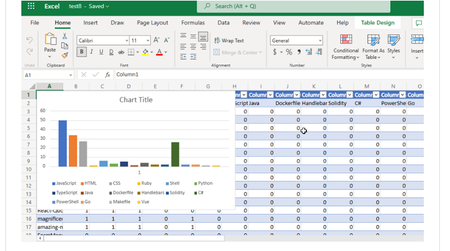
Have you ever thought about going through all your GitHub Repositories, taking note of the languages used, aggregating them and visualizing it on Excel? Well, that is what this post is all about except you don’t have to do it manually in a mundane way.9.6KViews1like1Comment