cowork
1 TopicIntroducing Education for Cowork
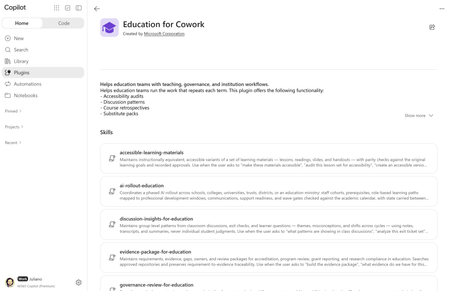
Education leaders, educators, and researchers don't need another chat window. They need help with the work that takes up their weeks and semesters. Pulling evidence together for accreditation, rolling out AI to staff one wave at a time, rolling out a policy change, or keeping a research project moving across lots of inboxes and folders. Today we're introducing Education for Cowork, a Microsoft plugin for Microsoft Copilot Cowork. It adds 10 education skills for administrative and academic work in K-12 and Higher Education. The plugin is rolling out to customers worldwide and will be available directly inside Copilot Cowork, Microsoft Marketplace, and on GitHub. What is Education for Cowork? Copilot Cowork is the agentic experience in Microsoft Copilot. It works on longer, multistep tasks for you across your mail, calendar, Teams, and files. Plugins add skills to Cowork. Skills are prompt-based workflows that give Cowork expertise in a specific domain. Education for Cowork teaches Cowork how education institutions actually work: academic calendars, professional development windows, cohorts, standards and accreditation requirements, policies and handbooks, exit tickets, and course cycles. Each skill uses the content your institution already has in Microsoft 365. It isn't generic advice. Many of these skills keep state from one run to the next. A weekly brief carries decisions and owners into the next week. An evidence ledger tracks what changed since the last review. A rollout plan remembers which wave is open. Each time you return, Cowork builds on where you left off. The 10 skills For education and technology leaders Skill What it helps you do Weekly Brief for Education Keep a running weekly brief of priorities, commitments, decisions, risks, and open questions. It pulls from your calendar, meetings, messages, and files, and carries decisions and owners from week to week. AI Rollout & Role-Based Training Run a phased AI rollout for staff in a school, district, trust, college, university, or ministry. Covers cohorts, prerequisites, role-based learning paths, communications, and support readiness, with wave gates checked against the academic calendar. Policy Change Pack for Education Take an approved policy all the way to implementation. It compares versions, finds the affected procedures and audiences, assigns owners and deadlines, and drafts the communications. Evidence Package for Education Keep a requirement-to-evidence ledger for accreditation, program review, grant reporting, and research compliance. It shows gaps, owners, and how current each piece of evidence is before a submission. Governance Review for Education Give IT and governance teams a consistent pre-deployment review for agents, plugins, skills, connectors, and AI tools. It covers technical, policy, data, accessibility, ownership, and support evidence, and tracks revalidation dates. It prepares the approval record. People make the decision. For educators Skill What it helps you do Instructional Continuity (K-12) Keep a handover pack ready so a substitute or covering colleague can run the day. It includes current plans, schedules, routines, and materials, and is checked for privacy and freshness before an absence. Instructional Retrospective (Higher Ed) Keep a private, evidence-based retrospective of your own course across terms: what you changed, what the evidence suggests (counterevidence included), and which next-cycle actions you accepted. Accessible Learning Materials Audit and maintain accessible versions of lessons, readings, slides, and handouts. It checks alt text, reading level, and structure, and confirms each version still meets the original learning goals. Discussion Insights for Education Find group-level patterns in class discussions, exit tickets, and learner questions, such as recurring misconceptions and changes between cycles. It also checks whether last cycle's teaching response made a difference. For researchers Skill What it helps you do Research Project Brief Keep a living brief for a research project. It covers literature, methods, collaborator input, decisions, disagreements, milestones, and open questions, and flags sources that have gone stale. Try it: example prompts "Build my weekly brief and tell me what changed since last week." "Are we ready to open the next wave of our AI rollout?" "Build the policy change pack for the updated acceptable use policy." "Find the gaps in our accreditation evidence for Standard 4." "Run a governance review for this agent before we deploy it to our tenant." "I'll be out next week. Get my handover pack ready." "Audit this lesson set for accessibility." "What misconceptions came up in this week's exit tickets compared to last week?" "Did my course changes work? Run my course retrospective." "Update my research project brief before Thursday's lab meeting." Cowork picks the right skill based on what you ask for. If you know which skill you want to use, you can invoke it directly using "/" and the name of the skill. Get started with Education task ideas Cowork also includes Education-specific task ideas to help faculty and staff get started with common education workflows. These ready-to-use prompts take advantage of the context Cowork can access across your work and can be adapted to fit your specific needs. Education task ideas include: Plan my teaching week – Organize upcoming classes, preparation, follow-ups, and deadlines. Prepare a leadership brief – Bring together decisions, risks, commitments, and next steps. Check grant readiness – Map grant requirements to available evidence, owners, and gaps. Map our review evidence – Connect review criteria with supporting evidence and identify gaps. Find discussion patterns – Surface themes, misconceptions, and potential next teaching moves. Build an FAQ – Create a sourced FAQ from recurring questions and existing guidance. Explain a policy change – Turn an approved change into clear communications for the people affected. Plan our AI rollout – Develop a phased plan covering audiences, training, support, and launch readiness. You can find these and additional Education scenarios under Task ideas in Cowork. Designed for education, with responsible AI built in Education work involves learners, families, and sensitive records. Every skill in the plugin follows the same rules: People approve every action. Cowork asks for confirmation before it sends, publishes, or changes any record. Governance Review prepares an approval but never grants it. No individual student judgments. Discussion Insights reports group-level patterns only. Skills don't grade, rank, or assess individual learners, and they keep student records and individual support-plan details (such as an IEP or EHCP) out of their outputs. No evaluating colleagues. Instructional Retrospective is private to the instructor and declines any personnel, promotion, or performance-review use. Output you can review. Results keep facts, interpretation, recommendations, assumptions, and open questions separate, and show which sources were used and how current they are. Staff-only AI rollout. The AI rollout skill plans enablement for staff. It refers any request to roll out to learners elsewhere. All of this runs inside Microsoft 365. Cowork works with the user's own permissions and is covered by the security, compliance, and data residency controls your institution already uses for Microsoft 365 Copilot. For IT: what you need to make it work Education for Cowork is designed to be simple to deploy. It's a skills-only plugin: No EDU-specific license, connector, or app is required. No external services and no SSO. It includes no connectors, so users have no sign-in or consent flows to complete. No configuration. After it's enabled, the skills appear in Cowork automatically. The skills were designed to work in a production education tenant, where they can use your academic calendars, policies, course materials, and teaching evidence. Licensing and access prerequisites Requirement Details Microsoft 365 Copilot license Users who use Cowork plugins must have a Microsoft 365 Copilot license assigned. Cowork access through usage-based billing Cowork uses usage-based billing (Copilot Credits). Admins grant access with a spending policy that selects Cowork: Microsoft 365 admin center > Copilot > Cost Management > Configuration > + Add spending policy, scoped to a security group (for example, staff or faculty), with Cowork selected as the service. Model responses and skill calls count toward consumption. Admin role To manage Cowork plugins, you need to be a tenant administrator or have the Copilot administrator role. Standard M365 services Users get the best results with Exchange Online (mail and calendar), OneDrive, SharePoint, and Teams, because that's where the skills find their source content. Note A spending policy controls access, not only budget. Anyone in the scope of a policy that selects Cowork can use Cowork, even with a very small credit limit. To keep a group out of Cowork, leave it out of every Cowork-selecting policy. Deploy or allow the plugin Sign in to the Microsoft 365 admin center. Go to Agents > Tools (or Agents > All agents) and search for Education for Cowork. Choose your rollout: Deploy to All users or Specific users/groups. The plugin is acquired automatically, shows the label Managed by your organization, and can't be removed by targeted users. Make available to all users or specific groups, so people can add it themselves from the Cowork Customize > Plugins page. Block it if you're not ready to roll it out yet. Use security groups to target specific roles (for example, Faculty, School Leaders, Research Staff). Plugin availability can't be scoped by country or region. Users can turn any plugin on or off for their own conversations from the Sources & Skills panel. Governance and monitoring Auditing: Cowork and plugin activity is recorded in Microsoft Purview audit logs under Copilot activities (included in Audit Standard). Data protection: Microsoft Purview DLP and your existing compliance policies apply to Cowork interactions. Usage and cost: Track adoption and consumption in the Cowork Usage report and the Copilot Credits consumption views in the Microsoft 365 admin center. Use the Cowork cost estimator to plan budgets per group. Known limitation: Microsoft Purview Information Barriers aren't currently supported for plugin or skill management and sharing. In tenants with Information Barriers enabled, embedded knowledge file uploads are blocked at the tenant level, which prevents affected plugins and skills from being uploaded or published. Get started IT: Confirm that Copilot licenses and a Cowork spending policy are in place, then deploy or allow Education for Cowork for a pilot group. Leaders, educators, and researchers: Open Cowork, check that Education for Cowork is turned on under Sources & Skills, and try one of the prompts above. Tell us what you think. We'll keep adding skills, connectors, and MCP servers based on what we learn from customers and partners. Share your feedback in the comments below. Learn more Manage Copilot Cowork for your organization Manage plugins for Copilot Cowork Microsoft Copilot requirements Responsible AI Overview for Cowork Education for Cowork plugin in the Microsoft Marketplace303Views0likes0Comments