cowork
17 TopicsMicrosoft and SAP at Ignite 2026: Connecting SAP customers to AI agents, data, and security
At Microsoft Ignite 2026, Microsoft and SAP are announcing advances across five layers: infrastructure, development, data, agents, and security. Each is valuable on its own. Together, they compound: a faster foundation runs richer data, richer data grounds smarter agents, and integrated security protects all of it. Run mission-critical SAP workloads on an AI-ready cloud foundation Azure Mv4 virtual machines, powered by Intel® Xeon® 6 processors (Granite Rapids) and Azure Boost v2, are purpose-built for demanding, data-intensive SAP workloads such as SAP HANA. With CXL-enabled memory expansion, workloads that once required four-socket systems can run on simpler two-socket configurations, reducing complexity while preserving performance. All Mv4 families share a modern foundation featuring Total Memory Encryption and Trusted Launch, helping customers run their most critical applications with enhanced performance, security, and efficiency. The Mv4 portfolio includes three VM families optimized for distinct workload requirements: Mv4 Medium Memory (generally available): up to 4 TB of memory and 256 vCPUs, with 75% higher remote storage IOPS and up to 10× better local storage performance than the previous generation—ideal for SAP HANA and enterprise applications. Mv4 CXL (private preview): CXL-enabled memory expansion supporting up to 8 TB of memory and 304 vCPUs, with flexible memory-to-vCPU ratios to scale memory-intensive workloads with compelling performance and TCO efficiency. Mbv4 (public preview): optimized for storage-intensive workloads such as SQL Server, delivering up to 780,000 remote storage IOPS, 16 GB/s of remote storage throughput, and 3.2 million local NVMe IOPS. Learn more about Azure Mv4 including memory expansion with CXL Bring agentic operations to SAP on Azure IT operations consume a large portion of IT budgets, and much of that work can still be manual. When talking with customers, they report that more than half of operations time goes to detecting, triaging, and troubleshooting issues. For SAP customers, the stakes are especially high: when critical systems go down, the impact extends well beyond IT, disrupting business processes and potentially costing hundreds of thousands of dollars every hour of downtime. That makes catching issues early, before they become larger operational or business problems, increasingly important. That is why Microsoft is bringing agentic operations to SAP on Azure. We are announcing limited preview of Azure Workload Center for SAP, together with the Azure Copilot Run SAP Agent. Customers will be able to onboard SAP systems running on Azure as Workload Virtual Instances and take advantage of new agentic capabilities. Learn more: https://aka.ms/workloadcenterforsap-blog Connect trusted data, work context, and governed agents Microsoft and SAP are deepening the bidirectional integration between Joule and Microsoft 365 Copilot through Work IQ, Microsoft’s workplace intelligence layer. Since the integration became generally available earlier this year, hundreds of customers have shown interest. Work IQ combines SAP business context with the email, meetings, documents, relationships, and workflows surrounding a decision. Start in Copilot and bring in SAP context; start in Joule and bring in Microsoft 365 context. Employees can move from insight to action across finance, supply chain, HR, procurement, and customer operations—without switching tools or rebuilding integrations. The partnership is also advancing a more open, governed agent ecosystem. Through SAP’s agent gateway capabilities and Microsoft Copilot Studio, organizations can connect SAP-powered agents with Microsoft agents and tools through a common orchestration approach. With SAP AI Agent Hub and Microsoft Agent 365, Microsoft and SAP are working toward agents that can be discovered, registered, governed, and observed across both environments—giving IT a clearer control plane as agent adoption grows. Data makes those agents useful. SAP tabular foundation predictive models (TabFM) predictive models are available in Microsoft Foundry, helping agents move beyond retrieving records to anticipating likely outcomes. SAP data and master-data capabilities on Azure, together with SAP Business Data Cloud connectivity to Microsoft Fabric, help customers combine SAP and non-SAP signals while preserving trusted business meaning. This creates a stronger grounding layer for analytics, Microsoft 365 Copilot, and agentic workflows. Customers who don’t yet use Joule can connect Microsoft 365 Copilot to their SAP systems today. Using MCP servers and Copilot skills, AI agents can read, write, and update data directly in SAP ERP, including RISE with SAP, SAP S/4HANA, and SAP ECC. The MCP servers can run on SAP BTP or Azure API Management, and both options align with SAP’s API policy. Together, MCP servers and Copilot skills let customers use Copilot and Work IQ with their SAP applications today. Watch it in action: https://aka.ms/AgentShowcaseSAP Secure the connected enterprise from infrastructure to application AI agents will soon handle work across finance, supply chain, and HR. That makes securing the systems underneath them a business priority. Attacks rarely start in SAP. They start with a stolen password or an unpatched laptop and move from there, so SAP needs protecting together with everything around it. We run it ourselves first. SAP runs critical commerce and finance processes at Microsoft. When we moved those systems to RISE with SAP on Azure, SAP took over operating the infrastructure, and we worked with them to connect SAP LogServ to Microsoft Sentinel for SAP. Our security team now sees activity from the SAP-managed layers next to identity, endpoint, cloud, and Dynamics 365 data. "We did not have to create a parallel operating model for SAP," says Satya Bonda, Platform Engineer, Microsoft Digital. The same data gives the AI agents in our SOC the context they need to make good decisions. Read the full story. From detection to agentic remediation. Microsoft Security brings SAP into the AI-powered platform protecting identities, devices, data, and cloud, for security teams, security software vendors, managed service providers, and SAP SE itself. SAP SuccessFactors joins SAP S/4HANA in RISE, SAP BTP, and SAP Ariba in Microsoft Sentinel for SAP, with pre-packaged detections and a community version available today. Microsoft Defender now automatically recognizes SAP devices as critical assets, so response starts where the business is most exposed. Green team agents from Project Perception close the loop: they fix the root cause and carry out remediation of cyber threats or compromises. Customers moving to Integrated Security Operations Center (ISOC) in Defender can extend SAP protection across more of their environment and bring SAP security data into their broader security operations: Protect more of your SAP environment. The SAP solution fee for production SAP system IDs (SIDs) does not apply to ISOC, helping customers extend protection beyond production to dev, test, and QA. Bring more security data together. SAP and other non-Microsoft data can be ingested at $2.40/GB*, enabling broader visibility for investigation and response. *At the time of writing based on East US Azure region pricing for ISOC. Others may vary slightly. Existing Sentinel SAP licensing models remain unchanged. Mirroring SAP logs to the Sentinel data lake continues to be supported. Learn more about Microsoft Sentinel for SAP cost efficiency. For customers, the opportunity is to modernize and activate AI together: run SAP on a resilient Azure foundation, unlock governed SAP data for Microsoft analytics and AI, equip developers with modern tools, and introduce agents around a high-value business process. The result is not AI beside the business. It is AI connected to how the business runs. Azure Backup helps protect your SAP systems with support for SAP HANA scale-out databases is now in preview, extending protection for large, distributed environments. The customer benefit is straightforward: modernize the core on resilient infrastructure while creating the capacity and security foundation for the next generation of data and AI workloads. Learn more here. Modernize ABAP with Visual Studio Code and GitHub Copilot For SAP customers, meaningful transformation starts within the ERP platform. Decades of custom ABAP code capture unique processes, competitive differentiation, and operational expertise. Modernization must preserve this institutional knowledge while evolving it into a more agile, AI-ready foundation that can accelerate innovation and future growth. Bring modern development tools to ABAP With ABAP Development Tools for Visual Studio Code, developers can connect directly to SAP systems to create, edit, debug, and manage ABAP artifacts without leaving the editor. They can also use GitHub Copilot capabilities—including chat, inline suggestions, and agent mode—to improve productivity and modernize development workflows. See it in action and learn more Visit us at Microsoft Ignite 2026 to see four demos of the partnership in action: Joule and Microsoft 365 Copilot, Joule Studio, SAP Business Data Cloud and Microsoft Fabric, and SAP AI Agent Hub, along with much more. To go deeper: Explore memory expansion with Azure Mv4 CXL Get ABAP Development Tools for Visual Studio Code Read how Microsoft secures its own RISE with SAP environment Learn about Microsoft Sentinel for SAP cost efficiency Learn about limited preview of Azure Workload Center for SAP Join our sessions to see these in action BRK435: Bring agentic operations to Oracle and SAP on Azure Tuesday, November 17 2:00 – 2:45 PM → Register: https://ignite.microsoft.com/en-US/sessions/1787856639452001EQey-1791814913867001C2Bx?source=sessions BRK408: Microsoft and SAP bring a connected system of intelligence. Wednesday, November 18 10:15-11:00 AM. → Register: https://ignite.microsoft.com/en-US/sessions/1787856635338001E3Ce-1791588287542001CM78?source=sessions THR933: Power agentic connectivity across SAP and Microsoft with Work IQ Thursday, November 19 11:40 AM - 12:05 PM → Register: https://ignite.microsoft.com/en-US/sessions/1787856587353001EqNK-1791588277887001CdCj?source=sessionsIntroducing Education for Cowork
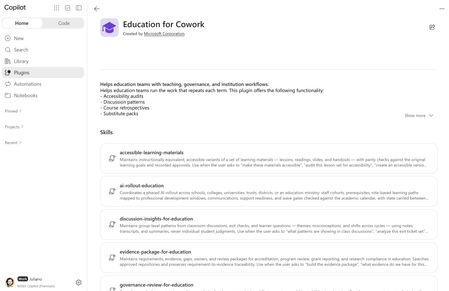
Education leaders, educators, and researchers don't need another chat window. They need help with the work that takes up their weeks and semesters. Pulling evidence together for accreditation, rolling out AI to staff one wave at a time, rolling out a policy change, or keeping a research project moving across lots of inboxes and folders. Today we're introducing Education for Cowork, a Microsoft plugin for Microsoft Copilot Cowork. It adds 10 education skills and 20 education tasks for administrative and academic work in K-12 and Higher Education. The plugin is rolling out to customers worldwide and will be available directly inside Copilot Cowork, Microsoft Marketplace, and on GitHub. Education for Cowork is available to faculty and staff with a Microsoft 365 Copilot license. What is Education for Cowork? Copilot Cowork is the agentic experience in Microsoft Copilot. It works on longer, multistep tasks for you across your mail, calendar, Teams, and files. Plugins add skills and tasks to Cowork. Skills are prompt-based workflows that give Cowork expertise in a specific domain. Education for Cowork teaches Cowork how education institutions actually work: academic calendars, professional development windows, cohorts, standards and accreditation requirements, policies and handbooks, exit tickets, and course cycles. Each skill uses the content your institution already has in Microsoft 365. It isn't generic advice. Many of these skills keep state from one run to the next. A weekly brief carries decisions and owners into the next week. An evidence ledger tracks what changed since the last review. A rollout plan remembers which wave is open. Each time you return, Cowork builds on where you left off. The 20 tasks The Education tasks help faculty and staff get started with common education workflows. Each one is a ready-to-use prompt that takes advantage of the context Cowork can access across your work, and you can adapt it to fit your needs. You'll find all 20 under Task ideas in Cowork. Tasks and skills work well together. A task gives you a result for the job in front of you today. When you want Cowork to keep that work current over weeks or terms, move to the related skill. For education and technology leaders Task What it helps you do Related skill Prepare a leadership brief Bring together decisions, risks, commitments, indicators, and stakeholder signals in one brief. Weekly Brief for Education Prepare a board briefing Turn approved evidence and decisions into concise, sourced materials for a board, cabinet, or senate, with likely questions and answers. Update our improvement plan Bring a school, department, or program improvement plan up to date with recent evidence, decisions, progress, and risks. Map our review evidence Connect program review or accreditation criteria with supporting evidence, owners, and gaps, keeping weak or disputed evidence visible. Evidence Package for Education Explain a policy change Turn an approved change into clear, consistent communications for the people it affects. Policy Change Pack for Education Plan our AI rollout Develop a phased plan covering audiences, training, communications, support, and go/no-go gates. AI Rollout & Role-Based Training Plan professional learning Connect priorities, educator goals, training resources, calendars, and support capacity in a phased plan. Prep for a committee Assemble the agenda context, prior decisions, open actions, and pre-reads you need to be ready to decide. Summarize a staff meeting Turn a meeting record into decisions, actions, owners, and open questions, with a version for people who missed it. For educators Task What it helps you do Related skill Make content accessible Review a set of learning materials for accessibility and learner usability, then prioritize fixes. Accessible Learning Materials Prepare a course or class Assemble the plans, communications, resources, key dates, and open decisions you need for a strong start. Find curriculum gaps Compare plans across grades, courses, departments, or programs to find gaps, overlap, and sequencing issues. Plan my teaching week Organize upcoming classes, preparation, follow-ups, and deadlines in one sourced weekly plan. Find discussion patterns Surface themes, misconceptions, and productive threads from discussions and learner questions, with next teaching moves. Discussion Insights for Education Build an FAQ Create a sourced FAQ from recurring questions and existing guidance. Prepare a substitute handoff (K-12) Gather plans, schedules, routines, and linked materials into a practical handover. Instructional Continuity (K-12) Prep for a family conference (K-12) Prepare a balanced conference brief from the work samples, notes, and communications you select. Prep for a seminar (Higher Ed) Pull readings, prior discussion, and course goals into a focused seminar plan with discussion questions. For researchers Task What it helps you do Related skill Summarize my research project Consolidate literature, methods, collaborator input, decisions, and milestones in one brief. Research Project Brief Check grant readiness Map grant requirements to available evidence, owners, and gaps before you submit. Evidence Package for Education The 10 skills For education and technology leaders Skill What it helps you do Weekly Brief for Education Keep a running weekly brief of priorities, commitments, decisions, risks, and open questions. It pulls from your calendar, meetings, messages, and files, and carries decisions and owners from week to week. AI Rollout & Role-Based Training Run a phased AI rollout for staff in a school, district, trust, college, university, or ministry. Covers cohorts, prerequisites, role-based learning paths, communications, and support readiness, with wave gates checked against the academic calendar. Policy Change Pack for Education Take an approved policy all the way to implementation. It compares versions, finds the affected procedures and audiences, assigns owners and deadlines, and drafts the communications. Evidence Package for Education Keep a requirement-to-evidence ledger for accreditation, program review, grant reporting, and research compliance. It shows gaps, owners, and how current each piece of evidence is before a submission. Governance Review for Education Give IT and governance teams a consistent pre-deployment review for agents, plugins, skills, connectors, and AI tools. It covers technical, policy, data, accessibility, ownership, and support evidence, and tracks revalidation dates. It prepares the approval record. People make the decision. For educators Skill What it helps you do Instructional Continuity (K-12) Keep a handover pack ready so a substitute or covering colleague can run the day. It includes current plans, schedules, routines, and materials, and is checked for privacy and freshness before an absence. Instructional Retrospective (Higher Ed) Keep a private, evidence-based retrospective of your own course across terms: what you changed, what the evidence suggests (counterevidence included), and which next-cycle actions you accepted. Accessible Learning Materials Audit and maintain accessible versions of lessons, readings, slides, and handouts. It checks alt text, reading level, and structure, and confirms each version still meets the original learning goals. Discussion Insights for Education Find group-level patterns in class discussions, exit tickets, and learner questions, such as recurring misconceptions and changes between cycles. It also checks whether last cycle's teaching response made a difference. For researchers Skill What it helps you do Research Project Brief Keep a living brief for a research project. It covers literature, methods, collaborator input, decisions, disagreements, milestones, and open questions, and flags sources that have gone stale. Try it: example prompts "Build my weekly brief and tell me what changed since last week." "Are we ready to open the next wave of our AI rollout?" "Build the policy change pack for the updated acceptable use policy." "Find the gaps in our accreditation evidence for Standard 4." "Run a governance review for this agent before we deploy it to our tenant." "I'll be out next week. Get my handover pack ready." "Audit this lesson set for accessibility." "What misconceptions came up in this week's exit tickets compared to last week?" "Did my course changes work? Run my course retrospective." "Update my research project brief before Thursday's lab meeting." Cowork picks the right skill based on what you ask for. If you know which skill you want to use, you can invoke it directly using "/" and the name of the skill. Designed for education, with responsible AI built in Education work involves learners, families, and sensitive records. Every skill in the plugin follows the same rules: People approve every action. Cowork asks for confirmation before it sends, publishes, or changes any record. Governance Review prepares an approval but never grants it. No individual student judgments. Discussion Insights reports group-level patterns only. Skills don't grade, rank, or assess individual learners, and they keep student records and individual support-plan details (such as an IEP or EHCP) out of their outputs. No evaluating colleagues. Instructional Retrospective is private to the instructor and declines any personnel, promotion, or performance-review use. Output you can review. Results keep facts, interpretation, recommendations, assumptions, and open questions separate, and show which sources were used and how current they are. Staff-only AI rollout. The AI rollout skill plans enablement for staff. It refers any request to roll out to learners elsewhere. All of this runs inside Microsoft 365. Cowork works with the user's own permissions and is covered by the security, compliance, and data residency controls your institution already uses for Microsoft 365 Copilot. For IT: what you need to make it work Education for Cowork is designed to be simple to deploy. It's a skills-only plugin: No EDU-specific license, connector, or app is required beyond a Microsoft 365 Copilot license. No external services and no SSO. It includes no connectors, so users have no sign-in or consent flows to complete. No configuration. After it's enabled, the skills appear in Cowork automatically. The skills were designed to work in a production education tenant, where they can use your academic calendars, policies, course materials, and teaching evidence. Licensing and access prerequisites Requirement Details Microsoft 365 Copilot license Users who use Cowork plugins must have a Microsoft 365 Copilot license assigned. Cowork access through usage-based billing Cowork uses usage-based billing (Copilot Credits). Admins grant access with a spending policy that selects Cowork: Microsoft 365 admin center > Copilot > Cost Management > Configuration > + Add spending policy, scoped to a security group (for example, staff or faculty), with Cowork selected as the service. Model responses and skill calls count toward consumption. Admin role To manage Cowork plugins, you need to be a tenant administrator or have the Copilot administrator role. Standard M365 services Users get the best results with Exchange Online (mail and calendar), OneDrive, SharePoint, and Teams, because that's where the skills find their source content. Note A spending policy controls access, not only budget. Anyone in the scope of a policy that selects Cowork can use Cowork, even with a very small credit limit. To keep a group out of Cowork, leave it out of every Cowork-selecting policy. Deploy or allow the plugin Sign in to the Microsoft 365 admin center. Go to Agents > Tools (or Agents > All agents) and search for Education for Cowork. Choose your rollout: Deploy to All users or Specific users/groups. The plugin is acquired automatically, shows the label Managed by your organization, and can't be removed by targeted users. Make available to all users or specific groups, so people can add it themselves from the Cowork Customize > Plugins page. Block it if you're not ready to roll it out yet. Use security groups to target specific roles (for example, Faculty, School Leaders, Research Staff). Plugin availability can't be scoped by country or region. Users can turn any plugin on or off for their own conversations from the Sources & Skills panel. Governance and monitoring Auditing: Cowork and plugin activity is recorded in Microsoft Purview audit logs under Copilot activities (included in Audit Standard). Data protection: Microsoft Purview DLP and your existing compliance policies apply to Cowork interactions. Usage and cost: Track adoption and consumption in the Cowork Usage report and the Copilot Credits consumption views in the Microsoft 365 admin center. Use the Cowork cost estimator to plan budgets per group. Known limitation: Microsoft Purview Information Barriers aren't currently supported for plugin or skill management and sharing. In tenants with Information Barriers enabled, embedded knowledge file uploads are blocked at the tenant level, which prevents affected plugins and skills from being uploaded or published. Get started Not using Copilot Cowork yet? Many institutions start with Copilot Chat, included with Microsoft 365 Education, and Copilot experiences like Teach. They then add Microsoft 365 Copilot licenses for the teams that would benefit most, such as leadership, administration, advisors and faculty, to unlock Cowork and work grounded in their institution's content. Learn about Copilot in Education or contact your Microsoft representative to plan a pilot. IT: Confirm that Copilot licenses and a Cowork spending policy are in place, then deploy or allow Education for Cowork for a pilot group. Leaders, educators, and researchers: Open Cowork, check that Education for Cowork is turned on under Sources & Skills, and try one of the prompts above. Tell us what you think. We'll keep adding skills, connectors, and MCP servers based on what we learn from customers and partners. Share your feedback in the comments below. Learn more Manage Copilot Cowork for your organization Manage plugins for Copilot Cowork Microsoft Copilot requirements Responsible AI Overview for Cowork Education for Cowork plugin in the Microsoft Marketplace2.3KViews2likes0Comments