copilot studio
14 TopicsAGENTIC RAG
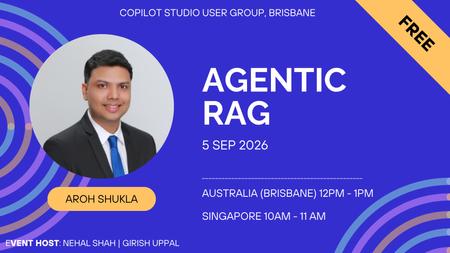
Agentic RAG for the Enterprise: Building Intelligent AI Agents with Microsoft Foundry Enterprise AI is moving beyond simple chatbots and classic RAG patterns. In this session, we will explore how Agentic RAG can help organizations build smarter, more autonomous AI solutions using Microsoft Foundry. We will cover how Agentic RAG combines retrieval, reasoning, tools, orchestration, grounding, and guardrails to solve real enterprise use cases. The session will also share practical architecture patterns, implementation tips, common pitfalls, security considerations, performance tuning techniques, and lessons learned from real-world Microsoft AI projects. By the end of the session, attendees will understand when to use classic RAG versus Agentic RAG, how to design enterprise-ready AI agents, and what best practices to follow when building solutions with Microsoft Foundry. Event Host Girish Uppal | Nehal Shah11Views0likes0CommentsSKILLS IN COPILOT STUDIO
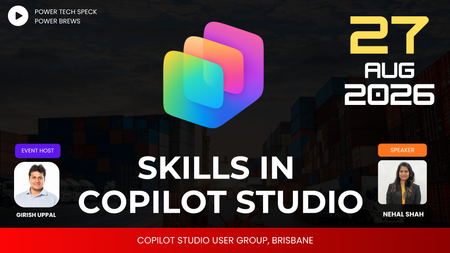
Skills are having a moment in Copilot Studio and agent design — but what actually makes a good one? Join us this session as we cover: What is a skill & how it works Why use a skill When NOT to use a skill Best practices for writing skills What SKILL.md files contain Different ways to view md files Using a skill-creator skill Packaged skills10Views0likes0CommentsCOPILOT STUDIO USER GROUP, BRISBANE - AUSTRALIA
Welcome to the Copilot Studio User Group, Brisbane - Australia Who runs the group? This group is run by Girish Uppal for the community When and where the events are held? Every month there will be a virtual event hosted by community team members revolving around the topic of Power Platform and Microsoft Copilot Studio. What topics are covered? Learn about Copilot Studio Learn advance topics in Copilot Studio Understand Best practices - Copilot Studio Learn about Copilot Studio Adoption Understand about AI fundamentals Understand various Copilot Studio tools Learn Integration with AI Tech (Copilot / Azure AI Foundry) Troubleshooting Copilot Studio agents Roadmap knowhow on Copilot Studio Learn about upcoming features Understand about Licensing process Understand about overall Power Platform Architecture Do you record the events? All the video recordings will be hosted in YouTube channel https://www.youtube.com/playlist?list=PL5xdZrvu1OhXtz5kMIhhOPMOYBFeTZWz34Views0likes0CommentsGovernance Is the New Bottleneck: What Agent 365 Means for Admins ?
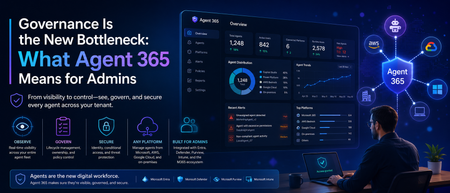
Hi all , following up on my last post about token limits, I wanted to write about something that's been on my mind a lot lately: the sheer number of agents quietly showing up across our tenant. Not just the ones we built deliberately in Copilot Studio, but ones people spun up in Power Platform, ones connected through Teams, and a few I genuinely couldn't trace back to an owner when I went looking. That's the moment this topic stopped being theoretical for me. For the last couple of years, the Microsoft AI conversation was mostly about capability -what can Copilot do, which model is better, how do I write a good prompt. That conversation hasn't gone away, but a second one has caught up to it fast: who's actually watching all of this. Microsoft's own 2026 Work Trend Index makes the shift explicit this isn't about saving a few minutes in Outlook anymore, it's about organizations redesigning how work gets divided between people and agents. And the moment agents start acting semi-independently across your tenant, "how many do we have, and what are they allowed to touch" becomes a real operational question, not a hypothetical one. That's exactly the gap Microsoft Agent 365 is built to close. It went generally available on May 1, 2026, alongside Microsoft 365 E7, and I think it's worth understanding properly especially if you're the one who ends up fielding the "wait, there's an agent doing what?" conversation. What Agent 365 Actually Is (and Isn't) The first thing worth clearing up: Agent 365 doesn't build agents. That's still Copilot Studio's job, or Foundry, or whatever platform your team is using. Agent 365 is the layer that sits on top of all of that it's a control plane, not a construction tool. Think of it less like "another AI product" and more like the admin and security backbone that was honestly missing from the picture until now. Microsoft frames it around three pillars: observe, govern, and secure. In practice, that means every agent in your tenant whether it was built in Copilot Studio, imported from AWS or Google Cloud, or even running locally on someone's Windows machine gets registered, gets its own identity through Microsoft Entra, and becomes something you can actually see and act on instead of just hoping it's behaving. That identity piece is the part I think gets underrated. Each agent gets its own Entra Agent ID, the same way a human user would. That's a meaningful shift it means conditional access policies, auditing, and compliance tooling that already exist for people can now extend to agents instead of treating them as some invisible background process. Why This Matters Right Now Here's the honest version of what's been happening across a lot of organizations, including bits of what I've seen firsthand: agent creation has gotten easy. Almost too easy. Between Copilot Studio, Power Platform, and now agentic mode built directly into Word, Excel, and PowerPoint, it doesn't take much for someone in a business unit to spin up something that's technically an AI agent with access to real data without IT or security ever being looped in. Microsoft has been fairly direct about this risk themselves, which I appreciated seeing in writing rather than just implied: the speed of agent development shows real value, but without guardrails, that pace turns into blind spots, lower ROI, and genuine security exposure. That's not vendor fear-mongering, that's just what happens when adoption outpaces oversight in any technology, and agents are no exception. What makes this particular moment different from past "shadow IT" waves is that agents don't just store or move data they can act on it. An agent with the wrong scope isn't just a compliance footnote, it's something that could send an email, modify a file, or trigger a workflow on its own. That's a different risk category than an unsanctioned spreadsheet sitting in someone's OneDrive. What You Actually Get With Agent 365 A few capabilities stood out to me as genuinely useful rather than just checkbox governance: The overview dashboard gives you a real-time view of your entire agent fleet total registered agents, active users, connected platforms, runtime hours, and risk signals, all in one place. Before this, getting even a rough headcount of "how many agents exist in our tenant" was a manual, frustrating exercise. Registry sync extends that visibility beyond Microsoft's own tools. It can pull in agents built on AWS Bedrock and Google Cloud, so you're not stuck with three different governance stories depending on where an agent happens to live. For organizations that are realistically never going to be 100% single-vendor, that matters. Lifecycle actions install, publish, block, unblock, delete, reassign ownership are now available directly from the registry. That's a big deal operationally. Before, tracking down who owned a rogue or abandoned agent could turn into an actual investigation. Now it's a few clicks. Local agent controls through Defender and Intune are rolling in too, extending management down to agents running on individual Windows endpoints, not just cloud-hosted ones. Given how much agent activity is starting to happen at the device level, this closes a gap that would've otherwise been a blind spot. Conditional access for agents, through Entra, means you can apply the same kind of dynamic, granular access policies to agents that you'd apply to a human user which is really the whole philosophical shift Agent 365 represents: agents aren't a separate, ungoverned category anymore, they're first-class identities in your tenant. What This Means for Admins, Practically If you're managing a tenant with any real Copilot or agent activity, here's where I'd actually start: Don't wait for "full autonomy" to engage. It's tempting to think governance can wait until agents are doing something more dramatic than they are today. Microsoft's own guidance pushes against that the advice is to establish visibility and guardrails early, while adoption is still accelerating, not after. Get a real inventory first. Before writing new policies, it's worth just knowing what already exists. I'd genuinely bet most tenants have more agents running than the admin team could name off the top of their head. The overview dashboard is the fastest way to close that gap. Loop in more than just IT. Agent 365 licensing and controls touch the M365 admin center, Entra, Defender, Purview, and Intune which means this isn't a single-team rollout. Security, compliance, and helpdesk all need to understand what's changing, especially the distinction between Frontier (preview, no production SLA) and GA (production-ready, supported). Understand the licensing model before you scope a rollout. Agent 365 is licensed per human user — the person who manages, sponsors, or is served by an agent rather than per agent. It's available standalone at $15 per user per month, or bundled into Microsoft 365 E7. Worth mapping that against your actual agent-using population rather than assuming it's a flat cost per bot. Treat this as incremental, not a one-time setup. Microsoft has said plainly that Agent 365's capabilities will keep evolving as adoption patterns and governance models mature. This isn't a project you finish and close out it's closer to how you'd think about identity and access management generally: ongoing, not a one-time rollout. The Bigger Shift Underneath All This What I find genuinely interesting about Agent 365 is what it signals about where Microsoft thinks this is all heading. They're not just selling a better Copilot anymore they're positioning Microsoft 365 as the place where AI-driven work gets governed, regardless of which vendor's model or platform an agent actually runs on. Whether that's the right long-term answer for every organization is a fair thing to debate. But the underlying problem it's solving that agents were multiplying faster than anyone's ability to see or control them is real, and I don't think it's specific to Microsoft shops. If your organization is building agents in Copilot Studio, experimenting with Foundry, or even just watching Copilot's agentic mode quietly take on more autonomous work in Word and Excel, this is worth getting ahead of. The teams that treat agent governance as a foundational layer now are going to have a much easier time scaling adoption later than the ones who bolt it on after something goes wrong. Curious whether others are already rolling out Agent 365, or still in the "let's figure out how many agents we actually have" phase I suspect a lot of us are somewhere in between. Would love to hear how your organization is approaching this. Cheers, and happy reading. Surya Vennapusa-MCT274Views0likes0CommentsNew Microsoft Applied Skill Alert – Create Agents in Microsoft Copilot Studio (APL-7008)
Hi Friends👋 If you’ve been demoing Copilot Studio in your classes, here’s a quick way to validate and showcase those agent-building skills—without sitting a full certification exam. Why grab this micro-credential? Hands-on, half-day lab — prove you can build, publish & govern generative-AI agents end-to-end. Instant résumé boost — digital badge drops into Credly the moment you pass. Perfect add-on to PL-300/PL-400/PL-700 prep or any Power Platform course you teach. Lab tasks you’ll master Design the agent persona & generative AI instructions Build topics, variables & rich dialogues (Adaptive Cards included!) Call Dataverse data with Power Automate flows Publish to Microsoft Teams & the web, then secure with content moderation Prep in three steps Run the free learning path: Create agents in Microsoft Copilot Studio (9 bite-size modules). Skim the official study guide checklist (APL-7008). Spin up a trial tenant for learners and let them practice before the live lab. Ready? 👉 Copilot Studio Applied Skill Let’s keep empowering our students (and ourselves) to build the next generation of AI agents inside Microsoft 365. If you earn the badge, drop it below—would love to celebrate your win! 🏆 #CopilotStudio #AppliedSkills #PowerPlatform #GenerativeAI5.6KViews3likes3CommentsAgent Builder, Copilot Studio, or Azure AI Foundry: How We Decide for Every Client
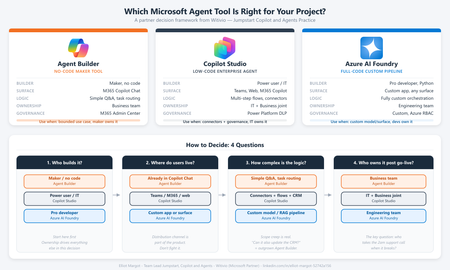
Every client conversation starts the same way. Someone has seen a demo, attended an Ignite session, or read a press release. They want to build an agent. Then comes the question that derails more projects than any technical challenge: "Which tool should we use?" After deploying agents for clients across industries - insurance, professional services, manufacturing, public sector - we have developed a repeatable framework for answering that question. It is not based on which tool is newest or which has the best marketing. It is based on where projects actually succeed or fail in production. The three tools are not competitors The first mistake most teams make is treating Agent Builder, Copilot Studio, and Azure AI Foundry as a hierarchy - basic, intermediate, advanced. That framing leads to bad decisions. They are not a ladder. They are three distinct tools built for three distinct contexts. The right question is not "which tool is most powerful?" It is "which tool fits this project's constraints?" The framework: 4 questions We evaluate every project against four dimensions before recommending a tool: Who is building it? Where do users live? How complex is the logic? Who owns it after go-live? Agent Builder Copilot Studio Azure AI Foundry Builder profile Maker, no code Developer / power user Pro developer, Python User surface M365 Copilot Chat Teams, web, M365 Copilot Custom app, any surface Logic complexity Simple Q&A, task routing Multi-step flows, connectors Fully custom orchestration Post-go-live ownership Business team IT + Business joint Engineering team Governance M365 Admin Center Power Platform DLP Custom, Azure RBAC When we recommend Agent Builder Agent Builder is the right call when the business team wants to own the agent end-to-end, the use case is bounded, and the users already live inside M365 Copilot Chat. The key advantage is distribution - an Agent Builder agent surfaces natively inside Copilot Chat with zero additional deployment work. No IT ticket, no app registration, no Teams app package. The ceiling is real. Agent Builder does not support complex branching logic, external API calls, or dynamic prompt injection. The moment a client asks "can it also update a record in our CRM?" the answer is usually no. Use it when: The maker owns it, the use case is narrow, and M365 Copilot is already the user's primary surface. When we recommend Copilot Studio Copilot Studio is our default recommendation for the majority of enterprise agent projects. It covers the wide middle ground between no-code simplicity and full-code flexibility - within the Microsoft governance perimeter most enterprise IT teams already control. Power Platform connectors - 1,000+ out-of-the-box connectors means most enterprise data sources are reachable without custom API development M365 Copilot channel - surface a Copilot Studio agent directly inside M365 Copilot Chat, Agent Builder-level distribution with enterprise-grade logic underneath Topic-level governance - fallback behaviors, confidence thresholds, escalation paths configurable without code DLP policy enforcement - the agent operates within the same data loss prevention perimeter as the rest of the Power Platform tenant The most common mistake: under-investing in the knowledge layer. The agent authoring is the easy part. Getting SharePoint content structured, metadata consistent, and documents deduplicated is where most projects hit delays. Budget for it. Use it when: The use case requires connectors, dynamic responses, or M365 Copilot integration - and you want IT to own governance without requiring a developer team. When we recommend Azure AI Foundry Foundry is the right call when you need to bring your own model, build a fully custom orchestration pipeline, or integrate into a surface that has nothing to do with Microsoft 365. In practice, this means one of three scenarios: The client has a model fine-tuned on proprietary data that must be used The agent is embedded inside a custom-built web or mobile application The logic requires Python-level control - complex reasoning chains, multi-agent coordination, custom evaluation loops Foundry projects require a professional developer, take longer, and produce something the business team cannot maintain without engineering support. That is not a reason to avoid it - it is a reason to be honest with the client upfront. Use it when: You need full control of the model, the orchestration, or the surface - and you have a developer team to own it. The question that resolves most debates When a client is torn between Copilot Studio and Foundry, we ask one question: "Who is answering the 2am support call when this breaks in production?" If the answer is a developer, Foundry is viable. If the answer is the IT admin or the business owner, Copilot Studio is the right call. Not because Foundry is unreliable, but because the operational model has to match the tool. More projects fail from ownership mismatch than from technical limitations. What we see go wrong Reaching for Foundry too early. Developers often want full control and reach for Foundry before validating the use case. We have rebuilt several Foundry POCs in Copilot Studio when the production constraints called for it - faster to ship and cheaper to run. Under-scoping Agent Builder. Business teams choose Agent Builder because it looks simple, then hit the ceiling at month two. The re-platform cost is higher than building in Copilot Studio from the start. Ignoring the M365 Copilot channel. Many Copilot Studio projects are deployed as standalone Teams apps when they could surface directly inside M365 Copilot Chat. The distribution advantage is significant and underused. The short version Agent Builder - maker-owned, bounded use case, M365 Copilot surface, fast Copilot Studio - IT + business joint ownership, connectors, production governance, M365 Copilot integration Azure AI Foundry - developer-owned, custom model or surface, full control, higher cost Start with the ownership model. Everything else follows. Elliot Margot - Team Lead Jumpstart, Copilot and Agents at Witivio (Microsoft Partner). Connect on https://www.linkedin.com/in/elliot-margot-52742a156/.317Views3likes1CommentCopilot Studio User Group • About Microsoft Copilot Studio
What Is Microsoft Copilot Studio? According To serinf Microsoft Copilot Studio Is The Platform That Enables You To Create Conversational AI Agents Using An Low Code Interface How To Access Copilot Studio? The: " `Resources` Tab Has Details On How To Access Copilot Studio30Views0likes0CommentsGetting Started with Copilot Studio: Your PAA & FAQ Guide
What is Microsoft Copilot Studio? Microsoft Copilot Studio is a low-code, graphical tool within the Power Platform used for building and conversational bots. It empowers users, even those without extensive technical backgrounds, to create sophisticated logic and connect to various data sources and services using prebuilt or custom plugins. Is Copilot Studio easy to use for beginners? Yes Copilot Studio is designed to be easy for beginners. You only need to describe the agent you want in plain language to start creating it. The platform uses a graphical, low-code interface that streamlines the process of defining instructions, knowledge sources (like documents), and conversation triggers, making it accessible to most users. What is the difference between Microsoft 365 Copilot and Copilot Studio? Microsoft 365 Copilot is an AI assistant that integrates across Microsoft 365 apps (Word, Excel, Teams, etc.) to enhance productivity. Copilot Studio, conversely, is a development platform used to build customised AI agents that are tailored to specific business goals or data sources. Copilot is the agent you use; Copilot Studio is the tool you use to build or extend agents. Do end-users need a specific license to use a Copilot I create? Yes, licensing for end-users depends on how and where the custom copilot is deployed. While development often requires a Power Platform or Azure subscription deploying the bot across an organization may require specific Copilot licenses for the end-users accessing the agent. Check the official Microsoft licensing documentation for your specific scenario. How can I add SharePoint data as a knowledge source for my Copilot? You can connect your Copilot agent to SharePoint data using the generative answers feature in Copilot Studio. The agent can search documents stored in a SharePoint document library. Be aware that there can sometimes be nuances with how attachments versus core document libraries are indexed, which the community is actively discussing in the forums. We hope this formatted FAQ helps you quickly find the information you need! If you have more questions, please use the discussion board to connect with the community.523Views0likes2Comments