copilot studio
72 TopicsThe AI job boom continues: Build the skills that move business forward
Discover new AI powered business Certifications to validate the skills that matter most. Gretchen LaBelle: Copilot + Agents Learning Portfolio Manager, Global Skilling Tarek Saleh Eldin: Content Publishing Manager, Global Skilling In Part 1 of this series, The AI job boom is here. Are you ready to showcase your skills?, we explored how Microsoft Certifications across AI, cloud, and security are evolving to keep pace with a rapidly changing job market. AI is no longer a niche capability. It’s becoming foundational across roles, reshaping how work gets done, and redefining how professionals create impact. This post picks up that thread. As organizations move from experimenting with AI to operationalizing it at scale, big changes are happening in business solutions roles. These shifts demand the ability to apply AI in real business contexts, redesign processes, build intelligent apps and agents, and lead transformation responsibly across the organization. Earlier this year, Microsoft introduced four new AI business solutions Certifications: Microsoft Certified: Agentic AI Business Solutions Architect (Exam AB‑100) Microsoft 365 Certified: Copilot and Agent Administration Fundamentals (Exam AB‑900) Microsoft Certified: AI Business Professional (Exam AB‑730) Microsoft Certified: AI Transformation Leader (Exam AB‑731) Together, these Certifications map to the critical roles in an AI‑driven workplace, from business practitioners and IT administrators to solution architects and transformation leaders. Building on that foundation, we’re launching new Certifications to help amplify human skills for AI-powered roles in the business landscape. New AI business solutions credentials: April 2026 and beyond Additional new Certification exams begin rolling out in beta starting in April 2026, with more releases over the following months, and going live later this year. The Microsoft Certified: AI Agent Builder Associate Certification is designed for tech pros, including developers, AI engineers, and architects, who are pushing AI agents beyond out‑of‑the‑box scenarios to implement production‑ready Microsoft Copilot Studio agents and multi‑agent solutions capable of sophisticated processes, workflow automation, and enterprise integration. Exam AB-620 beta and training available in April 2026; exam expected to go live in June 2026. The Microsoft Certified: Dynamics 365 Contact Center AI Engineer Associate Certification is designed for contact center engineers and solutions pros who design and run modern contact center as a service (CCaaS) solutions with Dynamics 365 Contact Center and service‑oriented autonomous agents. This Certification goes beyond routing and channels, focusing on how AI, Microsoft Copilot, and agents deliver scalable, always‑on service across voice and digital channels. Exam AB-250 beta and training available in June 2026; exam expected to go live in August 2026. The Microsoft Certified: Dynamics 365 Sales AI Consultant Associate Certification is for modern sellers who design and operationalize AI‑powered sales solutions across the lead‑to‑cash lifecycle, emphasizing Copilot-driven productivity and insights, AI-powered opportunity research and qualification, agent configuration and lifecycle management, and secure, scalable automation aligned with governance and responsible AI. Exam AB‑210 beta and training available in May 2026; exam expected to go live in June 2026. The Microsoft Certified: Intelligent Applications Builder Associate Certification equips Microsoft Power Platform pros to build for an AI-first world, where apps, agents, automation, and models work as one. It validates the skills to use Copilot and natural language to design intelligent solutions, embed agents across experiences, and ship responsibly with strong governance and application lifecycle management. Exam AB-410 beta and training available in April 2026; exam expected to go live in June 2026. The Microsoft Applied Skills: Build an agent-first app credential validates learners’ ability to build an app that surfaces a Copilot Studio agent and to craft prompts that make the agent genuinely effective, not just functional. This credential is part of the broader Microsoft Certified: Intelligent Applications Builder Associate (Exam AB-410) Certification journey, serving as a fast, accessible entry point for those looking to get started with agent-first development before pursuing the full Certification. Credential and training expected to go live in June 2026. Refresh: The Microsoft Certified: Power Platform Fundamentals Certification (Exam PL-900) is being updated with a streamlined, one-day instructor-led course and a new training program. These improvements are designed to align with the AI-powered Microsoft Power Platform and to make it easier than ever for learners to start building confidently. Training and courseware updates are scheduled for June 2026, with minor exam changes planned at the same time to reflect these enhancements. Retiring Certifications: What you need to know We’re committed to keeping our Certifications portfolio aligned with latest technology. As we launch new Certifications, we also retire some older credentials to keep the portfolio mapped to evolving roles. The following table itemizes what’s changing and provides key dates for Certification and training retirements in 2026. If your Certification is eligible for renewal, please renew it before the retirement date. Retiring Microsoft Credential Credential and exam retirement date Planned training retirement date Related new Credential Microsoft Certified: Dynamics 365 Customer Experience Analyst Associate (Exam MB-280) July 31, 2026 July 31, 2026 Microsoft Certified: Dynamics 365 Sales AI Consultant Associate (Exam AB-210) Microsoft Certified: Power Platform Functional Consultant Associate (Exam PL-200) August 31, 2026 August 31, 2026 Microsoft Certified: Intelligent Applications Builder Associate (Exam AB-410) Microsoft Certified: Dynamics 365: Finance and Operations Apps Solution Architect Expert (Exam MB-700) June 30, 2026 June 30, 2026 No new Certification is planned. To stay up to date with these technologies please refer to the Microsoft technical documentation. Microsoft Certified: Power Platform Solution Architect Expert (Exam PL-600) June 30, 2026 June 30, 2026 Microsoft Certified: Dynamics 365 Supply Chain Management Functional Consultant Expert (Exam MB-335) June 30, 2026 June 30, 2026 Microsoft Certified: Dynamics 365 Field Service Functional Consultant Associate (Exam MB-240) June 30, 2026 June 30, 2026 Microsoft Certified: Power Automate RPA Developer Associate (Exam PL-500) June 30, 2026 June 30, 2026 Microsoft Applied Skills: Create and manage model-driven apps with Power Apps and Dataverse June 30, 2026 June 30, 2026 Microsoft Applied Skills: Build an agent-first app Note: The recently released Microsoft Certified: Agentic AI Business Solutions Architect Certification (Exam AB‑100), although not a direct replacement for the retiring Certifications listed here, is the flagship expert‑level Certification, spanning a significantly broader scope and covering agentic architectures, AI‑driven solution design, and end‑to‑end business impact. If you currently hold one of the retiring expert-level Certifications (associated with Exam MB‑700, Exam PL‑600, Exam MB-335, Exam MB-240, or Exam PL-500), consider pursuing the Microsoft Certified: Agentic AI Business Solutions Architect Certification (Exam AB‑100) as your next step. Navigating the transition: FAQs The following questions and answers can help you determine how these retirements and expanded portfolio could impact your learning journey: Q. Why is Microsoft implementing these updates? A. Microsoft Credentials are valuable, as is the time you spend earning them. With the ongoing evolutions in technology, it’s essential that we keep the credentials up to date so we can help you stay aligned with latest skills and trends. We’re implementing these updates to provide a valuable path forward to keep up with the latest skills. Q. I’ve already earned one of the retiring Certifications. What happens now? A. If you’ve already earned any of the retiring Certifications, your credential remains valid until it expires. Retirement does not revoke or invalidate Certifications that were earned while the exam was active. They show your continued dedication to staying up to date and learning new skills in this ever-changing technical landscape. Q. What if a Certification that’s retiring is part of the prerequisites for an expert-level Certification? A. If a retiring Certification is required for an expert-level Certification, the requirements for that expert-level Certification will be updated as needed. The retiring Certification will be removed from the requirements and replaced (as appropriate) with a new associate-level Certification. If you’ve earned an expert-level Certification by earning an associate-level Certification that’s now retiring, you’ll continue to hold the expert-level Certification as long as you renew the expert-level Certification when it’s eligible. After you’ve earned a Certification, and if you renew it when it’s eligible, you hold it until it expires. If you’ve earned an associate-level Certification that’s a requirement for an expert-level Certification and that associate-level Certification hasn't expired, it can still satisfy the expert-level requirement. Be sure to meet all the requirements for the expert-level Certification before the associate-level Certification expires. Expired Certifications cannot be used to meet the requirements for an expert-level Certification. Q. Can I renew a soon-to-retire Certification? A. Yes, as long as it’s eligible for renewal and you renew it before the Certification officially retires, you can renew a soon-to-retire Certification. Please note that Fundamentals Certifications don’t expire. Q. Is there a direct transition path from a retiring Certification that I’ve already earned to the related new Certification, or do I need to pass the new exam? A. To earn the new Certification, you need to pass the new exam, since the new exam and the old one don’t measure the same skill sets. Q. I’m preparing for an exam that’s retiring. What should I do? A. The time you spend preparing for an exam and earning a Certification never goes to waste. If you’re actively preparing for an exam that’s retiring and a replacement exam has been announced: If you’ve already registered for the exam, you can continue preparing for it and take it while it’s still available. Keep in mind that after the exam retires, you won’t be able to retake it if you don’t pass, and you won’t be able to renew it. Exam registration ends on the same day that the exam retires. If you haven’t registered for the exam and there’s a related new exam, we strongly recommend that you prepare for and take the new exam instead, as noted in the following table. If you’re not close to testing for this exam Prepare for and take this exam instead Learning path and instructor-led training expected to be available in Exam MB-280 Exam AB-210 April 2026 Exam PL-200 Exam AB-410 April 2026 If you’re preparing for Exam PL-900 to earn the Microsoft Certified: Power Platform Fundamentals Certification, the new Course PL-900 will be available at the end of June 2026. If you’re preparing for Exam MB-335 to earn the Microsoft Certified: Dynamics 365 Supply Chain Management Functional Consultant Associate Certification, Exam MB-700 to earn the Microsoft Certified: Dynamics 365: Finance and Operations Apps Solution Architect Expert Certification, or Exam PL-600 to earn the Microsoft Certified: Power Platform Solution Architect Expert Certification, consider preparing for and taking Exam AB-100 to earn the Microsoft Certified: Agentic AI Business Solutions Architect Certification, the new flagship expert‑level Certification for solutions architects, available now. Note that to earn the Certification, you must pass Exam AB-100 and you must also have a current associate-level Certification. Q. How might these updates impact partner competency requirements? A. To track whether and how these updates might impact partner competency requirements, go to Solutions Partner for Business Applications in the Partner Center. The bigger picture AI is transforming not only what technology can do but also who does the work and how. Whether you’re building agents, designing intelligent apps, transforming sales, or leading enterprise AI strategy, there’s now a Certification that reflects the real skills your role demands. These Certifications can help ensure that you’re not only ready for AI-driven work but you’re also leading it. We’ll share updates for the new AI business solutions Certifications, including beta exams and go-live dates, on The Skills Hub Blog. Stay tuned! Explore more Microsoft Credentials on AI Skills Navigator.80KViews13likes65CommentsIntroducing Microsoft Agent Factory
Microsoft Agent Factory is a new program designed for organizations that want to move from experimentation to execution faster. With a single plan, organizations can build agents with Work IQ, Fabric IQ, and Foundry IQ using Microsoft Foundry and Copilot Studio. They can also deploy their agents anywhere, including Microsoft 365 Copilot, with no upfront licensing and provisioning required. Eligible organizations can also tap into hands-on engagement from top AI Forward Deployed Engineers (FDEs) and access tailored role-based training to boost AI fluency across teams.34KViews13likes0Comments
Copilot Studio + SharePoint: Markdown (.md) Files in Doc Libraries Supported as Knowledge Sources?
Hi all, We’ve been doing some deeper testing with Copilot Studio agents grounded in SharePoint knowledge sources, and I’m hoping to clarify whether what we’re seeing is a known limitation or an undocumented gap. Scenario A Copilot Studio agent uses SharePoint document libraries as a knowledge source The library contains Markdown (.md) files that are intentionally used as canonical design references The same .md files: ✅ Work well when uploaded directly to the agent ❌ Are not retrievable or citable when stored in a SharePoint library and added as a SharePoint knowledge source To help with grounding, we created modern SharePoint index pages that: Explain what the markdown collections are (Patterns, ADRs, Guardrails) Link directly to the canonical folders and files Explicitly state that the .md files are the source of truth The agent can: Discover and summarize the index pages correctly Understand that .md artifacts exist and where they live But it cannot: Read the content of the individual .md files Apply a specific pattern or ADR from those files in a design conversation Cite them as sources, even when permissions and search indexing are confirmed What We’ve Checked Permissions (agent user has access) Folder depth (kept shallow) Search results (markdown files appear in SharePoint search) SharePoint indexing status Work IQ enabled Same content works when attached directly to the agent This behavior also seems consistent with what others have reported here: Markdown works when uploaded directly Markdown retrieval degrades when hosted in SharePoint libraries Questions for the Product Team / Community Are Markdown (.md) files in SharePoint document libraries officially supported as Copilot Studio knowledge sources today? If yes, are there specific constraints (file size, rendering, parsing, indexing) that differ from Word/PDF? If no (or “not yet”), is this a known limitation on the roadmap? Is the recommended pattern to: Convert important markdown files into .aspx pages, or Use thin “index / summary” pages and keep markdown canonical until retrieval improves? We’re happy to adapt our information architecture — just trying to align with the intended platform direction rather than work against it. Thanks in advance for any guidance or clarification. This capability is extremely powerful, and clearer expectations here would help a lot of teams make the right design tradeoffs.874Views7likes3CommentsWelcome let's get started
Welcome to the Copilot Studio Community on Microsoft Tech Community! We're thrilled to announce that Copilot Studio now has a dedicated home on the Microsoft Tech Community, and we'd love for you to be part of it from day one. Whether you're just getting started with building Agents in Agent Builder or you are a pro building agents and automations with Copilot Studio, this is your space to: Ask questions and get answers from the community and Microsoft experts Share what you've built — show off your agents, flows, and use cases Stay up to date on the latest features, releases, and best practices Connect with peers across industries who are shaping the future of AI-powered work The community is open to everyone, from first-time explorers to seasoned pros. Every question asked and every insight shared makes this a better resource for all of us. We can't wait to see what you build. Welcome!214Views5likes3Comments
Three tiers of Agentic AI - and when to use none of them
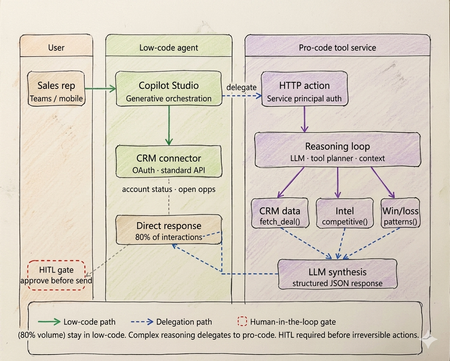
Every enterprise has an AI agent. Almost none of them work in production. Walk into any enterprise technology review right now and you will find the same thing. Pilots running. Demos recorded. Steering committees impressed. And somewhere in the background, a quiet acknowledgment that the thing does not actually work at scale yet. OutSystems surveyed nearly 1,900 global IT leaders and found that 96% of organizations are already running AI agents in some capacity. Yet only one in nine has those agents operating in production at scale. The experiments are everywhere. The production systems are not. That gap is not a capability problem. The infrastructure has matured. Tool calling is standard across all major models. Frameworks like LangGraph, CrewAI, and Microsoft Agent Framework abstract orchestration logic. Model Context Protocol standardizes how agents access external tools and data sources. Google's Agent-to-Agent protocol now under Linux Foundation governance with over 50 enterprise technology partners including Salesforce, SAP, ServiceNow, and Workday standardizes how agents coordinate with each other. The protocols are in place. The frameworks are production ready. The gap is a selection and governance problem. Teams are building agents on problems that do not need them. Choosing the wrong tier for the ones that do. And treating governance as a compliance checkbox to add after launch, rather than an architectural input to design in from the start. The same OutSystems research found that 94% of organizations are concerned that AI sprawl is increasing complexity, technical debt, and security risk and only 12% have a centralized approach to managing it. Teams are deploying agents the way shadow IT spread through enterprises a decade ago: fast, fragmented, and without a shared definition of what production-ready actually means. I've built agentic systems across enterprise clients in logistics, retail, and B2B services. The failures I keep seeing are not technology failures. They are architecture and judgment failures problems that existed before the first line of code was written, in the conversation where nobody asked the prior question. This article is the framework I use before any platform conversation starts. What has genuinely shifted in the agentic landscape Three changes are shaping how enterprise agent architecture should be designed today and they are not incremental improvements on what existed before. The first is the move from single agents to multi-agent systems. Databricks' State of AI Agents report drawing on data from over 20,000 organizations, including more than 60% of the Fortune 500 found that multi-agent workflows on their platform grew 327% in just four months. This is not experimentation. It is production architecture shifting. A single agent handling everything routing, retrieval, reasoning, execution is being replaced by specialized agents coordinating through defined interfaces. A financial organization, for example, might run separate agents for intent classification, document retrieval, and compliance checking each narrow in scope, each connected to the next through a standardized protocol rather than tightly coupled code. The second is protocol standardization. MCP handles vertical connectivity how agents access tools, data sources, and APIs through a typed manifest and standardized invocation pattern. A2A handles horizontal connectivity how agents discover peer agents, delegate subtasks, and coordinate workflows. Production systems today use both. The practical consequence is that multi-agent architectures can be composed and governed as a platform rather than managed as a collection of one-off integrations. The third is governance as the differentiating factor between teams that ship and teams that stall. Databricks found that companies using AI governance tools get over 12 times more AI projects into production compared to those without. The teams running production agents are not running more sophisticated models. They built evaluation pipelines, audit trails, and human oversight gates before scaling not after the first incident. Tier 1 - Low-code agents: fast delivery with a defined ceiling The low-code tier is more capable than it was eighteen months ago. Copilot Studio, Salesforce Agentforce, and equivalent platforms now support richer connector libraries, better generative orchestration, and more flexible topic models. The ceiling is higher than it was. It is still a ceiling. The core pattern remains: a visual topic model drives a platform-managed LLM that classifies intent and routes to named execution branches. Connectors abstract credential management and API surface. A business team — analyst, citizen developer, IT operations — can build, deploy, and iterate without engineering involvement on every change. For bounded conversational problems, this is the fastest path from requirement to production. The production reality is documented clearly. Gartner data found that only 5% of Copilot Studio pilots moved to larger-scale deployment. A European telecom with dedicated IT resources and a full Microsoft enterprise agreement spent six months and did not deliver a single production agent. The visual builder works. The path from prototype to production, production-grade integrations, error handling, compliance logging, exception routing is where most enterprises get stuck, because it requires Power Platform expertise that most business teams do not have. The platform ceiling shows up predictably at four points. Async processing anything beyond a synchronous connector call, including approval chains, document pipelines, or batch operations cannot be handled natively. Full payload audit logs platform logs give conversation transcripts and connector summaries, not structured records of every API call and its parameters. Production volume concurrency limits and message throughput budgets bind faster than planning assumptions suggest. Root cause analysis in production you cannot inspect the LLM's confidence score or the alternatives it considered, which makes diagnosing misbehavior significantly harder than it should be. The correct diagnostic: can this use case be owned end-to-end by a business team, covered by standard connectors, with no latency SLA below three seconds and no payload-level compliance requirement? Yes, low code is the correct tier. Not a compromise. If no on any point, continue. If low-code is the right call for your use case: Copilot Studio quickstart Tier 2 - Pro-code agents: the architecture the current landscape demands The defining pattern in production pro-code architecture today is multi-agent. Specialized agents per domain, coordinating through MCP for tool access and A2A for peer-to-peer delegation, with a governance layer spanning the entire system. What this looks like in practice: a financial organization handling incoming compliance queries runs separate agents for intent classification, document retrieval, and the compliance check itself. None of these agents tries to do all three jobs. Each has a narrow responsibility, a defined input/output contract typed against a JSON Schema, and a clear handoff boundary. The 327% growth in multi-agent workflows reflects production teams discovering that the failure modes of monolithic agents topic collision, context overflow, degraded classification as scope expands are solved by specialization, not by making a single agent more capable. The discipline that makes multi-agent systems reliable is identical to what makes single-agent systems reliable, just enforced across more boundaries: the LLM layer reasons and coordinates; deterministic tool functions enforce. In a compliance pipeline, no LLM decides whether a document satisfies a regulatory requirement. That evaluation runs in a deterministic tool with a versioned rule set, testable outputs, and an immutable audit log. The LLM orchestrates the sequence. The tool produces the compliance record. Mixing these letting an LLM evaluate whether a rule pass collapses the audit trail and introduces probabilistic outputs on questions that have regulatory answers. MCP is the tool interface standard today. An MCP server exposes a typed manifest any compliant agent runtime can discover at startup. Tools are versioned, independently deployable, and reusable across agents without bespoke integration code. A2A extends this horizontally: agents advertise capability cards, discover peers, and delegate subtasks through a standardised protocol. The practical consequence is that multi-agent systems built on both protocols can be composed and governed as a platform rather than managed as a collection of one-off integrations. Observability is the architectural element that separates teams shipping production agents from teams perpetually in pilot. Build evaluation pipelines, distributed traces across all agent boundaries, and human review gates before scaling. The teams that add these after the first production incident spend months retrofitting what should have been designed in. If pro-code is the right call for your use case: Foundry Agent Service The hybrid pattern: still where production deployments land The shift to multi-agent architecture does not change the hybrid pattern it deepens it. Low-code at the conversational surface, pro-code multi-agent systems behind it, with a governance layer spanning both. On a logistics client engagement, the brief was a sales assistant for account managers shipment status, account health, and competitive context inside Teams. The business team wanted everything in Copilot Studio. Engineering wanted a custom agent runtime. Both were wrong. What we built: Copilot Studio handled all high-frequency, low-complexity queries shipment tracking, account status, open cases through Power Platform connectors. Zero custom code. That covered roughly 78% of actual interaction volume. Requests requiring multi-source reasoning competitive positioning on a specific lane, churn risk across an account portfolio, contract renewal analysis delegated via authenticated HTTP action to a pro-code multi-agent service on Azure. A retrieval agent pulled deal history and market intelligence through MCP-exposed tools. A synthesis agent composed the recommendation with confidence scoring. Structured JSON back to the low-code layer, rendered as an adaptive card in Teams. The HITL gate was non-negotiable and designed before deployment, not added after the first incident. No output reached a customer without a manager approval step. The agent drafts. A human sends. This boundary low-code for conversational volume, pro-code for reasoning depth maps directly to what the research shows separates teams that ship from teams that stall. The organizations running agents in production drew the line correctly between what the platform can own and what engineering needs to own. Then they built governance into both sides before scaling. The four gates - the prior question that still gets skipped Run every candidate use case through these four checks before the platform conversation begins. None of the recent infrastructure improvements change what they are checking, because none of them change the fundamental cost structure of agentic reasoning. Gate 1 - is the logic fully deterministic? If every valid output for every valid input can be enumerated in unit tests, the problem does not need an LLM. A rules engine executes in microseconds at zero inference cost and cannot produce a plausible-but-wrong answer. NeuBird AI's production ops agents which have resolved over a million alerts and saved enterprises over $2 million in engineering hours work because alert triage logic that can be expressed as rules runs in deterministic code, and the LLM only handles cases where pattern-matching is insufficient. That boundary is not incidental to the system's reliability. It is the reason for it. Gate 2 - is zero hallucination tolerance required? With over 80% of databases now being built by AI agents per Databricks' State of AI Agents report the surface area for hallucination-induced data errors has grown significantly. In domains where a wrong answer is a compliance event financial calculation, medical logic, regulatory determinations irreducible LLM output uncertainty is disqualifying regardless of model version or prompt engineering effort. Exit to deterministic code or classical ML with bounded output spaces. Gate 3 - is a sub-100ms latency SLA required? LLM inference is faster than it was eighteen months ago. It is not fast enough for payment transaction processing, real-time fraud scoring, or live inventory management. A three-agent system with MCP tool calls has a P50 latency measured in seconds. These problems need purpose-built transactional architecture. Gate 4 - is regulatory explainability required? A2A enables complex agent coordination and delegation. It does not make LLM reasoning reproducible in a regulatory sense. Temperature above zero means the same input produces different outputs across invocations. Regulators in financial services, healthcare, and consumer credit require deterministic, auditable decision rationale. Exit to deterministic workflow with structured audit logging at every Five production failure modes - one of them new The four original anti-patterns are still showing up in production. A fifth has been added by scale. Routing data retrieval through a reasoning loop. A direct API call returns account status in under 10ms. Routing the same request through an LLM reasoning step adds hundreds of milliseconds, consumes tokens on every call, and introduces output parsing on data that is already structured. The agent calls a structured tool. The tool calls the API. The agent never acts as the integration layer. Encoding business rules in prompts. Rules expressed in prompt text drift as models update. They produce probabilistic output across invocations and fail in ways that are difficult to reproduce and diagnose. A rule that must evaluate correctly every time belongs in a deterministic tool function unit-tested, version-controlled, independently deployable via MCP. No approval gate on CRUD operations. CRUD operations without a human approval step will eventually misfire on the input that testing did not cover. The gate needs to be designed before deployment, not added after the first incident involving a financial posting, a customer-facing communication, or a data deletion. Monolithic agent for all domains. A single agent accumulating every domain leads predictably to topic collision, context overflow, and maintenance that becomes impossible as scope expands. Specialized agents per domain, coordinating through A2A, is the architecture that scales. Ungoverned agent sprawl. This is the new one and currently the most prevalent. OutSystems found 94% of organizations concerned about it, with only 12% having a centralized response. Teams building agents independently across fragmented stacks, without shared governance, evaluation standards, or audit infrastructure, produce exactly the same organizational debt that shadow IT created but with higher stakes, because these systems make autonomous decisions rather than just storing and retrieving data. The fix is treating governance as an architectural input before deployment, not a compliance requirement after something breaks. The infrastructure is ready. The judgment is not. The tier decision sequence has not changed. Does the problem need natural language understanding or dynamic generation? No — deterministic system, stop. Can a business team own it through standard connectors with no sub-3-second latency SLA and no payload-level compliance requirement? Yes — low-code. Does it need custom orchestration, multi-agent coordination, or audit-grade observability? Yes — pro-code with MCP and A2A. Does it need both a conversational surface and deep backend reasoning? Hybrid, with a governance layer spanning both. What has changed is that governance is no longer optional infrastructure to add when you have time. The data is unambiguous. Companies with governance tools get over 12 times more AI projects into production than those without. Evaluation pipelines, distributed tracing across agent boundaries, human oversight gates, and centralised agent lifecycle management are not overhead. They are what converts experiments into production systems. The teams still stuck in pilot are not stuck because the technology failed them. They are stuck because they skipped this layer. The protocols are standardised. The frameworks are mature. The infrastructure exists. None of that is what is holding most enterprise agent programmes back. What is holding them back is a selection problem disguised as a technology problem — teams building agents before asking whether agents are warranted, choosing platforms before running the four gates, and treating governance as a checkpoint rather than an architectural input. I have built agents that should have been workflow engines. Not because the technology was wrong, but because nobody stopped early enough to ask whether it was necessary. The four gates in this article exist because I learned those lessons at clients' expense, not mine. The most useful thing I can offer any team starting an agentic AI project is not a framework selection guide. It is permission to say no — and a clear basis for saying it. Take the four gates framework to your next architecture review. If you have already shipped agents to production, I would like to hear what worked and what did not - comment below What to do next Three concrete steps depending on where you are right now. If you have pilots that have not reached production: Run them through the four gates in this article before the next sprint. Gate 1 alone will eliminate a meaningful percentage of them. The ones that survive all four are your real candidates for production investment. Download the attached file for gated checklist and take it into your next architecture review. If you are starting a new agent project: Do not open a platform before you have answered the gate questions. Once you have confirmed an agent is warranted and identified the tier, start here: Copilot Studio guided setup for low-code scenarios, or Foundry Agent Service for pro-code patterns with MCP and multi-agent coordination built in. Build governance infrastructure - evaluation pipeline, distributed tracing, HITL gates - before you scale, not after. If you have already shipped agents to production: Share what worked and what did not in the Azure AI Tech Community — tag posts with #AgentArchitecture. The most useful signal for teams still in pilot is hearing from practitioners who have been through production, not vendors describing what production should look like. References OutSystems — State of AI Development Report - https://www.outsystems.com/1/state-ai-development-report Databricks — State of AI Agents Report - https://www.databricks.com/resources/ebook/state-of-ai-agents Gartner — 2025 Microsoft 365 and Copilot Survey - https://www.gartner.com/en/documents/6548002 (Paywalled primary source — publicly reported via techpartner.news: https://www.techpartner.news/news/gartner-microsoft-copilot-hype-offset-by-roi-and-readiness-realities-618118) Anthropic — Model Context Protocol (MCP) - https://modelcontextprotocol.io Google Cloud — Agent-to-Agent Protocol (A2A) . https://developers.googleblog.com/en/a2a-a-new-era-of-agent-interoperability NeuBird AI — Production Operations Deployment Announcement NeuBird AI Closes $19.3M Funding Round to Scale Agentic AI Across Enterprise Production Operations ReAct: Synergizing Reasoning and Acting in Language Models — Yao et al. https://arxiv.org/abs/2210.03629 Enterprise Integration Patterns — Gregor Hohpe & Bobby Woolf, Addison-Wesley https://www.enterpriseintegrationpatterns.com3.9KViews4likes1CommentStep-by-Step Deployment Guide: MCP Tool Call in Copilot Studio agent with OAuth 2.0
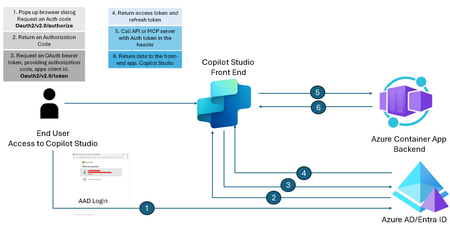
Introduction Modern development workflows increasingly rely on secure integrations between tools and platforms. Copilot Studio, with its ability to extend functionality through MCP (Model Context Protocol) tools, offers developers powerful customization options. However, when these tools need to access sensitive APIs or user-specific data, robust authentication becomes essential. OAuth 2.0, particularly the Authorization Code Flow, is the industry standard for secure delegated access. It enables applications to obtain tokens on behalf of users without exposing credentials, ensuring compliance with enterprise security policies. In this guide, we’ll walk through how to configure MCP tools in Copilot Studio using OAuth 2.0 Authorization Code Flow — covering prerequisites, configuration steps, token handling, and best practices for a seamless and secure setup. Disclaimer & Context This article focuses on configuring an MCP tool within a Copilot Studio agent using OAuth 2.0 Authorization Code Flow. Every environment is unique, so the approach outlined here should be treated as a starting point rather than a one-size-fits-all solution. You can enhance this setup with additional security measures such as app roles, conditional access policies, or by extending the Python code for advanced scenarios. We assume readers have a basic understanding of Python, MCP concepts, OAuth 2.0 flows, and some familiarity with Copilot Studio. For deeper dives into these individual technologies, refer to the official documentation linked throughout this article. Please note: This solution reflects the state of the technology at the time of writing. Given the fast-paced nature of these platforms, minor adjustments may be required as features evolve. MCP tool integration in Copilot Studio is currently a preview feature, so expect changes and improvements over time. What is Authorization Code Flow? The Authorization Code Flow is designed for applications that can securely store a client secret (like server-side apps). It allows the app to obtain an access token on behalf of the user without exposing their credentials. This flow uses an intermediate authorization code to exchange for tokens, adding an extra layer of security. Steps in the Flow User Authentication The user is redirected to the Authorization Server (In this case: Azure AD) to log in and grant consent. Authorization Code Issued After successful login, the Authorization Server sends an authorization code to the app via the redirect URI. Token Exchange The app sends the authorization code (plus client credentials) to the Token Endpoint to get: Access Token (for API calls) and Refresh Token (to renew access without user interaction) API Access The app uses the Access Token to call protected resources. Below diagram shows the Authorization code flow in detail. Press enter or click to view image in full size Microsoft identity platform and OAuth 2.0 authorization code flow — Microsoft identity platform | Microsoft Learn High Level Architecture Press enter or click to view image in full size High Level Architecture for MCP server as a backend server and Copilot Studio as a front-end client Develop MCP server in VS Code Clone the following repository and open in VS Code. git clone https://github.com/mafzal786/mcp-server.git Run the following to execute it locally. cd mcp-server uv venv uv sync uv run mcpserver.py Deploy MCP Server as Azure Container App Deploy the MCP server in Azure container App by running the following command. It can be deployed by many other various ways such as via VS Code or CI/CD pipeline. AZ Cli is used for simplicity. az containerapp up \ --resource-group <RESOURCE_GROUP_NAME> \ --name streamable-mcp-server2 \ --environment mcp \ --location <REGION> \ --source . Configure Authentication for Azure Container App Sign in Azure portal. Visit the container App in Azure and Click “Authentication” as shown below Press enter or click to view image in full size For more details, visit the following link: Enable authentication and authorization in Azure Container Apps with Microsoft Entra ID | Microsoft Learn Click Add Identity Provider as shown. Select Microsoft from the drop down and leave everything as is as shown below. This will create a new app registration for the container App. After it is all setup, it will look like as below. As soon as authentication is configured. it will make container app inaccessible except for OAuth. Review App Registration of Container App — Backend Visit App registration and click streamable-mcp-server2 as in this case. Click on Authentication tab. Verify the Redirect URIs. you should see a redirect URL for container app. URI will end with /.auth/login/aad/callback as shown in the green box in the below screenshot. Now click on “Expose an API”. Confirm Application ID URI is configured with scope as shown below. its format isapi://<client id> Verify API Permission. Make sure you Grant admin consent for your tenant as shown below. More scope can be created depending on the requirement of data access. Create App Registration for Client App — Copilot Studio In these steps, we will be configuring app registration for the client app, such copilot studio in this case acting as a client app. This is also mentioned in the “high level architecture” diagram in the earlier section of this article. Lauch Azure Portal. Visit App registration. Click New registration. Create a new App registration. leave the Redirect URL as of now, we will configure it later as it is provided by copilot studio when configuring custom MCP connector. Click on API permission and click “Add a permission”. Click Microsoft Graph and then click “Delegated permissions”. Select email, openid, profile as shown below. Make sure to Grant admin consent and it should look like as below. Create a secret. click “Certificates & secrets”. Create a new client secret by clicking “New client secret”. store the value as it will be masked after some time. if that happens, you can always delete and re-create a new secret. Capture the following as you would need it in configuring MCP tool in Copilot Studio. Client ID from the Overview Tab of app registration. Client secret from “Certificates & secrets” tab. Configure API permissions for backend which is App registration of Azure container app i.e. streamable-mcp-server2 in this case. Click “API permissions” tab. Click “Add a permission”. Click on “My APIs” tab as shown below and select streamable-mcp-server2. Select “Delegated permissions” Select the Permissions already created as a result of configuring Authentication for Azure Container App earlier. Click “Add permission” You MUST “Grant admin consent” as final step. It is very important!!! I can’t emphasize more on that. without it, nothing will work!!! End result of this client app registration should look like as mentioned in the below figure. MCP Tool configuration in Copilot Studio Lauch copilot studio at https://copilotstudio.microsoft.com/. Configuration of environment and agent is beyond the scope of this article. It is assumed, you already have environment setup and agent has been created. Following link will help you, how to create an agent in copilot studio. Quickstart: Create and deploy an agent — Microsoft Copilot Studio | Microsoft Learn Inside agent configuration, Click “Add tool”. Click on New tool. Select Model Context Protocol. Provide all relevant information for MCP server. Make sure your server URL ends with your mcp setup. In this case, it is Azure container app URL with/mcpin the end. Provide server name and server description. Select OAuth 2.0 radio button. Provide the following in the OAuth 2.0 section Client ID of client app registration. In this case, copilot-studio-client as configured earlier. Client secret of copilot-studio-client app registration. Authorization URL: https://login.microsoftonline.com/common/oauth2/v2.0/authorize Token URL template & Refresh URL: https://login.microsoftonline.com/oauth2/v2.0/token Scopes: openid, profile, email — which we selected earlier for Microsoft Azure Graph permissions. Click “Create”. This will provide you Redirect URL. you need to configure the redirect URL in client app registration. In this case, it is copilot-agent-client. Configure Redirect URL in Client App Registration Visit client app registration. i.e. copilot-studio-client. Click Authentication Tab and provide the Web Redirect URIs as shown below. Modify MCP connector in PowerApps Now visit the https://make.powerapps.com and open the newly created connector as shown below. Change the Resource URL from “Expose an API” in streamable-mcp-server2 app registration. The backend “Application ID URI” and also add .default in the scope. Provide the secret of client app registration as it will not let you update the connector. This is extra security measure for updating the connector in Powerapps. Click Update connector. CORS Configuration Congratulation of getting that far!!!, We are getting close to make it work!!! CORS configuration is a MUST!!! Since our Azure Container App is a remote MCP with totally different domain or origin. Power Apps and CORS for External Domains — Brief Overview When embedding or integrating Power Apps with external web applications or APIs, Cross-Origin Resource Sharing (CORS) becomes a critical consideration. CORS is a browser security feature that restricts web pages from making requests to a different domain than the one that served the page, unless explicitly allowed. Key Points: Power Apps hosted on *.powerapps.com or within Microsoft 365 domains will block calls to external APIs unless those APIs include the proper CORS headers. The external API must return: Access-Control-Allow-Origin: https://apps.powerapps.com (or * for all origins, though not recommended for production) Access-Control-Allow-Methods: GET, POST, OPTIONS (or as needed) Access-Control-Allow-Headers: Content-Type, Authorization (and any custom headers) If the API requires authentication (e.g., OAuth 2.0), ensure preflight OPTIONS requests are handled correctly. For scenarios where you cannot modify the external API, consider using: Power Automate flows as a proxy Azure API Management or Azure Functions to inject CORS headers Always validate security implications before enabling wide-open CORS. If the CORS are not setup. You will encounter following error in copilot studio after pressing F12 (Browser Developer) CORS policy — blocking the container app Azure container app provides very efficient way of configuring CORS in the Azure portal. Lauch Azure Portal. Visit Azure container app i.e. streamable-mcp-server2 in this case. Click on CORS under Networking section. Configure the following in Allowed Origin Section as shown below. localhost is added to make it work from local laptop, although it is not required for Copilot Studio. Click on “Allowed Method” tab and provide the following. Provide wild card “*” in “Allowed Headers”tab. Although, it is not recommended for production system. it is done for the sake for simplicity. Configure that for added security Click “Apply”. This will configure CORS for remote application. Test the connector We are in the final stages of configuring the connector. It is time to test it, if everything is configured correctly and works. Lauch the http://make.powerapps.com and click on “Custom connectors”, select your configured connector and click “5. Test” tab as shown below. You will see Selected Connection as blank if you are running it first time. Click “+ New connection” New connection will launch the Authorization flow and browser dialog will pop up for making a request for authorization code. Click “Create”. Complete the login process. This will create a successful connection. Click “Test operation”. If the response is 406 means everything is configured correctly. Test MCP Tool in Copilot Studio Lauch copilot studio and click on the Agent you created in earlier steps and click on “Tools tab”. Select your MCP tool as shown the following figure. Make sure it is “Enabled” if you have other tools attached to the same agent, disable them for now for testing. Make sure you have connection available which we created during the testing of custom connector in earlier step. You can also initiate a fresh connection by clicking on the drop down under “Connection” as shown below. Refreshing the tools will show all the tools available in this MCP server. Provide the prompt such as “Give me the stock price of tesla”. This will trigger the MCP server and call the respective method to bring the stock price of Tesla. Now try a weather-related question to see more. Conclusion Securing MCP tools in Copilot Studio with OAuth 2.0 Authorization Code Flow is a critical step toward building enterprise-ready integrations. By leveraging this flow, you ensure that user credentials remain protected while enabling delegated access to sensitive APIs and resources. The approach outlined here provides a solid foundation, but it’s only the beginning. As environments differ, you should evaluate additional security enhancements such as app roles, conditional access policies, and token lifecycle management to meet organizational compliance standards. Remember, MCP integration in Copilot Studio is still a preview feature, and the ecosystem evolves rapidly. Stay informed, revisit configurations periodically, and adapt to new best practices as they emerge. With a thoughtful implementation, you can unlock the full potential of MCP tools while maintaining robust security and user trust.3.9KViews4likes2CommentsInside the AB-620 Beta Exam: A Real-World Experience
I recently had a different kind of certification experience and wanted to share it with the community. After completing multiple certifications across the Microsoft ecosystem, I decided to take my first beta exam: AB-620 – Microsoft Certified: AI Agent Builder Associate. I registered early using the beta promo code (AB620Sunny26), which provided 80% off, reducing the cost from $165 USD to about $33 USD (valid for exams booked on or before May 12, 2026). What makes beta exams unique? This was not a typical certification experience. Beta exams are released before general availability, which means: There are limited or no preparation resources (no practice tests, minimal guidance) Some questions may feel ambiguous or still being refined The exam often includes more questions than the final version However, there are strong advantages: You can earn the certification earlier than the general public The certification holds the same value as the live exam You help improve exam quality through feedback (Microsoft reviews all beta comments) The discount and exam voucher make it very cost-effective It validates real-world experience, not just theoretical knowledge Important considerations There are a few trade-offs to be aware of: Results are delayed - typically 10–12 weeks You only get one attempt during the beta period The exam scope may feel broader or less predictable Who should take this exam? If you already have hands-on experience with: Azure Microsoft 365 Copilot Copilot Studio Power Platform …then this beta exam is a great opportunity to validate your skills early. You can find more details here: https://learn.microsoft.com/en-us/credentials/certifications/ai-agent-builder-associate/ I’ve now completed the exam and am currently in the waiting phase. According to Microsoft: "You'll receive your score about 10 days after the exam goes live - approximately 10–12 weeks after the beta period begins." Final thought If you are confident in your practical experience and comfortable navigating uncertainty, I would definitely encourage you to consider beta exams. They are a great way to stay ahead and contribute to the certification ecosystem.665Views3likes1CommentDeployment Guide-Copilot Studio agent with MCP Server exposed by API Management using OAuth 2.0
Introduction In today’s enterprise landscape, enabling AI agents to interact with backend systems securely and at scale is critical. By exposing MCP servers through Azure API Management (APIM), organizations can provide controlled access to these services. When combined with OAuth 2.0 authorization code flow, this setup ensures robust, enterprise-grade security for AI agents built in Copilot Studio—empowering intelligent automation while maintaining strict access governance. Disclaimer & Caveats This article explores how to configure a MCP tool—exposed as a MCP server via APIM—for secure consumption by AI agents built in Copilot Studio. Leveraging the OAuth 2.0 Authorization Code Flow, this setup ensures enterprise-grade security by enabling delegated access without exposing user credentials. With Azure API Management now supporting MCP server capabilities in public preview, developers can expose REST APIs as MCP tools using a standardized JSON-RPC interface. This allows AI agents to invoke backend services securely and scalable, without the need to rebuild existing APIs. Copilot Studio, also in preview for MCP integration, empowers organizations to orchestrate intelligent agents that interact with these tools in real time. While this guide provides a foundational approach, every environment is unique. You can enhance security further by implementing app roles, conditional access policies, and extending your integration logic with custom Python code for advanced scenarios. ⚠️ Note: Both MCP server support in APIM and MCP tool integration in Copilot Studio are currently in public preview. As these platforms evolve rapidly, expect changes and improvements over time. Always refer to the https://learn.microsoft.com/en-us/azure/api-management/export-rest-mcp-server for the latest updates. This article is about consuming remote MCP servers. In Azure, managed identity can also be leveraged for APIM integration. What is Authorization Code Flow? The Authorization Code Flow is designed for applications that can securely store a client secret (like server-side apps). It allows the app to obtain an access token on behalf of the user without exposing their credentials. This flow uses an intermediate authorization code to exchange for tokens, adding an extra layer of security. Steps in the Flow User Authentication The user is redirected to the Authorization Server (In this case: Azure AD) to log in and grant consent. Authorization Code Issued After successful login, the Authorization Server sends an authorization code to the app via the redirect URI. Token Exchange The app sends the authorization code (plus client credentials) to the Token Endpoint to get: Access Token (for API calls) and Refresh Token (to renew access without user interaction) API Access The app uses the Access Token to call protected resources. Below diagram shows the Authorization code flow in detail. Press enter or click to view image in full size Microsoft identity platform and OAuth 2.0 authorization code flow — Microsoft identity platform | Microsoft Learn High Level Architecture Press enter or click to view image in full size This architecture can also be implemented with APIM backend app registration only. However, stay cautious in configuring redirect URIs appropriately. Remote MCP Servers using APIM Architecture APIM exposing Remote MCP servers, enabling AI agents—such as those built in Copilot Studio—to securely access backend services using standardized JSON-RPC interfaces. This integration offers a robust, scalable, and secure way to connect AI tools with enterprise APIs. Key Capabilities: Secure Gateway: APIM acts as an intelligent gateway, handling OAuth 2.0 Authorization Code Flow, authentication, and request routing. Monitoring & Observability: Integration with Azure Log Analytics and Application Insights enables deep visibility into API usage, performance, and errors. Policy Enforcement: APIM’s policy engine allows for custom rules, including token validation, header manipulation, and response transformation. Rate Limiting & Throttling: Built-in support for rate limits, quotas, and IP filtering helps protect backend services from abuse and ensures fair usage. Managed Identity & Entra ID: Secure service-to-service communication is enabled via system-assigned and user-assigned managed identities, with Entra ID handling identity and access management. Flexible Deployment: MCP servers can be hosted in Azure Functions, App Services, or Container Apps, and exposed via APIM with minimal changes to existing APIs. To learn more, visit https://learn.microsoft.com/en-us/samples/azure-samples/remote-mcp-apim-functions-python/remote-mcp-apim-functions-python/ Develop MCP server in VS Code This deployment guide provides sample MCP code written in python for ease of use. It is available on the following GitHub repo. However, you can also use your own MCP server. Clone the following repository and open in VS Code. git clone https://github.com/mafzal786/mcp-server.git Run the following to execute it locally. cd mcp-server uv venv uv sync uv run mcpserver.py Deploy MCP Server as Azure Container App In this deployment guide, MCP server is deployed in Azure Container App. It can also be deployed as Azure App service. Deploy the MCP server in Azure container App by running the following command. It can be deployed by many other various ways such as via VS Code or CI/CD pipeline. AZ Cli is used for simplicity. az containerapp up \ --resource-group <RESOURCE_GROUP_NAME> \ --name streamable-mcp-server2 \ --environment mcp \ --location <REGION> \ --source . Configure Authentication for Azure Container App 1. Sign in Azure portal. Visit the container App in Azure and Click “Authentication” as shown below. Press enter or click to view image in full size For more details, visit the following link: Enable authentication and authorization in Azure Container Apps with Microsoft Entra ID | Microsoft Learn Click Add Identity Provider as shown. 2. Select Microsoft from the drop down and leave everything as is as shown below. 3. This will create a new app registration for the container App. After it is all setup, it will look like as below. As soon as authentication is configured. it will make container app inaccessible except for OAuth. Note: If you have app registration for Azure Container App already configured, use that by selecting "pick an existing app registration in this directory" option. Review App Registration of Container App — Backend Visit App registration and click streamable-mcp-server2 as in this case. Click on Authentication tab. Verify the Redirect URIs. you should see a redirect URL for container app. URI will end with /.auth/login/aad/callback as shown in the green box in the below screenshot. Now click on “Expose an API”. Confirm Application ID URI is configured with scope as shown below. its format is api://<client id> Scope "user_impersonation" is created. Verify API Permission. Make sure you Grant admin consent for your tenant as shown below. More scope can be created depending on the requirement of data access. Note: Make sure to "Grant admin consent" before proceeding to next step. Create App registration for representing APIM API Lauch Azure Portal. Visit App registration. Click New registration. Create a new App registration as shown below. For example, "apim-mcp-backend-api" in this case. Click "Expose an API", configure Application ID URI, and add a scope as shown in the below diagram such as user_impersonation. Click "App roles" and create the following role as shown below. More roles can be created depending on the requirements and case by case basis. Here app roles are created to get the concept around it and how it will be used in APIM inbound policies in the coming sections. Create App Registration for Client App — Copilot Studio In these steps, we will be configuring app registration for the client app, such as copilot studio in this case acting as a client app. This is also mentioned in the “high level architecture” diagram in the earlier section of this article. Lauch Azure Portal. Visit App registration. Click New registration. Create a new App registration. leave the Redirect URL as of now, we will configure it later as it is provided by copilot studio when configuring custom MCP connector. 3. Click on API permission and click “Add a permission”. Click Microsoft Graph and then click “Delegated permissions”. Select email, openid, profile as shown below. 4. Make sure to Grant admin consent and it should look like as below. 5. Create a secret. click “Certificates & secrets”. Create a new client secret by clicking “New client secret”. store the value as it will be masked after some time. if that happens, you can always delete and re-create a new secret. 6. Capture the following as you would need it in configuring MCP tool in Copilot Studio. Client ID from the Overview Tab of app registration. Client secret from “Certificates & secrets” tab. 7. Configure API permissions for APIM API i.e. "apim-mcp-backend-api" in this case. Click “API permissions” tab. Click “Add a permission”. Click on “My APIs” tab as shown below and select "apim-mcp-backend-api". Note: If you don't see the app registration in "My APIs". Go to App registration. Click "Owners". Add your AD account as Owners. 8. Select "Delegated permissions". Then select the permission as shown below. 9. Select the Application permission. Select the App roles created in the apim-mcp-backend-api registration. Such as mcp.read in this case. You MUST “Grant admin consent” as final step. It is very important!!! I can’t emphasize more on that. without it, nothing will work!!! 10. End result of this client app registration should look like as mentioned in the below figure. Configure permissions for Container App registration Lauch Azure Portal. Visit app registration. Select app registration of Azure container app such as streamable-mcp-server2 in this case. Select API permissions. Add the following delegated and application permissions as shown in the below diagram. Note: Don't forget to Grant admin consent. Configure allowed token audience for Container App It defines which audience values (aud claim) in a token are considered valid for your app. When a client app requests an access token from Microsoft Entra ID (Azure AD), the token includes an aud claim that identifies the intended recipient. Your container app will only accept tokens where the aud claim matches one of the values in the Allowed Token Audiences list. This is important as it ensures that only tokens issued for your API or app are accepted and prevents misuse of tokens intended for other resources. This adds extra layer of security. In the Azure Portal, visit Azure Container App. i.e. streamable-mcp-server2. Click on "Authentication" Click "Edit" under identity provider Under "Allowed token audiences", add the application ID URI of "apim-mcp-backend-api". As this will be included as an audience in the access token. Best Practices Only include trusted client app IDs. Avoid using overly broad values like “allow all” (not recommended). Validate tokens using Microsoft libraries (MSAL) or built-in auth features. Configure MCP server in API Management Note: Provisioning an API Management resource is outside the scope of this document. If you do not already have an API Management instance, follow this QuickStart: https://learn.microsoft.com/en-us/azure/api-management/get-started-create-service-instance The following service tiers are available for preview: Classic Basic, Standard, Premium, and Basic v2, Standard v2, Premium v2. For the Classic Basic, Standard, or Premium tiers, you must join the AI Gateway Early Update group to enable MCP server features. Please allow up to 2 hours for the update to take effect. Expose an existing MCP server Follow these steps to expose an existing MCP server is API Management: In the Azure portal, navigate to your API Management instance. In the left-hand menu, under APIs, select MCP servers > + Create MCP server. Select Expose an existing MCP server. In Backend MCP server: Enter the existing MCP server base URL. Example: https://streamable-mcp-serverv2.kdhg489457dslkjgn,.eastus2.azurecontainerapps.io/mcpfor the Microsoft Azure Container App hosting MCP server. In Transport type, Streamable HTTP is selected by default. In New MCP server: Enter a Name the MCP server in API Management. In Base path, enter a route prefix for tools. Example: mcptools Optionally, enter a Description for the MCP server. Select Create. Below diagram shows the MCP servers configured in APIM for reference. Configure policies for MCP server Configure one or more API Management policies to help manage the MCP server. The policies are applied to all API operations exposed as tools in the MCP server and can be used to control access, authentication, and other aspects of the tools. To configure policies for the MCP server: In the Azure portal, navigate to your API Management instance. In the left-hand menu, under APIs, select MCP Servers. Select an MCP server from the list. In the left menu, under MCP, select Policies. In the policy editor, add or edit the policies you want to apply to the MCP server's tools. The policies are defined in XML format. <!-- - Policies are applied in the order they appear. - Position <base/> inside a section to inherit policies from the outer scope. - Comments within policies are not preserved. --> <!-- Add policies as children to the <inbound>, <outbound>, <backend>, and <on-error> elements --> <policies> <!-- Throttle, authorize, validate, cache, or transform the requests --> <inbound> <base /> <set-variable name="accessToken" value="@(context.Request.Headers.GetValueOrDefault("Authorization", "").Replace("Bearer ", ""))" /> <!-- Log the captured access token to the trace logs --> <trace source="Access Token Debug" severity="information"> <message>@("Access Token: " + (string)context.Variables["accessToken"])</message> </trace> <set-variable name="userId" value="@(context.Request.Headers.GetValueOrDefault("Authorization", "Bearer ").Split(' ')[1].AsJwt().Claims["oid"].FirstOrDefault())" /> <set-variable name="userName" value="@(context.Request.Headers.GetValueOrDefault("Authorization", "Bearer ").Split(' ')[1].AsJwt().Claims["name"].FirstOrDefault())" /> <trace source="User Name Debug" severity="information"> <message>@("username: " + (string)context.Variables["userName"])</message> </trace> <set-variable name="scp" value="@(context.Request.Headers.GetValueOrDefault("Authorization", "Bearer ").Split(' ')[1].AsJwt().Claims["scp"].FirstOrDefault())" /> <trace source="Scope Debug" severity="information"> <message>@("scope: " + (string)context.Variables["scp"])</message> </trace> <set-variable name="roles" value="@(context.Request.Headers.GetValueOrDefault("Authorization", "Bearer ").Split(' ')[1].AsJwt().Claims["roles"].FirstOrDefault())" /> <trace source="Role Debug" severity="information"> <message>@("Roles: " + (string)context.Variables["roles"])</message> </trace> <!-- <set-variable name="requestBody" value="@{ return context.Request.Body.As<string>(preserveContent:true); }" /> <trace source="Request Body information" severity="information"> <message>@("Request body: " + (string)context.Variables["requestBody"])</message> </trace> --> <validate-azure-ad-token tenant-id="{{tenant-id}}" header-name="Authorization" failed-validation-httpcode="401" failed-validation-error-message="Unauthorized. Access token is missing or invalid."> <client-application-ids> <application-id>{{client-application-id}}</application-id> </client-application-ids> <audiences> <audience>{{audience}}</audience> </audiences> <required-claims> <claim name="roles" match="any"> <value>mcp.read</value> </claim> </required-claims> </validate-azure-ad-token> </inbound> <!-- Control if and how the requests are forwarded to services --> <backend> <base /> </backend> <!-- Customize the responses --> <outbound> <base /> </outbound> <!-- Handle exceptions and customize error responses --> <on-error> <base /> <trace source="Role Debug" severity="error"> <message>@("username: " + (string)context.Variables["userName"] + " has error in accessing the MCP server, could be auth or role related...")</message> </trace> <return-response> <set-status code="403" reason="Forbidden" /> <set-body> {"error":"Missing required scope or role"} </set-body> </return-response> </on-error> </policies> Note: Update the above inbound policy with the tenant Id, client application id, and audience as per your environment. It is recommended to use APIM "Named values" instead of hard coding inside the policy. To learn more, visit Use named values in Azure API Management policies Configure Diagnostics for APIM In this solution, APIM diagnostics are configured to forward log data to Log Analytics. Testing and validation will be carried out using insights from Log Analytics. Note: Setting up diagnostics is outside the scope of this article. However, you can visit the following link for more information. https://learn.microsoft.com/en-us/azure/api-management/api-management-howto-use-azure-monitor Below diagram shows what Logs are being sent to Log Analytics workspace. MCP Tool configuration in Copilot Studio Lauch copilot studio at https://copilotstudio.microsoft.com/. Configuration of environment and agent is beyond the scope of this article. It is assumed, you already have environment setup and agent has been created. Following link will help you, how to create an agent in copilot studio. Quickstart: Create and deploy an agent — Microsoft Copilot Studio | Microsoft Learn Inside agent configuration, click "Add tool". 3. Click on New tool. 4. Select Model Context Protocol. 5. Provide all relevant information for MCP server. Make sure your server URL ends with your mcp setup. In this case, it is APIM MCP server URL, with base path configured in APIM in the end. Provide server name and server description. Select OAuth 2.0 radio button. 6. Provide the following in the OAuth 2.0 section Client ID of client app registration. In this case, copilot-studio-client as configured earlier. Client secret of copilot-studio-client app registration. Authorization URL: https://login.microsoftonline.com/common/oauth2/v2.0/authorize Token URL template & Refresh URL: https://login.microsoftonline.com/oauth2/v2.0/token Scopes: openid, profile, email — which we selected earlier for Microsoft Azure Graph permissions. Click “Create”. This will provide you Redirect URL. you need to configure the redirect URL in client app registration. In this case, it is copilot-agent-client. Configure Redirect URI in Client App Registration Visit client app registration. i.e. copilot-studio-client. Click Authentication Tab and provide the Web Redirect URIs as shown below. Note: Configure Redirect URIs MUST be configured in app registration. Otherwise, authorization will not complete and sign on will fail. Configure redirect URI in APIM API app registration Also configure apim-mcp-backend-api app registration with the same redirect URI as shown below. Modify MCP connector in PowerApps Now visit the https://make.powerapps.com and open the newly created connector as shown below. Select the security tab and modify the Resource URL with application ID URI of apim-mcp-backend-api configured earlier in app registration for expose an API. Add .default in the scope. Provide the secret of client app registration as it will not let you update the connector. This is extra security measure for updating the connector in Powerapps. Click Update connector. CORS Configuration CORS configuration is a MUST!!! Since our Azure Container App is a remote MCP server with totally different domain or origin. Power Apps and CORS for External Domains — Brief Overview When embedding or integrating Power Apps with external web applications or APIs, Cross-Origin Resource Sharing (CORS) becomes a critical consideration. CORS is a browser security feature that restricts web pages from making requests to a different domain than the one that served the page, unless explicitly allowed. Key Points: Power Apps hosted on *.powerapps.com or within Microsoft 365 domains will block calls to external APIs unless those APIs include the proper CORS headers. The external API must return: Access-Control-Allow-Origin: https://apps.powerapps.com (or * for all origins, though not recommended for production) Access-Control-Allow-Methods: GET, POST, OPTIONS (or as needed) Access-Control-Allow-Headers: Content-Type, Authorization (and any custom headers) If the API requires authentication (e.g., OAuth 2.0), ensure preflight OPTIONS requests are handled correctly. For scenarios where you cannot modify the external API, consider using: Power Automate flows as a proxy Azure API Management or Azure Functions to inject CORS headers Always validate security implications before enabling wide-open CORS. If the CORS are not setup. You will encounter following error in copilot studio after pressing F12 (Browser Developer) CORS policy — blocking the container app Azure container app provides very efficient way of configuring CORS in the Azure portal. Lauch Azure Portal. Visit Azure container app i.e. streamable-mcp-server2 in this case. Click on CORS under Networking section. Configure the following in Allowed Origin Section as shown below. localhost is added to make it work from local laptop, although it is not required for Copilot Studio. 4. Click on “Allowed Method” tab and provide the following. 5. Provide wild card “*” in “Allowed Headers”tab. Although, it is not recommended for production system. it is done for the sake for simplicity. Configure that for added security 6. Click “Apply”. This will configure CORS for remote application. Test the MCP custom connector We are in the final stages of configuring the connector. It is time to test it, if everything is configured correctly and works. Launch the http://make.powerapps.com and click on “Custom connectors”, select your configured connector and click “5. Test” tab as shown below. You will see Selected Connection as blank if you are running it first time. Click “+ New connection” 2. New connection will launch the Authorization flow and browser dialog will pop up for making a request for authorization code. 3. Click “Create”. 4. Complete the login process. This will create a successful connection. 5. Click “Test operation”. If the response is 406 means everything is configured correctly as shown below. Solution validation Add user in Enterprise Application for App roles Roles have been defined under the required claims in the APIM inbound policy and also configured in the apim-mcp-backend-api app registration. As a result, any request from Copilot Studio will be denied if this role is not properly assigned. This role is included in the JWT access token, which we will validate in the following sections. To assign role, perform the following steps. Visit Azure Portal. Visit Enterprise Application. Select APIM backend app registration. In this case for example, apim-mcp-backend-api Click "Users and groups" Select "Add user/group" 5. Select User or Group who should have access to the role. 6. Click "Assign". It will look like as below. Note: Role assignment for users or groups is an important step. If it is not configured, MCP server tests will fail in Copilot studio. Test MCP server in Copilot Studio Lauch copilot studio and click on the Agent you created in earlier steps and click on “Tools tab”. Select your MCP tool as shown the following figure. Make sure it is “Enabled” if you have other tools attached to the same agent, disable them for now for testing. Make sure you have connection available which we created during the testing of custom connector in earlier step. You can also initiate a fresh connection by clicking on the drop down under “Connection” as shown below. Refreshing the tools will show all the tools available in this MCP server. Provide the sample prompt such as “Give me the stock price of tesla”. This will trigger the MCP server and call the respective method to bring the stock price of Tesla. Now try a weather-related question to see more. Now invoking weather forecast tool in the MCP server. APIM Monitoring with Log Analytics We previously configured APIM diagnostic settings to forward log data to Log Analytics. In this section, we’ll review that data, as the inbound policy in APIM sends valuable information to Log Analytics. Run the Kusto query to retrieve data from the last 30 minutes. As shown, the logs capture the APIM API endpoint URL and the backend URL, which corresponds to the Azure Container App endpoint. Scrolling further, we find the TraceRecords section. This contains the information captured by APIM inbound policies and sent to Log Analytics. The figure below illustrates the TraceRecords data. In the inbound policy, we configured it to extract details from the access token—such as the token itself, username, scope, and roles—and forward them to Log Analytics. Now let's capture the access token in the clip board, launch the http://jwt.io which is JSON Web Token (JWT) debugger, and paste the access token in the ENCODED VALUE box as show below. Note the following information. aud: This shows the Application URI ID of apim-mcp-backend-api. which shows access token is requested for that audience. appid: This shows the client Id for copilot-studio-client app registration. You can also see roles and scope. These roles are specified in APIM inbound policy. Note: As you can see, roles are included in access token and if it is not assigned in the enterprise application for "apim-mcp-backend-api", all requests will be denied by APIM inbound policy configured earlier. Perform a test using another Azure AD account that does not have the app role assigned Now, let's try the copilot studio agent by logging in with another account which is not assigned for the "mcp.read" role. Let's, review the below diagram. Logged in as demo and tried to access the MCP tool in copilot studio agent. Request failed with the error "Missing required scope or roles". If you look at it, this is coming from the APIM policy configured earlier in <on-error> Let's review log analytics. As you can see request failed due to inbound APIM policy with 403 error and there is no backend URL. Error is also reported under TraceRecords as we configured it in APIM policy. Now copy the Access token from log analytics and paste it into jwt.io. You can notice in the below diagram, there is no "roles" in the access token, resulting access denied from APIM inbound policy definition to the APIM backend i.e. azure container app. Assign the app role to the demo account Let's assign the "mcp.read" role to the demo account and test if it accesses the tool. Visit Azure Portal, Lauch Enterprise application, and select "apim-mcp-backend-api" as in this example. Click "Users and groups" Click "+ Add user/group" Select demo Click "Select" Click "Assign" End result would look like as shown below. Now, login again as demo. Make sure a new access token is generated. Access token refresh happens after one hours. As you can see in the image below, this time the request is successful after assigning the "mcp.read" app roles. Now let's review the log analytics entries. Let's review the access token in JWT.io. As you can see, roles are included in the access token. Conclusion Exposing the MCP server through Azure API Management (APIM) and integrating it with Copilot Studio agents provides a secure and scalable way to extend enterprise capabilities. By implementing OAuth 2.0, you ensure robust authentication and authorization, protecting sensitive data and maintaining compliance with industry standards. Beyond security, APIM adds significant operational value. With APIM policies, you can monitor traffic, enforce rate limits, and apply fine-grained controls to manage access and performance effectively. This combination of security and governance empowers organizations to innovate confidently while maintaining control and visibility over API usage. In today’s enterprise landscape, leveraging APIM with OAuth 2.0 for MCP integration is not just best practice—it’s a strategic move toward building resilient, secure, and well-governed solutions.5.9KViews3likes2Comments