copilot in powerpoint
53 Topics
Issues with number of slides
Hello, I am using MS 365 Copilot to generate presentations on some reports that I have, however when I try to specify the number of slides that I would like the presentation to be, Copilot never uses this and will always generate many more slides than I asked for. Is there any specific prompting I could use to make this more consistent or any other tips? Any help would be appreciated, thanks! 😄351Views4likes1CommentToken Limit Exceeded ?
Hi All, Please check out my latest blog on “Token Limit Exceeded” would love to hear your thoughts https://techcommunity.microsoft.com/blog/1c769f9e-c0b0-45a7-af52-fecceca10bb2/token-limit-exceeded-whats-actually-going-on-and-what-to-do-about-it-/453627194Views2likes2Comments
Limitations of Microsoft 365 Copilot for Excel workflows?
I've been exploring Microsoft 365 Copilot for Excel workflows recently. It works well for simple queries, but I still find it limited when dealing with: - messy data cleaning - converting images/PDFs into structured tables - more complex data transformations Curious how others are using Copilot for these scenarios? Are you relying purely on Copilot, or combining it with other tools/workflows?997Views2likes4Comments
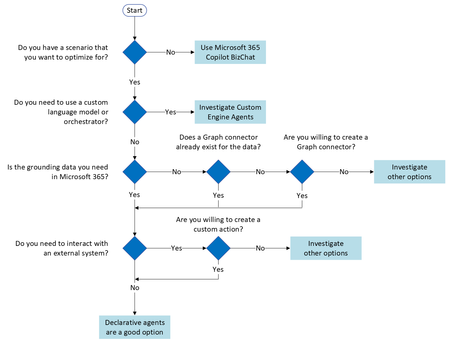
What the hack is a "Microsoft 365 Copilot Bizchat"?
I am taking a training course on learn.microsoft and this word "Microsoft 365 Copilot Bizchat" just came out of nowhere... I went few slides/pages of the training course and even googled it but there is no definition or clarification of it either sigh... What is that3.6KViews2likes4CommentsVoice Input in Copilot 365.
Hello All, I have copilot 365 subception on my MS. E3 Apps. And I could not be able to give the prompt through voice input to copilot. I can find this feature in personal copilot but not in work 365. Are there any settings or policy need to be enable for this feature? Please help me on this. Thank you.631Views2likes2Comments
Such a disappointment
One of my team members recently left, and with a critical meeting coming up next week, I had to step into the role quickly. I thought MS Copilot could assist with updating Excel and PowerPoint, but it turned out to be a mistake. I asked Copilot to replace all instances of "2024" with "2025," but it replied that it couldn’t perform the task. Next, I requested it to analyze a pivot table to identify which rows were subtotals and apply the same formula to other columns in the sheet. Instead, it suggested irrelevant adjustments to unrelated columns. I expected these tasks to be straightforward for MS software, but Copilot struggled with them. Honestly, it feels less efficient than a simple "Ctrl+F" and "Replace All."740Views2likes7CommentsHow to use the Copilot Wave 2 in PowerPoint
The release of the second wave of Copilot also enriches Microsoft PowerPoint, bringing the so-called Narrative Builder. The user starting from a description and existing files can easily create a presentation. In addition, Copilot is able to apply the same template used to be aligned with the corporate brand. #MicrosoftCopilot #Copilot #AI #Microsoft365 #MPVbuzz #PowerPoint1.7KViews2likes0CommentsCopilot Does Not Summarise Slides in Powerpoint
I have a 40 slide presentation. Some of the slides are particularly wordy, so what I was planning to do was to ask Copilot to summarise a series of slides and add that as a companion document to the presentation. When I ask it to summarise a single slide by asking it to "Summarise slide 5" it grabs a title from a previous headline slide and creates a summary based seemingly on the whole presentation. If I ask it to summarise multiple slides with "Please summarise slides 5, 7, 10...." It creates a headline for each slide but summarises the wrong slides throughout and places the wrong titles on each slide in the response. Anyone else tried summarising specific slides in a presentation?489Views2likes1Comment
Proposal for a Unified Copilot Architecture and Tiered AI Assistant Model
Submitted by: Craig D. Evans Detroit, Michigan Executive Summary This proposal outlines a strategic redesign of Microsoft Copilot that transforms it from a collection of isolated chat instances into a unified, persistent, account based artificial intelligence assistant. The proposed architecture positions Copilot as the central intelligence that operates all Microsoft Office applications, maintains long term memory, and follows the user across all devices. This model introduces a tiered pricing structure that creates a scalable revenue engine while strengthening Microsoft’s long term dominance in productivity software. The proposal also introduces the concept of a dual AI verification system, in which Copilot performs tasks and a secondary model provides independent review. This structure increases reliability, reduces errors, and enhances user trust. Problem Statement The current Copilot experience is fragmented. Each application instance behaves as a separate assistant with limited continuity, limited memory, and limited cross application intelligence. Users must repeatedly re explain context, re establish preferences, and manually coordinate tasks across Word, Excel, PowerPoint, Outlook, and other Microsoft 365 applications. This fragmentation reduces efficiency, increases cognitive load, and prevents Copilot from functioning as a true personal assistant. It also limits Microsoft’s ability to monetize Copilot at scale, because the product does not yet offer a unified, persistent experience that users would be willing to subscribe to at higher tiers. Vision The vision is a single, persistent Copilot identity that the user logs into, similar to any modern online service. This identity follows the user across all devices and applications, retaining memory, preferences, formatting rules, workflows, and ongoing projects. In this model, Copilot becomes the central intelligence that operates the Microsoft Office ecosystem. Office applications become the tools, and Copilot becomes the operator. This transformation elevates Copilot from a chatbot to a long term digital assistant that remains with the user for decades. Functional Overview 1. Persistent Copilot Identity A single Copilot account that retains: Long term memory User preferences Formatting rules Writing style Project context Cross application workflows Templates and document structures This identity behaves like any other modern login system, such as Amazon, Walmart, or email services. 2. Copilot as the Central Intelligence of Office Copilot should be capable of: Opening and managing Word documents Applying templates and formatting Building PowerPoint presentations Managing Excel formulas and data structures Organizing files and directories Coordinating tasks across applications Executing workflows on behalf of the user Office becomes the body. Copilot becomes the brain. 3. Cross Device Continuity The user logs into Copilot once, and the assistant follows the user across: Desktop Laptop Mobile Web Cloud environments This creates a seamless, continuous experience. Tiered Pricing Model A tiered structure creates a scalable revenue engine and aligns with Microsoft’s existing subscription model. Tier 1: Free Copilot Basic chat No memory No continuity Limited functionality This tier serves as the entry point that encourages users to upgrade. Tier 2: Copilot with Memory and Formatting Persistent memory Document formatting intelligence Writing style retention Basic cross application awareness This tier provides immediate value and will attract a large user base. Tier 3: Cross Device Copilot Identity Full continuity across devices Unified assistant experience Project level intelligence Long term context retention This tier becomes the premium personal assistant model. Tier 4: Copilot as Full Office Manager Complete control of Word, Excel, PowerPoint, Outlook Workflow automation File management Multi application coordination Enterprise grade productivity This tier becomes the flagship offering for professionals and businesses. Optional Tier: Dual AI Verification (Copilot + Reviewer Model) Copilot performs tasks. A secondary model independently reviews output for: Accuracy Formatting Logic Consistency This reduces errors and increases trust. It becomes a high value premium tier. Competitive Advantage This architecture provides Microsoft with several strategic advantages: A unified assistant that no competitor currently offers A multi tier revenue structure that scales with user needs A long term relationship between user and assistant Increased adoption of Microsoft 365 subscriptions Strong differentiation from competing AI products Reduced user churn due to persistent memory and continuity This model positions Microsoft as the leader in personal and professional AI assistance. Long Term Strategic Value A persistent Copilot identity ensures that users remain within the Microsoft ecosystem for decades. As the assistant accumulates memory, preferences, and workflows, the cost of switching to another platform becomes extremely high. This creates: Long term subscription stability Increased enterprise adoption Stronger user loyalty A durable competitive moat Copilot becomes not only a feature, but a lifelong digital partner. Closing Statement I respectfully submit this proposal as a long time user who believes that Microsoft has the opportunity to define the future of personal and professional artificial intelligence. A unified Copilot identity, combined with a tiered pricing model and a dual AI verification system, will create a powerful, scalable, and enduring platform that strengthens Microsoft’s leadership in productivity software. Submitted by: Craig D. Evans Detroit, Michigan86Views1like0Comments