copilot in onenote
18 TopicsProposal for a Unified Copilot Architecture and Tiered AI Assistant Model
Submitted by: Craig D. Evans Detroit, Michigan Executive Summary This proposal outlines a strategic redesign of Microsoft Copilot that transforms it from a collection of isolated chat instances into a unified, persistent, account based artificial intelligence assistant. The proposed architecture positions Copilot as the central intelligence that operates all Microsoft Office applications, maintains long term memory, and follows the user across all devices. This model introduces a tiered pricing structure that creates a scalable revenue engine while strengthening Microsoft’s long term dominance in productivity software. The proposal also introduces the concept of a dual AI verification system, in which Copilot performs tasks and a secondary model provides independent review. This structure increases reliability, reduces errors, and enhances user trust. Problem Statement The current Copilot experience is fragmented. Each application instance behaves as a separate assistant with limited continuity, limited memory, and limited cross application intelligence. Users must repeatedly re explain context, re establish preferences, and manually coordinate tasks across Word, Excel, PowerPoint, Outlook, and other Microsoft 365 applications. This fragmentation reduces efficiency, increases cognitive load, and prevents Copilot from functioning as a true personal assistant. It also limits Microsoft’s ability to monetize Copilot at scale, because the product does not yet offer a unified, persistent experience that users would be willing to subscribe to at higher tiers. Vision The vision is a single, persistent Copilot identity that the user logs into, similar to any modern online service. This identity follows the user across all devices and applications, retaining memory, preferences, formatting rules, workflows, and ongoing projects. In this model, Copilot becomes the central intelligence that operates the Microsoft Office ecosystem. Office applications become the tools, and Copilot becomes the operator. This transformation elevates Copilot from a chatbot to a long term digital assistant that remains with the user for decades. Functional Overview 1. Persistent Copilot Identity A single Copilot account that retains: Long term memory User preferences Formatting rules Writing style Project context Cross application workflows Templates and document structures This identity behaves like any other modern login system, such as Amazon, Walmart, or email services. 2. Copilot as the Central Intelligence of Office Copilot should be capable of: Opening and managing Word documents Applying templates and formatting Building PowerPoint presentations Managing Excel formulas and data structures Organizing files and directories Coordinating tasks across applications Executing workflows on behalf of the user Office becomes the body. Copilot becomes the brain. 3. Cross Device Continuity The user logs into Copilot once, and the assistant follows the user across: Desktop Laptop Mobile Web Cloud environments This creates a seamless, continuous experience. Tiered Pricing Model A tiered structure creates a scalable revenue engine and aligns with Microsoft’s existing subscription model. Tier 1: Free Copilot Basic chat No memory No continuity Limited functionality This tier serves as the entry point that encourages users to upgrade. Tier 2: Copilot with Memory and Formatting Persistent memory Document formatting intelligence Writing style retention Basic cross application awareness This tier provides immediate value and will attract a large user base. Tier 3: Cross Device Copilot Identity Full continuity across devices Unified assistant experience Project level intelligence Long term context retention This tier becomes the premium personal assistant model. Tier 4: Copilot as Full Office Manager Complete control of Word, Excel, PowerPoint, Outlook Workflow automation File management Multi application coordination Enterprise grade productivity This tier becomes the flagship offering for professionals and businesses. Optional Tier: Dual AI Verification (Copilot + Reviewer Model) Copilot performs tasks. A secondary model independently reviews output for: Accuracy Formatting Logic Consistency This reduces errors and increases trust. It becomes a high value premium tier. Competitive Advantage This architecture provides Microsoft with several strategic advantages: A unified assistant that no competitor currently offers A multi tier revenue structure that scales with user needs A long term relationship between user and assistant Increased adoption of Microsoft 365 subscriptions Strong differentiation from competing AI products Reduced user churn due to persistent memory and continuity This model positions Microsoft as the leader in personal and professional AI assistance. Long Term Strategic Value A persistent Copilot identity ensures that users remain within the Microsoft ecosystem for decades. As the assistant accumulates memory, preferences, and workflows, the cost of switching to another platform becomes extremely high. This creates: Long term subscription stability Increased enterprise adoption Stronger user loyalty A durable competitive moat Copilot becomes not only a feature, but a lifelong digital partner. Closing Statement I respectfully submit this proposal as a long time user who believes that Microsoft has the opportunity to define the future of personal and professional artificial intelligence. A unified Copilot identity, combined with a tiered pricing model and a dual AI verification system, will create a powerful, scalable, and enduring platform that strengthens Microsoft’s leadership in productivity software. Submitted by: Craig D. Evans Detroit, Michigan34Views1like0CommentsCopilot missing in Word, Excel and PowerPoint desktop apps of some users
Hi Everyone, At my company we're setting up copilot. After allowing access through the Admin Centers we've encountered various oddities. Some users can use the sharepoint/onedrive search functionality. But most can't. Some users have the Copilot button in some of their apps. There is no consistency in which app they get it. Some have it in word, others in excel, some in multiple, some in none. A handful of users have Copilot in all apps. Things like transcribe work fine everywhere. We switched intune to push Office apps with Current Channel instead of Semi-Annual, to no avail. We use M365 Business premium with the Teams phone standard addon.1.7KViews0likes1CommentCopilot Notebooks in OneNote (Windows): The AI Note-Taking Upgrade You Need
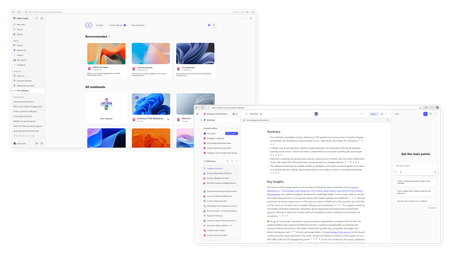
🚀 Big news for productivity enthusiasts! Microsoft has just introduced Copilot Notebooks in OneNote on Windows, and I’ve created a new video to walk you through everything you need to know. With this update, you can now: ✅ Combine the power of AI-driven Copilot with the flexibility of OneNote ✅ Create structured, interactive notebooks for brainstorming, planning, and learning ✅ Boost your workflow with context-aware assistance right inside your notes 📺 Watch my full breakdown here: https://youtu.be/tgmW873iWGk 💬 What do you think about AI-powered note-taking? Will this change the way you work? #Microsoft365 #Copilot #OneNote #ArtificialIntelligence #Productivity #WorkSmarter #DigitalWorkplace #AIinBusiness #FutureOfWork140Views1like0CommentsCopilot for Work - Search in OneNote
If I use Copilot for Work at ask something it would be nice if it would use the informations in OneNote to find the right answer. As far as I know Copilot do not look in my OneNote Notebooks when I ask something. (Just if I directly use Copilot in OneNote, but not when I use Copilot for Work via Browser or M365 App or Teams)353Views1like2CommentsWhat the hack is a "Microsoft 365 Copilot Bizchat"?
I am taking a training course on learn.microsoft and this word "Microsoft 365 Copilot Bizchat" just came out of nowhere... I went few slides/pages of the training course and even googled it but there is no definition or clarification of it either sigh... What is that2KViews2likes4CommentsWork/Web Toggle Not present on Microsoft 365 copilot
Hi there, I am unable to see the work/web toggle and other features of the paid version of microsoft 365 copilot. Can you help with this? I was able to see it in Word, Excel, Powerpoint but accessing copilot from onedrive, onenote, loop, outlook, teams or even on m365.cloud.microsoft, I couldnt see the features of the paid version of copilot. I tried manually updating the license but couldnt find those options for some of the app. I am using M365 for Mac. Can you help with this. I had included a screenshot of this. I check my subscriptions and I had already been assigned the correct license.Solved3.9KViews1like7Comments