copilot for security
19 TopicsMonthly news - May 2024
Microsoft Defender XDR Monthly news May 2024 Edition This is our monthly "What's new" blog post, summarizing product updates and various new assets we released over the past month across our Defender products. In this edition, we are looking at all the goodness from April 2024.45KViews9likes17CommentsMonthly news - May 2024
Microsoft Defender XDR Monthly news May 2024 Edition This is our monthly "What's new" blog post, summarizing product updates and various new assets we released over the past month across our Defender products. In this edition, we are looking at all the goodness from April 2024.10KViews6likes2CommentsMonthly news - June 2024
Microsoft Defender XDR Monthly news June 2024 Edition This is our monthly "What's new" blog post, summarizing product updates and various new assets we released over the past month across our Defender products. In this edition, we are looking at all the goodness from May 2024.9.8KViews4likes1CommentMonthly news - May 2024
Microsoft Defender XDR Monthly news May 2024 Edition This is our monthly "What's new" blog post, summarizing product updates and various new assets we released over the past month across our Defender products. In this edition, we are looking at all the goodness from April 2024.9.6KViews8likes1CommentMonthly news - May 2024
Microsoft Defender XDR Monthly news May 2024 Edition This is our monthly "What's new" blog post, summarizing product updates and various new assets we released over the past month across our Defender products. In this edition, we are looking at all the goodness from April 2024.7.6KViews3likes0CommentsSecurity Copilot for SOC: bringing agentic AI to every defender
Cybersecurity has entered an era of relentless complexity. As threat actors increasingly leverage artificial intelligence to automate attacks, evade detection, and scale their tactics, defenders are challenged to keep up. In this new era, security operations centers (SOCs) must transform to not just react, but to anticipate, disrupt, and outpace the next wave of cyberthreats. Microsoft’s goal is to empower every organization to meet this challenge head-on by transforming how security operates. We believe the future of the SOC is more than just agentic: it’s predictive and proactive. This means moving beyond fragmented tools and manual processes, and instead embracing a unified, intelligent approach where AI-driven skills and agents work in concert with human expertise. To bring this vision to life, it’s essential to look at the SOC through the lens of its lifecycle—a dynamic continuum that spans from anticipation and prevention through to recovery and optimization—and to recognize the unique challenges and opportunities within each stage. With Security Copilot’s GenAI and agentic capabilities woven across this lifecycle, Microsoft is delivering an integrated defense platform that enables defenders to move faster, act smarter, and stay ahead of adversaries. Introducing agentic innovation across the SOC lifecycle At Ignite, our agentic innovations are concentrated in three of the five SOC lifecycle pillars, and each one represents a leap forward in how analysts anticipate, detect, triage and investigate threats. Predict and prevent Threat Intelligence Briefing Agent: Introduced in March, this agent has already helped security teams move from reactive to anticipatory defense. At Ignite, we’re announcing that the Threat Intelligence Briefing Agent is now fully embedded in the Microsoft Defender portal, delivering daily, tailored briefings that synthesize Microsoft’s unparalleled global intelligence with organization-specific context in just minutes. Teams no longer need to spend hours gathering TI from disparate sources—the agent automates this process, offering the most current and relevant insights. Analysts can reference the summary to prioritize action, using the agent’s risk assessments, clear recommendations, and links to vulnerable assets to proactively address exposures. Detect and disrupt Dynamic Threat Detection Agent: Detections have long been bottlenecked by the limitations of traditional alerting systems, which rely on predefined logic that can’t scale fast enough to match the speed and variability of modern attacks— resulting in blind spots and missed threats. The Dynamic Threat Detection Agent addresses this challenge head-on. Instead of depending on static rules or isolated input, it continuously analyzes incidents and telemetry, searching for gaps in coverage and correlating signals across the entire security stack. For example, this is how it surfaced a recent AWS attack: a threat actor used an EntraID account to federate into an AWS admin account to exfiltrate sensitive data. The Dynamic Threat Detection Agent generated an alert before the intruder even authenticated into the single sign-on flow, driven by a correlated signal from Sentinel. That alert didn’t exist beforehand; the agent created it on the fly to stop the attack. The result is an adaptive system that extends Microsoft’s industry-leading, research-based detections with context-aware alerts tailored to each organization, closing gaps and revealing threats that legacy systems miss. Triage and investigate Security Alert Triage Agent (previously named Phishing Triage Agent): In March 2025, we introduced the Security Alert Triage Agent, built to autonomously handle user-submitted phishing reports at scale. The agent classifies incoming alerts and resolves false positives, escalating only the malicious cases that require human expertise. At Microsoft Ignite, we’re announcing its general availability, backed by strong early results: the agent identifies 6.5 times more malicious alerts, improves verdict accuracy by 77%, and frees analysts to spend 53% more time investigating real threats. St. Luke’s even said it’s saving their team nearly 200 hours each month. Coming soon, we’ll be extending these autonomous triage capabilities beyond phishing to identity and cloud alerts, bringing the same precision and scale to more SOC workflows. Note: The Phishing Triage Agent has since been expanded and is now called the Security Alert Triage Agent. Learn more at aka.ms/SATA Threat Hunting Agent: this agent reimagines the investigation process. Instead of requiring analysts to master complex query languages or sift through mountains of data, Threat Hunting Agent enables natural language investigations with contextual insight. Analysts can vibe with the agent by asking questions in plain English, receive direct answers, and be guided through comprehensive hunting sessions. It levels up the existing Security Copilot NL2KQL capability by enabling teams to explore patterns, pivot intuitively and uncover hidden signals in real time for a fluid, context-aware experience. This not only accelerates investigations but makes advanced threat hunting accessible to every member of the SOC, regardless of experience level. Agents built into your workflows To make the agents easily accessible and help security teams get started more quickly, we are excited to announce that Security Copilot will be available to all Microsoft 365 E5 customers. Rollout starts today for existing Security Copilot customers with Microsoft 365 E5 and will continue in the upcoming months for all Microsoft 365 E5 customers. Customers will receive 30-day advanced notice before activation. Learn more: https://aka.ms/SCP-Ignite25 Discover more: the Security Store The Security Store, now generally available, is the central hub for discovering, deploying, and managing first-party and third-party security agents. Today, it provides instant access to 20+ agents deployable directly in the Microsoft Defender portal, all within a broader ecosystem of 100+ trusted security solutions. Whether you're investigating incidents, hunting threats, or automating response, the Security Store extends Defender with vetted, scenario-aligned tools that can be set up in minutes. Learn more in this blog. Introducing new GenAI embedded capabilities Security Copilot isn’t just growing through agents—it’s also gaining new embedded capabilities: GenAI skills that help SOC teams work faster, operate at greater scale, and get upleveled directly inside Microsoft Defender. Today, we’re excited to introduce new innovations: Analyst Notes represent a meaningful shift in how investigation work is captured and shared. For organizations that choose to opt into this capability, Copilot automatically reconstructs an analyst’s investigation session—from the moment they open an incident to the moment they close it—and turns that activity into clear, structured notes. The system can even track multiple sessions in parallel and attribute actions to the right incident, and analysts can fully review and edit the generated notes before saving them. This not only saves teams valuable time and effort, it preserves the actual investigation path with far greater accuracy and consistency than manual documentation ever could. The result is a living, cumulative record of how the SOC investigates threats: easier handoffs, stronger auditability, faster onboarding, and a deeper shared understanding of how incidents unfold across multiple SecOps members and phases. Standard Operating Procedures (SOPs) for guided response allows organizations to upload their own internal procedures so Security Copilot can align its recommendations with established guidebooks and compliance requirements. Guided response is one of the ways Copilot helps analysts navigate an incident: it offers one-click actions across triage, containment, investigation and remediation that teams can take immediately. With SOPs uploaded, these recommendations draw directly from organizational workflows and policy standards, ensuring they are contextually relevant and trusted. For defenders, this translates into greater confidence and faster, more consistent decision-making. We’re also eager to share that we’re introducing auto-generated content configuration for Security Copilot’s incident summaries. This new feature allows security admins to decide how and when summaries are produced, choosing between always auto-generating, manual trigger only, or auto-generating based on incident severity. The configuration is managed directly in the Microsoft Defender portal, giving organizations flexibility to fine-tune Copilot’s outputs to their operational needs. Join us at Ignite We invite you to learn more and see these innovations in action at Microsoft Ignite. Don’t miss our featured sessions: Microsoft Defender: Building the agentic SOC with guest Allie Mellen on Wednesday, November 19 th with Allie Mellen, Corina Feuerstein, and Rob Lefferts. Learn more. Empowering the SOC: Security Copilot and the rise of Agentic Defense on Friday, November 21 st with Corina Feuerstein and Cristina da Gama. Learn more. Join us to discover how Microsoft is shaping the future of cybersecurity—making intelligent, agentic defense accessible to every organization.6.5KViews1like0CommentsThe Best of Microsoft Sentinel — Now in Microsoft Defender
Just over a year ago, we introduced the unified security operations (SecOps) experience within Microsoft Defender, bringing together the full stack of threat protection capabilities across” Security Incident Event Management (SIEM), Extended Detection and Response (XDR), Extended Security Posture Management (XSPM), Cloud Security, Threat Intelligence (TI), and Security Copilot. Thousands of organizations have already embraced this unified SecOps experience to streamline analyst workflows, enhance operational efficiency, and accelerate incident response across their security environments. Today, we are proud to share that the most advanced and integrated SIEM experience from Microsoft Sentinel is now fully available within the Microsoft Defender portal as one unified experience. This experience encompasses all SIEM features and is accessible to every customer, including large-scale enterprises and partners with complex security environments. With the general availability of multi-tenant and multi-workspace capabilities, security teams can now seamlessly collaborate, investigate threats, and manage incidents across multiple Microsoft Sentinel tenants—all from a single, unified queue. This advancement empowers analysts to operate more efficiently and effectively in today’s dynamic threat landscape. Why Customers Are Making the Move Thousands of organizations have already made the move—and they’re seeing real results. Work smarter: Manage incidents, alerts, and investigations across tenants and workspaces in one unified view. Detect faster: AI-driven insights reduce false positives by 85%* and boost alert correlation speed by 50%*. Respond instantly: Security Copilot delivers guided investigations and automated summaries. Hunt deeper: Investigate threats across Microsoft Sentinel and Defender XDR—no switching, no silos. “The Defender portal is a game-changer. Our team is faster, more focused, and finally working in one place.” — Security Operations Lead, Global Financial Services What’s New—and Why it Matters Advanced Hunting Enhancements Unified queries across Microsoft Sentinel and Defender data, with Security Copilot-assisted KQL generation allows for threat hunting across all data sources from a single portal without context switching and delays. For more information, see Advanced hunting in the Microsoft Defender portal and Security Copilot in advanced hunting. Case Management Use native case workflows in Defender to manage complex investigations efficiently. Features include custom statuses, task assignments, due dates, and multi-incident linking, all while maintaining security context. For more information, see Manage cases natively in Microsoft Defender experience. SOC Optimization Tools Get actionable, tailored recommendations to reduce costs, close data gaps, improve coverage, strengthen your security posture, and maximize ROI. To learn more about the different types of recommendations, see SOC optimization reference. Expanded Threat Intelligence Import indicators in bulk, visualize data better, and map to MITRE ATT&CK. Enrich investigations with deeper context and better visibility into attacker behavior. For more information, see Threat detection features across the Microsoft unified security platform. Embedded Security Copilot The GenAI power of Security Copilot built to the experience. Utilize AI-powered tools to summarize incidents, analyze scripts/files, and generate incident reports directly within the portal. Accelerate response times and reduce analyst fatigue with intelligent automation. For more information, see Security Copilot in Defender. Seamless, Zero-Disruption Onboarding Connecting your Microsoft Sentinel workspace to Defender is fast, simple, and non-disruptive. Your data stays intact, and you can continue using the classic Azure experience while unlocking the full power of Defender. And going forward, all new features and innovations will be delivered exclusively through the Microsoft Defender portal—ensuring you always have access to the most advanced tools in the Microsoft Security ecosystem. Take Action Now Transform your SecOps with Microsoft Defender and take advantage of the latest innovations. Get started today: https://security.microsoft.com Begin the process of onboarding your Microsoft Sentinel workspaces to the Defender portal Transition Guide Pre-recorded webinar Register for upcoming webinars here. *Source: Microsoft internal research5KViews5likes0CommentsAzure Firewall integration in Security Copilot: protect networks at machine speed with gen AI
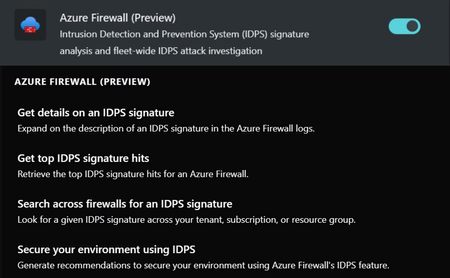
Today, at Microsoft Build, we are excited to announce the availability of the Azure Firewall integration in Security Copilot. It helps analysts perform detailed investigations of the malicious traffic intercepted by the IDPS feature of their firewalls across their entire fleet using natural language questions in the Security Copilot portal. Azure Firewall is a cloud-native and intelligent network firewall security service that provides best of breed threat protection for your cloud workloads running in Azure. It's a fully stateful firewall as a service with built-in high availability and unrestricted cloud scalability. In this blog we will walk through the newly announced Azure Firewall integration in Security Copilot. gin enabled in the Security Copilot portal These capabilities were announced at RSA. Take a look at this blog to learn more about the user journey and value that Copilot can deliver: Bringing generative AI to Azure network security with new Microsoft Copilot integrations. There are four primary capabilities now in preview which are outlined below. Get top IDPS signature hits This capability retrieves the top IDPS signature hits for an Azure Firewall. It helps the user get information about the traffic intercepted by the IDPS feature by simply asking natural language questions instead of the user having to construct KQL queries manually. Get details on an IDPS signature This capability enriches the threat profile of an IDPS signature beyond the information found in logs. It helps the user get additional details about an IDPS signature instead of requiring them to manually source this information. Search across firewalls for an IDPS signature This capability looks for a given IDPS signature across your tenant, subscription or resource group. It helps users perform a fleet-wide search (over any scope) for a threat across all their Firewalls instead of searching for the threat manually. Secure your environment using IDPS This capability generates recommendations to secure your environment using Azure Firewall’s IDPS feature. It helps users get information from documentation about using Azure Firewall’s IDPS feature to secure their environment instead of having to look up this information manually. Get started Learn more in our documentation about these capabilities and how to access them today!4.6KViews3likes0Comments