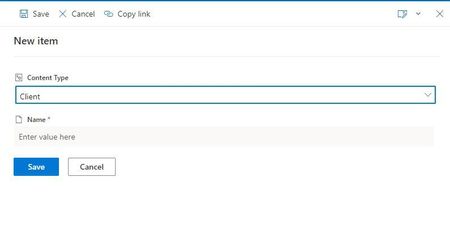
content type
24 Topics
Mandatory field added to Teams SharePoint site (lists and libraries) accidently and now can't remove
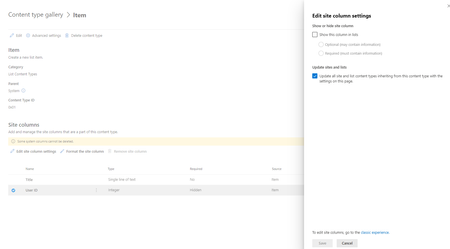
Please help. In trying to implement a fix for a different problem I have somehow inadvertently added a "mandatory field" which is an integer field and called "User ID" to all Content Types on the site. The site is hosted in a channel in a MS team and I have confirmed that the added field is not in the Parent site (main team channel site). I don't remember how I added it and all avenues I have tried to delete it/make it non-mandatory have failed. I have tried editing/removing it from the Item content type but no options to delete or even save changes for this field are available: The User ID field below is not selectable: I have tried the same in the "Classic" experience but still no options. Further digging shows ALL content on the site "missing" this mandatory User ID field metadata. e.g. site content pages I need to find a way to remove this mandatory field from either the "System" (as this is the parent content type for an Item) or the Item content type as this is the ultimate parent for all other content types. If I can't work it out then I will have to setup a new team channel and copy/replicate/update all the work to date (Power Automate/Power App integration/Power BI Report). Not what I want to do. Also, while I am a site "owner" I am not a site Admin. Any suggestion would be appreciated. Gavin1.4KViews1like1Comment
Content type created but not finding in file properties content type dropdown - SharePoint 2019
I'm in SharePoint 2019 On-Premise, and I've created a site content type. Added it to list form settings. However, I can't locate it in the file properties dropdown. The other existing content types display correctly within the document properties, but the recently created one only appears only at the document set folder level. My goal is to have it included in the file content type dropdown. Can someone provide assistance?460Views0likes0Comments
SharePoint Online content type with template opens the template, not a new instance of a page
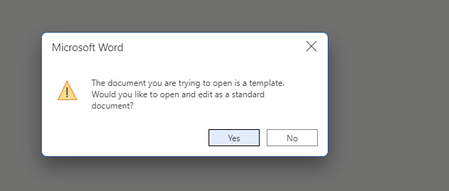
I have created a custom content type and then linked a template to it. I have then added this content type to a SharePoint Library to allow users to click the 'New' button and then select the new content type. My issue is that this opens the template, not a new instance of a page using the template. Does anyone know what I may have done wrong here? This can't be the intended functionality?730Views0likes1Commentpopup appear when create new document after Enable content type in document library
I have created document library and enable content type in that document library. But, after this when I create any document this kind of pop up appears. is there any way to get rid of it. Plus, I want default excel,notebook,etc.. Menu's back.1.1KViews0likes2Comments
Dynamically display previews of files within Document Sets
I have a Document Set Library containing multiple Document Sets. Each Set contains 3 documents, each with a different Content Type. When I select a Document Set, I would like to display 3 'web parts' showing a preview of each of the documents - 1 web part for each Content Type. It should work in the same way as the File and Media web part which shows a preview of each selected file in a Document Library web part. Any advice is very appreciated thanks.609Views0likes0Comments
How to give a direct link to create a New document from a Content Type in a Library?
Hi, I have a bunch of report templates on the New button in a Document library. We need to help the users select the correct template, so I want to get a link for each report template. All works OK, using the link below - BUT we now have some macro driven dotm templates. https://<tenancyname>.sharepoint.com/:w:/r/sites/siteA/siteB/_layouts/15/Doc.aspx?sourcedoc=%7B912b9561-64ef-4447-a82b-732adbe789bb%7D&action=editnew The Macro template, (wrapped in a content type) works perfectly from the new button, (and opens in MSWord). But I am struggling to get a link equivalent for selecting the item from the new button. Can anyone help? Many Thanks Ruth12KViews0likes8Comments
Is There a Limit on the Number of Content Types Allowed in a Library?
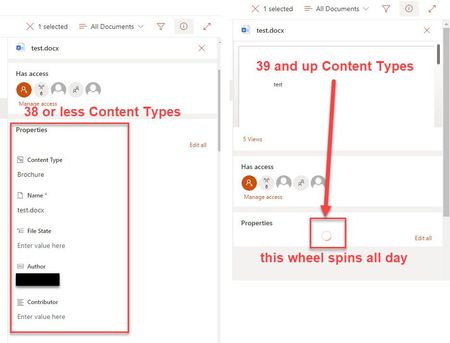
Hi, Everything I've read says there's no hard limit on the number of Content Types you can have in a Library. However, I'm running into issues with 39 or more Content Types added to a Library. When I add the 39th, the metadata 'details pane' will not show any metadata at all, and it displays a spinning wheel which never goes away, even after leaving it sit all day. It just looks like it's trying to load the metadata, but never does. When I remove the 39th content type bringing the total down to 38, everything works again. I've tried: Creating new libraries and adding the content types again. Same issue. For the 39th content type, I've tried different ones to see if a particular one was causing issue. But it doesn't matter which one is the 39th. Tried adding content types in smaller batches (five at a time) in case SharePoint had trouble processing all at once. Tried waiting 24hrs to see if there was a timer job waiting to happen. Same issue. Here is a screen capture below to help illustrate: Any insight appreciated, Anton3.2KViews0likes1Comment
Changing content type of list item is impossible
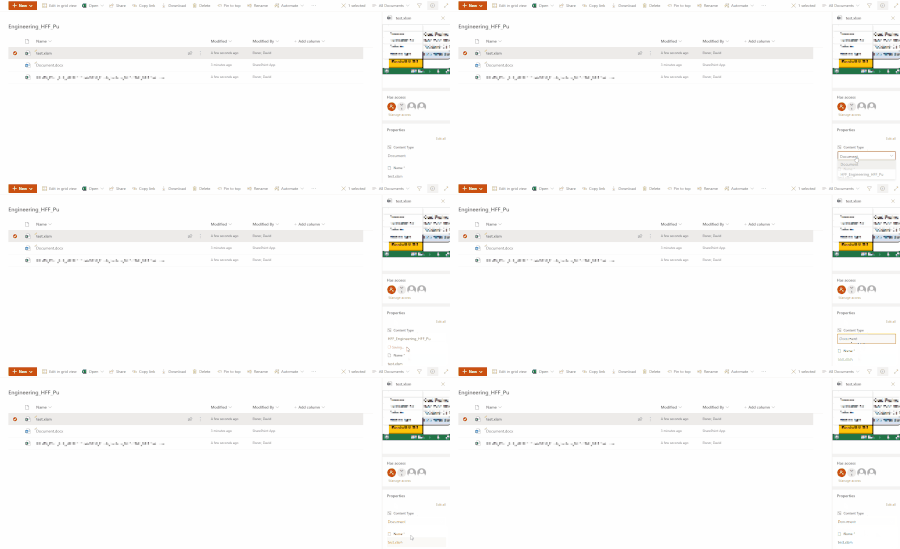
I have a SharePoint library with a file that must have another Content type that it should have. But changing it seems impossible. After changing the Content type it suddenly goes back to the "Document" Content type. See for yourself how it looks for me: Any idea why this happens?819Views0likes1CommentApply PnP Template Error: Urloffile
Hi Folks, Looking to apply a template to a site using the PnP Engine, I've worked out that the custom template within a content type causes an error: "Apply-PnPProvisioningTemplate : urlOfFile Parameter name: Specified value is not supported for the urlOfFile parameter" Just wondering if there is any way round this? I'm using the PnP file format not .xml Cheers!4.4KViews0likes3Comments
SharePoint Online Content Type field appearing in New Forms
In SharePoint Online library, I have noticed that the Content Type field now appears in the New forms if you turn on allow management of content types. There are situations when users don't need additional content types, in new forms. how can we hide the content type field on new form. I would like to avoid using that modern experience. Can any one help me on this. Thanks in Advance..!562Views0likes0Comments