containers
48 TopicsLock Down AKS End to End with Application Gateway for Containers and Managed Cilium L7
Hello Folks! If your AKS cluster looks like most production clusters I have walked through, one of two things is true. Either nobody writes any network policies and every pod can talk to every other pod, so one compromised container blows up the entire blast radius. Or somebody wrote a few coarse rules along the lines of “namespace A talks to namespace B over port 80”, which sounds secure right up until an attacker realizes that port 80 is exactly where they were planning to live anyway. Real attacks happen at Layer 7, dressed up like ordinary HTTP traffic, and L3 / L4 plumbing cannot tell the difference. That is the gap session MAIS09 from the Microsoft Azure Infrastructure Summit 2026 closes. Vyshnavi Namani and Darshil Shah from the Azure Networking product team walked through how two AKS-managed add-ons, Application Gateway for Containers (AGC) and Cilium L7 via Advanced Container Networking Services (ACNS), can lock down the entire path from the public internet to a single pod. No NGINX. No external WAF appliance. No third-party CNI to babysit. 📺 Watch the session: Why IT Pros Should Care Let me cut to the chase. If you operate AKS clusters today, this session matters because: You probably still have an ingress controller and an external WAF stitched together with annotations and prayers. AGC plus ACNS collapses that stack into first-party add-ons that AKS owns end to end. Both Application Gateway for Containers and Advanced Container Networking Services are generally available. This is not a preview demo, this is production. Security is finally readable. Every rule is a YAML object. Code review, audit, GitOps. No more “what does this NGINX config map even do anymore” archaeology. It actually works on a real attack pattern. The demo shows WAF killing a SQL-injection-style GET that Cilium would have happily forwarded, because the method (GET) was on the allow list. If you have ever had to explain to an auditor why a single compromised pod could pivot across your whole cluster, this is your exit ramp. The AKS Security Gap This Closes Most clusters are protected by a load balancer at the edge and basically nothing inside. The cluster door looks like a vault, but the hallways are wide open. Cilium calls this the lateral movement problem, and it is exactly how Kubernetes attacks unfold in the wild. Compromise a pod, then phone home, then pivot. What MAIS09 demonstrates is something different. AGC is the L7 front door (the metal detector at the lobby). ACNS Cilium L7 is the lock on every pod’s office door. Both speak HTTP. Both enforce identity. Both are managed by AKS itself. The legacy alternative, Application Gateway Ingress Controller (AGIC), bolted a full Application Gateway onto your cluster through a translator. Two services, two lifecycles, two finger-pointing teams when something broke. AGC is the successor, built from scratch for Kubernetes, speaking the Gateway API natively, enabled with a single AKS flag. AKS provisions the controller, wires the identity, delegates the subnet, and owns the upgrades. You own the policies. AGC + Managed Cilium, End to End Here is the mental model from the session. Picture four concentric layers of defense between the public internet and a pod. AGC front end. One Azure resource, one public DNS name, and (thanks to the Kubernetes Gateway API) multiple hostnames behind the same IP. The demo runs Contoso, Fabrikam, and Adventure Works on a single AGC public IP using three HTTPRoute objects. One infrastructure, three websites. Real cost savings, real ownership clarity (platform owns the Gateway, app teams own the HTTPRoutes). Azure WAF on AGC. This is the content inspector. It runs the OWASP Core Rule Set (DRS 2.1 in the demo) against every incoming request, looks for SQL injection, cross-site scripting, path traversal, and the rest of the OWASP Top 10, and returns a 403 before the packet ever touches your pod. Microsoft maintains the rule set, you bind it to AGC via a SecurityPolicy. ACNS Cilium L7 ingress on every pod. This is where identity-based policy lives. Rules key off pod labels, not IPs, because IPs change every time the cluster autoscaler does its job. The demo uses an allow-agc-l7-get-only CiliumNetworkPolicy that lets the AGC backend reach the tenant pods, but only with GET or GET /products. Anything else, POST, PUT, DELETE, gets a Cilium-synthesized 403 before NGINX ever sees the request. ACNS east-west and egress policy. Two more policies do the heavy lifting inside. client-may-call-contoso-get-only lets the client pod reach Contoso with GET, and only Contoso. A default-deny baseline blocks everything else (pod-to-pod and pod-to-internet) with a single carve-out for kube-dns on port 53. The magic is that the same Cilium engine handles north-south, east-west, and egress with one consistent identity model. eBPF in the Linux kernel does the enforcement on the same node as the pod, so the decision happens before the packet leaves the host. No sidecars, no iptables sprawl, no daemonset you need to upgrade by hand. Real-world Scenarios The demo walks through six tests and the results map directly onto things you are probably trying to solve right now: Multi-site hosting on one IP. Three hostnames, one AGC, three 200 OKs from three different backend pods. If you are paying for three load balancers today, you can stop. WAF blocks a malicious GET that ACNS would have let through. This is the punch line of why you need both layers. The method (GET) is on the Cilium allow list, but the payload is a SQLi pattern. WAF returns 403 at the edge. Defense in depth, working as advertised. Method enforcement at the pod door. GET returns 200, POST/PUT/DELETE return 403, GET /admin returns 403, GET /products returns 200. Cilium is doing actual HTTP inspection, not just dropping packets. East-west enforcement with readable verdicts. Client to Contoso GET is 200. Same client, same destination, POST is 403 (L7 deny, TCP completed). Client to Fabrikam is 000 (L4 drop, no TCP handshake). Reading the difference between 403 and 000 is now a debuggable signal, not a mystery. Default-deny egress kills phone-home. A pod tries to reach bing.com. DNS resolves (the carve-out works), TCP SYN goes nowhere, wget gives up with exit code 1. If that pod was compromised and trying to exfiltrate data, this is where the attack chain dies. Selective allow still works. Same pod, same tools, but a DNS lookup against kube-dns inside the cluster returns instantly. We did not unplug the network. We locked it down with a purpose. Honest tradeoffs to call out. The session does not pretend everything is free. AGC introduces a billed subnet association and a managed identity you do not manage in BYO mode. Cilium L7 needs the Cilium data plane (ACNS Container Network Security features are Cilium-only). The Envoy proxy that handles L7 inspection has a cost only when you actually enforce L7, which is a fair deal in my book. Getting Started If you want to try this on a cluster of your own, three flags do most of the work on az aks create: --network-dataplane cilium (turns on the eBPF data plane) --enable-acns (enables Advanced Container Networking Services, including Hubble observability and Cilium L7 policy) --enable-app-routing or the ALB add-on flag (provisions the AGC controller as an AKS-managed add-on) From there you write four YAML objects: a default-deny CiliumNetworkPolicy, an allow-DNS carve-out, an AGC ingress allow with method and path constraints, and your east-west allow rules. The session repo includes the full set so you can clone and follow along. One bonus worth knowing about. ACNS ships Hubble out of the box, with pre-built Azure Managed Grafana dashboards. Flow logs, service maps, policy hit counts. Even on pods that are not yet under L7 enforcement, you get observability for free. When something breaks at 2 a.m., you have an audit trail instead of a tcpdump. Resources Azure Application Gateway for Containers documentation Set up Layer 7 policies with Advanced Container Networking Services AKS security concepts Cluster security best practices for AKS Container Network Observability for AKS (Hubble, Prometheus, Grafana) Advanced Container Networking Services hands-on lab Use cases of Advanced Network Observability for AKS (Azure Networking Blog) Watch the Rest of the Summit If MAIS09 hit the spot, there are dozens more sessions in the same playlist covering AKS networking at scale, Azure Local, AVM, the new Deployment Agent, and a lot more. Grab a coffee and binge. Microsoft Azure Infrastructure Summit 2026 playlist Cheers! Pierre Roman470Views1like1CommentgMSA on AKS and Private Endpoints
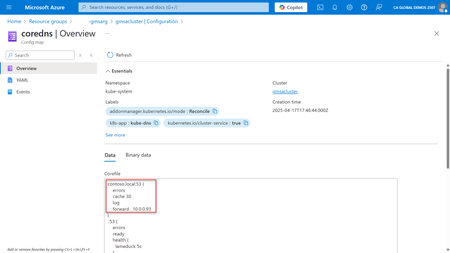
A few weeks ago, I spent some time with our support and engineering teams helping a customer solve a problem that happened after they enabled Group Managed Service Accounts (gMSA) on Azure Kubernetes Service (AKS). I decided to write this blog so other customers with the same issue can avoid going through it altogether. I’m writing the blog in the sequence as I experienced it, but if you’re just looking for the solution, feel free to skip to the end. The gMSA on AKS symptoms When that customer enabled gMSA on their cluster, a few things started to happen: Any gMSA enabled deployment/container/pod entered a failed state. The events from the deployments would show the pods with the following error: Event Detail: Failed to setup the external credentials for Container '<redacted>': The RPC server is unavailable. Any non-gMSA deployment/container/pod using the customer’s private images and running on Windows nodes also entered a failed state. The deployments were showing an event of ErrImagePull. All other deployments/containers/pods both on Windows and Linux nodes that were not using private images kept their healthy state. Removing the gMSA configuration from the cluster would automatically revert to a healthy state for the entire cluster. Troubleshooting gMSA issues The error with the gMSA pods took me immediately to other cases in which I’ve seen customers having similar issues because of network connectivity. The most common gMSA issues I have seen so far are: Blocked ports: Having a firewall between your AKS cluster and the Active Directory (AD) Domain Controllers (DCs). AD uses multiple protocols for communication between clients and DCs. I even created a simple script that validates the ports. Incorrect DNS configuration: AD uses DNS for service discovery. Domain Controllers have a “SRV” entry in the DNS that clients query so they can find not only all DCs, but the closest one. If either the nodes or pods can’t resolve the domain fqdn to a DC, gMSA won’t work. Incorrect secret on Azure Key Vault (AKV): A user account is used by the Window nodes, rather than a computer account as the nodes are not domain-joined. The format of the secret should be <domain dns fqdn>\<user account>:<user password>. There are other minor issues that I’ve seen, but these are the main ones. In the case of this customers, we reviewed the above and everything seemed to be configured properly. At that point, I brought other folks and they caught on something that I knew existed, but had not seen using gMSA yet: AKS private clusters. Private Endpoints and gMSA This customer has a security policy in-place that mandates Azure resources should be using private endpoints whenever possible. That was true for the AKS cluster and therefore, it introduced a behavior that broke the cluster. I mentioned above that gMSA uses DNS for DC finding. Let me explain what the default config is and what happened after enabling gMSA: By default, Linux and Windows nodes on AKS will use the Azure vNet DNS server for DNS queries. Windows and Linux pods will use CoreDNS for DNS queries. Azure DNS can’t resolve AD domain FQDNs since these tend to be private to on-premises or non-public cloud networks. For that reason, when you enable gMSA and pass the parameter of DNS server to be used, two things are changed in the AKS cluster. First, the Windows nodes will start using the DNS server provided. Second, the CoreDNS setting is changed to add a forwarder. This forwards anything related to the domain FQDN to the specified DNS server. With these two configs, Windows nodes and Windows pods can now “find” the DCs. However, this introduces another issue when combined with a private AKS cluster. Private endpoints are behind a private DNS zone. Azure DNS servers can resolve for those zones, but non-Azure DNS servers can’t. Since now the Windows nodes and Windows pods are using a DNS server outside of Azure, the private zone of the AKS cluster can’t be resolved so the DCs can’t access the Windows nodes and Windows pods. Not only that, but this customer also had their Azure Container Registry (ACR) behind a private endpoint. The second symptom above was also caused by this configuration, as now the Windows nodes can’t resolve for the private zone of the ACR registry and consequently can’t pull their private images. For reference, these are the container related services and their private zones: Private link resource type Subresource Private DNS zone name Public DNS zone forwarders Azure Kubernetes Service - Kubernetes API (Microsoft.ContainerService/managedClusters) management privatelink.{regionName}.azmk8s.io {subzone}.privatelink.{regionName}.azmk8s.io {regionName}.azmk8s.io Azure Container Apps (Microsoft.App/ManagedEnvironments) managedEnvironments privatelink.{regionName}.azurecontainerapps.io azurecontainerapps.io Azure Container Registry (Microsoft.ContainerRegistry/registries) registry privatelink.azurecr.io {regionName}.data.privatelink.azurecr.io azurecr.io {regionName}.data.azurecr.io For a full list of zones, check out the Azure documentation. Solving for DNS query on Azure Private Endpoint zones The solution here is simple. For the non-Azure DNS servers to resolve Private Endpoint zones, a DNS forwarder can be created. This customer had a very specific implementation, but in general what you need to configure is a DNS forwarder to the zones related to the services you are using. For example: - AKS clusters: Create a forwarder of azmk8s.io to 168.63.129.16. - For ACR registries: Create a forwarder of azurecr.io to 168.63.129.16. 168.63.129.16. is the virtual IP address of the Azure platform that serves as the communication channel to the platform resources. One of its services is DNS. In fact, this is the original service that the Windows nodes and Windows pods were using before gMSA was enabled. Conclusion It’s always DNS! If you are using gMSA on AKS, keep in mind that Windows nodes and Windows pods will start using a DNS server outside of Azure (or that has no visibility into the Azure platform directly, such as Private Endpoint zones). You might need to configure DNS forwarders once you start using gMSA on AKS, although this will be true for any service. I hope this blog post helps you avoid this issue – or helps you troubleshoot it. Let us know in the comments!526Views0likes0CommentsDocker for Developers: Understanding the Core Concepts
Docker and containers in general continue to receive a lot of attention, and it’s well-deserved. But, you may have found yourself wondering, “What exactly is Docker? Can it be useful for developers like me?”. This post introduces what images and containers are, how they differ from other options, the benefits they offer, and how you can get started using them in Docker Desktop.9.8KViews5likes3CommentsUsing WSL 2 on Windows Server 2022 to run Linux containers
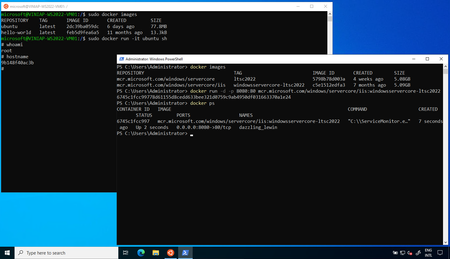
Windows Subsystem for Linux 2 (WSL 2) is one of the most popular features for developers on Windows 10 and 11. It has recently been made available on Windows Server 2022. With this addition, you can now run Linux containers on WSL 2 on Windows Server 2022 for development and testing purposes.100KViews10likes29Comments