contacts missing data
1 Topic
How contacts are supposed to work in the Outlook web app
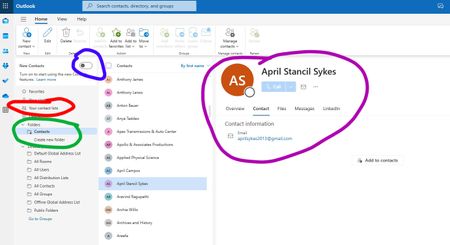
I only use the desktop app, keep it updated but don't use the one listed as "new" in the start menu. My contacts show in a folder called contacts. When I highlight a contact in people view all of the contact information appears in the reading pane on the right. In the web app, there is a folder called your contacts (screenshot 1, red circle), which does not contain my contacts. To find my contacts, I have to turn off the "new contacts" switch at the top (screenshot 1, blue circle). Then my contact folder appears (screenshot 1, green circle). But when I hightlight a contact, only, minimal details appear in the reading pane (screenshot 1, purple circle) and if I click the 3 dots it has the option to "add to contacts." However, if I click on edit (screenshot 2), I see all the contact information. Can someone please help me understand how MS intends for me to migrate my contact data to this system so that I still have access on the desktop app but that contacts show up as intended in the web app? Thank you.1.4KViews1like6Comments